1
Contents
1 Introduction...................................................................................1
1.1 Manual Version...................................................................................2
1.2 Other Manuals.....................................................................................2
1.3 Important Information..........................................................................2
1.3.1 Installation and Protection..........................................................2
1.3.2 Electromagnetic Radiation..........................................................2
1.4 Warranty..............................................................................................2
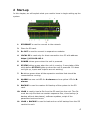
2 Start-up..........................................................................................4
2.1 Power Supply......................................................................................5
2.2 Connect Sensors and Actuators..........................................................5
2.2.1 Universal Inputs..........................................................................5
2.2.2 Digital Inputs...............................................................................6
2.2.3 Analog Outputs...........................................................................6
2.2.4 Digital Outputs............................................................................7
2.3 Connect Expansion Modules..............................................................7
2.3.1 Digital Outputs............................................................................7
2.4 Network Connection............................................................................8
2.5 Login and Password............................................................................9
2.6 Overview Web Interface ...................................................................10
3 Applications & Resources..........................................................14
3.1 Applications.......................................................................................14
3.2 Channels ..........................................................................................14
3.3 Alarms...............................................................................................14
3.4 Alarm Groups....................................................................................15
3.5 Parameters........................................................................................15
3.6 Curves ..............................................................................................15
3.7 Time Schedule..................................................................................15