1
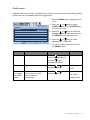
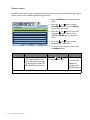
System menu
Available menu options may vary depending on the input sources, functions and settings. Menu
options that are not available will become grayed out.
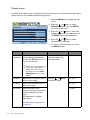
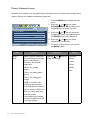
1. Press the MENU key to display the main
menu.
2. Press the
SYSTEM
MODE: Standard
Input
D-sub
DDC/CI
OFF
Auto Power off
OFF
Information
Reset All
Move
Item
Input
ENTER Select
MENU
key to enter the menu.
Exit
4. Press the
or
keys to make
adjustments or selections.
5. To return to the previous menu, press
the MENU button.
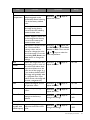
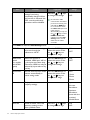
Function
Operation
Use this to change the input
to that appropriate to your
video cable connection type.
Analog-only models do
not have the Input function.
Press the
or
keys
to change the settings.
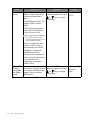
OSD Settings - Press ENTER to enter the OSD Settings menu.
34
How to adjust your monitor
keys to select
3. Press the
or
keys to move the
highlight to a menu item and then
press the ENTER key to select that
item.
OSD Settings
HDMI Auto Switch
or
SYSTEM and then press the ENTER
Range
• DVI
• D-sub (VGA)
• HDMI (for
models with
HDMI inputs)