1
DM2220A / EM2220A
User’s Manual - Page 1 of 2
Technical Specifications
Interface Descriptions
Operation Mode
playback only
Power Input Terminals: VDC & GND
Use a well regulated DC power supply to obtain the best sound quality. Connect the power
supply’s positive to terminal VDC, negative to terminal GND (the ground).
Sound File Format
Windows WAV
- 8 bit PCM (uncompressed)
- mono
- sampling rate: 11.025/22.05 KHz
Max. Number of Sound Files
10 per trigger input
Memory Type
SD card formatted with FAT16, or
SDHC card formatted with FAT32
Max. Memory Capacity
2GB (SD), 32GB (SDHC)
Max. Recording Time (w/32GB card)
800 hours (sampling rate = 11.025 KHz)
Supply Voltage
12~32 VDC
Speaker Output Terminals: SP1 & SP2
The speaker output is single ended. Terminal SP1 is internally connected to power ground.
Depending on the ambient temperature, additional cooling may be required to obtain the
maximum output.
Trigger Input Terminals: T1 - T20
These inputs are internally pulled up to 3.3V through 10K resistors, and protected with 1K
serial resistors against static discharge. An input is automatically disabled if no sound file is
associated with it - see the File Number Assignment section for more information.
Busy Output Terminal: T20
This output is open collector with 100 mA current rating. It shares the same terminal with
trigger input T20 and is disabled by default. To enable it (and disable T20), move the internal
jumper J1 (both shorting caps) to the BSY position while the power is turned off.
Power Light (PWR)
The power light is turned on when power is applied.
Volume Pot (VOL)
Turn the knob clockwise to increase the output level.
Typical Standby Current
50 mA
Max. Audio Output
10W (4 Ohm load)
Serial Interface
none
Parallel Interface
20 trigger inputs
Physical Dimensions
DM2220A (board only): 3.0’’ x 4.7’’
EM2220A (enclosed): 3.7” x 5.0” x 1,2”
Firmware Version
1.0 ~ 1.1
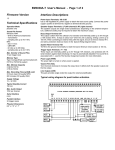
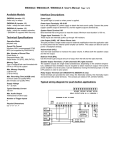
Typical wiring diagram for push button activation
DM2220A / EM2220A
File Number Assignment
The file number is a three digit number used to associate a sound
file with a particular trigger input. The file number must be added in
front of the original filename in the following manner:
010, 011, ...019 for input T1
020, 021, ...029 for input T2
......
190, 191, ...199 for input T19
200, 201, ...209 for input T20
Up to ten files may be associated with each input, and the file numbers must be consecutive. For example, to associate three files
with T1, the file numbers must be 010, 011 and 012. If the files are
numbered 010, 011 and 014, then only 010 and 011 will be associated with T1. If an input has no file associated with it, it is automatically disabled.
The files associated with an input will be used sequentially, one file
per trigger. For example, if two files (010 and 011) are associated
with T1, the first trigger will play file 010, the second trigger will play
file 011, and the third trigger will play file 010 again.
Device Configuration
The device can be configured to operate in many different ways by
adding on the flash card a plain text file called MODE.TXT, with
three upper case letters in it according to the following.
First Letter = Priority Mode
D = Decreasing (prioritized)
Inputs are prioritized with T1 being the highest and T20 being
the lowest. If multiple inputs are triggered at the same time, the
input with the highest priority wins. Also, in the Interrupt mode
(see below), a higher priority input can interrupt a lower priority
one, but not vice versa.
R = Round-robin (unprioritized)
Inputs are not prioritized. If multiple inputs are triggered at the
same time, they will take turn to play. For example, if both T1
and T2 are triggered, T1 will play first. After T1 ends, if both T1
and T2 are still triggered, then T2 will play. However, if T2 is not
triggered when T1 ends, then T2 will not play. That means the
system does not memorize previous triggers, it always checks
the inputs again after a playback ends.
Second Letter = Play Mode
User’s Manual - Page 2 of 2
Third Letter = Trigger Mode
C = Close (repeatable)
An input is triggered when it’s at or near 0V (ground). Therefore
if an input is tied to the ground through a switch, it is triggered
when the switch is closed.
O = Open (repeatable)
An input is triggered when it’s at or near 3.3V. Therefore if an
input is tied to the ground through a switch, it is triggered when
the switch is open (because the inputs are internally pulled up
to 3.3V).
M = Make (play once)
An input is triggered when it changes from 3.3V to 0V. Therefore if an input is tied to the ground through a switch, it is triggered at the very moment when the switch is closed.
B = Break (play once)
An input is triggered when it changes from 0V to 3.3V. Therefore if an input is tied to the ground through a switch, it is triggered at the very moment when the switch is opened.
Special Considerations on Certain Modes
DHM & RHM
The Hold mode requires the triggering condition to be held in
order to keep playing the file. However, the triggering condition
for the Make mode is always momentary (a transition from 3.3V
to 0V) and cannot be held. Therefore both DHM and RHM are
useless in theory. However, these two modes have been
changed to work in the following manner: The file will start to
play when the input changes from 3.3V to 0V, and continue to
play for as long as the input is at 0V. The playback stops as
soon as the input returns to 3.3V, or when the end of the file is
reached. Therefore, if the input stays at 0V after triggering, the
file will be played only once.
DHB & RHB
Similar to DHM & RHM, these two mode are useless in theory
and changed to work in the following manner: The file will start
to play when the input changes from 0V to 3.3V, and continue
to play for as long as the input is at 3.3V. The playback stops as
soon as the input returns to 0V, or when the end of the file is
reached. Therefore, if the input stays at 3.3V after triggering,
the file will be played only once.
Trouble Shooting Guide
I = Interrupt
The file plays once but can be interrupted by any other input if
the inputs are not prioritized (Round-robin mode), or by any
input of higher priority if the inputs are prioritized (Default mode).
1. Does not play any file at all.
a. File numbers are not assigned properly.
b. The system is in the wrong mode due to missing or incorrect
configuration file.
c. If the flash card is inserted when the power is on, the system
may not work. To fix this problem, turn the power off for a few
seconds to reset the system.
d. The volume pot may need to be adjusted.
e. Some flash cards, especially those having been used in digital
cameras, may need to be reformatted in a PC.
H = Hold
The file plays for as long as the input is triggered, and stops as
soon as the trigger is removed. The playback is not interruptible until the file is played to the end. At that point, the inputs
are checked again according to the priority mode.
2. Plays the wrong file.
a. File numbers are not assigned properly.
b. The system is in the wrong mode due to missing or incorrect
configuration file.
N = Non-interrupt
The file plays once and is not interruptible until it is played to
the end. At that point the inputs are checked again according to
the priority mode. The hardware reset is the only way to stop
the playback prematurely.