1
More information on this topic can be found in the
EncoreAnywhere online user manual. Just click ‘Help’ at any
stage to be directed to relevant guides.
EncoreAnywhere Help Guide
2. Modems
2. Pairing Modems
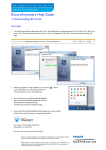
1. All modems are shipped as Inactive. An Inactive modem will not be listed in the EncoreAnywhere modem list.
2. A modem must be in Active status in order for it to communicate with EncoreAnywhere.
3. A modem is automatically activated when it is paired with a therapy device through EncoreAnywhere.
4. The modem is paired when the therapy device serial number and the wireless modem serial number are both entered into
the patient’s profile through the patient prescription tab (see below). The modem serial number is entered into the Encore
ID field of the Equipment Assignment pane.
Therapy
device serial
number
Wireless
modem
serial
number
Once Active, the status and information about a modem is available to the Modem Manager.
If the Modem Manager accesses the “Modem Administration” tab and clicks on an Encore ID, the “Modem List” screen will
display the following information seen below :
Respironics and EncoreAnywhere are trademarks of Respironics, Inc. and its affiliates. All rights
reserved. All other trademarks are the property of their respective owners.
Philips Healthcare reserves the right to make changes in specifications and/or to discontinue any
product at any time without notice or obligation and will not be liable for any consequences
resulting from the use of this publication.