1
BUYERS LABORATORY TEST REPORT
Xerox WorkCentre Pro 580 Multifunctional
TEST RESULTS AND OBSERVATIONS continued
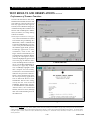
Ease of replacing imaging cartridge: Good. The user pushes
the blue release buttons on each side of the unit, which
opens the front of the machine, giving the user access to
the imaging cartridge. The user then grabs the handle on
the imaging cartridge, lifts the cartridge up slightly and
pulls it out. To replace the cartridge, the user lines up the
cartridge with the guides, slides it in place and closes the
front cover.
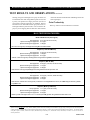
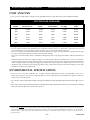
TESTED TONER YIELD (BASED ON 5% PAGE COVERAGE)
Toner Cartridge Weight
Full
749.0 grams
Empty
697.0 grams
Net Weight
52.0 grams
Toner Yield
(Impressions)
2,915
Impressions
Per Gram
56.06
Guarantee/Warranty: The Xerox WorkCentre Pro 580 is backed by a 90-day warranty; Xerox offers one-year on-site
($156) and three-year on-site ($432) service plans.
Ease of Operation
Documentation: Good. The WorkCentre Pro 580 comes
with a printed “Quick Reference Guide,” which covers
installation of the device and software, fax and copy
operations and troubleshooting. In addition, an on-line
user manual is included on one of the CD-ROMs bundled
with the system.
separately but uses the WorkCentre Pro 580’s TWAIN
driver for scanning.
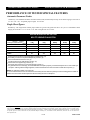
Control panel status messages/job access: The LCD
display indicates whether the unit is printing or sending
or receiving a fax, but does not provide any status
information regarding print or copy jobs (only one job
resides at the device at a time).
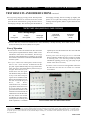
Ease of use: Good. The control panel, which incorporates a 2-1/2" x 8/16" one-line, 16-character LCD disFeedback to PC workstations: Not applicable. The Xerox
play and separate dedicated keys for copy and fax funcWorkCentre Pro 580 was not tested in a network
tions, was easy to use and the menu system was easy to
environment.
navigate. Ease of use as a connected device was also good.
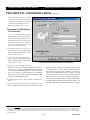
The Windows GDI print driver
is easy to use and to setup using the Xerox installation disk.
During the installation process,
the user can install the print
driver,
scan
driver,
ControlCentre Lite, a software
program that allows the user to
set up one-touch or two-digit
speed autodial numbers in the
workstation and download the
information to the WorkCentre
Pro 580, and the user manual.
TextBridge Pro Millennium,
which provides scanning and
OCR capabilities, is installed
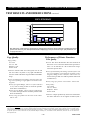
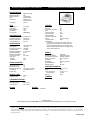
Xerox WorkCentre Pro 580 Control Panel
Copyright 2002. WARNING: This material is copyrighted by Buyers Laboratory Inc. and is the sole property of Buyers Laboratory. Duplication of this proprietary
report or excerpts from this report, in any manner, whether printed or electronic (including, but not limited to, copying, faxing, scanning or use on a fax-back system),
is illegal and strictly forbidden without written permission from Buyers Laboratory. Violators will be prosecuted to the fullest extent of the law. To purchase reprints
of any BLI reports or articles, contact BLI at (201) 488-0404. Buyers Laboratory Inc., 20 Railroad Avenue, Hackensack, NJ 07601. Or visit our Web site at
www.buyerslab.com.
4-TR
610P717870