1
Clock system generates all clocks needed by peripherals. Clocks
synchronization is based on Zarlink MT9042 chip and works according to
following principles:
✔
✔
✔
The KKO extracts 2MHz clock from PCM30 routes E1A & E1B,
Arbitration unit selects valid clock and adjusts all other clock signals to it,
If synchronization is lost, clocks are formed as freerun.
CONFIGURATION & SETTINGS
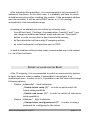
After installing the KKO in exchange magazine and when fatal error
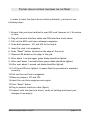
occurred, user should press RESET button (see Appendix 3 add 4). After this
all LEDs on the front panel blinks for several seconds.
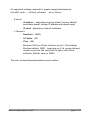
If cold reset jumper (JMP1) is shorted, cold restart occurs and all settings
are set to default values (announcements are not erased).
DUAL PCM30 INTERFACE
This is the basic module of the KKO, which makes possible to link it with
proper PCM30 device in the exchange. Module has two independent
interfaces named E1A & E1B respectively.
Module co-operates with the exchange across PCM30 link with CAS
signaling using one or two PCM30 interface card (TLU76 or later). From MD110 or BP point of view the KKO is seen as additional external automatic
exchange.
By default the KKO consists of one PCM30 interface (E1A).
This module is based on Zarlink MT9075 interface circuit and meets the
ITU-T Recommendations including G.703, G.704, G.706, G.732, G.775,
G.796, and G.823 for PCM30 and I.431 for ISDN primary rate.
Made using OpenOffice.org2.0
page 8 / 22