1
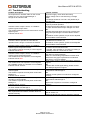
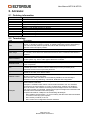
User Manual MT50 & MT150 4.3 Troubleshooting Problem description No response from actuator either on the control system or if you connect with Manager 3. No light in the indicator LED. Actuator’s alarm output is active, on a fieldbus system it gives torque alarm. The actuator attempts to move valve when a control signal is given. Indicator LED is RED. Actuator is able to operate the valve but the operation time is longer or shorter than desired. Actuator’s alarm output is active, on a fieldbus system it gives temperature alarm. The actuator responds normally to control signals. Indicator LED is RED. Actuator’s alarm output is active, on a fieldbus system it gives temperature alarm. The actuator does not respond to control signals. Indicator LED is RED. The actuator does not respond to control signals. On a fieldbus system, the actuator is not available. Indicator LED is “normal”. Actuator with fieldbus interface does not respond to control signals. The actuator responds normally when tested with Manager 3. Indicator LED is “normal”. Actuator with digital interface does not respond normally to control signals. The actuator responds normally when tested with Manager 3. Indicator LED is “normal”. Actuator does not respond neither to control signals nor when tested with Manager 3. Actuator power supply is verified with voltage meter. After replacement of interface, actuator does not operate correctly. Cause & solution No power supply, check fuses and wiring. Supply voltage can be checked using a voltage meter. L-N voltage should be 110-240 V AC (50/60 Hz) or 125-230 V DC Valve operation torque is too high, please check torque by manual operation. Be aware that foreign objects in the pipe can block the valve and that valve torque changes over time. OR Actuator torque has been set too low, increase it by using Eltorque Manager 3 as described in section 3.3. On fieldbus control systems, torque can be adjusted via the fieldbus communication. Change actuator’s speed by using Eltorque Manager 3 as described in section 3.3. On fieldbus control systems, speed can be adjusted via the fieldbus communication. Actuator’s internal temperature is 10 C or less from the motor current shut-down limit. If possible, allow actuator to cool down by leaving it in standby mode for 15 minutes or more. Actuator has over-heated and the motor current is shut down to prevent damage. Make sure surrounding temperature is within limits and that the duty type requirements are followed. See section 2 for more details. Faulty control system, please ask system vendor for support. OR Problem with control signal wiring, please contact local Eltorque agent for support. Incorrect fieldbus settings, please check configuration with Manager 3. OR Fieldbus control system is not wired or configured correctly. Incorrect digital inversion settings, please check configuration with Manager 3. OR Digital control system is not wired or configured correctly. Defective control interface, must be replaced. Interface has not been configured correctly, please refer to section 3.3. Contact local Eltorque agent for support if required. Page 21 of 27 Revision date: 04.03.2011