1
ACM3000
PART NO. 02404-0144
OPERATOR
GUIDE
Document Ref: OGACM3000 v.1.0 Aug. 2011
9006391
Rel. 2
05/08
M2
HIGH
T2
M1
EV5
LOW
P1
T1
EV2
2
3
VU3
P
1
P2
F1
HP
V5
V6
VU2
5
F2
4
VU1
V1 V3
V4 V2
EV3
6
C
EV4
EV1
7
9
8
M3
11
12
13
17
15
18
14
16
19
20
21
23
22
35
34
33
24
25
26
27
28
V
AUTO
29
ENTER
32
STOP
31
30
36
37
38
______________________________________________________________________________ ACM3000
Dear garage owner,
Thank you for having chosen one of our instruments for your workshop.
We are certain that it will give the utmost satisfaction and be a notable help on the job.
Please become fully familiar with the instructions in this user’s manual.
It should be kept ready to hand for consultation whenever required.
ACM3000 is an electronic unit for recovery, recycle, vacuum and charge of A/C systems
using R134a as refrigerant.
A simple but reliable connection system guarantees a safe work during all of the
operations: refrigerant recovery and recycle; vacuum and leak test; lubricant injection;
circuit recharge and working pressure test.
The refrigerant flow is controlled and managed by an electronic scale so as to prevent
any tank overflow or the flow of a refrigerant quantity exceeding that allowed.
A patented separator still allows to separate the refrigerant from the lubricant.
OPERATING INSTRUCTIONS
33
•
It is forbidden to even partially this handbook in any way unless prior written authorisation has
been obtained from the manufacturer.
•
The data and characteristics indicated in this handbook are not binding. The manufacturer reserves
the right to make all those modifications as are considered necessary without being obliged to give
advance warning or make replacements.
•
All the names of brands and products and the trade marks are the property of the respective
owners.
TTPR – May 2008
______________________________________________________________________________ ACM3000
INDEX
CAPTIONS
37
GENERAL INFORMATION FOR THE USER
38
Disposing of equipment
38
Disposing of batteries
38
1.0 -
FOR A SAFE USE ACM3000
39
1.1 -
For a safe use
39
1.2 -
Safety devices
40
1.3 -
The work environment
41
2.0 -
INTRODUCTION TO THE UNIT
42
3.0 -
DESCRIPTION OF THE UNIT
43
3.1 -
The Keyboard
43
4.0 -
INSTALLATION OF THE UNIT
44
4.1 -
Unpacking and checking components
44
4.2 -
Machine handling and storage
44
4.3 -
Preparation for use
44
4.4 -
Bottle filling
46
5.0 -
USE OF THE UNIT
47
5.1 -
Refrigerant recovery
47
5.2 -
Evacuating the A/C system
48
5.3 -
Oil injection and A/C system charge
49
5.4 -
How to disconnect from the A/C system
50
5.5 -
Automatic function
50
5.6 -
Recycling function
52
5.7 -
Incomplete charge
52
6.0 -
DISPLAYED MESSAGES
53
6.1 -
Service messages
53
6.2 -
Error messages
53
OPERATING INSTRUCTIONS
35
ACM3000 _______________________________________________________________________________
7.0 -
MAINTENANCE
54
7.1 -
Vacuum pump oil change
54
7.2 -
Reset oil counter vacuum pump
54
7.3 -
Filter dryer change
55
7.4 -
Reset counter filter dryer
56
7.5 -
Refrigerant scale calibration
57
8.0 -
STOPPAGE FOR LONG PERIODS
58
9.0 -
DEMOLITION/DISPOSAL
58
9.1 -
Disposal of the equipment
58
9.2 -
Disposal of the recycled materials
58
10.0 -
TECHNICAL SPECIFICATIONS
59
11.0 -
SPARE PARTS
59
12.0 -
GLOSSARY OF TERMS
60
36
OPERATING INSTRUCTIONS
______________________________________________________________________________ ACM3000
CAPTIONS
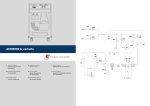
M1
Low pressure gauge
M2
High pressure gauge
M3
Inside tank pressure meter
T1
Low pressure service hose
T2
High pressure service hose
LOW
Manifold set low pressure valve
HIGH
Manifold set high pressure valve
V1
Tank vapour side hose valve
V2
Tank liquid side hose valve
V3
Tank vapour side valve
V4
Tank liquid side valve
V5
Safety valve
V6
Non condensable drain valve
VU1
Bottle inlet unidirectional valve
VU2
Separator-still check valve
VU3
Recovery line unidirectional valve
F1
Recovery line mechanic filter
F2
Dehydrating filter
EV1
Vacuum line solenoid valve
EV2
Oil addition solenoid valve
EV3
Oil purge solenoid valve
EV4
Charge solenoid valve
EV5
Recovery/Recycle solenoid valve
1
Oil replenishing bottle
2
Vacuum pump
3
Pressure adjuster
4
Separator-still for recovered oil
5
Separator-still for compressor oil
6
Compressor
7
Storage tank
8
Electronic scale
9
Oil purge bottle
P1
Pressure transducer
P2
High pressure switch
OPERATING INSTRUCTIONS
37
ACM3000 _______________________________________________________________________________
GENERAL INFORMATION FOR THE USER
Disposing of equipment
•
Do not dispose of this equipment as miscellaneous solid municipal waste but
arrange to have collected separately.
•
The re-use or correct recycling of the electronic equipment (EEE) is important in
order to protect the environment and the wellbeing of humans.
•
In accordance with European Directive WEEE 2002/96/EC, special collection points
are available to witch to deliver waste electrical and electronic equipment.
•
The public administration and producers of electrical and electronic equipment are
involved in facilitating the processes of the re-use and recovery of waste electrical
and electronic equipment through the organisation of collection activities and the
use of appropriate planning arrangements.
•
Unauthorised disposal of waste electrical and electronic equipment is punishable by
law with appropriate penalties.
Disposing of batteries
38
•
Batteries must be recycled or disposed of properly. Do not throw batteries
away as part of normal refuse disposal.
•
Do no throw batteries into open flame!
OPERATING INSTRUCTIONS
______________________________________________________________________________ ACM3000
1.0 -
FOR A SAFE USE ACM3000
The advanced technology adopted in the design and production of the ACM3000 make
this equipment extremely simple and reliable in the performance of all procedures.
Therefore, the user is not exposed to any risk if the general safety rules reported below
are followed with proper use and maintenance of the equipment.
NOTA BENE:
This unit can be exclusively used by professionally trained operators who have to know
the principles of refrigeration, refrigerating systems and gases and the possible
damages which might be caused by pressurized equipment.
Every user has to read carefully this manual for a correct and safe use of the
equipment.
1.1 -
•
For a safe use
It is necessary to wear suitable protections such as goggles and gloves, the
contact with the refrigerant can cause blindness as well as other injuries to the
operator. Please make reference to the symbols below:
Carefully read the instructions.
Do not use open air in case of rain or high humidity.
Use gloves.
Use protection goggles.
•
Avoid the contact with the skin, the low boiling temperature (about -30 °C) may
provoke freezing.
•
Do not inhale refrigerating gases fumes.
•
Before connecting the ACM3000 unit to an A/C system or to an external tank,
make sure all the valves are closed.
OPERATING INSTRUCTIONS
39
ACM3000 _______________________________________________________________________________
•
Ensure that the phase has been completed and that all valves are closed before
disconnecting the unit ACM3000. This will prevent release of the refrigerant into
the atmosphere.
•
Do not change the safety valve or control system settings.
•
Do not use external tanks or other storage tanks that have not been
type-approved or that lack safety valves.
•
Never leave the unit live if an immediate use is not scheduled, stop the electrical
supply before a long period of unit inactivity or before internal maintenance
interventions.
•
Be careful while servicing the unit since connecting hoses may contain pressurized
refrigerant.
•
Do not use the unit in explosive environments.
Extraordinary maintenance interventions have to be performed by authorized staff only.
•
Pressure of leaks of the HCF-134a service equipment or of the air conditioning
systems of the vehicle must not be tested by using compressed air.
Some air/HCF-134a mixtures can burn at high pressures. These mixtures can be
dangerous and may cause fires or explosions and subsequent injuries or damages.
Further information on the operators’ health and safety can be obtained from the
refrigerant producers.
1.2 -
Safety devices
The ACM3000 is equipped with the following safety devices:
•
Overpressure valves.
•
Besides the overpressure valve a maximum pressure switch has been fitted
which stops the compressor in case of excessive pressure.
ATTENTION:
Any type of tampering with the safety devices mentioned above is
hereby prohibited.
40
OPERATING INSTRUCTIONS
______________________________________________________________________________ ACM3000
1.3 -
•
The work environment
The unit has to work in a sufficiently ventilated environment.
ATTENTION:
Work far from free flames and hot surfaces; at high temperatures the
refrigerant decomposes freeing toxic and aggressive substances
which are noxious for the user and the environment.
•
For a correct functioning the unit has to work on an even surface; during short
handling do not shake it.
•
Do not subject the ACM3000 unit to vibration.
ATTENTION:
While operating do not disperse the refrigerant in the environment.
Such a precaution, besides being required by the international rules
for the environment protection, is necessary to prevent the possible
presence of refrigerant in the working environment from making it
difficult to detect possible leaks.
•
Work in environments with sufficient lighting.
•
Avoid inhalation of the refrigerants and oils in the A/C systems. Exposure may
cause irritation to eyes and the respiratory tract. To remove R134a from the
A/C system, use only the special recycling-units for R134a. If the refrigerant is
accidentally released into the atmosphere, ventilate the work area before resuming
service.
•
Do not use the unit under direct sunrays; sun exposure can cause excessive
temperatures and malfunctioning. Working temperatures indicated refer to the unit
being not directly exposed to the sun.
OPERATING INSTRUCTIONS
41
ACM3000 _______________________________________________________________________________
2.0 -
INTRODUCTION TO THE UNIT
The ACM3000 unit fits all of the air-conditioners functioning with R134a refrigerant
located on cars, trucks and industrial vehicles.
The ACM3000 unit microprocessor allows the managing of all functions by means of an
electronic scale, a LCD to display the weight or minute values and the help messages of
the various procedures which can be set, a control board with keyboard.
By connecting the ACM3000 unit to an A/C system the refrigerating gas can be
recovered and recycled to enter the system itself again after a correct vacuum.
The amount of lubricant taken from the A/C system during the recovery can be
measured and, afterwards, reintegrated in the system.
The unit is equipped with a one-stage pump for high vacuum and a manifold set to
continuously monitor the operations in process.
Tightness test on the A/C units is carried out through the manometers the unit is
equipped with.
The unit is equipped with special connectors to avoid cross-mixing with systems using
R12.
ATTENTION:
Do not try to adapt this unit for air conditioning systems using R12.
42
OPERATING INSTRUCTIONS
______________________________________________________________________________ ACM3000
3.0 -
DESCRIPTION OF THE UNIT
11. Keyboard.
12. Low pressure gauge.
13. High pressure gauge.
14. Inside tank pressure meter.
15. High pressure valve.
16. Low pressure valve.
17. Printer (optional).
18. Main power switch.
19. Port for software updates.
20. Low side connection hose.
21. High side connection hose.
22. Oil injector glass.
23. Oil drain glass.
3.1 -
The Keyboard
24. CHARGE function Led.
25. VACUUM function Led.
26. RECOVERY function Led.
27. RECOVERY function key.
28. VACUUM function key.
29. AUTOMATIC function key.
30. CHARGE function key.
31. STOP key.
32. ENTER key.
33. Downwards cursor shifting key.
34. Upwards cursor shifting key.
35. Display.
OPERATING INSTRUCTIONS
43
ACM3000 _______________________________________________________________________________
4.0 -
INSTALLATION OF THE UNIT
Please find below operations to perform to start the unit.
4.1 -
Unpacking and checking components
•
Remove the machine packaging.
•
Check to ensure that all of the accessory components are present:
Operating instructions.
2 cylinder connectors.
Bottle safety valve conformity certificate.
4.2 -
Machine handling and storage
Remove the unit from the base pallet of the packaging.
The unit is moved on the four wheels. The two front wheels have brakes.
On rough terrain, the ACM3000 can be moved by tilting it and balancing the weight on
the two rear wheels.
In spite of the fact that the heaviest components have been assembled on the base in
order to lower the centre of gravity, it has not been possible to eliminate the
risk of overturning completely.
4.3 -
Preparation for use
Before starting to use the ACM3000 unit, it is possible to personalize it.
These settings are not compulsory on the standard models.
To personalize the A/C unit comply with the following procedure:
•
Turn on the unit and wait until the STAND-BY page is displayed (amount of coolant
in the bottle).
•
Simultaneously press the cursor shifting keys upwards (34) and downwards (33)
for some seconds.
•
A menu is displayed containing the operations that may be carried out.
•
Press the upwards cursor shifting key (34) or the downwards cursor shifting key
(33) to scroll the menu.
•
Select the wished function and press ENTER (32) to enter.
•
Press STOP (31) to go back to the STAND-BY page.
44
OPERATING INSTRUCTIONS
______________________________________________________________________________ ACM3000
LANGUAGE CHANGE
•
Select the LANGUAGE CHANGE function and press ENTER.
•
The list of languages available in memory is displayed.
•
Press the upwards cursor shifting key (34) or the downwards cursor shifting key
(33) to scroll the menu and press ENTER to set the selected language.
•
Then the main menu is displayed again.
UNITS OF MEASURE
•
Select the UNITS OF MEASURE function and press ENTER.
•
The list of units of measure being available in memory is displayed.
•
Press the upwards cursor shifting key (34) or the downwards cursor shifting key
(33) to scroll the menu and press ENTER to set the selected unit of measure.
•
Then the main menu is displayed again.
CONTRAST
•
Select the CONTRAST function and press ENTER.
•
Press the upwards cursor shifting key (34) or the downwards cursor shifting key
(33) to modify the contrast and press ENTER to confirm.
•
Then the main menu is displayed again.
OPERATING INSTRUCTIONS
45
ACM3000 _______________________________________________________________________________
4.4 -
Bottle filling
Before being able to use the unit, after personalizing it, it is necessary to inject some
coolant in the inner bottle. Comply with the following procedure:
•
Connect the service pipe
(use the supplied unions).
to
an
external
container
full
of
coolant
NOTA BENE:
There are two types of source tanks: one with a liquid outlet and one without.
Tanks with liquid outlets must remain in an upright position in order to transfer the
liquid refrigerant. Use the LIQUID valve connection for this type of tank.
Tanks without liquid outlets are usually equipped with only one valve and have to be
overturned to transfer the liquid refrigerant.
•
Open the valve on the external bottle and on the service pipe.
•
Open the high and low pressure valves on the unit.
•
Simultaneously press the cursor shifting keys upwards (34) and downwards (33)
for some seconds.
•
The functions menu is displayed.
•
Press the upwards cursor shifting key (34) or the downwards cursor shifting key
(33) to select the BOTTLE FILLING and press ENTER to confirm.
•
The display shows the tank available capacity.
•
Press the ENTER key to continue.
•
Set the amount of coolant that you wish to inject (it is advisable to inject about
4 kg).
•
Press ENTER to start the operation.
•
The unit automatically stops once reached the set value.
•
Close the valve on the source tank.
•
Press ENTER to complete the operation and empty the pipes and the still
separator.
NOTA BENE:
Usually the final amount of coolant recovered is greater than the set quantity, since also
the still separator and the hoses are emptied.
•
The function stops automatically when pressure is over in the system.
•
The STAND-BY page is displayed.
•
Close the valves on the unit.
46
OPERATING INSTRUCTIONS
______________________________________________________________________________ ACM3000
5.0 -
USE OF THE UNIT
Find below the description of the unit functions.
5.1 -
Refrigerant recovery
ATTENTION:
Always wear protection goggles and gloves when working with
refrigerant. Read and comply with warnings at the beginning of this
manual before using the unit.
In order to recover the coolant present in the A/C system, carry out the following
procedure:
•
Connect the T1 low pressure and T2 high pressure hoses of the A/C system.
•
Open the valves on the hose quick couplers T1 and T2.
•
Open the high and low pressure valves on the unit.
•
Press the RECOVERY key (27), the maximum amount of coolant that may be
recovered is displayed.
•
The function is not started in case of lack of pressure in the system; in this case a
message is displayed to inform the operator.
•
Press ENTER to start the function; the self-cleaning function is thus started.
NOTA BENE:
This function is useful to ensure a correct weighing of the recovered coolant.
The self-cleaning function can be by-passed by holding down the RECOVERY key for
some seconds.
•
When the self-cleaning is over, the refrigerant recovery starts.
NOTA BENE:
The function stops automatically when the pressure inside the system drops below
0 bar.
•
At the end of recovery the oil is automatically drained and the pressure values are
checked.
•
When the waiting time is over:
The function restarts automatically, if pressure has increased.
The display shows the amount of recovered refrigerant, if the pressure value
has not changed.
•
Close the valves on the unit.
•
Press STOP to go back to the STAND-BY page.
OPERATING INSTRUCTIONS
47
ACM3000 _______________________________________________________________________________
NOTA BENE:
For the units equipped with printer (optional), after the display of data, comply with the
following procedure:
Enter the value of recovered oil by using the cursor upwards/downwards
shifting key and then press ENTER to confirm.
Press the ENTER key to print.
Press the STOP key to exit.
5.2 -
Evacuating the A/C system
NOTA BENE:
If the vacuum pump has run for more than 50 hours the message CHANGE OIL
appears. Carry out the maintenance according to the procedures described in the
relevant section.
•
Open the high and low pressure valves on the unit.
•
Press the VACUUM key (28).
•
The function is not started in case of pressure presence in the system; in this case
a message is displayed to inform the operator.
•
Enter the wished vacuum time by using the cursor upwards/downwards shifting
key.
•
Press ENTER to confirm and start the function.
•
When the vacuum time is over the pressure values check time starts. At the end of
this time the check result is displayed showing whether leaks have been detected
on the system.
•
Close the valves on the unit.
•
Press STOP to go back to the STAND-BY page.
NOTA BENE:
For the units equipped with printer (optional), after displaying the result of the test it is
possible to carry out the following procedure:
Press the ENTER key to print.
Press the STOP key to exit.
48
OPERATING INSTRUCTIONS
______________________________________________________________________________ ACM3000
5.3 -
Oil injection and A/C system charge
ATTENTION:
This function must be performed only on A/C systems under vacuum
(following a system evacuation function). At the end of the oil
injection function, following a filling function.
Charge the oil from the high side only. In case of systems equipped
with low side fitting only (LOW), wait at least 10 minutes before
starting the A/C system after the charge.
•
Check that the service pipes are connected and that their valves are open.
•
Press the CHARGE key (30).
•
Enter the amount of coolant to be charged by using the cursor upwards /
downwards shifting key and press ENTER to go on.
•
The display prompts to fill in the oil.
If you wish to fill in the oil, press the AUTO key and check on the oil bottle the
charged amount. Press ENTER to start charging the oil.
If you do not wish to charge the oil, press ENTER to start the charge.
•
The unit carries out the coolant charge and at the end displays the value of the
charged coolant.
•
To verify if the circuit is efficient, you need to check the functioning pressures.
•
Close the valves on the unit.
ATTENTION:
Failure to close the valves may cause errors, malfunction or damage
of the internal components.
•
Switch On the car and the A/C system.
•
Check pressure values.
•
Switch Off the A/C system and the car.
NOTA BENE:
For the units equipped with printer (optional), after the display of the charged coolant
carry out the following procedure:
Enter the charged oil value by using the cursor upwards / downwards shifting
key and press ENTER to confirm.
Press the ENTER key to print.
Press the STOP key to exit.
OPERATING INSTRUCTIONS
49
ACM3000 _______________________________________________________________________________
5.4 -
How to disconnect from the A/C system
In order to disconnect from the A/C system of the vehicle comply with the following
procedure:
•
Close the valve on the high pressure quick coupler placed on the vehicle.
•
Open the high and low pressure valves on the unit.
•
Switch On the car and the A/C system.
•
Make sure the pressure on the manometers stabilizes to about 1-2 bars.
•
Close the valve on the low pressure quick coupler placed on the vehicle.
•
Switch Off the A/C system and the car.
•
Disconnect the hoses from the A/C system.
•
Carry out a recovery to empty the hoses from residual coolant.
5.5 -
Automatic function
This function allows carrying out recovery, vacuum, and charge functions in automatic
function.
ATTENTION:
For cars equipped with a single service fitting the charge function
should be carried out manually by following the procedure suggested
by the manufacturer.
To carry out the automatic function:
•
Connect the T1 low pressure and T2 high pressure hoses of the A/C system.
•
Open the valves on the hose quick couplers T1 and T2.
•
Open the high and low pressure valves on the unit.
•
Press the AUTOMATIC function key (29).
•
The display requires the entry of the vacuum time.
•
Enter the value and press ENTER to confirm (comply with the procedure described
in chapter 5.2).
50
OPERATING INSTRUCTIONS
______________________________________________________________________________ ACM3000
•
The display requires the entry of the amount of refrigerant to be charged
(comply with the procedure described in chapter 5.3) and press ENTER to
confirm.
•
The function is started and goes on automatically until the vacuum function is
ended.
•
The display prompts to fill in the oil.
If you wish to fill in the oil, press the AUTO key and check on the oil bottle the
charged amount. Press ENTER to start charging the oil.
If you do not wish to charge the oil, press ENTER to start the charge.
NOTA BENE:
In case of errors, the station stops and displays the relevant error message.
•
To verify if the circuit is efficient, you need to check the functioning pressures.
•
Close the valves on the unit.
ATTENTION:
Failure to close the valves may cause errors, malfunction or damage
of the internal components.
•
Switch On the car and the A/C system.
•
Check pressure values.
•
Switch Off the A/C system and the car.
•
Carry out the disconnection procedure as described in chapter 5.4.
NOTA BENE:
For the units equipped with printer (optional), after the display of data, comply with the
following procedure:
Enter the value of recovered oil by using the cursor upwards/downwards
shifting key and then press ENTER to confirm.
Enter the charged oil value by using the cursor upwards / downwards shifting
key and press ENTER to confirm.
Press the ENTER key to print.
Press the STOP key to exit.
OPERATING INSTRUCTIONS
51
ACM3000 _______________________________________________________________________________
5.6 -
Recycling function
ATTENTION:
During the recycling function keep the high and low valves closed on
the station.
•
Simultaneously press the cursor shifting keys upwards (34) and downwards (33)
for some seconds.
•
The functions menu is displayed.
•
Press the upwards cursor shifting key (34) or the downwards cursor shifting key
(33) to select either RECYCLING and press ENTER to confirm.
•
The function is self-limited to 60 minutes.
•
Press STOP to stop the function.
•
The function stops automatically after the complete draining of the internal circuit.
5.7 -
Incomplete charge
•
Close the high side quick coupler valve on the T2 service hose on the A/C system.
•
Start the vehicle system.
•
Open the high and low pressure valves on the unit.
•
Press ENTER to complete the charge.
•
Let the residual refrigerant be sucked until manifold gauges show a pressure of
about 1-2 bar.
•
Close the low side quick coupler valve on the T1 service hose on the A/C system.
•
Turn off the vehicle and disconnect the unit from the vehicle.
•
Close the valves on the unit.
ATTENTION:
Disconnect the flexible hoses with extreme caution. All of the flexible
hoses can contain liquid refrigerant under pressure. Before using the
equipment read and follow carefully the instructions at the beginning
of this manual.
52
OPERATING INSTRUCTIONS
______________________________________________________________________________ ACM3000
6.0 -
DISPLAYED MESSAGES
6.1 -
Service messages
CHANGE OIL
Vacuum pump oil change (see chapter 7.1).
CHANGE FILTER
Change filter dryer (see chapter 7.3).
6.2 -
Error messages
HIGH PRESSURE
Out feed pressure from compressor is excessively high. Switch off the unit and wait for
about 30 minutes. If the problem persists, apply to the Technical Service.
SOFTWARE ERROR
Error in the software, apply to the Technical Service.
FULL BOTTLE
Coolant level in the bottle reached the maximum capacity level, carry out some charges
to reduce the amount of coolant inside.
SCALE RECALIBRATION
Error in scale calibration, reset it. If the error persists, apply to the Technical Service.
HIGH RECOVERY TIME
The recovery time exceeds the set safety limit. Make sure there are no leaks in the A/C
system. If no leaks are detected, apply to the Technical Service.
EMPTY SYSTEM
There is no refrigerant in the A/C system.
FULL SYSTEM
The A/C system is charged with refrigerant.
INCOMPLETE CHARGE
Excessive charge time; this proves that the pressure inside the bottle is equal to the
pressure inside the A/C system (see chapter 5.7).
OPERATING INSTRUCTIONS
53
ACM3000 _______________________________________________________________________________
7.0 -
MAINTENANCE
The ACM3000 is a highly reliable unit built with top-quality components with the use of
today's most advanced production techniques.
For these reasons, maintenance is reduced to a minimum and marked by a very low
frequency of intervention. In addition, owing to the electronic control system, all
periodic maintenance procedures are signalled at the prescribed time.
CHANGE OIL
Change vacuum pump oil (50 hours).
CHANGE FILTER
Change filter dryer.
7.1 -
Vacuum pump oil change
The oil of the vacuum pump must be changed frequently in order to assure higher
performances of the unit.
When the oil has to be changed, the display shows CHANGE OIL.
To change the oil, follow carefully these instructions:
•
Disconnect the unit from the power supply.
•
Open the upper cap (36).
•
Put a beaker under the cap (38), open the cap and discharge the oil contained in
the vacuum pump.
•
When the pump is empty, screw in the cap (38).
•
Fill the pump with the oil through the upper hole. Check the oil level in the pump
through the inspection glass (37); level has to reach the sight glass middle line.
•
When the pump is filled, close the upper cap (36).
7.2 -
Reset oil counter vacuum pump
After having changed the oil of the vacuum pump, reset the counter.
To reset the counter follow carefully these instructions:
•
Simultaneously press the cursor upwards shifting keys (34) and AUTO (29) for
some seconds.
•
The display shows the message 0000.
•
By using the cursor upwards /downwards shifting keys enter the value 5555 and
press ENTER to confirm every single value that has been entered.
•
After setting the code 5555, press and hold down the ENTER key for some
seconds.
54
OPERATING INSTRUCTIONS
______________________________________________________________________________ ACM3000
•
The functions menu is displayed.
•
Press the upwards cursor shifting key (34) or the downwards cursor shifting key
(33) to select either OIL CHANGE and press ENTER to confirm.
The display shows a value which corresponds to the working hours of the vacuum
pump.
•
Press the ENTER key and keep it pressed.
•
When the display shows 0000 release the ENTER key.
•
The display displays the functions menu again.
•
Press STOP to go back to the STAND-BY page.
7.3 -
Filter dryer change
The filter dryer of this unit has been designed in order to eliminate all acid residues and
the high water content of the refrigerant R134a.
The filter has to be changed when the display shows the message CHANGE FILTER.
To change correctly the filter dryer, follow carefully these instructions.
•
Connect the unit to the electric power; press and hold down the RECOVERY key
for some seconds.
•
Open the high and low pressure valves on the unit.
•
Wait for the end of self-cleaning.
•
Let the compressor operate until the pressure indicated on the manometers has
not decreased under the 0 (zero) bar value.
•
The function stops automatically.
•
Close the valves on the unit.
•
Disconnect the unit from the electrical power supply and remove the lower front
panel.
ATTENTION:
During the following phase it will be necessary to open the refrigerant
circuit of the unit. Wear goggles and gloves.
•
Disconnect the filter with caution and replace it with a new one.
ATTENTION:
Check that the sealing rings are in the right position.
•
Set up the plastic protection again.
OPERATING INSTRUCTIONS
55
ACM3000 _______________________________________________________________________________
7.4 -
Reset counter filter dryer
After the change of the filter dryer, reset the counter.
To reset the counter follow carefully these instructions:
•
Simultaneously press the cursor upwards shifting keys and AUTO for some
seconds.
•
The display shows the message 0000.
•
By using the cursor upwards /downwards shifting keys enter the value 5555 and
press ENTER to confirm every single value that has been entered.
•
After setting the code 5555, press and hold down the ENTER key for some
seconds.
•
The functions menu is displayed.
•
Press the upwards cursor shifting key (34) or the downwards cursor shifting key
(33) to select either FILTER CHANGE and press ENTER to confirm.
The display displays a value, either in kg or in Pounds, corresponding to the amount of
coolant that has been filtered.
•
Press the ENTER key and keep it pressed.
•
When the display shows 0000 release the ENTER key.
•
The display displays the functions menu again.
•
Press STOP to go back to the STAND-BY page.
56
OPERATING INSTRUCTIONS
______________________________________________________________________________ ACM3000
7.5 -
Refrigerant scale calibration
Required equipment:
2 Sample weights.
After removing the front cover, remove the container to the scale plate.
NOTA BENE:
The hoses from the internal container do not have to be disconnected. If you wish to
disconnect them, close the valves on the pipes and on the bottle.
•
Simultaneously press the cursor upwards shifting keys and AUTO for some
seconds.
•
The display shows the message 0000.
•
By using the cursor upwards /downwards shifting keys enter the value 1111 and
press ENTER to confirm every single value that has been entered.
•
After setting the code 1111, press and hold down the ENTER key for some
seconds.
•
The functions menu is displayed.
•
Press the upwards cursor shifting key (34) or the downwards cursor shifting key
(33) to select either BOTTLE CALIBRATION and press ENTER to confirm.
•
The displays shows ZERO WEIGHT.
•
With the scale pan being completely empty, insert the numerical value 00.00 and
press the ENTER key (to vary the displayed value use the cursor
upwards/downwards shifting key).
•
The displays shows SAMPLE WEIGHT.
•
Position the sample weight on the scale plate (the suggested weight 10 Kg).
•
Enter the sample weight value and press the ENTER key (to vary the displayed
value use the cursor upwards/downwards shifting key).
•
The display displays the functions menu again.
•
Press STOP to go back to the STAND-BY page.
OPERATING INSTRUCTIONS
57
ACM3000 _______________________________________________________________________________
8.0 -
STOPPAGE FOR LONG PERIODS
•
The unit must be kept in a safe place
•
Ensure that the valves on the internal tank are closed.
•
To resume use, follow the activation process only after reopening the internal tank
valves.
9.0 -
DEMOLITION/DISPOSAL
9.1 -
Disposal of the equipment
At the end of the equipment's lifetime, the following procedures must be performed:
•
Detach and vent the gas from the unit circuit: be sure the refrigerant tank too is
completely discharged, in compliance with the rules in force.
•
Deliver the unit to a disposal center.
9.2 -
Disposal of the recycled materials
•
The refrigerants recovered from A/C systems and which cannot be reused, must be
delivered to gas suppliers for disposal as required.
•
The lubricants extracted from systems must be delivered to used oil collection
centres.
58
OPERATING INSTRUCTIONS
______________________________________________________________________________ ACM3000
10.0 -
TECHNICAL SPECIFICATIONS
Refrigerant:
R134
Coolant electronic scale resolution:
±5g
M1 M2 gauges:
Kl. 1.0
M3 gauge:
Kl. 2.5
Container capacity:
10 l
Maximum weight that can be stored:
8 Kg
Filtering station:
1 spin-on filter dryer
Supply voltage:
230 V - 50/60 Hz
Power:
550 W
Working temperature:
10°C ÷ + 50°C
Humidity: 20 ÷ 75%
Transport and storage temperature:
- 25°C ÷ + 60°C
Dimensions:
940 × 580 × 520
Weight:
60 kg approx with empty tank
Noise:
<70 dB (A)
11.0 -
SPARE PARTS
Components indicated below are those necessary for routine maintenance.
Dehydrating filter
N°1 Vacuum pump oil bottle
Thermal paper roller (for units with printers)
OPERATING INSTRUCTIONS
5117486
RA13119B
5607069
59
ACM3000 _______________________________________________________________________________
12.0 -
GLOSSARY OF TERMS
•
Refrigerant: A refrigerant solely of the type for which the unit has been created
(ex. R134a).
•
A/C system: Air-conditioning system in the motor vehicle.
•
Unit or Station: ACM3000 equipment for the recovery, recycling, evacuation and
filling of the A/C system.
•
External tank: Non-refillable fresh refrigerant (ex. R134a) cylinder, used to fill
the refrigerant tank.
•
Refrigerant tank: The tank specifically designed for the unit.
•
Function: Execution of an individual function.
•
Recovery/Recycling: Function in which the refrigerant is recovered by an
A/C system and stored in the internal container.
•
Evacuation: Function in which incondensables and moisture are evacuated from
an A/C system solely by means of a vacuum pump.
•
Oil injection: Introduction of oil inside an A/C system for the purpose of
maintaining the amount of oil specified by the manufacturer.
•
Filling: Function during which refrigerant is introduced into an A/C system in the
amount specified by the manufacturer.
60
OPERATING INSTRUCTIONS