1
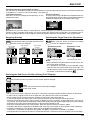
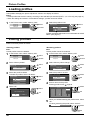
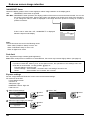
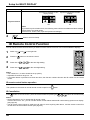
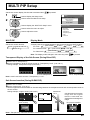
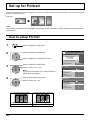
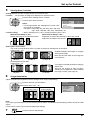
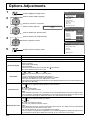
Reduces screen image retention
Custom settings
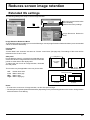
Set the individual “Image Retention Reduction” menu.
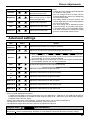
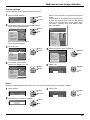
1 Select “Custom settings”.
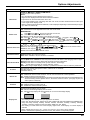
Extended life settings
Express settings
Custom settings
Reset
1 select
2 access
set each menu to the recommended setting:
2 To
Select “Recommended settings”.
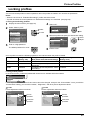
1 select
Extended life settings
Recommended settings
Picture Mode
Contrast
Side panel
NANODRIFT Saver
Peak limit
Lock settings
Apply to current input
Apply to all inputs
Dynamic
30
High
High mid
Off
Unlock
2 set
Each menu will be set as same
as the “Express settings”.
3
Normal
Picture Mode
Contrast
Brightness
Colour
Hue
Sharpness
White balance
Colour Management
Advanced settings
Dynamic
30
0
0
0
5
Normal
Off
Extended life settings
1 select
Extended life settings
Recommended settings
Dynamic
30
High
High mid
Off
Unlock
2 adjust
Recommended settings
Dynamic
30
High
High mid
Off
Lock
Extended life settings
Picture Mode
Contrast
Side panel
NANODRIFT Saver
Peak limit
Lock settings
Apply to current input
Apply to all inputs
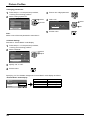
1 select
Extended life settings
5 Select the input to apply the settings.
Recommended settings
lock each menu setting:
4 To
Set the “Lock settings” to “Lock”.
Picture Mode
Contrast
Side panel
NANODRIFT Saver
Peak limit
Lock settings
Apply to current input
Apply to all inputs
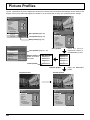
Picture
Normalise
Memory save
Memory load
Memory edit
Set each menu.
Picture Mode
Contrast
Side panel
NANODRIFT Saver
Peak limit
Lock settings
Apply to current input
Apply to all inputs
When a menu is locked, it is grayed out and cannot
be set.
“Picture Mode” and “Contrast” will no longer be able
to set in the “Picture” menu, and they are labeled
with icon to indicate their locked status. Also,
“Normalise”, “Memory save” and “Memory load”
are not available.
2 adjust
Dynamic
30
High
High mid
Off
Lock
6 Select “Yes”.
1 select
2 set
1 select
Extended life settings
Apply to current input
Yes
No
2 set
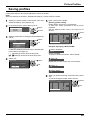
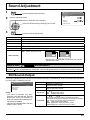
Reset
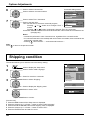
Reset the “Image Retention Reduction” menu to the factory settings. Each menu will be unlocked.
1 Select “Reset”.
Extended life settings
Express settings
Custom settings
Reset
2 Select the input to reset the settings.
Extended life settings
Reset current input
Reset all inputs
1 select
2 access
3 Select “Yes”.
1 select
Extended life settings
Reset current input
Yes
No
2 set
1 select
2 set
39