1
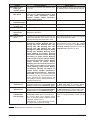
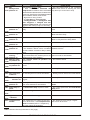
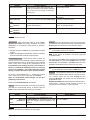
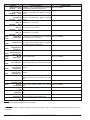
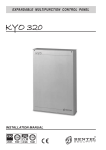
EXPANDABLE MULTIFUNCTION CONTROL PANEL
KYO 320
INSTALLATION MANUAL - Vol.1
®
ISO 9001
9105.BNT1
ISO 9001
IT-52587
ISO 14001
9191.BNT2
ISO 14001
IT-52588
OHSAS 18001 OHSAS 18001
9192.BSEC
IT - 60983
This system can be programmed using the respective KYO320 Software Application 5.4.3 or higher.
Installation of the system must be carried out strictly in accordance with the instructions described in this manual, and in
compliance with the local laws and bylaws in force.
The KYO320 Control panels have been designed and manufactured to the highest standards of quality and performance.
The KYO320 Control panels have no user-friendly components, therefore, should be serviced by authorized personnel only.
BENTEL SECURITY shall not assume the responsibility for damage arising from improper application or use.
The manufacturer recommends that the installed system should be completely tested at least once a month.
Hereby, Bentel Security, declares that KYO320 Control panels comply with the essential requirements and other relevant
provisions of Directive 1999/5/EC.
ATTENTION
The control keypads of KYO320 control panel are the CLASSIKA and PREMIUM LCD keypads. All previous Bentel LCD
keypads (Alison-S, Alison-DVP, Mia-S, Mia-D) and the LED keypad Alison32LP continue to be supported by the KYO320
Control panel. For a correct functionality of PREMIUM and CLASSIKA LCD keypad, the KYO 320 control panel must have
a firmware rev. 2.06 or higher (see page 85, 86).
Recycling information
BENTEL SECURITY recommends that customers dispose of their used equipments (panels, detectors, sirens, and other
devices) in an environmentally sound manner. Potential methods include reuse of parts or whole products and recycling of
products, components, and/or materials.
For specific information see:
www.bentelsecurity.com/en/environment.htm
Waste Electrical and Electronic Equipment (WEEE) Directive
In the European Union, this label indicates that this product should NOT be disposed of with household waste. It
should be deposited at an appropriate facility to enable recovery and recycling.
For specific information see:
www.bentelsecurity.com/en/environment.htm
BENTEL SECURITY srl. reserves the right to change the technical specifications of this product without prior notice.
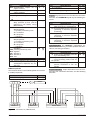
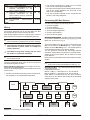
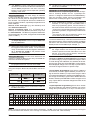
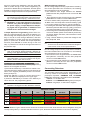
TABLE OF CONTENTS
INTRODUCTION
5
About the System
General Features
The System and Accessories
Technical Specifications
Accessory Items
KYO320 features Table
5
6
6
7
8
8
IDENTIFICATION OF PARTS
9
About the Control panel
9
PREMIUM and CLASSIKA Keypads
11
Readers and Digital Keys
13
M-IN/OUT Programmable Input/Output Expander14
INSTALLING
15
Mounting the Main Unit
15
Connecting Keypads
15
Connecting Readers
16
M-IN/OUT Programmable Input/Output Expander16
Terminals
17
Main Unit
17
BPI Peripherals
18
Wiring
19
Connecting BPI Bus Devices
19
BPI bus Wiring Limitations
21
Connecting Detectors
21
Connecting Motion Detectors
22
Glass Break Detectors
23
Connecting Roller-Blind and Vibration Detectors 24
Connecting Fire Detectors
24
Connecting Alarm Signalling Devices
25
Supervised Outputs
26
Connecting Tamper Terminals
26
Connecting the Telephone Line
27
Connecting a Power Supply
27
Connecting the Mains
28
Note about Switching Power Supply
28
Auto-configuration
29
RAM Battery (see page 11)
29
Thermal Probe
30
PROGRAMMING FROM THE PC
31
Configuration (Enrolling Devices)
Keypads Page
LED Keypads
Input Expanders
Output Expanders
Readers
31
32
32
33
33
33
KYO 320
Power station
Accessories
Hardwired Zones
Type
Command
Attributes
Balance Type
Threshold
Inactivity
Cycles
Partitions
Sensitivity
Voice Messages
AND Mode Zones
Wireless Receivers
Replacing Wireless Devices
Enrolling Wireless Devices
Unenrolling Wireless Devices
Outputs
Type
Polarity
Attributes
Associated Timer
Times
Oscillation
Cycles
Events
Partitions
Telephone
Answer
Dialling
Answering Machine
Dialler
Dialler book
Send Message after ...
Messages
Options
Actions
Digital Communicator
Voice Messages
Compound Messages
Teleservice
Enable Test Event
Installer Maintenance
Central Station Maintenance
Log – Events setup
Events-Actions
Telephone action priority
Colours
Events Details
Clear
Find
34
35
36
37
37
38
39
39
40
40
41
41
41
42
42
43
43
43
43
44
44
45
45
45
45
46
46
46
47
48
48
48
49
49
49
50
50
50
51
53
54
54
55
55
56
56
56
57
57
57
58
58
3
Event Description
Scheduler - Arming
Type Description
Models
Options
Examples
Scheduler - Timers
Type Description
Models
Options
Keypad Codes - User
Enable on Partitions
Associated Timer
User menu access
Father PIN
New PIN
Code Type
Enable on LCD Keypad
Enable on LED Keypad
Programming
Codes - Installers
Lost Installer Codes
Codes - Code Types
User Codes
Installer Codes
Digital keys
Allowed Operations
Attributes
Enable on Key Reader
KeyFobs
Clock
On-site downloading
Firmware Upgrade
Remote Downloading
Check Panel
4
58
72
72
72
73
73
74
75
75
75
77
78
78
78
79
79
79
79
79
79
79
80
80
80
82
82
83
83
83
83
84
85
85
85
87
KYO 320
INTRODUCTION
About the System
The full-featured KYO320 security systems have been
especially designed to satisfy all security needs, from
residential to advanced industrial applications.
The objective of the KYO320 is to make end-user operation simple and help the Installer improve efficiency.
This is achieved by reduced complexity software and
firmware, and remote programming and diagnostic facilities.
This system provides impressive application flexibility
and many interesting features such as monitoring facilities and telephone access (refer to “Telephone functions”).
Voice Board The K3/VOX2 Voice Board (accessory
item) manages 64 recordable Voice messages and 32
telephone numbers for the Answerphone, Dialler,
Memo and Ambient-sound recording facilities.
The answering device can function even if the K3/VOX2
Voice Board is absent, but in this case there aren't voice
messages.
Voice communications to and from the Control panel allow operations such as: Listen-in; Talk/Listen-in (2Way
Audio); Input status enquiry (with Voice answer); Remote control of appliances (Turn ON/OFF); Arm/Disarm
Partitions; Alarm Reset and Inhibit Calls.
Access to all the “over-the-phone” features requires a
Telephone Access Code — which can be disabled immediately after use.
KYO 320 has 8 Input zones expandable to 344, and 6
Outputs expandable to 118.
Scheduler The Scheduler can be setup to Arm/Disarm
Partitions automatically (on a daily or weekly basis),
and to control 64 daily timer events for KYO320.
Partitions KYO320 manages 32 independent Partitions — all with Stay/Away control. Each Partition
(group of zones) can be programmed with its own Entry/Exit and Auto-Arm/Disarm Times, etc., and can be
controlled by digital Keys/Cards, Codes and/or Input
zones.
Wireless Devices the VRX32-433 and VRX32-868 receivers (optional) may be used to "connect" up to 32+32
radio sensors and up to 16+16 radio keys to this control
unit.
The VectorRX-8 receiver (optional) may be used to
"connect" up to 8+8 radio sensors and up to 8+8 radio
keys.
Events and Actions KYO320 manages over 3000
events . The factory default settings have been purpose
programmed to require few or no changes for standard
applications. However, the programming flexibility of
the Events and Actions (Output, Digital communicator
and Voice Dialler Actions) will allow you to fully customize the system.
Programming This system can be programmed from
the Keypad, or via the KYO320 Software Application
and a computer. The Software Application (runs under
Windows) provides real-time supervisory facilities (via
connection to an RS232 Interface or Teleservice), and
will allow you to make the fullest use of all the system
features.
Telephone Functions The Telephone Communicator
manages 50 telephone number. Up to 8 telephone
numbers can be assigned to the Digital Communicator.
Each Communicator number can have its own Customer Code and Reporting format (usually assigned by
the Central station).
The Bentel Security Suite Software and B-Mod2 Modem (accessory items) reduce on-site time to a minimum by allowing you to provide Teleservice (on-line
Customer enquiry and assistance facilities).
The Teleservice function can also be used for uploading, downloading and diagnosis. Up to 4 telephone
numbers can be assigned to this function.
KYO 320
INTRODUCTION
5
General Features
The KYO320 Control panel
r Up to 344 Alarm zones: 8 zones on the Main Board;
192 on 32 M-IN/OUT Expanders programmed as Inputs (6 zones each) ; 64 on 32 PREMIUM Keypads
(2 zones per keypad); 16 on 16 ALISON32LP LED
Keypads (1 zone per keypad) and 64 Wireless zones
r Up to 118 Outputs: 6 Outputs on the Main Board (3
Relays and 3 Open-Collectors); 96 on 16 M-IN/OUT
Expanders programmed as Outputs (6 zones each)
and 16 on ALISON32LP LED Keypads
r Up to 32 backlit LCD Keypads (PREMIUM,
CLASSIKA) for system control
r Up to 32 Digital Key/Card Readers
r 195 User Codes with programmable ‘View’ option,
priority and functions
r 10000 Event Log with date and time details
r Up to 8 power stations
r 4 wire Bus (protected against short-circuit) for peripherals
r Dual branch bus for protection against tamper
r Programmable Balance, Operating mode and Alarm
type — for all zones
r Input zones can be programmed to send specific
commands to the Control panel
r Outputs can be programmed as bistable or cyclic
with programmable cycle times and standby status
r 32 programmable partitions — each with own zones,
keypads, readers, outputs and times
r 195 User Codes with programmable priority and
functions
r 500 programmable Digital Keys/Cards
r 16 character labels (ID) for the partitions, zones,
keypads, readers, codes, keys/cards, etc. — the assigned label will be shown on the keypad display during the user operations
r 10000 Event Log — provides details of the operation
type, time and user
r RS232 Interface for system programming and monitoring
r Software (runs under Windows) for Control panel
Programming, Teleservice and Monitoring
Telephone Facilities
r Pulse and Touch-tone (DTMF) dialling
r 50 Telephone numbers for Telemonitoring,
Teleservice and Voice Calls
r Integrated Digital Communicator: supports Pulse,
DTMF and FSK Reporting formats
r 6 Instant Alarm calls from each Keypad
r Programmable Test call
r Double Call
r Line sharing with other Telephone devices
r 1200 baud FSK integrated Modem for Teleservice
management
Telephone facilities with K3/VOX2 optional Voice Board
r Dialler function: sends recordable voice messages
to up to 32 Telephone numbers
r Remote Inquiry with Voice answer (requires Access
Code)
r Remote control of Outputs, Arm/Disarm operations,
Alarm Reset (requires Access Code)
6
r Remote Listen-in and multipoint Telephone communication (Talk/Listen-in)
r Answerphone function
Scheduler function
r Daily, Weekly and Monthly scheduling
r Holiday and Daylight Saving (BST) changeover
management
r Overtime and Arming delay management
r 4 Arm and 4 Disarm operations per day per Partition
r 64 independent daily Timer events for KYO320.
Event print-out using optional K3/PRT2 Board
r Prints Events on parallel printer
r Real-time and/or Event Log printout from specified
date to last Event
r Event filter
The System and Accessories
The Control panel The Control panel is the core of the
system. It has 8-zones (KYO320 expands to 344); 6 Outputs (KYO320 expands to 118;) and a 3A Switching Power
Supply (5A accessory item).
M-IN/OUT The M-IN/OUT is an Input/Output Expander
which allows the number of zones and outputs of the
Control panel to be increased. It can be programmed to
function as: 6-zone Input Expander; Output Expander
with 6 Outputs; Input/Output Expander with 4 zones
and 2 Outputs; Input/Output Expander with 2 zones and
4 Outputs. In this manual the term Input Expander will
be used to refer to the M-IN/OUT programmed to function as an Input Expander or Input/Output Expander;
the term Output Expander will be used to refer to the
M-IN/OUT programmed to function as an Output Expander or Input/Output Expander. The Control panel
supports up to 32 Input Expanders and up to 16 Output
Expanders.
M-IN/OUT programmed as an Input/Output Ex+ An
pander contributes both to the number of Input Expanders and to the number of Output Expanders
connected to the Control panel.
The zones of the M-IN/OUT can operate in normal
mode, for connecting movement detectors, or as an interface for connecting contacts for Roller blinds. The
M-IN/OUT’s Outputs are of open-collector type, i.e.
floating or connected to Earth. The M-IN/OUT is connected to the 4-wire bus (on the Control panel), through
which it communicates with the Control panel itself and
receives a feed for its own operation. The M-IN/OUT is
provided with a plastic container for flush or surface
mounting and equipped with Anti-tamper and
Anti-snatch devices (excludable).
Control Devices The KYO320 accepts up to 32
ECLIPSE and/or PROXI Digital Key/Card Readers, and/or
up to 32 PREMIUM and/or CLASSIKA LCD Keypads.
The operating principles of the ECLIPSE and PROXI
Readers are the same, except:
KYO 320
Ø ECLIPSE Readers accept SAT Keys only and are for indoor use (unless mounted inside weatherproof boxes);
Ø PROXI Readers have weather strips, and can be installed indoors or outdoors (IP34 Protection Class)
and accept SAT Keys and PROXI-cards.
Ø ECLIPSE and PROXI Systems operate without contacts,
therefore, are highly resistant to oxidization and wear.
Ø The operating principles of the PREMIUM and
CLASSIKA Keypads are the same, with a large display (2 lines and 16 columns; only PREMIUM
Keypads has on-board a PROXI;
control keypads of KYO320 control panel are
+ The
the CLASSIKA and PREMIUM LCD keypads. All
previous Bentel LCD keypads
(Alison-S,
Alison-DVP, Mia-S, Mia-D) and the LED keypad
Alison32LP continue to be supported by the
KYO320 Control panel. For a correct functionality
of PREMIUM and CLASSIKA LCD keypad, the
KYO 320 control panel must have a firmware rev.
2.06 or higher (see page 85, 86).
K3/VOX2 The K3/VOX2 Voice board (accessory item)
can be used for Voice Messages, and Telephone Access.
K3/PRT2 The K3/PRT2 Printer Interface (accessory item)
can be used for real-time and/or Event Log printout.
Power station The Power station has been especially
designed for Security system applications. The tamper
protected box (protected against delinquency and
forced removal) can house a backup battery for power
supply during black-out. This control panel supports up
to eight BXM12-B/30 3A Power Stations and/or
BXM12-B/50 5A Power stations.
Management Software The management software
(runs under Windows) provides full Programming, Customer
Database and real-time Supervisory functions, and will allow
you to make the fullest use of all the system features.
The B-Mod2 Modem The B-Mod2 Modem will allow
you to Upload/Download from/to the remote system and
carry out Teleservice operations (remote diagnosis and
maintenance). The B-Mod2 will allow you to Upload/Download from/to the remote system and carry out
Teleservice and Telemonitoring (send/receive real-time
transmissions).
KYO 320
Technical Specifications
The following table contains the technical Specifications of the KYO320.
Voltage
230 V~ ±10% 50/60 Hz
Maximum current
0.9 A
draw
Insulation Class
Class I
Power
13.8 V_ ±1% 3 A (5A
Supply/Battery
accessory item)
Charger
Maximum Current
available for
1.8 A (3.8 A accessory item )
Peripherals
12 V - 7 Ah or 12 V - 17 Ah
YUASA
Battery
NP 7-12 FR or NP 17-12 FR or
(Brand and Type)
similar
Case Flame Class UL94-V2 or
higher
Random Digital
Key/Card Codes
4.295.000.000
Operating
Temperature
Dimensions
(W x H x D)
Weight
(without battery)
5 - 40 °C
339 x 488 x 108 mm
5.55 Kg
The following chart shows the current draw (I (mA) column) and size of the accessory components.
Component
KYO320 Main Board
PREMIUM Keypad with
PROXI enabled
with PROXI disabled
CLASSIKA Keypad
ECLIPSE Reader
PROXI Proximity Reader
ALISON32LP LED Keypad
M-IN/OUT Programmable
Input/Output Expander
Omnia4R 4 Relay Module
K3/VOX2 + VOX-REM
Voice Board + Microphone
-Loudspeaker Board
K3/PRT2 Printer Interface
BXM12-B/30 Power Station
BXM12-B/50 Power Station
INTRODUCTION
I
(mA)
250
Size
(WxHxD mm)
—
60
50
50
30
134x114x28,5
144,5x116x27,5
—
30
70
78 x 108 x 22
142 x 115 x 35
20
108 x 101 x 34
120
20
—
40
10
10
—
—
—
7
n Accessory Items
The following chart shows the Control panel accessory
items, and certifications.
PREMIUM
CLASSIKA
ALISON32LP
M-IN/OUT
K3/VOX2
K3/PRT2
VOX-REM
MINI-BOX
PROXI
PROXI-CARD
ECLIPSE3
SAT
OMNIA/4R
BXM12-B/30
BXM12-B/50
BAQ60T12
B-MOD2
CVSER/9F9F
ADSER/9M25F
SECURITY SUITE
VECTOR/RX
VRX32-868
VRX32-433
VECTOR/RX-8
KMD20 - 20NP
KMC10-20-30
KRC10
KRP10
KSD20
AMD20
AMC30
ARC20
ASD20
ASNC
ASNC-MINI
KST
PREMIUM LCD, CLASSIKA LCD
LCD keypads supported
Backlit LCD Keypad+PROXI
Backlit LCD Keypad
(MIA-D, ALISON-DV,
ALISON-S with firmware 1.30
or higher ONLY)
ALISON-DVP,ALISON(B029)
32 LED Keypad (1 Input and 1 Output)
RX Wireless Receiver
yes
Programmable Input/Output
Expander
Voice Board
Printer Interface
Microphone + Loudspeaker for
Listen-in function
Microphone + Loudspeaker box
Proximity Reader
Proximity Card
Flush-mounted insertion device
Digital Key, Contactless—for
Key and Proximity Readers
4-Relay module for the M-IN/OUT
Expanders programmed as Outputs
3 A Power Station
5 A Power Station
Power supply 13,8 V - 5 A
Teleservice and telesurveillance
Modem
Serial cable for computer link
25 pin adapter for serial ports
Management Software
Wireless Receiver
868 MHz Wireless Receiver
433 MHz Wireless Receiver
433 MHz Wireless Receiver
868 MHz Wireless PIR Detector
868 MHz Wireless Magnetic
Contact
868 MHz Wireless Digital Key
868 MHz Wireless Digital Key
868 MHz Wireless Smoke Detector
433 MHz Wireless PIR Detector
433 MHz Wireless Magnetic
Contact
433 MHz Wireless Digital Key
433 MHz Wireless Smoke Detector
Seize microswitch for Keypads
Seize microswitch for Proximity
Readers
Thermal Probe
Zones on-board
8
Zones on Keypad
64+16
Zones on Exp-In
192
Wireless Zone
32+32
Total Zones
344
Supervised Relay Outputs
3
On-board Relay Outputs
3
Open-drain Outputs on-board 3
Open-drain Outputs on- Exp-out 96
Total Outputs
102+16
Partitions
32
Total User Codes
195
DTMF User Codes
64 (su195)
Installer Codes
5
User Code Types
16
Installer Code Types
3
Keys/Cards
500
Keyfobs (Wireless Keys)
16+16
Events in Log
10000
Total Events-Actions
3418
Customizable Events
32
Timers
64
Voice Messages
64
K3/VOX2 Voice Board
yes
K3/PRT2 Printer Board
yes
Numbers in Phonebook
50
Telephone Dialler Actions
50
Digital Communicator Actions 100
n KYO320 features Table
Readers
32
Input/Output Expander
32 Input Expanders
16 Output Expanders
Power Station
8
LCD Keypads
32
LED Keypads
16
8
KYO 320
IDENTIFICATION OF PARTS
Please read this section carefully to get an overall view
of the main components of the system and LEDs.
The numbers in boldface (used in this text) refer to the
descriptions in the tables and figures in this section.
The components are generally numbered in clockwise
order. The outlined numbers refer to the common hardware components of the BPI devices and are described
once only — when first encountered.
n About the Control panel
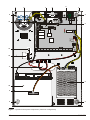
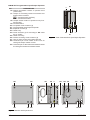
Figure 1 shows the maximum configuration of the
KYO320, therefore, some of the components may not
be present on this system.
No.
DESCRIPTION
1 Frontplate screws (2)
2 Loudspeaker (supplied with K3/VOX2 Voice
Board)
3 Tamper microswitch
4 Main Board (see fig. 2)
5 Backplate anchor screw locations (4x Ø 5 mm)
6 K3/VOX2 Voice board (accessory item)
7 K3/PRT2 Printer Interface (accessory item)
8 Switching Power Supply (see fig. 3)
9 Thermal probe (accessory item)
10 Housing for 12V – 17Ah max. Battery (not supplied)
11 Cable entry
12 Seize microswitch
13 Seize microswitch bracket
14 Loudspeaker Connector
15 Future use connector
16 Terminal board for Telephone line connection
17 K3/VOX2 Voice Board connector
19 K3/PRT2 Printer Interface connector
20 Flash Memory chip
21 Memory Jumper (M) — if inserted, it will allow
the system to save the programmed parameters
during black-out:
o// = parameters will be deleted (at default);
//o = parameters will be saved
22 Switching power Supply connector (connected)
23 RAM chip battery holder
24 Serial Port RS232
25 MICRO LED(RUN):
OFF or ON = Microprocessor blocked
Flickering = Microprocessor OK
KYO 320
No.
DESCRIPTION
26 BPI LED:
OFF = BPI Bus OK
ON = BPI Bus Trouble
27 MAINS LED (POW):
ON = Control panel powered by Mains (230 V);
OFF = Mains Failure—the Control panel will be
powered by the backup Battery during blackout
28 RESET LED (RES):
OFF = Microprocessor OK
ON = Microprocessor resetting
29 Self-recover termic Fuse
30 Connector for backup Battery (The control panel
shuthdown the backup Battery due to voltage
drop (Safety threshold 9,6V), because this condition can damage the battery)
32 Terminal board (KEY BUS) for VectorRX,
VRX32-433 and VectorRX-8 Receiver connection
33 Terminal board (BPI bus) for BPI device connections
34 Self-recover termic Fuse
35 Self-recover termic Fuse
36 Self-recover termic Fuse
37 Self-recover termic Fuse
38 Connector for PREMIUM LCD, or CLASSIKA Keypad
39 Microprocessor
40 Terminal board for Tamper Line and Input device connections (Detectors, etc.)
41 Seize connector (connected)
42 Self-recover termic Fuse
43 Self-recover termic Fuse
44 Self-recover termic Fuse
45 Self-recover termic Fuse
46 Self-recover termic Fuse
47 RAM chip
49 Terminal board for Output device connections
(Sirens, etc.)
50 STOP ALARM Jumper: can be used to disable
Outputs no. 1, 2 and 3 (terminals +N1, +A1,
C1-NC1-NA1, +N2, +A2, C2-NC2-NA2, +N3,
+A3, C3-NC3-NA3):
//o = Output Enabled (at default)
o// = Output Disabled
51 Tamper microswitch connector (connected)
53 Stranded wires: connect the Switching Power
Supply to the Main board (connected)
54 Fine Adjustment Trimmer
55 Auxiliary power terminals (13.8 V)
56 Mains terminals
(230V / 50 Hz)
57 Switching Power Supply screw
IDENTIFICATION OF PARTS
9
1
2
7
4
3
1
5
5
STOP ALARM
AUX
COM
14
LI
B046
MEM
68
67
66
LE
65 64
+
OPEN
VOX
+N1 +A1 C1 NC1 NA1
5
4
3
2
1
6
+N2 +A2 C2 Nc2 NA2
11 10
9
8
7
6
PRN
RUN
BPI
POW
59 60 61 62 63
RED BLK YEL GRN YEL2
+B4 +B5
OC3 OC2 OC1
24 23 22 21 20 19 18
+N3 +A3 C3 NC3 NA3
17 16 15 14 13
12
RES
SEIZE
13
27 28
+F
29
L2
30
+F
31
32 33
L3 +F
34
35
L4
36
+F
37
38
L5
39
+F
40
41
L6
42
+F
43
44
L7
45
+F
46
47
L8
48
+F
49
50
AS
51
+
BPI1
C
R
GND
26
L1
+V
25
54
-
55
+
BPI2
C
R
58
-
12
11
B+
L
B–
GND +V
FG
F 6.3A/25ØV
AC/N
AC/L
F 3.15A/25ØV
8
10
9
5
5
Figure 1 Kyo320 Control panel components (maximum configuration)
10
KYO 320
57
58
AC/L
F 6.3A/25ØV
FG
AC/N
56
59
F 3.15A/25ØV
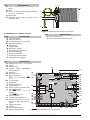
No.
DESCRIPTION
58 Fuse — protects against overload (F 3.15A
250V)
59 Rivet
60 Fuse — protects against Battery polarity inversion (F 6,3A 250V)
61 Mains LED
62 Switching Power Supply connector to connect the probe 9
B+
L
B–
GND
GND +V
+V
55
54
53
62 57a 61 60
Figure 3 Switching Power Supply components
n PREMIUM and CLASSIKA Keypads
No.
DESCRIPTION
81 Board Supports (2)
82 Seize microswitch bracket location
ICON
I
a
G
M
S
T
b
f
s
t
r
DESCRIPTION
Partitions Armed
Alarms in Memory
Trouble and Zone in Test status
Message in Memory
Open Panel
Tamper Alarm
BPI Device Tamper
False Key/Card at Reader
BPI Device Missing
Teleservice enabled
Answering device enabled
i Telephone line engaged
No.
63
64
65
66
67
68
69
DESCRIPTION
Backlit LCD, 2 rows x 16 columns
Buzzer
Keypad Clips
15
Tubular bubble (PREMIUM
Keypad ONLY)
Down flip
50
Microprocessor
51
BPI Level Jumper:
+
oo = 12 V (at default); // 49
=5V
Terminal label
Cable entry
Board Supports (4)
Terminal board
20
Strip to connect terminal board
BPI Level Jumper :
47
12V //o 5V = 12 V (at
default)
46
12V o// 5V = 5 V
45
Screw locations
44
Tamper microswitches (2)
43
Screw locations (2) for mount- 42
ing to mod. 503 outlet boxes or
41
similar
41
Keypad backplate
PCB Clip
38
39
Slot to open keypads
Fig
ure
2
Kyo320
Main
board
com
po
nents
Address DIP Switches
STOP ALARM
21
LI
B046
MEM
68
67
66
LE
65 64
16
23
17
19
AUX
COM
OPEN
25
26
+N2 +A2 C2 Nc2 NA2
11 10
9
8
7
6
PRN
RUN
22
27
28
34
30
35
24
BPI
POW
12
RES
59 60 61 62 63
RED BLK YEL GRN YEL2
74
75
76
+B4 +B5
OC3 OC2 OC1
24 23 22 21 20 19 18
+N3 +A3 C3 NC3 NA3
17 16 15 14 13
69a
70
71
72
73a
73
+N1 +A1 C1 NC1 NA1
5
4
3
2
1
VOX
77
78
79
80
KYO 320
25
26
L1
27 28
+F
29
L2
30
+F
31
32 33
L3 +F
34
35
L4
36
+F
37
38
L5
39
+F
40
41
L6
42
+F
PROGRAMMING FROM THE PC
43
44
L7
45
+F
46
47
L8
48
+F
YEL
SEIZE
32
49
50
AS
51
+
BPI1
C
R
54
-
37 36
55
+
BPI2
C
R
33
58
-
29
11
63
77
79
79
67
78
70
78
75
73a
74
82
74
69a
72
+ C R -
76
71
76
71
74
74
65
68
65
64
71
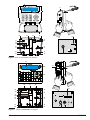
Figure 4 Parts of CLASSIKA LCD Keypad.
63
89a
77
79
89
78
75
78
79
73a
74
74
82
72
69a
76
71
66
+ C R - +F T1 T2 T3
76
71
74
74
65
65
71
Figure 5
12
70
71
68
64
Parts of PREMIUM LCD keypad
KYO 320
n Readers and Digital Keys
LED
DESCRIPTION
red Status of Reader Partitions
I OFF = ALL the Reader Partitions are DISARMED;
ON = AT LEAST ONE of the Reader Partitions is
ARMED.
Slow blinking = AT LEAST ONE of the Reader
Partitions has AT LEAST ONE Alarm or Tamper
memory, and all Partitions are DISARMED.
Fast blinking = AT LEAST ONE of the
Reader Partitions has AT LEAST ONE Alarm
or Tamper memory, and AT LEAST ONE Partition is ARMED.
amber A Mode Arming:
A OFF = the status of the Keypad Partitions DOES
NOT MATCH the A Mode Arming configuration;
ON = the status of the Keypad Partitions
MATCHES the A Mode Arming configuration.
green B Mode Arming:
B OFF = the status of the Keypad Partitions DOES
NOT MATCH the B Mode Arming configuration;
ON = the status of the Keypad Partitions
MATCHES the B Mode Arming configuration.
No.
DESCRIPTION
83 Backplate anchor screw locations (2)
84 Microprocessor
85 Connection wires:
red = +; white = C; blue = R; black = –
86 Seize microswitch connector
87 Seize microswitch (accessory item)
88 Seize microswitch location
89 Sensitive field
89a PROXI reader LEDs
90 Cover screw
91 Key slot
92 Command button
93 Snap catch
94 Cable entry
95 Tamper microswitch
descriptions are not valid when a
+ These
key is present at the Reader.
ALL THREE LEDs blink, the system HAS NOT
+ IfRECOGNIZED
the Key/Card (false Key/Card).
If ONE LED blinks, one or more of the Partition
zones is already in Alarm status.
83
73 85 8687 88
80 84
89
b)
a)
c)
1 2 3 4 5
BPI
5V
95
69
ON
LB092-P
BPI LEVEL
5V
12V
R
SNATCH
C
– +
C
94
83
93
NO
NC
90
d)
1 2 3 4 5
ON
80
73
e)
f)
72
69
92
91
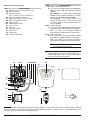
Figure 6 Readers and Digital Key: PROXI Proximity Reader — internal view (a) external view (b); PROXI-CARD for
Proximity Reader (c); ECLIPSE Contactless Reader with 5 DIP Switches , Magic Version — side view (d) front view
(e); SAT Key for ECLIPSE and PROXI Readers (f)
KYO 320
PROGRAMMING FROM THE PC
13
n M-IN/OUT Programmable Input/Output Expander
96
72
100
100
100
108 100
101
+
C
R
+F
T1
T2
B061
+F
T4
+F
ON
T5
T6
1 2 3 4 5 6 7 8
T3
TAMP.DIS.
No.
DESCRIPTION
96 Snatch microswitch contact on printed circuit
(solder side)
97 Jumper for excluding snatch microswitch and
tamper switch contacts:
oo = Contacts Active (default);
// = Contacts Excluded
98 Tamper switch contact on printed circuit (component side)
99 Terminal Board
100 Frontplate screw locations (4)
101 Programmable Input/Output Expander
102 Expander screws (2)
103 Cable entry
104 Screw locations (2) for mounting to 503 outlet
box or similar
105 Cable duct entry
106 Surface mounting screw locations (2)
107 Hole for fixing snatch microswitch bracket
108 Conductive pin on the inside of the cover for
closing the tamper switch contact
109 Conductive pin on the snatch microswitch bracket
for closing the snatch microswitch contact
98
99
80
97
Figure 7 Parts of the M-IN/OUT Input/Output Expander
102 96
102 98
103
104 105
106
106
104
109 107
Figure 8 Module and Expander box
14
KYO 320
INSTALLING
Mounting the Main Unit
Please read this section carefully to get an overall view of
the steps involved in installing the KYO320 Main Unit. The
KYO320 Main Unit should be located in a safe, dry place
that is far from sources of interference.
n Connecting Keypads
Keypads should be located in places where full control
of the system is required: PREMIUM LCD, CLASSIKA
LCD, Keypads can be surface mounted on Mod. 503,
outlet boxes or similar.
PREMIUM keypad can be mounted on a suitable box
(accessory item) see Premium keypad manual.
Once you have selected a suitable place, create a layout of all the system peripherals (Keypads, Readers,
Detectors, etc.) and ensure that you will be able to connect the Main power, peripherals, and if necessary, the
telephone line to the KYO320 without difficulty. Allow at
least 5 cm of free space around the Main Unit for air
flow.
pads should be mounted at eye level for easy
+ Key
viewing.
!
CAUTION - Before removing the CLASSIKA keypad
cover, open the down flip (67) COMPLETELY.
The Main Unit must be at least 2 metres from
GSM and radio relay systems.
Work carefully through the following steps (see Figure
on page 10).
1. Remove the screws 1 and frontplate.
2. Install add-on modules and boards (K3/VOX2,
etc.), refer to the respective paragraphs for instructions.
Work carefully through the following steps (see Figure 5
on page 12) and/or respective manuals.
1. If the Keypads are closed, insert a little flat screwdriver in the slot 79 (see Figure 4) and rotate in the
direction of the arrow. Open the keypad slightly
(see the position of the hands, Fig 4, 5); one part
will be composed of the cover with the mounted
PCB and on the other hand, the backplate with the
terminal board.
3. Drill the holes for the cabinet and Seize microswitch
bracket anchor screws (5 and 13 respectively).
2. If you are surface mounting the Keypad: drill the
holes for the backplate anchor screws 76 (74), and
if required, for the seize microswitch bracket screw
82.
4. Pull the connection wires through the wire entry 11
then attach the cabinet and Seize microswitch
bracket to the wall.
3. If you are surface mounting the Keypad on a suitable box: drill the holes for the seize microswitch
bracket screw 82.
NOT over tighten the screws as this may dam+ DO
age the Seize microswitch bracket.
4. Fix the keypad base in place.
5. Run the connection cables through opening 70.
5. Complete the connections — DO NOT connect the
MAINS until all other wiring has been completed.
6. Connect the Mains Power (refer to “Connecting the
Mains Power”).
7. Program
the
system
(refer
to
the
“PROGRAMMING”
section
and
the
“PROGRAMMING FROM KEYPAD” Guide for instructions).
KYO 320
6. Connect the wires to the terminal board 72.
7.
8. Replace the keypad cover, before using the hooks 65
then block it with a slight pressure till the snaps 78
are clicked.
INSTALLING
15
n Connecting Readers
Readers can be located in places where limited control
of the system is required (Arming, A and B Mode
Arming, Disarming and Stop Alarm operations).
This system supports Digital Key and Proximity Card
Readers.
Key Readers Key Readers can be flush mounted to
most standard domestic light-switch/plug-socket outlet
boxes (refer to “Accessory items” in the
“INTRODUCTION” for the available models).
+ Digital Key Readers must be at least 10 cm apart.
To install Key Readers, work carefully through the following steps (see Figure on page 13).
1. Assign the Reader Address, then set the BPI Level
and complete the connections on the terminal
board (refer to “Connecting BPI Peripherals” for instructions).
2. Fit the Reader in its placement (use the standard
procedure for fitting domestic light-switches and
plug sockets).
Proximity Readers Proximity Readers can be surface
mounted, or mounted to Mod. 503 outlet boxes or similar. Proximity Readers are fitted with weather strips
(Protection Class IP34), therefore, are suitable for outdoor use.
+ Proximity Readers must be at least 50 cm apart.
To install Proximity Readers, work carefully through the
following steps (see Figure on page 13).
3. Remove the screw 90 (if fitted), then using a screwdriver or similar tool push down on the catch 93 to
release the frontplate.
4. Drill the holes for the backplate and Seize
microswitch bracket anchor screws (83 and 88 respectively).
5. If you are fitting a Seize microswitch (Order Code:
ASNC-MINI), push it firmly into its location (87 in
Fig. 6) then connect it to the connector 86. Ensure
that the Seize microswitch lever is held firmly in position by the bracket tooth.
6. Secure the Reader and Seize microswitch bracket
to the wall.
7. Assign the Reader Address, set the BPI Level and
complete the connections on the terminal board
(refer to “Connecting BPI Peripherals” for instructions).
8. Reattach the frontplate.
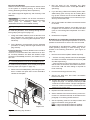
n M-IN/OUT Programmable Input/Output Expander
Fix the M-IN/OUT Input/Output Expander as close as
possible to the devices to which it is to be connected.
The Expander is provided with a plastic container for
visible (surface) mounting or flush mounting, as described in the following instructions (see Figure on
page 14).
1. Remove the knockout (103 or 105 as required).
2. – Surface mounting: drill the holes for the backplate
and Seize microswitch bracket anchor screws (106
and 107 respectively).
– Flush mounting to Mod. 503 outlet box or similar:
drill the hole for the Seize microswitch bracket anchor screw 104. No other drilling is required for
Flush mounting.
3. Pull the wires through the wire entry.
4. Secure the back box and Seize microswitch
bracket to the wall.
sition the snatch microswitch bracket as shown
+ Po
in figure 8 on page 14, with the conductive pin 109
on the back of the container. The pin is designed to
close the snatch microswitch contact 96 on the
printed circuit (solder side).
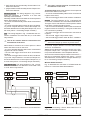
COM
5. Replace the PCB inside the box.
NC
NO
6. Set the Address of the device and carry out the connections on terminal board 72, as described in the
paragraph "Connecting the BPI devices".
to the
Tamper line
7. Set the operating mode for the tamper switch and
snatch microswitch using jumper 97:
oo = Tamper and Snatch switches enabled ;
// = Tamper and Snatch switches disabled.
Figure 9 Mounting Key Readers
16
KYO 320
8. Set the operating mode using microswitches 6 and
7 on DIP switch 80 as shown in the following table:
Microswitch No.
OPERATING MODE
6
7
OFF
OFF
Input Expander with 6 Inputs
ON
OFF
Input Expander with 4 Inputs +
Output Expander with 2 Outputs (T1 and T2 Outputs; T3,
T4, T5 and T6 Inputs)
OFF
ON
Output Expander with 4 Outputs + Input Expander with 2
Inputs (T1, T2, T3 and T4 Outputs; T5 and T6 Inputs)
ON
ON
Output Expander with 6 Outputs
9. Set the operating mode of the Inputs using
microswitch 8 on DIP switch 80 as shown in the foll
owing table:
Microswitch
No.8
OPERATING MODE FOR
INPUTS
OFF
All Inputs operate in Normal
mode
ON
All inputs operate in Normal
mode and function as interface for Roller blind contact.
Zone will trigger alarm according to programmed sensibility
or if 5 pulses will be noticed, in
the time of two minutes
10. Replace the frontplate.
The Roller-blind attribute can only be reset via
+ hard
ware, through microswitch n.97, and not by
software, through the package Bentel Suit (the
Roller-blind attribute, for the M-IN/OUT expander
zones, is blocked).
+
Be careful about the position of conductive pin 108,
located inside the cover: it must close the Tamper
switch Contact 98 on the PCB (component side).
Terminals
This section describes the Main Unit and BPI device terminals.
The layout of Terminal Description table is as follows:
Ø the Ter. column shows the terminal identifier;
Ø the DESCRIPTION column provides a brief description of each terminal;
Ø the v(V) column shows the terminal voltage (the hyphen “–” indicates that the voltage cannot be specified for the terminal concerned);
Ø the I(A) column shows the maximum current (in Amperes) that can circulate on the terminal (the hyphen
KYO 320
“–” indicates that the current cannot be specified for
the terminal concerned);
Ø the numbers in brackets refer to the following notes.
(1) The total current draw of Main Unit terminals [+A3],
[+N3], [+A2], [+N2], [+A1], [+N1], [+B4], [+B5], [+F],
[+F1], [+] and [RED] must not exceed 3.8A for KYO320.
(2) The current draw of BPI device [+] terminals is:
Ø Keypad = 0.06 A for PREMIUM (with Proxi enabled),
and 0.05 A (with Proxi disabled),
0.05A for CLASSIKA
Ø 0.07A for Alison32LP
Ø Reader = 0.03 A
Ø M-IN/OUT Input/Output Expander = 0.02 A.
values refer to the current draw of the BPI
+ These
devices with no loads.
(3) The sum of the currents absorbed by the terminals
[+F] of an M-IN/OUT Input/Output Expander must not
exceed 0.4 A.
(4) The terminals T of M-IN/OUT Expander can switch
up to 0.1 A. To switch higher currents use the
CNM004R Relays card.
n Main Unit
Ter.
DESCRIPTION
NA3 Programmable Output no. 3
NC3 (changeover switch contacts)
C3
+A3 Programmable Output no.3 (positive), protected by fuse
+N3 Programmable Output no. 3 (intrinsic security), protected by fuse
NA2 Programmable Output no. 2
NC2 (changeover switch contacts)
C2
+A2 Programmable Output no. 2 (positive), protected by fuse
+N2 Programmable Output no. 2 (intrinsic security), protected by fuse
NA1 Programmable Output no. 1
NC1 (changeover switch contacts)
C1
+A1 Programmable Output no. 1 (positive), protected by fuse
+N1 Programmable Output no. 1 (intrinsic security), protected by fuse 46
+B4 Positive power supply to peripherals, protected by fuse (will be
powered by the battery during
Mains failure)
+B5 Positive power supply to peripherals, protected by fuse (will be
powered by the battery during
Mains failure)
M Negative
OC1 Programmable Output no. 4
(Open-Collector)
INSTALLING
v(V) I(A)
–
3
13.8 3(1)
13.8 3(1)
–
3
13.8 3(1)
13.8 3(1)
–
3
13.8 3(1)
13.8 3(1)
13.8 3(1)
3(1)
0
0
–
1
17
Ter.
DESCRIPTION
OC2 Programmable Output no. 5
(Open-Collector)
OC3 Programmable Output no. 6
(Open-Collector)
AS 10 KWBalance Tamper Line
L1 Programmable Input Line
:
L8
+F Power supply to detectors (positive), protected by fuse (will be
powered by the battery during
Mains failure)
BPI1 1° branch of the BPI bus for the
BPI peripherals:
+ = positive protected by fuse
C = Command
R = Response
– = Negative
BPI2 2nd branch of the BPI bus for the
BPI peripherals:
+ = positive protected by fuse
C = Command
R = Response
– = Negative
KEY BUS:
RED positive protected by fuse
BLK negative
YEL Receiver 1
YEL2 Receiver 2
GRN data
- Earth Terminal
LE External telephone line terminals
LI Line-sharing devices terminals (for
Answerphone, telephone, fax, modem, etc.)
v(V) I(A)
0
1
0
1
–
–
–
–
Ter.
DESCRIPTION
C Command
R Response
– Power supply: negative
Keypad Keypad have the common BPI bus connection
terminals, and PREMIUM keypad only the following terminals.
13.8 3(1)
Ter.
DESCRIPTION
v(V) I(A)
+F Power supply to Detectors (posi- 13.8 0.4
tive), protected by resettable fuse
T1 Programmable Input or output Line
–
–
(according to M-in/out expander
functioning)
T2 Programmable Input or output Line
(according to M-in/out expander
functioning)
T3 Programmable Input or output Line
(according to M-in/out expander
functioning)
13.8 3(1)
13.8 3(1)
13.8
0
–
–
Input Expanders The M-IN/OUT Input/Output Expander has the following terminals (besides the terminals for connecting to the BPI).
0.5
(1)
Ter.
DESCRIPTION
v(V) I(A)
+F Power supply (positive) protected 13.8 (3)
by a self-resetting fuse
T1 Input or Output zones depending
–
–
: on the operating mode of the ExT6 pander
M Power supply (negative) for the
0 0,15
devices connected to the Expander
–
–
–
n BPI Peripherals
The terminals shown in the following table are common
to all BPI peripherals.
Ter.
DESCRIPTION
+ Power supply: positive
+
C R
–
+
C R
–
BPI device
v(V) I(A)
–
–
–
–
0
–
Output Expanders Output Expanders have the common BPI bus connection terminals, and the following
terminals.
v(V) I(A)
13.8 (2)
Panel
+
C R
–
BPI device
+
+ C R
C R
BPI IN
BPI OUT
Power station
+
C R
–
BPI device
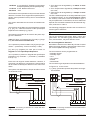
Figure 10 Connection of 4 BPI Devices
18
KYO 320
Ter.
DESCRIPTION
v(V) I(A)
M Power supply (negative) to the pe0
–
ripherals connected to the
Open-Collector Outputs
+F Power supply (positive) to the pe- 13,8 (3)
ripherals connected to the
Open-Collector Output, protected
by resettable fuse
OC1 Programmable
Open-Collector
0 0.15
: Output
OC6
Wiring
The section describes how to wire the Main Unit, BPI
bus peripherals and various security devices.
Each wiring diagram refers to a specific type of device
(BPI bus devices, Detectors and Signalling devices).
shielded cable for all connections, with one
+ Use
end connected to negative and the other floating.
The end of the stranded conductor must not be
! soft
soldered in places where it is subject to
contact pressure.
Mains wiring must comply with the rules
! The
for double or reinforced insulation.
Use an adhesive cable grip to secure the wires to
+ the
terminal boards.
The wiring diagrams show some of the many tailored
solutions this system provides.
About the Wiring Diagrams The locations of the terminals in the wiring diagrams may be different to those
on the board.
Ø The Zone terminals may belong to the Control panel,
the Keypads or the Input/Output Expanders;
Ø The Output terminals may belong to the Control
panel or the Input/Output Expanders;
Ø the Input zone and the Open-Collector Output terminals (in the wiring diagrams) can be found on the
Main Unit or Expanders;
Ø only the terminals required for the connection are
shown in the wiring diagrams.
Connecting BPI Bus Devices
The BPI bus supports the following devices:
Ø up to 32 Keypads
Ø up to 32 Readers
Ø up to 32 Input Expanders
Ø up to 16 Output Expanders
Ø up to 8 Power stations
Ø up to 16 LED Keypads
Electrical Connections The BPI bus devices must be
connected in parallel to terminals [+], [C], [R], [–] on the
Main Unit, as shown in Fig. 10.
The Power Station has two groups of terminals for the
BPI bus connection: the BPI-IN group — for the Power
Station; and the BPI-OUT group — for the BPI devices
connected downstream of the Power Station.
The two groups of terminals are electrically isolated,
therefore, all the cables and devices connected downstream of the Power Station will not load the Control
panel BPI bus.
Refer to the Power Station Instructions leaflet for further
details.
one Power Station can be connected to each
+ Only
shunt of the Control panel BPI bus (see Fig. 11).
Dual Branch Bus The Control panel BPI bus has two
independent branches:
Branch 1 (BPI1) — terminals no. 51, 52, 53 and 54;
Branch 2 (BPI2) — terminals no. 55, 56, 57 and 58.
Each Branch is protected by its own fuse, therefore,
short-circuit on one branch will not impair the operating
capacity of the other.
Panel
BPI
device
Power
station
Power
station
Power
station
BPI
device
BPI
device
BPI
device
BPI
device
BPI
device
BPI
device
Yes
BPI
device
BPI
device
Yes
BPI
device
NO
Power
station
Figure 11 Connecting a Power Station
KYO 320
INSTALLING
19
Outdoor Control panel BPI bus peripherals
+ The
should be connected to one Branch of the BPI bus,
and the Indoor peripherals to the other. In this way,
tamper on one branch will not impair the operating
capacity of the other.
Assigning Addresses You must assign an Address
to each of the BPI bus devices. The assigned Address
will allow the Control panel to distinguish one device
from another. The Peripheral devices are divided into
types: Keypads, Readers, Input/Output Expanders and
Power Stations.
Devices of the same type (e.g. two Readers) must
have different Addresses.
Devices of different types (e.g. a Keypad and a
Reader) are intrinsically different, therefore, may have
the same Address. The BPI bus peripheral Addresses
can be assigned in any order, using the DIP switches 80
(refer to Table 1).
put Expanders programmed to function
+ Inasput/Out
Output Expanders can be assigned ONLY the
first 16 addresses.
fer to the Power Station Instructions leaflet, and
+ Re
the keypads Instructions leaflet, for the Address
setup. Power Stations can be assigned to Addresses
no. 1 through no. 8 ONLY. The position of DIP
switch no. 1 in uninfluential.
Setting the BPI Level The BPI Level determines the
maximum voltage the BPI bus can carry. Some BPI devices have 5V and 12V options.
This Control panel operates at 12V, therefore, all
+ the
peripheral devices must be set at 12 V.
Using the Jumpers 69 and 73, set the BPI Level as follows:
BPI Level
Jumper 69
Jumper 73
5V
// 5 V
12 V o// 5 V
12 V
oo 5 V
12 V //o 5 V
fer to the Power station Instructions leaflet for
+ Re
the BPI Level setup.
No.
1 (0)
2 (1)
3 (2)
4 (3)
5 (4)
BPI level of the Input/Output Expander is 12 V
+ The
and is NOT modifiable.
PREMIUM LCD ASSIGNING ADDRESSES
PREMIUM LCD is a special keypad that also incorporates a Proximity Reader and an Input/output Expander. To assign the addresses to the PREMIUM keypad, the Proximity reader and the Input/output Expander work carefully through the following step:
(PREMIUM-CLASSIKA) – The first time it is
+ NOTE
switched on, the keypad will AUTOMATICALLY
enter its programming phase, and will remain in
that mode until the address has been programmed.
– Every time a keypad which has already been programmed is powered, a keypad tamper alert will be
generated.
–The keypad exits the programming phase one
minute after the last button was pressed
1.Press and hold the keys 1 and OFF for at least 3 seconds
after which it enters in the programming phase: the display
will show in the first line the name of the keypad (PREMIUM) and the current address (for example, 1)
you assign the address using the numbers,
+ When
the 2-digit numbers are stored only if the second
number is pressed in a time of less than 1 sec. after
the first. If you enter a wrong address, wait at least
2 seconds before trying again.
2.Assign an Address to the Keypad Enter the address
you want to assign (1 to 32) or use the arrow keys C and D
to scroll through the addresses: the address will be displayed in the upper right. Press ENTER to confirm the address displayed and go to the next step or press ESC to
cancel the change and return to previous step.
3.Proxi Reader Programming Press ON to enable the
Proxi Reader, and then digit the address you want to assign to the Proxi Reader (1 to 32) or use the Keys C and D
to scroll through addresses, and then press ENTER to confirm and go to next step or, press OFF to disable the Proxi
Reader, and then press ENTER to confirm and go the next
step, or press ESC to cancel the changes and return to the
previous step.
4.Input Expander Programming Press ON to enable
the Input Expander, then digit the address you want to
assign the Input Expander (1 to 32) or use the Keys C
ADDRESS COMBINATIONS
1 2 3 4 5 6 7 8 9 10 11 12 13 14 15 16 17 18 19 20 21 22 23 24 25 26 27 28 29 30 31 32
off off off off off off off off off off off off off off off off ONONONONONONONONONONONONONONONON
off off off off off off off off ONONONONONONONON off off off off off off off off ONONONONONONONON
off off off off ONONONON off off off off ONONONON off off off off ONONONON off off off off ONONONON
off off ONON off off ONON off off ONON off off ONON off off ONON off off ONON off off ONON off off ONON
off ON off ON off ON off ON off ON off ON off ON off ON off ON off ON off ON off ON off ON off ON off ON off ON
Table 1 Expander Module and Power Station Addresses. The No. column shows the DIP switch number (1 through 5
for devices with 5 DIP switches, and 1 through 4 in brackets for devices with 4 DIP switches).
20
KYO 320
n BPI bus Wiring Limitations
Due to Voltage drops and stray capacitance caused by
the Control panel BPI bus connections, the following
wiring limitations must be respected:
Ø the maximum wire length between the Control
panel and the BPI peripheral must not exceed 500
metres;
Ø the overall wire length of each branch of the Control
panel BPI bus must not exceed 1000 metres.
In order to allow the BPI peripherals to operate properly,
11.5V or more must be present across terminals [+] and
[–]. If a lower voltage is present, it can be boosted by:
Ø increasing the wire section that supplies the Control panel
BPI device (the wires that connect [+] and [–] of the Control panel to terminals [+] and [–] of the BPI device);
Ø connecting some of the BPI peripherals downstream
of a Power Station (these devices will be powered by
the Power Station, therefore, will not load the Control
panel BPI bus);
Ø using a Power Station to provide the voltage for the
BPI peripheral load.
and D to scroll through addresses, and then press ENTER to confirm and go to the Zones Programming, or
press OFF to disable the Input Expander, and then press
ENTER to confirm and go the next step, or press ESC to
cancel the changes and return to the previous step.
zones corresponding to terminals L4, L5 and
+ The
L6 of the Keypad Input Expander, although appearing on the application/display, CANNOT be used.
– If the Input Expansion function is
! WARNING
enabled, every time the keypad is connected to
the power supply, an Input Expansion tampering signal will be generated, in addition to the
normal device disconnection messages.
5.Output Expander Programming Press ON to enable the Output Expander, then digit the address you
want to assign the Output Expander (1 to 16) or use the
Keys C and D to scroll through addresses, and then
press ENTER to confirm and exit the Programming
phase, or press OFF to disable the Output Expander,
and then press ENTER to confirm and go to the next
step, or press ESC to cancel the changes and return to
the previous step.
cable length downstream of a Power station
+ The
should not to be included the overall wire length for
each branch of the Control panel BPI bus.
outputs corresponding to terminals OC4, OC5 and
+ The
OC6 of the Keypad Output Expander, although ap-
Due to Voltage drops and stray capacitance caused by
the Power Station BPI bus connections, the following
wiring limitations must be respected:
Ø the maximum wire length between the Power Station (BPIOUT terminals) and the BPI peripheral
must not exceed 500 metres;
Ø the overall wire length between the Power Station
(BPIOUT terminals) and the BPI bus peripherals
must not exceed 1000 metres.
pearing on the application/display, CANNOT be used.
can enable ONE of the two Expander, Input or
+ You
Output Expander. If you do not want to use any Expander, set the value OFF for both.
CLASSIKA LCD ASSIGNING ADDRESSES Once
connected to the Control Panel, insert the programming
address of the keypad as follows:
1) Press and hold the keys 1 and OFF for at least 3 seconds after which the display will show in the first line the
name of the keypad (CLASSIKA) and the current address (example 3).
2)Digit the address (1 to 32) or use the arrow keys C
and D: the address is displayed in the upper right.
3) Press the ENTER key to confirm or the ESC key to
cancel and exit the programming phase .
Connecting Detectors
The KYO320 system has 8 zones, expandable to 344
zones by means of the M-IN/OUT Programmable Input/Output Expander, PREMIUM LCD, CLASSIKA
LCD and/or Alison32LP Keypads and the VectorRX:
8 Zones on the Main Unit
64 Zones on 32 PREMIUM LCD Keypads (2 Zones per
16 Zones Keypad)on 16 Alison32LP Keypads
more informations about Premium and
+ For
Classika LCD keypad see the dedicated manuals.
BALANCE TYPES
R
NO
NC
10 K
10 K ALARM
DOUBLE
GLASS BREAK
¥
STANDBY
ALARM
ALARM
ALARM
TAMPER
TAMPER
10 K
ALARM
STANDBY
STANDBY
STANDBY
ALARM
STANDBY
5K
ALARM
STANDBY
SHORTED
ALARM
STANDBY
ALARM
0
ALARM
STANDBY
SHORTED
ALARM
SHORTED
SHORTED
Table 2 Balance Types: the R column shows the resistance across the Zone terminal and the Negative during the
corresponding status (¥ indicates that the terminal is open; 0 indicates that the terminal is shorted to negative)
KYO 320
INSTALLING
21
192 Zones on 32 M-IN/OUT Expanders programmed
as Input Expanders (6 zones per Expander)
64 Zones on the Wireless Receivers
344 Zones Total
The Receiver zones (wireless zones) are for the wireless
detectors. The Main Unit, Keypad and Input/Output Expander zones (hardwired zones) are for the hardwired
detectors.
This section describes the connection of hardwired detectors.
The terminals of the Main Unit and Keypad are marked
[L1], [L2], etc., while the terminals of the Input/Output
Expanders are marked [T1], [T2] etc.
The following terminals can be used for the power supply to the detectors:
either [+F] and [M] (negative) or [+F1] and [M] (negative), for each zone on the Main Unit.
13.8 V positive is present on Main Unit [+F] and [+F1] terminals — protected by fuses 37 and 36 (F 1.85A).
[+F] and [M] (negative) for each pair of zones on
Keypads and the Input/Output Expanders.
13.8 V positive is present on Keypad and Input/Output
Expanders [+F] terminals — protected by resettable
fuse (0.4 A).
Each zone can support several detectors. However, if
more than one detector is connected, the Control panel
will be unable to identify the detector in the event of an
Alarm.
This system can detect Alarm, Tamper and Short-circuit
on hardwired zones:
+F
T1
Input Expander
+F
L1
Panel
Keypad
The following paragraphs describe the connections of
various types of detectors.
+ The 10 KW resistors are included in the Resistor pack.
The 10 KW resistors have brown, black, orange and
gold bands. The last band (gold) indicates the tolerance, and therefore, may be a different colour.
n Connecting Motion Detectors
Most Motion detectors have Normally-Closed Contacts
(NC in the wiring diagram), and Normally-Closed Tamper Contacts (AS in the wiring diagram).
The zone balance can be programmed as:
– Normally Closed
– Normally Open
– 10 K
– 10 K Alarm
– Double
– Glass Break
The connection type depends on the selected balance.
In Figures 12, 13 and 14 the:
Ø [+] and [–] terminals represent the positive and negative terminals;
+F
T1
Input Expander
+F
L1
Panel
Keypad
tamper line
tamper line
N. C. A. S.
N. C. A. S.
Detector
Figure 12 Connecting a Detector to a zone with Normally Closed balance
22
Ø Zone Alarm will be signalled by an Alarm on zone
no. event;
Ø Zone Tamper will be signalled by a Tamper on zone
no. event;
Ø Short-circuit will be signalled by a Tamper on zone
no. event.
The Zone status depends on several parameters (refer
to “Hardwired Zones” in the “PROGRAMMING FROM
PC” section). This section refers to the Balance type. If
only this parameter is considered, the zone status will
depend on the resistance between its terminal and negative, as shown in Table 2.
Detector
Figure 13 Connecting a Detector to a zone with 10 K or
10 K Alarm only balance
KYO 320
Ø [NC] terminals are the Normally Closed Alarm Contacts of the detector;
Ø [AS] terminals are the Normally Closed Tamper Contacts of the detector.
Normally Closed The wiring diagram in Fig. 12 illustrates the connection of a detector to a zone with
Normally Closed balance.
Normally Closed balance will allow the Control panel to
detect Alarm status on the zone:
– the zone will hold Standby status whilst connected to
negative;
– the zone will trigger Alarm under all other conditions.
To provide Tamper detection: connect the Tamper contact of the detector to the Control panel Tamper Line, or to a
24h zone (refer to “Connecting Tamper Contacts”).
The 10 KW resistor must be connected to the
! last
detector of the zone.
10 K Alarm Only balance will allow the Control panel to
detect Alarm status on the zone:
– the zone will hold Standby status when connected to
negative via a10 KW;
– the zone will trigger Alarm under all other conditions.
10 K The wiring diagram in Fig. 13 illustrates the connection of a detector to a zone with 10 K, or 10 K Alarm
Only balance.
Double The wiring diagram in Fig. 14 illustrates the
connection of a detector to a zone with Double balance.
This type of zone will allow the Control panel to detect
zone Alarm, Tamper and Short-circuit:
– the zone will hold Standby status whilst connected to
negative via a 5 KW resistor (i.e. using two 10 KW resistors connected in parallel);
– the zone will trigger short-circuit when connected to
negative;
– the zone will trigger Tamper when open;
– the zone will trigger Alarm under all other conditions.
The 10 KW resistor must be connected to the
! last
detector of the zone.
Zones with Double balance can detect and signal
+ Alarm
and Tamper by means of just two wires.
10 K balance will allow the Control panel to detect
Alarm and Short-circuit on the zone:
– the zone will hold Standby status when connected to
negative via a10 KW resistor;
– the zone will trigger short-circuit when connected to
negative;
– the zone will trigger Alarm under all other conditions.
To provide Tamper detection: connect the Tamper contact of the detector to the Control panel Tamper Line, or
to a 24h zone (refer to “Connecting Tamper Contacts”).
To provide Tamper detection on zones with Normally
Closed or 10 K balance:
either connect the detector tamper contact to the Control panel Tamper Line — this type of connection does
not provide identification of the tampered detector;
or connect the detector tamper contact to a 24h zone —
this type of connection requires two zones — one for
Alarm detection, and the other for Tamper detection (refer to “Connecting Tamper Contacts”).
10 K Alarm Only The wiring diagram in Fig. 13 illustrates the connection of a detector to a zone with 10 K,
or 10 K Alarm Only balance.
+F
T1
Input Expander
+F
L1
Panel
Keypad
n Glass Break Detectors
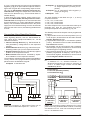
Fig. 15 illustrates the connection of 3 Glass Break detectors to a zone with Glass Break balance.
+F
T1
Input Expander
+F
L1
Panel
glass
break
detector
glass
break
detector
Keypad
glass
break
detector
N. C. A. S.
Detector
Figure 14 Connecting a Detector to a zone with Double balance
KYO 320
Figure 15 Connecting 3 Glass Break Detectors to a
zone with Glass Break balance
INSTALLING
23
! Glass Break zones accept up to 20 detectors.
The continuous lines in the wiring diagram represent
the soft-soldered conductors of the detector, and the
broken lines represent the copper wires.
Connect the Glass Break detectors in parallel between
the zone and negative, and a 10 kW resistor in parallel
to the last detector.
This balance type will allow the Control panel to detect
Alarm, Tamper and Short-circuit on the zone:
– the zone will hold Standby status whilst connected to
negative via a 10 KW resistor;
– the zone will trigger short-circuit when connected to
negative;
– the zone will trigger Tamper when open;
– the zone will trigger Alarm under all other conditions.
n Connecting Roller-Blind and Vibration Detectors
Zones 1 through 8 of KYO320 support Roller-blind and
Vibration detectors. The zones must be programmed
respectively with either the Vibration or Roller-blind attribute (refer to the ‘PROGRAMMING’, Hardwired
zones, in this Manual), and can be set up as Normally
Closed (N.C.) or Balanced 1K ohm (BAL) or Customized (for NC or NO Balanced zones only, and in this
case the Threshold Voltage must be in Standby status).
The wiring diagram in Figure 18 shows a typical connection. The 1 K ohm Balance Resistor must be connected to the last device.
The Roller Blind contacts can also be connected to the
zones of the M-IN/OUT programmed as Input Expander.
To do this, microswitch no. 8 of DIP switch 80 must be
moved to the ON position, as described in the paragraph
"M-IN/OUT Programmable Input/Output Expander".
(a)
Esp.Expander
Uscita
Output
T5
Centrale
Control
Panel
OC1
+F L2
+F L3
Control Panel
+F T2
+F T3
Input Expander
*
Diode
L1 R L L2
2
3
5
Fire
detector
bration detectors CANNOT be connected.
length of cable between Roller-Blind and
! The
M-IN/OUT Expander should NOT be higher than
50 m. The alarm line cut will not be detected, if
you set a number of pulses exceeding 1 for the
zone which is connected to the Roller-Blind.
Test vibration If the system has an LCD Keypad, it will
be possible to Test the sensitivity of the ‘Vibration’
zones.
- For the most reliable results, the
+ IMPORTANT
‘Vibration’ attribute must be disabled on all zones
except the one being tested.
n Connecting Fire Detectors
The KYO320 can also manage Fire detectors that can
operate with a supply voltage of 12 V and are equipped
with alarm repeat outputs (such as BENTEL SECURITY 600 series/ZT100PL Smoke Detector).The Fire
detectors can be connected using the MUB-RV relay
base.Alternatively:
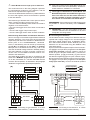
a) Connect the Alarm Repeat outputs of the Fire detectors [R]/[3] to an Input Zone programmed as Fire (Normally Open and 24h), inserting a diode in series as
shown in figure 16a (600 series ONLY). Connect the
detector positive [L1]/[2] to terminal [+F], and connect
the detector negative [L]/[5] to an open-collector output;
b) Connect the Alarm Repeat outputs of the Fire detectors [R]/[3] to an Input Zone programmed as Fire (Normally Open and 24h), connect the detector positive
(b)
Output
Esp.Expander
Uscita
T5
Centrale
Control
Panel
OC1
+A1 +F L2
+F L3
Control Panel
+F T2
+F T3
Input Expander
*
Diode
600 Series
ZT100PL
L1 R L L2
2
3
5
Fire
detector
Figure 16(a) Connecting 2 Fire Detectors to a Zone
with Normally Open balance (* with serie 600 ONLY)
24
the contacts for the Roller Blind can be con+ ONLY
nected to the zones of the M-IN/OUT, whereas vi-
L1 R L L2
2
3
5
Fire
detector
600 Series
ZT100PL
L1 R L L2
2
3
5
Fire
detector
Figure 17(b) Connecting 2 Fire Detectors to a Zone
with Normally Open balance (without Diode)
KYO 320
[L1] / [2] to the terminal [+A1] and connect the detector
negative [L]/ [5] to an open-collector output as shown in
figure 16b. Program the corresponding output to terminal [+A1] as: Monostable, Normally Closed, 20 seconds ON Time. Assign the Output to an event that will
reset the Fire Detectors (e.g. Control Panel Reset or
Partition Reset).
In both cases the open-collector output must be programmed as Monostable, Normally Closed or 20 seconds ON Time and assigned to an event that will reset
the Fire Detectors (e.g. Control Panel Reset or Partition
Reset). The connections described result in the power
supply to the Fire Detectors being cut off for 20 seconds
each time the event occurs, thus allowing the Detectors
to reset.
Connecting Alarm Signalling Devices
Alarm Signalling Devices, such as: Self-Powered Sirens, Indoor Sirens, Telephones Diallers, etc., can be
classified as follows:
Ø Intrinsic Security Devices (e.g. Self-Powered Sirens) activated by voltage failure on the respective
terminal;
Ø Positive Alarm Line devices (e.g. Indoor Sirens) activated by positive (12 V) on the respective terminal.
Ø Negative Alarm Line devices activated by negative
positive on the respective terminal.
Ø Balance Alarm Line devices activated by impedance unbalance on the respective terminal.
The KYO320 is equipped with 6 Outputs expandable to
118 by means of the programmable Input/Output Expander and the ALISON32LP keypad:
6 Outputs on the Main Unit
+A2+N2
+A1+N1
96 Outputs on 16 M-IN/OUT Expanders programmed
as Output Expanders (6 zones per Expander).
16 Outputs On 16 Alison32LP LED Keypads (1
Output per Keypad)
118Outputs Total
The three Outputs on the Main Unit (no. 1, 2, and 3)
comprise terminals:
Ø +N1, +A1, C1-NC1-NA1
Ø +N2, +A2, C2-NC2-NA2
Ø +N3, +A3, C3-NC3-NA3
The other Outputs on the Control Panel are made up of
terminals OC1, OC2 etc. The Outputs from the Input/Output Expander are marked [T1], [T2], etc.
The Standby status of the Outputs can be programmed
as follows:
Ø [+N] terminals can be connected to positive (13.8 V)
or can be open, and therefore can be used to activate
Intrinsic Security Devices;
Ø [+A] terminals can be open or connected to positive
(13.8 V), and therefore can be used to activate Positive Alarm Line devices;
Ø [C] terminals can be connected to their respective
terminals [NC] or [NA], and therefore, can be used to
activate all types of signalling devices;
Ø [OC] terminals (terminals [T] for the M-IN/OUT Expanders programmed as Outputs) can be open or
connected to negative, and therefore, can be used to
activate Negative Alarm Line devices
OC terminals on the Control Panel can switch
+ The
a maximum of 1 A, whereas terminals T on
M-IN/OUT Expanders can switch a maximum of
0.15 A. To switch larger currents use the Omnia/4R Relay Board.
Programming:
L1/T1: N.C. (Normally Closed)
L2/T2: Balanced 1K
Panel
T1 T2
Input Expander
L1 L2
Control Panel
tamper line
+B GND
AS1 AS2
indor
siren
A. S.
+N
self-powere
siren
Figure 17 Connecting a Self-powered Siren and an
Indoor Siren to Main Unit Outputs no. 1 and no. 2
KYO 320
N. C.
Roller Blind
or Vibration
Detector
N. C.
Roller Blind
or Vibration
Detector
N. C.
Roller Blind
or Vibration
Detector
Figure 18 Connecting Vibration Detectors (for Control
panel zones only) and Roller Blind contacts: connecting
one detector to a N.C. zone and connecting two detectors to a 1K balanced zone
INSTALLING
25
The activation/restoral of Outputs depends on various
parameters (refer to “Outputs” under “PROGRAMMING
FROM PC”).
The wiring diagram in Fig. 17 illustrates connection of a
Self-powered Siren and an Indoor Siren to Outputs
no. 1 and no. 2 on the Main Unit:
Ø Outputs no. 1 and no. 2 on the Main Unit are programmed as Normally Closed;
Ø [+N] is the positive power and Input of the Self-powered Siren. The Siren will activate when positive
(13.8 V) fails on the [+N] terminal;
Ø [+B] is the positive power and Input of the Indoor Siren. The Siren will activate when positive (13.8 V) is
applied to the [+N] terminal;
Ø [M] and [GND] are the negative power terminals of
the Self-powered Siren and Indoor Siren;
Ø [A.S.] and [AS1-AS2] are the Normally Closed Tamper contacts of the Self-powered Siren and Indoor Siren.
To provide Tamper detection: connect the Signalling
device Tamper contact to the Control panel Tamper
Line or to a 24h zone (refer to “Connecting Tamper
Contacts”).
n Supervised Outputs
Outputs no. 1, 2 and 3 can be set up as Supervised Outputs. This type of output must be programmed as Normally Closed (refer to “Attributes” under “Outputs” in the
“PROGRAMMING” section). The Control panel can detect short-circuit and Connection interrupt to terminals
+A of Outputs with this attribute. The wiring diagram in
Fig. 19 illustrates the connection of an Indoor Siren to a
Supervised Output using a 2.2 KW across terminals +A
and negative. Sieze Tamper Microswitch
The two 2.2 KW resistors (included in the package)
have 3 red bands and a gold band. The last band (gold)
indicates the tolerance, therefore, it may be a different
colour.
Ø The Tamper Line will trigger an Alarm under all other
conditions.
Alarm on the Tamper Line will be signalled by:
Ø a Tamper on Main unit event;
Ø flashing on the T indicator on Keypads.
T indicator will flash until the cause of Alarm is
+ The
cleared (memory). The T indicator will stop flashing when the Control panel resets.
The wiring diagram in Fig. 20 illustrates the connection
of 3 Tamper contacts to the Main Unit Tamper Line:
Ø connect the device tamper contacts in series;
Ø connect a 10 KW resistor in series to the last Tamper
contact;
Ø connect one end of the series to the [ASB] terminal
and the other to the [M] terminal.
The 10 KW resistor must be connected to the
! last
device on the Output.
If the Tamper line is not used, connect a 10 KW
resistor across terminals [ASB] and [M].
several contacts are connected to the Tamper
+ IfLine,
the tampered device will be unidentifiable.
To identify tampered devices:
Ø select Double Balance for Motion detector connections (refer to “Double Balance” under “Connecting
Motion Detectors”);
Ø connect each Tamper contact to a 24h zone with 10
K or 10 K ALARM ONLY balance (see Fig. 21).
Tamper contact zones can be programmed with
+ Normally
Closed balance, in which case, the 10 KW
resistors must not be connected.
2.2 KW resistor must be connected to the last de+ The
vice on the Output, otherwise it will have no effect.
Short-circuit and connection interruption to terminal +A
of Supervised Outputs, will be signalled by:
Ø Tamper on supervised output — relative to the
Output;
Ø flashing on the a indicator on the Keypads.
a indicator will flash until the cause of Alarm
+ isThecleared
(memory). The a indicator will stop
+A3+N3
Panel
tamper line
flashing when the Control panel resets.
Connecting Tamper Terminals
The Tamper contacts of the security system devices
can be connected to the 19 K Balance 24h Tamper
Line.
The Tamper Line terminal is marked ASB:
Ø The Tamper Line will hold Standby status when connected to negative via a 10 KW resistor;
26
+B GND
AS1 AS2
Indoor
siren
Figure 19 Connecting an Indoor Siren to a Controlled
Output on the Main Unit
KYO 320
Connecting the Telephone Line
vice for protection against over voltage and short-circuit
to Earth (e.g. automatic isolating switch).
In order to allow use of the Dialler, Digital communicator
and Teleservice facilities, the telephone line must be
connected to terminals [LE], as shown in Fig. 22.
This Control panel can detect Telephone line trouble
(Line down), which will be signalled when the voltage on
the [LE] terminals drops below 3 V for over 45 seconds.
Telephone line trouble will be signalled by:
Ø the Line-down event;
Ø ON status of the G indicator on Keypads;
Ø flashing on the i indicator on Keypads.
The Control panel will signal restoral when the voltage
on the [LE] terminals returns to 3 V for over 15 seconds.
+
If the telephone line IS NOT CONNECTED to the
Panel, the Telephone line check option must be
DISABLED. If it is not Disabled, the Control panel
will signal Line-down status persistently (refer to
“Telephone” in the “PROGRAMMING” section).
Connect Line-sharing devices (Fax, Answerphone,
etc.) to the [LI] terminals. This will allow the Control
panel to take priority ONLY in the event of an alarm.
Connect the [-] terminal to the Mains Earth — this will
protect the PCB against surges from the Telephone line.
sure that the Mains Earth is fully intact and
! En
operating properly before connecting the Tele-
The KYO320 is powered from the Mains (230V/50 Hz)
through a Switching power supply, located inside the
cabinet. The cabinet can also house a backup battery
(not included) for power backup during Mains failure.
Programmed data will be protected at all times by the
RAM battery.
Mains failure will be signalled by the:
Ø OFF status of indicator 28 on the Main board;
Ø ON status of the G indicator on Keypads;
Ø Warning Mains failure event.
ing Mains failure event will be signalled
+ afTheterWarn
the programmed delay (refer to “Filter Times”
in the “PROGRAMMING FROM PC” section).
The Control panel will monitor the battery at all times,
(refer to Static Test and Dynamic Test).
Static Test The Static Test monitors the battery
charge during Mains failure. Low battery status (below
11.4 V) will be signalled by the:
Ø Low battery event;
Ø ON status of the G indicator on Keypads.
If this occurs, the Mains power must be restored before
the battery empties, otherwise, the system will shutdown.
phone line.
Low battery restoral (over 12.3 V) will be signalled by:
Ø the end of the Warning low battery event;
Ø OFF status of the G indicator on Keypad.
Connecting a Power Supply
In order to comply with the Safety regulations in force,
the Mains must be equipped with a bipolar isolating de-
ASB
A. S.
+F
T4 +F
T5 +F
T6
+F
L4 +F
L5 +F
L6
A. S.
Panel
Keypad
A. S.
A. S.
Figure 20 Connecting 3 Tamper contacts to the Main
Unit Tamper Line — the [A.S.] terminals represent the
Normally Closed Tamper contacts of the device
Connecting 3 Tamper contacts to the Main Unit Tamper
Line — the [A.S.] terminals represent the Normally Closed Tamper Contacts of the device
KYO 320
Input Expander
Panel
A. S.
A. S.
Figure 21 Connecting 3 Tamper contacts to three 24h
Zones with 10 K or 10 K ALARM ONLY balance — the
[A.S.] terminals represent the Normally Closed Tamper
Contacts of the device
INSTALLING
27
control panel shuthdown the backup Battery
+ The
due to voltage drop (Safety threshold 9,6V), because this condition can damage the battery
Dynamic Test The Dynamic Test monitors the operating capacity of the battery. Failed Test (battery does
not meet the Test requirements) will be signalled by the:
Ø Warning power trouble event;
Ø ON status of the G indicator on Keypads.
If this occurs, the backup battery must be replaced immediately, otherwise, the system will be unable to function in the event of Mains failure (black-out).
Battery trouble restoral will be signalled by the:
Ø end of the Warning power trouble event;
Ø Off status of the G indicator on Keypads.
n Connecting the Mains
Work carefully through the following steps (refer to
“Parts Identification”).
Main Unit Tamper Microswitch is enabled by the
+ The
initial closure of the Control panel. Therefore, it cannot
trigger a Tamper on Panel event on first power up.
Likewise, if the Panel is opened during a programming
session (via Keypad or computer), the Tamper
microswitch will be inhibited thus unable to trigger a
Tamper on Panel event until the Programming session ends, and the Panel is closed again.
n Note about Switching Power Supply
KYO320 control panel supports BAQ35T12 (13.8 V_
±1% 3 A) Switching Power Supply (factory default).
If it is necessary more Power Supply/Battery charger
the BAQ60T12 (13.8 V_ ±1% 5A) is avaible (accessory item). In this case it is necessary to remove the
BAQ35T12 from the backplate of control panel and so
work carefully through the following steps.
1. Disconnect the BAQ35T12 from Main Board;
2. remove the screw (57a) and pull the BAQ35T12
from the hook on the backplate of control panel;
1. Locate the backup battery in its housing 10.
2. Using the connector 30, connect the backup battery,
and using the connector 22 the Switching Power Supply.
3. Connect the Earth wire to the [Q] terminal on the terminal board 56.
4. Connect the Neutral wire to terminal [N], and the Line
wire to terminal [L] on the terminal board 56.
LI
Panel
4. Insert the BAQ60T12 in the same location of
BAQ35T12 (Figure 1): before in the hook and then
secure the screw (57a).
5. Connect the connector (53) on Main Board and if
scheduled the termal probe (KST), connector (62);
Otherwise KYO320 control panel can manage
BXM12-B/30 and BXM12-/50 Power Stations (see
page 7).
Line
Mains
earth
Neutral
This connection
is necessary!
LE
3. Before installing cut the two BAQ60T12 wires for
connecting battery;
Earth
Automatic
Isolating
Switch
–
+
a
b
c
telephone
plug
Backup Battery
N
Figure 22 Connecting the Telephone Line to the Main
Unit
28
L
Panel
Figure 23 Connecting the Mains power
KYO 320
The ON status of the G indicator, and the Warning
+ Ge
neric event signal many types of Trouble
n Auto-configuration
On first power up, the Control panel will carry out an
Auto-configuration. During this phase the Control panel
will enroll the BPI Bus peripherals. The auto-configuration can be changed during the programming session.
events. The Trouble details can be found on the
LCD Keypads (in View Mode). If the trouble is related to the RAM battery the Warn. Lithium batt
message will be shown.
The Auto-configuration phase takes approximately 15
seconds. Termination of this phase will be indicated on
the LCD Keypads as follows:
To Install a Fresh RAM Battery:
1. Ensure that the Control panel is powered by the Mains
or backup battery, otherwise, all the programmed parameters will be cleared when the 21 (M) Jumper is removed.
00:00 01/01/2000
DDDDDDDD
Connect the jumper 21 (M) to enable the RAM battery.
2. Remove the jumper 21 (M).
n RAM Battery (see page 11)
The RAM must be powered by a 3 V GLD CR2032 Lithium battery or similar. This battery will allow the system
to store the programmed parameters for 71 days of total
black-out (Mains and Battery).
1. Using a flat screwdriver, remove the battery from its
location 23.
NOT TOUCH the PCB with the screwdriver
! DO
or Battery, as this may provoke short-circuits.
The RAM battery will last approximately 2 years, after
which time it must be replaced.
2. Insert the fresh Battery in the battery location 23
(positive to the top).
use 3 V GLD CR2032 Lithium batteries or
! ONLY
similar, as there is a serious risk of EXPLOSION
Empty RAM battery will be signalled by the:
Ø ON status of the G indicator;
Ø Warning Generic event.
if other types are used. When disposing of used
batteries follow the instructions and precautions printed on the battery.
3. Reinsert the Jumper 21 (M).
a)
VOLTAGE (V)
14,5
14,0
13,7
13,5
13,0
-10
-5
0
5
10
15
20 22
25
30
35
40
45
50
TEMPERATURE (°C)
Figure 24 Switching Power Supply Output Voltage graph. To find the Output Voltage using the graph: — indicate the
Probe temperature on the TEMPERATURE (°C) axis; draw a line from the temperature value point up to the curve a);
draw a line from the intersection point across to the VOLTAGE (V) axis; adjust the Output Voltage of the Switching
Power Supply to the resultant value. For example, if the Probe temperature is 22 °C, the Output Voltage of the
Switching Power Supply must be set at 13.7 V.
TEMPERATURE (°C)
-10
-5
0
5
10
15
20
25
30
35
40
45
50
Table 3 Switching Power Supply Output Voltage chart. To find the Output Voltage using the chart: — select the nearest value to the Probe temperature on the TEMPERATURE (°C) row; read the corresponding value on the VOLTAGE
(V) row; adjust the Output Voltage of the Switching Power Supply to the indicated value. For example, if the Probe temperature is 22 °C, the Output Voltage of the Switching Power Supply must be set at 13.7 V.
KYO 320
INSTALLING
29
n Thermal Probe
This Control panel has an on-board connector 31 for a
KST thermal probe (accessory item). The probe will optimize the backup battery charge process, by regulating
the charge voltage in accordance with the temperature
of the backup battery.
Work carefully through the following instructions (refer
to the figure on page 10):
1. Connect the probe 9 to the connector 62 (PTC) on
the Switching Power supply.
2. Attach the probe to the backup battery, in such a
way as to obtain optimum heat transfer.
3. Connect the connector of backup battery 53 on
the PCB.
4. Measure the Probe temperature.
5. Using the graph in Figure 24 and/or Table 3, find
the value (in accordance with the battery temperature) that the Switching Power supply output voltage will be based on.
6. Using the trimmer 54, adjust the voltage on the terminal board 55 to the required value.
30
KYO 320
PROGRAMMING FROM THE PC
You can program the system using a LCD Keypad, or using the KYO320 downloading software from the Bentel
Security Suite Software package (accessory item).
following options and parameters CANNOT
+ The
BE programmed from Keypads:
the Scheduler parameters — except for the Max.
no. overtime requests and Overtime Request;
— the Timers.
— Enable Keypad Codes (LCD keypads) and/or
Keys /Cards.
The following operations CAN BE DONE from
Keypads ONLY:
— Record and playback of Voice Messages;
— Enable and Program Key/Card Codes;
— Request Log Printout;
— Enrol/Unenrol the Network PCB module.
If you are programming the system from a Keypad, refer
to the instructions in the “PROGRAMMING FROM
KEYPAD” manual.
section provides information on the system
+ This
parameters, and should be referred to also when
programming from a Keypad.
programmed parameters can be saved on
+ The
hard or floppy disk, and downloaded to the Control
panel via modem or on-site. The programmed parameters can be renamed and reused for different
Customers (refer to “Save” and “Open Customer”
in the “Bentel Security Suite” Manual).
The system parameters are organized in Pages. The
Programming Pages in this section are congruent with
the KYO320 software structure.
Configuration (Enrolling Devices)
On startup the Control panel will automatically enrol all
the BPI Bus peripherals (refer to “Power supply connection” under “INSTALLATION”). Any changes after automatic enrollment must be made by the Installer.
During the polling process, the Control panel will match the
interrogation result with the stored configuration and, in the
event of mismatch, will generate the respective warning.
trol Panel is connected to a computer, it
+ IfwillthebeCon
possible to view the configuration by loading
the Configuration page.
Read this section thoroughly to learn how to install and
use the KYO320 software application.
1. Install the KYO320 software application as described in the Security Suite manual.
2. Run the KYO320 application.
3. Select the Control panel Type (refer to the Customer data paragraph) and the Firmware Release
(refer to the Options paragraph in the Security
Suite manual).
4. NOTE: When programming the KYO320, select
File > INIT then setup the Panel Type and Firmware Release in the Parameters window.
The Configuration section is divided into pages — one
for each type of device ( Keypads, Input Expanders,
Output Expanders, Readers, Power Supply Stations
and Accessories ).
The following programming instructions refer to parameters common to all BPI devices. For instructions on
how to program the parameters of a specific device, refer to the relevant paragraph.
ü The devices connected to the BPI Bus must be Selected, otherwise the system will be unable to enrol them.
Select button (on the bottom of the page) will
+ The
allow you to select/deselect all the devices on the
page at once.
5. Program the parameters (refer to the respective
paragraphs for instructions).
6. Download the programmed parameters (refer to the
respective paragraph: On-site Programming via
Computer or Remote Programming via Computer).
KYO 320
The Control panel cannot manage unenrolled peripherals.
If a peripheral device has not been connected properly
to the BPI bus, or fails to respond (Device Lost) due to
Trouble or Tamper, an X will be shown above the s icon
on the Keypad, and the Control Panel will generate the
respective event, as follows:
Ø Warning Readers = Lost Device
PROGRAMMING FROM THE PC
31
Ø Warning BPI Input Expander = Lost Input Expander1
Ø Warning Keypads = Lost Keypad
Ø Warning Output Expanders = Lost Output Expander1
Ø Warning Power Stations = Lost Power Station
Display Partition Alarm Memory If this option is enabled, the a LED will signal the presence of Partition
Alarm and/or Tamper memory.
event will be recorded in the Log (refer to
+ The
ID.TYPE for the BPI Device Lost event).
Also LED keypads provide the Display Panel Alarm
Memory and Display Partition Alarm Memory options.
No. This field shows the Identifier number of the device.
The Identifier number of a BPI Device is also the device Address (refer to “Assigning Addresses” under “Connecting
BPI Devices” in the “INSTALLATION” section).
Description This editable field (maximum 16 characters) is for the device label (e.g. Entrance, Kitchen,
etc.). This Description will identify the Device in all the
operations it is involved in.
Display Panel Alarm Memory If this option is enabled,
the a LED will signal the presence of Panel Alarm memory.
Comp. EN50131 If this option is enabled, in standby
mode the keypad will hide the control unit and zone display status (this is necessary to achieve EN50131 certification). To display this information, you will have to
enter your own access code first. In the event of a malfunction, indicator light G will be illuminated, but in order
to view malfunction information you will have to enter
your own access code.
n Keypads Page
The Keypads page will allow you to set up Keypads.
The Page layout is as follows.
Viewable Partitions Select the Partitions (1 through 32)
that will be shown on the Keypad concerned. At default,
the first eight characters on the second line of the display correspond to Partitions 1 through 8.
information regarding the ü, No. and Descrip+ For
tion parameters, refer to the “Configuration” section.
Partitions must be selected in successive or+ The
der, therefore, if Partition no. 5 is selected first, Par-
Enabled on Partitions Select the Keypad Partitions.
The Keypad will be able to control (Arm, Disarm, etc.)
ONLY the Enabled Partitions.
pads need not necessarily be enabled on Parti+ Key
tions, and can be used for programming, viewing
and other non-command related purposes.
titions no. 1 through no. 4 cannot be selected.
n LED Keypads
The LED Keypads page will allow you to set up LED
Keypads.
information regarding the ü, No. and Descrip+ For
tion parameters, refer to the “Configuration” section.
The Partitions button (bottom of the window) will allow
you to deselect the Partitions (None), select all the Partitions (All), or invert the current setting (Toggle).
Quick Arm Code Select the Code that will be
used for Quick Arming (refer to “Quick Arm” in
the USER MANUAL).
Memo Keypads with this attribute will be able
to record and play back Voice Messages.
Quick viewing of Partition status If
this
option is enabled, it will be possible to view
the status of ALL the Keypad Partitions by
pressing the ON key (refer to “Fast Status
Enquiry” in the USER MANUAL).
tion Alarm or Tamper is present
+ IftheParretispec
tive character will blink.
Figure 25 Keypads page
Alarm/Tamper Beep If this option is enabled, the Keypad will emit an audible signal (beep), when Alarm or
Tamper is detected on any of its Partitions.
1 The M-IN/OUT Expander is seen as an Input Expander and/or as an Output Expander, depending on how it is
programmed (see “M-IN/OUT Programmable Input/Output Expander” in the “INSTALLATION” chapter).
32
KYO 320
n Input Expanders
The Inlet Expanders page will allow you to set up the
M-IN/OUT Expanders which have terminals programmed in Input mode2.
information regarding the ü, No. and Descrip+ For
tion parameters, refer to the “Configuration” section.
n Output Expanders
The Outlet Expanders page will allow you to set up the
M-IN/OUT Expanders which have terminals programmed in Output mode2.
information regarding the ü, No. and Descrip+ For
tion parameters, refer to the “Configuration” section.
n Readers
The Key/Card Readers will allow Users to:
Ø Arm Partitions
Ø Disarm Partitions
Ø Arm in A and B Mode
Ø Stop Partition Alarms
mands will affect ONLY the Partitions com+ Com
mon to both the Reader and Key/Card in use.
For example, if you attempt to Arm the system at a Reader
that is enabled on Partitions no. 1 and no. 2, with a
Key/Card that is enabled on Partitions no. 1 and no. 3,
ONLY Partition no. 1 will Arm (Partition no. 1 is common to
both the Reader and Key/Card). The Readers page will allow you to set up the Readers, as follows.
information regarding the ü, No. and Descrip+ For
tion parameters, refer to the “Configuration” section.
M This attribute will enable the Reader for Monitoring
purposes (i.e. To signal specific events — to be programmed by the Installer).
Monitoring Readers (Readers with the M attrib+ ute)
CANNOT be used for system control purposes
but will be able to generate Valid Key, Key at
Reader events and Valid Key on Partition.
The Expand button at the bottom of the page will open
the Readers table.
If you are programming System Control Readers: select
the Reader Partitions, and set up the A and B Mode
Arming configurations (refer to the following paragraphs).
If you are programming Monitoring Readers: select the
Events to be monitored (refer to the following paragraphs).
RED spot This row will allow you to assign (ü) the
Reader to the Partitions (01 through 32).
To view the Partition Description: click the Description button (bottom of page) then position the cursor on
the Partition check box.
To highlight a Reader: hold down the SHIFT key and
click anywhere on the Reader table, then release the
SHIFT key.
To highlight a group of Readers: hold down the SHIFT
key and click anywhere on the tables of the first and last
Readers of the group, then release the SHIFT key.
To assign the Reader Partitions (quick mode): highlight
the Reader concerned, click the Partitions button then
select:
None — to Disable the highlighted Readers on all Partitions;
All — to Enable the highlighted Readers on all Partitions;
Toggle — to invert the current status of the highlighted
Readers.
To Copy data (Enabled Partitions, A and B Mode Arming configuration): highlight the Reader to be copied;
right click the mouse; select Copy from the pop-up
menu; highlight the Readers to be pasted; right click the
mouse, then select Paste from the pop-up menu.
YELLOW spot This programming section will allow
you to set up the A Mode Arming configuration. If an A
Mode Arming request is made at a Reader, the Partitions will Arm/Disarm in accordance with the programmed configuration, as follows:
Ø D — the corresponding Partition will Disarm
Ø N — the status of the corresponding Partition will remain unchanged (None)
Ø A — the corresponding Partition will Arm
Ø S — the corresponding Partition will Arm in Stay
mode (i.e. Zones with the Internal Attribute will be
Bypassed).
Ø I — the corresponding Partition will Arm in Instant
Mode (Stay with zero Entry Delay)
GREEN spot As per the YELLOW spot but for B
Mode.
Display Panel Alarm in Memory If this option is enabled (Default setting), the RED LED will signal the presence of Panel Alarm memory.
Display Partition Alarm in Memory If this option is
enabled (Default setting), the RED LED will signal the
presence of Alarms and/or Tamper memory relative to the
Keypad partitions.
2 The M-IN/OUT Expander is seen as an Input Expander and/or as an Output Expander, depending on how it is
programmed (see "M-IN/OUT Programmable Input/Output Expander" in the "INSTALLATION" chapter). If the
M-IN/OUT Expander is programmed as an Input and Output Expander, it must be configured as an Input
Expander and as an Output Expander. For example, if you have programmed an M-IN/OUT Expander as an
Input Expander and Output Expander, and assigned it address no. 1, you must configure Input Expander no. 1
and Output Expander no. 1.
KYO 320
PROGRAMMING FROM THE PC
33
Monitoring Readers (Readers with the M attribute)
+ CANNOT
be used for system control purposes.
Buzzer on entry time If this option is enabled, the
buzzer inside the reader will emit a series of beeps for
the duration of the entry time period.
Buzzer on exit time If this option is enabled, the
buzzer inside the reader will emit a series of beeps for
the duration of the exit time period.
Comp. EN50131 If this option is enabled, in standby
mode the indicator lights on the reader will always remain off, regardless of the control unit status.
Event no. This programming section will allow you to
set up the Monitoring Readers events will be able to
signal. Enter the Identifier Number of the Event that is to
be signalled on the LED, or double-click and select the
Event from the Events list, then click OK.
The Event no. section is for Monitoring Readers
+ ONLY
(Readers with “M” attribute)
n Power station
The Power stations page will allow you to setup the
system Power Stations.
information regarding the ü, No. and Description
+ For
parameters, refer to the “Configuration” section.
Mains fault warning delay This programming field
will allow you to set the Mains fault warning delay (in
seconds). Interruption of the Mains power supply to the
Power station will trigger the programmed delay. If
power is not restored before the delay expires, the Control Panel will signal Mains fault.
Low battery delay This programming field will allow
you to set the Low battery delay (in seconds). If the
Power station battery voltage drops below 11.4 V, the
Control Panel will trigger the programmed delay. If the
Voltage is not restored before the delay expires, the
Control Panel will signal Low battery.
Valid entries: 1 through 3932 seconds (60 min. 32 sec.).
Default setting: 180 seconds
The Control Panel can detect and signal:
Ø forced opening or removal of Power stations
Ø interruption of power supply to the Power stations
Ø the status of Power station batteries
Ø the status of Power supply modules
Ø the status of Power station Outputs
Forced opening or removal will be signalled by:
Ø the Tamper Power stations event (refer to
“Events-Actions” section)
Ø an X above the b icon on the Keypad
Ø the Event details in the log
TYPE — Tamper BPI
EVENT ID. — The Power Station label (Description)
Mains power failure (interruption) will be signalled
by:
Ø the Warning mains failure on Power station event
(refer to “Events-Actions” section)
Ø the ON status of the G LED on the keypads, and the
AC Mains Failure message (refer “View Trouble Mode” in the USER MANUAL)
Ø the Event details in the log
TYPE — AC Mains Failure
EVENT ID. — The Power Station label (Description)
Low Battery (below 11.4 V — refer to “Static Test”
under “Connecting Power supplies” in the “INSTALLATION” section) will be signalled by:
Ø the Warning low battery on Power station event
(refer to “Events-Actions” section)
Ø the ON status of the G LED on the keypads, and the
Low Battery message (refer “View Trouble
Mode” in the USER MANUAL)
Ø the Event details in the log
TYPE — Low Battery
EVENT ID. — The Power Station label (Description)
Battery Trouble (refer to “Dynamic Test” under “Connecting Power supplies” in the “INSTALLATION” section) will be signalled by:
Ø the Warning power trouble on Power station
event (refer to “Events-Actions” section)
Ø the ON status of the G LED on the keypads, and the
Troub. pow. syst. message (refer “View Trouble Mode” in the USER MANUAL)
Ø the Event details in the log
TYPE — Troub. pow. syst.
EVENT ID. — The Power Station label (Description)
Disconnected Battery3 will be signalled by:
Ø the Battery not connected on Power station event
(refer to “Events-Actions” section)
Ø the ON status of the G LED on the keypads, and the
Batt. disc. pw.s message (refer “View Trouble Mode” in the USER MANUAL)
Ø the Event details in the log
TYPE — Batt. disc. pw.s
EVENT ID. — The Power Station label (Description)
Power supply module trouble4 will be signalled by:
Ø the Battery charger trouble on Power station
event (refer to “Events-Actions” section)
Ø the ON status of the G LED on the keypads, and the
Fault chrg.pw.s message (refer “View Trouble
Mode” in the USER MANUAL)
3 If the battery voltage drops below 10.2V, the Power station will disconnect it automatically. This operation will
prevent damage to the battery.
4 The Power supply module of the Power station will be considered “out-of-order” if its output voltage reaches
0.5V above, or drops to 0.5V below the preset value. If the Power station is not equipped with a Thermal probe,
the output voltage will be 13.8V. If the Power station is equipped with a Thermal probe, the output voltage will
depend on the probe temperature.
34
KYO 320
Ø the Event details in the Log
TYPE — Fault chrg.pw.s
EVENT ID. — The Power Station label (Description)
Disconnected Power supply module5 will be signalled
by:
Ø the Switching not connected on Power station
event (refer to “Events-Actions” section)
Ø the ON status of the G LED on the keypads, and the
Swtch.disc.pw.s message (refer “View Trouble
Mode” in the USER MANUAL)
Ø the Event details in the log
TYPE — Swtch.disc.pw.s
EVENT ID. — The Power Station label (Description)
Current draw of a Power station output that exceeds the
maximum will be signalled:
Ø the Short circuit output ½/3 on Power Station
event (refer to “Events-Actions” section)
Ø the ON status of the G LED on the keypads, and the
Out. short pw.s message (refer “View Trouble
Mode” in the USER MANUAL)
Ø the Event details in the log
TYPE — Out. short pw. s
EVENT ID. — The label (Description) of the
respective Power Station
AGENT: Output number
n Accessories
The Accessories page will allow you to set up the Wireless Receiver, Auxiliary Communicator, Voice boards
and Printer interface.
Wireless module The Present option MUST BE
ENABLED, if a VectorRX Receiver is connected to the
Control Panel KEY bus.
The Wireless module option must be enabled
+ man
ually, otherwise, it will be impossible to program the wireless devices (refer to “Wireless”).
Transmission trouble between the Control Panel and
Receiver (due to Fault or Tamper) will be signalled by
an X above the s icon on the Keypad, and by the
Warning wireless device event.
+
Receiver Trouble and Lost BPI devices will be signalled in the same way ( X above the s icon on
the Keypad. If the signal is due to Receiver Trouble, the Keypad will display the Receiver Lost
message in the TYPE field in the Events Log (refer
to “Events Log” in the KEYPAD PROGRAMMING
MANUAL).
Disable the Present option to clear the Receiver Trouble warnings.
Time Supervision Zones This programming field will
allow you to program the supervisory time for the Supervised Wireless Zones (refer to “Supervised” under
“Wireless” ). Each wireless zone should send a supervisory signal within a programmed interval. If the Receiver does not receive the signal it will generate a Lost
wireless zone event.
Valid entries: 2 hours and 30 minutes (at default) to 24
hours (in 15-minute steps).
Zone control time Set this option for the Supervised
Wireless Zones ONLY(refer to “Supervised” under
“Wireless” ). When the Zone control time is elapsed
from when the Receiver has received the signal that
Each wireless zone should send the control panel
does not allow the arming if the "Disable arming on wireless zones fault" option is enable (See Option, page 75).
Valid entries: 15 minutes (at default) to 2 hours (in
15-minute steps). When a LCD keypad is arming, the
zones, that haven't sent signals in the programmed time
(Wireless delinquency Zones), are shown.
GSM Communicator Not present-Present-FUTURE
USE.
Disable Jamming If the system detects RF jamming,
and this option is DISABLED (at default), it will be signalled by an X above the b icon on the Keypad, and by
the Tamper wireless device event.
and BPI Device Tamper will be signalled
+ Jamming
by X above the b icon on the Keypad. Jamming
and Receiver Tamper will be signalled by the Tamper wireless device event. If the signal is due to
Receiver Tamper (jamming, opening or removal)
the WLS Tamper event will be logged.
VOX board The Control Panel will enrol the Voice
board as soon as it is connected to the Keybus. Transmission trouble between the Control panel and Voice
Board (due to Fault or Tamper) will be signalled on the
G LED (ON).
G LED signals several different Trouble
+ The
events. If the signal is due to loss of the Voice
Board, the Keypad (in View Trouble Mode) will
show the Vox Board Lost message (refer to
“View Trouble Mode” in the USER’S MANUAL).
Disable the Present option to clear the Voice board
Trouble warnings.
Print Log If this option is enabled the Control panel will
printout the events as they occur (real-time printout).
5 The Power station will disconnect the Power supply module if its output voltage reaches 0.5V above the preset
value.This operation will prevent damage to the peripherals. The power to the peripherals will be provided by the
Power station battery. If the Power station is not equipped with a Thermal probe, the preset output voltage will
be 13.8 V. If the Power station is equipped with a Thermal probe, the output voltage will depend on the probe
temperature.
KYO 320
PROGRAMMING FROM THE PC
35
feature is provided by the optional K3/PRT2
+ This
Printer Interface (refer to “K3/PRT2 Printer Interface” in the APPENDIX).
Only Enabled events can be printed (refer to “Log
— Event settings”).
Add line feed Enable this option, if there are overlapped lines on the printout. Disable this option, if there
are empty lines between events.
Hardwired Zones
The hardwired Zones can be used for system monitoring (Alarm Zones), or management (Control Zones).
gram the Hardwired Zones (for Wireless Zones refer to
the “Wireless” paragraph).
The chart on the left side of the BPI Zones page shows
the available hardwired Zones (refer to “Configuration”).
If an M-IN/OUT Expander is configured as an Expander
with 4 Zones + Expander with 2 Outputs, only the Zones
corresponding to terminals L3, L4, L5 and L6 will be usable; if it is configured as an Expander with 4 Outputs +
Expander with 2 Zones, only the Zones corresponding to
terminals L6 and L7 will be usable.
The following information will be shown for each Zone.
No. This field shows the Zone ID number that will be
used (instead of the Zone Description) in some parts of
the application (refer to “Description”).
Alarm Zones If Alarm conditions are detected, the
Alarm Zones will generate the respective event (refer to
“Type”). The Events-Action page will allow you to associate each event with one or more actions (activation
of Hornstrobes, Digital Communicator, Dialler, etc.).
The system cannot generate an Alarm event until the Partitions the Zone is assigned to Arm6 (refer to “Partitions”).
Position This field shows the Description of the hardware component the Zone is assigned to. This label can
be edited on the Configuration page.
+
Device This field shows the ID number (Address) of
the device the Zone is assigned to. A hyphen indicates
that the Zone is assigned to the Control Panel.
This does not apply to 24h and Fire Zone events,
as these events do not depend on Partition status.
If the zone is NOT an Exit Delay or Last Exit Zone (refer to “Type”) the Control Panel will start monitoring as
soon as the Partitions the Zone is assigned to Arm5,
otherwise, it will start monitoring when the longest Exit
Time of the Armed Partitions the Zone is assigned to
ends (refer to “Partitions”).
The system will generate an Alarm when the voltage on
the Zone terminal falls within the Alarm voltage range
(refer to “Voltage Ranges”) for the programmed number of times and/or length of time (refer to “Sensitivity”).
Each Alarm Zone can generate the Zone Alarm event
for the programmed number of times (refer to
“Cycles”).
Position of the Control panel Zones (Main
+ The
Unit) is non-editable.
Ter. This field shows the Zone terminal tag.
numbers L1, L2, ..., L6 on M-IN/OUT Expand+ The
ers programmed as Input Expanders correspond,
respectively to terminals T1, T2, ..., T3.
Description This 16 character field will allow you to assign and/or edit the Zone Description. The label will
identify the Zone in all parts of the Software Application.
Command Zones Each Command Zone
can be programmed to activate one of the following actions:
Ø
Ø
Ø
Ø
Ø
Ø
Ø
Ø
Ø
Switch Partition status
Arm and Disarm Partitions
Arm Partitions only
Disarm Partitions only
Reset Partitions
Reset Control Panel
Cancel telephone calls
Not Ready to Arm
Ready to Arm
The Command Zones will activate when they
are unbalanced (refer to “Balance”) for the
programmed number of times or length of
time (refer to “Sensitivity”).
The BPI Zones page will allow you to pro-
Figure 26 BPI Zones page
6 If the Full Arming alarm option is enabled, ALL the Partitions the Zone is assigned to must be Armed.
If the Full Arming alarm option is disabled, AT LEAST ONE of the Partitions the Zone is assigned to must be
Armed.
36
KYO 320
The chart on the right-hand side of the BPI Zones page
will allow you to change the Zone settings. The Zone
must be selected from the Zones list.
n Type
The Type determines the affect the Armed/Disarmed
status of the system will have on the Alarm signals, and
whether the Zone will trigger Alarms immediately or after a programmed delay.
Zones — other than Fire and 24h — will be clas+ All
sified as Burglar.
Instant Violation (refer to “Balance”, “Voltage Range” and
“Sensitivity”) of an Instant Zone — that is not Unbypassed
or in Test status (refer to “Attributes”); has not run its programmed Cycles (refer to “Cycles”), and whose Partitions
are Armed7 — will generate the following events:
Ø Alarm on zone (related to the Zone concerned);
Ø Burglar alarm partition, Generic alarm on partition and Generic+Tamper alarm on partition —
relative to the Armed Partitions of the Zone;
Ø Burglar alarm on panel, Generic alarm on panel
and Generic+Tamper alarm on panel.
Entry delay Violation of an Entry Delay Zone — that is
not Unbypassed or in Test status; has not run its programmed Cycles, and whose Partitions are Armed6 —
will trigger the longest Entry Delay of all of its Partitions.
All the associated Keypads will beep until the delay expires. If the Partitions the Zone is assigned to are not
Disarmed8 before the delay expires, or if the Zone is violated after the Delay, the system will generate the
Events associated with the Instant Zones.
The first Zone on the path to a Disarm point (Reader or Keypad) should be programmed as an Entry delay Zone.
Entry path Violation of an Entry path Zone — after violation of an Entry delay zone — will trigger the Events
associated with the Instant Zones, as soon as the programmed Entry delay expires.
If the Entry Time is not active, or has expired, the system
will generate the Events associated with the Instant Zones.
The Zones leading to a Disarm point (Reader or Keypad) should be programmed as Entry path Zones.
Exit delay Violation of an Exit delay Zone — during
the Exit Time of its Partition — will not trigger any
events. In all other cases, the system will generate the
Events associated with the Instant Zones.
The Zones leading out of a Partition should be programmed as Exit delay Zones.
Last exit Violation of a Last Exit Zone — during the
Exit Time of its Partition — will not generate any Events
but will clear any residual Exit Time, and trigger the
programmed Last Exit Time of its Partition.
In all other cases, the system will generate the Events
associated with the Instant Zones.
This feature will allow the system to Arm as soon as the
programmed Last Exit Time expires.
The last Zone leading out of a Partition should be programmed as a Last Exit Zone.
24h Violation of a 24h Zone — regardless of the status
of its Partition (Armed/Disarmed) will generate the following events:
Ø Alarm on zone (relevant to the Zone concerned);
Ø 24h alarm on partition, Generic alarm on partition
and Generic+Tamper alarm on partition — relevant to the Partition the Zone is assigned to;
Ø Tamper alarm on panel, Generic alarm on panel
and Generic+Tamper alarm on panel.
24h Zones NEED NOT necessarily be assigned to Partitions. In which case, they will generate only:
Ø Alarm on zone (relevant to the Zone concerned);
24h Zones that are not assigned to Partitions can be used
for control applications, such as switching on courtesy
lights (using infrared sensors).
Zones which are not assigned to Partitions
+ 24h
must be programmed as Repetitive (refer to
“Cycles”).
Fire Violation of a Fire Zone — regardless of the status of its Partition (Armed/Disarmed) will generate the
following events:
Ø Alarm on zone (relevant to the Zone concerned);
Ø Fire alarm on partition, Generic alarm on partition and Generic+Tamper alarm on partition —
relevant to the Partition the Zone is assigned to;
Ø Fire alarm on panel, Generic alarm on panel and
Generic+Tamper alarm on panel.
Duress Violation of an Unbypassed Duress Zone which
is not in Test status, and has not run its programmed cycles will generate the following Instant Events7:
Ø Alarm on zone (relevant to the Zone concerned);.
Moreover, the Keypad:
Ø WILL NOT signal Alarms triggered by Duress Zones
(the a indicator WILL NOT blink).
Ø WILL NOT signal outgoing calls triggered by Duress
Zones (X WILL NOT appear above the i icon).
n Command
If a Command Zone triggers an Alarm (see “Balance”,
“Voltage Range” and “Sensitivity”), the system will generate the programmed Actions. In all other cases (Tamper and Short Circuit) it will operate as an Alarm Zone.
7 If the Full Arming alarm option is enabled, ALL the Partitions the Zone is assigned to must be Armed.
If the Full Arming alarm option is disabled, AT LEAST ONE of the Partitions the Zone is assigned to must be Armed.
8 If the Full Arming alarm option is enabled, AT LEAST ONE of the Partitions the Zone is assigned to must be Armed.
If the Full Arming alarm option is disabled, ALL the Partitions the Zone is assigned to must be Disarmed.
KYO 320
PROGRAMMING FROM THE PC
37
Command Zones will be active at all times, regardless
of the status of their Partitions (Armed/Disarmed).
Arm/Disarm/Toggle If this command is enabled, all
the Partitions the Zone is assigned to will change status
when the Zone triggers an Alarm — Armed Partitions
will Disarm and visa versa (refer to “Partitions”).
Arm/Disarm/Bistable If this command is enabled, all
the Partitions the Zone is assigned to will Arm — when
the Zone triggers an Alarm, and Disarm — when it restores to standby.
titions — Armed by an Arm/Disarm/Bistable Com+ Par
mand Zone — cannot be Disarmed until all the Zones
of that type are in standby status (and CANNOT be
Disarmed via Keypad, Reader, Telephone or PC).
Arm only If this command is enabled, all the Partitions
the Zone is assigned to will Arm when the Zone triggers
an Alarm.
Disarm only If this command is enabled, all the Partitions the Zone is assigned to will Disarm when the Zone
triggers an Alarm.
Partition Reset If this command is enabled, all the
Partitions the Zone is assigned to will Reset when the
Zone triggers an Alarm.
Panel Reset If this command is enabled, the Control
panel will Reset when the Zone triggers an Alarm.
Clear Call Queue If this command is enabled, the Call
Queue will be cleared when the Zone triggers an Alarm.
n Attributes
following attributes apply to Alarm Zones
+ The
ONLY.
Unbypassable Zones with this attribute cannot be Bypassed.
Chime Violation of a Zone with this attribute — during
Disarmed status of its Partition will generate the Chime
on partition no. event, and an audible signal (beep) on
the assigned Keypads. Violation of a Chime Zone —
during Armed status of its Partition will trigger the Actions programmed for the Type parameter.
The Chime Attribute is ineffective on 24h and Fire
+ Zones.
Test Violation of a Zone with this attribute will not
generate the Alarm on zone no. event. However, the
“Alarm - Zone under test” message will be recorded in
the Control panel log. The Test phase will allow you to
check the functionality of the Zones without triggering
Alarm signals. At default, the Control panel will record
ONLY the Events that occur during Armed status. However, by means of the respective option, events that oc-
38
cur during Disarmed status can also be recorded (refer
to the Options page).
G LED on the keypad will blink when there is
+ The
one or more Unbypassed Zones is in Test status.
Autobypassable Zones with this attribute will be bypassed automatically, if violated during Armed status of
their Partitions. They will be unbypassed when their
Partitions are Disarmed.
Autobypassable attribute is ineffective on
+ The
Delayed Exit Zones.
Autobypass with Reset Unbypass Zones with this
attribute will be bypassed automatically, if violation occurs when their Partitions are Armed. They will be
unbypassed when standby is restored.
Stay Zones with this attribute will be bypassed when
their Partitions Arm in Stay mode or Stay with Zero Delay mode.
Delayed on Stay Arming This Attribute can be assigned to Entry Path Zones ONLY. Zones with this attribute will operate as Delayed Entry Zones when AT
LEAST ONE of their Partitions is in Stay mode.
Delayed and Estimated on Ready to Arm This Attribute can be assigned to Delayed Exit and Last Exit
Zones ONLY. If a Zone with this Attribute is NOT in
standby status when the system receives a command
to Arm one of its Partitions, it will generate a Not Ready
to Arm event.
Display during Entry Time This Attribute can be assigned to Delayed Entry Zones ONLY. If a Zone with
this Attribute activates the Entry Time, or is violated
during the Entry Time, the description of the Zone concerned will be shown on the Keypad display.
Vibration This attribute must be assigned to Zones
used for Vibration detectors. There are two trimmers for
sensitivity adjustment in the ‘ Sens. Vibration’ section.
Sensitivity: This trimmer sets the ‘Single Shock’
threshold. The selected value — minimum 30 (150 ms),
maximum 1 (5 ms) — will determine the ‘Shock’ impact
the zone will allow before signalling violation. Set 1 for
maximum sensitivity.
Pulse: This trimmer sets the ‘Pulse’ threshold. The selected value will determine the number of ‘Shocks’ the
zone will allow before signalling violation. Therefore, if
the trimmer is positioned on Disable, the corresponding
zone will be completely insensitive to Pulses.
For example, a zone with the ‘Sensitivity’ threshold
of 10 and ‘Pulse’ threshold of 5 will generate an Alarm
when:
a) it receives a single Pulse that exceeds the Sensitivity
threshold of 10 (the zone will be open for 50 ms at least), or
b) it receives 5 Pulses of low Sensitivity within 30 seconds.
KYO 320
Roller Blind This attribute must be assigned to Zones
used for Roller blind contacts. There are two trimmers
for sensitivity adjustment in the ‘Roller Blind’ section.
Pulse: This trimmer regulates the ‘Pulse’ threshold (1
through 7). The selected value will determine the number of ‘Shocks’ that the zone will allow before signalling
violation. Therefore, if Disable is selected, the corresponding zone will be completely insensitive to Pulses.
Time: This trimmer regulates the ‘Time’ window. The
selected value will determine the ‘Pulse’ threshold time
(i.e. the time allowed for the Pulse counter to reach the
programmed threshold).
For example, a zone with a ‘Pulse’ threshold of 4 and a
‘Time’ window of 2 minutes, will signal violation when its
contact generates 4 Pulses within 2 minutes. If less
pulses than the programmed ‘Pulse’ threshold are generated during the ‘Time’ window, the zone will not signal
violation, but will refresh the window and carry forward
the memorized number of pulses minus one (e.g. 3
pulses memorized = 2 pulses carried forward). The window will be refreshed until there are no pulses to carry
forward, at which point, the ‘Pulse’ threshold and ‘Time’
window will reset.
If the trimmer is positioned on ‘repetitive’, the number
of pulses (if less pulses than the programmed ‘Pulse’
threshold) will be stored indefinitely. In all cases, the
‘Pulse’ threshold will reset automatically each time the
Control panel disarms.
n Balance Type
The Balance Type determines the electrical state (on
the Zone input terminal) that will trigger Alarms.
following electrical states must be present on
+ The
the Zone Input terminals for at least 0.3 seconds.
Normally Open Zones with this attribute will trigger
Alarms when they short to Negative (e.g. Fire detectors).
Normally Closed Zones with this attribute will trigger
Alarms when they Open.
1K For Roller Blind and Vibration Zones. Control
panel will consider the Zone in standby status, when the
1 K resistor (1,000 ohm) is connected between the
Zone terminal and Negative. If a 1K Zone shorts to Negative, the Control panel will detect Tamper conditions
and generate the same following events of 10K Balance
Type.
10K If you apply this Balance Type, the Control panel
will consider the Zone in standby status, when the 10 K
resistor (10,000 ohm) is connected between the Zone
terminal and Negative. If a 10K Zone shorts to Negative, the Control panel will detect Tamper conditions
and generate the following events:
Ø Tamper on zone (relative to the zone concerned);
Ø Tamper alarm on partition no. and Generic+Tamper alarm on partition no. relevant to the Partition
the Zone is assigned to;
Ø Tamper alarm on panel and Generic+Tamper
alarm on panel;
KYO 320
In all other cases (Unbalancing, Open, etc.) the Control
panel will signal violation (refer to “Type”).
Double If you apply this Balance Type, the Control
panel will consider the Zone in standby status when the
two 10 K resistors (10,000 ohm) are connected in parallel between the Zone terminal and Negative.
If one of the resistors disconnects, the Control panel will
generate the events associated with the Zone Type (refer to “Type”). In all other cases (Zone Open, Connected to Negative, etc.), the Control panel will detect
Tamper conditions and generate the Events associated
with 10K Balance Zones.
This Balance Type (using 2 wires) will allow the system
to detect open Alarm and Tamper contacts (refer to
“Connecting to a Double Balance zone”).
Glass Break You must apply this Balance Type to
Zones with Glass Break Detectors.
10K Alarm Only If you apply this Balance Type, the
Control panel will consider the Zone in standby status
when the 10 K resistor (10,000 ohm) is connected between the Zone terminal and Negative.
The Control panel will consider all other conditions as
violation (Zone open, short-circuit, etc.).
10K Alarm Only Balance Zones will signal Alarm status when shorted.
10K Balance Zones will signal Tamper status when
shorted.
Customized You can customize this Balance Type to
suit the system requirements (refer to “Threshold”).
n Threshold
The voltage threshold values will allow the Control
Panel to detect and distinguish Zone Alarm, Tamper
and Short-circuit conditions.
If you apply Customized Balance, you will be able to
select the various thresholds (Standby, Alarm, Tamper
and Short circuit).
Value in ohm This option will allow you to view the
zone terminal voltage values (instead of the threshold
% values).
Standby If you enable this option, the Control panel
will consider the Zone in Standby status when the voltage on its terminal is below the programmed Standby
threshold.
Alarm If you enable this option, the Control panel will
consider the Zone in Alarm status when the voltage on
its terminal exceeds the programmed Alarm threshold
for the programmed interval, and number of times (refer to Sensitivity).
Tamper If you enable this option, the Control panel will
consider the Zone in Tamper status when the voltage
on its terminal exceeds the programmed Tamper
threshold for at least 0.3 seconds (300 ms).
PROGRAMMING FROM THE PC
39
Short-circuit If you enable this option, the Control
panel will consider the Zone “Shorted” when the voltage
on its terminal exceeds the programmed Short-circuit
threshold for at least 0.3 seconds (300 ms).
Thresholds Valid entries: 1% through 98% in steps of
1% (equal to 138 mV with a 13.8V Power supply). The
thresholds must be programmed with rising values.
order to ensure maximum immunity to voltage
+ Inchanges,
the thresholds are expressed in percentage of the Zone power voltage.
The Zone Status option (from the INSTALLER MENU)
will allow you to view the Zone voltages (refer to “Zone
Status” in the “KEYPAD PROGRAMMING MANUAL”).
Threshold parameter is protected against un+ The
intentional changes.
To change the Threshold values, select the
button.
n Inactivity
This function allows the system to monitor Alarm Zone
inactivity (non-detection of motion), when the Partitions
are Disarmed. The Inactivity function provides protection against the Detector blinding and allows the system
to detect Zone malfunction. Under normal circumstances, Users disarm the system when they are on the
premises, therefore, the Zones should detect motion
(violation) quite frequently. If this does not occur, the
system will suppose that the User is unable to move
(due to serious illness, accident or delinquency) and as
a result will generate a Delinquency on Partition
event, thus prompting the Central station operator to
take the necessary action.
The Inactivity function can also be applied to automatic
Arming. In which case, if the Zone does not detect motion (violation) for the programmed period the system
will suppose that no Users are present and will Arm the
Partitions the Zone belongs to.
system will monitor Zone Inactivity ONLY
+ The
when ALL the Partitions of the Zone are Disarmed.
The Inactivity field will allow you to set the Inactivity parameters, as follows:
None If you enable this option, Zone Inactivity will not
be signalled. All Zones are disabled at default.
Inactivity If you enable this option, Zone Inactivity will
be signalled when the programmed Inactivity Time expires.
Zone Inactivity will be signalled by:
Ø the Event delinquency on partition — relating to
the Partitions the Zone is assigned to.
40
G LED (ON) signals several different types of
+ The
Trouble events. If the signal is due to Inactivity, the
Keypad (in View Trouble Mode) will show the Inactivity message (refer to “View Trouble
Mode” in the USER’S MANUAL).
The following information will be recorded in the Event
log:
Ø TYPE: Inactivity
Ø ID. EVENT: Description of the Partitions the Zone is
assigned to;
Ø AGENT: None;
Ø ID. AGENT: Description of the Zone that triggered
the Inactivity event.
Zone Inactivity will terminate when the Zone restores
standby, or when the Zone triggers an Alarm.
The termination of a Zone Inactivity event will be signalled on the G LED (OFF) on Keypads which are enabled
on at least one of the Partitions the Zone belongs to.
G LED switch OFF ONLY when there are no
+ InTheactive
Zone or Trouble signals relating to the
Keypad Partitions.
As the event is a Spot event, the termination of a
Zone Inactivity event will not be signalled.
Auto-arm on delay If you enable this option, the Partitions the Zone belongs to will Arm automatically when
the programmed Inactivity Time expires (refer to Inactivity Time/Delay).
Inactivity Time/Delay This field will allow you to program the Inactivity window (i.e. the time the system will
allow the Zone to be inactive).
Valid entries: 1 through 14400 minutes (10 days) 1-minute steps.
At default, the Inactivity Time is 1 minute.
programmed Inactivity Time will reset when:
+ The
— ALL the Partitions the Zone belongs to Disarm;
— the Zone is violated;
— the Zone Restores to standby.
n Cycles
This parameter determines the number of times the
Zone will be able to trigger the Zone Alarm event.
Valid entries: 0 through 254 or Repetitive:
Ø If 0 is selected, the Zone will be unable to trigger
Zone Alarm events;
Ø if any number other than 0 is selected, the Zone will
be able to trigger the corresponding number of Alarm
events;
Ø if Repetitive is selected, the Zone will be able to trigger an unlimited number of Zone Alarm events.
The Zone Alarm Cycle counter will reset when:
Ø one of the Partitions of the Zone changes status;
Ø one of the Partitions of the Zone Resets;
Ø one of the Partitions of the Zone exits Block Alarm
status;
KYO 320
Ø the programming session ends (i.e. when you exit
the Installer Menu or complete downloading via the
PC);
Ø the Zone is Unbypassed.
that signals a persistent Alarm condition
+ A(e.g.Zone
due to Trouble conditions) will generate one
Low This field will allow you to set the minimum Pulse
length.
If you select Step 500 ms, you will be able to set a Pulse
length of 0.5 through 32 seconds in 0.5 second steps.
If you select Step 30 sec., you will be able to set a
Pulse length of 30 through 1920 seconds (32 minutes)
in 30 second steps.
Alarm cycle ONLY. It will be unable to generate further cycles until the Alarm counter has been
cleared.
you select the Step 30 sec. option, the Control
+ Ifpanel
will round off the Pulse length to the nearest
n Partitions
This table will allow you to assign the Alarm and Command Zones to the Partitions.
For Alarm Zones — The selected Partitions will determine which User Codes, Digital Keys/Cards and Operating Times will be associated with the Zone. Each Alarm
Zone can be assigned to more than one Partition.
is a Delayed Zone (Entry Delay, Path,
+ IfExittheDeZone
lay or Last Exit Delay), the system will apply
the longest Entry Delay, Exit Delay or Last Exit Delay of all its Armed Partitions.
5 seconds. For example, if you set 30 seconds, the
Control panel will trigger an Alarm when it detects a
Pulse between 25 and 30 seconds.
n Voice Messages
This feature is provided by the K3/VOX2 kit (optional
Voice Board + Speaker). If this optional feature is available, you will be able to assign two voice messages to
the Zone. These messages will allow the User to make
status enquiries (with voice answer) over the phone.
The Voice Messages can be recorded, played and deleted at the Keypad (refer to “Voice Messages”).
Standby This field will allow you to select the Message
which will be played when the Zone is in Standby status.
For Command Zones — The selected Partitions will determine which Partitions the Zone will be able to control. Each
Command Zone can operate on more than one Partition.
message is selected, Standby status will be
+ Ifsignonalled
by a Beep.
Full Arming Alarm If this option is enabled, the Zone
will be able to generate the Alarm on Zone event ONLY
when ALL of its Partitions are Armed.
If this option is disabled, the Zone will be able to generate the Alarm on Zone event even when AT LEAST
ONE of the Partitions it is assigned to is Armed.
Alarm This field will allow you to select the Message
which will be played when the Zone is in Alarm, Tamper
or Short Circuit status.
n Sensitivity
The system will signal Zone Alarm status when the voltage on the Zone terminal exceeds the Alarm threshold
for the programmed interval (Within), and/or number of
times (Pulses). This section will allow you to program
amount of time (Length) and/or the number of times
(Pulses), as follows.
Default Code In Contact ID and SIA protocols case,
the associated code changes with Alarm Types (See
Alarm Zones). In this way, a Fire Zone (for example) will
be associated to a particular code that will be different
from a Duress Zone or 24h Zone.
If no Voice Message is selected, Zone Alarm will
+ be
signalled by two Beeps.
Standard This field will allow you to set the
number of Pulses that will trigger Alarm status.
Valid entries: 1 to 3 pulses from 100 ms (0.1
seconds) through 1000 ms (1 second) in steps
of 100 ms (0.1 seconds).
If you set more than 1 Pulse, you will be able to
set the Within time (i.e. the interval within which
the programmed number of Pulses must occur), and select whether the system will signal
Zone Alarm when:
— Pulses are detected within the set time
(Alarm for n pulses within t Sec., where n
stands for the number of Pulses and t the programmed Within time), or when:
— 1 pulse is detected which is longer than the
programmed Within time (OR single pulse
with length > t Sec., where t stands for the programmed Within time).
Figure 27 AND Zones Page
KYO 320
PROGRAMMING FROM THE PC
41
less Devices other than those listed above are
+ Wire
not supported by the Vector Receivers. Read the
AND Mode Zones
This option will allow you to set up the system to generate Alarms when violation occurs on a specific group of
Zones within a set time.
No. This field shows the Identifier number of the AND
Zone group.
Window This field will allow you to set the time within
which ALL the Zones of the respective group must detect violation.
The And Zones page will allow you to set up to 32
Groups, each with:
Ø up to 8 Zones
Ø a set time (Window) within which ALL the Zones in
the respective Group must detect violation.
From Standby status, each Group will operate as follows: violation of any of the Zones in the Group will not
generate an Alarm but will start the programmed Window.
If ALL the Zones in a specific Group detect violation
within the programmed window, the system will generate the respective Zone Alarms, and will indicate the
Zones concerned on the Keypad.
If NOT ALL the Zones in the Group detect violation
within the programmed Window, the system will refresh
the window and restore to Standby.
After generating a Zone Group Alarm, the system will
be unable to generate further Alarm cycles until ALL the
AND Zones concerned restore to Standby.
‘Reset Partition Alarm’, ‘Arm/Disarm Partition’ or ‘Stop
Partition Alarm’ operations will restore ALL the AND
Zones of the Partition concerned to standby.
The Zones of a Group need not have Partitions in common.
AND Zones can be set up via PC only.
“APPENDIX” for further information on the listed
Devices.
The system can detect Alarm, Tamper, Low Battery and
Lost Wireless Detectors.
When a Wireless Detector (assigned to a Wireless
Zone) detects Alarm conditions, the system will generate the respective Alarm on zone no. - Wireless event,
and other events which depend on the programmed
“Type” (refer to “Type” under “Hardwired Zones”).
When a Wireless Detector (assigned to a Wireless
Zone) detects Tamper conditions, the system will generate the respective Tamper on zone no. - Wireless
event, and other events which depend on the programmed “Type” (refer to “Type” under “Hardwired
Zones”).
When the battery of a Wireless Detector (assigned to a
Wireless Zone) is Low, the system will generate a
Warning low battery on wireless device event . This
event will not identify the Wireless detector concerned.
However, the respective information will be recorded in
the log as follows:
Ø TYPE - Low Battery
Ø ID. EVENT - Description of the Wireless Zone no.
When a Wireless Detector fails to transmit, the system will
generate a Lost wireless zone event. The Wireless detector concerned will not be identified. However, the respective information will be recorded in the log as follows:
Ø TYPE - Wireless Device Disapp.
Ø ID. EVENT - Description of the Wireless Zone
Wireless keys can Arm in Stay/Away mode and The
Wireless page will allow you to program the Wireless
Zone, as follows.
Wireless Receivers
Systems with two VectorRX-8, VRX32-433
or VRX32-868 Receivers can manage up to
64 Wireless Zones and up to 32 keyFobs
(with two vectorRX-8 up to 16 Zones and up
to 16 KeyFobs). With two VRX32 receivers,
up to 64 zones via radio and up to 32 radio
keys.
The Wireless Zones support the following Detectors:
Ø AMD20 / KMD20 / KMD20NP - Wireless
Pet-immune Infrared Detector
Ø AMC30 / KMC10 - Wireless Magnetic Contact
Ø AGB10 - Wireless Glass Break Detector
Ø ASD20 / KSD20 - Wireless Optical Smoke
Detector
Figure 28 Wireless Page
42
KYO 320
The list on the left side of the page shows the Wireless
Zones of the system. The following information is
shown for each Wireless Zone.
less Device Receiver option is Disabled
+ If(rethefer Wire
to the Accessories page), the left side of the
Cycles Refer to “Cycles” under “Hardwired Zones”.
Partitions Refer to “Partitions” under “Hardwired Zones”.
Full Arming Alarm Refer to “Full Arming Alarm” under
“Hardwired Zones”.
Wireless page will be empty.
Inactivity Refer to “Inactivity” under “Hardwired Zones”.
No. This field shows the Wireless Zone which will be
used in some parts of the application instead of the
Wireless Zone.
The Inactivity Time of Wireless Zones must not be
+ less
that 5 minutes.
Position This field shows the Description of the hardware device the Wireless Zone is assigned to.
n Replacing Wireless Devices
To replace a Wireless detector (assigned to a Wireless
Zone): select the required Wireless Zone, then enter
the ESN of the new Wireless detector in the Serial
Number field.
Description This editable field (16 characters) is for the
Wireless Zone (e.g. the detector placement or the name
of the Key User). This Description will identify the Wireless Detector in all the operations it is involved in.
The right side of the page will allow you to program the
parameters of the Wireless Device (to be selected on
the left), as follows.
right side of the page shows the various pa+ The
rameters for the Wireless Zones.
Serial Number This editable field is for the ESN (Electronic Serial Number) of the Wireless detector which is
assigned to the selected Wireless Zone.
+
n Enrolling Wireless Devices
To enrol a Wireless detector: select an empty Wireless
Zone, then enter the Wireless detector ESN in the Serial Number field.
n Unenrolling Wireless Devices
To unenrol a Wireless detector (assigned to a Wireless
Zone): select the required Wireless Zone then enter
000000 in the Serial Number field.
Outputs
You cannot program the device parameters until
you have entered its ESN.
The ESN will allow the Control panel to identify the wireless device on the system.
The ESN may comprise hexadecimal digits (A, B, C, D,
E and F), in order to lower the risk of duplicate ESNs.
Wireless Devices have 5-digit and 6-digit
+ Some
ESNs (printed on back), use ONLY 6-digit ESNs
Control panel Outputs no. 1, no. 2 and no. 3 are 3 A double switching relays. The terminals for these Outputs are:
Ø Output no. 1 = +N1, +A1, C1-NC1-NA1
Ø Output no. 2 = +N2, +A2, C2-NC2-NA2
Ø Output no. 3 = +N3, +A3, C3-NC3-NA3
The Control panel Outputs no. 4, no. 5 and no.6 are 1 A
Open-Collectors. The terminals for these Outputs are:
OC1, OC2 and OC3.
with this Control panel.
Supervised If this option is Enabled, the system will be able to signal the loss of the Wireless detector. The Receiver will trigger the
Lost wireless zone event as soon as the
programmed Supervisory time expires (refer
to the Time supervision zones under “Accessories” in the “Configuration” section).
The placement of Wireless detector will not
be indicated, however, the respective information will be recorded in the log.
Type Refer to “Type” under “BPI Zones”.
Voice Messages Refer to “Voice
sages” under “Wired Zones”.
mes-
Attributes Refer to “Attributes” under “Hardwired Zones”.
KYO 320
Figure 29 Outputs page
PROGRAMMING FROM THE PC
43
The Expander Outputs9 are 0.15 A Open-Collectors.The terminals for these Outputs are T1, T2, T3, T4,
T5 and T6.
The Control Panel Outputs and Expander Outputs9 can
be associated with Events that activate signalling devices (Sirens, Flashers, etc.), or used to provide Operating/Trouble status and device control signals. They can
also be used to turn ON/OFF electrical appliances at the
Keypad or via telephone (Heating, Garden sprinklers,
etc.). The Outputs page will allow you to program the
Control Panel and Expander Output9 parameters, as follows. The table on the left side of the Outputs page
shows the Outputs. The number of available Outputs depends on the system (refer to “Configuration”). The following information will be shown for each Output.
Ø RL1 = +N1, +A1, C1-NC1-NA1
Ø RL2 = +N2, +A2, C2-NC2-NA2
Ø RL3 = +N3, +A3, C3-NC3-NA3
labels OC1, OC2, ..., OC6 on M-IN/OUT Ex+ The
panders programmed as Output Expanders correspond, respectively to terminals T1, T2, ..., T3.
Description This editable field (16 characters) is for the
Output label (e.g. the detector placement or the name of
the Key User). The Parameters on the right side of the
Outputs page can be programmed as follows.
Type The Output can be programmed as either Monostable (M) or Bistable (B).
an M-IN/OUT Expander is configured as an Ex+ Ifpander
with 4 Zones + Expander with 2 Outputs, only
Pol. The Output can be programmed as either
Normally Closed (NC) or Normally Open (NO).
the Outputs corresponding to terminals OC1 and
OC2 (see column ‘Ter’) will be usable; if it is configured as an Expander with 4 Outputs + Expander with
2 Zones, only the Outputs corresponding to terminals
OC1, OC2, OC3 and OC4 will be usable.
n Type
Bistable This type of Output will activate when AT
LEAST ONE of its associated Events occurs, and will
stop when ALL of its associated Events end.
No. This field shows the Output ID number, used in
some parts of the application, instead of the Output Description (refer to “Description”).
Monostable This type of Output will activate when AT
LEAST ONE of its associated Events occurs, and will
stop when the programmed ON Time expires (see “ON
Time” below).
Position This field shows the Description of the Output9 placement. This label can be edited on the Output
Expanders page.
n Polarity
This programming field will allow you to program the
Output standby polarity .
Device This field shows the Address of the Output9
placement (Control Panel Outputs are indicated by a
hyphen).
Normally Open The electrical state during standby is:
[+N] terminals open; Positive signal (13.8V) on the [+A]
terminals; [C] terminals closed to their respective [NO]
terminals; [NC] terminals open; terminals [OC] on the
Ter. This field shows the Output terminal tag:
... on set
EVENT
... end
the event ends here if
it is associated with a
Monostable Output
... onset
OUTPUT
Bistable
... on standby
Half cycle
... onset
OUTPUT
Monostable
... on standby
ON time
1st Cycle
OFF time
2nd Cycle
Figure 30 The Effect of the Oscillation and Cycle parameters on Bistable and Monostable Outputs
9 M-IN/OUT Expander programmed as Output Expander or Input/Output Expander (see “M-IN/OUT
Programmable Input/Output Expander” in the “INSTALLATION” chapter).
44
KYO 320
Control Panel and terminals [ T ] on Output Expanders9
are open.
the Timer window expires, the Output will re+ When
store to standby, even if the conditions that generated the event are still present.
Normally Closed The electrical state during standby
is: Positive signal (13.8V) on the [+N] terminals; [+A]
terminals open; [C] terminals closed to their respective
terminals [NC]; [NO] terminals open; terminals [OC] on
the Control Panel and terminals [ T ] on Output Expanders9 are closed to Negative.
n Attributes
Reserved This Attribute will allow the User to activate/stop the Output from the Keypad or via telephone
(refer to “Activating Outputs” under “KEYPAD
OPERATIONS" in the PROGRAMMING FROM KEYPAD
MANUAL, and to the “OPERATIONS VIA TELEPHONE”
section in the USER MANUAL).
served Outputs CANNOT be associated with
+ Re
the Events on the Events-Actions page.
you exit a programming session via PC, Mo+ When
dem or Keypad, the Reserved Outputs will restore
to the status they were in before the programming
session started.
Output followed This field will allow you to associate
the selected Output with another Output. The selected
Output will track the specified Output (i.e. be activated
by the same Events, and perform the same Actions).
If you DO NOT want the selected Output to track another Output, you must select “None” in this field. An
Output that is programmed to track another Output will:
Ø activate when the specified Output activates;
Ø restore to standby when the “tow” Output restores to
standby.
an Output to track another Output,
+ Ifyouyouwillpronotgram
be able to associate it with the Events
n Times
This section will allow you to set the On/Off Times of
the Output.
ON Time and OFF Time can be set for Mono+ The
stable Outputs only.
ON Time This is the maximum activation time of the
Output.
Valid entries:
Ø 0.2 through 25.4 seconds, in 0.2-second steps (for
sec. option)
Ø 1 through 127 minutes, in 1-minute steps (for Min.
option)
Default setting: 3 minutes
OFF Time This is the minimum OFF Time after restoral
of the Output. The Output will be unable to re-activate
until the programmed OFF Time expires.
Valid entries: 1 through 255 seconds, in 1-second steps.
Default setting: 3 minutes
n Oscillation
Outputs with this attribute will remain active for the programmed time, return to standby for the same amount
of time, and then reactivate. Oscillating Outputs can be
used to generate visual and audible signals (cause
LEDs to blink or buzzers to sound).
Oscillation parameters
Half Cycle This field will allow you to program the amount
of time the Output will be active, and the amount of time it
will be in standby status during Oscillation.
Valid entries: 200 msec (milliseconds) through 1400 msec
in 200 msec steps; If you set 0, the Output will not oscillate.
on the Events-Actions page.
Supervised If the system has been duly set up, this
Attribute will allow the system to monitor the Output for
short circuits and interrupted connections (refer to
NOTE).
Attribute can be selected for Outputs no. 1,
+ 2This
and 3 .
NOTE: Terminal [+A] must be wired in accordance
with the instructions in the “Supervised Outputs”
paragraph (refer to the “INSTALLATION” section under “Connecting Signalling Devices”), otherwise, the
system will be unable to signal short circuits and interrupted connections on the Supervised Outputs.
n Associated Timer
This section will allow you to associate a Timer with
the Output. The Output can be activated ONLY by
the selected Timer (refer to “Time Programmer Timer”).
KYO 320
Figure 31 Partitions page
PROGRAMMING FROM THE PC
45
n Cycles
Monostable Outputs may continue to run the programmed
number of Cycles even after the triggering event has been
cleared. During each cycle, the Output will be active for the
programmed ON Time and will restore to standby for the
programmed OFF Time. If a Half Cycle has been programmed, the Output will oscillate in accordance with the
Half Cycle parameters (during the ON Time).
This field will allow you to set the number of Output
Cycles, as follows.
parameters in the Cycles section can be set for
+ The
Monostable Outputs only.
Cycles This field will allow you to set the number of cycles the Output must run.
Valid entries: 1 to 31 Cycles (1 Cycle is set at default).
Timeless If this option is enabled, the Output will run
an unlimited number of cycles. In which case, the Output cycles can be interrupted ONLY by Partition Reset
or Control Panel Reset.
NOT associate Outputs with the Timeless attrib! DO
ute with NON Restorable-NON Spot, Spot and Special events, as these events cannot be stopped.
n Events
The Events button will allow you to view the Events that
activate the selected Output.
Partitions
Each Partition consists of a group of zones that the system manages independently (Virtual Control Panel).
Each Partition can be programmed with its own Codes,
Timers, Actions and Parameters.
This system manages 32 Partitions. You can setup the
Partitions in the BPI Zones and Wireless pages.
The layout of the Partitions page is as follows.
If violation ends before the Exit time expires, the Zone
will not generate an Alarm.
The Partition Exit Time will be signalled by:
Ø the Exit time on partition event for the respective
Partition;
Ø an audible signal on the Partition Keypads.
Last Exit Time This field will allow you to set the Last
Exit Time. Violation of an Armed Last Exit Zone will
trigger the programmed Last Exit Time of its Partition.
This feature will allow the system to Arm as soon as the
programmed Last Exit Time expires. Valid entries for
Entry, Exit and Last Exit Times:
0 minutes and 0 seconds through 59 minutes and 55
seconds, in 5-second steps. If you enter a higher value,
it will be converted automatically to the maximum admissible value. If you enter a value that is not a multiple
of 5 seconds, it will be rounded off to the nearest 5-second step. Default setting: 1 minute.
Partition Code This field is for the Partition User
Code. When a Partition-related event occurs, the Digital
Communicator will send the respective Partition Code
to the telephone numbers with the Send Always option
Disabled (refer to “Digital Communicator”).
The Partition Code is useful in shared Security system
applications (for example, in an apartment building or
Shopping Mall, etc.) where it is necessary to identify the
Partition in Alarm status rather than the system (the
Partition Code will identify the Partition whereas the
Customer Code will identify the system).
ing format supports 4 digits, only the
+ Iffirstthefourreport
digits will be sent.
If the protocol does not support hexadecimal digits
(A, B, C, D and F), they will be converted to 0.
operating with SIA or SIA on B-NET reporting for+ When
mats, the Digital Communicator will send the respective
Customer Code (refer to "Digital Communicator").
Entry Time This field will allow you to set the Partition
Entry Time. Violation of an Armed Entry Delay Zone
will trigger the programmed Entry Time.
The Partition Entry Time will be signalled by:
Ø the Entry time on partition event for the Partition;
Ø an audible signal from the Partition Keypads.
An Alarm will not be generated if the violated Partition is
Disarmed before the Entry time expires.
Negligence Time Under
normal
circumstances,
Users Arm their systems with a certain regularity, if this
does not occur, it may be due to Negligence on the
User’s behalf or may mean that the User is in difficulty
(due to serious illness, accident or delinquency), in
which case, this feature will prompt the Central station
operator to take the necessary action.
This programming field will allow you to set the Negligence Time. If the system is not Armed within the programmed time, the Control panel will generate the Negligence on Partition event.
Valid entries: 1 through 60000 minutes (41 days and 16
hours) in 1-minute steps.
Invalid entries (over 60000 minutes) will generate an error message.
If this option is left at default (0), Negligence will not be
signalled.
Exit Time This field will allow you to set the Partition
Exit Time. Violation of an Armed Exit Delay Zone will
trigger the programmed Exit Time.
Negligence will be signalled by:
Ø the Event negligence on partition event — relevant
to the Partitions the Zone is assigned to.
No. This field shows the Partition ID number, used in
some parts of the application instead of the Description
(e.g. for Telephone Access).
Description This field is for the Partition Label (16
characters). The Description will identify the Partition
in all the operations it is involved in.
46
KYO 320
Auto-Arm Timeout This field will allow you to program
the Automatic Arm pre-alert period.
For example, if the Timer is set to Arm Partition no. 1 at
17:45 p.m. with a 15-minute Auto-Arm Timeout, the
system will generate the Autoarming warning partition no. 1 event at 17.30, and will signal the start of the
pre-alert period. The pre-alert signal will warn anyone
on the premises that the system is about to Arm. During
the pre-alert phase the system will accept Overtime Requests. If no valid Code is entered during this period,
the system will Arm as programmed.
The event will end when the programmed Auto-Arm
Timeout expires or when the Partition Arms after an
Overtime request.
Valid entries: 0 through 240 minutes, in 1-minute steps.
If you set 0, there will be no warning.
If you enter a higher value than the maximum, it will be
converted automatically to 240 minutes.
Auto-Arm Signal If this option is enabled (ü) for the Partition (Enabled at Default), the Partition Keypads will emit
an audible signal (beep) during the entire pre-alert period.
Patrol Time This programming field will allow you to
set the Patrol Time. If the system is disarmed by a User
Code with the Patrol attribute (refer to “Patrol Code” under “Keypad Codes — User”), it will rearm automatically
when the programmed Patrol Time expires.
Valid entries: 0 through 254 minutes in 1-minute steps.
Default setting: 10 minutes.
Autoreset on Arming If this option is enabled (at default), the system will Reset Partition Alarms each
time it is Armed (refer to “Reset Partition Alarms” under
“Keypad Codes — Code Types”).
Timer Associated Arming This option provides the
system with an Arm command filter. If a Timer window
is associated with a Partition, the system will carry out
commands to Arm the Partition concerned ONLY when
the respective Timer window is running (refer to
“Scheduler - Timers”).
Confirm alarm timer This field will allow you to program the Confirm alarm timer window (necessary
when the Confirm alarm option is enabled) which determines the Partition alarm delay. This feature will allow
the system to trigger a Partition alarm only when two or
more zone alarms (triggered by different zones) occur
during the running window.
Disarm with Alarm in memory If this option is enabled, it will be possible to override the Partition Timer
and Disarm the Partition in the event of violation (Alarm
or Tamper in memory), even when the Timer window is
running (refer to Timer associated Disarming). This
feature will allow users to disarm Timer controlled Partitions which under normal circumstances (unviolated)
cannot be disarmed. The permitted values range from a
minimum of 30 to a maximum of 60 minutes.
Partition Armed Voice Message This option will allow you to select the voice message which will answer
status enquiries over-the-phone (DTMF) when the Partition concerned is armed.
Partition Disarmed Voice Message This option will
allow you to select the voice message which will answer
status enquiries over-the-phone (DTMF) when the Partition concerned is disarmed.
"Partition Armed" voice message will apply to
+ The
all arming types: Stay; Away, Stay 0 Delay.
Telephone
The Telephone page will allow you to program:
Ø the Telephone numbers for the Digital Communicator, Dialler, Auxiliary Communicator and Teleservice
facilities;
Ø Telephone line parameters;
Ø the Answering Machine parameters.
Timer Associated Disarming This option
provides the system with a Disarm command
filter. If a Timer window is associated with a Partition, the system will carry out commands to Disarm the Partition concerned ONLY when the respective Timer window is running (refer to “Scheduler - Timers”). However, if the Disarm with
Alarm in memory option is enabled, it will be
possible Disarm the Partition in the event of violation (Alarm or Tamper) during the Timer window.
Confirm alarm If this option is enabled and a
zone triggers Alarm status, the system will
start the respective Confirm alarm timer
window but will not generate a Partition burglar alarm. If another zone alarm occurs
(triggered by a different zone) while the Timer
window is running, the system will generate a
Partition alarm.
KYO 320
Figure 32 Telephone page
PROGRAMMING FROM THE PC
47
The layout of the Telephone page is as follows.
No. This field shows the Telephone ID number. This
number will be used instead of the Description (User label) in some parts of the application.
Telephone Number This editable field (maximum 20
digits) is for the Telephone number the system will call.
Valid entries: digits from 0 to 9, pound (#), star (*) and
comma (,). The comma can be used to insert pauses, for
example, between a switchboard number and a telephone number.
Description This editable field (maximum 16 characters)
is for the Telephone Number label (e.g. User Name). The
Description at default is [Tel. Number nnn] — (nnn represents the ID number of the Telephone Number).
The system will signal “Line down” (i.e. voltage on the
[L.E.] terminals less than 3V for over 45 seconds) by:
Ø turning ON the G10 LED;
Ø generating the Line Trouble signal — an X (blinking)
above the i icon;
Ø generating the Telephone line trouble event.
The system will signal “Line restoral” (voltage on the
[L.E.] terminals more than 3V for 15 seconds) by:
Ø turning OFF the G LED (i.e. unless there are other
faults);
Ø clearing the Trouble signal;
Ø terminating the Telephone line trouble event.
This option must be Disabled when the Control Panel is
not connected to a telephone line, otherwise, the Telephone line trouble event will be signalled persistently.
Used by This programming section will allow you to
assign the Telephone facilities:
Ø Dial. = Dialler
Ø Dig. = Digital Communicator
Ø Tel. = Teleservice
Start Telephone Call Delay This field will allow you to
program a delay between the start of the Alarm and the
first outgoing Alarm call. This delay will give the User
time to verify the Alarm and stop outgoing calls in the
event of false Alarm.
n Answer
The Answer section will allow you to program the Control Panel answer mode.
Start Telephone Call Delay will be applied to
+ The
the first Telephone number in the Call Queue.
+
Valid entries: 0 through 1200 seconds (20 minutes), in
1-second steps.
Default setting: 0 seconds.
The Control Panel cannot answer incoming calls
when the Answering Machine or Teleservice function is Disabled (refer to “Enable/Disable
Teleservice” and “Enable/Disable Answering Machine” in the USER’S MANUAL).
Rings This field will allow you to program the number
of rings the Control panel must allow before answering
an incoming call.
If the Double call option is enabled, the number of
+ Rings
will be ignored (refer to “Double call” under
“Teleservice”).
n Dialling
The Dialling section will allow you to program the Control Panel Dialling mode.
Line Check If this option is Enabled, the system will
supervise the telephone line.
Tone Check If this option is enabled, the Control panel
will check for the dialling tone before dialling. If the dialling tone is not detected during the programmed Timeout, the Control panel will hang-up and retry.
High-Low Volume If listen-in and and remote 2way
Speaker system (Teleassistance) is enabled it is possible to choose between High or Low Volume.
Pulse Dial This Control Panel has been set up to dial
in DTMF (Touch-tone). If this option is enabled, the
Control Panel will dial in Pulse.
Tones This option will allow you to select the country.
The selected country will allow the Control panel to operate properly on the local terrestrial line.
the country is not listed, select EUROPEAN
+ IfGENERIC.
Control panel is unable to operate properly
+ Ifusthe
ing EUROPEAN GENERIC, you must Disable
the Tone check.
n Answering Machine
The Answering Machine function will allow you to record a Voice Answer Message. The message will be
Figure 33 Answering Machine window
10The G LED signals several different types of Trouble events. If the signal is due to telephone line trouble, the
Keypad (in View Trouble Mode) will show the Tel.Lin.Failure message.
48
KYO 320
played each time the Control Panel answers a call after
the programmed number of Rings.
connected telephone number have been sent. This feature reduces call time and costs.
Answering Machine function can be En+ The
abled/Disabled by the User (refer to “Enable/Dis-
Events will not be queued when the Call success+ ful
number option is Enabled (refer to “Options”
able Answering
MANUAL).
Machine”
in
the
USER’S
under “Dialler”).
The layout of the Dialler page is as follows.
If the Teleservice function is also Enabled, the Control
Panel will emit a beep, wait approximately 6 seconds
for the Modem to respond (if connected) and, if no response is detected, will play the Message. If the Answering Machine Message has not been recorded the
Control panel will emit a beep.
The layout of the Answering Machine window is as follows.
Dialler parameters apply to all the numbers in
+ The
the Dialler book.
Answer Message This field will allow you to select the
Answering Machine Voice Message (refer to “Voice
Messages”).
No. This is the Identifier number (1 through 32) which
represents the Telephone number in the Actions window.
This
Identifier
number
DOES
NOT
CORRESPOND to the Telephone Number ID number
in the General Phonebook.
Message Repetitions This field will allow you to program the number of times the message must be played.
Valid entries: 0 through 255;
Default setting: 3.
Replay Pause This field will allow you to program a
pause between Answer Message announcements.
Valid entries: 1 through 254, in 1-second steps;
Default setting: 5 seconds.
PIN Timeout This field will allow you to program the
time the User will have to enter the User Code (with remote Telephone Access) on the telephone keypad.
Valid entries: 1 through 254 seconds, in 1-second steps
Default setting: 30 seconds.
+
n Dialler book
The Dialler book will allow you to assign up to 32 Telephone numbers from the General book (refer to “Telephone”) to the Dialler function.
Telephone Number This field will allow you to select
the Telephone Number the Dialler must call.
1. Click on the field you wish to program.
2. Click again on the same field: the program will display the Telephone Numbers in the General
Phonebook.
3. Select the required Telephone Number.
ID numbers can be entered in any order. How+ The
ever, the sequence defined in the Dialler
phonebook will determine the call priority.
Only Codes no. 132 to 195 can access the Control
Panel via telephone (refer to the “Codes” paragraph).
DTMF Tone Timeout This field will allow you to program the time (in seconds) the User will have to enter
the Command after Code acceptance. The
User must start entering the command before
the Timeout ends, otherwise, the Control
Panel will end the call. Valid entries: 1 through
254 seconds, in 1 second steps. Default setting: 30 seconds.
n Send Message after ...
This section will allow you to program when the Voice
Message announcement.
Dialler
The Dialler page will allow you to define up to
50 Actions. Each Action can be associated
with one or more Events in the Events-Actions page. The Actions will signal via Telephone the start and/or end of their associated
Events. Each Dialler Action can send a Voice
Message to a maximum of 32 Telephone
numbers.
Message Queue The Dialler will not end the
call until all the messages destined for the
KYO 320
Figure 34 Dialler page
PROGRAMMING FROM THE PC
49
Voice on line If this option is enabled, the Voice message will be played after detection of a voice response.
If the Control Panel does not detect a voice response
before the Voice timeout ends, it will hang-up and generate a Dialler action failed event.
Call successful numbers If this option is enabled, the
Telephone numbers of successful calls WILL BE
REDIALLED in subsequent call cycles. If this option is
disabled (at default), the Telephone numbers of successful calls WILL NOT BE REDIALLED in subsequent
call cycles.
Dial If this option is enabled, the Voice message will be
played after Dialling.
WILL NOT be queued when the Call suc+ Events
cessful numbers option is enabled (refer to
Time out If this option is enabled, the Voice message
will be played when the programmed Delay after dialling expires.
All calls that comply with the programmed Send
+ Mes
sage After conditions will be considered Suc-
“Events Queue” under “Digital Communicator”).
Confirm successful calls If this option is enabled, the
Control Panel will not consider a call successful until
the call receiver presses the star key on the telephone
keypad, in order to generate a feedback signal.
cessful. However, only the Voice on Line option
ensures a proper response to calls, therefore, if
you select Dial or Timeout, you should also enable
Confirm successful calls option.
this option is enabled, you should include a re+ Ifquest
for the feed back signal (press star) in the
Voice Timeout This field will allow you to program a
pause after dialling. If the Control Panel does not detect
a voice answer before the Voice timeout ends, it will
hang-up and generate a Dialler action failed event.
Attempts This field will allow you to program the maximum number of call attempts the Dialler will make before aborting the call.
Valid entries: 1 through 99
Default setting: 5
Voice Timeout applies to the Voice on Line
+ The
option (under Send Message After ...).
Valid entries: 1 through 255 seconds, in 1-second steps
Default setting: 15 seconds
Delay This field will allow you to program a pause between the end of dialling and the Voice Message announcement.
The Delay applies to the Timeout option (under
+ Send
Message After ...).
Valid entries: 1 through 255 seconds, in 1-second steps
Default settings: 5 seconds
message.
n Actions
Each Dialler Action will trigger a series of telephone
calls (Voice Messages).
The Actions button opens the Actions window, the
layout of which is as follows.
No. This field shows the Action identifier number. This
number is to be used on the Events-Actions page, to
associate the Action with the Events.
! If you select this field, the Action will take absolute Priority over all other Actions. Therefore, if one of its associated Events occurs, the Control Panel will suspend
any ongoing Dialler calls, and will call the telephone num-
n Messages
The Messages section will allow you to program some of the Voice Message parameters.
Message repetitions This field will allow
you to program the number of times the Control Panel must repeat the Voice Message.
Valid entries: 1 through 99
Default setting: 3
Replay Pause This field will allow you to program the pause (in seconds) between Voice
Message announcements.
Valid entries: 1 through 10 seconds, in 1-second steps
Default setting: 1 second
n Options
The Options section will allow you to program some of the Dialler options.
50
Figure 35 Dialler settings window
KYO 320
bers of the Priority Action.
To assign Priority (!): double click on the corresponding cell.
+
will not be queued for Telephone numbers
+ Events
which are associated with Reporting formats with
the Voice feature.
Only one Dialler Action can take priority.
1 ... 32 Numbers 1 through 32 represent the Dialler
Telephone Numbers (refer to the No. column in the
Dialler book on the Dialler page).
To assign an Action to a Dialler Telephone Number,
double click on the corresponding cell (Y indicates that
the Action will generate a call to the corresponding Dialler Telephone Number.
time you click on a Telephone Number cell (1
+ Each
through 32), the application will display the complete Telephone Number and corresponding Description (User Label).
The layout of the Digital Communicator page is as follows.
no. This ID number (1 through 8), corresponds to the
Telephone number Identifier in the Actions window.
This Identifier number DOES NOT CORRESPOND to
the Telephone Identifier number in the General
Phonebook.
Telephone Number to call
This field will allow you to select the Telephone Numbers for the Digital Communicator (from the General
Phonebook on the Telephone page).
All If this option is enabled, the Control Panel will call
all the Telephone numbers for the corresponding Action. If this option is disabled (at default). The Dialler will
call associated Telephone numbers until one call is successful. To enable (Y) this option, press ENTER or double click on the respective cell.
Protocol This field will allow you to select the Reporting format.
Message 1-2-3-4-5 This option will allow you to setup
the Voice Messages (refer to “Voice Messages” and
“Preset Messages” for further information).
The first five protocols are also available with the Voice
feature.
Description This editable field is for the Action label.
Hide This button will allow you to hide the Telephone
number columns (1 through 32), and Voice Message
columns (Messages 1 through 5).
Events This button will allow you to view all the Events
that generate the selected Action.
i on the Keypad WILL NOT signal Dialler or
+ The
Digital Communicator calls related to Zones and
codes with Panic attribute.
This Control Panel supports the Reporting formats
shown Table 4. (refer to “Communication Protocols” in
the APPENDIX).
the Control panel and Central Station must be
+ Both
able to manage voice communications, otherwise,
Reporting formats with the Voice feature cannot be
used.
Once the digital transmission has been completed, the
Control Panel will open the Voice channel, and the
Central Station operator will be able to open a Talk/listen session.
The system Users will be able to communicate with the
Central Station operator via the VOX-REM Microphone
and Speaker boards (refer to “K3/VOX2 Voice Cards” in
the “APPENDIX”).
Digital Communicator
The Digital Communicator will allow you to
define up to 100 Actions. Each Action can be
associated with one or more Events in the
Events-Actions page, and will signal (via
telephone to Central Stations, etc.), the start
and/or end of its associated Events.
Each Digital Communicator Action can transmit a distinct groups (8 Telephone numbers
per group), (e.g. a Trouble signal to the Installer and Central Station).
Event Queue The Digital Communicator will
not end the communication until all the events
destined for the connected service have been
transmitted. This feature reduces communication time, and call costs.
Figure 36 Digital Communicator page
KYO 320
PROGRAMMING FROM THE PC
51
CUSTOMER CODE EVENT CODE
digits (validity)
digits (validity)
REPORTING FORMAT
TYPE
ADEMCO/SILENT KNIGHT - Slow 10 baud
ADEMCO/SILENT KNIGHT - Fast 20 baud
FRANKLIN/SESCOA/DCI/VERTEX - Fast 20 baud
RADIONICS - 40 baud
SCANTRONIC - 10 baud
CONTACT ID
Pulse
Pulse
Pulse
Pulse
Pulse
3/4 (0 ÷ F)
DTMF
4 (0 ÷ F)
Pulse
Pulse
FSK
3 (0 ÷ 9)
6 (0 ÷ 9)
5 (0 ÷ 9)
LAN
4 (0 ÷ 9)
TELEMAX
TELIM
CESA
SIA
SIA over B-NET
½ (0 ÷ F)
See Event-Actions
Page
1 (0 ÷ 9)
Pre-set
2 (0 ÷ 9)
See Event-Actions
Page
NOTES
0=A
0=A
Table 4 Digital Communicator Reporting Formats
The Voice channel will remain open for the programmed time (refer to “2-way audio”), or until the Central Station operator ends the session.
porting formats with the Voice feature transmit
+ Re
ONLY one event per call.
Reporting formats with the Voice feature should only be
used when absolutely necessary. For events that do not
require the Voice channel feature, use the same Reporting format without the Voice feature, as follows:
1. Select the same Telephone number (Central Station number) in two programming fields on the Digital Communicator page.
2. Select the Reporting format “without Voice” in one
programming field, and the same Reporting format
”with Voice” in the other.
3. In the Digital Communicator Actions window:
for events that DO NOT REQUIRE a Voice channel
— select the Central Station that supports the Reporting format “without Voice”;
for events that REQUIRE a Voice channel
— select the Central Station that supports
the Reporting format “with Voice”.
the System Code regardless of the type of event.
Attempts This field will allow you to program the maximum number of Call attempts for each Telephone Number.
Valid entries: 1 through 99
Default setting: 3
2-way audio This option will allow you to program the
2-way audio session time.
Valid entries: 0 through 180 seconds (3 minutes), in
1-second steps.
Default setting: 30 seconds
Actions The Actions button opens the Actions window.Each Digital Communicator Action comprises two
sub-actions, each of which sends a Code Call to a series of telephone numbers.
No. This field shows the Action ID number. This number is to be used on the Events-Actions page to associate the Action with the Events.
System Code This field is for the System ID
Code (usually assigned by the Central Station). The System Code format (number of digits and valid range) depends on the selected
Reporting Format (refer to the CUSTOMER
CODE column in the Table 4).
Send Always If this option is Disabled, the
Digital Communicator will transmit the Partition Code when the Action is triggered by a
Partition-related event, and will transmit the
System Code when the Action is triggered by
any other type of event. If this option is Enabled, the Digital Communicator will transmit
Figure 37 Digital Communicator Actions window
52
KYO 320
! If this option is enabled, the Action will take absolute
Priority over all other Actions. Therefore, if one of its associated Events occurs, the Control Panel will suspend
any ongoing Digital Communicator calls, and will call
the telephone numbers of the Priority Action. To assign
Priority (!): double click on the corresponding cell.
+
Voice Messages
Only one Digital Communicator Action can have
priority.
Code This field is for the Event Code. The Event Code
format depends on the selected Reporting Format (refer to the EVENT CODE column in the Table 4) (for
CESA and Pulse protocol only).
The preset Event Codes of TELIM Reporting Format
CANNOT be edited (refer to “Reporting Formats” in the
“APPENDIX”). Therefore, the Communicator will transmit the preset Event Code.
The preset Event Codes of CONTACT ID, SIA and SIA
over B-NET can be edited (refer to “Reporting Formats” in
the “APPENDIX”). If the cell is left empty, the Communicator
will transmit the preset Event Code, otherwise, it will transmit
the edited Event Code. For SIA and SIA over B-NET Reporting Formats accept 2 uppercase letters only.
1 ... 8 These Numbers represent the Digital Communicator Telephone Numbers that will be called when the
Action occurs.
The Digital Communicator Numbers are represented by
their ID Number (see No. column on the Digital Communicator page). To select/deselect a Digital Communicator
Number, double click on the respective cell (YES indicates
that the Digital Communicator Number will be called).
+
DEFAULT SIA If the selected telephone number is associated with SIA, it is possible to associate this reporting format automatically to priority events, by selecting and confirming SIA (see the Figure 38).
This function is provided by the K3/VOX2 Voice Board
(accessory item). The K3/VOX2 will allow the Control
Panel to manage up to 64 Voice Messages with programmable quality and length. The amount of message time
available depends on the sound quality of the messages,
and ranges from 3 minutes 48 seconds for high sound
quality, to 8 minutes 44 seconds for low sound quality (refer to “K3/VOX2 Voice board” in the “APPENDIX”).
sage No. 63 can be used for the Memo func+ Mes
tion (refer to “Memo” in the USER’S MANUAL) and
Message No. 64 for the Continuous Recording
function (refer to “Enable Continuous Recording”
under “Options”). If the Home Memo and/or Continuous Recording facilities are not used, these messages can be used for other purposes.
The Voice messages can be used for the:
Ø Zone status control
Ø Answering Machine message
Ø Dialler messages
Ø Memo function
Ø Continuous Recording function
Messages can be recorded and played at
+ Voice
the Keypad, as described in the KEYPAD
PROGRAMMING MANUAL.
If you associate an Action with a Digital Communicator
Number which transmits in CONTACT ID, TELIM,
CESA or SIA Reporting Format, any other Digital
Communicator Numbers, assigned to the Action
concerned, must transmit in the same Reporting Format.
The layout of the Voice Messages page is as follows.
No. This is the non-editable Message ID Number. This
number substitutes the Message Description in some
parts of the application.
All If this option is Enabled, the Control Panel
will call all the numbers when the corresponding Action occurs. If this option is Disabled (at
default), the Control Panel will terminate the
call cycle after the first successful call. To enable (Y) this option, press ENTER or double
click on the respective cell.
Description This editable field is for the Action label.
Events This button will allow you to select
the Events that will trigger the Action.
CONTACT ID If the selected telephone number is associated with CONTACT ID, it is possible to associate this reporting format automatically to priority events, by selecting and confirming CONTACT ID (see the Figure 38).
Figure 38 Voice Messages page
KYO 320
PROGRAMMING FROM THE PC
53
Description This editable field is for the Message label
(maximum 16 characters).
Quality This field will allow you to select the sound quality, as follows: click the required cell; click again to highlight the programming field; click the arrow to open the
drop-down menu.
(for 63 and 64 messages only). For all other messages
during Recording it is possible to set the Time and the
Quality.
Time Enter the Message length (in seconds) (for 63
and 64 messages only).
With quality Select the Voice Message quality.
Leftover Time This field will show the residual time
which can be added to other Voice Messages.
The residual time depends on the selected quality.
n Compound Messages
The Control panel Dialler can manage Compound Messages. This type of Message takes up less time than a
regular Message. Therefore, if you must record several
messages with parts in common, such as an Address,
the Compound Message will allow you to save message time.
For example, instead of recording:
Ø Message 1 (regular Message taking 5 seconds)
<<Burglar Alarm, Stef’s Café, King St., St. Helier>>
Ø Message 2 (regular Message taking 5 seconds)
<<Fire Alarm, Stef’s Café, King St., St. Helier>>
Ø Message 3 (regular Message taking 5 seconds)
<<Duress Alarm, Stef’s Café, King St., St. Helier>>,
you can record:
Ø Message 1 (1 second) <<Alarm>>
Ø Message 2 (1 second) <<Burglar>>
Ø Message 3 (1 second) <<Fire>>
Ø Message 4 (1 second) <<Duress>>
Ø Message 5 (4 seconds) <<Stef’s Café, King St., St.
Helier>>
and combine the messages to obtain the
same contents, as follows:
Ø Message 1 = Messages 2 + 1 + 5
Ø Message 2 = Messages 3 + 1 + 5
Ø Message 3 = Messages 4 + 1 + 5
The three regular Messages take 15 seconds
while the three Compound Messages take
only 8 seconds, thus saving 7 seconds.
ously saved to the hard disk and send them to the voice
P.C.B.: all existing messages stored on the voice
P.C.B. will be overwritten (not available with the
B-MOD).
button is only available for updated firmware
+ This
version 2.10 or later.
Teleservice
The B-Mod2 modem and the KYO320 application from the
Security Suite will allow you to provide the Teleservice
function (access to the system via telephone).
Teleservice calls can be made by the installer
(Teleservice calls to the Control panel require User authorization), or by the User (if the Control panel has
been setup to perform the automatic Test Event).
When the Control Panel generates a Teleservice call
(manually, by User request, or automatically via the
Callback or Enable Test Call options (these options
must be Enabled), it will dial the programmed numbers
(refer to Enable and Telephone number to call) until a
call is successful, or until the programmed call Attempts cycle ends.
The layout of Teleservice page as follows.
Double call This option will allow the Control Panel to
share the telephone line with another answering device
(answering machine, fax, etc.). Under normal circumstances, the device which allows the least number of
rings will answer any incoming calls. However, if this
option is Enabled, the Control panel will override the
other answering device when it recognizes the Double
Call sequence.
Double Call sequence: the caller must allow no more
than 2 rings, then hang up and callback within 60 seconds. The Control panel will answer on the first ring of
the second call.
other answering device must be programmed
+ The
to answer after 3 or more rings.
Load messages button This can be used to
save all the messages already recorded and
stored in the voice P.C.B. in a file on the hard
disk of your PC (not available with the
B-MOD).
button is only available for updated
+ This
firmware version 2.10 or later.
Send messages button This can be used to
select a file containing the messages previFigure 39 Teleservice page
54
KYO 320
The B-Mod2 modem manages the Double call option
automatically.
To access the system over the phone: ring twice and hang
up, then call the Control Panel again within 60 seconds.
Callback If this option is Enabled, the Control panel
will call the Enabled telephone numbers (refer to Enable and Telephone number to call on the
Teleservice page). In this way, ONLY authorized persons can access the Teleservice function.
Enable This check box will allow you to Enable the
Teleservice number.
The application will assign the first four Telephone
+ Num
bers in the General book (Telephone page)
to the Teleservice function. If you do not wish to
use the preset numbers, Disable the corresponding Enable option.
Telephone Number to call Select the Teleservice
Telephone Numbers from the General book on the
Telephone page.
+ Disabled Telephone Numbers will not be called.
Customer Code This Code will allow the Central Station to identify the Control Panel.
changes made to the Customer code on the
+ Any
Teleservice page will affect the Customer code in
the Customer Data window and vice versa.
Attempts This programming field will allow you to program the maximum number of call attempts.
Valid entries: 1 through 99
At default: 8
n Enable Test Event
If this option is Enabled, the Control panel will make
regular Test Calls. The Test call confirms that the Control Panel is operating properly. If the Control
panel fails to transmit to the Central station for
a long period, it may mean:
— the system is operating properly but no
events have occurred or,
— there is a breakdown in transmissions.
If the Central station does not receive the Test
Call at the set time, it will be assumed that
there is a breakdown in transmissions.
To set up the Test call, use the Test event
and/or Teleservice, as follows.
Enable Test Event If this option is Enabled, the Control panel will generate the Test event in accordance
with the First Test and Repeat test event parameters.
If this option is Disabled (at default), the Test event will
be inhibited.
First Test This programming field is for the date and
time of the first Test.
sequent Test calls depend on the Repeat test
+ Sub
event setting.
Repeat test event This programming field is for the interval between Test calls.
Initialize If you are downloading a new Test setting to
the Control panel, you must select this button, otherwise the new setting will be ignored.
If the entered date and time are prior to the current
+ date
and time on the computer, the Initialize button
will be inhibited. The Control Panel must be connected to the PC via serial port or telephone.
n Installer Maintenance
The Installer Maintenance section will allow you to
program the date and time of Installer Maintenance Request signal.
The Installer Maintenance Request will be signalled by the:
Ø Installer Maintenance event;
Ø ON status of the G indicator on the keypad.
The Trouble indicator G signals various Trouble
+ events.
The Trouble details can be found on the
LCD Keypads (in View Mode). If the trouble is related to an Installer Maintenance Request, the respective message will be shown (see the
Description field in the Installer Maintenance
section).
Enable Test Call If this option is Enabled, the
Control Panel will make the Test call at regular
intervals, in accordance with the First Test and
Repeat test event settings.
Enable Test Event is Disabled,
+ theIf the
Control panel will not send the Test
call.
Figure 40 Event-Actions page
KYO 320
PROGRAMMING FROM THE PC
55
The Trouble signal generated by the Installer Maintenance Request and Installer Maintenance will terminate when:
Ø the Teleservice page is downloaded;
Ø the Date and Time of Installer Maintenance are programmed at the Keypad (refer to “Teleservice” in the
KEYPAD PROGRAMMING MANUAL).
To set up the Installer Maintenance Request — Enable
the Maintenance Request option and set the Date and
Time, as follows.
Log – Events setup
The Events setup page will allow you to select the Events
that will be recorded in the log, and those that will be
printed, as follows.
Event Printout is an accessory feature, and is
+ The
provided by the optional K3/PRT2 Printer Interface
(refer to “K3/PRT2 Printer Interface” in the
APPENDIX).
No. This is the Event ID Number.
Date Enter the date of the Installer Maintenance Request signal.
Description This is the Event label.
Time Enter the time of Installer Maintenance Request
signal.
Enabled Select the Events that will be recorded in the
log.
Description Edit the message that will be shown on
Keypad (in View Mode) when an Installer Maintenance
Request is received.
Printer Select the Events that will be printed.
n Central Station Maintenance
The Central Station Maintenance section will allow
you to program the date and time of the Monitoring
Maintenance Request signal.
The Monitoring Maintenance Request will be signalled
by the :
Ø Central station maintenance event;
Ø ON status of G indicator on the keypad.
+
The Trouble G indicator signals various Trouble
events. The Trouble details can be found on the
LCD Keypads (in View Mode). If the trouble is related to a Monitoring Maintenance Request, the respective message will be shown (refer to the
Description field in the Central station maintenance section).
The Trouble signal generated by the Central station
maintenance request and the Central station maintenance event will terminate when:
Ø the Teleservice page is downloaded;
the Date and Time of Monitoring Maintenance are programmed at the Keypad (refer to “Teleservice” in the
KEYPAD PROGRAMMING MANUAL).
You must Enable the Central Station Maintenance
option and set the Date and Time, as follows.
Date Enter the Date of the Central Station Maintenance Request signal.
Time Enter Time of the Central Station Maintenance
Request signal.
Description Enter the message that will be shown on
the Keypad (in View Mode) when a Central Station
Maintenance Request is received.
56
Colour For a best reading of the Logger it is possible to
change the colour events.
In the Logger menu there is the Wiew window. In
+ this
window you find the "Export" key. This key allows yow to export the Logger as a text file. So
you can edit it by software as "Excel" or others. The
Logger export can be done in several way, using
many type of filters.
Events-Actions
The Events-Actions page determines how the system
will operate.
The Table in the Events-Actions page will allow you to
associate the Events (managed by the Control Panel)
with the Output, Digital Communicator and Dialler Actions, as follows.
No. This is the Event ID Number.
Description This is the Event label:
Ø the round brackets show the label of the device (Keypad, Reader, etc.) that is associated with the “Object”
(Zone, Code, Key, etc.) that generated the event;
Ø the square brackets show the Description of the “Object”
(Zone, Code, Key, etc.) that generated the event.
events shown depend on the selected detail
+ The
level (see “Events Details”).
Output The ON column is for the ID number of the Output that must activate when the respective Event occurs
(refer to No. column on the Outputs page).
Enter 0 if the event is not to activate any Output.
can select the required Output by double click+ You
ing the corresponding cell in the Output column.
KYO 320
Dig. Comm. The ON column is for the ID Number of
the Actions the Digital Communicator must generate
when the Event concerned starts (see No. column in
the Actions window on the Digital Communicator
page) . The OFF column is for the ID Numbers of the
Actions the Digital Communicator must generate when
the Event concerned ends (see No. column in the Actions window on the Digital Communicator page).
Enter 0 in the ON or OFF column if the Digital Communicator for NO Actions.
You can associate the Digital Communicator Ac+ tion
with the Event by double clicking the corresponding cell in the Dig. Comm. ON or Dig.
Comm. OFF column.
Dialler The ON column is for the ID Numbers of the Actions the Dialler must generate when the Event concerned starts (see No. column in the Actions window
on the Dialler page).
The OFF column is for the ID Numbers of the Actions
the Dialler must generate when the Event concerned
ends (see No. column in the Actions window on the
Dialler page).
Enter 0 in the ON or OFF column if the Dialler is not to
generate any Actions.
You can associate the Dialler Action with the Event
+ by
double clicking the corresponding cell in the
Dialler ON or Dialler OFF column.
Contact ID Code Event Code default value with Contact ID protocol. If teleservice needs this value can be
changed.
SIA N Code Event Code default value with SIA protocol (New event). If teleservice needs this value can be
changed.
SIA O Code Event Code default value with SIA protocol (Restore). If teleservice needs this value can be
changed.
n Telephone action priority
Priority Actions will override all other Actions in the call
queue.
The Digital Communicator Action marked with an exclamation mark (refer to “Actions” in the “Digital Communicator” section) has priority over all other Telephone
Actions. The Dialler Action marked with an exclamation
mark (refer to “Actions” in the “Dialler” section) has priority over all other Telephone Actions except the priority
Action set for the Digital Communicator.
priority Telephone Actions are useful in situa+ The
tions that require quick intervention, such as Medical emergency and Duress.
KYO 320
n Colours
The Colours button will allow you to assign a colour to
each group of events.
n Events Details
The Events Details button will allow you to filter the
events that will be shown, as follows.
Highlight programmed events If you Enable this option, Events with AT LEAST ONE associated Action (on
an Output, Digital Communicator or Dialler) will be displayed in bold face.
Show only programmed events If you Enable this
option, only the Events with AT LEAST ONE associated
Action (on an Output, Digital Communicator or Dialler)
will be shown.
None If you Enable this option, All Events will be displayed.
Zone If you Enable this option, all the Zone events will
be shown. If this option is Disabled, the Zone events will
be grouped into the following *Global* Events:
Ø
Ø
Ø
Ø
Ø
Ø
Ø
Ø
Alarm on zone *Global*
Alarm on zone Wireless *Global*
Tamper on zone *Global*
Tamper on zone Wireless *Global*
Bypass zone *Global*
Bypass zone Wireless *Global*
Real time of zone *Global*
Real time of zone Wireless *Global*
Partition If you Enable this option, all the Partition events
will be shown. If this option is Disabled, the Partition
events will be grouped in the following *Global* Events:
Ø
Ø
Ø
Ø
Ø
Ø
Ø
Ø
Ø
Ø
Ø
Ø
Ø
Ø
Ø
Ø
Ø
Ø
Ø
Ø
Ø
Ø
Ø
Fire alarm on partition *Global*
24h alarm on partition *Global*
Burglar alarm on partition *Global*
Generic alarm on partition *Global*
Tamper alarm on partition *Global*
Generic+Tamper alarm on partition *Global*
Away alarm on partition *Global*
Stay alarm on partition *Global*
Not Ready-to-arm partition *Global*
Extended not Ready-to-arm partition *Global*
Partial arming partition *Global*
Global arming partition *Global*
Disarming partition *Global*
Exit time on partition *Global*
Entry time on partition *Global*
Autoarming warning partition *Global*
Memory alarm on partition *Global*
Memory tamper on partition *Global*
Alarm stop on partition *Global*
Reset on partition *Global*
Chime on partition *Global*
Event negligence on partition *Global*
Event delinquency on partition *Global*
PROGRAMMING FROM THE PC
57
Digital Key If you Enable this option, all the Key events
will be shown. If this option is Disabled, the Key events
will be grouped in the following *Global* Event:
Ø Valid Key *Global*
Output If you Enable this option, the Supervised Output events will be shown. If this option is Disabled, the
Supervised Output events will be grouped in the following *Global* Event:
Ø Tamper on supervised output *Global*
Keypad If you Enable this option, the Keypad events
will be shown. If this option is Disabled, the Partition
events will be grouped in the following *Global* Event:
Ø Block keypad *Global*
Ø Recognized user code on Keypad *Global*
FAP Key If you Enable this option, the Super Key events
will be shown. If this option is Disabled, the Super Key
events will be grouped in the following *Global* Event:
Ø Super key *Global*
Keypad Codes If you Enable this option, all the Code
events will be shown. If this option is Disabled, the Code
events will be grouped in the following *Global* Event:
Ø Recognized user code *Global*
User Events If you Enable this option, all the Customized Events will be shown. If this option is Disabled, the
Customized Events will be grouped in the following
*Global* Event:
Ø User event *Global*
Timer If you Enable this option, all the Timer events will
be shown. If this option is Disabled, the Timer Events
will be grouped in the following *Global* Event:
Ø Timer *Global*
Reader If you Enable this option, all the Reader events
will be shown. If this option is Disabled, the Reader
Events will be grouped in the following *Global* Event:
Ø Zone: ONLY the events concerning the specified
Zone will be viewable (the Zone ID Number must be
entered in the small box).
Ø Partition: ONLY the events concerning the specified
Partition will be viewable (the Partition ID Number
must be entered in the small box).
Ø System: ONLY the System events will be viewable.
Ø Digital Key: ONLY the events concerning the specified Key will be viewable (the Key ID Number must
be entered in the small box).
Ø Output: ONLY the events concerning the specified
Supervised Output will be viewable (the Output ID
Number must be entered in the small box).
Ø Keypad: ONLY the events concerning the specified
Keypad will be viewable (the Keypad ID Number
must be entered in the small box).
Ø FAP Key: ONLY the events concerning the specified
SuperKey will be viewable (the SuperKey Number
must be entered in the small box).
Ø Keypad Codes: ONLY the events concerning the
specified Keypad Code will be viewable (the Keypad
Code ID Number must be entered in the small box).
Ø User events: ONLY the events concerning the specified Customized Event will be viewable (the Customized
Event ID Number must be entered in the small box).
Ø Timer: ONLY the events concerning the specified
Timer will be viewable (the Timer ID Number must be
entered in the small box).
Ø Reader: ONLY the events concerning the specified
Reader will be viewable (the Reader ID Number
must be entered in the small box).
n Clear
The Clear button will allow you to delete the Output,
Digital Communicator and Dialler Actions.
Select the Type of Action to be deleted (Output, Digital
Communicator or Dialler), then click OK to confirm the
operation.
n Find
This tool will allow you to find Events quickly. You must
enter part, or the entire Event label (Description), then
click the
button. The application will go to the first
Event which contains the entered word or combination
of words. Click the
button again to continue.
Ø Key present on reader *Global*
n Event Description
This section describes the conditions that generate,
and terminate each event.
CANNOT associate Actions with Global
+ You
Events as they re not single events but represent
Zone Events Table 5 shows Zone events associated
with Zone alarm and Zone Tamper events.
groups of Events that would not otherwise be
shown.
Show events concerning The drop-down menu in
this section (opened by clicking the arrow) will allow you
to filter the details of the Events (Enabled in the Show
Details section) that will be viewable, as follows.
Ø All: ALL the events concerning the Enabled Event
Types will be viewable.
58
The conditions which terminate Zone events
+ (ENDS
WHEN ... column) are valid ONLY when the Zone
Event is NOT associated with a Monostable Output.
If the Zone event is associated with a Monostable Output, the event will end when the Output OFF Timeout
expires, even if the conditions that triggered the event
are still present. In all other cases, the event will end
when the conditions clear (see Figure 41).
KYO 320
A Zone event can be restored to standby by:
Ø changing the status (Armed/Disarmed) of a Partition
the Zone is associated with;
Ø running Alarm Reset from a Keypad (the entered
User Code and Keypad must be jointly enabled on a
Partition the Zone is associated with);
Ø running Alarm Stop from the Keypad (the entered
User Code and Keypad must be jointly enabled on a
Partition the Zone is associated with);
Ø Using a valid Digital Key/Card at a Reader (both Digital Key and Reader must be jointly Enabled on a Partition the Zone is associated with).
Partition Events Table 6 shows the Partition Events.
The Partition Events encase the Zone Events (Fire, 24h,
Burglar, etc.). Each Zone event will in turn generate a
Partition event (on the Partition the Zone is associated
with). The Partition event will not terminate until all the
Zone events end, as follows:
conditions which terminate Partition Events
+ The
(ENDS WHEN ... column) are valid ONLY when
the Partition Event is NOT associated with a Monostable Output.
Zone Events which are associated with a Monostable
Output will not terminate until the Output OFF Timeout
has expired (see Figure 41).
Partition Events can be restored to standby by:
Ø changing the Partition status (Armed/Disarmed);
Ø running Alarm Reset from a Keypad (the entered
User Code and Keypad must be jointly enabled on
the Partition concerned);
Ø running Alarm Stop from the Keypad (the entered
User Code and Keypad must be jointly enabled on
the Partition concerned)
Ø Using a valid Digital Key/Card at a Reader (both Digital Key and Reader must be jointly enabled on the
Partition concerned).
Control Panel Events Table 7 shows the Control
panel Events. The Control panel events comprise all
the Zone Events (Fire, 24h, Burglar, etc.) but are totally
independent of the Partitions. Control panel events will
be generated when the events they comprise occur,
and will not terminate until all the events they comprise
have ended.
conditions which terminate the Control Panel
+ The
Events (ENDS WHEN ... column) are valid ONLY
when the Control Panel Event is NOT associated
with a Monostable Output.
Control Panel Events associated with Monostable Outputs will not terminate until the Output OFF Timeout has
expired (see Figure 41).
Control Panel Events can be restored to standby by:
Ø running Alarm Reset from a Keypad (the entered
User Code must be enabled for Control Panel Reset
— refer to “Keypad codes - Codes types”);
Ø running Alarm Stop from a Keypad (the entered
User Code must be enabled for Stop alarms — refer to “Digital keys”);
Ø using a Digital Key/Card at a Reader (the Digital
Key/Card must be enabled for Stop alarms, refer to
“Digital keys”).Generic Events
These are Control
Panel-generated warnings (e.g. Power Failure).
The conditions which end a Generic Event
+ (ENDS
WHEN ... column) are only valid when the
Generic Event is NOT associated with a Monostable Output.
0001
0280
0281
EVENT
OCCURS WHEN...
Alarm on ... the zone detects Alarm conditions12
zone no.11
0344
0345
0624
0625
0688
ENDS WHEN...
... the zone restores to standby status
Alarm on ... the Wireless zone detects Alarm13 condi- ... the Wireless zone restores to standby
zone no. – tions
Wireless
... Tamper conditions are no longer present
Tamper on ... the zone detects Tamper conditions
on the zone
zone no.11
Tamper on … the Wireless Zone detects Tamper con- ... Tamper conditions are no longer present
Zone no. – ditions
on the Wireless zone
Wireless
Table 5 Zone Events
11 Zone Events relating to terminals T1 and T2 of M-IN/OUT Expanders programmed as Expanders with 4 Zones
+ 2 Outputs, and Zone Events relating to terminals T1, T2, T3 and T4 of M-IN/OUT Expanders programmed as
Expanders with 4 Outputs + 2 Zones, are NOT usable.
12 The conditions that trigger Alarm and Tamper status on Hardwired Zones depend on the settings programmed
on the BPI Zones page.
13 The conditions that trigger Alarm and Tamper status on Wireless Zones depend on the settings programmed on
the Wireless page.
KYO 320
PROGRAMMING FROM THE PC
59
... alarm
ZONE
... standby
... onset
Monostable
OUTPUT
... on standby
ON time
OFF
time
ON time
OFF
time
... onset
Zone
EVENT
... end
... onset
Partition/Panel
EVENT
... standby
Figure 41 Zone, Partition and Control Panel event operation — when associated with Monostable Outputs
If a Generic Event is associated with a Monostable Output, it will not terminate until the Output-OFF Timeout
has expired (even if the trouble clears before); in all
other cases it will terminate when the trouble has been
cleared (see Figure 42).
Generic Events can be restored to standby by:
0689
0720
0721
0752
0753
0784
0785
0816
0817
0848
0849
0880
0881
0912
0913
0944
Ø running Alarm Reset from a Keypad (the entered
User Code must be enabled for Control Panel Reset
— refer to “Keypad codes - Codes types”);
Ø running Alarm Stop from a Keypad (the entered
User Code must be enabled for Stop alarms — refer to “Digital keys”);
Ø using a Digital Key/Card at a Reader (the Digital
Key/Card must be enabled for Stop alarms — refer
to “Digital keys”).
EVENT
STARTS WHEN...
ENDS WHEN...
Fire alarm on ...a Fire Zone — associated with the Parti- …all events generated by Fire Zones — aspartition no. tion detects Fire Alarm conditions
sociated with the Partition restore to
standby
24h alarm on ...a 24h Zone — associated with the Parti- ...all events generated by 24h Zones — aspartition no. tion detects Alarm conditions
sociated with the Partition restore to
standby
Burglar alarm ...a Burglar Zone (Instant, Entry delay, En- ...all events generated by Burglar Zones
on partition no. try path, Exit delay, Last exit) — associ- — associated with the Partition restore to
ated with the Partition detects Alarm standby
conditions
Generic alarm ...a Zone (any type) — associated with the ... all Alarm events generated by Zones —
on partition no. Partition detects Alarm conditions
associated with the Partition restore to
standby
Tamper alarm ...a Zone — associated with the Partition ...all Tamper events generated by Zones
on partition no. detects Tamper conditions
— associated with the Partition restore to
standby
Generic+ ...a Zone— associated with the Partition de- ...all Alarm and Tamper events generated
Tamper alarm tects Alarm or Tamper conditions
by Zones — associated with the Partition
on partition no.
restore to standby
Away alarm on ...the Generic+Tamper alarm on partition ...the Generic+Tamper alarm on partition
partition no. event is triggered during Away mode
event ends
Stay alarm on ...the Generic+Tamper alarm on parti- ...the Generic+Tamper alarm on partipartition no. tion no. event is triggered during Stay tion no. event ends
mode
Table 6 Partition Events
60
KYO 320
0945
0946
0947
EVENT
Fire alarm on
panel
24h alarm on
panel
Burglar alarm
on panel
STARTS WHEN...
...a Fire zone — regardless of its Partition
detects Fire Alarm conditions
...a 24h zone — regardless of its Partition
detects Alarm conditions
...a Burglar zone — regardless of its Partition
detects Alarm conditions (Instant, Entry delay, Entry path, Exit delay, Last exit)
...a Zone — regardless of its Type and Partition detects Alarm conditions
...a Zone — regardless of its Partition detects Tamper conditions
...a Zone — regardless of its Partition detects Alarm or Tamper conditions
ENDS WHEN...
...All events generated by the Fire zones of
all Partitions restore to standby
…all events generated by the 24h zones of
all Partitions restore to standby
...All events generated by the Burglar
zones of all Partitions restore to standby
0948 Generic alarm on
…All events generated by the zones of all
panel
Partitions restore to standby
0949
Tamper alarm
...All Tamper events generated by the
on panel
zones of all Partitions restore to standby
0950
Generic+
…All Alarm and Tamper events generTamper alarm
ated by the zones of all Partitions restore to
on panel
standby
0951 Tamper on Main ...the Control Panel Tamper microswitch 3 ...the Tamper and Seize microswitches reunit or Seize microswitch 12 trip
store
0952
0953
0954
:
0956
0957
0958
Stop-alarms
jumper
Balanced
tamper
Tamper on
supervised
output no.
Tamper BPI
readers
Tamper BPI
input expanders
0959 Tamper keypads
0960
keypadTamper
LED
0961
Tamper output
expanders
0962
Tamper power
stations
0963 Tamper wireless
device
...
...
... the STOP ALARMS jumper 50 is inserted ...the STOP ALARMS 50 is removed
...the [ASB] terminal is unbalanced
...a Supervised Output is tampered14
… the [ASB] terminal is balanced (grounded
with a 10000 ohm resistor)
...the Output tamper event ends
...the Proximity reader Tamper microswitch
95 or Seize microswitch 87 trips
...the Tamper microswitch 98 or Seize
microswitch 96 of an Input Expander15 with
the same BPI bus Address trips
...the Proximity reader Tamper and Sieze
microswitches restore
...the Tamper and Seize microswitches of
all Input Expanders15 restore, and NO two
Expanders have the same BPI bus address16
...the Keypad Tamper microswitch 75 or ...the Tamper and Seize microswitches of
Seize microswitch 79 trips, or there are at all Keypads restore, and NO two Keypads
least two Keypads with the same BPI bus have the same BPI bus Address16
Address
...the Keypad Tamper microswitch 75 or ...the Tamper and Seize microswitches of
Seize microswitch 79 trips, or there are at all Keypads restore, and NO two Keypads
least two Keypads with the same BPI bus have the same BPI bus Address16
Address
...the Output Expander Tamper microswitch ...the Tamper and Seize microswitches of
101 or Seize microswitch 96 trips, or there all Output Expanders restore, and NO two
are at least two Output Expanders17 with Output Expanders17 have the same BPI bus
the same BPI bus Address
Address16
...the Tamper microswitch or Sieze Tamper ...the Tamper and Snatch switches of all
Microswitch switch of a Power Supply Sta- Power Supply Stations are closed
tion is tripped
...the Tamper switch or Snatch switch of a ...the Tamper and Snatch switches of all
VectorRX Receiver is tripped
VectorRX Receivers are closed
...
...
Table 7 Control panel events (continued on next page)
14The conditions that will trigger Tamper on Supervised Outputs are described in the “Outputs” paragraph.
15M-IN/OUT Expander programmed as Input Expander or Input/Output Expander
16 The event can terminate with a maximum delay of 5 minutes after the moment that there are no more
duplicated devices on the BPI bus.
17 M-IN/OUT Expander programmed as Output Expander or Input/Output Expander.
KYO 320
PROGRAMMING FROM THE PC
61
3415
3416
3417
3418
EVENT
STARTS WHEN...
Memo present … a message is recorded on the
Answerphone
B-NET Module … the Control panel cannot communicate
Missing with the B-NET Module
LAN Link … the Control panel cannot communicate
Missing with the LAN
IP Receiver … the Control panel cannot communicate
Missing with the IP Receiver
ENDS WHEN...
.....the message is played
... communication with the B-NET Module
restores
... communication with the LAN restores
...communication with the IP Receiver restores
Table 7 Control panel events
... low
BATTERY
... charge
... onset
Monostable
OUTPUT
... on standby
ON time
OFF
time
OFF
time
ON time
... onset
Low battery
EVENT
... end
Figure 42 Operations of Generic Events associated with Monostable Outputs
EVENT
STARTS WHEN...
0964 Warning readers ...an enrolled Reader does not respond to
the Control Panel
0965 Warning BPI
...an enrolled Input Expander15 does not reinput expander spond to the Control Panel
0966 Warning
...an enrolled Keypad does not respond to
keypads
the Control Panel
0967
Missing LED .an enrolled LED Keypad does not respond
Keypad to the Control Panel
0968 Warning output ...an enrolled Output Expander17 does not
expanders
respond to the Control Panel
0969 Warning power ...an enrolled Power Supply Station does
stations
not respond to the Control Panel
0970 Warning
...the VectorRX Receiver does not respond
wireless
to the Control Panel
devices
0971 False key
...a false Key/Card is used at a Reader
0972 Warning fuse +F ...fuse blows
0973 Warning fuse
+B1
...fuse blows
ENDS WHEN...
...ALL Readers respond to the Control
Panel
...ALL Input Expanders15 respond to the
Control Panel
...ALL Keypads respond to the Control
Panel
ALL LED Keypads respond to the Control
Panel
...ALL Output Expanders17 respond to the
Control Panel
....ALL Power Supply Stations respond to
the Control Panel
...The VectorRX Receiver responds to the
Control Panel
...ALL false Keys/Cards have been withdrawn from the Readers
...fuse is replaced
...fuse is replaced
Table 8 Generic Events (continued on next page)
15 M-IN/OUT Expander programmed as Input Expander or Input/Output Expander
17 M-IN/OUT Expander programmed as Output Expander or Input/Output Expander.
62
KYO 320
EVENT
0974 Warning fuse
+B2
0975 Warning fuse
+B3
0976 Warning fuse
+B4
0977 Warning fuse
+B5
0978 Warning fuse
BPI1
0979 Warning fuse
BPI2
0980 Warning fuse
KEYBUS
0981 Warning mains
failure
0982 Warning low
battery
0983 Warning power
trouble
0984
0985
0986
0987
0988
0989
0990
0991
STARTS WHEN...
...fuse blows
ENDS WHEN...
...fuse is replaced
...fuse blows
...fuse is replaced
...fuse blows
...fuse is replaced
...fuse blows
...fuse is replaced
...fuse blows
...fuse is replaced
...fuse blows
...fuse is replaced
...fuse blows
...fuse is replaced
...Mains power has been off for the pro- ...Mains power is restored
grammed Timeout (refer to "Options")
...Battery voltage drops below 11.4V
...Battery voltage is restored to 12.3V
...a Battery fails the Dynamic Test (refer to
"Connecting the Power supply" under
"INSTALLING THE KYO320"), or fuse 60 blows
Warning mains ...the programmed Timeout expires (refer to
failure on Power "Power stations" under “Configuration”). The
station
Timeout will start when the Control panel detects failure of the Mains supply — to one of
the BPI Bus Power Supply Stations.
...the Battery Voltage of a BPI Power Supply
Warning low
Station drops below 11.4V
battery on
Power station
Warning power ...the Battery of a BPI Bus Power Supply
trouble on
Station fails the Dynamic test, and therePower station
fore, is unable to feed and ensure proper
functioning of the peripherals; or the Power
Supply Station polarity inversion fuse blows
Battery not ...the voltage of a Power station battery
connected on drops below 10.2 V
Power station
Battery charger ...the output voltage of a Power station
trouble on power supply module is 0.5 V above or bePower station low the preset value18
Switching not ...the output voltage of a Power station
connected on power supply module is 0.5 V above the
Power station preset value
Short circuit ...the current draw of a Power station output
output 1/2/3 on is over 1.8 A
Power station
Battery low
…2 years have passed since the last Reset
memory
Battery Memory expired operation
...Battery meets the Dynamic Test requirements, or fuse 60 is replaced
...Mains power is restored to ALL the BPI
Bus Power Supply Stations
...the Battery voltage of ALL BPI Power
Supply Stations restores to 12.3V
...the Batteries of ALL the BPI Bus Power
Supply Stations pass the Dynamic test, or
ALL the Power Supply Station polarity inversion fuses are replaced
the voltage of ALL the Power station batteries rises above 10.2V
...the output voltage of ALL the Power station power supply modules is 0.5 V above
or below the preset value
...the output voltage of ALL the Power station power supply modules is 0.5 V below or
equal to the preset value
...the current draw of ALL the Power station
outputs is over 1.8 A
...the Reset Battery Memory operation is
done (refer to "Reset Warning Lithium" under "KEYPAD OPERATIONS" in the
PROGRAMMING
FROM
KEYPAD
MANUAL)
Table 8 Generic Events (continued on next page)
18 The value previewed for the power supply output voltage is 13.8V without Thermal Probe. With the Thermal Probe
the output voltage varied in function of the temperature of the same Probe.
KYO 320
PROGRAMMING FROM THE PC
63
EVENT
0992 Warning low
battery on
wireless device
0993 Memory tamper
BPI device
STARTS WHEN...
ENDS WHEN...
...the battery of at least one Wireless Sen- ...the last Wireless sensor has closed and
sor is low
ALL Wireless Sensor batteries are charged
...the Control panel detects one of the fol- ...the Control Panel Resets
lowing Events: Tamper BPI readers, Tamper BPI input expanders, Tamper
keypads, Tamper output expanders,
Tamper power station
...Balanced tamper event is detected
...the Control Panel Resets
0994 Memory
balanced tamper
0995 Memory tamper ...Tamper on Main unit event is detected
on main unit
0996 Memory false key ... False key event is detected
0997 Memory tamper
supervised
output
0998 Lost wireless
zone
...the Control Panel Resets
...the Control Panel Resets
...at least one Tamper on supervised out- ...the Control Panel Resets
put event is detected
...at least one of the Wireless Sensors of a
Supervised Wireless zone fails to send a
valid signal during the Supervision Time
0999 Warning generic ...at least one of the following events occurs:
Stop-alarms jumper, Warning fuse +F,
Warning fuse +F1, Warning fuse +B1,
Warning fuse +B2, Warning fuse +B3,
Warning fuse +B4, Warning fuse +B5,
Warning fuse +BPI1, Warning fuse +BPI2,
Warning fuse KEYBUS, Warning mains
failure, Warning low battery, Warning
mains failure on Power station, Warning
low battery on Power station, Warning
power trouble on Power station, Battery
not connected on Power station, Battery
charger trouble on Power station,
Switching not connected on Power station, Short circuit output ½/3 on Power
station, Warning power trouble, Battery
Low Memory, Warning low battery on
wireless device, Installer maintenance,
Central Station maintenance, Telephone
line trouble; or the Control panel cannot find
the Voice board, the Control Panel clock is
wrong (because the microprocessor has
been reset), the Control Panel has been programmed from the PC
1000 Installer
…the Control panel clock reaches the Time
maintenance
and Date programmed in the Installer maintenance section on the Teleservice page
1001 Central station ...the Control panel clock reaches the Time and
maintenance
Date programmed in the Central station Maintenance section on the Teleservice page
1002 Standard
...the Enable automatic update standard
time/Summer
time/summer time option is enabled and:
time changed
the Control panel clock reaches 02.00
hours on the last Sunday in March (switch
to daylight saving time) or,
at 03.00 hours on the last Sunday in October (switch back to standard time)
...ALL Wireless Sensors send valid signals
during the Supervision Time
...ALL the listed events clear or, the Control
panel finds the Voice board; the Control
Panel clock is set properly; the Reset Programming from PC operation is done; the
Reset lith. batt. operation is done
...the Teleservice page is downloaded or
the Date and Time for Installer Maintenance are programmed from a Keypad
...the Teleservice page is downloaded or
the Date and Time for Central station maintenance are programmed from a Keypad
...the [Upd.leg.sum.time] message is
shown on a keypad display in View Trouble
mode
Table 8 Generic Events (continued on next page)
64
KYO 320
EVENT
1003 Not
Ready-to-arm
1034 partition no.
1035 Partial arming
partition no.
1066
1067 Global arming
partition no.
1098
1099 Disarming
partition no.
1130
1131 Exit time on
partition no.
1162
1163 Entry time on
partition no.
1194
1195 Autoarming
warning
1226 partition no.
1227 Memory alarm
on partition no.
1258
1259 Memory tamper
on partition no.
1290
1291 Valid key no.
1790
1791 Key present on
reader no.
1822
1823
Valid Key on
Partition no.
1854
1855 Alarm stop on
partition no.
1886
1887 Alarm stop on
panel
1888 Bypass zone no.
STARTS WHEN...
...the Partition Disarms AND:
at least one of the Extended not
Ready-to-Arm Command Zones associated
with the Partition detects Alarm conditions OR,
at least one of the Zones of the Partition detects
Alarm conditions and the Zone IS NOT:
— Bypassed or being Tested
— an Exit delay or Last exit zone
— Autobypassable or Autobypass with
reset unbypass or Delayed and estimated on ready to arm (the event may be
triggered with a delay of up to 2 seconds)
...the Partition Arms in Stay Mode with Zero
Delay
ENDS WHEN...
...ALL the Zones listed in the “STARTS
WHEN” field restore to standby (the event
may take up to 2 seconds to end)
…the Partition Arms in Away Mode
...the Partition Arms in Stay Mode or Stay
Mode with Zero Delay
...the Partition Disarms
...the Partition Arms in Away Mode or Stay
Mode or Stay with Zero Delay Mode
...the Partition Arms in Stay or Away Mode
...the Partition Output Time expires
...one of the Entry delay Zones belonging
to the Partition detects Alarm conditions
and the Partition is Armed in Stay or Away
Mode
…the Control panel signals the start of the
programmed Auto-Arm Timeout prior to Automatic Arming of the Partition
...the Generic alarm on partition no.
Event occurs
...the Partition Input Time expires or the
Partition Disarms
...the Partition Arms in Away Mode or Disarms
...the Partition Arms or an Overtime Request is made for the Partition
...the Partition Resets
...the Tamper alarm on partition no. Event ...the Partition Resets
occurs
...a Key/Card is used at a Reader
...the Key/Card is removed from the Reader
...a valid Key/Card is used at the Reader
...the Key/Card is removed from the Reader
... a valid Key/Card is inserted/held near a ...the Key/Card is removed from the Reader
Keypad
...a Stop Alarms request is made using a ...the Control panel exits the Stop Alarms
User Code enabled for the Partition
phase
…a Panel Alarm Stop request is made
...the Zone is bypassed
2167
2168 Bypass zone no. ...the Wireless Zone is bypassed
– Wireless
2231
2232 Telephone line
...the Telephone Line voltage is less than
trouble
3V for 45 seconds. If the Telephone line
check is disabled (refer to "Telephone"),
the event cannot be generated
...the Control panel exits the Panel Alarm
Stop phase
...Zone no. is restored
...the Wireless Zone is restored
...the Telephone Line voltage is higher
than 3V for 45 seconds
Table 8 Generic Events (continued on next page)
KYO 320
PROGRAMMING FROM THE PC
65
EVENT
2233 Error printer
STARTS WHEN...
ENDS WHEN...
…the Printer is either Disconnected; Im…the trouble clears
properly connected to the Printer interface;
OFF or Not in line (no paper, no ink/toner,
blocked, etc.)
2234 Call queue full
...the 254th Telephone Action is queued
2235 Timer no.
2298
2299 Real time of
zone no.
2578
2579 Real time of
zone no. –
2642 Wireless
...there are no Telephone Actions in the
Call Queue
...Timer no. switches ON (see Timer page) ... Timer no. switches OFF
...the voltage (resistance) on Zone no. enters the Alarm Range
...voltage (resistance) on Zone no. restores to Standby Range
...Wireless Zone no. is violated
...Wireless Zone no. returns to standby
Table 8 Generic Events
Spot Events Spot events (see Table 9), such as Recognized User Code, are instant. Therefore, any action
undertaken on termination would serve no purpose.
Therefore:
Ø Bistable Outputs CANNOT be associated with Spot
Events;
Ø Dialler and Digital Communicator Actions CANNOT
be associated with restoral of Spot Events.
Customized Events These events (refer to Table 10)
can be set up to suit particular system requirements.
Each Customized Event is generated by the combined
effect of two other events (to be programmed in the
Customized event settings section). This feature is
useful in commercial buildings where, for security
reasons for example, two Codes must be entered
during a 2 minute window to open a protected door.
To set up a Customized Event — select the required
event, right click on the mouse, then click Define.
Refer to “Customized event settings” for the programming instructions.
Setup the Customized Event, as follows.
Event 1 Enter the ID Number of the first event (associated with the Customized event), or double click the
Event 1 field and select the event from the Table.
Event 2 Enter the ID Number of the second event (associated with the Customized event), or double click the
Event 2 field and select the event from the Table.
Enter 0 in the Event 1 and Event 2 fields, if the
+ Cus
tomized event is not required.
NOT If this option is enabled, the Event logic will
CHANGEOVER.
For example, if the NOT option is enabled for an Alarm
on zone event, the event will START when the zone
RESTORES TO STANDBY, and END when the zone
SIGNALS ALARM STATUS, instead of vice versa.
NOT option cannot be enabled for Spot Events,
+ The
and for NON-Spot events with the AND Operator.
Window This parameter determines the period within
which the associated events (Events 1 and 2) must occur. If these events do not occur during the programmed Window, the system will not generate the
Customized event.
Disable the NONE option then enter the required value.
Valid entries: 1 through 13106 seconds (3 hours, 38
minutes and 26 seconds) in 1 second steps.
EVENT
2643
2644
2675
2676
STARTS WHEN...
ENDS WHEN...
Test ..the Control panel clock signals the Time NOT ALLOWED!
programmed on the Teleservice page
Reset on ...Alarms Reset is requested using a User NOT ALLOWED!
partition no. Code and Keypad jointly enabled for the
Partition
Reset on panel ... Panel Reset is requested
NOT ALLOWED!
Table 9 Spot Events (continued on next page)
66
KYO 320
EVENT
Super key [Fire]
[Keypad
nnn]
Super key
[Assistance]
[Keypad
nnn]
Super
key [Police]
[Keypad
nnn]
Super key
[Key 1]
[Keypad
nnn]
Super key
[Key 2]
[Keypad
nnn]
Super key
[Key 3]
[Keypad
nnn]
2917
SuperKey
on KeyFob
2948
2949
Chime on
partition no.
2980
2981
3012
3013
3044
3045
3092
3093
3287
3288
3367
3370
3371
3372
3373
3374
NOT ALLOWED!
NOT ALLOWED!
NOT ALLOWED!
...button 2 on the Keypad is pressed and NOT ALLOWED!
held down for 3 seconds
...button 3 on the Keypad is pressed and NOT ALLOWED!
held down for 3 seconds
…the button of a Wireless key is pressed NOT ALLOWED!
and held down for 2 seconds
Recognized ....ON, OFF, ENTER, A, B, C or D is NOT ALLOWED!
user code no. pressed after entry of a valid User Code PIN
3336
3369
ENDS WHEN...
NOT ALLOWED!
...a Zone with the Chime Attribute belong- NOT ALLOWED!
ing to the Partition detects Alarm conditions
when the Partition is Disarmed
Event … the Negligence Time expires
NOT ALLOWED!
negligence on
partition n.
Event ...the Inactivity Time expires
NOT ALLOWED!
delinquency on
partition no.
Block ...the Keypad locks
NOT ALLOWED!
Keypad no.
3335
3368
STARTS WHEN...
…buttons Ì and Í on the Keypad are pressed
simultaneously (Mia-D keypad ONLY)
...buttons P and p on the Keypad are
pressed simultaneously (Mia-D keypad
ONLY)
...buttons À and Á on the Keypad are
pressed simultaneously (Mia-D keypad
ONLY)
...button 1 on the Keypad is pressed and
held down for 3 seconds
Recognized
user code on
Keypad no.
Recognized
user code on
Partition no.
Invalid code
...a Valid User Code PIN is entered at the NOT ALLOWED!
Keypad
...a Valid User Code PIN is entered for the NOT ALLOWED
partition
....ON, OFF, ENTER, A, B, C or D is NOT ALLOWED!
pressed after entry of an Invalid User Code
PIN
Recognized …the Installer Menu is quitted
NOT ALLOWED!
installer code
Kissoff ...the Control panel detects the Kissoff NOT ALLOWED!
recognized tone19
Start telephone ...the Control Panel engages the telephone NOT ALLOWED!
call line
Teleservice ...the Control Panel answers a Teleservice NOT ALLOWED!
requested call
Start ...the Teleservice connection is generated NOT ALLOWED!
Teleservice after recognition of the Installer PIN
Dialler action ...a Dialler call is successful
NOT ALLOWED!
OK
Table 9 Spot Events (continued on next page)
19 The Kissoff tone is signal used them from the receiver in order to communicate that it has received a block correctly data.
KYO 320
PROGRAMMING FROM THE PC
67
EVENT
3375 Action on digital
communicator
OK
3376
Digital
communicator
OK
3377
Teleservice
action OK
3378
Dialler action
failed
3379 Action on digital
communicator
failed
3380
Digital
communicator
action failed
3381
B-NET
communication
Failed
3382
Teleservice
action failed
STARTS WHEN...
ENDS WHEN...
...a Digital Communicator call — using a NOT ALLOWED!
protocol other than Contact ID — is successful
...a Digital Communicator call — using a NOT ALLOWED!
protocol other than Contact ID — is successful
...a Teleservice call is successful
NOT ALLOWED!
...a Dialler call fails
NOT ALLOWED!
...a Digital Communicator call — using a NOT ALLOWED!
protocol other than Contact ID fails
...a Digital Communicator call — using
Contact ID protocol fails
NOT ALLOWED!
... a Digital Communicator call — using SIA NOT ALLOWED!
over B-NET via the B-NET Module
...a Test call or other
teleservice call fails
user-requested a NOT ALLOWED!
Table 9 Spot Events —
Customized Event can be associated with
+ The
Spot events (which end almost instantly), and
NON-Spot events (which have a duration).
If you associate two Spot events with the Customized Event, you MUST program the Window in order to provide the Spot events with a “virtual” end.
The “virtual” end of Spot events will occur when the
Window expires.
The Window will start when either Event 1 or Event 2
occurs.
Window cannot restart until both events end
+ The
(see Fig. 43: b3).
Operator Select the Operator (AND, OR or XOR) for
Events 1 and Event 2. The selected Operator determines the operating mode of the Customized Event, as
follows.
r AND
The AND Operator will signal when BOTH the associated events start. The AND Operator depends on the
event types (NON-Spot and/or Spot), and on whether or
not the Window has been programmed, as follows.
Ø Event 1 and Event 2 NON-Spot, NO Window
3383
3414
The system will generate the Customized Event, when
Event 1 AND Event 2 start (see Fig. 43: a1 and a3).
The system will end the Customized Event when either
Event 1 OR Event 2 ends (see Fig. 43: a2 and a4).
Ø Event 1 and Event 2 NON-Spot, WITH Window
The system will generate the Customized Event when
Event 1 AND Event 2 BOTH start during the programmed Window (see Fig. 43: b1 and b4).
The system will end the Customized Event when the
programmed Window expires (see Fig. 43: b2 and b5).
Ø One Spot Event and one NON-Spot Event, NO
Window
The system will generate the Customized Event when
the NON-Spot Event starts after the Spot Event (see
Fig. 43: c1) or, when the Spot Event starts after the
NON-Spot Event (see Fig. 43: c3).
The system will end the Customized Event when the
NON-Spot Event ends (see Fig. 43: c2 and c4).
Ø One Spot Event and one NON-Spot Event, WITH
Window
The system will generate the Customized Event when
the NON-Spot Event starts after the Spot Event during
the Window (see Fig. 43: d1) or, when the Spot Event
starts after the NON-Spot event during the Window
(see Fig. 43: d3).
The system will end the Customized Event when the
NON-Spot Event ends (see Fig. 43: d2 and d4).
EVENT
STARTS WHEN...
ENDS WHEN...
Customized ...the logic expression defined for the Cus- ...the logic expression defined for the Cusevent no. tomized Event is true
tomized Event is false
Table 10 Customized Events
68
KYO 320
Ø Event 1 and Event 2 Spot, NO Window
The system will end the Customized Event when Event 1
AND Event 2 end (see Fig. 44: a2 and a4).
Ø Event 1 and Event 2 NON-Spot, WITH Window
apply the AND Operator to two Spot Events,
+ IfyouyouMUST
program the Window.
you apply the OR Operator to two NON-Spot
+ IfEvents,
the Window will be uninfluential.
Ø Event 1 and Event 2 Spot, WITH Window
The system will generate the Customized Event when
either one of its associated Events starts after the other
during the Window (see Fig. 43: e1).
The system will end the Customized Event when
the Window expires (see Fig. 43: e2).
r OR
The OR Operator will signal when ONE of the associated events starts. The OR Operator depends on the
Event types (NON-Spot and/or Spot), and on whether
or not the Window has been programmed, as follows.
Ø Event 1 and Event 2 NON-Spot, NO Window
The system will generate the Customized Event when either Event 1 OR Event 2 starts (see Fig. 44: a1 and a3).
a)
1
Ø One Spot Event and one NON-Spot Event, NO
Window
The system will generate the Customized Event when
either Event 1 OR Event 2 starts (see Fig. 44: b1, b2,
b4, b6 and b8).
The system will end the Customized Event when Event
1 AND Event 2 end (see Fig. 44: b1, b3, b5, b7 and b8).
2
3
4
Event 1
Event 2
AND
b)
1
2
3
4
5
Event 1
Event 2
Window
AND
c)
1
2
3
4
Event 1
Event 2
AND
d)
1
2
3
4
Event 1
Event 2
Window
AND
e)
1
2
Event 1
Event 2
Window
AND
Figure 43 The AND Operator mode
KYO 320
PROGRAMMING FROM THE PC
69
you apply the OR operator to a Spot Event and a
+ IfNON-Spot
event, the Customized Event may in
some cases operate as a Spot Event (i.e. end almost instantly). Therefore, if you assign a Telephone Action to the start and end of the Customized
Event, the respective telephone calls will be placed
in the Call queue almost instantly. If you assign a Bistable Output to the Customized Event, the Output
may activate for approximately 1 second.
Ø One Spot Event and one NON-Spot Event, WITH
Window
The system will generate the Customized Event when
Event 1 OR Event 2 starts (see Fig. 44: c1, c3, c5 and c7).
The system will end the Customized Event when the
NON-Spot Event ends (Fig. 42: c2, c4 and c8) or, when
the Spot Event ends, and no other NON-Spot Events
have occurred in the meantime (Fig. 42: c6).
Ø Event 1 and Event 2 Spot, NO Window (NOT
ALLOWED)
If you apply the OR Operator to two Spot Events,
+ you
MUST program the Window.
The system will generate the Customized Event when
Event 1 OR Event 2 starts (see Fig. 44: d1, d3 and d5).
The system will end the Customized Event when the
Window expires (see Fig. 44: d2, c4 and d6).
r XOR
The XOR Operator will signal when the status of Event 1 is
different from that of Event 2. The XOR Operator depends
on the event types (NON-Spot and/or Spot), and on whether
or not the Window has been programmed, as follows.
Ø Event 1 and Event 2 NON-Spot, NO Window
The system will generate the Customized Event when
the status of Event 1 is different from that of Event 2
(see Fig. 45: a1, a3, a5 and a7).
The system will end the Customized Event when the
status of Event 1 is the same as that of Event 2 (see
Fig. 45: a2, a4, a6 and a8).
Ø Event 1 and Event 2 NON-Spot, WITH Window
The system will generate the Customized Event when
the status of Event 1 is different from that of Event 2
during the Window (see Fig. 45: b1, b4 and b7).
The system will end the Customized Event when the
status of Event 1 is the same as that of Event 2 (see
Fig. 45: b2, b5 and b9).
Ø Event 1 and Event 2 Spot, WITH Window
a)
1
2
3
4
Event 1
Event 2
OR
b)
1
2
3
4
5
6
7
8
Event 1
Event 2
OR
c)
1
2
3
4
5
6
7
8
Event 1
Event 2
Window
OR
d)
1
2
3
4
5
6
Event 1
Event 2
Window
OR
Figure 44 The OR Operator mode
70
KYO 320
system WILL NOT generate the Customized
+ The
Event if the status of Event 1 is different from that
ply the XOR operator to a NON-Spot event
+ IfandyouaapSpot
Event, the Customized event may, in
of Event 2 when the Window is not running (see
Fig. 45: b3, b6 and b9).
some cases, operate as a Spot Event (i.e. end almost instantly). Therefore, if you assign a Telephone Action to the start and end of the Customized
Event, the respective telephone calls will be placed
in the Call queue almost instantly. If you assign a Bistable Output to the Customized Event, the Output
may activate for approximately 1 second.
Ø One Spot Event and one NON-Spot Event, NO
Window
The system will generate the Customized Event when
the status of Event 1 is different from that of Event 2
(see Fig. 45: c1, c2, c4, c7 and c9).
The system will end the Customized Event when the
status of Event 1 is the same as that of Event 2 (see
Fig. 45: c1, c3, c6 and c8), that is, unless the Spot Event
starts after the NON Spot event (see Fig. 45: c5).
a)
1
2
3
Ø One Spot Event and one NON-Spot Event, WITH
Window
When calculating the XOR result of a Spot Event and a
NON-Spot Event, you must consider the Spot Event as
ending when the Window expires. Thus the Customized
Event will start when the status of Event 1 is diferent
from that of Event 2 during the Window (see Fig. 45: d1,
d4, d7 and d9).
The Customized Event will end when the status of the
Event 1 is the same as that of Event 2 (see Fig. 45: d2,
d5, d8 and d10).
4
5
6
7
8
Event 1
Event 2
XOR
b)
1
2
3
4
5 6
7
8
9
Event 1
Event 2
Window
XOR
c)
1
2
3
4
6
5
7
8
9
Event 1
Event 2
XOR
d)
1
2
1
2
3
4
5
6
7
8
9
10
Event 1
Event 2
Window
XOR
e)
3
4
5
6
Event 1
Event 2
Window
XOR
Figure 45 The XOR Operator mode
KYO 320
PROGRAMMING FROM THE PC
71
system will not generate the Customized
+ The
event, if the status of Event 1 is different from that
of Event 2, when the Window is not running (see
Fig. 45: b3, b6 and b9).
Ø Event 1 and Event 2 Spot, NO Window (NOT
ALLOWED)
+
If you apply the XOR Operator to two Spot Events,
you MUST program the Window.
Ø Event 1 and Event 2 Spot, WITH Window
When calculating the XOR result of two Spot Events,
you must consider them as both ending when the Window expires. In this way, the Customized Event will start
when the status of Event 1 is different from that of
Event 2 (see Fig. 45: e1, e3 and e5).
The Customized Event will end when the status of
Event 1 is the same as that of Event 2 (see Fig. 45: e2,
e4, and e6).
Scheduler - Arming
You can program the Scheduler to manage up to 16
Day Models (e.g. Weekday, Holidays, etc.), each with
up to 4 Arm and 4 Disarm operations per Partition.
Scheduler Actions will be ignored during
! The
the programming session.
You can program the automatic Arm/Disarm parameters in the Arming page.
To create the Day Models — click the Models tab.
Partitions This field shows the Partition Descriptions
(to be programmed in the Partitions page).
1st Dis. / 2nd Dis. / 3rd Dis. / 4th Dis. These fields will
allow you to set up to 4 Disarm times for the corresponding
Partition.
Valid format: hh.mm — where hh represents
the hour (00 to 23) and mm represents the
minutes (00 to 59).
For example, to set 7:45 a.m. — enter 07.45.
to set 5:45 p.m. enter 17.45.
If you enter an invalid value, the application
will display an error message.
n Type Description
The Type Descr. button opens a window for the Model
labels (Weekday, Half-day, Holiday, Christmas holiday,
Summer Holiday, etc.).
No. This non-editable field shows the Model ID Number.
Description This field will allow you to edit the Model
label (maximum 16 characters).
n Models
The Models button will open the programming window
of the parameters described in this section.
Day This field will allow you to select the Day number.
Valid entries: 1 through 31 or Asterisk *.
Ø If you select an asterisk (*), the Day number (1
through 31) will be irrelevant for the Model.
Ø If you select a Day number, you will not be able to select a Weekday.
Ø If you select an invalid number, the application will
automatically rectify it to last day of the month
concerned, when you click Download.
Month This field will allow you to select the Month.
Ø If you select an asterisk (*) the Month will be
uninfluential.
Year This field will allow you to select the Year.
Valid entries: 2005 through 2019:
Ø If you select an asterisk (*) the Year will be
uninfluential.
Interval You must select this field, if the corresponding
line indicates the Start of an Interval such as: Summer
holidays, Bank holiday week-end, Christmas, etc.
To program an Interval: select the start of the Interval on
one line and the end of the Interval on the following line,
then click the Start field. If the entry is valid the words
Start and Stop will be shown.
1st Arm. / 2nd Arm. / 3rd Arm. / 4th Arm.
These fields will allow you to set up the automatic arming times for the corresponding Partition.
1st Type / 2nd Type / 3rd Type / 4th Type
These fields will allow you to select the
Arming Mode (Type) for that Partition:
Ø A = Away
Ø S = Stay
Ø I = Stay with 0 Delay (Instant)
72
Figure 46 Scheduler - Arming Page
KYO 320
Valid entries: 1 through 31 (Day Number) or Monday,
Tuesday, etc. (Weekday).
Interval MUST Start and Stop within the same
+ The
month.
Day of Week This field will allow you to select the Day.
Ø If you select an asterisk (*), the Day of the week will
be uninfluential.
Ø If you select a Weekday, you will not be able to specify the Day Number (1 through 31).
Type This field will allow you to select the Description
(label) of the Model.
Ø If you do not select a Description, the corresponding
Model will not be saved.
Ø You must select the Description of the Model on the
Start line of the interval. You cannot select the Description on the Stop line as this field is automatic (*).
Sort Models This button will allow you to prioritize the
Models.
NOTE: Some days may belong to several Models. If
this occurs, the Scheduler will apply the Times of the
least frequent Model.
For example, the Christmas Holiday Model is applied
once a year, therefore, it will take priority over the
Weekday Model that is applied 5 days per week.
n Options
The Options button will open the programming window
of the parameters described in this section.
Max. Overtime Requests This option will allow you to
set the maximum number of Overtime Requests.
EXAMPLE: If a Timer controlled Partition is scheduled
to Arm at 17:45 — and the Overtime request period is
set at 60 minutes, and the Max. No. of Overtime requests is set at 2 — Arming can be postponed until
19:45 by two Overtime requests (17:45 + 2 x 60 minutes), after which, Overtime requests will be ignored.
The maximum Overtime request is 180 minutes.
Ø If you select an invalid value, the application will rectify it to the highest accepted value.
Ø If you select 0, the program will rectify it to 1.
time Requests will affect the imminent Arming
+ Over
event ONLY.
Example: If the 1st Arm event of a Partition is scheduled for 12:45 and the 2nd Arm event is scheduled for
15:30, and the User makes four 1-hour Overtime Requests at 12.30 — with the intention of overlapping the
2nd Arm event (12:45 + 4 h = 16.45), the system will ignore the overlap and will Arm the Partition at 15.30 as
scheduled.
Overtime request This is the delay before a scheduled Arming Time.
KYO 320
Example: If a Partition is scheduled to Arm at 17:45
and the Overtime Request is set at 60 minutes, and the
User makes an Overtime Request at 17.30, the Partition will Arm at 18:45 (17:45 + 1 h) unless the User
makes further Overtime Requests in the meantime.
Valid entries: 0 through 60 minutes, in 1-minute steps.
Ø If you enter a value of over 60 minutes, it will be rectified automatically to 60 minutes.
Ø If you enter 0 minutes, Overtime Requests will be ignored.
n Examples
The following Models show: Weekday, Half-day, Bank
holiday, Summer holiday and Christmas holiday.
Weekdays This Model includes weekdays, regardless
of the Day number, Month and Year.
The Weekdays Model is an Interval and must be setup
on two lines.
On the upper line, select an asterisk (*) in the Day,
Month and Year fields, and Monday in the Day of
Week field.
On the lower line, select an asterisk (*) in the Day,
Month and Year fields, and Friday in the Day of Week
field.
Click the Interval field of the upper line: the words Start
and Stop will be shown.
Select Weekdays in the Type field.
DayMonth Year Interval Day of week
*
*
*
Start
Monday
*
*
*
Stop
Friday
Type
Weekdays
*
Half-day This Model is for Half-day Closing.
Select an asterisk (*) in the Day, Month and Year fields,
and Saturday in the Day of Week field.
Select Half-day in the Type field.
DayMonth Year Interval Day of week
*
*
*
*
Saturday
Type
Half-day
Summer Holiday This Model is an Interval and must
be setup on two lines.
On the upper line, select the number of the first day of
the holiday period (e.g. 8) in the Day field, and the respective Month in the Month field (e.g. August).
Select an asterisk (*) in the Year and Day of Week
fields.
On the lower line, select the number of the last day of
the holiday period (e.g. 23) in the Day field, and the respective Month in the Month field (e.g. August).
Select an asterisk (*) in the Year and Day of Week
fields.
Click the Interval field of the upper line: the words Start
and Stop will be shown.
Select Summer holidays in the Type field.
DayMonth Year Interval Day of week
Type
8 August *
Start
*
Summer Holiday
23 August *
Stop
*
*
PROGRAMMING FROM THE PC
73
Christmas Holidays This Model can be setup in the
same way as the Summer Holiday period. However, if
the Christmas holiday period continues into the New
year (e.g. 24th December to 3rd January), it must be
setup on two blocks of 2 lines, as follows.
Days from the 24th to the 31st of December in the first
block
Ø Days from the 1st to the 2nd of January in the second
block.
DayMonth Year Interval Day of week
Type
24 Dec.
*
Start
*
Christmas Holidays
31 Dec.
*
Stop
*
*
1 January *
Start
*
Christmas Holidays
2 January *
Stop
*
*
Bank Holiday This Model is for Bank Holidays.
Select the Day number (e.g 20) and Month (e.g. April)
in the respective fields.
Select Bank holiday in the Type field.
If a User disables a Timer during its programmed ON
Time, the corresponding Timer event will end.
If a User enables a Timer during its programmed ON
Time, the corresponding Timer event will start within the
minute.
Example: If a Timer — with a programmed ON Time of
21.00 to 24.00 — is enabled at 22:02:01 the corresponding Timer event will be triggered at 22:03:00
The ENABLE/DISABLE operations of each Timer will
be recorded in the log, as follows:
Ø Type: Timer Enabled or Timer Disabled
Ø IDENT.: Timer Description
Ø USER: Keypad Description
Ø USER ID.: Code Description
Ø TIME: Time and Date of the ON and OFF operations
The Timers page will allow you to program the Timer
parameters, as follows.
DayMonth Year Interval Day of week
Type
20 April
*
*
*
Bank holiday
Select the required Day Model, then select the tag of
the Day model timer you wish to set up, in the lower part
of the table.
Model Priority Some days may belong to more than
one Model, therefore, the Scheduler will apply the
Times of the least frequent Model.
For example, Christmas Holiday Model — is applied
once a year, therefore, will take priority over the Weekday Model that is applied 5 days per week.
No. This non-editable field shows the Timer ID Number.
Description Enter the respective Timer label (e.g.
Heater, Sprinkler, etc.). This label will be used to identify the Timer in all the operations it is involved in.
Scheduler - Timers
1st ON / 2nd ON / 3rd ON / 4th ON This field will allow you to set the ON Time (refer to 1st Dis. / 2nd Dis. /
3rd Dis. / 4th Dis. for the Time format).
You can define up to 16 Models, each with a maximum
of 4 different ON and 4 different OFF Times for each of
the 64 Control panel Timers.
1st OFF / 2nd OFF / 3rd OFF / 4th OFF This field will
allow you to set the OFF Time (refer to 1st Dis. / 2nd
Dis. / 3rd Dis. / 4th Dis. for the Time format).
Each Timer is associated with a Timer Event on the
Events-Actions page.
When the Timer triggers the ON signal, the corresponding Event will occur (e.g. the Garden Sprinkler will turn
ON).
When the Timer triggers the OFF signal, the corresponding Event will be terminated (e.g. the Garden
Sprinkler will turn OFF).
The ON/OFF operations of each Timer will be recorded
in the log, as follows:
Ø Type: Timer ON or Timer OFF
Ø IDENT.: Timer Description
Ø TIME: Time and Date of the ON and OFF operations
The Timers can be programmed with the ON/OFF
Times of domestic appliances such as Garden Sprinklers, Courtesy lights, Heating systems, etc., or with the
ACTIVE/INACTIVE Times of the system Outputs,
Codes and Keys.
user can enable/disable the Timers (refer to
+ The
Figure 47 Options page
“En./Dis. Timers” in the USER MANUAL).
74
KYO 320
n Type Description
Refer to “Types Description” under “Scheduler - Timers”.
n Models
Refer to “Models” and “Events” under “Scheduler Timers”.
Options
This page will allow you to setup the options that determine
the operating mode of the system.
Disable Tamper Memory Reset with User code If
this option is enabled, only the Installer Codes will be
able to delete the Zone, Partition and Control Panel
Tamper memories. This option is selected by default.
Maintain Zone Test Attribute If this option is enabled, any Alarms generated by Zones in Test status
will be recorded in the Events log, also when the Partition is Disarmed.
Enable dynamic battery test timeout after mains restoral
After providing power during a Mains blackout, the battery will be quite low, and therefore, unable to meet the
Dynamic Battery Test requirements (refer to “Power
supply connection” under “Installation”). If this option is
enabled, the Dynamic Battery Test will restart 5 hours
after Mains restoral (instead of immediately) thus allowing the battery to recharge.
Disable Alarm Memory Reset With Installer Code
If this option is enabled, only enabled User Codes will
be able to delete Alarm memories.
LEDs OFF on Readers If this option is enabled, the
Reader LEDs will not signal the system status (all LEDs
OFF) until a valid Key/Card is used at the Reader.
option is not available for control units with up+ This
dated firmware version 2.10 or later.
LEDs of Readers which have the M option En+ The
abled (refer to “Readers” under “Enrolling”), will always show the status of their associated events,
regardless of the status of the LEDs OFF on
Readers option.
Bypass Tamper on Zone If this option is enabled, bypassed Zones will not generate Tamper Alarms.
Disable Arming on Battery Trouble If this option is
enabled, Arming requests will be denied when any of
the following events is in progress:
Ø
Ø
Ø
Ø
Warning low battery
Warning power trouble
Warning low battery on Power station
Warning power trouble on Power station
Lock Installer Code If this option is enabled, restoral
of the default settings WILL NOT default the PIN of
Code no. 200 (MASTER Installer Code).
Disable Arming with Partition Alarm If this option is
enabled, Arm commands from Keypads or Readers will
not be carried out if the system detects Partitions in
alarm status.
option does not apply to Arming operations
+ This
done via a Command zone, Timer, remote Telephone or computer.
Enable Automatic Update of
Standard Time/Summer Time If this option is enabled, the Control Panel will manage the Daylight
Saving Time changeover automatically, as follows:
Ø the Clock will be put forward 1 hour at 2 am on the
last Sunday in March;
Ø the Clock will be put back 1 hour at 3:00 am on the
last Sunday in October.
The system will signal Automatic Changeover by:
Ø generating the Standard time/Summer time
changed event;
Ø switching ON the G LED.
G LED signals several different types of Trou+ The
ble events. If signalling is due to the Standard
time/Summer time changeover, the Keypad (in
View
Trouble
Mode)
will
show
the
[daylighttimeUpdt] message.
Voice guide for commands via telephone If this option is enabled, the User will be able to access the voice
guided menu and operate the system from a remote
phone. Access to this function requires entry of a valid
Telephone Access Code. Once the communication has
been established, the Control panel will play message
56 which will explain the functions associated with keys
1, 2, 3, 4, 5, 6, 7, 8, 9, # and *.
Ø If key 1 is pressed, the Control panel will play message 57 which contains the instructions for the DTMF
menu Listen-in options, that is, the functions of keys 1, 2 and #.
Ø If key 2 is pressed, the Control panel will play message 58 which contains the instructions for the DTMF
menu Zone and Partition status enquiry options, that
is, the functions of keys 1+nnn, and 2+nnn.
Ø If Key 3 is pressed, the Control panel will play message 59 which contains the instructions for the DTMF
menu Activate/Deactivate Reserved Outputs options, that is, the functions of keys 0+nnn, and 1+nnn.
Ø If key 4 is pressed, the Control panel will play message 60 which contains the instructions for the DTMF
menu options, that is, the functions of keys 1, 2, 3, 4, 5
and 6.
This option is selected by default.
KYO 320
PROGRAMMING FROM THE PC
75
Ø If key 5 is pressed, the Control panel will play message 61 which contains the instructions for the DTMF
menu Arm/Disarm single Partitions options, that is, the
functions of keys 0+nn and 1+nn.
Messages 55, 56, 57, 58, 59 and 60 of the Voice Guide
must be recorded by the Installer. The Voice Message
recording instructions, and some examples of typical
messages can be found in the “Voice Message” section. For example, message 55: “Press 1 to activate Remote Listen-In, press 2 to activate the 2-way Audio
channel, press # to go back to the Main menu”.
If any of the Events listed in the Events enabled to
stop continuous recording Table occurs, the Control
Panel will stop recording after the programmed Timeout stop continuous recording. In this way, Message
No. 64 will record ambient sounds picked up before and
after the programmed events (refer to “Continuous Recording” in the USER MANUAL).
Events Enabled to Stop Continuous Recording If this
option is enabled, you will be able to select the Events
that will stop the Continuous Recording function.
At default, only Generic+Tamper alarm on partition
will stop the Continuous Recording function.
Ø If key 7 is pressed, the Control panel will play message 62 which contains the instructions for the DTMF
menu Record/Play Memos option, that is, key 1 (Record memo) and Key 0 (Play memo).
To change an Event:
Display Zones in Alarm on Keypad If this option is
enabled, the LCD Keypad will provide real-time information — during Disarmed status — regarding Alarm conditions on Zones associated with any of its Partitions.
2. Select the required Event from the list.
Display Chime Zone on Keypad(realtime) If this option is enabled, the LCD Keypad will provide real-time
information — during Disarmed status — regarding
Alarm conditions on Chime Zones associated with any
of its Partitions. Signalling will stop when the Zones
concerned restore automatically to standby status.
Display Chime Zone on Keypad (memory) This option is uninfluential if the “Display Chime on Keypad
(real-time)” option is disabled.
If this option is enabled, the LCD Keypad will provide
real-time information — during Disarmed status — regarding Alarm conditions on Chime Zones associated
with any of its Partitions. Signalling will continue until
the Partition concerned is reset manually.
above-mentioned “Display … on Keypad” op+ The
tions will soon be available for programming via
Keypad.
Disable False Key warning If this option is enabled,
the Control Panel will store False Key events in the
Event log but WILL NOT provide False Key warnings on
the system Keypads and Readers.
Disable arming on wireless receiver lost If this option is enable Arm command will not be carried out on
Partitions that have wireless zones, if the receiver is lost.
This option is selected by default.
Disable arming on wireless zones fault If this option is enable, Arm command will not be carried out if a
wireless zone has not transmitted to the receiver in the
15 last minutes (Zone Control time).
Enable Continuous Recording If this option is enabled, the Control Panel will use Message No. 64 to
continuously record any sounds picked up by the microphones of the Voice board and connected Microphone-Speaker boards.
76
1. Double click on the No. field, or on the field of the
Events enabled to stop continuous recording.
3. Click OK.
To delete an Event:
4. Select the No. field of the Event;
5. Press Canc button on the computer keypad.
Timeout Stop Continuous Recording This field will
allow you to program the interval (in seconds) between
the start of an Event — selected on the Events enabled
to stop continuous recording list — and termination
of recording.
Valid entries: 0 seconds to 75% of the programmed
length of Message No. 64
Default: 10 seconds
Lock Keypad on Invalid Code If this option is enabled, the Keypad will lock for the programmed time (refer to “Lock time in min.”) when an Invalid PIN is entered
for the programmed number of times (refer “Max. Number of Attempts”).
Attempts This field will allow you to program the number
of wrong PIN entries allowed before keypad lock out.
The wrong PIN counter will reset when the valid PIN is
entered or when the Lock Time min. expires.
Valid entries:1 through 10.
Default: 3
Lock Time min. This field will allow you to set the Keypad Lock time (in minutes).
Valid entries: 1 through 20 minutes, in 1-minute steps
Default: 3 minutes
Mains Fault Timeout This field will allow you to set the
amount of time that must expire before the Warning
mains failure event occurs.
Valid entries: 0 through 5400 minutes, in 1-minute steps
Default: 3 minutes.
KYO 320
Code hierarchy If this option is enabled, the user
should enable the Maintenance mode, so the installer
can work on the system (see "Enable/Disable maintenance" in the User Manual. If this option is not enabled,
the user will not need to enable Maintenance mode before the installer begins work on the system. This option
is selected by default.
Generate tampering if keypad disappears If this option is enabled, the control unit generates a tampering
event when it does not detect one of the keypads.
Generate tampering if Expander-IN disappears If
this option is enabled, the control unit generates a tampering event when it does not detect one of the input expanders.
Keypad Codes - User
The Keypad Codes and Digital Keys/Cards allow the Users
and Installer to access the system.
200 Codes Available for KYO320 KYO320 manages
a total of 200 Codes — 195 User Codes (1 through
195), 4 Installer Codes (196 through 199) and a Master
Installer Code (200).
Each User Code can be programmed to control specific
functions and Partitions. Each Code must be assigned
at least 1 Father code (up to 3 different Father codes
can be assigned). A Code can be assigned to itself,
thus becoming its own Father code.
Only the Father code can change the PIN, Available
and Active status of its assigned Codes.
PIN The PIN is the combination of digits that allows access to Code functions. The PIN can be a 4, 5 or 6 digit
number.
can Arm/Disarm and Bypass Partitions using
+ You
6-digit User PIN as follows: type in a valid 6-digit
User PIN followed by the 2-digit ID number of the
Partition concerned, then press ON, OFF, A, B, C
or D, as required. The Partition will Arm/Disarm in
accordance with programming.
Keypads and User Codes Each Keypad and User
code can be programmed to control specific Partitions.
Therefore, the outcome of a command entered at a Keypad depends on the User code and Keypad in use (commands will affect ONLY the Partitions common to both the
User Code and Keypad). This dual level of control greatly
increases application flexibility, for example, a Code can be
programmed to control a certain group of Partitions when
entered at one Keypad, and a different group when entered
at another. This feature simplifies User control, as the same
operation will have a different outcome on different
Keypads.
User Code Recognition Event Each time a Control
panel recognizes a Valid Code, it will generate the Recognized user code Event. Like all other Control Panel
Events, this Event can be assigned to an Output or
KYO 320
Telephone Action — regardless of whether or not the
Code is enabled to request Control Panel actions.
Therefore, an opportune combination of Events and
Outputs will eliminate some of the hitches linked with
access control and/or limitations.
The Users page will allow you to program the Code attributes, as follows (the Installer Codes can be programmed on the Installers page).
The Code list (195 Codes for KYO320), on the left side
of the Users page, shows the following information for
each Code.
No. This non-editable field shows the Code ID Number.
Description This editable field (maximum 26 characters) is for the Code label (e.g. User’s Name). The label
will identify the User Code in all the operations it is involved in.
The parameters of the Codes selected on the left side of
the Users page can be programmed on right, as follows.
You cannot change the attributes of a Code without
+ first
entering its Father code PIN.
Available If this option is enabled, the corresponding
Code can be programmed and used for system access.
Many applications require fewer Codes. This option will
allow you to enable only the required number of Codes,
thus simplifying the programming process while increasing the security level.
Codes which have not been made Available can be
considered inexistent.
able Codes will be assigned their de+ NON-Avail
fault PINs.
cannot toggle the Available status of a Code,
+ You
without first entering its Father code PIN.
You cannot toggle the Available status of a Code
when the Active option is Enabled.
Active An Active Code can access and control the
system in accordance with its access level.
A Non-Active Code cannot access the system, however, it can still be programmed using its Father Code.
Father Codes can toggle the Active status of their assigned Codes (also via the User Menu).
cannot toggle the Active status of a Code that
+ You
is the sole Father of another Code.
AT Default: ONLY Code No. 001 is Active.
Duress Code If this option is enabled, any Telephone
actions (calls or reports) associated with the Recognized user code event (generated by the Code
concerned) will not be signalled on the keypad (i.e.
<@255> will not appear over the i icon).
PROGRAMMING FROM THE PC
77
Patrol Code If this option is enabled, the Code will be
able to perform Disarm and Arm operations ONLY, regardless of its assigned Code Type. Furthermore, if a
Partition is Disarmed by a Code with the Patrol attribute, it will remain Disarmed for the programmed Patrol Time ONLY, after which, it will Rearm automatically (refer to “Patrol Time” under “Partitions”).
To DISABLE the Code on all the Partitions: click the
Partitions button (bottom of page) then select None.
To ENABLE the Code on all the Partitions: click the Partitions button (bottom of page) then select All.
To toggle the current Enabled/Disabled status of the
Code: click Partitions button (bottom of page) then select Invert selection.
Father Code 1 - 2 - 3 This drop-down list will allow
you to select the Father codes.
commands will affect ONLY the Partitions
+ Code
(and subsequently the Zones) common to both the
Code and Keypad in use.
Ø Each Code can have up to 3 Father codes;
Ø a Code can be programmed as its own Father.
A Father Code can:
Ø Change the PIN of its assigned Codes (Sons);
Ø Enable/Disable the Active status of its assigned
Codes, that is, if they are not Fathers of other Codes;
Ø Enable/Disable the Available status of its assigned
Codes.
YOU CANNOT assign a new Father code to a
+ code
without first entering the PIN of one of its current Father codes.
For KYO320 — Codes no. 132 to 195 (the 64 Telephone Access Codes) CANNOT be Father codes.
Father codes can be changed by the User.
A This line will allow you to select the A Mode Arming
configuration of the Partitions.
Double click on the Partition field until the required
mode is shown (D, N, A, S or I), or right click the Partition field then select the required mode from the
drop-down list.
Arming Modes
Ø D = Partition will Disarm
Ø N = no operation
Ø A = Partition will Arm in Away mode
Ø S = Partition will Arm in Stay mode
Ø I = Partition will Arm in Stay mode with zero delay (Instant)
B As for A but for B Mode Arm commands at a Keypad.
At default:
Ø Code no. 001 is its own Father code;
Ø Codes no. 002 to 131 have two Father codes: themselves and Code no. 001;
Ø Codes no. 132 to 195 have one Father code: Code
no. 001.
Linked event codes Connected with Code Types (if
Duress Code or not), in Contact ID and SIA protocol
case, the linked code changes. In this way, for example, a code only will be automatically linked to a Duress
code.
n Enable on Partitions
The Enable on Partitions Table will allow
you to select the Partitions the Code will be
able to control and set the A, B, C and D
Arming modes, as follows.
C As for A but for C Mode Arm commands at a Keypad.
D As for A but for D Mode Arm commands at a Keypad.
n Associated Timer
If a Code is associated with a Timer, it will function only
during the programmed Timer slots (refer to “Scheduler
- Timers”).
n User menu access
This section of the User page will allow you to limit the
number of operations a code can perform (Arm, Arm
Type A, B, c or D, Disarm and Access User Menu).
Partitions The Partitions line (first line)
shows the Control Panel Partition ID Numbers.
If you click the Description button (at the
+ bot
tom of the page), the application will
show the Partition Description.
The check boxes on the second line will allow
you to select the Code Partitions.
Ø Box ticked: the Code CAN operate on the
corresponding Partition.
Ø Box empty: the Code CANNOT operate on
the corresponding Partition.
Figure 48 Users — Code access page
78
KYO 320
Always If this option is enabled, the Code will be able
to perform an UNLIMITED number of operations.
If this option is disabled, you will be able to LIMIT the
number of operations the Code will be able to perform
via the Max. option.
Codes with Always status can be Father
+ ONLY
codes.
You CANNOT disable the Always status of Father codes.
A Code that DOES NOT HAVE Always status
(Always option disabled) can be its own Father
code, in which case, the Always attribute will be
enabled automatically.
Max. This field will allow you to program the number
operations the Code will be allowed to perform.
Valid entries: 1 through 254
The Code operation counter will count all the Arm, Arm
Type A, B, c or D, Disarm and Access User Menu operations.
Once the Code reaches the Max. number of operations
allowed, it will be automatically disabled. If an attempt is
made to use a Code that has reached the Max. number
of operations (therefore disabled), the display will show
the [code not active] message.
You must change the Code PIN, if you wish to refresh
the Code operation counter.
the Code operation counters will be refreshed
+ ALL
automatically each time the User page is downloaded.
n Father PIN
A Code’s Available status, Active status, Father
codes and PIN cannot be changed without entering one
of its programmed Father codes.
+
The Code PIN at default is 0 followed by the Code
ID Number. Example: PIN of Code No. 001 is 0001.
n New PIN
This programming field will allow you to change the default PIN, as follows:
Ø enter the Code’s Father Code (to activate the New
PIN programming field);
Ø enter the New digits in the New PIN and Redigit
New PIN fields, then click OK.
The digits will be masked by asterisks (*). A PIN can
have 4, 5 or 6 digits.
WARNING: The default PINs of all Available Codes
must be changed for security reasons.
cannot change a Code’s Father code/s with+ You
out first entering the PIN of one of its Father codes.
Redigit New PIN Enter the digits of the New PIN in
this field.
If the entry is correct (both fields match), the PIN fields
will clear when you click OK, and the New PIN will be-
KYO 320
come Valid.
In the event of mismatch, the PIN fields will not clear,
and it will be necessary to repeat the procedure.
n Code Type
This parameter determines the Code functions — programmed in the Code Types page (refer to “Keypad
codes - Codes types”).
n Enable on LCD Keypad
The “Enable LCD keypad” table will allow you enable
the code concerned on the LCD Keypads (32 keypads
for KYO320).
n Enable on LED Keypad
The “Enable LED keypad” table will allow you enable
the code concerned on the LED Keypads (16 keypads
max).
n Programming
Due to the extreme importance of Code functions (system access and security), the programming procedure
is different from that normally used.
Full downloading of all the parameters on the User
page depends on whether or not the Code PIN entries
(entered at Computer) match the Control panel PINs
(programmed at the system Keypad). In the event of
mismatch, a dialogue box will inform you of the incongruity:
<<WARNING: PINs in Control Panel not congruent.
Only data for Partition enabling, associated Timers and
Code Types will be sent>>.
If you select OK you will be able to program the Description, Enabled Partitions, Associated Timers,
User menu access and Code Type ONLY.
If you wish to program the Code parameters (Available
status, Active status, Panic attribute, Patrol attribute
Father Codes and PIN), you must first upload the
Users page from the Control panel.
Matching Code entries All the programmed Code
data will be downloaded, including any user modified
parameters.
Mismatching Code entries Only the following parameters will be sent:
Ø Description
Ø Enabled Partitions Functions
Ø Associated Timer
Ø Code Type
Codes - Installers
The Installer Codes can access the system for programming and maintenance purposes.
The MASTER Installer code is always Active and can
perform a limited number of programming and maintenance operations.
PROGRAMMING FROM THE PC
79
The four Installer Codes can be made Activated as required, and programmed to perform a limited number of
programming and maintenance operations.
n Lost Installer Codes
For the instructions on how to restore the default PIN 0200
for KYO320, refer to the “Restore Default Settings” paragraph.
Installer Code can program and change all pa+ The
rameters via computer.
Installer Codes Lock option is enabled
! If(rethe
fer to “Options”), restoral of the default settings WILL NOT restore the Installer Code PIN.
The Installers page will allow you to program Installer
code attributes, as follows.
NOTE: If this occurs, contact your Service dealler.
cannot program an Installer Code without first
+ You
entering its Father Installer Code PIN.
Codes - Code Types
The Installer Code hierarchy is set at factory and
CANNOT be changed:
Ø Installer codes no. 196, 197, 198 and 199 have two
Father codes which cannot be changed: themselves
and Code no. 200;
Ø Code no. 200 is its own Father code and cannot be
changed.
The Table on the left side of the Installers page shows
the 5 Installer Codes . The page layout is as follows:
No. Refer to “No.” in the “Keypad codes - Users” section.
Description Refer to “Description” in the “Keypad
codes - Users” section.
On the right side of the Installers page you can set the
parameters for the Codes selected on the left side of the
page, as described below.
Active Refer to “Active” in the “Keypad codes - Users”
section.
Active status of Installer Code no. 200 is irre+ The
versible.
Father PIN Refer to “Father PIN” in the “Keypad
codes - Users” section.
fault the Installer Code PIN is 0 followed by
+ AtthedeCode
ID Number. For KYO320 for example, the
PIN of Code no. 200 is 0200;
New PIN Refer to “New
codes - Users” section.
PIN”
in
the
“Keypad
Redigit New PIN Refer to “Redigit New PIN” in the
“Keypad codes - Users” section.
Code Type Refer to “Code Type” in the “Keypad
codes - Users” section.
+ The Installer Code type CANNOT be changed.
The Code Type for Installer Codes no. 196 and 197 is
Install. Type 1 and CANNOT be changed.
The Code Type for Installer Codes no. 198 and 199 is
Install. Type 2 and CANNOT be changed.
The Code Type for Installer Codes no. 200 is a MASTER
and CANNOT be changed.
80
When programming the Codes, you must also select
which functions are to be enabled.
The system manages 19 Code Types:
Ø 16 User Codes
Ø 2 Installer Codes
Type 19 is reserved for Installer Code No.
+ Code
200 , and CANNOT be programmed.
The Code Types page will allow you to select the User
Code and Installer Code functions, as follows.
On the left side of the Code Types page is a Table with
a list of the 19 Code types.
No. This is the Code Type ID Number:
Ø Code Types no. 01 to 16 are reserved for User
Codes;
Ø Code Types no. 17 and 18 are reserved for Installer
Codes;
Ø Code Type no. 19 is reserved for Installer Code No.
200 and CANNOT be programmed.
Description This editable field (16 characters) is for the
label that will identify the Code Type. The label will be used
in the Code Type on the Users and Installers pages.
The functions of the Code Type (selected from the
Code Type list) can be programmed on the right side of
the page.
The User Code functions are described in the following
paragraph.
The Installer Code functions are described in the “Installer Codes” paragraph.
n User Codes
This paragraph provides a general description of the
User Code functions — refer to the USER’S MANUAL
for further information.
Partition related functions will affect ONLY
+ The
those Partitions common to both the Code and
Keypad in use.
Panel Reset This operation will:
KYO 320
Ø terminate all the Control Panel Events (refer to Table 7 on page 61) and Generic Events (see Table 8
on page 62);
Ø restore to standby any Outputs associated with the
terminated events (refer to the previous points);
Ø delete memory of BPI Device Tamper, Tamper Line
Alarm, Control Panel Tamper, False Key and Supervised Output Tamper events.
the Alarm conditions are still present after Reset
+ If(approx.
2 seconds), the Control panel will trigger
Output ON/OFF If this option is enabled, the Code will
be able to switch the Reserved Outputs ON and OFF.
Bypass/Unbypass Zones If this option is enabled, the
Code will be able to Bypass/Unbypass and view the status of the Zones of its Partitions.
Reset/Play/Restart Continuous Rec. If this option is
enabled, the Code will be able to manage the Continuous Recording function.
Play/Rec. Memo If this option is enabled, the Code will
be able to listen to and record Voice Memos at the Keypad.
the relative Alarm Events again.
Stop Alarms As per Panel Reset but for the Stop
Alarms option.
NOTE: If the Stop Alarms option is enabled, the events
listed in the previous paragraph will be ignored.
Arm/Disarm from User Menu If this option is enabled, the Code will be able to Arm (in Stay/Away mode
and Stay 0 Delay mode) and Disarm its Partitions, via
the Arm option from the USER MENU.
Request Overtime If this option is enabled, the Code
will be able to make Overtime Requests for its Partitions.
Request Teleservice If this option is enabled, the
Code will be able to Enable/Disable Teleservice.
Enab./Disab. Scheduler If this option is enabled, the
Code will be able to Enable/Disable the Scheduler on its
Partitions.
Enab./Disab. Teleservice If this option is enabled, the
Code will be able to Enable/Disable Teleservice.
Enab./Disab. Answering Machine If this option is enabled, the Code will be able to Enable/Disable Answering function.
View Log If this option is enabled, the Code will be
able to view and print the Events — relative to its Partitions — in the Control panel log.
feature is provided by the optional K3/PRT2
+ This
Printer Interface (refer to “K3/PRT2 Printer Interface” in the APPENDIX).
Only Enabled events can be printed (refer to “Log
— Event settings”).
Clear Call Queue If this option is enabled, the Code
will be able to stop outgoing calls.
Enable Timer Control If this option is enabled, the
Code will be able to program specific Timers (refer to
“Controlled Timers”) via the USER MENU. If this option
is disabled, the Timers can be selected in the “Controlled Timers” section.
Enable Key Control If this option is enabled, the
Code will be able to enable/disable any Keys which operate on the Partitions it is assigned to.
Each Enable/Disable Key operation, complete with the
Code and Keypad concerned, will be recorded in the
Event log. The Maximum Operations’ counters of ‘limited’ Keys (i.e. Keys programmed with a maximum num-
Enab./Disab. Keypad Buzzer If this option is enabled,
the Code will be able to Enable/Disable the
Keypad buzzer.
Phone Number Modify If this option is enabled, the Code will be able to edit the Telephone Numbers in the General Phonebook.
Date/time Modify If this option is enabled,
the Code will be able to set the Control Panel
date and time.
Reset Warning PC Progr. If this option is
enabled, the Code will be able to restore fault
signals triggered by computer or Keypad programming.
Keypad Test If this option is enabled, the
Code will be able to run the Keypad test.
Squawk If this option is enabled, the Code
will be able to run the test on Output no. 1.
KYO 320
Figure 49 Codes Type page
PROGRAMMING FROM THE PC
81
ber of operations) will refresh automatically when the
Key is deactivated.
Enable Timers Control If this option is enabled, the
Code will be able to Enable/Disable the Timers selected
in the ‘Controllable Timers’ section.
Clear phone queue on Partition in stop/reset If this
option is enabled, outgoing calls — triggered by events
associated with the Code Partitions — will be aborted
when the Code is used to stop/reset Alarms.
Clear phone queue on Panel in stop/reset If this option is enabled, outgoing calls — triggered by events associated with the Control panel — will be aborted when
the Code is used to stop/reset Alarms (refer to the Table 7 on page 61).
Clear phone queue on disarming If this option is enabled, outgoing calls — triggered by events associated
with the Code Partitions — will be aborted when the
Code is used to Disarm the system.
Reset Partition Alarms If this option is enabled, Resets
Partition Alarm operations requested by the Codes will:
Ø terminate all Partition Events (refer to Table 6 on
page 60) and Zone Events (refer to Table 5 on
page 59) associated with the Code Partitions;
Ø restore to standby the Outputs associated with the
terminated events (refer to the previous points);
Ø delete Generic Partitions and Partitions Tamper
Alarms generated by the Code Partitions.
the Alarm conditions are still present after Reset
+ If(approx.
2 seconds), the Control panel will trigger
the respective Alarm Events again.
Stop Partition Alarms As for Reset Partition Alarms
but for the Stop Alarms option.
NOTE: If this option is enabled, the events listed in the
previous paragraph will be ignored.
Arming A with User Code If this option is enabled, the
Code will be able to perform A Mode Arming operations.
Arming B with User Code If this option is enabled, the
Code will be able to perform B Mode Arming operations.
Arming C with User Code If this option is enabled,
the Code will be able to perform C Mode Arming operations.
Arming D with User Code If this option is enabled,
the Code will be able to perform D Mode Arming operations.
Away Arming with User Code If this option is enabled, the Code will be able to Arm all the Partitions common to both the Code and Keypad in use in Away mode.
Disarming with User Code If this option is enabled,
the Code will be able to Disarm all the Partitions common to both the Code and Keypad in use.
n Installer Codes
This paragraph provides a general description of the functions that can be performed by the Installer Codes: refer to
the KEYPAD PROGRAMMING MANUAL for details.
View Log If this option is enabled, the Code will be
able to view and print the events recorded in the log.
feature is provided by the optional K3/PRT2
+ This
Printer Interface (refer to “Printer Interface” in the
APPENDIX). Only the enabled events will be
printed (refer to “Log — Events setup”).
Zone Status If this option is enabled, the Code will be
able to view the status (Standby, Alarm, Short, Tamper,
Bypass) of all the Control Panel Zones, and the percentage of the Voltage value.
Zone Test If this option is enabled, the Code will be
able to Test all the Control Panel Zones.
Output Test If this option is enabled, the Code will be
able to Stop all the Control Panel Outputs.
Clear Call Queue If this option is enabled, the Code
will be able to clear the Call Queue.
Voice Functions If this option is enabled, the Code
will be able to record and listen to Voice Messages.
Change Installer PIN If this option is enabled, the
Code will be able to change its own PIN, and the PINs of
its assigned codes (sons).
User Codes If this option is enabled, the Code will be
able to program the User codes from the Keypad.
Digital Keys If this option is enabled, the Code will be
able to the Digital Keys from the Keypad.
Panel Programming If this option is enabled, the Code
will be able to program the Control Panel from the Keypad.
Enrol Wireless If this option is enabled, the Code will be
able to enrol Wireless Devices from the Keypad.
Keypad Broadcast If this option is enabled, the Code
will be able to edit the Keypad strings.
Change date/time If this option is enabled, the Code
will be able to change the system Date and Time from
the Keypad.
Digital keys
The Digital Keys page will allow you to program the parameters of the Digital Keys, as follows.
82
KYO 320
ital Keys can be enrolled at the Keypad (refer to
+ Dig
the KEYPAD PROGRAMMING Manual.
The Table on the left side of the Digital Keys page
shows the Keys the Control Panel can manage.
ü Select the required Keys:
Box checked (ü) = Key Enabled
Box empty = Key Disabled
Press the Select button at the bottom of the page to Enable/Disable all the Keys.
system will consider Disabled Keys as False,
+ The
even if they have been enrolled.
No. This is the Key ID Number.
Description This editable field (16 characters) is for
the Key label (e.g. User’s Name). The label will identify
the key in all the operations it is involved in.
The parameters of the key (selected on the left side of
the page) can be programmed on the right side of the
Keys page, as follows.
Enable on Partitions This line will allow you to assign
the Key to the Partitions.
Box checked (ü) = the Key is Enabled on the corresponding Partition
Box empty = the Key is Disabled on the corresponding
Partition
Away, A and B Mode operations) before it is locked out
automatically.
Unlimited If this option is enabled, the Key will be able
to perform an unlimited number of operations. If this option is disabled, the required number of operations can
be programmed in the Operations field.
Maximum Operations This programming field will allow you to program the amount of times the Key can operate the system (accepted values: 1 to 254).
The system will disable the Key automatically when the
‘Maximum Operations’ counter reaches its limit.
The ‘Maximum Operations’ counter can be cleared
and the Key re-enabled by entering a valid User Code
(refer to “Enable Key Control” under “User Code Type”).
n Attributes
Patrol If this attribute is enabled, the Key will be able to Disarm and Re-arm the Control panel during the programmed
Patrol Time. If a Partition is disarmed by a Key with the Patrol attribute, the Partition will Re-arm automatically when
the programmed Patrol time of the Partition concerned expires (refer to “Patrol Time” in the “Partitions” section).
Arm only If this attribute is enabled, the Key will be able to
Arm the Control panel ONLY.
Disarm only If this attribute is enabled, the Key will be
able to Disarm the Control panel ONLY.
To DISABLE the Key on all the Partitions: click the Partitions button (bottom of page) then select None.
To ENABLE the Key on all the Partitions: click the Partitions button (bottom of page) then select All.
To toggle the current Enabled/Disabled status of the
Key: click Partitions button (bottom of page) then select Invert selection.
n Enable on Key Reader
The “Enable Key Reader” table will allow you enable the
code concerned on the Key Reader (32 Readers for
KYO320).
Stop Alarms If this option is enabled, the Key will be
able to stop Control panel Alarms (refer to “Stop
Alarms” under “Codes - Code types”).
Systems with VectorRX-8 or VRX32 serie Receivers can
manage up to 16 keyFobs (up to 32 with VRX32 series).
KeyFobs
Stop Partition Alarms If this option is enabled, the Key will be able to stop Partition
Alarms (refer to “Stop Alarms” under “Codes Code types”).
Clear Call Queue on disarming If this option
is enabled, the Key will be able to stop outgoing
Alarm calls (refer to “Clear Call Queue upon
Disarming” under “Codes - Code types”).
Associated Timer If this option is enabled,
the Key will be able to perform its programmed
functions ONLY during its Timer slots (refer to
“Scheduler - Timers”).
n Allowed Operations
This section of the Digital Keys Page will allow
you to set up the amount of times a Key can opFigure 50 Wireless key page.
erate the system (i.e. perform Arm/Disarm in
KYO 320
PROGRAMMING FROM THE PC
83
The parameters description and programming is shown in
the following KeyFobs page (Fig.51).
N. This field shows the keyFob identification number
which will be used in different parts of the application.
Description This editable field (16 characters) is for
the KeyFobs (e.g. the name of the Key User). This Description will identify the KeyFob in all the operations it is
involved in.
1, 2, 3...32 These numbers correspond to the Partitions. The KeyFob can be programmed to operate in 3
different modes on the system Partitions.
On/Off Button This row will allow you to Enable/Disable the KeyFobs on the Partition (Check= KeyFob enabled on the relative Partition).
A mode (Amber) This row will allow you to enable the
status the Partition will assume when the KeyFob
makes an A Mode Arming request. The box will indicate the selected mode (see the Mode section: A=
Away, S= Stay, I= Stay o Delay, D= Disarm, N= No
change.
B mode (Green) This row will allow you to enable the
status the Partition will assume when the KeyFob
makes an B Mode Arming request. The box will indicate the selected mode (see the Mode section: A=
Away, S= Stay, I= Stay o Delay, D= Disarm, N= No
change.
Serial Number This editable field is for the ESN
6-digit (Electronic Serial Number) of the KeyFob
(printed on back). The ESN may include hexadecimal
digits (A, B, C, D, E and F), in order to lower the risk of
duplicate ESNs.
To replace KeyFob: select the required Wireless key,
then enter the ESN of the new Wireless Key in the Serial Number field.
To enrol a KeyFob: select an empty key placement
(ESN = 0) then enter the Wireless Key ESN in the Serial
Number field.
To unenrol a KeyFob: select the required Wireless Key
then enter 000000 in the Serial Number field.
the SHIFT button and click on A or B
+ IfArmyouingpress
type the arming mode will change on all the
partitions.
click on Partition number the arming mode
+ Ifwillyouchange
on all the KeyFobs.
Clock
Proper functioning of the Scheduler/Timers depends on
the Clock setting (Clock page), therefore, the Control
panel clock must be set with extreme precision.
Actual Date Set the current date.
Actual Time Set the current time.
Date format Select the Keypad date format:
1
2
3
4
5
a)
1
6
2
7
3
8
4
9
DB9 female
connector
5
7-wire cable
shield
12
11
10
9
8
7
6
8
7
6
b)
5
5
4
4
3
3
2
2
1
1
DB9 female
connector
7-wire cable
shield
7
8
9
DB9 female
connector
13
9
6
25
24
23
22
21
20
19
18
17
16
15
14
DB25 female
connector
Figure 51 Wiring diagram for the serial link between the Control panel and PC
84
KYO 320
Ø dd/mm/yyyy = day/month/year
Ø mm/dd/yyyy = month/day/year
Ø yyyy/mm/dd = year/ month/day
5. To Download several pages:
– select the required page from the Folders menu,
right click, select Tag (a ü on the page Icon indicates that it will be downloaded);
– repeat the procedure for all the required Pages;
– right click again then select Download.
On-site downloading
Once the operating parameters have been set up, they must
be downloaded to the Control Panel concerned, as follows.
cess to
+ Ac
Code PIN.
Programming requires the Installer
1. Connect the Control Panel serial port (24) to one of
the PC serial ports, as follows:
– using a CVSER/9F9F link (accessory item), or a
cable similar to the one in Figure 51a, connect the
Control Panel to the PC;
– if the PC serial port has 25 pins, use an
ADSER/9M25F adapter (accessory item), or a cable similar to the one in Figure 51b.
2. Select the PC serial port used for connection with
the Control panel, as follows:
– select Serial Ports from the Settings menu;
– select the serial port (Control Panel section);
– select the number of attempts (Attempts box)
and Baud Rate;
– click Download (Baud Rate section) or OK.
3. Select the parameters to be downloaded, as follows:
– select Parameters from the Settings menu;
– enter a valid Installer code in the Installer code
field;
–select the Control panel type from the Panel type
menu;
–select the relevant firmware release from the
Firmware Release menu;
– click OK.
4. To download a specific page: click the Download
button on the page concerned.
+ To download a family of pages, select the root.
the User page with other pages, the
! IfConyoutrolsend
panel WILL STORE the Description, Enabled Partitions, Associated Timers, User Menu
Access and Code type parameters, but WILL NOT
STORE the Available status, Active status, Duress
Code, Patrol Code and Father Code parameters.
to the Descriptions are not shown on the
+ IfKeychanges
pads, use the Broadcast Keyp.command
from the INSTALLER MENU.
For example: – to download all the Configuration related pages, select Configuration from the Folders
menu; to download All the Pages, select KYO 320 from
the Folders menu.
6. To view the parameters of the connected Control
Panel, work carefully through point 4. then select
Upload instead of Download.
Firmware Upgrade
Under "Programming Menu" in addition to Upload and
Download item there is Firmware Upgrade.
When a new Firmware is released, a file .hex will be
given to the installer. This file will run after selecting the
"Start" button (see Figure 53). In this fase if the system
goes in black-out or block, it is necessary to check on
"Restore Panel" and click on "Start". To restore the system with the default setting call the Service).
Remote Downloading
You can download the programming data via telephone
line, using a B-Mod2 modem, as follows.
Figure 52 Connecting Window
KYO 320
Figure 53 Upgrade Firmware window
PROGRAMMING FROM THE PC
85
phone access requires entry of the Installer code
+ Tele
PIN, and will ONLY be allowed when the Teleservice
option has been Enabled by the User (refer “Enable/Disable Teleservice” in the USER’S MANUAL).
1. Using the serial cable (the same as used for On-site
Downloading), connect the Modem to one of the PC
serial ports.
2. Select the PC serial port for connection with the
Modem, as follows:
– select Serial Ports from the Settings menu;
– select the serial port (Modem section);
– select OK.
3. Select Connecting from the Modem menu: this command will open the Connecting window ( Figure 52).
4. Program the following parameters:
– Telephone Number – enter the Control panel
telephone number;
– Disable Tone Check – Enable/Disable this option as required.
If this option is Enabled, the Modem will not check
for the dialling tone before dialling;
– Double call – refer to the Teleservice page;
– Call back – refer to the Teleservice page;
– Installer Code – enter a valid Installer code PIN
(enabled for Downloading)
This is the release of the Modem that
is connected to the PC serial port
The application cannot find the
Modem not BMod2 on the specified serial port.
recognized
Check the cable and serial port
settings
The Modem/PC system is waiting for
Receiving...
an incoming call. This is the status
when the Connections window opens
The modem detects rings on the
RING
telephone line
BUSY
The dialled number is busy
BACKRING
the dialled number is ringing
A KYO320 Control Panel has been
KYO320 ACK
recognized
This is the Firmware Release of the
2.00
Control panel
The Modem and Control Panel are
CONNECTION
connected
ON HOOK
The Modem has released the line
The Control panel cannot read the
Installer Code
PIN — probably due to a poor quality
reading error
signal on the telephone line
It is impossible to communicate with
Lost
the Control Panel — probably due to
Connection
a poor quality signal on the
telephone line
MODEM v. x.xx
When the Connecting window opens, the above parameters (except for Disable Tone Check) will have
the programmed settings.
The parameters in the Connecting window can be
+ changed
temporarily without affecting the programmed parameters of the open Customer.
5. Press Dial: the connection status will be shown in
the box at the bottom of the Connecting window
(refer to “Messages”). If the connection is completed properly, the following message will be
shown:
KYO320 ACK
02.00
CONNECTION
6. Select OK: the Connecting window will close.
At this point, it will possible to download/upload
to/from the connected Control panel.
7. To program and view the parameters of the connected Control panel, work carefully through steps
4. and 5. in the “On-site Downloading” section.
8. Select On-hook from the Modem menu to end the
connection.
Messages The connection status will be shown in the
box at the bottom of the Connecting window, as follows.
86
KYO 320
Check Panel
Check Configuration This option will allow you to
view the status of the Control panel peripherals in either
Test mode or Graphic mode (see Fig.56).
Graphic mode: The real-time status of each peripheral
will be indicated by the colour of its icon, as follows:
The Check option from the menu bar of KYO320 downloading software application
provides two sub-options: Check Panel and Check Configuration.
Check Panel This option will allow you to view the
real-time status of the Control panel (see Fig. 55).
Entry of a valid User code PIN will allow you to control
the Zones, Outputs and Partitions and view the Timers
and Trouble windows.
To operate on a specific Partition: click on the Partition concerned then right-click to open a menu (see Fig.
55) which will allow you to:
D: Disarm; A: Arm Away mode; S: Arm Stay Mode; I: Instant (Arm Stay 0 Delay Mode) or Reset the Partition
concerned and Control panel.
To operate on a ALL Partitions: right-click on the Partition section to open a menu which will allow you to:
D: Disarm ALL Partitions; A: Arm ALL Partitions in Away
mode; S: Arm ALL Partitions in Stay mode; I: Arm ALL
Partitions in Instant mode (Stay 0 Delay) or Reset ALL
Partitions and Control panel.
To operate on a specific Zone:
right click on the Partition the
Zone belongs to, then right-click
to open a menu which will allow
you to: Bypass; Unbypass or
view the real-time analogue
value of the Zone. To control an
Output: right-click on the Output concerned to open a menu which will allow you to turn the Output ON or
OFF.
r Green: the peripheral concerned is in the configuration and operating properly.
r Red: the peripheral concerned is in the configuration
but is in Tamper status (e.g. Frontplate open).
r Yellow: the peripheral concerned is in the configuration but is missing.
r Orange: the peripheral concerned is in the configuration but has the same address as another peripheral
of
the
same
type
(Duplicated
peripheral-Possible tamper).
r White: the peripheral concerned is not included in
the configuration.
mode the real-time status of each peripher+ InalsTest
will be indicated by the colour of the virtual LED
located next to it.
About the function buttons (under User PIN field).
Clicking on the first button will open a menu
which will allow you to disable display of
real-time status data (enabled at default) regarding the Zones, Partitions, Trouble, Outputs
and Timers.
Clicking on the second button will open a
menu with the following options: Show violated
zones only; Audible signalling (Beep); Clear
manually.
Figure 54 Check panel Window
Clicking on the third button will allow you to enable "Test" mode on ALL Zones.
Clicking on the fourth button will allow you to
disable "Test" mode on ALL Zones.
Clicking on the fifth button will allow you to Reset "Programming from PC" Trouble.
Clicking on the sixth button will close the window.
Figure 55 Check Configuration Window
KYO 320
PROGRAMMING FROM THE PC
87
®
BENTEL SECURITY s.r.l.
Via Gabbiano, 22
Zona Ind. S. Scolastica
64013 Corropoli (TE) -ITALY
Tel.: +39 0861 839060
Fax: +39 0861 839065
e-mail: [email protected]
http: www.bentelsecurity.com
ISTISBLEKYO320 3.0 171209 V10