1
Code hierarchy If this option is enabled, the user
should enable the Maintenance mode, so the installer
can work on the system (see "Enable/Disable maintenance" in the User Manual. If this option is not enabled,
the user will not need to enable Maintenance mode before the installer begins work on the system. This option
is selected by default.
Generate tampering if keypad disappears If this option is enabled, the control unit generates a tampering
event when it does not detect one of the keypads.
Generate tampering if Expander-IN disappears If
this option is enabled, the control unit generates a tampering event when it does not detect one of the input expanders.
Keypad Codes - User
The Keypad Codes and Digital Keys/Cards allow the Users
and Installer to access the system.
200 Codes Available for KYO320 KYO320 manages
a total of 200 Codes — 195 User Codes (1 through
195), 4 Installer Codes (196 through 199) and a Master
Installer Code (200).
Each User Code can be programmed to control specific
functions and Partitions. Each Code must be assigned
at least 1 Father code (up to 3 different Father codes
can be assigned). A Code can be assigned to itself,
thus becoming its own Father code.
Only the Father code can change the PIN, Available
and Active status of its assigned Codes.
PIN The PIN is the combination of digits that allows access to Code functions. The PIN can be a 4, 5 or 6 digit
number.
can Arm/Disarm and Bypass Partitions using
+ You
6-digit User PIN as follows: type in a valid 6-digit
User PIN followed by the 2-digit ID number of the
Partition concerned, then press ON, OFF, A, B, C
or D, as required. The Partition will Arm/Disarm in
accordance with programming.
Keypads and User Codes Each Keypad and User
code can be programmed to control specific Partitions.
Therefore, the outcome of a command entered at a Keypad depends on the User code and Keypad in use (commands will affect ONLY the Partitions common to both the
User Code and Keypad). This dual level of control greatly
increases application flexibility, for example, a Code can be
programmed to control a certain group of Partitions when
entered at one Keypad, and a different group when entered
at another. This feature simplifies User control, as the same
operation will have a different outcome on different
Keypads.
User Code Recognition Event Each time a Control
panel recognizes a Valid Code, it will generate the Recognized user code Event. Like all other Control Panel
Events, this Event can be assigned to an Output or
KYO 320
Telephone Action — regardless of whether or not the
Code is enabled to request Control Panel actions.
Therefore, an opportune combination of Events and
Outputs will eliminate some of the hitches linked with
access control and/or limitations.
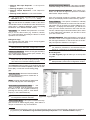
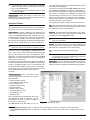
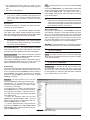
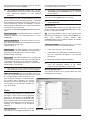
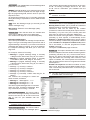
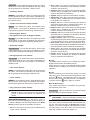
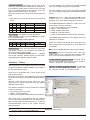
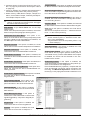
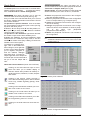
The Users page will allow you to program the Code attributes, as follows (the Installer Codes can be programmed on the Installers page).
The Code list (195 Codes for KYO320), on the left side
of the Users page, shows the following information for
each Code.
No. This non-editable field shows the Code ID Number.
Description This editable field (maximum 26 characters) is for the Code label (e.g. User’s Name). The label
will identify the User Code in all the operations it is involved in.
The parameters of the Codes selected on the left side of
the Users page can be programmed on right, as follows.
You cannot change the attributes of a Code without
+ first
entering its Father code PIN.
Available If this option is enabled, the corresponding
Code can be programmed and used for system access.
Many applications require fewer Codes. This option will
allow you to enable only the required number of Codes,
thus simplifying the programming process while increasing the security level.
Codes which have not been made Available can be
considered inexistent.
able Codes will be assigned their de+ NON-Avail
fault PINs.
cannot toggle the Available status of a Code,
+ You
without first entering its Father code PIN.
You cannot toggle the Available status of a Code
when the Active option is Enabled.
Active An Active Code can access and control the
system in accordance with its access level.
A Non-Active Code cannot access the system, however, it can still be programmed using its Father Code.
Father Codes can toggle the Active status of their assigned Codes (also via the User Menu).
cannot toggle the Active status of a Code that
+ You
is the sole Father of another Code.
AT Default: ONLY Code No. 001 is Active.
Duress Code If this option is enabled, any Telephone
actions (calls or reports) associated with the Recognized user code event (generated by the Code
concerned) will not be signalled on the keypad (i.e.
<@255> will not appear over the i icon).
PROGRAMMING FROM THE PC
77