1
8.0 FUEL BED LAYOUT (COAL EFFECT)
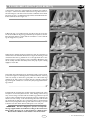
4. Take five more moulded coals and position as shown in figure 10
to form the ‘second row’ of the fuel effect. The coals may be rotated
as desired to fit into the gaps between the coal supports in order to
create a random, realistic effect. Again, remember not to push the
coals down too far into the valleys between the coal supports as this
can have a detrimental effect to the flame picture.
Figure 10
5. Take another four coals and place behind the second row of coals
as shown in figure 11, in order to complete the third row. The coals
may be orientated as desired to achieve a realistic effect. Keep the
spacing between the coals even and uniform. The two coals at the
ends of the row may be placed rearwards, towards the back corners
of the fuel matrix.
Figure 11
6. Finally, take the two remaining coals and place at the back of the
fuel matrix, in the centre as shown in figure 12. Adding these coals
should complete the appearance of the fuel bed giving an even distribution of equally spaced coals.
Figure 12
- CONTINUED
GB IE
IMPORTANT : The fire is designed to operate correctly
with the coals supplied when assembled according to the
instructions. Never add to the sixteen coals, or change
them for a different type. Never throw rubbish or other
matter onto the coal bed.
8.1 FUEL BED LAYOUT (PEBBLE EFFECT)
1. Refer back to section 6.0 - Fuel bed layout - coal effect and follow
steps 1 and 2. The front strip and fuel effect matrix used for pebble
effect versions are of the same design as coal effect versions, but have
a different surface finish. Position them as shown in figure 13.
5
Figure 13
'
2013 Focal Point Fires plc.