1
8.1 FUEL BED LAYOUT (PEBBLE EFFECT)
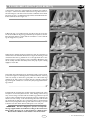
2. Open the bag of 16 ceramic pebbles. All of these pebbles are the
same size. Take five pebbles and place them as shown in figure 14.
Care should be taken to ensure that the pebbles bridge the gap
between the front strip and the four supports at the front of the
matrix. Care should also be taken not to push the pebbles right
down between the supports, as this can affect the flame picture
when the appliance is running.
3. Take five more ceramic pebbles and position as shown to form the
‘second row’ of the fuel effect as shown in figure 15. The pebbles may
be rotated as desired to fit into the gaps between the supports in
order to create a random, realistic effect. Again, remember not to
push the pebbles down too far into the valleys between the supports
as this can have a detrimental effect to the flame picture.
4. Now take another two pebbles and place behind the second row of
pebbles next to each other in the centre of the fuel bed as shown in figure 16. The pebbles may be orientated as desired to achieve a realistic
effect. Keep the spacing between the pebbles even and uniform.
- CONTINUED
GB IE
Figure 14
Figure 15
Figure 16
Figure 17
5. Finally, take the four remaining pebbles and place at the back of the
fuel matrix as shown in figure 17.
Once again, the pebbles may be orientated as desired in order to give a
realistic effect. Avoid pushing the pebbles down between the supports.
The fuel bed layout is now complete.
IMPORTANT : The fire is designed to operate correctly with the pebbles supplied when assembled according to the
instructions. Never add to the sixteen pebbles, or change them for a different type. Never throw rubbish or other
matter onto the fuel bed.
Due to the light colour of the pebbles, some discolouration/sooting is to be expected during normal use.
6
'
2013 Focal Point Fires plc.