1
UG-386
10593-007
Evaluation Board User Guide
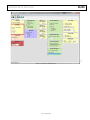
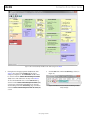
Figure 7. VisualAnalog, Main Window
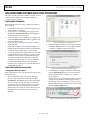
Setting Up the SPI Controller Software
After the ADC data capture board setup is complete, set up the
SPI controller software using the following procedure:
Open the SPI controller software by going to the Start menu
or by double-clicking the SPIController software desktop
icon. If prompted for a configuration file, select the appropriate
one. If not, check the title bar of the window to determine
which configuration is loaded. If necessary, choose Cfg
Open from the File menu and select the appropriate file
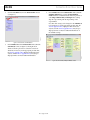
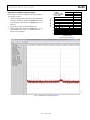
based on your part type. Note that the CHIP ID(1) section
should be filled to indicate whether the correct SPI
controller configuration file is loaded (see Figure 8).
10593-008
1.
Figure 8. SPI Controller, CHIP ID(1) Section
Rev. 0 | Page 7 of 28