1
1
Copyright © 2003-2012 Terasic Technologies Inc. All Rights Reserved
CONTENTS
Chapter 1
INTRODUCTION TO THE TME EBK ....................................................................................... 3
1.1 Features....................................................................................................................................................... 4
1.2 About the KIT ............................................................................................................................................. 5
1.3 PSoC Creator .............................................................................................................................................. 6
1.4 Getting Help ............................................................................................................................................... 6
Chapter 2
TME EBK ARCHITECTURE .................................................................................................... 7
2.1 Layout and Components ............................................................................................................................. 7
2.2 Thermal Management Solution on the TME .............................................................................................. 8
Chapter 3
TME EBK HARDWARE OVERVIEW...................................................................................... 10
3.1 2x20 pin Interface Header ........................................................................................................................ 10
3.2 TME EBK Headers and Jumpers.............................................................................................................. 11
3.3 PWM Output Digital Temperature Sensors .............................................................................................. 12
3.4 I2C Digital Temperature Sensor ............................................................................................................... 13
3.5 1-Wire Digital Temperature Sensor .......................................................................................................... 14
3.6 Diode Analog Temperature Sensors ......................................................................................................... 15
3.7 4-Wire Fan Connectors ............................................................................................................................. 15
3.8 Development Kit (DVK) Compatibility ................................................................................................... 16
Chapter 4
EXAMPLE PROJECTS FOR THE TME ................................................................................. 17
4.1 Introduction .............................................................................................................................................. 17
4.2 Software Installation ................................................................................................................................. 17
4.3 Hardware Setup ........................................................................................................................................ 18
4.4 Example Projects ...................................................................................................................................... 21
Chapter 5
TME SCHEMATICS ............................................................................................................... 39
5.1 Power Supply............................................................................................................................................ 39
5.2 4-Wire Fan Sockets................................................................................................................................... 39
5.3 I2C/SMBus/PMBus Port .......................................................................................................................... 40
5.4 2x20 Pin DVK Connector and Test Points ............................................................................................... 40
5.5 1-Wire Temperature Sensor ...................................................................................................................... 40
5.6 Temperature Diodes .................................................................................................................................. 41
5.7 I2C Temperature Sensor ........................................................................................................................... 41
1
5.8 PWM Temperature Sensors ...................................................................................................................... 41
5.9 Layout ....................................................................................................................................................... 42
5.10 Top layer ................................................................................................................................................. 42
5.11 Bottom layer ........................................................................................................................................... 43
5.12 Top Silkscreen ........................................................................................................................................ 43
5.13 Bill of Materials ...................................................................................................................................... 44
Chapter 6
APPENDIX ............................................................................................................................ 46
6.1 Revision History ....................................................................................................................................... 46
6.2 Copyright Statement ................................................................................................................................. 46
2
Chapter 1
Introduction to the TME EBK
In general terms, thermal management is a combination of temperature sensing, fan control and the
algorithms or transfer functions that map temperature to fan speed. Thermal management is a
critical, system-level function that needs to ensure that all components in the system operate within
safe temperature limits, while at the same time minimizing power consumption and acoustic noise.
Typical solutions for thermal management include multiple devices such as CPLDs, mixed-signal
ASICs and/or limited-functionality and inflexible discrete devices. Thermal management solutions
need to be flexible enough to interface with many kinds of both digital and analog temperature
sensors. To maximize efficiency, they must also be able to drive a multitude of fans independently.
Finally, thermal management solutions must have enough intelligence built in to reliably control the
cooling systems autonomously, independent of a master control processor in the event that
communications are lost or the master control processors fail or go offline.
The PSoC® 3 architecture enables a flexible and unique method of thermal management in a single
chip, combining analog sensing capabilities for any kind of analog temperature sensor such as
remote diodes, thermistors, resistance temperature detectors (RTDs), etc. PSoC 3’s versatile digital
resource pool enables the integration of multiple I2C bus interfaces, capture timers and even
full-custom logic to support interfaces to a wide variety of digital temperature sensors such as I2C
based, pulse-width-modulated (PWM) based and other proprietary serial interface digital
temperature sensors. PSoC 3’s unique CPLD-like hardware blocks are also used to implement a full
hardware closed loop fan control system for high reliability systems that require zero intervention
from firmware running on the built-in MCU or running on an external master control processor.
This frees up MCU processing power to run and manage algorithms or transfer functions of very
high complexity to optimize fan speeds to achieve system cooling requirements.
The PSoC Thermal Management Expansion Board Kit (TME EBK) is a part of the PSoC
development kit ecosystem and is designed to work with the CY8CKIT-001 PSoC Development Kit
(DVK) and CY8CKIT-030 PSoC 3 Development Kit (DVK). It enables you to evaluate a system’s
thermal management functions and capabilities of PSoC 3 devices. You can evaluate the example
projects described in this guide or design and customize your own thermal management solution
using components in Cypress’s PSoC CreatorTM software (included in this kit) or by altering
example projects provided with this kit.
The PSoC Thermal Management Expansion Board Kit (TME EBK) is used with the PSoC family of
devices and is specifically designed and packaged for use with the PSoC 3 device family. PSoC 3 is
a programmable system-on-chip platform that combines precision analog and digital logic with a
high performance, single-cycle, 67MHz 8051 processor. With the flexibility of the PSoC
architecture, you can easily create your own custom thermal management solution on chip with the
exact functionality you need, in the way you want it—no more, no less.
3
1.1
Features
The TME EBK is intended to provide a demonstration and development platform for developing
system thermal management co-processor solutions with compelling example projects that
demonstrate a variety of modes:
Temperature monitoring
Open-loop and closed-loop fan control
Thermal zone management: the relationship between temperatures and cooling functions
Algorithms to detect thermal and cooling failures or warnings
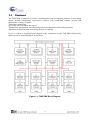
Figure 1-1 shows a simplified block diagram of the components on the TME EBK and how they
interact to aid in understanding of the hardware.
Figure 1-1: TME EBK Block Diagram
4
1.2
About the KIT
The PSoC Thermal Management Expansion board kit (TME) consists of:
Cypress TME EBK
Quick Start Guide
Power DC Adaptor 12V/2A
System CD containing:
o User’s Guide (this document)
o PSoC Creator and pre-requisite software
o PSoC Programmer and pre-requisite software
o TME Example Firmware for the CY8CKIT-001 DVK
o Firmware based (open loop) Fan Control
o Hardware based (closed loop) Fan Control
o Thermal Management System
o TME Example Firmware for the CY8CKIT-030 DVK
o Firmware based (open loop) Fan Control
o Hardware based (closed loop) Fan Control
o Thermal Management System
o Application Note (AN66627) “PSoC® 3 and PSoC 5 Intelligent Fan Controller”
o Application Note (AN60590) “Temperature Measurement Using Diode”
o Datasheets for key TME EBK components
Figure 1-2 shows the photograph of the TME EBK contents.
Figure 1-2: TME EBK Package Contents
5
1.3
PSoC Creator
Cypress's PSoC Creator software is a state-of-the-art, easy-to-use integrated development
environment (IDE) that introduces a game changing, hardware and software design environment
based on classic schematic entry and revolutionary embedded design methodology.
With PSoC Creator, you can:
Draw a schematic of the hardware circuit you would like to build inside PSoC and the tool will
automatically place and route the components for you
Eliminate external CPLDs or standard logic ICs by integrating state machines and simple glue logic
in your design
Trade-off architecture decisions between hardware and software, allowing you to focus on what
matters and getting you to market faster
PSoC Creator also enables you to tap into an entire tools ecosystem with integrated compiler tool
chains, RTOS solutions, and production programmers to support PSoC 3.
1.4
Getting Help
Certified as a Cypress Authorized Design Partner, Terasic offers design expertise in rapidly
developing PSoC Solutions to get your products into production quickly and reducing your
development and BOM costs. Terasic provides customized board designs for academia and industry.
For additional information visit:
www.cypress.com/go/CY8CKIT-036
or
http://tme.terasic.com
For support please contact:
Online: www.cypress.com/go/support
Telephone (24x7): +1-800-541-4736 ext. 8 (USA)
+1-408-943-2600 ext. 8 (International)
6
Chapter 2
TME EBK Architecture
This chapter provides information about the architecture and block diagram of the TME EBK.
2.1
Layout and Components
The picture of the TME EBK is shown in Figure 2-1 and Figure 2-2. They depict the layout of the
board and indicate the locations of the connectors and key components.
Figure 2-1: TME PCB (Top)
7
Figure 2-2: TME PCB (Bottom)
2.2
Ther mal Management Solution on the TME
The TME EBK contains two 4-wire, 12V brushless DC fans with connectors to support an
additional 2 fans for designers who need to prototype with their own specific fan models. 6
temperature sensors (4 different kinds) are also installed on the kit: 1) TMP175 I2C digital
temperature sensor, 2) 2x TMP05 PWM output digital temperature sensors, 3) DS18S20 “One
Wire” digital temperature sensor and 4) 2x MMBT3094 temperature diodes. This combination of
hardware elements enables designers to rapidly prototype thermal management solutions in a
variety of configurations.
TME EBK also provides an I2C/SMBus/PMBus compatible header to support systems that have a
requirement for communication with a host controller. All of this functionality is implemented on a
single PSoC 3. The TME routes all the input/output signals for thermal management to a PSoC 3
mounted on a development kit platform such as the CY8CKIT-001 PSoC Development Kit or
CY8CKIT-030 PSoC 3 Development Kit. PSoC 3 is not mounted on the TME EBK itself.
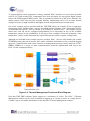
Figure 2-3 shows a functional diagram of the PSoC Thermal Management solution. This solution
enables control of up to 4x 4-wire fans using MCU based firmware control or hardware control. Fan
drive signals are generated by independent hardware PWM blocks in PSoC to drive the 4 wire fans.
Tachometer signals from the fans are interpreted by PSoC to determine fan rotational speeds. In
hardware control mode, speed control is implemented entirely in hardware (no MCU intervention
required). In firmware control mode, speed control can be achieved by the firmware running on
PSoC with CPU intervention. In both cases, fan stall or rotor lock faults are detected by hardware.
8
To support digital sensor temperature sensing, standard PSoC interfaces are used where possible
(such as I2C) and custom PSoC components have been developed for non-typical digital sensors
such as the PWM output TMP05 sensor. This is explained in Section 4 of this User’s Manual. For
analog sensors, PSoC also provides on-board filtering, multiplexing and a 0.1% accurate internal
voltage reference for high resolution and highly accurate temperature sensor measurement.
One of the example projects provided with the TME EBK shows an example of how to aggregate
temperature sensor readings using a variety of methods and the resultant “zone” temperature used to
set individual fan speeds – this is referred to as defining a “thermal zone”. The example project
shows how each fan can be configured independently to be dependent on any of the available
temperature sensors in any combination. It also gives some examples of how the composite “zone
temperature” can be used to determine the required fan speed to achieve system cooling needs.
Although not included in the example projects provided, PSoC 3 devices also include non-volatile
EEPROM memory that can be used to store sensor calibration information or for event/fault logging
purposes. Communication with a host controller or management processor can be achieved via I2C,
SMBus, PMBus or a variety of other communications protocols implemented with easy-to-use
PSoC Creator component blocks.
(x4)
PWM (x4)
(x4)
EBK supports 4 Fans
(2 Installed)
Figure 2-3: Thermal Management Functional Block Diagram
Note that TME EBK hardware limits support to a maximum of 4 fans. The PSoC 3 Thermal
Management solution can be easily extended to support up to 16 fans or more in a single device.
Contact Cypress for further information on the full PSoC Thermal Management solution.
9
Chapter 3
TME EBK Hardware Overview
Figure 3-1: TME Hardware Components
This chapter describes the specifications of the components used on the TME EBK.
3.1
2x20 pin Interface Header
The 40-pin interface (2×20 pin header) provides a mechanism to connect the TME EBK to a
Cypress development kit platform.
Table 3-1 lists the pin assignments of the 2x20 connector.
10
Table 3-1: 2x20 Header (J14) Pin Definition
Description
Tachometer signal from Fan #4
Tachometer signal from Fan #3
Tachometer signal from Fan #2
Tachometer signal from Fan #1
Analog Ground
Analog Ground
Temperature diode current source
Temperature diode anode
I2C temperature sensor data
PWM temperature sensor output
Analog Ground
Reserved
Serial Data (I2C/SMBus/PMBus)
3.3V power from DVK
Digital Ground
Optional 12V power from DVK
3.2
Signal
TACH4
TACH3
TACH2
TACH1
AGND
NC
NC
NC
NC
AGND
TD-I
TD-A
T-SDA
P-OUT
AGND
RESV
SM-SDA
3.3V
DGND
12V
Pin
1
3
5
7
9
11
13
15
17
19
21
23
25
27
29
31
33
35
37
39
Pin
2
4
6
8
10
12
14
16
18
20
22
24
26
28
30
32
34
36
38
40
Signal
PWM4
PWM3
PWM2
PWM1
NC
NC
NC
NC
NC
NC
TD-K
1-WIRE
T-SCL
P-IN
NC
SM-ALT
SM-SCL
VADJ
5V
DGND
Description
PWM speed control for Fan #4
PWM speed control for Fan #3
PWM speed control for Fan #2
PWM speed control for Fan #1
Temperature diode cathode
One wire temperature sensor
I2C temperature sensor clock
PWM temperature sensor input
Alert Signal (I2C/SMBus/PMBus)
Serial Clock (I2C/SMBus/PMBus)
unused
5V power from DVK
Digital Ground
TME EBK Headers and Jumpers
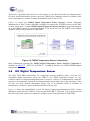
A number of jumpers are provided on the TME EBK.
Table 3-2 lists the default jumper settings for the board.
Table 3-2: TME Jumper Settings
Headers and
Jumpers
J1
J2
J3
J4
Description
Factory Default
5-pin header for connecting an external host or
management processor via I2C/SMBus/PMBus
3-pin header to choose between single sensor or dual
sensor (daisy chain) connection for the PWM
temperature sensors. Place jumper in 1-2 position to
enable dual sensor daisy-chain mode
3-pin header to set logic signal levels for digital
temperature sensors. Place in 1-2 for 5V interfacing.
Place in 2-3 position to 3.3V interfacing
4-pin header (1.25mm pitch) to connect Fan 1. Supplies
12V power, ground, PWM drive and tachometer
11
Configuration
Connector fitted
1-2 position
(dual sensor daisy chain)
2-3 position
(3.3V interfacing)
Not connected
J5
J6
J7
J8
J9
J10
J11
J12
J13
J14
J15
3.3
feedback. All signals replicated on J7
4-pin header (1.25mm pitch) to connect Fan 2. Supplies
12V power, ground, PWM drive and tachometer
feedback. All signals replicated on J8
4-pin header (1.25mm pitch) to connect Fan 3. Supplies
12V power, ground, PWM drive and tachometer
feedback. All signals replicated on J10
4-pin header (2.54mm pitch) to connect Fan 1. Supplies
12V power, ground, PWM drive and tachometer
feedback. All signals replicated on J4
4-pin header (2.54mm pitch) to connect Fan 2. Supplies
12V power, ground, PWM drive and tachometer
feedback. All signals replicated on J5
3-pin header for fan power supply. Place in 1-2 position
to source external power from the power jack (J13).
Place in 2-3 position to source 12V power from the DVK.
4-pin header (2.54mm pitch) to connect Fan 3. Supplies
12V power, ground, PWM drive and tachometer
feedback. All signals replicated on J6
4-pin header (2.54mm pitch) to connect Fan 4. Supplies
12V power, ground, PWM drive and tachometer
feedback. All signals replicated on J12
4-pin header (1.25mm pitch) to connect Fan 4. Supplies
12V power, ground, PWM drive and tachometer
feedback. All signals replicated on J11
Power Jack. 12V DC nominal
2×20 pin header for connecting to PSoC DVK
2×20 pin header that replicates signals on J14 for easy
connection to a logic analyzer or oscilloscope
Not connected
Not connected
Connected to Fan 1
Connected to Fan 2
1-2 position
(fan power from J13)
Not connected
Not connected
Not connected
Connector fitted
Connector fitted
Open
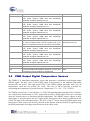
PWM Output Digital Temperature Sensors
The TMP05 is a monolithic temperature sensor that generates a modulated serial digital output
(PWM) signal. The duty cycle of this PWM signal is proportional to the ambient temperature
measured by the device. The high period (TH) of the PWM remains generally static over all
temperatures, while the low period (TL) varies. The ratio of TH/TL provides a method for
determining the temperature as per this formula: Temperature (°C) = 421 – (751 × TH/TL).
The TMP05 sensors have a 2 pin interface: 1) CONV/IN input that when pulsed by PSoC initiates a
new temperature measurement, 2) OUT output that provides a PWM signal that can be decoded
using the formula above to determine ambient temperature. The TMP05 sensors support a daisy
chain mode of operation where the OUT signal of the first sensor can be directly connected to the
CONV/IN input of the subsequent sensor. The OUT of the 2nd sensor carries the PWM signals from
both sensors. Many sensors can be daisy chained in this fashion, with the final OUT signal carrying
the PWM temperature encodings from all sensors in the daisy chain.
12
This sensor is generally operated in one of two modes: (1) one-shot mode and (2) continuous mode.
For more detailed information, please refer to the TMP05 device datasheet which is available on the
device manufacturer’s website or under the datasheet folder of the kit CD.
Figure 3-2 shows the TMP05 Digital Temperature Sensor Interface custom component
instantiated in a PSoC Creator Schematic configured to support the 2 TMP05 sensors on the TME
in daisy chain mode. A single TMP05 Digital Temperature Sensor Interface component supports
up to 4x TMP05 sensors in a single daisy chain. P_IN and P_OUT are the TMP05 sensor signals
available on the 2x20 pin header on TME EBK.
Figure 3-2: TMP05 Temperature Sensor Connectivity
More information regarding the TMP05 Digital Temperature Sensor Interface Component is
available in AN65977 – “PSoC® 3 and PSoC 5 - Creating an Interface to a TMP05/TMP06 Digital
Temperature Sensor”.
3.4
I2C Digital Temperature Sensor
The PSoC TME EBK demonstrates I2C temperature sensing capability using a two-wire I2C
compatible digital temperature sensor, the TMP175. I2C digital temperature sensors are very
common sensors for thermal management and are used in a variety of communication, computer,
consumer, environmental, industrial and instrumentation applications due to the popularity of the
I2C bus. For more detailed information, please refer to its datasheet which is available on
manufacturer’s website or under the datasheet folder of the kit CD.
Figure 3-3 shows the standard PSoC Creator I2C Master component instantiated in a PSoC Creator
Schematic connected to the TMP175 sensor on the TME EBK. T_SDA and T_SCL represent serial
data and serial clock respectively which are available on the 2x20 pin header on TME EBK.
13
Figure 3-3: I2C Temperature Sensor Connectivity
The I2C Master component can be configured to run the I2C interface at 50, 100 or 400 kbps. Like
any I2C bus application, multiple I2C temperature sensors such as the LM75 or TMP175 can be
connected to the same I2C bus I/O pins on PSoC. Refer to the I2C Master component datasheet
inside PSoC Creator for more details on this block.
3.5
1-W ire Digital Temperature Sensor
The TME EBK has a Maxim DS18S20 1-wire high precision digital temperature sensor installed.
The DS18S20 digital thermometer provides 9-bit resolution Celsius temperature measurements and
has an alarm function with nonvolatile user-programmable upper and lower trigger points. The
DS18S20 communicates over a proprietary 1-wire bus that by definition requires only one data line
(and ground) for communication with a host microprocessor. It has an operating temperature range
of –55°C to +125°C. For more detailed information, please refer to its datasheet which is available
on the manufacturer’s website or under the datasheet folder of the kit CD.
A one wire protocol interface PSoC Creator component is currently planned for future development,
but is not yet available and is therefore not provided in this release of the TME EBK. Check the
TME EBK link: www.cypress.com/go/CY8CKIT-036 for upgrades to the TME that might include
this interface component in the future.
Figure 3-4 shows the connections for DS18S20 1-wire temperature sensor
Figure 3-4: 1-Wire Temperature Sensor Connectivity
14
3.6
Diode Analog Temperature Sensors
MMBT3904 is a bipolar junction transistor (BJT) designed as a general purpose amplifier and
switch. The useful dynamic range extends to 100 mA as a switch and to 100 MHz as an amplifier.
The delta Vbe method described in Cypress Application Note AN60590 – “Temperature
Measurement Using Diode” can be used with the TME EBK. Refer to that application note for the
theory of operation and relevant mathematical equations. The implementation described in that
application note is primarily driven by firmware due to the complexities associated with varying the
source current fed to the BJT, filtering the ADC measurements and calibrating the analog
sub-system all of which are required to achieve sufficiently high accuracy with these low cost
temperature sensors.
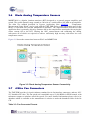
Figure 3-5 shows the connections between PSoC and MMBT3904
Figure 3-5: Diode Analog Temperature Sensor Connectivity
3.7
4-W ire Fan Connectors
The TME EBK provides 8 (4 pairs) industry standard 4-wire fan interface connectors, and two AVC
12V brushless DC fans. The fan speeds are controllable up to 13,000 RPM via PWM control, with
tachometer output to calculate actual fan speeds. For more detailed information please refer to its
datasheet which is available on the manufacturer’s website or under the datasheet folder of the kit
CD.
Table 3-3: Fan Connector Pinouts
15
Pin Number
1
2
3
4
Name
GND
POWER
TACH
PWM
Colors
Black
Red
Yellow
Blue
Description
GND
12V DC power
Frequency Generator Signal
PWM Control Signal
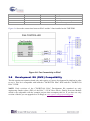
Figure 3-6 shows the connections between PSoC and the 2 fans installed on the TME EBK.
Figure 3-6: Fan Connectivity to PSoC
3.8
Development Kit (DVK) Compatibility
This kit contains an expansion board only and requires a Cypress development kit platform in order
to use it. This kit is compatible with both the CY8CKIT-001 PSoC DVK and the CY8CKIT-030
PSoC 3 DVK.
NOTE: Early revisions of the CY8CKIT-001 PSoC Development Kit contained an early
engineering sample release (ES2) of the PSoC 3 CY8C38xxx Device Family Processor Module
which is not compatible with the example projects that accompany this kit. If you have an early
revision of the kit you can upgrade free of charge at www.cypress.com/go/psockitupgrade
16
Chapter 4
Example Projects for the TME
4.1
Introduction
This section provides details on how to operate the hardware and run the example projects provided.
4.2
Software Installation
Perform the following steps to install the PSoC TME EBK software: Insert the kit CD into the CD
drive of your PC. The CD is designed to auto-run and the kit menu should appear. (See Figure 4-1)
Figure 4-1: CD Autorun Kit Menu
NOTE: If auto-run does not execute, double-click AutoRun on the root directory of the CD.
After the installation is complete, the kit contents are available at the following location:
C:\Program Files\Terasic\PSoC Thermal Management EBK\1.0
On 64-bit Windows 7 installations, replace “C:\Program Files” with “C:\Program Files (x86)”
When installing the PSoC Thermal Management EBK software, the installer checks if your system
has the required software. This includes PSoC Creator, PSoC Programmer, Windows Installer, .NET
17
framework, Adobe Acrobat Reader, and KEIL Compiler. If these applications are not installed, then
the installer prompts you to install all pre-requisite software, which is also available on the kit CD.
The software can be uninstalled using one of the following methods:
Go to Start > Control Panel > Add or Remove Programs; select appropriate software package;
select the Remove button.
Go to Start > All Programs > Cypress > Cypress Update Manager > Cypress Update Manager;
select the Uninstall button for the appropriate software package.
Insert the kit CD and click Install the kit contents from CD button. In the CyInstaller for PSoC
Thermal Management EBK 1.0 window, select Remove from the Installation Type drop-down
menu. Follow the instructions to uninstall. (NOTE: this method will only un install the kit software
and not all the other material/software that may have been installed along with the kit software)
4.3
Hardware Setup
The kit includes example projects for both the CY8CKIT-001 PSoC DVK and the CY8CKIT-030
PSoC 3 DVK hardware platforms. The main difference between the projects for the two hardware
platforms is the PSoC pin mapping. Other differences will be highlighted in the sections that
describe details of the example projects. The following sections describe how to set up the hardware
to run the example projects. For a given DVK base platform, the same hardware configuration
applies to both example projects.
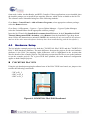
CY8CKIT-001 PSoC DVK
Using the pin header/prototyping breadboard area of the PSoC DVK base board, use jumper wires
to make the following connections:
“VR” to P1_2
“SW1” to P1_4
“SW2” to P1_5
Figure 4-2: CY8CKIT-001 PSoC DVK Breadboard
18
Set the system to run at 3.3V using SW3 and set J6 “VDD DIG” and J7 “VDD ANLG” to
VDD=3.3V using J6 and J7 as shown below:
Figure 4-3: CY8CKIT-001 PSoC DVK Power Jumpers
Ensure that the LCD character display included with PSoC DVK is attached and that the LCD
POWER jumper (J12) is in the ON position:
Figure 4-4: CY8CKIT-001 PSoC DVK LCD Power Jumper
Ensure that the VR_PWR jumper (J11) is installed:
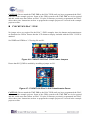
Figure 4-5: CY8CKIT-001 PSoC DVK VR_POWER Jumper
19
CAUTION: Do not attach the TME EBK to the PSoC DVK until you have programmed the PSoC
with one of the example projects. Some of the GPIOs routed to the TME EBK are tied to ground
and this could cause hard shorts on PSoC I/O pins if firmware previously programmed into PSoC
drives those pins. Instructions on how to program the example projects are covered in the example
projects section.
CY8CKIT-030 PSoC 3 DVK
No jumper wires are required for the PSoC 3 DVK examples since the buttons and potentiometer
are hardwired to GPIOs. Ensure that the LCD character display included with the PSoC 3 DVK is
attached.
Set VDDD and VDDA to 3.3V using J10 and J11.
Figure 4-6: CY8CKIT-030 PSoC 3 DVK Power Jumpers
Ensure that POT_PWR is enabled by installing a jumper on J30.
Figure 4-7: CY8CKIT-030 PSoC 3 DVK Potentiometer Power
CAUTION: Do not attach the TME EBK to the PSoC DVK until you have programmed the PSoC
with one of the example projects. Some of the GPIOs routed to the TME EBK are tied to ground
and this could cause hard shorts on PSoC I/O pins if firmware previously programmed into PSoC
drives those pins. Instructions on how to program the example projects are covered in the example
projects section.
20
4.4
Example Projects
The TME EBK includes three example projects:
Firmware Based Fan Control
Closed-Loop Hardware Based Fan Control
Thermal Management System
The kit includes project workspaces for both the CY8CKIT-001 PSoC DVK and the CY8CKIT-030
PSoC 3 DVK.
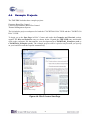
To begin, go to the Start Page in PSoC Creator and under the Examples and Tutorials section,
expand The Kits and Solutions entry as shown below. Expand the TME EBK entry and double
click on the workspace file that matches your development kit (CY8CKIT-001_Examples.cywrk or
CY8CKIT-030_Examples.cywrk). The example projects will be copied to any location you specify
on your hard drive and then opened automatically.
Figure 4-8: PSoC Creator Start Page
21
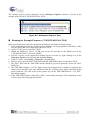
The example projects will be displayed in the Workspace Explorer window as shown in the
example below for the CY8CKIT-001 PSoC DVK:
Figure 4-9: Workspace Explorer View
Running the Example Firmware: CY8CKIT-001 PSoC DVK
Make sure the hardware has been configured according to the Hardware Setup section.
1. If this is the first time that the example project firmware is being programmed into PSoC, make
sure the TME EBK is not connected to the PSoC DVK
2. Apply 12 VDC power to the PSoC DVK
3. Attach the MiniProg3 first to a USB port on the PC and then to the PROG port on the
CY8CKIT-009 PSoC 3 Processor Module
4. In PSoC Creator, set the appropriate example project as active by right clicking on it in the
Workspace Explorer and selecting Set As Active Project
5. In PSoC Creator, select Debug > Program to program PSoC
6. Remove power from the PSoC DVK and attach the TME EBK to Port A of the PSoC DVK
7. The PSoC DVK and the TME EBK boards should be powered separately. Power the PSoC
DVK first
8. The TME EBK includes a 12V DC high-current power supply that is capable of supplying the
inrush current needed by the fans installed on that kit. Use that power supply connected to the
power connector (J13) and set the power jumper (J9) on the TME EBK board to “12V_EXT”
(the default setting)
9. If the TME EBK cannot be detected by PSoC, status debug messages will be displayed on the
LCD to assist with rectifying the problem
22
Figure 4-10: CY8CKIT-001 PSoC DVK with TME EBK Connected to Port A
(Running Example 3)
Running the Example Firmware: CY8CKIT-030 PSoC 3 DVK
Make sure the hardware has been configured according to the Hardware Setup section.
1. If this is the first time that the example project firmware is being programmed into PSoC, make
sure the TME EBK is not connected to the PSoC 3 DVK
2. Attach a USB cable from the PC to the PSoC 3 DVK Program/Debug USB port (use J1 - the
USB connector closest to the corner of the board)
3. In PSoC Creator, set the appropriate example project as active by right clicking on it in the
Workspace Explorer and selecting Set As Active Project
4. In PSoC Creator, select Debug > Program to program PSoC
5. Remove the USB cable from the PSoC 3 DVK and attach the TME EBK to Port E of the PSoC
3 DVK
6. Re-attach a USB cable from the PC to the PSoC 3 DVK Program/Debug USB port (use J1 - the
USB connector closest to the corner of the board)
7. The TME EBK includes a 12 VDC high-current power supply that is capable of supplying the
inrush current needed by the fans installed on that kit. Use that power supply connected to the
power connector (J13) and set power jumper (J9) on the TME EBK board to “12V_EXT” (the
default setting)
8. If the TME EBK cannot be detected by PSoC, status debug messages will be displayed on the
LCD to assist with rectifying the problem
9. Going forward, every time PSoC is re-programmed, press the Reset (SW1) button on the PSoC
3 DVK to run the newly programmed firmware image
23
Figure 4-11: CY8CKIT-030 PSoC 3 DVK with TME EBK Connected to Port E
(Running Example 3)
Example1: Firmware Based Fan Control
Overview
The purpose of this example is to demonstrate the Fan Controller Component controlling the two
fans on the TME EBK in Firmware (CPU) control mode. It is called Open Loop to describe the fact
the hardware components used in this implementation are not regulating the fan speeds by
themselves. Instead, PSoC firmware is entirely responsible for managing fan speeds.
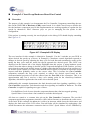
If the project is running correctly, the text displayed on the debug LCD should display something
like Figure 4-12:
5 0 0 0
F / W
5 0 7 5
5 0 8 6
6 . 2 4 %
7 . 5 8 %
Figure 4-12: Example1 LCD Display
24
The fans spin up to an initial speed target, or desired speed, of 5000 revolutions per minute (RPM)
set by a #define in main.c. The desired speed is shown in the top left corner of the LCD display.
The user can adjust the desired speed up or down in steps of 500 RPM by pressing buttons on the
DVK as follows:
CY8CKIT-001 PSoC DVK: SW1=Decrease Speed, SW2=Increase Speed
CY8CKIT-030 PSoC 3 DVK: SW2=Decrease Speed, SW3=Increase Speed
A firmware algorithm responds to changes in desired speed by adjusting the duty cycle for both fans
and continuously works at fine tuning the duty cycle until the actual fan speeds approach the desired
speed. The center section of the LCD display shows the actual speed in RPMs of both fans.
The right side of the LCD display shows the duty cycles of each fan for reference. Note that the
duty cycles may not be the same for both fans, even though the desired speed is the same. This is
due to variations in the actual electromechanical performance of the 2 fans.
The “F/W” text displayed on the bottom left of the display highlights that this project is using
firmware speed control. This is done because the LCD display in example project 2 (when hardware
closed loop control is introduced) is virtually identical, so this text helps to identify which example
project is currently running on PSoC.
Technical Details
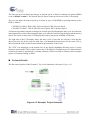
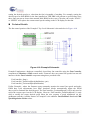
The fan control portion of the Example 1 Top Level Schematic is shown in Figure 4-13
Figure 4-13: Example1 Project Schematic
25
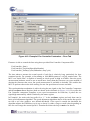
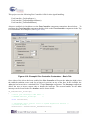
The Fan Controller Component can be configured by double-clicking on it in the Top Level
schematic for Example 1. This will open the customizer Basic Tab. For this example, ensure that
the control mode is set to Firmware (CPU). Other options are not important for this example. (See
Figure 4-14)
Figure 4-14: Example1 Fan Controller Customizer – Basic Tab
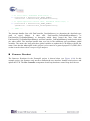
Click on the Fans Tab to setup the electromechanical properties of the fans installed on the TME
EBK. The RPM A, Duty A (%) and the RPM B, Duty B (%) parameters represent two data points
from the fan’s PWM duty cycle to speed conversion chart. That information can be obtained from
the fan manufacturer’s datasheet. The parameters shown below match the fans installed on the TME
EBK. (See Figure 4-15)
26
Figure 4-15: Example1 Fan Controller Customizer – Fans Tab
Firmware is able to control the fans using these provided Fan Controller Component APIs:
FanController_Start()
FanController_GetActualSpeed(fanNumber)
FanController_SetDutyCycle(fanNumber, dutyCycle)
The time taken to measure the actual speeds of each fan is relatively long, particularly for slow
rotational speeds. For example, a fan running at 1000 RPM equates to a 60 ms rotation time. The
MCU core inside PSoC is capable of running at clock speeds as high as 67MHz. Since the speed
measurement hardware needs to run so much more slowly than the firmware can, some method of
alerting the firmware that a new fan speed measurement is available is desirable. This enables the
MCU to perform other tasks while waiting for new fan speed data to become available.
This synchronization mechanism is achieved using the eoc signal on the Fan Controller Component
and the eocStatus Status Register (both are shown in the schematic in Figure 4-13). Every time the
Fan Controller component completes a new speed measurement for both fans, it pulses the eoc
signal high momentarily which is latched by the status register.
In Example1, the main code loop polls for a “1” in the eocStatus register and only then runs its
basic speed adjustment algorithm. The speed adjustment algorithm detects if the current fan speed is
too fast or too slow (within a user defined threshold). If the speed is outside the threshold, the
algorithm adjusts the PWM duty-cycle (up or down) by either a large or small value depending on
how far out of range the current speed is. Examine the main code loop in main.c for details.
27
Note: that the eoc signal in this project is also routed to a GPIO (P0.0) so that it can be observed on
a scope or logic analyzer.
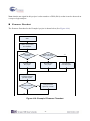
Firmware Flowchart
The firmware flowchart for the Example1 project is shown below (See Figure 4-16)
Start
Initialize Components
And Variables
Actual Fan Speed
< Desired?
NO
Actual Fan Speed
Within Tolerance?
YES
NO
Increase Fan
Duty Cycle
Decrease Fan
Duty Cycle
YES
No Change to
Fan Duty Cycle
Display Desired and
Actual Fan Speeds
plus Duty Cycles
Switches Pressed?
YES
Change Desired
Speed Up or Down
NO
Figure 4-16: Example1 Firmware Flowchart
28
Example2: Closed-Loop Hardware Based Fan Control
Overview
The purpose of this example is to demonstrate the Fan Controller Component controlling the two
fans on the TME EBK in Hardware (UDB) control mode. It is called Closed Loop to describe the
fact the hardware components used in this implementation are working together to regulate the fan
speeds by themselves. PSoC firmware plays no part in managing the fan speeds in this
configuration.
If the project is running correctly, the text displayed on the debug LCD should display something
like Figure 4-17
5 0 0 0
H / W
5 0 3 2
5 0 2 1
4 . 8 7 %
6 . 2 8 %
Figure 4-17: Example2 LCD Display
The user interface for this example is identical to Example1. Use the 2 switches on your DVK to
adjust desired fan speeds up or down. In Example2, a hardware control algorithm responds to
changes in desired speed by adjusting the duty cycle for both fans and continuously works at fine
tuning the duty cycle until the actual fan speeds approach the desired speed. The “H/W” text
displayed on the bottom left of the display highlights that this project is using hardware speed
control. Note that when a change in desired speed is requested through the DVK switches, you may
notice that the actual speed initially jumps to a higher value than the desired speed (in response to a
an increase speed request) or a lower value than the desired speed (in response to a decrease speed
request) and then gradually settles to the correct value. This is because the Fan Controller
component estimates the duty cycle required to achieve the desired speed based on the
electromechanical properties of the fans entered into the Fans Tab of the customizer. This is an
approximation only, but is used as a duty cycle starting point for the closed-loop hardware
algorithm, which then regulates the fans to the correct desired speed.
Additionally, this example demonstrates the fault detection and alert signaling capabilities of the
Fan Controller component. Fault detection and alert signaling are handled in hardware. The Fan
Controller is capable of signaling two types of alerts:
Fan Stall/Rotor Lock: Occurs when the component detects that a fan has stopped spinning
Speed Failure: Occurs when a fan is unable to reach the desired speed
All alerts are routed to a common alert pin on the Fan Controller Component. The provided
component application programmer interfaces (APIs) allow firmware to determine the exact source
of the fault. In this example, the Alert pin is tied to an interrupt which clears the fault source and
displays the fault state on the LCD screen. Fan stall faults can be simulated by unplugging a fan
which disconnects the tachometer connection back to PSoC. Speed failures can be simulated by
29
setting the desired speed to a value that the fan is incapable of reaching. For example, setting the
desired speed to 2000 RPM for the fans installed on TME EBK will generate a speed failure since
those fans can run no slower than around 2000 RPM. In the event of an alert, the words “STALL”
or “SPEED” will replace the current actual speed reading on the LCD display for that fan.
Technical Details
The fan control portion of the Example 2 Top Level Schematic is shown below in Figure 4-18
Figure 4-18: Example2 Schematic
Example2 implements a hardware controlled, closed-loop fan controller using the Fan Controller
component in Hardware (UDB) control mode. Firmware does not control fan speeds but can still
interact with the Fan Controller component using these provided APIs:
FanController_Start()
FanController_SetDesiredSpeed(fanNumber, rpm)
FanController_GetActualSpeed(fanNumber)
Unlike Example1, where the firmware must constantly monitor the actual fan speeds and make
PWM duty cycle adjustments, here PSoC hardware blocks automatically adjust the PWM
duty-cycles to maintain the desired speed. The FanController_GetActualSpeed() API is only used to
report the current speed on the LCD display. Likewise, FanController_SetDesiredSpeed() is only
used to modify the target desired speed when the user requests a speed adjustment via the
pushbutton switches. Another feature of Example2 is the addition Fan Stall/Rotor Lock and UDB
Speed Regulation Failure alerts.
30
This project uses the following Fan Controller APIs for alert signal handling:
FanController_GetAlertSource()
FanController_GetFanStallSpeedStatus()
FanController_GetFanStallStatus()
Alerts are enabled via checkboxes on the Fan Controller component customizer shown below. To
configure the Fan Controller component double-click on the Fan Controller component in the Top
Level schematic for Example2. (See Figure 4-19)
Figure 4-19: Example2 Fan Controller Customizer – Basic Tab
Once either of the Alerts has been enabled, the Fan Controller will assert the Alert pin (high) when
the enabled condition occurs (and for as long as it persists) on any of the fans. In this example, the
Alert pin has been tied to a standard PSoC Creator Interrupt component. The Interrupt component
allows the user to insert custom code to handle the interrupt. The custom handler for the Alert
interrupt can be found in the file AlertInt.c and is shown below:
CY_ISR(AlertInt_Interrupt)
{
/* Place your Interrupt code here. */
/*`#START AlertInt_Interrupt`
*/
uint8 alertStatus;
/* Determine alert source: stall or speed regulation failure */
/*(could be both) */
alertStatus = FanController_GetAlertSource();
31
/* If stall alert, determine which fan(s) */
if (alertStatus & FanController_STALL_ALERT)
stallStatus = FanController_GetFanStallStatus();
/* If speed regulation failure alert, determine which fan(s) */
if (alertStatus & FanController_SPEED_ALERT)
speedStatus = FanController_GetFanSpeedStatus();
/* `#END` */
}
The interrupt handler first calls FanController_GetAlertSource() to determine the alert/fault type
(stall or speed failure). It then calls FanController_GetFanStallSpeedStatus() or
FanController_GetFanStallStatus() to determine which fan(s) caused the alert. Note that
FanController_GetFanStallSpeedStatus() and FanController_GetFanStallStatus() both clear the alert
pin when called. The interrupt handler then sets bits in the stallStatus and speedStatus global
variables. The main code loop polls these global variables to update the LCD display with the fan
status. Note that the Alert signal in this project is also routed to a general purpose IO (GPIO) P0.0
so that it can be observed on a scope or logic analyzer.
Firmware Flowchart
The firmware flowchart for the Example2 project is shown below (see Figure 4-20). In this
example project, the firmware only needs to maintain the user interface: handle switch presses and
update the LCD. The Fan Controller component closed loop hardware control loop does the rest.
32
Start
Initialize Components
And Variables
Actual Fan Speed
< Desired?
NO
Actual Fan Speed
Within Tolerance?
YES
NO
Set Higher
Desired Speed
Set Lower
Desired Speed
Display Desired and
Actual Fan Speeds
plus Duty Cycles
Switches Pressed?
YES
Change Desired
Speed Up or Down
NO
Figure 4-20: Example2 Firmware Flowchart
33
YES
No Change to
Desired Speed
Example3: Thermal Management System
Overview
Example 3 demonstrates how the temperature sensors combined with the fans on the TME EBK can
create a complete thermal management system. The example shows how to combine temperature
readings from a number of temperature sensors in a variety of ways and use the composite
temperature to set desired fan speeds according to a customizable transfer function.
The thermal management example project uses the concept of a “Thermal Zone”. In this context, a
thermal zone describes 2 things: 1) how to combine multiple temperature sensor readings together
to form a composite “Zone Temperature” and 2) how to map the zone temperature to a fan speed.
Therefore, by this definition, each fan will be controlled according to its own independent thermal
zone. This example has two thermal zones since the TME EBK has only 2 fans installed.
Algorithms currently implemented to combine multiple temperature sensors into a composite zone
temperature include: 1) Straight average, 2) weighted average, 3) maximum.
In this example project, the weighted method is used on both fans. A zone temperature to fan speed
transfer function is then definable for each zone. Transfer functions currently implemented include:
1) linear and 2) table driven. In this example project, the transfer function used is table driven on
both fans. That is, a look-up table maps composite zone temperature to fan speed.
This example is a simulation of a thermal management system. The first zone, Zone 1, combines
temperature measurements from two temperature sensors (1 analog and 1 digital). The analog
sensor is simulated using a variable potentiometer to allow easy demonstration of fan control over a
wide simulated temperature range without the need of an environmental chamber to cycle through
temperatures. In Zone 1, the temperature sensors are combined using a weighted average where the
potentiometer is given 90% weight and the digital I2C temp sensor (U1 on TME EBK) is given
10% weight. Adjust the potentiometer (R20 on the CY8CKIT-001 PSoC Development Kit and R56
on the CY8CKIT-030 PSoC 3 Development Kit) to vary the simulated temperature value in the
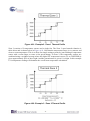
approximate range of 15 to 100 degrees C. The Zone 1 speed transfer function is table driven and
follows the profile shown in Figure 4-21.
34
Figure 4-21: Example3 - Zone 1 Thermal Profile
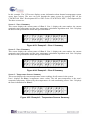
Zone 2 consists of 2 temperature sensors and a single fan. The Zone 2 speed transfer function is
table driven and is shown below in Figure 4-22. Note that the temperature range is very narrow and
close to room temperature. This is to allow for simple testing at room by just touching a temperature
sensor with a warm finger to cause a fan speed change. In Zone 2, the temperature sensors are
combined using a weighted average where the digital I2C temperature sensor (U1 on TME EBK) is
given approximately 99% of the weight. And the potentiometer is given 1% weight. In this example
U1’s temperature reading will dominate the overall zone temperature calculation.
Figure 4-22: Example 3 - Zone 2 Thermal Profile
35
In this example, The LCD screen displays status information about thermal management system
across three screens. The user can cycle through the status screens by pressing SW1 on the
CY8CKIT-001 PSoC Development Kit or SW2 on the CY8CKIT-030 PSoC 3 Development Kit.
The three screens are:
Screen 1 - Zone 1 Summary
This screen displays the current status of Zone 1. Line 1 displays the zone number, the current
composite zone temperature and the zone temperature calculation algorithm used. Line 2 displays
the desired fan speed and the actual fan speed for Zone 1.
Z 1 : T = 1 6
F 1 : 4 5 0 0
WE I GH T E D
A 1 : 4 5 1 5
Figure 4-23: Example3 – Zone 1 Summary
Screen 2 - Zone 2 Summary
This screen displays the current status of Zone 2. Line 1 displays the zone number, the current
composite zone temperature and the zone temperature calculation algorithm used. Line 2 displays
the desired fan speed and the actual fan speed for Zone 2.
Z 2 : T = 2 6
F 2 : 7 0 0 0
WE I GH T E D
A 2 : 7 0 6 2
Figure 4-24: Example3 – Zone 2 Summary
Screen 3 - Temperature Sensors Summary
This screen displays the current temperature sensor readings for all sensors in the system.
Line 1 displays the Zone 1 temperature sensor values. The left most temperature is the zone’s
composite temperature followed by the temperatures of each contributing sensor. Line 2 displays
the same information for Zone 2.
Z 1 : T = 7 9
Z 2 : T = 2 6
( 2 5 , 8 5 )
( 2 5 , 8 5 )
Figure 4-25: Example3 – Temperature Sensors Summary
36
Technical Details
The thermal management system example consists of two parts: 1) the main application and 2) the
thermal manager. The main application is responsible for the user interface and for periodically
calling the thermal manager. The application implementation can be found in main.c and on the
Test Application tab of the project’s schematic. The thermal manager implementation can be found
in ThermalManager.c and on the Thermal Manager tab of the project’s schematic.
The main application only needs to call ThermalManager_Start() to initialize the Thermal Manager
and then it must periodically call ServiceThermalManager() to run temperature and speed updates.
In this example, this is done every 500ms but can be changed by modifying #define
THERMAL_UPDATE_MS_RATE in main.c.
All the parameters that define the zone composite temperature sensor algorithm and the zone
temperature to fan speed algorithm are defined at the top of ThermalManager.c. To modify these
settings, refer to ThermalManager.h for the relevant keywords.
Firmware Flowchart
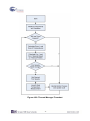
The following flowchart shows the basic function of the Thermal Manager along with the APIs in
ThermalManager.c that implement the main service loop:
37
Figure 4-26: Thermal Manager Flowchart
38
Chapter 5
TME Schematics
5.1
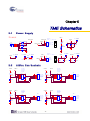
Power Supply
Power
VDD12
VDD12_EXT
D1
J13
DC-12V
1
2
3
VDD12
SM340A
1
2
3
D2
SM340A
R5
1K
VDD12_EXT
VDD12
VDD12_DVK
+
JMP-3
D3
SM340A
D5
SM340A
TP1 VDDIO
TP2 DGND
DIGITAL GND
VDDIO
0
ANALOG GND
C8
C9
C17
22u
10u
0.1u
D4
VDD12
Default :
VDDIO <-> VDD3P3
VDD5
TP3 AGND
R11
TP4 VDD12
VDD12
J9
VDD12_DVK
12V/3A
VDDIO
Default :
VDD12 <-> VDD12_EXT
VDD12_EXT
VDD5
TP5 VDD5
VDD3P3
TP6 VDD3P3
J3
1
2
3
VDD3P3
VDD5
VDDIO
VDD3P3
C23
C22
C10
C18
10u
0.1u
10u
0.1u
JMP-3
5.2
VDDIO
4-W ire Fan Sockets
VDD12
VDDIO
F1_DGND
F1_VDD12
F1_TACH
F1_PWM
R7
J4
1
2
3
4
4.7K
TACH1
J7
C20
PWM1
C13
1
2
3
4
VDD12
R8
F1_DGND
F1_VDD12
F1_TACH
F1_PWM
J5
1
2
3
4
4.7K
TACH2
0.1u
1.25MM PITCH 1
0.1u
VDDIO
F3_DGND
F3_VDD12
F3_TACH
F3_PWM
TACH3
C15
J6
1
2
3
4
J10
C12
PWM3
1
2
3
4
1.25MM PITCH 1
VDD12
F4_DGND
F4_VDD12
F4_TACH
F4_PWM
R10
F3_DGND
F3_VDD12
F3_TACH
F3_PWM
4.7K
TACH4
0.1u
0.1u
PWM2
F2_DGND
F2_VDD12
F2_TACH
F2_PWM
2.54MM PITCH 1
R9
4.7K
C21
1
2
3
4
0.1u
2.54MM PITCH 1
VDD12
J8
C14
0.1u
VDDIO
F2_DGND
F2_VDD12
F2_TACH
F2_PWM
C16
1.25MM PITCH 1
J12
1
2
3
4
J11
C19
PWM4
1.25MM PITCH 1
2.54MM PITCH 1
39
F4_DGND
F4_VDD12
F4_TACH
F4_PWM
0.1u
0.1u
2.54MM PITCH 1
1
2
3
4
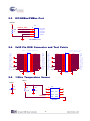
5.3
I2C/SMBus/PMBus Por t
VDDIO
J1
R6
0
5
4
3
2
1
SMBUS_SDA
SMBUS_SCL
SMBUS_ALERT_n
SM_SDA
SM_SCL
SM_ALT
SM_GND
VDDIO
I2C/SMBus Port
5.4
2x20 Pin DVK Connector and Test Points
Config Pin 2 4 6 8
to OC Output Mode
Debug & Signal Probe Port
TACH4
TACH4
TACH3
TACH3
TACH2
TACH2
TACH1
TACH1
AGND
NC_11
LCD_NC
NC_13
LCD_NC
NC_15
LCD_NC
NC_17
LCD_NC
AGND
TD-I
TD-I
TD-A
TD-A
I2C-TEMP_SDA
I2C_SDA
PWM-OUT
PWM_OUT
AGND
NC_31
RESV
SMBUS_SDA
SM_SDA
VDD3P3 VDD3P3
DGND
VDD12_DVK VDD12_DVK
J15
1
3
5
7
9
11
13
15
17
19
21
23
25
27
29
31
33
35
37
39
CON40A
5.5
2
4
6
8
10
12
14
16
18
20
22
24
26
28
30
32
34
36
38
40
PWM4
PWM3
PWM2
PWM1
NC_10
NC_12
NC_14
NC_16
NC_18
NC_20
TD-K
ONEWIRE
I2C-TEMP_SCL
PWM-IN
NC_30
SMBUS_ALERT_n
SMBUS_SCL
NC_36
VDD5
PWM4
PWM3
PWM2
PWM1
NC
LCD_NC
LCD_NC
LCD_NC
LCD_NC
NC
TD-K
ONEWIRE
I2C_SEL
PWM_IN
NC
SM_ALT
SM_SCL
VADJ
VDD5
DGND
TACH4
TACH4
TACH3
TACH3
TACH2
TACH2
TACH1
TACH1
AGND
NC_11
LCD_NC
NC_13
LCD_NC
NC_15
LCD_NC
NC_17
LCD_NC
AGND
TD-I
TD-I
TD-A
TD-A
I2C-TEMP_SDA
I2C_SDA
PWM-OUT
PWM_OUT
AGND
NC_31
RESV
SMBUS_SDA
SM_SDA
VDD3P3 VDD3P3
DGND
VDD12_DVK VDD12_DVK
DNI
J14
CON40A
1-W ire Temperature Sensor
VDDIO
VDDIO
U2
C4
DNI
1
3
5
7
9
11
13
15
17
19
21
23
25
27
29
31
33
35
37
39
R4
C5
1
4.7K
0.1u
2
DNI
3
ONEWIRE
4
NC1
NC8
NC2
NC7
VDD
NC6
DQ
GND
DS18S20
40
8
7
6
5
2
4
6
8
10
12
14
16
18
20
22
24
26
28
30
32
34
36
38
40
PWM4
PWM3
PWM2
PWM1
NC_10
NC_12
NC_14
NC_16
NC_18
NC_20
TD-K
ONEWIRE
I2C-TEMP_SCL
PWM-IN
NC_30
SMBUS_ALERT_n
SMBUS_SCL
NC_36
VDD5
PWM4
PWM3
PWM2
PWM1
NC
LCD_NC
LCD_NC
LCD_NC
LCD_NC
NC
TD-K
ONEWIRE
I2C_SEL
PWM_IN
NC
SM_ALT
SM_SCL
VADJ
VDD5
DGND
5.6
Temperature Diodes
TD-I
TD-A
Q2
MMBT3094
Q1
MMBT3094
TD-K
5.7
I2C Temperature Sensor
VDDIO
C3
DNI
VDDIO
DNI
R1
R2
R3
C2
10K
2.2K
2.2K
0.1u
U1
I2C-TEMP_SDA
1
I2C-TEMP_SCL
2
3
4
SDA
V+
SCL
A0
ALERT
A1
GND
A2
8
7
6
5
TMP175
5.8 I2C
PWAddress
M Temper8'b01001000
ature Sensors
VDDIO
C6
DNI
VDDIO
DNI
U3
1
PWM-IN
3
J2
SINGLE
PWM_TMP
DUAL
3
2
1
JMP-3
Default :
PWM_TMP <-> DUAL
2
PWM-OUT
OUT
VDD
5
C7
CONV/IN
FUNC
GND
0.1u
4
TMP05
U4
1
2
3
OUT
VDD
5
C11
CONV/IN
FUNC
GND
4
0.1u
TMP05
41
5.9
5.10
Layout
Top layer
42
5.11
Bottom layer
5.12
Top Silkscreen
43
5.13 Bill of Materials
Item
1
2
3
4
5
6
7
8
9
10
11
12
13
14
15
Description
Designator
Qty
C2,C5,C7,
Ceramic
C11,C12,C13,
Capacitor, 0.1uF, C14,C15,
15
+/-10%,
25V, C16,C17,C18,
X5R(0402)
C19,C20,
C21,C22
22uF,
+/-10%,
C8
1
25V, X5R(1210)
10uF,
+/-10%,
C9,C10,C23
3
25V, X5R(1206)
Schottky Rectifier
40V/3A(SM340A D1,D2,D3,D5 4
)
Light
Emitting
D4
1
Diode (Yellow)
ONN HEADER
5POS .100 VERT J1
1
TIN
1X3 .100"CENT
J2,J3,J9
3
ER HEADER
FAN
socket,
1.25mm
Wafer J4,J5,J6,J12
4
180°
FAN
socket,
2.54mm
Wire-to-Board
J7,J8,J10,J11 4
Header, DIP 180°
Type
DC Power Socket
Pin
Header,
2X20,
Pitch
2.54MM, male,
Right Angel
NPN
General
Purpose
Amplifier
10K ohm, +/-1%,
1/16W(0402)
2.2K ohm, +/-1%,
1/16W(0402)_
4.7K ohm, +/-1%,
1/16W(0402)
Value
Manufacturer
Manufacturer Part#
0.1uF
Taiyo Yuden
TMK105BJ104KVF
22uF
MURATA
10uF
MURATA
SM340
A
GW
SM340A
VDD12
LITEON
LTST-C170KSKT
I2C/SM
Bus Port
MOLEX
22-05-3051
JMP-3
SAMTEC
TSW-103-07-G-S
GRM32ER61E226
KE15L
GRM31CR61E106
KA12
1.25MM
CHERNG
PITCH
WEEI
1
CCX-W125-04-DI
P
2.54MM
CHERNG
PITCH
WEEI
1
CD-W254-(3.4)
J13
1
DC-12V
CHERNG
WEEI
32753PA
J14
1
CON40
A
NA
NA
Q1,Q2
2
MMBT3
Fairchild
094
R1
1
10K
YAGEO
R2,R3
2
2.2K
YAGEO
R4,R7,R8,R9,
R10
5
4.7K
YAGEO
44
MMBT3094
RC0402FR-0710K
L
RC0402FR-072K2
L
RC0402FR-074K7
L
16
17
18
19
20
21
22
23
24
25
1K ohm, +/-0.1%,
1/16W(0402)_
0 ohm, Jumper,
1/10W(0603)_
Digital
Temperature
Sensor
with
Two-Wire
Interface
High-Precision
1-Wire
Digital
Thermometer
±0.5°C Accurate
PWM
Temperature
Sensor
BUMPER
CLEAR.370X.19
" CYLINDER
Mini Jumper 2.54
Pitch
Open
Type(13.5)
M3
35mm,
Nickel
Plated,
Round Head
M3
Nickel
Plated Hexagonal
Nut
DC
Brushless
axial flow fan,
40x40mm,
4-wire, 12V
R5
1
1K
SAMSUNG
RG1005P-102-B-T
5
R6,R11
2
0 ohm
WALSIN
WR06X000 PTL
U1
1
TMP175
Texas
Instruments
TMP175AID
U2
1
DS18S2
0
MAXIM
DS18S20Z
U3,U4
2
TMP05
ADI
TMP05AKS-500R
L7
MH1,MH2,
MH3,MH4
4
screw
holes
Richco
Plastic Co
RBS-35
3
CHERNG
WEEI
CMJ-135BB
8
NA
NA
8
NA
NA
2
AVC
DB04028B12UP01
4
45
Chapter 6
Appendix
6.1
Version
V1.0
V2.1
6.2
Revision Histor y
Change Log
Initial Release
Example projects updated for PSoC Creator v2.1 and new Components
Copyright Statement
Copyright © 2012 Terasic Technologies Inc. All rights reserved.
46