1
MODELING
3.
Modeling
This chapter discusses features related to creating your model, such as node and element definition in
Abaqus/Standard, Abaqus/Explicit, and Abaqus/CFD; part and assembly definition in Abaqus/CAE; and
importing models to Abaqus/CAE. It provides an overview of the following enhancements:
•
•
•
•
•
•
3.1
“Enhanced import of parts in STEP format,” Section 3.1
“Enhanced control for creation of geometry from orphan elements,” Section 3.2
“Model instances in Abaqus/CAE,” Section 3.3
“Displaying material stacking directions,” Section 3.4
“Support for modeling crack propagation using the virtual crack closure technique,” Section 3.5
“Assigning sections to element sets,” Section 3.6
Enhanced import of parts in STEP format
Product:
Abaqus/CAE
Benefits: When you import one or more parts from a STEP-format file into Abaqus/CAE, you can now retain
the part names specified in the source file as the names of the imported parts you create in Abaqus/CAE.
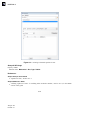
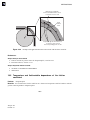
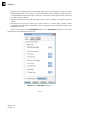
Description: The Create Part from STEP File dialog box now enables you to read the part name or names
during import of a STEP-format file and to use those names for the imported parts you create in the model
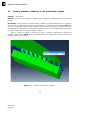
database in Abaqus/CAE. Figure 3–1 shows the revised dialog box, which also enables you to specify a part
name for all imported parts.
Abaqus/CAE Usage:
Part module:
File→Import→Part: File Filter: *.STP* or *.STEP*: Use part name from file
Reference:
Abaqus/CAE User’s Guide
•
3.2
“Importing a part from a STEP-format file,” Section 10.7.10, in the HTML version of this guide
Enhanced control for creation of geometry from orphan elements
Product:
Abaqus/CAE
Benefits: When you use orphan element faces to create geometric faces, you can now specify the stitch
tolerance and the tolerance value for surface fitting as you create the geometric faces. You can also defer
all stitching until after all geometric faces have been created. These enhancements streamline the process of
creating geometry and, in turn, parts from orphan mesh parts.
3–1
Abaqus ID:
Printed on: