1
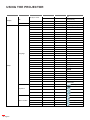
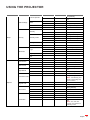
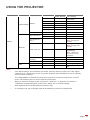
ADDITIONAL INFORMATION
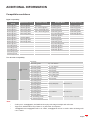
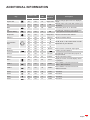
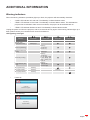
Key
Custome code
Data
code
Printing-key
definition
Description
Byte 1
Byte 2
Byte 3
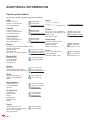
Aspect ratio
32
CD
64
Aspect ratio
3D
32
CD
89
3D
Mute
32
CD
52
Mute
DB
(Dynamic Black)
32
CD
44
DB
Sleep timer
32
CD
63
Sleep Timer
Volume +
32
CD
09
Volume +
32
CD
11
▲
32
CD
10
◄
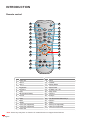
Use ▲, ◄, ►, or ▼ to select items or make
32
CD
12
►
adjustments to your selection.
32
CD
14
▼
Source
32
CD
18
Source
Enter key
32
CD
0F
Re-sync
32
CD
04
Re-sync
Automatically synchronizes the projector to
the input source.
Volume -
32
CD
0C
Volume -
Adjust to decrease volume.
Menu
32
CD
0E
Menu
HDMI 1
32
CD
16
HDMI1
HDMI 2
32
CD
30
HDMI2
VGA 1
32
CD
1B
VGA1
No function
VGA 2
32
CD
1E
VGA2
No function
Video
32
CD
1C
Video
No function
YPbPr
32
CD
17
YPbPr
No function
Four direction
keys
Press to change aspect ratio of a displayed
image.
Manually select a 3D mode that matches your
3D content.
Momentarily turns off / on the audio.
Automatically adjusts the picture brightness
to give optimum contrast performance.
Sets the countdown timer interval.
Adjust to increase volume.
Press “Source” to select an input signal.
Confirm your item selection.
Display or exit the on-screen display menus
for projector.
Press “HDMI1” to choose source from
HDMI 1 / MHL connector.
Press “HDMI2” to choose source from
HDMI 2 connector.
English
61