1
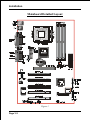
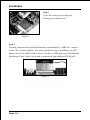
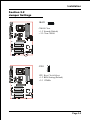
Installation Easy Installation Procedure The following must be completed before powering on your new system: 3-1. CPU Insertion 3-2. Jumper Settings 3-3. System memory Configuration 3-4. Device Connectors 3-5. STR Function Section 3-1 CPU Insertion CPU Insertion: (use AMD AthlonTM as reference) Step 1 Open the socket by raising the actuation lever. Figure 2 Step 2 Insert the processor. Figure 3 Ensure proper pin 1 orientation by aligning the FC-PGA corner marking with the socket corner closest to the actuation arm tip. The pin field is keyed to prevent mis-oriented insertion. Dont force processor into socket. If it does not go in easily, check for mis-orientation and debris. Make sure the processor is fully inserted into the socket on all sides. Page 3-3