1
I. Introduction to the Manual
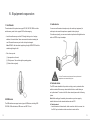
1. Precautions
Never spill water or other liquid onto it. You should call the professional service
In order to prevent the PC from being damaged, extend its service time, and
personnel under following circumstances:
ensure your normal use and personal safety, please carefully read the whole
User's Manual and the related safety information and strictly follow the
requirements in it. You should also keep the Manual well.
a. The power cord or plug was damaged.
b. Conductive liquid went into the product.
c. The product was dropped onto the ground or its shell was damaged.
d. When unidentified errors occurred or the product's performance is obviously
· Please read the documents attached to the product first. The page exclusively
deteriorated, please cut off power immediately and contact professional
inserted should be read firstly.
· Please observe all alarm information and marks on safety.
· Please use the original power adapter, or use special power supply mentioned
technicians.
in the Manual.
· Place place the product correctly on your table and make sure the anti-sliding
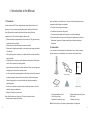
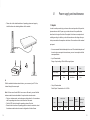
2. Accessories
Your consists of the accessories in the table below. If any of them is missing,
please contact your local distributor or the customer service center timely.
base is installed.
· In lightning time, do not plug or unplug the phone cable, network cable, power
cord or other conductors connecting outside.
· Unplug the power cord before you clean the device. Never use liquid, sprayed
cleaning agent or wet cloth to clean the product.
· In order to protect the operating system, motherboard and hard disk, please do
( PC )
( Power Adapter )
( User ’s Manual )
( Drivers CD )
( Certificate )
( Warranty Card )
not keep pressing the power switch or the reset key. Avoid interrupt power
failure during system's running, which might also physically damage the
operating system.
· Do not remove the shell or repair the product without permission. such work
should be done by professionals.
· Keep the PC away from heat source
Never block the heat vents. Keep your PC away from direct sunshine.
· Keep the product away from moisture
· Host (with base frame)1 unit
· User’s Manual1 copy
· Certificate of Conformity1 copy
· Adapter (with power cord)1 piece
· Disk1 piece
· Warranty Card1 copy
Note: Picture is just for your reference, please subject to the physicals.
4
5