1
5) Set the TV to display the HDMI Input you plugged
into in step 3.
6) You will see the image from the video source
device on the TV.
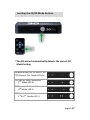
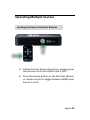
7) Switch through available modes by pressing the
mode button on the front panel or the 2D/3D
button on the remote control.
8) Put on your colored 3D glasses to experience the
3D effect.
3D Mode Operating Instructions
All the functions of the 3D Video Wizard can be
controlled using either the remote control or 2 buttons
on the 3D Video Wizard (the Source Button and the
Mode Button).
3D Compatible Devices
The 3D Video Wizard supports the following types of 3D
content players with HDMI Connections:
3D Blu-ray™ Players
Xbox 360
PlayStation 3
Cable / Satellite Boxes
English 15