1
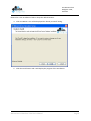
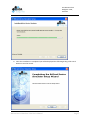
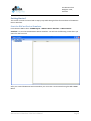
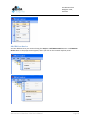
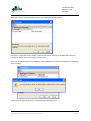
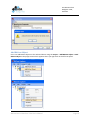
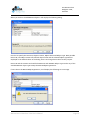
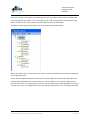
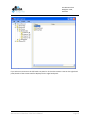
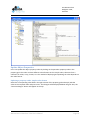
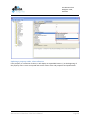
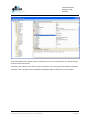
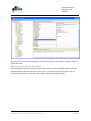
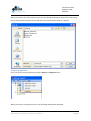
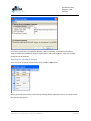
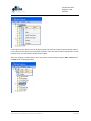
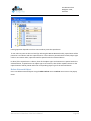
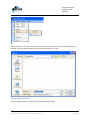
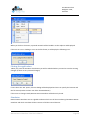
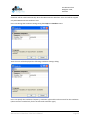
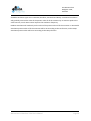
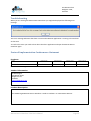
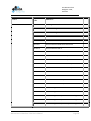
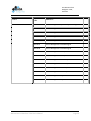
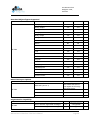
BACnet Device Simulator User’s Manual 5A Hartnett Close Mulgrave 3170, Australia Contents Introduction ...................................................................................................................................... 3 Installation ........................................................................................................................................ 4 System Requirements .................................................................................................................... 4 Install ............................................................................................................................................ 4 Installed Files ................................................................................................................................. 8 Application Data ............................................................................................................................ 8 Uninstall ........................................................................................................................................ 8 Getting Started .................................................................................................................................. 9 Start the BACnet Device Simulator ................................................................................................. 9 Add BACnet device ...................................................................................................................... 10 Add BACnet Object ...................................................................................................................... 12 Update Object Properties ............................................................................................................ 16 Updating a single value ............................................................................................................ 16 Updating a value with a selection ............................................................................................ 18 Updating a value collection ...................................................................................................... 20 Updating a value with a choice ................................................................................................ 22 Non updatable properties ........................................................................................................ 24 Saving the Network ..................................................................................................................... 24 Project properties ........................................................................................................................ 25 Opening an existing Network ....................................................................................................... 26 Copy / Paste network objects ...................................................................................................... 27 Delete Network Object ................................................................................................................ 29 Exporting the Network................................................................................................................. 30 Importing a network .................................................................................................................... 31 Closing the application ................................................................................................................ 32 Simulator..................................................................................................................................... 32 Protocol Implementation Conformance Statement.......................................................................... 35 BACnet Device Simulator V2.0 User’s Manual Page 2 5A Hartnett Close Mulgrave 3170, Australia Introduction The SCADA Engine BACnet Device Simulator is a client that provides creating and simulating BACnet Devices and Objects to test the functionality of the BACnet network. The BACnet Device Simulator allows creating a new network or opening an existing network. Then it allows adding, removing devices, objects in to the network according to the user requirements. In addition, it supports user to save the network or export it in to a file. Also, BACnet Device Simulator acts as a global simulator which simulates all the devices. All the devices and all the object types of a device are simulated while the BACnet Device Simulator is running. BACnet Device Simulator V2.0 User’s Manual Page 3 5A Hartnett Close Mulgrave 3170, Australia Installation This chapter describes how to install the SCADA BACnet Device Simulator onto your PC. It is important that you check the System Requirements section before following the installation section for a step by step guide to the installation process. System Requirements The minimum hardware requirements for the BACnet Device Simulator are: • • • Intel® Pentium® 4 Processor 512 MB RAM 20 GB hard drive The SCADA Engine BACnet Device Simulator can be used with the following operating systems: • • • • Microsoft Windows XP Microsoft Windows 2003 Server Microsoft Windows 2000 Microsoft Windows Vista Install Log onto the system as Administrator before running the installation program, it cannot be installed under a limited user account. 1. Place the SCADA Engine BACnet Device Simulator CD into the CD drive, or double click on the BACnetDeviceSimulator.msi program. 2. The Windows Installer will start and you should see the following screen. BACnet Device Simulator V2.0 User’s Manual Page 4 5A Hartnett Close Mulgrave 3170, Australia 3. Click the Next Button to select the installation folder. BACnet Device Simulator V2.0 User’s Manual Page 5 5A Hartnett Close Mulgrave 3170, Australia Browse for a new Installation folder or keep the default location. 4. Click next Button. You will be displayed the “Ready to Install” dialog. 5. Click the Install button and it will display the progress of the installation. BACnet Device Simulator V2.0 User’s Manual Page 6 5A Hartnett Close Mulgrave 3170, Australia 6. Once the installation is completed you will be displayed the following dialog. Click Finish Button to exit the wizard. BACnet Device Simulator V2.0 User’s Manual Page 7 5A Hartnett Close Mulgrave 3170, Australia Installed Files The program files are installed by default into the C:\Program Files\SCADA Engine\BACnet Device Simulator directory on the hard drive. The list below lists all of the files installed into this location. • • • • • • BACnAPI.dll BACnCSharp.dll BACnCSWrap.dll BACnetPropertyGrid.dll scada_engine.lic simulator.exe Application Data Application data is stored onto the hard drive into the C:\Documents and Settings\All Users\Application Data\SCADA Engine\BACnet Device Simulator directory for Windows 2000, 2003 and XP. It is stored into C:\ProgramData\SCADA Engine\BACnet Device Simulator for Vista. Uninstall To remove the BACnet Device Simulator, go to the Control Panel and select Add/Remove programs. Locate the entry for the BACnet Device Simulator and remove it. BACnet Device Simulator V2.0 User’s Manual Page 8 5A Hartnett Close Mulgrave 3170, Australia Getting Started This section contains a tutorial with a step by step walk through all the functionalities of the BACnet Device Simulator. Start the BACnet Device Simulator From the Start Menu select “SCADA Engine -> BACnet Device Simulator -> BACnet Device Simulator” to start the SCADA BACnet Device Simulator. You will see the following screen when you start it for the first time. After you started the BACnet Device Simulator you can create a new network using the File -> New Menu. BACnet Device Simulator V2.0 User’s Manual Page 9 5A Hartnett Close Mulgrave 3170, Australia Add BACnet device You can add devices to your network using the Project -> Add BACnet Device menu or Add BACnet Device Menu in the popup menu appears, when you click on the network explorer panel. BACnet Device Simulator V2.0 User’s Manual Page 10 5A Hartnett Close Mulgrave 3170, Australia When you click on the Add Network Device, you will get the following dialog. You have to specify the Device ID and a name for the device. The device ID displayed is the next possible device ID. Users can change it as they need. Device ID must be between 0 and 4194302. If user specifies an invalid ID it will display the following error message. If user enters an existing device ID, it will display the following error. BACnet Device Simulator V2.0 User’s Manual Page 11 5A Hartnett Close Mulgrave 3170, Australia Add BACnet Object Users can add BACnet objects to the selected device using the Project -> Add BACnet Object or Add BACnet Object in the popup menu which appears when you right click on the left tree panel. BACnet Device Simulator V2.0 User’s Manual Page 12 5A Hartnett Close Mulgrave 3170, Australia When you click on the Add BACnet Object it will display the following dialog. User has to specify the Device ID, Object Instance, Object Name and Object Type. Next possible Device ID, next Object Instance ID, Default object name and the selected object type will be displayed as the default values in the dialog. Users can change these values as they require. Device ID and the Instance ID should be between 0 and 4194302. Object Type can be any of the available BACnet object types except the BACnetObjectTypeDevice. If user selects the BACnetObjectTypeDevice, it will display the following error message. BACnet Device Simulator V2.0 User’s Manual Page 13 5A Hartnett Close Mulgrave 3170, Australia If you are creating a new object of an existing object type, new object instance will be added under the existing object type folder. If it is a new object type, folder corresponds to the new object type will be created and an instance will be created under the newly created folder. The devices, object types and instances hierarchy will be displayed like below. When you select a device, object type or an instance, details of the particular item will be displayed on the right hand pane. If user selects the BACnet Network (root level) on the left hand tree, all the devices belongs to the network will be displayed on the right hand pane. If the selected item is a device, object types of that devices and if it is an object type, the instances of that object type will be displayed on the right had side. Also users can navigate further down by clicking the particular item in the right hand pane. BACnet Device Simulator V2.0 User’s Manual Page 14 5A Hartnett Close Mulgrave 3170, Australia If you select an instance on the left hand tree panel or click on the instance name on the right hand panel, details of that instance will be displayed in the right hand panel. BACnet Device Simulator V2.0 User’s Manual Page 15 5A Hartnett Close Mulgrave 3170, Australia Update Object Properties Users can update the object property values by clicking on the particular property value in the property grid. The value can have different value formats such as simple value, selection from a collection of values, array, choices, etc. The method of displaying and updating the value depends on the value format. Updating a property with a simple value format Select the corresponding value field in the right column of the property grid and simply edit the value to the required value and press enter. The changes will be displayed below the grid. Also, the “Commit Changes” button will appear at the top. BACnet Device Simulator V2.0 User’s Manual Page 16 5A Hartnett Close Mulgrave 3170, Australia Then click on the “Commit Changes” button, which will update the server with the updated property value. The status of the updating is displayed at the bottom panel and “Commit Changes” button get disabled. BACnet Device Simulator V2.0 User’s Manual Page 17 5A Hartnett Close Mulgrave 3170, Australia Updating a property value with a selection Click on the property value that you want to update. If it is a selection property, the cell will become a selection box and it will display an arrow at the end. BACnet Device Simulator V2.0 User’s Manual Page 18 5A Hartnett Close Mulgrave 3170, Australia When you click on the array it will display a list of available options. You have to select one of them and commit changes similar to the way that mentioned under updating a property with a simple value. BACnet Device Simulator V2.0 User’s Manual Page 19 5A Hartnett Close Mulgrave 3170, Australia Updating a property with a value collection If the property is a collection of values, it will display an expandable button (+) at the beginning of the property name. Users can expand and see the values of the sub properties and update them. BACnet Device Simulator V2.0 User’s Manual Page 20 5A Hartnett Close Mulgrave 3170, Australia If the sub properties are simple values or selection values you can update them in a similar manner to the previous two sections. Sometimes, the collection can hold an array of elements. Users can specify the number of elements using the “count” property and it will add the specified number of sub items to the collection. BACnet Device Simulator V2.0 User’s Manual Page 21 5A Hartnett Close Mulgrave 3170, Australia After that you can change the properties of sub items and click on the “Commit Changes” button to update the server. Updating a property value with a choice Some of the property values are choice values, which means that the displayed sub properties get changed based on the user’s selection. The “choice” is a selection property from which you can select a value and based on that the other available sub properties get changed. BACnet Device Simulator V2.0 User’s Manual Page 22 5A Hartnett Close Mulgrave 3170, Australia BACnet Device Simulator V2.0 User’s Manual Page 23 5A Hartnett Close Mulgrave 3170, Australia Non updatable properties Some properties are not allowed to be updated by the users. When a user tries to update such a property it will display an error message below the property grid and the value will be reverted back to the original value. Saving the Network Users can save the network into a .dat file by clicking the File->Save menu or File->Save As menu. BACnet Device Simulator V2.0 User’s Manual Page 24 5A Hartnett Close Mulgrave 3170, Australia When you click on one of the above menus, File Save dialog will be appeared and users can specify the file name and the location for the new file. The network will be saved as a .dat file. Project properties Users can set the project properties using the Project -> Properties menu. When you click on the properties menu, the following dialog will be displayed. BACnet Device Simulator V2.0 User’s Manual Page 25 5A Hartnett Close Mulgrave 3170, Australia You have to specify the Local Network Number, UDP Port Number, Virtual Network Number, Support Read Property Multiple, Support Segmentation and Press OK button. Then the network properties will be updated. Opening an existing Network Users can open an already saved .dat file using the File -> Open menu. When you clicked on the Open button file open dialog will be displayed and user can select the file that needs to be opened. BACnet Device Simulator V2.0 User’s Manual Page 26 5A Hartnett Close Mulgrave 3170, Australia When the file is opened, the opened network will be displayed in the BACnet Device Simulator. Copy / Paste network objects Users can copy and paste the network devices, object types or instances in the network. Users can copy the corresponding object by using the Edit->Copy menu or Copy menu in the popup menu (Which appears when you right click on the left tree panel). BACnet Device Simulator V2.0 User’s Manual Page 27 5A Hartnett Close Mulgrave 3170, Australia If user selects at the device level, all the object types and instances under the device will be copied. If user selects at the object type level all the instances under that device will be copied and if it is the instance level, only the instance details will be copied. After user copying a network object, users can paste it to the network using the Edit -> Paste menu or Paste menu in the popup menu. BACnet Device Simulator V2.0 User’s Manual Page 28 5A Hartnett Close Mulgrave 3170, Australia Pasting operation depends on where user needs to paste the copied item. If user select to paste at the root level (by selecting the BACnet Network node), copied item will be pasted as a new device with the copied content. If user selects a particular device node, object type node or an instance node, copied item will be pasted under the selected device. In detail, if the copied item is a device, then all the object types and instances are pasted under the selected device, if copied item is an object type or an instance, then all the copied instances or the copied instance will be pasted under the corresponding object type of the selected device. Delete Network Object Users can delete network objects using the Edit-> Delete menu or Delete menu item in the popup menu. BACnet Device Simulator V2.0 User’s Manual Page 29 5A Hartnett Close Mulgrave 3170, Australia If user selects at the device level, all the objects and instances of that device will be deleted. If user selects at object level or instance level only the corresponding object type or the instances will be deleted. Exporting the Network Users can export the network to an EDE file using the File ->Export -> EDE File menu. BACnet Device Simulator V2.0 User’s Manual Page 30 5A Hartnett Close Mulgrave 3170, Australia When you click on the menu, Save As dialog will be displayed and in that you can specify the file location and a file name for the new file. File will be saved as a .csv file. Importing a network You can import an EDE file using the File->Import->EDE File Menu. BACnet Device Simulator V2.0 User’s Manual Page 31 5A Hartnett Close Mulgrave 3170, Australia When you click on the menu, imported network will be loaded in to the explorer and displayed. If there is an error in loading or error in the file format, it will display the following error. Closing the application When you press the windows close button you will be asked whether you need to save the existing changes (if there are any unsaved changes). If user select the ‘YES’ option, file save dialog will be displayed and user can specify the location and the file name (similar to when user clicks the SAVE button). If there are no changes made, BACnet Device Simulator will be directly closed. Simulator BACnet Device Simulator acts as a global simulator which runs all the time during the BACnet Device Simulator and which simulates all the instances of all the internal devices. BACnet Device Simulator V2.0 User’s Manual Page 32 5A Hartnett Close Mulgrave 3170, Australia Simulator will be stated automatically when the BACnet Device Simulator starts and will be stopped only when BACnet Device Simulator exits. Users can change the simulator settings using the Project -> Simulator menu. Then the user will be displayed the following simulation settings dialog. Users can specify the simulation frequency, simulation type and the value interval for the simulation (value interval is needed only for the incremental simulation type). BACnet Device Simulator V2.0 User’s Manual Page 33 5A Hartnett Close Mulgrave 3170, Australia Available simulation types are Incremental, Random, Sinusoidal and Ramp. Incremental simulation will gradually increase the value of the present value of all the instances by an amount equal to the value interval, in each time interval equal to the simulation frequency. Random simulation will randomly set the value of the present value of all the instances. In Sinusoidal simulation present value of all the instances will be set according to the Sin function, and in Ramp simulation present value will be set according to the Ramp function. BACnet Device Simulator V2.0 User’s Manual Page 34 5A Hartnett Close Mulgrave 3170, Australia Troubleshooting When you are starting the BACnet Device Simulator you might be displayed the following error message. This error message indicates that there are some other BACnet application is running in the machine at that time. To resolve this issue you need to shut down the other application and open the BACnet Device Simulator again. Protocol Implementation Conformance Statement Products Product BACnet Device Simulator Date Tested: Model Number Protocol Revision Software Version Firmware Version SE-SIM 135-1995b (4) 2.0.0 2.0.0 6 August 2009 Vendor Information SCADA Engine 4A Hartnett Close. Mulgrave 3170, Australia www.scadaengine.com Product Description The SCADA Engine BACnet Device Simulator is used to simulate 1 or more BACnet Devices. BACnet Device Simulator V2.0 User’s Manual Page 35 5A Hartnett Close Mulgrave 3170, Australia BACnet Standardized Device Profile Product SE-SIM Device Profile Tested BACnet Application Specific Controller (B-ASC) BACnet Device Simulator V2.0 User’s Manual Page 36 5A Hartnett Close Mulgrave 3170, Australia Supported BIBBs Product SE-SIM Supported BIBBs BIBB Name DS-RP-A Data Sharing-ReadProperty-A DS-RP-B Data Sharing-ReadProperty-B DS-RPM-A Data Sharing-ReadPropertyMultiple-A DS-RPM-B Data Sharing-ReadPropertyMultiple-B DS-WP-A Data Sharing-WriteProperty-A DS-WP-B Data Sharing-WriteProperty-B DS-WPM-A Data Sharing-WritePropertyMultiple-A DS-WPM-B Data Sharing-WritePropertyMultiple-B DS-COV-A Data Sharing-COV-A DS-COV-B Data Sharing-COV-B DS-COVP-A Data Sharing-COVP-A DS-COVP-B Data Sharing-COVP-B DS-COVU-A Data Sharing-COV-Unsolicited-A DS-COVU-B Data Sharing-COV-Unsolicited-B SCHED-A Scheduling-A SCHED-I-B Scheduling-Internal-B SCHED-E-B Scheduling-External-A T-VMT-A Trending-Viewing and Modifying Trends-A T-VMT-I-B Trending-Viewing and Modifying Trends-Internal-B T-VMT-E-B Trending-Viewing and Modifying Trends-External-B T-ATR-A Trending-Automated Trend Retrieval-A BACnet Device Simulator V2.0 User’s Manual Page 37 5A Hartnett Close Mulgrave 3170, Australia Product Supported BIBBs BIBB Name T-ATR-B Trending-Automated Trend Retrieval-B NM-CE-A Network Management-Connection Establishment-A NM-CE-B Network Management-Connection Establishment-B AE-N-A Alarm and Event-Notification-A AE-N-I-B Alarm and Event-Notification Internal-B AE-N-E-B Alarm and Event-Notification External-B AE-ACK-A Alarm and Event-ACK-A AE-ACK-B Alarm and Event-ACK-B AE-ASUM-A Alarm and Event-Alarm Summary-A AE-ASUM-B Alarm and Event-Alarm Summary-B AE-ESUM-A Alarm and Event-Enrollment Summary-A AE-ESUM-B Alarm and Event-Enrollment Summary-B AE-INFO-A Alarm and Event-Information-A AE-INFO-B Alarm and Event-Information-B AE-LS-A Alarm and Event-LifeSafety-A AE-LS-B Alarm and Event-LifeSafety-B DM-RD-A Device Management-ReinitializeDevice-A DM-RD-B Device Management-ReinitializeDevice-B DM-DDB-A Device Management-Dynamic Device Binding-A DM-DDB-B Device Management-Dynamic Device Binding-B DM-DOB-A Device Management-Dynamic Object Binding-A BACnet Device Simulator V2.0 User’s Manual Page 38 5A Hartnett Close Mulgrave 3170, Australia Product Supported BIBBs BIBB Name DM-DOB-B Device Management-Dynamic Object Binding-B DM-DCC-A Device Management-DeviceCommunicationControl-A DM-DCC-B Device Management-DeviceCommunicationControl-B DM-PT-A Device Management-Private Transfer-A DM-PT-B Device Management-Private Transfer-B DM-TM-A Device Management-Text Message-A DM-TM-B Device Management-Text Message-B DM-TS-A Device Management-TimeSynchronization-A DM-TS-B Device Management-TimeSynchronization-B DM-UTC-A Device Management-UTCTimeSynchronization-A DM-UTC-B Device Management-UTCTimeSynchronization-B DM-LM-A Device Management-List Manipulation-A DM-LM-B Device Management-List Manipulation-B DM-OCD-A Device Management-Object Creation and Deletion-A DM-OCD-B Device Management- Object Creation and Deletion -B BACnet Device Simulator V2.0 User’s Manual Page 39 5A Hartnett Close Mulgrave 3170, Australia Standard Object Types Supported Product SE-SIM Object Type Creatable Deletable Analog Input Yes Yes Analog Output Yes Yes Analog Value Yes Yes Binary Input Yes Yes Binary Output Yes Yes Binary Value Yes Yes Calendar Yes Yes Device No No Event Enrollment Yes Yes File Yes Yes Loop Yes Yes Multi-state Value Yes Yes Notification Class Yes Yes Program Yes Yes Schedule Yes Yes Trend Log Yes Yes LifeSafetyPoint Yes Yes LifeSafetyZone Yes Yes Accumulator Yes Yes PulseConverter Yes Yes Tested Data Link Layer Options Product Data Link BACnet/IP (Annex J) Options Can communicate as a Direct BACnet/IP device. Can register as a Foreign BACnet/IP device. Tested SE-SIM Segmentation Capability Product Segmentation Type Supported Window Size (MS/TP product limited to 1) Able to transmit segmented messages Yes Configurable Able to receive segmented messages Yes Configurable SE-SIM BACnet Device Simulator V2.0 User’s Manual Page 40 Tested 5A Hartnett Close Mulgrave 3170, Australia Device Address Binding Product SE-SIM Static Binding Supported Tested Yes Networking Options Product Router Option Options Tested SE-SIM Character Sets Product Character Sets supported ANSI X3.4 SE-SIM IBM Microsoft DBCS ISO 8859-1 BACnet Device Simulator V2.0 User’s Manual Page 41