1
XVME-103 RAM/ROM Memory Module
April 1996
3.5.2.1 Setting the Time with the RTC Stopped
If all of the date and time registers need to be set, stopping the clock is the preferred method for initializing the RTC.
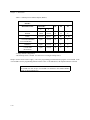
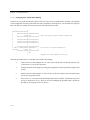
The procedure for setting the RTC time while it is stopped is described in the flow chart and instructions below.
•
•
•••••••••••••••••••••••••••••
•
Stop the Clock
•
•••••••••••••••••••••••••••••
•
•••••••••••••••••••••••••••••
•
Reset the Clock
•
•••••••••••••••••••••••••••••
•
•••••••••••••••••••••••••••••
•
Wait for Reset
•
•••••••••••••••••••••••••••••
•
•••••••••••••••••••••••••••••
• Set the counter registers •
• and alarm registers, as •
•
desired.
•
•••••••••••••••••••••••••••••
•
•••••••••••••••••••••••••••••
•
Start the Clock
•
•••••••••••••••••••••••••••••
•
Clear the Start/Stop bit in Control Register B.
Set the RESET bit in Control Register B.
Do not set the Counter Registers until RESET bit
returns to '0'.
Set the Start/Stop bit in Control Register B.
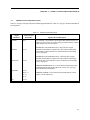
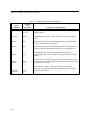
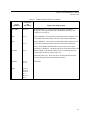
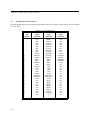
Follow the procedure below to set the RTC time with the clock stopped:
1.
Stop the RTC by clearing the Start/Stop bit (bit 0 of Control Register B) to '0'. The clock will then
be stopped, but no registers will be affected.
2.
Since the 64 Hz Counter Register is a read-only register, it must be reset with the RESET bit. Reset
the 64 Hz Counter Register by setting the RESET bit (bit 1 of Control Register B) to '1'.
3.
Wait for the reset operation to conclude by polling the RESET bit until it has been reset to '0'. The
RTC automatically clears the RESET bit when the reset operation is complete.
4.
Set the Seconds Counter through Year Counter Registers to the desired values. Except for the Day
of Week Counter Register, these registers are encoded in BCD format.
5.
Start the RTC by setting the Start/Stop bit (bit 0 of Control Register B) to '1'.
3-11