1
XSD27ZS-Operating
XSD27ZS
OperatingManual
Manual
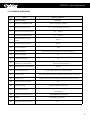
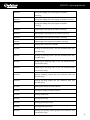
4. Disarming Time (Hours: Minutes)
5. Presetting Scanning: Linkage preset location scanning No. (0-4)
0 means the scanning without linking presetting
6. Pattern Scanning: Linkage pattern scanning No. (04)
0 means the pattern scanning without linking
7. Area Scanning: Linkage area scanning No. (0-4)
0 means the area scanning without linking
8. Alarm Output: On and Off
9. Exit: Exit the submenu without saving the modification
10. Save: Save the settings and exit submenu
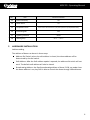
3.3.9 DEFAULT SETTING
Cancel: Cancel and exit the sub menu
Enter: Perform the defaulted setting and exit the sub menu
4
TROUBLESHOOTING
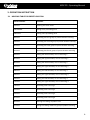
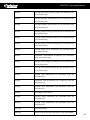
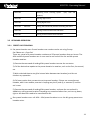
4.1 TROUBLE SHOOTING TABLE
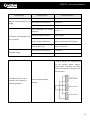
Phenomenon
Possible Cause
Countermeasures
Power damage or insufficient Change it
power
No action or image after
electrifying
Abnormal self-inspection;
image exists but with motor
noise
Error connection of power Correct it
line
Faults of engineering route
Eliminate it
Mechanical fault
Inspect it
Inclined camera
Adjust it
Insufficient power supply
Change the power complying with
the requirements and put the
switch power near the dome
Error video lines
Normal self-inspection but no
Poor video line connection
image
Camera damage
Correct it
Eliminate it
Change it
16