1
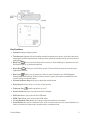
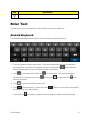
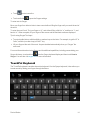
 n Touch the alphabetic keys to enter letters.
n Touch to use uppercase or lowercase. Double-tap n Slide right on prediction.
n Touch and hold n Touch to disable word to change the input language or TouchPal keyboard settings.
to find to go back to enter letters.
to start a new line.
n Touch or hold n Touch to enable word prediction. Slide left on to enter digits, symbols, emoticons and other pre-defined texts. Touch more. Touch n Touch to lock uppercase.
to delete text before the cursor.
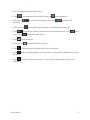
to access the quick settings of the TouchPal keyboard.
n Touch to open text editing options. You can select, cut, copy, paste, and delete text, or move the cursor.
n Touch to hide the onscreen keyboard. You can touch the text field again to show the keyboard.
Device Basics
15