1
tOm Programmer
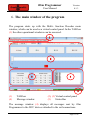
User Manual
Version
0.1.3
9. The CV Operation TAB
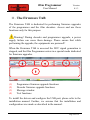
With the features outlined, in this window we can read, modify and
write configuration variables (CVs) of mobile and accessory
decoders.
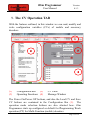
(1)
(3)
Configuration Bar
(2)
Operating Functions (4)
CV Table
Message Window
The Power On/Power Off buttons, and also the Load CV and Save
CV buttons are contained in the Configuration Bar (1). The
operation mode selection buttons are also situated here. tOm
Programmer starts up configured as default for Programming Track
operation (PT) for Multi-Function (mobile) decoders.
Page 15 of 36