1
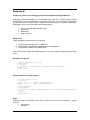
Appendix - A
An Application Note to Blink The Heartbeat LED
uCdimm Application Example
This application note (courtesy of Matthew T. Linehan) makes use of kernel discovered code in
the kernel code that is used to make an LED blink in a heartbeat pattern, even speeding up and
slowing down in response to the 5 minute load average.
kernel heartbeat code is located in:
./uClinux-2.4.x/arch/m68knommu/kernel/time.c:timer_interrupt()
In order to enable this feature, you need to do two things.
1. define the symbol CONFIG_HEARTBEAT during kernel compile time
2. provide machine specific code to turn the LED on and off
First, CONFIG_HEARTBEAT support is needed to be added to the kernel build options. This
heartbeat code is conditionally compiled only if the symbol CONFIG_HEARTBEAT is set at
compile time. The ColdFire arch types typically do not support this option, so we shall add
support for CONFIG_HEARTBEAT by modifying the following file:
./uClinux-2.4.x/arch/m68knommu/config.in
During 'make xconfig' the contents of this file is used to dynamically construct the menu
options displayed. We will add an a new button, which provides an option to turn on
CONFIG_HEARTBEAT.
Optionally you might wish to add custom configuration items into a special 'My Custom Options'
button which makes them easier to find. To do this, add the following text to the end of the
config.in file.
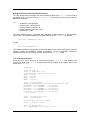
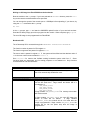
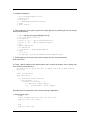
mainmenu_option next_comment
comment 'My Custom Kernel Options'
bool 'Enable the heartbeat feature' CONFIG_HEARTBEAT
end menu
After enabling the config_heartbeat support machine dependent code to implement the
heartbeat needs to be added.
The timer interrupt code expects the mach_heartbeat
function_pointer to point at a machine dependent function for turning the led on/off. The
machine dependent function takes a single int parameter which is either true for on or false for
off.
This code can optionally be stored in a location such as:
./uClinux-2.4.x/arch/m68knommu/platform/5282/config.c
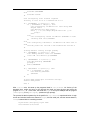
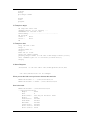
To accomplish this we need to add a new pulse_led() function to config.c this can be
inserted right above the config_BSP() function. On the uC5282 development system, port bit
E[2] is connected to an LED labeled health and is the LED we will reference in this example.
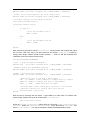
#if defined(CONFIG_HEARTBEAT)
//SETE = Port E Set Register (1s set output bits)
© 2004 ARCTURUS NETWORKS INC
- 49 -
UC5282 REFERENCE GUIDE