1
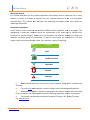
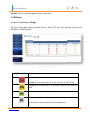
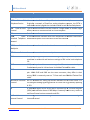
BRI User Manual About this manual This manual describes the Allo product application and explains how to work and use it major features. It serves as a means to describe the user interface and how to use it to accomplish common tasks. This manual also describes the underlying assumptions and users make the underlying data model. Document Conventions In this manual, certain words are represented in different fonts, typefaces, sizes, and weights. This highlighting is systematic; different words are represented in the same style to indicate their inclusion in a specific category. Additionally, this document has different strategies to draw User attention to certain pieces of information. In order of how critical the information is to your system, these items are marked as a note, tip, important, caution, or warning. Icon Purpose Note Tip/Best Practice Important Caution Warning Bold indicates the name of the menu items, options, dialog boxes, windows and functions. The color blue with underline is used to indicate cross cross-references references and hyperlinks. Numbered Paragraphs - Numbered paragraphs are used to indicate tasks that need to be carried out. Text in paragraphs without numbering represents ordinary information. The Courier font indicates a command sequence, file type, URL, Folder/File name e.g. www.allo.com www.allo.com Version 2.0 3