1
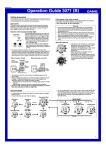
Operation Guide 3070 (B)
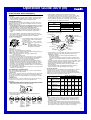
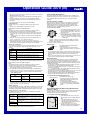
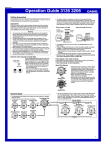
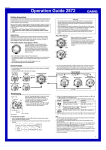
Radio-controlled Atomic Timekeeping
This watch receives a time calibration signal and updates its time setting
accordingly.
• This watch is designed to pick up the time calibration signals transmitted in
Germany (Mainflingen), England (Anthorn), and the United States (Fort
Collins) and the time calibration signals transmitted in Japan.
• Signal reception normally is better at night than during the day.
• Time calibration signal reception takes from two to seven minutes, but in
some cases it can take as long as 14 minutes. Take care that you do not
perform any button operations or move the watch during this time.
• The time calibration signal the watch will attempt to pick up depends on its
current Home City code setting as shown below.
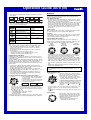
Current Time Setting
This watch adjusts its time setting automatically in accordance with a time
calibration signal. You also can perform a manual procedure to set the time
and date, when necessary.
• The first thing you should do after purchasing this watch is to specify
your Home City (the city where you normally will use the watch). For
more information, see “To specify your Home City” below.
• When using the watch outside the areas covered by the time signal
transmitters, you will have to adjust the current time setting manually as
required. See “Timekeeping” for more information about manual time
settings.
• The U.S. time calibration signal can be picked up by the watch while in
North America. The term “North America” in this manual refers to the area
that consists of Canada, the continental United States, and Mexico.
Home City Code
LON,
PAR, BER, ATH
TYO, SEL
NYC, CHI, DEN, LAX
Transmitter
Anthorn (England)
Mainflingen (Germany)
Fukushima (Japan)
Fukuoka/Saga (Japan)
Fort Collins, Colorado
(the United States)
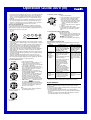
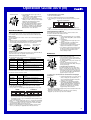
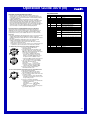
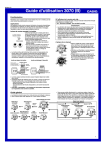
Hour : Minutes 1. In the Timekeeping Mode, hold down E until
the city code starts to flash, which indicates
the setting screen.
2. Press A (east) and C (west) to select the
city code you want to use as your Home City.
LON
: London
PAR, BER : Paris, Berlin, Milan, Rome,
Amsterdam, Hamburg, Frankfurt,
Seconds
Vienna, Barcelona, Madrid
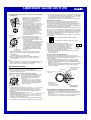
1,500 kilometers
2,000 miles
(3,000 kilometers)
Anthorn
600 miles
(1,000 kilometers)
Fort
Collins
ll
ll
llll llll
llll llll
PM
indicator
60.0 kHz
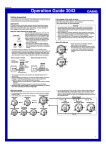
Approximate Reception Ranges
To specify your Home City
City code
Frequency
60.0 kHz
77.5 kHz
40.0 kHz
60.0 kHz
Mainflingen
500 kilometers
500
kilometers
Fukuoka/Saga
500
kilometers
Fukushima
ATH : Athens
TYO, SEL : Tokyo, Seoul
NYC :New York, Detroit, Miami, Boston, Montreal
CHI :Chicago, Houston, Dallas/Fort Worth, New Orleans, Winnipeg, Mexico City
DEN :Denver, El Paso, Edmonton, Culiacan
LAX :Los Angeles, San Francisco, Las Vegas, Seattle/Tacoma,
Vancouver, Tijuana
3. Press E to exit the setting screen.
• Normally, your watch should show the correct time as soon as you select
your Home City code. If it does not, it should adjust automatically after the
next auto receive operation (in the middle of the night). You also can
perform manual receive or you can set the time manually.
• The watch will receive the time calibration signal automatically from the
applicable transmitter (in the middle of the night) and update its settings
accordingly. For information about the relationship between city codes and
transmitters, see “Time Calibration Signal Reception” and “Transmitters”.
• See the maps under “Approximate Reception Ranges” for information about
the reception ranges of the watch.
• You can disable time signal reception, if you want. See “To turn auto receive
on and off” for more information.
• Signal reception may not be possible at the distances noted below during
certain times of the year or day. Radio interference may also cause
problems with reception.
Mainflingen (Germany) or Anthorn (England) transmitters: 500
kilometers (310 miles)
Fort Collins (United States) transmitter: 600 miles (1,000 kilometers)
Fukushima or Fukuoka/Saga (Japan) transmitters: 500 kilometers (310
miles)
• Even when the watch is within the reception range of the transmitter, signal
reception will be impossible if the signal is blocked by mountains or other
geological formations between the watch and signal source.
• Signal reception is affected by weather, atmospheric conditions, and
seasonal changes.
• See the information under “Signal Reception Troubleshooting” if you
experience problems with time calibration signal reception.
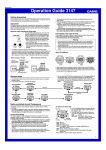
Time Calibration Signal Reception
About Auto Receive
There are two different methods you can use to receive the time calibration
signal: auto receive and manual receive.
• Auto Receive
With auto receive, the watch receives the time calibration signal automatically
up to six times a day. When any auto receive is successful, the remaining
auto receive operations are not performed. For more information, see “About
Auto Receive”.
• Manual Receive
Manual receive lets you start a time calibration receive operation with the press
of a button. For more information, see “To perform manual receive”.
Important!
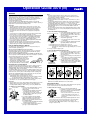
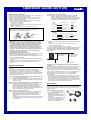
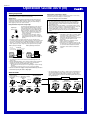
• When getting ready to receive the time calibration signal, position the watch
as shown in the nearby illustration, with its 12 o’clock side facing towards a
window. Make sure there are no metal objects nearby.
1,000
kilometers
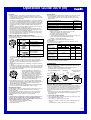
The watch receives the time calibration signal automatically up to six times a
day. When any auto receive is successful, the remaining auto receive
operations are not performed. The reception schedule (calibration times)
depends on your currently selected Home City, and whether standard time or
Daylight Saving Time is selected for your Home City.
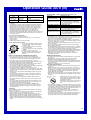
Your Home City
LON
Standard Time
PAR
BER
Standard Time
ATH
Standard Time
• Make sure the watch is facing the right way.
• Proper signal reception can be difficult or even impossible under the
conditions listed below.
Near
household
appliances,
office
equipment,
or a mobile
phone
Near a
construction
site, airport,
or other
sources of
electrical
noise
2:00 am 3:00 am 4:00 am 5:00 am Midnight 1:00 am*
Daylight Saving Time 3:00 am 4:00 am 5:00 am Midnight 1:00 am* 2:00 am*
3:00 am 4:00 am 5:00 am Midnight 1:00 am* 2:00 am*
Daylight Saving Time 4:00 am 5:00 am Midnight 1:00 am* 2:00 am* 3:00 am*
or
Inside a
vehicle
Auto Receive Start Times
1
2
3
4
5
6
1:00 am 2:00 am 3:00 am 4:00 am 5:00 am Midnight
Daylight Saving Time 2:00 am 3:00 am 4:00 am 5:00 am Midnight 1:00 am*
12 o’clock
Inside or
among
buildings
1,000
kilometers
Near hightension
power lines
Among or
behind
mountains
TYO
SEL
NYC
CHI
DEN
LAX
Standard Time
Midnight 1:00 am 2:00 am 3:00 am 4:00 am 5:00 am
Standard Time and Midnight 1:00 am 2:00 am 3:00 am 4:00 am 5:00 am
Daylight Saving Time
*Next day
Note
• When a calibration time is reached, the watch will receive the calibration
signal only if it is in either the Timekeeping Mode or World Time Mode.
Reception is not performed if a calibration time is reached while you are
configuring settings.
• Auto receive of the calibration signal is designed to be performed early in
the morning, while you sleep (provided that the Timekeeping Mode time is
set correctly). Before going to bed for the night, remove the watch from your
wrist, and put it in a location where it can receive the signal easily.
2