1
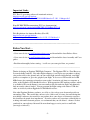
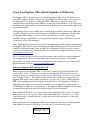
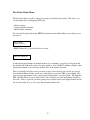
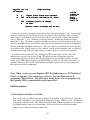
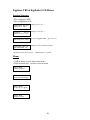
Check Status Menu
Main Menu
Check Status
• HOLD button for 1 second and release to select…
Status: 8.1V
DRO:OFF MAIN:ON
• TAP button to exit
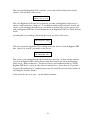
NOTE: If either deployment channel is enabled but there is no continuity,
you will get a beep alert and the channel will flash until you have fixed the
problem. You CANNOT continue a flight if both deployment channels are not
consistent with the state of the channel selection.
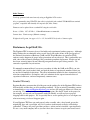
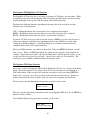
Display/Change Settings Menu
Main Menu
Dsp/Chg Settings
• HOLD button for 1 second and release to select…
Drogue
?Nose-Over
Drogue
Nose-Over
• Hold button for 1 sec.
to edit…
• TAP button to go to
next item…
|
|
|
|
|
|
|
V
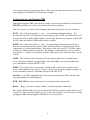
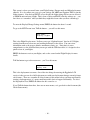
Main:OFF,50-1200
500
|
|
|
|
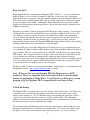
Drogue
?Backup
Drogue
?OFF
• TAP button to go to next value
• HOLD button for 1 sec to select
Main:OFF,50-1200
?500
• TAP button to go to next value
• HOLD button for 1 sec to select
- 51 -