1
Raisecom Technology Co., Ltd
Humidity: ≤90% (25℃ non-condensin
4. How to use
4.1. Description of the Front Panel
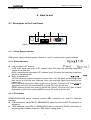
Figure 1. The front panel of RC802/804/806-60B module
4.1.1. Power Supply Indicator
PWR power supply indicator (green): Steady on, built-in power works in good condition.
4.1.2. Alarm Indicators
z
z
Loss of signal in E1 channel:
LLOS local signal loss alarm in E1 channel (red): ON when the receiving signal loss
occurs at the local site.
RLOS remote signal loss alarm in E1 channel (red): ON when the receiving signal loss
occurs at the remote site.
Alarm of optical port:
L/R LOS receiving signal loss alarm in optical link (red): ON when the receiving signal
loss occurs at the local site; Flashing, when the receiving signal loss occurs at the
remote site.
LERR receiving signal error alarm in optical link (yellow): ON when LOF (loss of frame
alignment) occurs or the receiving BER exceeds 10-3 level at local site.
RERR receiving signal error alarm in optical link (yellow): ON when LOF (loss of frame
alignment) occurs or the receiving BER exceeds 10-3 level at remote site.
4.1.3. E1 Interface
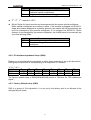
RC802/804/806-60B series modules provide DB9 connectors for dual E1 channels
interface.
z 75Ω unbalanced: using CBL-E1-DB9M/4BNCF cable to provide 2 BNC E1 tributaries in
accessory
z 120Ω balanced: using CBL-E1-DB9M/2RJ45 cable to provide 2 RJ45 E1 tributaries in
accessory. Note: please modify the SW4 default setting firstly.
6