1
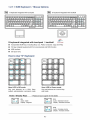
< 2.1 > SUN Keyboard / Mouse Options
Se
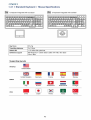
S keyboard integrated with touchpad
Sb
S keyboard integrated with trackball
S keyboard integrated with touchpad / trackball
SOLARIS
■
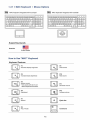
Incorporates SUN keys, including Stop, Cut, Paste, Compose, Copy and Help
■
104 key notepad keyboard with full numerical pad and SUN function
■
USB interface
■
US layout only
How to Use "S" Keyboard
Fn
Num
IJ 7 L L *LI
7
8
9
4
5
6
1
2
3
+
Enter
■ Del
"j
0
*>
C *>
<X'S
V
N u m L E D in Off m o d e
N u m L E D in G r e e n m o d e
Key pad behaves as a SUN Solar
system administration command mode
Key pad behaves as a normal key
pad mode
Audio/ Display Keys
" F9
CD A
n—--M
F9
Audio : Mute
Display : Degauss
* Please ask your supplier for full details
£7
F11
30
C7
F12
P. 7
F11
Audio : Decrease volume
Display : Decrease contrast
F12
Audio : Increase volume
Display : increase contrast