1
PAYMENT CHECKOUT SYSTEM FOR ONLINE LANGUAGE TESTING
TOOL CAST
_______________
A Thesis
Presented to the
Faculty of
San Diego State University
_______________
In Partial Fulfillment
of the Requirements for the Degree
Master of Science
in
Computer Science
_______________
by
Vaidehi S. Shah
Fall 2011
iii
Copyright © 2011
by
Vaidehi S. Shah
All Rights Reserved
iv
DEDICATION
I would like to dedicate this project to my family for their unconditional love,
support, and guidance which helped instilling confidence and zeal in me which I have today.
v
ABSTRACT OF THE THESIS
Payment Checkout System for Online Language
Testing Tool CAST
by
Vaidehi S. Shah
Master of Science in Computer Science
San Diego State University, 2011
The Language Acquisition Resource Center (LARC) program at San Diego State
University (SDSU) develops and supports the teaching and learning of foreign languages in
the United States. LARC’s Computer Assisted Screening Tool (CAST) is a vehicle for better
understanding the skill level of a test taker at some language and correctly placing the test
taker into a curriculum. CAST implements the concept of Software Internationalization as
the user can choose and give tests in 11 languages (Spanish, French, Chinese, Japanese,
Filipino (Tagalog), Arabic (Modern Standard), Iraqi Dialect, Persian (Farsi), Egyptian
Dialect, English as a Second Language, and Hindi languages).
This thesis work deals with the development of an online payment tool in CAST. This
tool will determine if a test taker needs to pay and if so will allow payment using the secure
and reliable PayPal API. The web application is compatible with all the common web
browsers and easy to use for all the test takers.
vi
TABLE OF CONTENTS
PAGE
ABSTRACT...............................................................................................................................v
LIST OF TABLES ................................................................................................................... ix
LIST OF FIGURES ...................................................................................................................x
LIST OF ABBREVIATIONS .................................................................................................. xi
ACKNOWLEDGEMENTS .................................................................................................... xii
CHAPTER
1
INTRODUCTION .........................................................................................................1
1.1 Background ........................................................................................................1
1.2 Objective of Computer Adaptive Screening Test (CAST) ................................2
1.3 Who Should Use CAST Tool? ...........................................................................3
1.4 Existing Cast System and Problems in CAST ...................................................3
1.5 The Problem with Paper Payment......................................................................3
1.6 Purpose of Online Payment Checkout System ..................................................4
1.7 Thesis Organization ...........................................................................................4
2
LANGUAGE LEARNING TOOLS AND ORGANIZATION .....................................6
2.1 ACTFL Guidelines.............................................................................................6
2.2 Types of Testing Methods Used in Online Testing Tools .................................7
2.3 How CAL Takes Test and Rate .........................................................................7
2.4 Types of Testing Methods in CAST ..................................................................9
2.4.1 Payment Tool in CAST............................................................................ 9
2.4.2 Why PayPal? .......................................................................................... 10
3
TECHNOLOGIES USED IN DEVELOPING CAST PAYMENT SYSTEM ............11
3.1 Software Development Tools ..........................................................................11
3.1.1 Java ........................................................................................................ 11
3.1.2 Java Servlets........................................................................................... 12
3.1.3 Oracle ..................................................................................................... 13
3.2 Designing Tools ...............................................................................................13
vii
3.2.1 HTML and CSS ..................................................................................... 13
3.2.2 JavaScript ............................................................................................... 14
3.3 Web/Application Server...................................................................................15
3.4 Technologies and Interaction ...........................................................................15
4
SYSTEM ARCHITECTURE AND DESIGN .............................................................16
4.1 System Architecture .........................................................................................16
4.2 Overall Research Methodology in CAST Payment System ............................18
4.2.1 Types of CAST Test Takers .................................................................. 18
4.2.2 Registration in CAST............................................................................. 18
4.2.2.1 Registration Information ............................................................... 19
4.2.2.2 Returning Users Login .................................................................. 20
4.3 Lifecycle of User Functions .............................................................................20
4.3.1 Admin Functions .................................................................................... 20
4.3.1.1 Rate CAST Test: Rater Functions................................................. 21
4.3.1.2 Test Taker Function ...................................................................... 21
4.3.2 Authorization Module ............................................................................ 22
4.3.3 Test Module ........................................................................................... 22
4.3.4 Confirmation Module............................................................................. 22
4.3.5 Payment Module for the Test Takers ..................................................... 22
4.4 CAST Modules ................................................................................................23
4.5 CAST System Process Flow ............................................................................23
4.6 Database Architecture and Design ...................................................................23
4.7 Database Security.............................................................................................26
5
SYSTEM IMPLEMENTATION AND WORKING ...................................................29
5.1 Placement of Components ...............................................................................29
5.2 CAST Main Screen ..........................................................................................29
5.3 CAST Survey Screen .......................................................................................29
5.4 Test Information Screen ...................................................................................31
5.5 Test Registration ..............................................................................................31
5.6 Test Payment for Paid Organizations ..............................................................32
5.7 PayPal API After Payment Type .....................................................................33
5.8 Test Confirmation ............................................................................................33
viii
5.9 Administrator Login.........................................................................................33
5.10 Administrator Page for Organization Codes ..................................................35
6
TESTING AND INSTALLATION SYSTEM REQUIREMENTS ............................37
6.1 System Configuration and Installation of Required Tools ..............................37
6.2 Testing..............................................................................................................37
6.2.1 Functional System Testing..................................................................... 37
6.2.2 Web Browser Testing ............................................................................ 38
7
CONCLUSION AND FUTURE ENHANCEMENTS ................................................39
7.1 Conclusion .......................................................................................................39
7.2 Future Enhancements .......................................................................................39
BIBLIOGRAPHY ....................................................................................................................41
APPENDIX
A JAVASCRIPT CODE FOR FORM SUBMISSION IN CAST ...................................43
B USER MANUAL .........................................................................................................46
ix
LIST OF TABLES
PAGE
Table 4.1. betaReg: Main Table which Stores all the Information of the Test Takers ............27
Table 4.2. Orgcode: Stores all the Test Information ................................................................28
Table 4.3. Langs: Stores all the Language Selection Values and Codes by the Test
Takers ...........................................................................................................................28
Table 4.4. Test_TRK: Stores all the Test Information along with Test Questions ..................28
x
LIST OF FIGURES
PAGE
Figure 3.1. Technologies used in the CAST system. ...............................................................15
Figure 4.1. Three-tiered architecture. ......................................................................................17
Figure 4.2. Login and registration in CAST. ...........................................................................19
Figure 4.3. System flow and communication between modules. ............................................24
Figure 4.4. Sequence diagram of test registration....................................................................25
Figure 4.5. Sequence diagram for payment in CAST. .............................................................26
Figure 5.1. Main CAST screen. ...............................................................................................30
Figure 5.2. CAST survey screen. .............................................................................................30
Figure 5.3. Test information screen for the test takers. ...........................................................31
Figure 5.4. Test registration form for the test takers................................................................32
Figure 5.5. Test payments for the test takers. ..........................................................................33
Figure 5.6. PayPal API for test payment..................................................................................34
Figure 5.7. Test confirmation page after successfully registering for the test. ........................34
Figure 5.8. Administrator login page. ......................................................................................35
Figure 5.9. Organization codes. ...............................................................................................36
xi
LIST OF ABBREVIATIONS
ACTFL
American Council on the Teaching of Foreign Languages
API
Application Programming Interface
BYU
Brigham Young University
CAL
Center for Applied Linguistics
CAST
Computer Assisted Screening Tool
CSS
Cascading Style Sheets
D-VOCI
Digital Video Oral Communication Instrument
DLI
Defense Language Institute Foreign Language Center
GUI
Graphical User Interface
HTML
Hypertext Markup Language
HTTP
Hypertext Transfer Protocol
IIS
Internet Information Services
LARC
Language Acquisition Resource Center
LRC
Language Resource Center
OPI
Oral Proficiency Interview
PDT
Payment Data Transfer
ROTC
Reserve Officers’ Training Corps
SDSU
San Diego State University
SOPI
Simulated Oral Proficiency Instrument
USAF
United Sates Air Force
USAR
United States Army Reserve
USCG
United States Coast Guard
USMC
United States Marine Corps
USNV
United States Naval Vessel
VM
Virtual Machine
VOCI
Video Oral Communication
xii
ACKNOWLEDGEMENTS
This thesis would have been a very difficult task without the guidance of my thesis
committee chair, Professor Carl Eckberg. I am also grateful to my other committee members,
Professor Mary Ann Lyman-Hager and Professor Joseph Lewis for their continuous support
and time to time guidance towards the improvement of this thesis. I would also like to thank
Mike Pasamonik for his help and support.
1
CHAPTER 1
INTRODUCTION
1.1 BACKGROUND
Language is one of the important mediums of communication and expression of
human thoughts, through belief and consideration. An online language learning tools offer
less formal and more communicative approaches. The need for online language speaking
tests arose because of the growing need for speaking expertise and oral competence in
foreign languages. The Internet and web has played an important role in making these online
tests ubiquitous. Online language speaking tests are given by a third party, such as Language
Acquisition Resource Center (LARC), by recording oral answers to prompts. The test is
saved and evaluated later by an appropriate language expert who then rates the skill level of
the test taker. A common goal of all the online tests is to improve foreign language
assessment procedures in the United States [1], [2].
Retired Senator Paul Simon, commenting on the nation’s needs for trained and
qualified language specialists, indicated that the national need for competent speakers of
world languages is immense, and far from being met. US citizens need skills in foreign
languages to understand and face challenges of multi-ethnic, multi-lingual populations and
cultural diversity, both internationally and domestically, and the nation needs techniques,
based on professional standards and hard linguistic data, to assess those skills. The LARC at
San Diego State University (SDSU) develops and supports the teaching and learning of
foreign languages in the United States. A main purpose of LARC is to pay particular
attention to less commonly taught languages, cross-cultural issues, language skills
assessment, and teacher training. Students with cultural diversity at SDSU benefit from a
variety of courses and considerable language learning support in critical languages [1], [3].
The main aim of LARC in proposing the Computer Assisted Screening Tool (CAST)
project to the Department of Education’s International Research and Studies programs is to
fulfill the urgently important issues of evaluating and retaining well qualified foreign
language teachers in schools, and foreign language experts in the intelligence, medical, and
2
business communities. A consortium of five educational and professional institutions,
Brigham Young University (BYU), SDSU, the Defense Language Institute Foreign
Language Center (DLI), the Center for Applied Linguistics (CAL), and the American
Council on the Teaching of Foreign Languages (ACTFL), collaborated to design, create, and
develop the proficiency online CAST on a nationwide scale [1], [3].
1.2 OBJECTIVE OF COMPUTER ADAPTIVE SCREENING
TEST (CAST)
CAST assesses oral proficiency for 11 languages, for test takers desiring to be
deemed at the advanced level, and gives them rated feedback, to let them know the likelihood
of attaining cutoff scores on an official oral proficiency test, as an addendum to their vitae or
as a necessity for career advancement. CAST test authors have written test items for
advanced tests using evaluated responses from previous tests along the dimensions of
fluency, discourse and accuracy among others.
The primary goal of CAST is to provide the necessary infrastructure needed to create
an online, computer assisted language screening test in a total of 11 languages including
Spanish, French, Chinese, Japanese, Filipino (Tagalog), Arabic (Modern Standard), Iraqi
Dialect, Egyptian Dialect, Persian (Farsi), English as a Second Language, and Hindi. Also
one of the other objectives of CAST is that it should be readily available for use nationwide
or worldwide, and should be useful to students and trainees as a predictor of their success on
an official oral test and as a diagnostic evaluation of their language skills, preparatory to
pursuit of careers or interests that require knowledge of any of the 11 languages.
The CAST diagnostic screening tool accomplishes all of the following:
1. CAST records speech samples from test takers to assure a reliable and fair rating.
2. CAST tests provide feedback to all takers on how their proficiency can be improved.
3. CAST tests can document professional development by an oral test proficiency rating,
assist classroom task development involving oral proficiency based tasks, and help
anchor foreign language instructors to an internationally recognized scale.
4. Provides benchmark information to foreign language programs on the progress of
majors, including foreign language students for whom English is not their first
language.
5. CAST is also effectively used by instructors as a tool to rate students’ oral production
and to increase their own understanding of the criteria by which ACTFL ratings are
given [3], [4].
3
1.3 WHO SHOULD USE CAST TOOL?
The research is based on all the above mentioned needs. ACTFL professional
proficiency standards became the role model for CAST. ACTFL provides a solid description
of examinee skills in oral proficiency and has secured the respect of language professionals
nationwide. CAST meets all the objectives of test takers by a comparatively low-stakes and
inexpensive test that does not require one-on-one interviews. All the Language majors would
be able to take the test to ascertain their proficiency prior to taking the ACTFL Oral
Proficiency Interview (OPI), which would, for most students, be a major investment. Test
ratings are provided based on the ACTFL ratings and test results are emailed back to the test
takers. Based on the feedback, the test taker can decide if he is ready to give the official
ACTFL OPI test or still needs to practice more [3].
1.4 EXISTING CAST SYSTEM AND PROBLEMS IN CAST
In the current CAST system the primary expenses are for the development of the
database structure, for personnel who will dedicate time and will work determinedly on the
project, and for video production, digital storage space, and professional raters who rate the
CAST test, etc. CAST relies on basic materials, technical, and personnel support from each
of the national Language Resource Centers (LRCs) and test data on Defense Language
Institutes (DLIs). So, to manage budget issues and equally distribute funds, CAST directors
raised a proposal for making the currently free CAST test into a paid tool, and the payment
method should be based on a reasonable and reliable payment method [3], [5].
1.5 THE PROBLEM WITH PAPER PAYMENT
Any person can take a language test with CAST, and it will be difficult for some test
takers to issue payment or checks to the institution. Additionally, if the institution collecting
fees needs to maintain records of the test takers manually, and the administrator needs to
handle paper receipts of the test takers every time they register, this can lead to huge pile of
papers.
CAST initially had no system to keep track of all the generated registration codes, as
well as to differentiate among different organizations (government organization,
collaborators and other paid organizations).
4
In order to solve these problems, the CAST project directors needed to build an on
line payment checking system, so that consistently test takers can take tests when needed and
can register online to pay test fees. An online payment system is very convenient. In most
cases, test takers only need to enter account information, such as name and credit/debit card
information in PayPal, and after making payments, they will be given an organization or
registration code.
1.6 PURPOSE OF ONLINE PAYMENT CHECKOUT SYSTEM
A Payment check out system for CAST directly affects the system’s performance, as
previously, the administrator was responsible for making new registration codes after logging
in to the system and for keeping track of codes every time a new test taker registered. It was a
very inefficient and time consuming process. So, it is imperative that the new payment
checkout system of CAST solve all the present problems and generate organization codes for
free as well as for payable organizations and individuals efficiently and effectively. The
system is compatible with all common web browsers, is user friendly and easy to use.
The CAST payment system tool is useful to any organization, as well as individuals
such as students and faculty who want to take an online speaking test. Some of the major
features making the online test payment more useful for speaking tests are as follows:
•
Reliability and Flexibility-Using this web based payment tool, users can pay for the
test based on the category of their organizations more accurately, and can take the test
anytime, providing great flexibility for choosing the test language and the time of the
test.
•
Security-This payment tool maintains high security for user information as it is using
the highly secured PayPal Application Programming Interface (API) for the payment.
•
Access Control-All the users are required to log in to the system before giving the
test, and make a proper test registration request. This web tool can be accessed by all
the test takers from anywhere with a proper internet connection.
1.7 THESIS ORGANIZATION
The rest of this document is organized into the following chapters:
•
Chapter 2: Other Language Testing Institutes and how they solved certain problems.
This chapter discusses the research that is done by other Language Testing Institutes.
•
Chapter 3: Technologies used in CAST system. This chapter gives a brief overview
about the technologies employed in the development of CAST Payment System.
•
Chapter 4: System Design. System architecture and design are discussed.
5
•
Chapter 5: User Interface and Appearance. This chapter provides a brief description
of the User Interface of the Tool.
•
Chapter 6: Installation and Testing. Brief Overview of the tools needed to be installed
in the system before using CAST is provided.
•
Chapter 7: Conclusion and Future Enhancements. The possibility of future
improvement is discussed.
6
CHAPTER 2
LANGUAGE LEARNING TOOLS AND
ORGANIZATION
Globalization is a buzz word understood by many people, students and professionals
alike, who are becoming highly mobile, moving from one region of the world to another.
Learning now often takes place online, and language learning is no different. The field of
language learning has moved towards integrative, performance based assessment by means
of online tests. One of the best examples of a computer based performance assessment test is
of one the world’s largest tests, the Test of English as a Foreign Language (TOEFL)
administered by the Educational Testing Service (ETS) since 1998 [6].
As discussed in Chapter 1, The CAST test uses recognized ACTFL standards to
award scores. Various foreign language proficiency and diagnostic tests have been
constructed which are informed by ACTFL standards, in addition to guidance from the CAL.
CAL uses the Standard Oral Proficiency Interview (SOPI), and this is the best known such
test.
2.1 ACTFL GUIDELINES
ACTFL employs the OPI, a proficiency test, which is currently used worldwide by
academic institutions, government agencies, and private corporations for purposes such as:
academic placement, student assessment, program evaluation, professional certification,
hiring, and promotional qualifications. ACTFL is recommended for college training by the
American Council on Education and it supports language tests in 65 languages. The ACTFL
OPI is a valid and reliable means of assessing how well a person speaks a language, and tests
their language skills. It is a 20-30 minute face-to-face or telephonic interview (OPI) between
a certified ACTFL tester and an examiner. The interview is double rated and an Official
ACTFL Oral Proficiency Certificate stating the candidate’s proficiency level is issued to the
candidate [4].
7
The ACTFL guidelines define proficiency as the ability to use language effectively
and appropriately in real life situations. The guidelines consider all the four level of
proficiency from Novice to Intermediate to Advanced and to Superior. The advanced level
again has Advanced High, Advanced Mid and Advanced Low ratings. Intermediate is further
divided into Intermediate High, Medium and Low, and so also for Novice as High, Medium
and Low [4].
2.2 TYPES OF TESTING METHODS USED IN ONLINE
TESTING TOOLS
SOPI is a tape-mediated test of speaking proficiency. Examinees listen to directions
for speaking tasks from master tape along with the test booklet. Examinees response to each
task is recorded into a separate response tape, which is later evaluated by a test rater
according to the proficiency guidelines developed by ACTFL. Available in 11 language
versions, the SOPI is an audiotape-based test that shows a high (.90 to .94, depending on
version) correlation of results with the OPI [7].
Video Oral Communication Instrument (VOCI) tests are similar to the SOPI, wherein
the response to each task is recorded and presented on the videotape. VOCI was developed at
SDSU and uses audiotape responses [3].
Digital Video Oral Communication Instrument (D-VOCI) tests use digital video to
prompt the test-taker to respond and save their answers on the computer digitally. Then, the
digital video files will be played via the Internet and digital audio responses will be saved to
a remote server. All of a test-takers’ responses will be made available online for a trained
rater to score and automatically generate feedback reports for the test-taker. D-VOCI was
also developed at SDSU’s LARC [3].
Computerized Oral Proficiency Instrument (COPI) tests are a multimedia, computer
administered adaptation of a tape mediated SOPI. SOPI and COPI both are oral proficiency
tests based on the speaking proficiency guidelines of the American Council of the Teaching
of Foreign Languages [3].
2.3 HOW CAL TAKES TEST AND RATE
CAL is a private nonprofit organization established in 1959, and is dedicated to the
study of language and culture and to the application of research on language and culture to
8
educational and social concerns. CAL is the first organization to focus on the identification
of qualified personnel for language-focused professions, professional development for
language teachers, and development of linguistically sound materials for English as a second
language, and other foreign language instruction. Secondly, CAL’s objective is to improve
the teaching of English around the world; to encourage the teaching and learning of less
commonly taught languages; to contribute new knowledge to the field by conducting
language research to resolve social and educational problems; and to serve as a clearinghouse
for information collection, analysis, and dissemination, and as a coordinating agency to bring
together scholars and practitioners involved in language-related issues [8].
The SOPI and COPI exams have been developed by professional test developers at
the Center for Applied Linguistics, working with leaders in the field of foreign language
education, and these tools have been carefully designed to elicit a representative performance
sample of an examinee’s speech in a short period of time. The SOPI is not intended to
replace the oral proficiency interview. It does, however, offer a standardized approach to oral
proficiency testing in situations where it is not feasible to give an oral interview due to the
unavailability of trained testing personnel or lack of time and budget for such testing. The
test is intended for all the test takers at proficiency levels from Novice to High to Superior.
The CAL test begins with a warm-up to make examinees relax and become familiar with
speaking in response to the master tape [8].
The warm up performance-based tasks are based on the following situations and
prompts:
•
Picture-Based Tasks-To respond to these tasks, test takers use illustrations printed in
the test booklet. Picture-based speaking tasks include giving directions, describing
activities in a familiar setting, and telling a story [8].
•
Topic-Based Tasks-These tasks require test takers to explain or discuss a variety of
topics. Topic-based speaking tasks include describing a procedure, presenting
advantages and disadvantages, explaining and defending a point of view, or
describing what would happen if a hypothetical situation were to come true [8].
•
Situation-Based Tasks-In these tasks, the test taker is placed in real-life situations and
is asked to respond to them in a socially and linguistically appropriate manner.
Situation-based tasks include giving advice to a friend, apologizing for having
offended someone, and making a formal presentation to a group [8].
•
Test Assessment in CAL-Serves foreign and English language learners of all ages, in
addition to bilinguals and heritage language learners. CAL also offers a number of
9
professional resources to educators, researchers, and government officials interested
in language assessment. The language testing experts of CAL focus on assessing tests
for language ability in English as a second language, and other foreign languages at
all the levels of education. Test payment in CAL is accepted with Visa/MasterCard
Credit/Debit card.
2.4 TYPES OF TESTING METHODS IN CAST
LARC’s VOCI, or Video Oral Communication Instrument, is similar to the SOPI in
that student responses are recorded on audiotape; it is dissimilar in that test items are
presented on videotape. The online D-VOCI project will further inform work done on the
CAST on these matters. The proposed CAST duplicates some of the functionality of SOPI
and D-VOCI. The ultimate test builds on each of the tests to create a more viable solution to
widely disseminated standardized testing. CAST effort, however, is focused on a
consideration which seems to be original: a database constructed to facilitate language
fluency research, with sound files tagged according to linguistic parameters, research and
discovery of speech variables which may be used to measure fluency, and may additionally
be used in automated assessments of fluency. A CAST database is constructed to facilitate
language fluency research, with sound files tagged according to linguistic parameters,
research and discovery of speech variables which may be used to measure fluency, and may
additionally be used in automated assessments of fluency [3].
Moreover, as an ACTFL pre-OPI test, CAST has the assurance of receiving a
widespread acceptance among the individuals, schools, programs, professional associations,
and language professionals that it would target, provided the test can be constructed to serve
the purpose that is intended. Test takers can be able to take the test from anywhere with
internet access and as the test is “Low-stakes” it is not restricted to proctor setting. Where the
OPI is an expensive and time consuming instrument, these efficient tests will overcome
difficulties of costs and rater time, and thus will be useful in assessing programs and
programmatic developments. Each test given will provide additional data for research in
computational linguistics [3].
2.4.1 Payment Tool in CAST
There are many online API’s available for payment these days. After enough research
CAST developers decided to use the PayPal API because of the following reasons:
10
2.4.2 Why PayPal?
PayPal maintains all the secured transaction ids of the users as well as authenticates
them. It is the faster, safer way to pay and get paid online.
So, CAST developers decided to move forward with the PayPal API because of the
following other advantages:
•
Credit/Debit card security: When a test taker is redirected from CAST to the PayPal
account for test payment, they type in the credit cards and bank accounts they wish to
use for purchases one time on the PayPal secure system. Once that is accomplished,
they never again have to disclose their credit card information online. By paying with
PayPal, they keep their credit card information private, meaning that they can
purchase tests without worrying about a hacker downloading their account data from
their online merchant.
•
Flexibility: Relieves test takers of the embarrassment and hassle of trying to purchase
services online only to have their credit card declined. Because they can set up
multiple bank accounts, debit cards, and credit cards to fund their PayPal account, test
takers can rest assured that their PayPal purchases always go through the first time.
PayPal will then look for funds from test taker’s sources based on the order they
define [9], [10].
11
CHAPTER 3
TECHNOLOGIES USED IN DEVELOPING CAST
PAYMENT SYSTEM
The CAST Payment System is a web application. A web application needs good
technological support to make it work. Essential components for the operation of CAST
server include:
•
Software Tools: Java Servlets, Oracle and JavaScript
•
Designing Tools: Hypertext Markup Language (HTML) and Cascading Style Sheets
(CSS)
•
Web Development Server: Orion
3.1 SOFTWARE DEVELOPMENT TOOLS
All the software development tools used for the development of CAST are described
below.
3.1.1 Java
One characteristic of Java, used in CAST development is portability, which means
that CAST web pages written in the Java language run similarly on all the operating systems.
This is achieved by compiling the Java language code to an intermediate representation
called Java byte code, instead of directly to platform-specific machine code. Java byte code
instructions are analogous to machine code, but are intended to be interpreted by a virtual
machine (VM) written specifically for the host hardware.
Java is simple: Java is easy to write, compile, debug, and learn as it uses automatic
memory allocation and garbage collection.
Java is object-oriented: This feature of java allows creating modular programs and
reusable code.
Java is platform-independent: One of the most significant advantages of using Java in
CAST is its ability to move easily from one computer system to another.
12
The ability to run the same program on many different systems is crucial to World
Wide Web software, and Java succeeds at this by being platform-independent at both the
source and binary levels.
Java is interpreted: An interpreter runs java programs. The programs are compiled
into Java Virtual Machine code called byte code.
The byte code is machine independent and is able to run on any machine that has a
Java interpreter. With Java, the CAST files need only be compiled once, and the byte code
generated by the Java compiler can run on any platform [11], [12].
3.1.2 Java Servlets
Java Servlets are used to create dynamic web pages in CAST.
A Servlet is a Java class that conforms to the Java Servlet API, a protocol by which a
Java class may respond to Hypertext Transfer Protocol (HTTP) requests. Thus, Servlets were
used in java to make dynamic web pages.
A Servlet is an object that receives a request and generates a response based on that
request. The package javax.servlet.http defines HTTP-specific subclasses of the generic
servlet elements, including session management objects that track multiple requests and
responses between the web server and a client. Servlets may be packaged in a Web Archive
(WAR) file as a web application. It implements HTTP 1.0/1.1 protocol and performs session
management for the client [13], [14].
One of the advantages of using servlets in CAST is fast performance and ease of use.
A simple description of the working of java servlets is:
•
When a HTTP request is made, a new process is created for each call. This overhead
of process creation can be very system-intensive, especially when the script does
relatively fast operations. Each request to be handled by a servlet was handled by a
separate Java thread within the CAST Web server process, avoiding more costly
separate process forking by the HTTP daemon.
•
Only a single instance of a class answered all requests concurrently. This reduced
memory usage and made the management of persistent data easy on the CAST server.
An outline of the code is as follows:
public void doGet(HttpServletRequest request, HttpServletResponse response)
throws IOException
{
doPost(request, response);
13
}
public void doPost(HttpServletRequest request, HttpServletResponse response)
throws IOException
{
response.setContentType("text/html");
CASTUtil cu = new CASTUtil();
HttpSession session = request.getSession(true);
PrintWriter output = response.getWriter();
}
3.1.3 Oracle
A database server or Data Base Management System is a software application that
searches and manages data that is stored in databases. The database server used in CAST is
Oracle because of its advantages mentioned below.
Oracle database management tracks its computer data storage with the help of
information stored in the SYSTEM table space. The SYSTEM table space contains the data
dictionary and often indexes and clusters. A data dictionary consists of a special collection of
tables that contains information about all user-objects in the database.
Moreover, Oracle Database software consists of 63 language-versions, so for a
language testing tool, CAST software internationalization was convenient using Oracle [15],
[16].
CAST connects to Oracle using the following java code.
Connection Object:
CASTUtil cu = new CASTUtil();
String username = cu.get(“db.user”);
String password = cu.get(“db.pass”);
return cu.getConnection(username, password);
3.2 DESIGNING TOOLS
The Graphical User Interface tools simplifies the design and look of the
system.HTML and CSS are the tools used for designing CAST system. All the designing
tools are described below.
3.2.1 HTML and CSS
HTML is the predominant markup language used for designing web pages of the
Language Testing Tool CAST. In the CAST tool, HTML allows images and objects to be
embedded and is used to create interactive forms [17], [18].
14
CSS is a style sheet language which is used to describe the look and feel of a
document written in a markup language. CSS separate HTML document content from the
presentation which includes layout, colors and fonts. This separation improves content
accessibility, provides more flexibility and control in the specification of presentation
characteristics, enables multiple pages to share formatting, and reduces complexity and
repetition in the structural content. CAST has inbuilt CSS files and style sheets which are
called from HTML pages for form designing, in order for pages to be more reliable and easy
to work with [17].
Advantages of using CSS in CAST include flexibility and robustness. By combining
CSS with the functionality of HTML, a considerable amount of flexibility is programmed
into content submission forms. This allows CAST developers to apply classes and IDs to the
HTML elements, therefore styling and positioning them according to the pre-defined CSS for
that particular layout type.
3.2.2 JavaScript
JavaScript is a client side scripting language supported in CAST forms. The primary
use of JavaScript is to write functions that are embedded in or included from HTML pages.
JavaScript is used in the CAST application for performing client side validation of the forms.
Since these validations are done on the client side, the tool responds quickly, thus making the
application look more responsive and dynamic. This makes sure that the data is acceptable
before the form is submitted to the server, thereby reducing the number of unwanted page
requests between the web browser and the server. HTML by itself does not have any
functionality and is used only for display purposes. JavaScript is embedded in HTML pages
for adding functionalities like input from validation [19], [20].
Advantages of JavaScript include:
•
Speed. Being client-side, JavaScript is very fast because any code functions run
immediately instead of having to contact the server and wait for an answer.
•
Simplicity. JavaScript is relatively simple to learn and implement for developers and
the form validations used in it are user friendly for test takers.
•
Versatility. JavaScript combines nicely with other languages i.e. JavaScript is
combined with Java in CAST and is also used in a huge variety of java CAST
Servlets.
•
Server Load. Being client-side it reduces demand on the website server.
15
JavaScript code for form submission in CAST is in Appendix A as well as the
Manual in Appendix B.
3.3 WEB/APPLICATION SERVER
A web server is a computer which gets requests from clients (web browsers),
processes those requests and delivers web pages to the respective clients. Examples of
common web servers are Apache, Tomcat, and Internet Information Services (IIS).The
CAST tool uses the Orion Application web server.
There are several benefits of using Orion in CAST: Orion provides the CAST
application with a foundation that is robust, scalable and easy to develop. It focuses on
performance business logic.
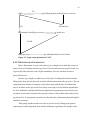
3.4 TECHNOLOGIES AND INTERACTION
Figure 3.1 shows all the technologies used in the development of the CAST tool and
their interaction with each other.
CSS
Design Tools
CAST HTML
Form Validator
JavaScript Form
Validator
Servlets (Http
Response/Request)
Figure 3.1. Technologies used in the CAST system.
Oracle
Database
entry
Server
Side Java
16
CHAPTER 4
SYSTEM ARCHITECTURE AND DESIGN
This chapter describes the high level design of CAST Payment System. There are
several benefits of making a good design. Good design decisions pay when the project size
increases. Some of the benefits of good system design are as follows:
•
It makes project easy to extend without increasing the complexity exponentially.
•
It helps in understanding the software complexity and intercommunication of
components.
•
Entire project can be decomposed into sub modules and each module is handled
separately improving overall quality of the project.
4.1 SYSTEM ARCHITECTURE
The CAST Payment System is a web based application. Payment tool is implemented
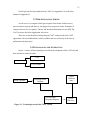
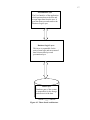
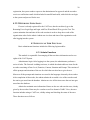
using three-tiered system architecture. Figure 4.1 shows the three tiered architecture which
typically consists of the following levels.
The Presentation Layer (User Interface Layer) runs on the client machine and
provides the Graphical User Interface (GUI). HTML and JavaScript has been used to build
the static web pages for the CAST payment system. Presentation layer displays the data
retrieved from the business layer and it is the responsibility of the presentation layer to
effectively display the retrieved data to the user.
The Business Logic Layer is responsible for all the logical part of the Payment system
which helps in processing the data. Java Servlets has been used in CAST. The main
responsibilities of the business layer in CAST are:
•
Login and Registration Section
•
Administrator Section
•
Payment Tool
•
Software Internationalization of CAST
•
Rating Tool
17
Presentation Layer
The User Interface of the application
which presents data to the user and
accepts input data from the user. It
gets data from user and sends to the
Business Logic Layer.
Business Logic Layer:
This layer is responsible for the
main system logic and movement of
data between data layer and
presentation layer.
Data Layer
Database part of the system
is responsible for the storage
and retrieval of the data.
Figure 4.1. Three-tiered architecture.
18
The Data Layer (Storage Layer) is responsible for storage of data in the database. A
Database Management system (Oracle) is used for the storage. Java Servlets which we use
for the business layer are compatible with the Data layer. Java provides a set of efficient and
effective methods to access data. The following resources are stored in the database:
•
Prompt, situations and all the CAST test questions
•
Data used for the language internationalization
•
Test registration codes and organization IDs
•
User name and password storage of the users
4.2 OVERALL RESEARCH METHODOLOGY IN CAST
PAYMENT SYSTEM
Payment in CAST is done based on the type of test takers. There are three different
types of test takers in CAST which are described below.
4.2.1 Types of CAST Test Takers
Government Organization consists of Reserve Officers’ Training Corps (ROTC),
United States Marine Corps (USMC), United Sates Air Force (USAF), United States Army
Reserve (USAR), United States Naval Vessel (USNV) and United States Coast Guard
(USCG). All the Government Organizations will be given free CAST tests.
Collaborators are the organizations which are affiliated with SDSU for research.
Collaborators pay $20 per test for simple as well as detailed feedback.
Individual/Group are all the other Organizations or test takers who are not affiliated
with SDSU and want to take a CAST test. Individual have to pay $30 for simple feedback
and $40 for detailed feedback and groups have to pay $35 for simple feedback and $40 for
detailed feedback. This payment schedule could change over time.
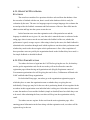
4.2.2 Registration in CAST
Registration and Login happen in separate files called as Login and registration in
CAST which is shown in Figure 4.2. If the User is already registered in CAST then they
bypass the registration system by typing up their organization ID and Test ID and
RegLogin.java servlet is called. If test taker is not registered for the test then the test taker
uses the regular registration servlet Reg.java which has Reg.html form file.
19
No
RegId
Test Registration (GetRegCode.java servlet)
Yes
GetCode.java
Registration Form (Reg.java servlet)
sdsuIc.java
Test ID
RegLogin.java
Confirmation Email to Test Takers
Figure 4.2. Login and registration in CAST.
4.2.2.1 REGISTRATION INFORMATION
Before Registration every test taker has to give a sample test to check the system set
up as well as to be familiar with the type of test. First, test takers need to register for the Test
to get OrgId if they don’t have one. OrgId is mandatory for every test taker in order to
proceed for the test.
In order to get OrgId, test takers have to fill up the Test Registration form and after
filling up the form, the test taker gets an email with the organization code given in it. The test
registration form consists of categories of test takers along with the type of feedback they
need. Test takers need to pay for the Test if they are not part of a Government Organization.
So, for Collaborators and Individual/Group Organization (organizations which need to pay)
test takers are directed to PayPal for the payment. Either a credit or debit card can be used to
pay for the Test. After payment, test takers are directed to the confirmation page and OrgId is
emailed to test takers.
After getting OrgId test takers are ready to give the test, by filling up the general
requirements on the Registration form with the mandatory registration code (OrgId). After
20
registration, the system sends a request to the administrator for approval and the test-taker
receives a notification email which includes his emailId and testId, with which he can login
to the system and proceed for the test.
4.2.2.2 RETURNING USERS LOGIN
If a user is already registered for the CAST test, then he can directly go to the
Returning Users Login Page and login with Test ID and Email ID to give the Test. The
system maintains date and time of the code creation in order to keep the records of the
organization codes for the admin. Admin can view date and time of the organization code
after logging into the system.
4.3 LIFECYCLE OF USER FUNCTIONS
Basic administrator functions include the following login modules.
4.3.1 Admin Functions
This module is responsible for managing all the test takers information and access
rights of the CAST System.
Administrator login: After logging in to the system, the administrator performs a
series of tasks. The first task is adding test items, in which the admin adds test items for the
test taker consisting of Item Level, Function, Content, Situation and Prompt. This consists of
all the prompts and situations of the test for which the test taker has to give the test.
Moreover all the prompts and situations are stored in the languages chosen by the test taker.
After completion of these tasks, the admin submits the recorded voice of the test taker and
the entries get stored into the database. Admin can view all the items once the test item gets
stored into the database.
Admin also maintain rater information. Raters are the one who rate the tests, already
given by the test taker. Rater may be a teacher as well as alumni of LARC. Now, the rater
function includes rating a CAST test, validity ratings and checking the status of the rater.
These functions are as follows.
21
4.3.1.1 RATE CAST TEST: RATER
FUNCTIONS
The actual test considers five questions which are selected from the database. Once
the test-taker is finished with the test, data is saved in the database which is ready for
evaluation by the rater. The rater is a language expert in a target language who evaluates the
test and provides the feedback comments and final outcome of the test. Rater falls into the
admin section and logs into the system to rate the test.
In this function raters enter the registration code of the particular test and the
language in which the test is given. So, once the code is entered the rater is redirected to the
rating page where in raters rate the test and enters the feedback of the test, whether the
performance is good, average or poor. After rating is done by the raters, the final feedback is
submitted to the test takers through email which explains to test takers their performance and
whether they need to take the test again or their performance is fine. After completion of
these procedure raters are paid by the organization based on the feedback they have rated i.e.
for simple feedback or detailed feedback.
4.3.1.2 TEST TAKER FUNCTION
Test takers also have to login into the CAST before giving the test. So, for that they
need to get the organization code for the test as they will not be allowed to enter the
registration page without having an Organization code (Regid). Registrants consist of
Government organizations who will be giving the test for free, Collaborators affiliated with
LARC and Individual/Group organization.
For Individual/Group type, test takers go to the organization registration page in
which they have to enter the organization name or whether they are giving the test
individually. Group type may be for the one who is purchasing bunch of tests together for the
test takers in their organization or an individual who is taking test. After that test takers need
to enter the number of tests and the feedback (simple or detailed) based on which they want
to be rated. After submitting the form, test takers will be given the organization code by
email.
Test takers can now register for the test from the main registration page. After
entering general information in the form along with the registration code, test takers will be
registered to give the test.
22
Test taker will get an email with Test ID with which he will be able to retrieve his test
again and so he does not need to register again for that.
So, the test taker is free to take the test; before proceeding further for the test, the test
taker needs to give one sample test to get familiar with the type of Test.
Once the evaluation is done a test-taker receives the notification of the result by
email.
4.3.2 Authorization Module
This module is responsible for checking test takers for authenticity and authorization
into the system. If user name and password of the test taker matches with that in the database
then only users are allowed to give the test else they are redirected back to the registration
page.
4.3.3 Test Module
After authorization, the test taker is directed to the test and for that, first he has to
give a warm up test to get familiar with the test. Test taker also needs to test the system on
which he is giving the test and should install all necessary modules.
4.3.4 Confirmation Module
After test completion, test taker is directed to the completion of the test page which is
the confirmation page and the test will be rated by the raters in the given time.
4.3.5 Payment Module for the Test Takers
All the collaborators and other paid organizations (Individual/Group) give a paid test
using PayPal.
PayPal Redirection: For the test takers, who need to pay for the Test, first they have
to fill up the form and as per the selection of the payment option they are redirected to
PayPal. PayPal maintains Transaction ID’s of every test taker and keeps track of the test
takers.
For maintaining secure payments PayPal Data Transfer is used from PayPal
Development Forum. Payment Data Transfer (PDT) is a secure method to retrieve the details
about a PayPal transaction so that you can display them to your customer. It is used in
combination with Website Payments Standard, so that after a customer returns to your
23
website after paying on the PayPal site, they can instantly view a confirmation message with
the details of the transaction. PDT is not meant to be used with credit card or Express
Checkout transactions. This page describes how PDT works and how to configure your
account to use PDT [9], [10].
Use of authorization Token for security reasons: In order to maintain track of valid
test payees and for every authorized payment, PayPal gives an authentication token to the
admin account holder. Here is some code.
String auth_token = “AZKRGqd23CipgfEQSdmYOXDRwmokpJmcZygWHuONEypzXUF-M--YsbCIwW”;
str = str + “&at=“ + auth_token;
4.4 CAST MODULES
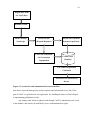
System flow and communication between modules is shown in Figure 4.3.
4.5 CAST SYSTEM PROCESS FLOW
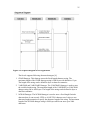
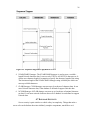
Sequence Diagram: This diagram shows operations and interactions between all the
processes in CAST system.
1. Test Registration (free test takers)-Test taker fills the form with all the Test
information. Administrator checks the information entered by the user, whether it is
correct or not, and after that sends user confirmation email of the Organization code.
Figure 4.4 shows the sequence diagram of test registration.
2. Payment Registration (for paid test takers)-Test taker enter all the test information
and all the payment details and after submission of the form the administrator verifies
all the details and once accepted, the user pay for the Test and confirmation email is
sent to the test taker with Registration code. The test taker can now give the test as
shown in sequence diagram for payment in CAST in Figure 4.5.
4.6 DATABASE ARCHITECTURE AND DESIGN
Database Architecture is the set of specifications, rules, and processes that shows how
data is stored inside the database and how data are accessed by the components. Database
Architecture includes data types, relationships, and naming conventions for all the data
fields. It involves anything that defines the nature of the data, the structure of the data, or
how the data flows.
CAST Database is designed keeping into consideration all the areas needed to be
implemented and various operations to be performed as many test takers will be accessing a
CAST test simultaneously. The existing CAST System is using Oracle database. Oracle is the
24
Registration form
for Test Takers
Dynamic HTML
Form Validator
HTTP Servlets
PayPal API (Payment
JavaScript
(Request/Response)
System) for paid tests
Free Code Generation
Central CAST
for Government
Database
Organization
Test Takers Registration
Confirmed
Test Takers are redirected to
the test
Figure 4.3. System flow and communication between modules.
best choice to provide homogeneity and to keep back-end uniform and secure. One of the
parts of CAST is to globalize the web application. So, multilingual feature of Oracle helped
in implementing globalization easily.
Any changes (add, delete or update) made through CAST by administrators are saved
in the database, and can only be modified by a user with administrative rights.
25
Figure 4.4. Sequence diagram of test registration.
The Oracle supports following character datatypes [4]:
1. CHAR Datatype: This datatype stores the fixed-length character string. The
maximum length of the CHAR datatype string is 2000 bytes with default as 1 byte.
The length of the string can be defined in byte or character semantics.
2. VARCHAR and VARCHAR2 Datatype: The VARCHAR2 datatype is used to store
the variable-length string. The maximum length of the VARCHAR2 or VARCHAR
dataype string can be 4000 bytes. The length of the string can be defined in byte or
character semantics.
3. NCHAR Datatype: The NCHAR datatype is used to store a fixed-length Unicode
character data. It can use only UTF8 or AL16UTF16 character sets. It always uses
character length semantics to specify the character length of the string. The maximum
length of the NCHAR datatype string is 2000 bytes which can store up to 2000
characters.
26
Figure 4.5. Sequence diagram for payment in CAST.
4. NVARCHAR2 Datatype: The NVARCHAR2 datatype is used to store a variablelength Unicode character data. It can use only UTF8 or AL16UTF16 character set. It
always uses character length 16 semantics to specify the character length of the string.
The maximum length of the NVARCHAR2 datatype string is 4000 bytes which can
store up to 4000 characters.
5. CLOB Datatype: CLOB datatype can store up to 8 terabytes of character data. It can
store Unicode character data, if the database is defined to support Unicode data.
6. NCLOB Datatype: NCLOB datatype can store up to 8 terabytes of national character
set data1. It can store unicode character data even if database is not defined to support
Unicode data.
4.7 DATABASE SECURITY
Server security is quite similar to vehicle safety in complexity. Things that make a
server safe can be broken down into infinitely complex components, much like a car’s
27
security features. For example, when asked to think about what makes a car safe, most people
will list the common safety features found in modern cars: safety belts, air bags, stopping
distance, perhaps a spare tire and flares for roadside emergencies.
Server security is quite similar to vehicle safety in complexity. Things that make a
server safe can be broken down into infinitely complex components, much like a car’s
security features.
CAST Database is secured from SQL Injections as various precautionary measures
are taken to secure the database. Input is inserted into the database after filtering all the
queries. Moreover, a java Prepared Statement is used to insert secured data inside the
database.
Prepared Statement has the following code:
PreparedStatement psmt = conn.prepareStatement(““);
psmt.setString(1,””);
ResultSet rs = psmt.executeQuery();
A prepared statement executes quickly when called repeatedly.
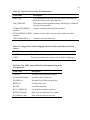
Table Descriptions: The CAST system uses a set of tables; the CAST Payment
System database is comprised of four tables: betaReg table, Orgcodetable, Langs and
Test_Item. The characteristics of each table are detailed through Tables 4.1 through 4.4.
Table 4.1. betaReg: Main Table which Stores all the Information of the Test Takers
Field Name
Description
USERNAME
Username of the test takers.
ADDRESS
Address of the test takers in Street, City and State.
USERID
Userid of all the test takers
PASSEDTECH
Password of the test taker
TESTID
Test id of all the test takers which is unique for all the test takers
LANG
Test language of the test takers.
RATED
Rated field stores the tests which are rated by the raters
EMAIL
Email Id of all the test takers is stored in this field
TESTDATE (date)
Test date of the test
ORGCODE (vc)
Organization code of the test taker which is the unique and
mandatory field for all the test takers to give online test.
28
Table 4.2. Orgcode: Stores all the Test Information
Field Name
Description
ORGCODE
The organization code of the test taker which is necessary for
all the test takers to give the online test.
ORG_DESCRIP
Description of the organization along with the type of feedback
and type of test payment.
NUMRATINGSREQD
(number)
Number of ratings required by the test takers.
NUMCODESALLOWED Number of codes allowed to give test to all the test takers.
(number)
CREATORNAME (vc)
Username of all the test takers.
Table 4.3. Langs: Stores all the Language Selection Values and Codes by the Test
Takers
Field Name
Description
VALUE
Test value of the language used.
CODE
Primary key which stores unique code of all the 11 languages
Table 4.4. Test_TRK: Stores all the Test Information along with
Test Questions
Field Name
Description
TESTID
TESTID of the registered test takers
QUESNUM (number)
Question number in the test
QUESID (vc)
Question ID of all the test questions
RESPLOC
Location of the test
RATED
List all the rated tests
RAT_COMPLETE
List of all the complete rated tests
RESPDATE (date)
Date of the test taken by the test taker
RATEDATE (date)
Date of the test rated by the rater
29
CHAPTER 5
SYSTEM IMPLEMENTATION AND WORKING
This chapter addresses the implementation and working of the CAST Payment
System. The Screen shots of the GUI of each functional unit have been provided. The initial
part of the chapter explains the CAST Test system and Registration part. The next part
describes the payment tool in CAST.
5.1 PLACEMENT OF COMPONENTS
Before coding, it is the good practice to review some basics of good web site design
and check out the sources of inspiration below. When the coding is done and users are happy
with the design, developers check out a hosting service and submit the site.
The very first step in the implementation of the CAST tool is the page structure. All
the meaningful information is displayed in the limited space on the screen. All the features
should be from one common web page and should be user friendly. The entire research is
done by gathering information about the page structure in the web application. The screen
layout is designed with a test menu on a left side bar and information pages on the right side.
The practical implementation of all the tools discussed in Chapter 3 is shown in this chapter.
The structure of the main page is shown in Section 5.2. All the other screens used in
the development of Payment Tool as well as Registration in CAST tool are shown below:
5.2 CAST MAIN SCREEN
Figure 5.1 shows the the main CAST screen which is implemented with HTML and
JavaScript. The left side bar shows the menu with components: CAST Test (start CAST
Test), Returning Users Login (already registered test takers), frequently asked questions,
Email to CAST tech support for any further questions and information.
5.3 CAST SURVEY SCREEN
The survey screen displays the sample prompt for test takers to listen just for a trial so
that the test taker can be familiar with the test which is shown in Figure 5.2 as CAST
30
Figure 5.1. Main CAST screen.
Figure 5.2. CAST survey screen.
31
survey screen. After that when test taker clicks on Continue to CAST Assessment, and a
popup, as shown on the screen below, is raised; if the test taker has a registration code then
he will click ok and be redirected to the registration page, and if the test taker does not have a
registration code, then he clicks on cancel and is redirected to the test registration page from
where a registration code is obtained. The test registration for an organization/individual
which is discussed in Chapter 4 is practically implemented and shown here in the screen shot.
5.4 TEST INFORMATION SCREEN
The task of the webpage which is shown as test information screen for the test takers
in Figure 5.3 is to provide test information to all the test takers. The main aim is to list types
of organizations (Government, Collaborators and Other paid organizations), feedback and all
the other information. The test information page is designed using forms in HTML.
Figure 5.3. Test information screen for the test takers.
5.5 TEST REGISTRATION
The test registration page for signup is designed using forms in HTML, with
JavaScript for client side validation which is shown as test registration form for the test
32
takers in Figure 5.4). Various fields exist in the registration form, some of which are optional
and some of which are mandatory fields, shown with *. A user can get an organization code
by clicking on continue (Government Organization) or pay now (Paid test takersCollaborators and All other paid organizations) buttons. If the user has already signed up and
has an organization code then he or she needs to go to the registration login to give the test.
Figure 5.4. Test registration form for the test takers.
The registered user can now give the test with an organization code after getting a
registration code confirmation message through email.
5.6 TEST PAYMENT FOR PAID ORGANIZATIONS
For the Collaborators and Individual/Group payment type, test takers are directed to
the payment page shown in Figure 5.5,Test Payment for the test takers. Type of feedback and
organization can be chosen from the drop down list and the Buy Now button redirects the test
taker to the PayPal API for payment.
33
Figure 5.5. Test payments for the test takers.
5.7 PAYPAL API AFTER PAYMENT TYPE
After choosing type of payment test taker is redirected to PayPal API for test
payment. test taker can create account in PayPal if he do not have one or even can pay
without having account. Paypal API for the test payment is shown in Figure 5.6.
5.8 TEST CONFIRMATION
Test confirmation page, where test takers are redirected after successfully completing
test information in test registration, and registration codes are emailed to the test takers which
is shown as Test confirmation page after successfully registering for the test in Figure 5.7.
5.9 ADMINISTRATOR LOGIN
Administrator login page in Figure 5.8 shows all the administrators with username
and password who will be able to enter into the CAST system.
34
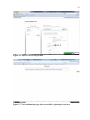
Figure 5.6. PayPal API for test payment.
Figure 5.7. Test confirmation page after successfully registering for the test.
35
Figure 5.8. Administrator login page.
5.10 ADMINISTRATOR PAGE FOR ORGANIZATION CODES
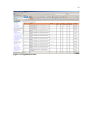
All the generated organization codes are stored in the super user functions under
create new org code. All the fields are clearly shown in the screen with the time of creation
of the code which is shown as Organization codes in Figure 5.9.
36
Figure 5.9. Organization codes.
37
CHAPTER 6
TESTING AND INSTALLATION SYSTEM
REQUIREMENTS
This chapter explains the specific configuration for the settings in the system,
installation of tools and usage of CAST payment system. The chapter also lists all the tests
performed in the application.
6.1 SYSTEM CONFIGURATION AND INSTALLATION OF
REQUIRED TOOLS
All the tools used in developing CAST system are reliable and easy to use. The tools
and installation used for developing CAST system are described below:
•
The CAST online tool has been developed on Microsoft Visio with service pack 2.
•
For overall development of the CAST Tool Java Servlets technology is used and
Oracle is used for the backend. Java plug-in is required to install in the system to run
the test pages.
•
Orion development server has been used on the development machine.
•
In addition to all these, a quick time plug in and flash plug-in need to be installed in
the machine in order to get media files for test prompt and questions as well as to
record the test.
•
The most common web browsers have been tested, and are Microsoft Internet
Explorer, Mozilla Firefox, Google Chrome and Apple Safari. All the web browsers
should have JavaScript enabled to view the web pages properly.
6.2 TESTING
As the CAST payment system is an online tool, thorough testing has been done with
the system for checking the security and reliability of the system. All the web pages in CAST
use Unicode-8 encoding to support all the nine test languages.
6.2.1 Functional System Testing
Functional System testing is testing conducted on a complete, integrated system to
evaluate the system's compliance with its specified requirements. Thorough system testing in
CAST is done on the following basis.
38
•
The Organization Code Generation has been tested thoroughly so that every
individual test taker or organization gets a unique organization code after Test
Registration.
•
Login: All the users (Admin, Raters and Test Takers) logins have been tested so that
all the users can be able to enter into the system securely.
All the other basic functionality testing of the following features has been done and the tool
is working properly:
•
Verifying the type of test takers based on the user selection
•
Generating proper test feedback as per user requirement
•
Redirecting test takers to the proper confirmation page and emailing organization
codes after test registration.
6.2.2 Web Browser Testing
As CAST is an online testing tool, it will be used by any test takers from anywhere
and so CAST tool has been tested successfully with all the commonly used browsers. These
browsers include Microsoft Internet Explorer Version 6.0, Mozilla Firefox 6.0, Apple
Safari 3.1.2 and Google Chrome. The tool works perfectly fine with all the web browsers as
well as content of the web pages, images and logical placement remains stable.
39
CHAPTER 7
CONCLUSION AND FUTURE ENHANCEMENTS
This chapter draws conclusions about the work done in the CAST Tool and some
enhancements in the future for CAST.
7.1 CONCLUSION
This thesis sets an initiative towards creating a Payment system for CAST and
successfully implementing it on the server. Simple design and easy to understand features
will motivate users to share information. It can be accessed from any machine that has
internet connection. The tool also supports payment and test in all the 11 languages. All
technologies that are used for enhancing problem module and implementing payment system
are open-source technologies like JavaScript and CSS. Thus, no special software’s or no
extra cost is required for using the CAST module.
It was discovered that considerable discussion and numerous meetings are useful in
planning a highly interactive tool such as CAST. Code testing is difficult because the tool
designers must be happy as well as three categories of users. Communication issues were the
stumbling blocks for solving the issues.
7.2 FUTURE ENHANCEMENTS
CAST tool has the feature of Software Internationalization which enables the test
takers to give tests in any of the 11 languages mentioned in Chapter 1. However, due to time
constraints and the defined scope of the project, some features could not be implemented.
•
The Payment System in CAST tool can be extended in many ways. Some of the
future enhancements are listed below:
•
Although the PayPal API which is secured and reliable API are used for the payment
of the CAST test, the tool can be further extended by CAST developers to have its
own API.
•
The Administrator Account is used for the payment of the test in CAST which can be
changed to LARC’s own account which should keep track of all the test payments
and organization types.
40
•
The Payment system in the CAST tool can also be globalized further so that test
takers from any country can register for the test by paying online and could be able to
give CAST test.
•
Users could be allowed the register using web pages in their native language.
•
The set of languages can be expanded from the current 11 languages.
•
The CAST test currently is a computer based application which can be developed into
a mobile application which will improve the overall language learning process.
41
BIBLIOGRAPHY
[1]
Language Acquisition Resource Center. Welcome to the LARC, 2010.
http://larc.sdsu.edu/, accessed Sept. 2010.
[2]
Foreign Language Resource Center. LRC Background Information, 2011.
http://nflrc.msu.edu/lrcs.php, accessed July 2011.
[3]
Language Acquisition Resource Center. CAST, 2010. http://larc.sdsu.edu/cast/,
accessed Sept. 2010.
[4]
American Council on the Teaching of Foreign Languages. ACTFL Certified
Proficiency Testing Programs (Oral and Written), 2010.
http://www.actfl.org/i4a/pages/index.cfm?pageid=3642, accessed Sept. 2010.
[5]
http://cast.sdsu.edu, accessed July 2010.
[6]
Valerie A. Malabonga and Dorry M. Kenyon. Multimedia Computer Technology and
Performance Based Language Testing, 1999. www.ldc.upenn.edu/acl/W/W99/W990404.pdf, accessed Aug. 2011.
[7]
Center for Applied Linguistics. Testing/Assessment, 2010.
http://www.cal.org/topics/ta/sopi.html, accessed July 2011.
[8]
Center for Applied Linguistics. Homepage, 2010. http://www.cal.org/, accessed
Aug. 2011.
[9]
PayPal. Homepage, 2010. https://www.paypal.com/, accessed Oct. 2010.
[10]
PayPal. IPN and PDT Variables, 2011. https://cms.paypal.com/us/cgibin/?cmd=_rendercontent&content_ID=developer/e_howto_html_IPNandPDTVariables, accessed
Oct. 2010.
[11]
Wikipedia.org. Java Programming Language, 2010.
http://en.wikipedia.org/wiki/Java_%28programming_language%29, accessed Dec.
2010.
[12]
Cay S. Horstmann and Gary Cornell. Core Java 2 volume I-fundamentals. PrenticeHall, Saddle River, NJ, 1999.
[13]
Wikipedia.org. Java Servlet, 2011. http://en.wikipedia.org/wiki/Java_Servlet,
accessed Oct. 2010.
[14]
Jayson Falkner and Kevin Jones. Servlets and JavaServer pages. Addison-Wesley,
Boston, MA, 2003.
[15]
Wikipedia.org. Oracle Database, 2011. http://en.wikipedia.org/wiki/Oracle_Database,
accessed Oct. 2010.
42
[16]
Oracle. Interface OracleConnection, 2009.
http://download.oracle.com/docs/cd/E11882_01/appdev.112/e13995/oracle/jdbc/Orac
leConnection.html, accessed Oct. 2010.
[17]
Steven M. Schafer. Web standards programmer’s reference: HTML, CSS, JavaScript,
Perl, Python, and PHP. Wiley Pub, Indianapolis, IN, 2005.
[18]
W3Schools. Homepage, 2010. www.w3schools.com, accessed Sept. 2010.
[19]
Wikipedia.org. JavaScripts, 2011. http://en.wikipedia.org/wiki/JavaScripts, accessed
Jan. 2011.
[20]
Ray Harris. Murach’s Javascript and DOM scripting. Mike Murach & Associates,
Fresno, CA, 2009.
43
APPENDIX A
JAVASCRIPT CODE FOR FORM
SUBMISSION IN CAST
44
form name="form1" method="post"
<tr>
<td colspan="2">
<p class="style1">
<b>Choose the type of organization you are in and then fill out the form:</b></p>
<p class="style1">
Organization<input type="radio" name="item1" value="Free Registration for
organization"checkedonclick="document.form1.paynow.disabled=true;
document.form1.Continue.disabled=false; document.form1.id.disabled=false;"></input>"
Researchers/Collaboraters<input
type="radio"
name="item1"
value="researchers or collaboraters payment"
onclick="document.form1.paynow.disabled
false;document.form1.Continue.disabled=true;document.form1.id.value='';document.form1.i
d.disabled=true; \"></input>
Individual/Group<input type="radio" name="item1" value="Individual or Group payment"
onclick="document.form1.paynow.disabled=false;document.form1.Continue.disabled=true;
document.form1.id.value='';document.form1.id.disabled=true;\" ></input>"
</p>"
<table border=\"0\" width=\"100%\">
<tr>
<td>*Username</td>
<td><input name="username" type="text" id="username" size="50" /></td>
</tr>
<tr>
<td>*Email Id </td>
<td><input name="zip" type="text" id="emailid" size="50" /></td>"
</tr>
<tr>
<td>*Number Of Tests </td>
<td><input name="not" type="text" id="not" size="50" /></td>
</tr>
<tr>
<tr>
<td>*Number Of Ratings Required for this Test </td>
<td><input name="nor" type="text" id="nor" size="50" /></td>
</tr>
<tr>
<td>*OrgId</td>
<td><input name="id" type="text" id="id" size="50" /></td>
</tr>
<tr>
<td><font size="-2">OrgId field is compulsory and enabled only for Government
Organization.</font></td>
</tr>
<tr align="right">
<tr><td><b>Feedback:</b></td></tr>
45
<td>Simple Feedback<input name="feedback" type="radio" id="fb" size="50"
value="simple feedback" checked /></td>
<td>Detailed Feedback<input name="feedback" type="radio" id="fb1" size="50"
value="detailed feedback" /></td>
</tr>
<tr>
<td><input
type="submit"
name="Continue"
id="Continue"
value="Continue" onclick="return func2(this.form)"/></td>
<td><input
type="submit"
name="paynow"
id="paynow"
value="paynow"
disabled="disabled" onclick="return call(this.form)"/></td>
</tr>
<tr>
<td><p>*All the fields are compulsory</p></td>
<td> </td>
</tr>
</table>
</td>
</tr>
</form>
46
APPENDIX B
USER MANUAL
47
CAST consists of three types of Test takers:
Government Organization consists of Reserve Officers’ Training Corps (ROTC),
United States Marine Corps (USMC), United Sates Air Force (USAF), United States Army
Reserve (USAR), United States Naval Vessel (USNV) and United States Coast Guard
(USCG). All the Government Organizations will be given free CAST tests.
Collaborators are the organizations which are affiliated with SDSU for research.
Collaborators pay $20 per test for simple as well as detailed feedback.
Individual/Group are all the other Organizations or Test Takers who are not affiliated
with SDSU and want to take a CAST test. Individual have to pay $30 for simple feedback
and $40 for detailed feedback and groups have to pay $35 for simple feedback and $40 for
detailed feedback. This payment schedule could change over time.
The servlets used for the development of CAST payment system are:
GetRegCode.java-The main form of the system with all the required fields
GetCode.java- The main logic for the Registration code generation and payment is written in
this servlet. The main method here in the logic which is used to generate Registration code is:
addregcode(request, cu, output, session, response).Server side validation for all the fields are
also done in GetCode.java.
Username is validated with isToken() method which allows only A-Z,a-z,0-9,(,),.,’,_,- only
characters.
Organization id which is required for Government organization is validated with isToken2()
method in GetCode.java() and it allows A-Z,a-z,0-9,-,_,(,) only characters.
Number of tests and Number of ratings are validated using isToken1() method which allows
only numbers from [0-9].
Email Id validation is done using isToken3() method. Regular expression ["^([a-zA-Z0-9_.])+@([a-zA-Z0-9_.-])+\\.([a-zA-Z])+([a-zA-Z])"] is used for the email id validation.
addtocart.java servlet is written for the payment part of the CAST which is called only with
Collaboraters and Individual/Group radio button click.It validates all the data coming for the
payment part and generates cookie for the data .Cookie expires after every browser close
event.
For checking Sql Injections cu.sanitizeInput() method is created in CastUtil.java, which
checks all the data and filter it in order to avoid security threats.