1
User Manual
Draft 1.1
4 December 2001
This manual, as well as the software described in it, is furnished under license and may
only be used or copied in accordance with the terms of such license. The information in
this manual is furnished for informational use only and is subject to change without
notice.
Dark Matter Digital Ltd. assumes no responsibility or liability for any errors or inaccuracies
that may appear in this manual. Except as permitted by such license, no part of this
publication may be reproduced, stored in a retrieval system, or transmitted in any form or
by any means, electronic, mechanical, recording, or otherwise, without the prior written
permission of Dark Matter Digital Ltd.
DARK MATTER DIGITAL LTD (“DARK MATTER”) MAKES NO WARRANTIES, EXPRESS OR
IMPLIED, INCLUDING, BUT NOT LIMITED TO, THE IMPLIED WARRANTIES OF
MERCHANTABILITY AND FITNESS FOR A PARTICULAR PURPOSE AND NON-INFRINGEMENT
OF THIRD-PARTY WITH RESPECT TO THE DOCUMENTATION AND SOFTWARE. IN NO EVENT
WILL DARK MATTER OR ITS SUPPLIERS BE LIABLE FOR ANY COSTS OF PROCUREMENT OF
SUBSTITUTE PRODUCTS OR SERVICES, LOST PROFITS, LOSS OF INFORMATION OR DATA,
OR ANY OTHER SPECIAL, INDIRECT, CONSEQUENTIAL, OR INCIDENTAL DAMAGES ARISING
IN ANY WAY OUT OF THE SALE, PREFORMANCE OR USE OF ANY DARK MATTER PRODUCT
OR SERVICE, EVEN IF DARK MATTER HAS BEEN ADVISED OF THE POSSIBILITY OF SUCH
DAMAGES. IN NO CASE SHALL DARK MATTER’S LIABILITY EXCEED THE ACTUAL MONEY
PAID FOR THE PRODUCTS AT ISSUE.
Because some jurisdictions do not allow the limitation of implied warrantees or liability for
incidental, consequential, special, or indirect damages, the above limitation may not
always apply.
All brand names or product names are trademarks or registered trademarks of their
respective owners.
Copyright © 2001
Dark Matter Digital Ltd
i
Contents
SYSTEM REQUIREMENTS ..........................................................................1
INSTALLATION........................................................................................2
BASIC OPERATION...................................................................................3
PROJECT CONVERSION............................................................................5
CONVERTING TO OMF .............................................................................9
CONVERTING DEVA FILES..................................................................... 11
FORMATTING DRIVES ........................................................................... 12
DISK FORMATS SUPPORTED ................................................................. 15
FILE FORMATS SUPPORTED .................................................................. 16
PREFERENCES ...................................................................................... 19
OTHER FEATURES ................................................................................ 21
ii
System Requirements
Media Magic is deigned to run on a Macintosh computer with the following
minimum specifications:
•
•
•
•
•
Power Mac 604e/200 Mhz processor (G3/266 Mhz or better
recommended)
64 MB RAM or more
Mac OS 8.6 or later (Mac OS 9.x recommended)
Mac OS compliant SCSI card (for connection of external drives)
USB port (for connection of license key)
Note that Media Magic is not currently designed to run natively under Mac
OSX (although it will run in the Mac OSX Classic environment).
The Mac OS File Exchange Control Panel must be enabled to allow access
to files on FAT16/FAT32 formatted volumes.
1
Installation
Before installing or running the application software for the first time, you
need to install two System Extensions which are used to communicate
with the Copy Protection key used for Media Magic.
1.
2.
3.
Copy the files MacHasp4Shim and MacHaspUsbDD to the
Extensions folder in the System Folder.
Reboot the system.
Connect the Copy Protection key to any available USB port.
The system will now recognize the license key and allow full use of the
software.
Note: If the Media Magic application is launched without the license key
connected it will run in demonstration mode. In this mode, all audio
conversions will contain mutes at periodic intervals. The warning message
shown below will be displayed to indicate that the application is running in
demo mode:
2
Basic Operation
Project Explorer Window
After launching the application, the main project selection window will be
displayed. This window is divided into two areas. The right hand side of the
window shows a list of all drives that are accessible by Media Magic. This
may include drives or volumes mounted on the Macintosh desktop
(including CD-ROMs and network volumes) as well as other SCSI drives
handled by Media Magic. Clicking on any drive will select it and it will be
shown highlighted.
The left hand side of the window shows a listing of files and directories on
the selected disk.
3
Basic Operation
DRIVE SCAN BUTTON
Press the Drive Scan button to update the list of drives available to
Media Magic. This will rescan for volumes mounted by the Mac OS as
well as SCSI drives in other formats.
FILE TYPE SELECTION
The file type selection menu allows you to choose which type of file
will be shown in the file list. The file types available in this menu will
change according to the format of the drive currently selected.
The FILE TYPE SELECTION field can make it much easier to find project files
on many disks. For example, the screen below shows the AKAI QLIST
project files available on an an AKAI DD-PLUS format disk:
4
Project Conversion
The easiest way to select a project to convert is to drag it from the file list
(on the left hand side of the screen) onto the disk (on the right hand side
of the screen) that you want the destination project to be created on.
Alternatively, you can double click on any project in the file list to select it
for conversion. In this case, you will need to manually select the
destination project disk before the conversion is performed.
After selecting a file for conversion, it will be loaded into memory ready for
conversion. During this process, Media Magic will try to locate all the audio
data associated with the project. In some cases, Media Magic may not be
able to automatically find an audio file needed by the project. In this case,
the following window will be shown to allow you to manually locate the
correct file:
5
Project Conversion
Project Convert Window
Once a project has been selected and loaded, the Project Convert window
will be displayed. This window shows details of the project being
converted as well as allowing various options to be selected for the
conversion.
6
Project Conversion
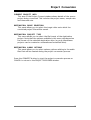
CURRENT PROJECT INFO
This area of the Project Convert window shows details of the source
project being converted. This includes the project name, sample rate
and timecode rate.
DESTINATION DRIVE SELECTION
This panel allows you to select the target drive onto which the
converted project files will be saved.
DESTINATION PROJECT TYPE
This menu allows you to select the file format of the destination
project. Note that the options available in this menu will depend on
the format of the selected destination drive (e.g only Waveframe
projects can be created on a Waveframe formatted drive).
DESTINATION AUDIO OPTIONS
This panel allows you to select various options relating to the audio
files that will be created during the project conversion process.
Press the CONVERT button to start the project conversion process or
CANCEL to return to the PROJECT EXPLORER window.
7
Project Conversion
If the destination drive supports sub-directories, you will next be asked to
choose a folder into which the converted project will be saved:
Select the directory into which use want the converted project files to be
saved and press the CHOOSE button.
During the project conversion process, each audio (media) file referenced
by the source project will be converted and saved into a new audio file in a
format suitable for the selected target project format. Finally, the project
file will be converted and saved in the correct format. A progress dialog
will be displayed during the conversion process:
8
Converting To OMF
OMF Export Options
If OMF is selected as the destination project type in the PROJECT
CONVERT window, you will be able to choose some further options before
the conversion process begins about the type of OMF file that is created.
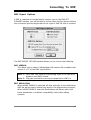
The OMF EXPORT OPTIONS window allows you to choose the following:
OMF VERSION
This allows you to select if Media Magic will create a file compliant with
version 1 or 2 of the OMF specification.
Note 1: Most OMF files used for transferring audio to or from Avid
products are OMF1 format.
Note 2: Clip gain information can only be exported in OMF 2.x
EDIT RESOLUTION
When AUDIO SAMPLE is selected, all clips and edits in the destination
OMF file will be exactly where they were in the original source project.
When VIDEO FRAME is selected, Media Magic will adjust edits onto
frame boundaries to maintain compatibility with video editing
systems.
9
Converting To OMF
OMFI FILE OPTIONS
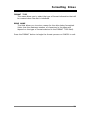
By selecting OMF COMPOSITION WITH EXTERNAL AUDIO FILES, Media
Magic wil create an OMF file which references external SD-II media
files. Alternatively, selecting SINGLE OMF FILE WITH EMBEDDED AUDIO
will cause Media Magic to create one big OMF file that includes both
edit information and embedded audio data.
10
CONVERTING DEVA FILES
The Zaxcom DEVA hard disk field recorder can create files on an external
DOS (FAT16) formatted disk in either B-WAV (Broadcast Wave) or SD-II
(Sound Designer II) formats.
Unlike other systems, the DEVA does not create a specific project file.
Instead, all the audio files associated with a particular project are saved
into a single directory usually called ZFILES.
Media Magic is able to convert audio files created on a Zaxcom DEVA into
projects suitable for use on other systems. Media Magic uses information
from both the audio file’s contents and file name to determine how audio
should be arranged in the target project.
To perform this type of conversion, first select the folder containing the
B-WAV or SD-II audio files in the FILE/DIRECTORY LIST on the PROJECT
EXPLORER window. This directory will normally be called ZFILES unless it
has been renamed:
Next, go to the OPTIONS menu in the menu bar and select DEVA FOLDER
CONVERSION:
Media Magic will now look at each B-WAV or SD-II file in the selected
directory and display the PROJECT CONVERT WINDOW described
previously ready to perform a conversion.
11
Formatting Drives
Media Magic is able to format empty drives (or re-format existing drives) in
a variety of formats according to the type of project conversions you want
to perform.
First, select the drive you want to format from the list of available drives
shown in the PROJECT EXPLORER WINDOW.
Next, go to the OPTIONS menu in the menu bar and select FORMAT DRIVE.
Formatting a drive will cause any existing files on that disk to be erased.
You will be shown the message below to warn you of this. Press OK to
continue with the format operation or CANCEL to abort.
Finally, you will be shown the following dialog which allows you to choose
options about the drive being formatted:
12
Formatting Drives
FORMAT TYPE
This menu allows you to select the type of format information that will
be created when the disk is initialized.
DRIVE NAME
This field allows you to enter a name for the drive being formatted.
(Note that the maximum number of characters in the name will
depend on the type of format selected in the FORMAT TYPE field).
Press the FORMAT button to begin the format process or CANCEL to exit.
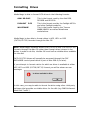
13
Formatting Drives
Media Magic is able to format SCSI drives in the following formats:
AKAI DD-PLUS
FAIRLIGHT FLFS
WAVEFRAME
This is the format used by the Akai DD8,
DD16PB and DD1500
This is the format used by the Fairlight MFX3+
and other Fairlight products.
This is the format used by the Tascam
MMR8/MMP16 as well as Waveframe
workstations.
Media Magic is also able to format drives in HFS, HFS+ or DOS
(FAT16/FAT32) formats through the Mac OS.
Note: Media Magic initializes drives in HFS, HFS+ or DOS (FAT16/FAT32)
formats through the Mac OS rather than through direct access to the
drives. In order to do this, the Mac OS must have a suitable driver available
for the disk.
FAT16/FAT32 drives will normally be accessed through the FILE
EXCHANGE control panel which is part of Mac OS8.6 (or later).
If you attempt to format a drive for which no driver is available in either
HFS, HFS+ or DOS (FAT16/FAT32) format you will be shown an eror
message:
In this case, you may be able to format the drive using other third-party
software that provides a suitable driver for the disk (e.g FWB Software’s
Hard Disk Toolkit”).
14
Disk Formats Supported
Storage media - including hard drives, MO disks, CD-ROMs or other
removeable media – are usually formatted with a file system specific to
the type of operating system or program that they are intended to work
with. The disk file system is a method for cataloging the contents of a disk
so that data can be stored and retrieved.
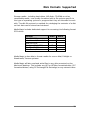
Media Magic includes dedicated support for accessing the following format
SCSI drives.
FORMAT
Akai DD1000
Akai Normal/Extended
Akai DD-PLUS
Fairlight (OS-9/RBF)
Fairlight (FLFS)
Waveframe/Tascam
READ
✓
✓
✓
✓
✓
✓
WRITE
✓
✓
✓
Media Magic is also able to format media for use on Akai, Fairlight or
Waveframe/Tascam systems.
Media Magic will also read and write files to any drive mounted on the
Macintosh desktop. This includes any HFS or HFSplus formatted drive, FAT
formatted drives (using PC Exchange/File Exchange) or any network drive.
15
File Format Information
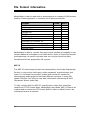
Media Magic is able to read and/or write projects in a variety of file formats
used by audio equipment in common use in post-production.
FORMAT
AES-31
Akai
Fairlight DL
Fairlight ML
OMF 1
OMF 2
Protools 3.2
Protools 4.x/Protools 24
Protools 5.0
Waveframe/Tascam MMR/MMP
Zaxcom Deva
READ
✓
✓
✓
✓
✓
✓
✓
✓
✓
✓
✓
WRITE
✓
✓
✓
✓
✓
✓
✓
✓
✓
Media Magic is able to convert from any format marked as readable to any
format marked as writeable in the table above. Some of these file formats
are proprietary to specific systems and can only be stored on disks
formatted with the appropriate file system.
AES-31
The AES-31 interchange format was developed by the Audio Engineering
Society in conjunction with many audio equipment manufacturers and
users. It is intended to provide a simple and consistent method of
interchanging audio projects between different systems. It uses ADL
(Audio Decision List) files to save edit information referencing B-WAV
(Broadcast Wave) audio files.
To fully comply with the AES-31 specification, these files should be
created on FAT32 format disks. Media Magic also allows AES-31 files to be
created and accessed on HFS format disks in order to allow them to be
transferred across a network.
16
File Format Information
Akai
Media Magic is able to read and write files for use with the Akai DD8,
DD16PB and DD1500 systems. These systems use several proprietary
disk formats (referred to as NORMAL, EXTENDED and DD-PLUS) and
proprietary file formats for storing audio data, settings and edit
information (QLISTs).
Fairlight ML/DL
The Fairlight MFX3+ system uses .MT, .ML, and .DL files for storing edit
information. The .MT file is the Fairlight MultiTrack file that a project is
recorded with. The .MT file can be exported to a .DL, DubberLanguage file,
or a .ML, File Exchange file (also called a MultiLanguage file) for use on
other systems.
These files are saved onto either RBF format disks (on older MFX3+
systems) or typically onto FLFS format disks. FLFS (Fairlight File System)
is Fairlight’s proprietary disk format based on Windows NT. Some recent
Fairlight system also allow these files to be stored on FAT32 format
drives.
The Tascam MMR-8 and MMP-16 support playback of the .ML file from
FLFS format disks. The Akai DD8/DD1500 support playback of the .DL file
from either an RBF or FLFS format disk.
In addition to reading both .ML and .DL files, Media Magic is able to create
projects with a .ML file that reference B-WAV (Broadcast WAV) audio files.
These files can be either created on FLFS or FAT32 disks and can be read
on all current revisions of Fairlight software.
Media Magic is also able to save .ML files (with B-WAV audio files) to any
HFS or network drive to allow access directly from a Fairlight system
connected to the network.
17
File Format Information
OMF
The Open Media Framework Interchange format was developed by Avid
Technology as a means for interchanging files between different video and
audio workstations. There are several different implementations of OMF in
both Avid products as well as other manufacturer’s products. Media Magic
has been designed to be compatible with as many of these
implementations as possible.
Protools Session Files
Media Magic will work with Digidesign Protools Session files saved to Mac
HFS or HFS+ formatted disks. Protools Session files typically reference
SD-II (Sound Designer II) audio files. (Note that Media Magic does not
include direct support for Protools 5.1 Session Files which can optionally
reference B-WAV audio files).
Waveframe/Tascam
MMR/MMP
Waveframe files use special formats for storing audio data, edit
information or other settings. These files can be read and written only to
disks formatted with the proprietary Waveframe disk file system.
The Tascam MMR8 and MMP16 use the Waveframe file system as their
native format.
Zaxcom Deva
The Zaxcom DEVA hard disk field recorder can create files on an external
DOS (FAT16) formatted disk in either B-WAV (Broadcast Wave) or SD-II
(Sound Designer II) formats. The DEVA does not produce any specific file
with edit information. Instead, this is encoded into the B-WAV files and
their filenames.
Media Magic is able to access files created on the Zaxcom DEVA as
described in the section called ‘Converting DEVA files’.
18
Preferences
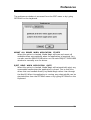
The preferences window is accessed from the EDIT menu or by typing
OPTION+R on the keyboard.
MOUNT ALL DRIVES WHEN APPLICATION STARTS
When this option is checked, Media Magic will scan and mount all
available drives automatically when the application is launched. You
can also use the DRIVE SCAN button on the main PROJECT EXPLORER
window to manually scan for drives.
EJECT DISKS WHEN APPLICATION QUITS
When this option is checked, Media Magic will automatically eject any
removeable media when the application is closed. This is useful for
drives that are handled directly my Media Magic rather than through
the MacOS. When the application is running, any selected disk can be
ejected either from the OPTIONS menu or by typing OPTION+E on the
keyboard.
19
Preferences
Some systems store a special representation of each audio file which is
used to provide a graphical overview of the audio in the file. By default,
Media Magic will generate these representations automatically for Akai
audio files (with Akai projects) and SD-II audio files (with Protools
Sessions).
If you do not want Media Magic to automatically generate this data, you
can disable it in the ‘Advanced’ Preferences page.
Note that if you disable the generation of Envelopes for Akai Audio Files, it
will not be possible to view a graphical representation of the audio on Akai
systems.
If you disable the generation of Overviews in SD-II audio files, Protools will
automatically generate these overviews when the files are opened.
However, this can be a lengthy process so you may find it more efficient to
generate the overviews during Media Magic’s conversion process.
20
Other Features
Clip Level Information
When converting between project formats that store 'clip-based' level
information (such as Akai, Fairlight or Waveframe), Media Magic will
convert the clip-level information into a format suitable for use on the
target system.
When converting from project formats that include ‘clip’-based level
information to Protools Session files, Media Magic will generate a Protools
volume automation graph with breakpoints at the start and end of each
clip at which a level change occurs..
Disk Drivers
In normal situations, each HFS or HFS+ format drive mounted on a
Macintosh will have a driver associated with it. The driver is a small piece of
software that is often written by a format program to a reserved area of
disk and loaded when the disk is mounted by the Mac OS. The driver is
responsible for all access to the disk itself.
When Media Magic accesses Akai, Fairlight or Waveframe format drives, it
needs to do so directly as these drive formats are not recognised by the
Mac OS. In most cases, you don’t need to worry if Media Magic is accessing
a SCSI disk directly or through a Mac OS driver.
However, some disk drivers may include code that will interfere with the
intended operation of Media Magic. This is most likely to occur with
removable media (e.g MO) and may result in one of the following
problems:
• A disk that is not recognised by the Mac OS (e.g Akai, Fairlight or
Waveframe format) may be ejected automatically by the driver before
Media Magic can access it.
Or
• The Mac OS may detect that a disk in an unrecognized format (e.g Akai,
Fairlight or Waveframe format) has been inserted into a drive and prompt
the user to reformat it.
21
Other Features
The solution to this problem is to reboot the Macintosh without any disk in
the drive that is causing the problem. This will prevent a Mac OS driver
being loaded for the drive and allow Media Magic to access it directly.
USB<->SCSI Interfaces
Media Magic will work correctly with SCSI drives attached to a USB/SCSI
converter (such as Adaptec’s ‘USBXChange’). However, this is not
recommended for normal operation due to the relatively slow transfer
rates of USB compared to SCSI.
If you do want to use a USB<->SCSI converter, please read the section
above on disk drivers. The USB<->SCSI converter will have its own driver
software which is needed for correct operation. In order to allow Media
Magic to access drives that are not recognised by the Mac OS (e.g drives
in Akai, Fairlight or Waveframe format), you may need to setup the
USB<->SCSI driver for access to devices other than hard disks.
With Adaptec’s USBXChange, this is done in the ‘USBXchange Switcher’
Control panel. The OTHER PERIPHERALS option should be selected to allow
access to drives that are not recognised by the Mac OS (e.g drives in Akai,
Fairlight or Waveframe format). The MASS STORAGE option will need to be
selected again if you want to access drives though the Mac OS (e.g drives
in HFS, HFS+ or FAT16/FAT32 format).
22
Index
Adaptec USBXChange ........................ 22
AES-31 ............................................... 16
Akai .................................................... 17
AKAI DD-PLUS Format ....................... 14
Akai Envelope Files............................. 20
Basic Operation.....................................3
Clip Level Information ........................ 21
CONVERT button ..................................7
Converting to OMF................................9
CURRENT PROJECT INFO .......................7
Demonstration mode ............................2
DESTINATION AUDIO OPTIONS..............7
DESTINATION DRIVE SELECTION...........7
DESTINATION PROJECT TYPE................7
DEVA FOLDER CONVERSION .............. 11
Drive Eject.......................................... 19
DRIVE NAME ....................................... 13
Drive Scan Button .................................4
Drivers................................................ 21
EDIT RESOLUTION .................................9
Eject Disk ........................................... 19
EJECT DISKS WHEN APPLICATION QUITS
....................................................... 19
Fairlight FLFS Format......................... 14
Fairlight ML/DL .................................. 17
FAT16/FAT32 Disk Format ............... 14
File Exchange ................................. 1, 15
File Type Selection................................4
FORMAT DRIVE ................................... 12
FORMAT TYPE .................................... 13
HFS Disk Format................................. 14
HFS+ Disk Format .............................. 14
Installation............................................ 2
License key .......................................... 2
MOUNT ALL DRIVES WHEN APPLICATION
STARTS .......................................... 19
OMF .................................................... 18
OMF EXPORT OPTIONS ......................... 9
OMF VERSION ....................................... 9
OMFI FILE OPTIONS ............................ 10
OPTIONS menu .............................11, 12
PC Exchange....................................... 15
progress dialog .................................... 8
Project Conversion ............................... 5
Project Convert Window ...................... 6
Protools Overviews ............................ 20
Protools Session Files......................... 18
Protools volume graphs ..................... 21
SD-II Overview files ............................ 20
Search for audio file dialog .................. 5
System Requirements .......................... 1
unrecognized format.......................... 21
USB<->SCSI Interfaces....................... 22
Waveframe Disk Format..................... 14
Waveframe/Tascam MMR/MMP ......... 18
Zaxcom DEVA ..............................11, 18
23