1
Programming Examples
Example #3
1
2
3
4
0 (no squelch)
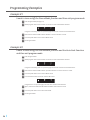
I want to lock-out channels
2 2and 3 3using 4the 1Channel Lock-Out Function.
1
1
LED on (channel active)
LED off
2
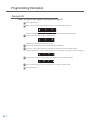
Enter Program Mode.
1
2
3
4
2
When program mode is entered the first function is active and the LED’s will show.
LED on
1
2
1
3
2
4
3
3
Stereo Mode
4
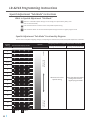
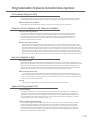
Using the functionality chart on a previous page note that this
4 is the Stereo On/Off Function.
LED off
on
LED
1
LED off
1
3
4
5
6
2
3
2
2
3
3
4
3
3
4
1
Press the Select button 1
once
so the LED’s show.
2
1
1
3
2
2
Note that this is the Channel Lock-Out
function.
2
3
4
1
Stereo Mode
Channel
Lock-Out
4
4
5
Channel Lock-Out
Auto-Seek
4
4
6
Auto-Seek
Squelch
2Channel Lock-Out
3
Press the Power button 1to enter the2
“Sub-Mode”.
3
4
4
1
7
2 “Sub-Mode”
3
Upon entry to the Channel Lock-Out
the 4LED’s will
show which channels are currently active
1
Squelch
Spare
(if the unit is at default settings, all four
LED’s
will
be
on
indicating
that
all channels are active).
2
3
2
3
4
4
1
1
Press the Select button to scroll through the 15 possible combinations
of active/locked out channels until
8
2
3
the unit displays.
4
1
2
2
1
1
1
3
3
2
3
2
Spare To Defaults
Reset
4
4
4
9
Reset
To Defaults
Exit
Program
3
7
4
1to save this2setting and3return to regular
Press the Power button1
program mode.
4
10
8
Exit Program Mode.
LED on
Example #4
LED off
1
1
2
3
2
1
1
2
2
3
2
1
34
3
4
3
4
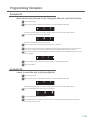
I want to reset the unit to factory
defaults.
2
3
4
1
2
4
11
4
Stereo Mode
Exit Program
Channel Lock-Out
12
3
Auto-Seek
1
Enter Program Mode.
2
13
2 first function
3
4
When program mode is1entered the
is active
and the LED’s will show.
LED on
1
1
11
2 2
2
3
3
4
Squelch
3
4
14
4
4 Stereo Mode
Using the functionality chart on a previous page note that this is the Stereo
On/Off Function.
Spare
2
3
Channel
Lock-Out
15 (tightest/lest
range)
2
3
4
2
3
1
4
4
Press the Select Button 11
five times until the unit displays.
LED off
3
1
1
22
3 3
4
4
Auto-Seek
Reset To Defaults
4
Press the Power Button to reset the unit.
5
1 LED’s three2 times and then
3 shut4down.
The unit will flash the four
4 It will be necessary to manually turn
1
the unit back on after a reset.
1
1
1
Squelch
Exit Program
2
3
2
3
4
2
3
4
2
3
4
Spare
Reset To Defaults
Exit Program
l
25