1
Selecting a Program and Operating Your Washer
Child Lock
Use the Child Lock function to prevent children from tampering with
the product. You can also avoid any changes being made in a running
program.
C
CAUTION
• You can switch the product on and off with the On / Off button
when the Child Lock is active. When you switch on the product
again, the program will resume from where it has stopped.
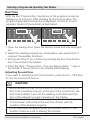
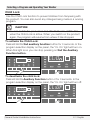
To activate the Child Lock:
Press and hold the 2nd auxiliary function button for 3 seconds. In the
program selection display on the panel, the “CL On” light will turn on.
When this light is on you can stop pressing on 2nd the Auxiliary
Function button .
CL:O
To deactivate the child lock:
Press and hold the Auxiliary Function button 2 for 3 seconds. In the
program selection display on the panel, the “CL On” light will turn off.
CL:O
Owner’s Guide & Installation Instructions
CL:OF
51 / English