1
RFIC Layout Analysis Using Sonnet EM
with Agilent EEsof EDA’s
Advanced Design System (ADS)
Sonnet Application Note: SAN-202A
May 2005
Description of Sonnet Suites Professional
Sonnet Suites Professional is an industry leading full-wave 3D Planar Electromagnetic (EM) field simulation
software based on the Method of Moment (MoM) technique which accounts for all coupling and radiation
effects from DC to THz. It also takes full advantage of mathematically robust and reliable FFT formulation
which avoids time consuming, error prone numerical integration. Both MoM and FFT combined gives Sonnet
an added assurance that it will give outstanding accuracy every time on problems that have traditionally been
difficult to solve. Problems with high dielectric constant, thin dielectric layers and/or small dimensions with
respect to the wavelength are handled especially well with Sonnet. Sonnet continues to be an indispensable
tool for designers involved in RF/Microwave circuits such as distributed filters, transitions, Low Temperature
Co-fired Ceramics, multi-layer RF packages, coplanar waveguides, and antennas. In addition, Sonnet has
proven successful in mm-wave designs as well as in EMC and EMI analysis.
Sonnet Professional Key Benefits
• Accurately model passive components (inductors, capacitors, resistors) to determine values like RLC and Q
factor
• Accurately model multi layer interconnects and via structures
• Generate a technology accurate electrical model for arbitrary layout shapes
• Quantify parasitic coupling between components, interconnects and vias
• Include substrate induced effects like substrate loss and eddy currents
• Visualize the current flow in components, interconnects and vias
Sonnet Professional Key Features
•
•
•
•
•
•
•
•
•
•
•
•
•
•
FFT based Method of Moments analysis for ultimate reliability and accuracy
Easy to learn, easy and efficient to use
Only one high precision analysis engine – no need to switch between solvers
Patented Conformal Meshing strategy for very efficient high accuracy meshing of curved structures
Finite thickness modelling (including advanced N-sheet model)
Dielectric bricks for truncated dielectric materials (e.g. MIM capacitor)
Adaptive Band Synthesis for fast and reliable frequency sweeps with a minimum number of EM samples - more
efficient than traditional approaches
Easy to use data display for analysis results, including R, L, C, Q evaluation
Equation capability for pre-defined or customized calculation on simulated data
All configuration and technology setup is menu / dialog based– no need to edit configuration text files
Remote simulation capability
Compatible with the LSF cluster and load balancing system
Seamless integration with Cadence® Virtuoso® , Agilent EEsof EDA’s ADS, AWR® Microwave Office® and
Analog Office™ and Eagleware-Elanix GENESYS™ design environments
Sonnet Software Inc. is a Cadence Connections partner
2
Introduction
The Sonnet Professional electromagnetic analysis program offers a menu level integration into the ADS design environment. This interface,
called Ebridge allows the RFIC designer to take layouts very easily from ADS to Sonnet for high precision EM analysis, and back annotate
results. Material and technology information will be extracted from schematic MSUB blocks, or from a project technology file.
In this document, we will study the data transfer and simulation setup of a layout-only project, with no circuit models. We base our
symmetrical inductor example on the following sample technology:
air εr=1
Metal M1 σ=3e7S/m ADS: cond (1)
1µm
2µm
1µm
via ADS: via(39)
oxide εr=3.9 cond= 0S/m
Metal M2 σ=3e7S/m ADS: cond2 (2)
2µm
300µm
substrate εr=11.9 cond= 5S/m
3
When to Use Sonnet Professional Analysis
The use of electromagnetic analysis with Sonnet Professional is especially valuable in the following design situations:
When parasitic coupling is present.
Parasitic coupling is not always easy to predict without using electromagnetic analysis. Even elements which are "sufficiently" far apart can
suffer from parasitic coupling: inductive or capacitive coupling, resonance effects due to grounding and surface waves that might propagate
at the substrate boundary under certain conditions. Sonnet Professional analysis is based on the physical properties of your technology and
will account for such physical effects.
When accurate circuit models are not available or circuit model parameters are out of range.
Model based circuit simulators are based on models for a specific application, with limited parameter range. For example, only selected
geometries, substrate types and substrate parameters are available. It is difficult to estimate the error induced by parameter extrapolation,
so using models outside their designed parameter range is not suitable for critical applications.
Whenever a layout feature cannot be described by a circuit model, due to its geometry or technology, the physics based analysis with
Sonnet Professional will provide the answer. An example for this could be a special inductor, capacitor or transformer which is not included
in the design kit. Sonnet can be used to analyze those components "on the fly", or generate a full library of components models with
trustworthy electrical results.
Sonnet Plug-in for ADS: Ebridge
Sonnet offers a menu level integration into the ADS environment through the “Ebridge” plug-in. This is an add-on from Sonnet Software
which requires a license.
The Ebridge menu is loaded into ADS as described in the Sonnet Installation Manual in chapter “Configuration Procedure for the Agilent
Interface”. In this example, we assume that the ADS variable
SONNET_EBRIDGE_DIR = sonnet
is also defined in the ADS configuration file de.cfg to specify a subdirectory /sonnet within the ADS project directory, where the Sonnet
preference file and the Sonnet simulation models and results are located.
When activated, the ebridge menu appears in both the ADS Schematic and Layout windows, as illustrated below.
Ebridge Menu within Agilent ADS
4
What is the “Ebridge preference file”
In our example, we use a layout translation with no reference to a circuit simulation schematic. Thus, we cannot get substrate and metal
information from an MSUB[1] schematic element, and need to get all physical material information from a “preference” file.
In our example, we will use the preference file to define the metal types and their use for different layers, the substrate materials and
thickness (stack-up) and also some simulation settings like frequency range and cell size (EM simulation spatial sampling resolution).
In this document, we will only give a brief description of the settings used. A detailed description of Ebridge and the preference file entries
can found in the Sonnet User’s Manual.
[1] MSUB is just one example here. Ebridge also supports many other substrate blocks.
To edit the preference file, select the menu item Ebridge > Edit Preference File.
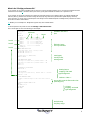
Here is the file that we use for the technology in this example:
SIZE_X_CELL 2
SIZE_Y_CELL 2
EXT 100
Level 0
Level 2
CUSTOM_SUB
CLAYER 2000
CLAYER 2
CLAYER 1
CLAYER 2
CLAYER 1
CLAYER 2
CLAYER 300
END CUSTOM_SUB
thickness
εr
1
3.9
3.9
3.9
3.9
3.9
11.9
1
1
1
1
1
1
1
0
0
0
0
0
0
0
0
0
0
0
0
0
0
0
0
0
0
0
0
5
0
0
0
0
0
0
0
σ
simulation cell size is
2µm
Name
Air_above
Oxide_above_M1
Oxide_at_M1
Oxide_between
Oxide_at_M2
Oxide_below_M2
Substrate
Dielectric layers
from top to bottom
Level 4
! SETUP METALIZATION LOSS
! Thick metal model, 3e7S/m, 1 micron, 2 sheets
MET "M1" TMM 37000000 0 1 2
MET "M2" TMM 37000000 0 1 2
! ignore layer # 37 (Momentum Box)
LAYER 37 IGNORE
! MAP
! ADS
! ADS
LAYER
LAYER
METALIZATION LAYERS
layer 1 to Sonnet level 2, material index 0 -> M1
layer 2 to Sonnet level 4, material index 1 -> M2
1 2 0
2 4 1
! BOUNDING BOX TO BOX BOTTOM
LAYER 13 GND -1
! MAP VIA LAYERS
! ADS layer 39 to Sonnet level 3, material index -1 -> lossless
LAYER 39 3 -1 VIA
! SETUP REFERENCE PLANES
! number of substrate heights to add to each side of circuit
EXT 0
! ANALYSIS FREQUENCY SWEEP in GHz
FREQS
ABS_ENTRY 0.50 20
DC_FREQ AUTO
END FREQS
metal types,
used by index,
starting with 0
drawing layers
mapping and metal
type assignment
lossless = index -1
we use this to set the Sonnet box size
(bounding box)
via layer
mapping and metal
type assignment
analysis setup
frequency range
5
Definition for thick metal analysis
In the preference file shown here, thick metal types are defined. Many RFIC technology components contain transmission lines and other
adjacent metal traces with narrow gaps that are on the order of the metal thickness. In these cases electromagnetic analysis with true thick
metal analysis will provide more realistic simulation results. For this reason, our example is based on thick metal analysis. For a discussion of
thin metal vs. thick metal, please refer to the Sonnet User's Guide, Chapter 19: Thick Metal.
Create the Sonnet simulation
model from ADS
To create a Sonnet simulation model file
from the current layout view, select the
menu item Rep -> Geo from the Ebridge
menu. This will create the Sonnet EM
simulation model and show a message
when the file was written successfully.
Now, you can open the Sonnet EM
simulation model file in the Sonnet project
editor “xgeom”. To do so, select the menu
item Launch xgeom from the Ebridge
menu.
The EM simulation model is almost
complete now, except for the port
configuration and a few advanced
simulation settings.
Box and cell size
The EM analysis cell size was taken from
the preference file (2µm in both directions)
and the box size was set automatically
during data translation as the bounding
box of all translated objects. In our case,
we had included the ADS layer 13 “bound”
and mapped it to the bottom of the
analysis box in Sonnet. It has no effect on
EM simulation; it only helps during data
transfer to set the bounding box as
desired, because it is the biggest layout
object.
For good results, the size of the analysis
box and the cell size must be configured
with care. The cell size determines the
spatial sampling resolution for the EM
analysis engine, so this is the key to high
precision results. The box size must be
large enough to avoid coupling between
the circuit and the side walls. If you have
any questions on these issues, please
contact Sonnet support for the details.
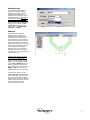
Box and cell size are set in the Circuit >
Box dialog. If you change the box size and
want to move your circuit, you can do this
easily by first doing Edit > Select All
(<Ctrl>+<A>) and then moving the circuit
with the mouse, or use Modify > Center
to center it horizontally and/or vertically in
the analysis box.
6
Subsection type
For EM analysis of RFIC inductors,
Sonnet’s new conformal meshing
capability is very useful, because it
enables significant memory and
simulation time reductions for curved
and diagonal polygons. Please refer to
the Sonnet User's Guide for more
information about conformal meshing.
You can enable conformal meshing per
polygon, but you can also do Edit
>Select All and then change all
polygons at once: Modify > Metal
properties > Fill Type.
Add ports
Once the EM Project geometry
(including vias) is complete and
material properties are defined, the
remaining step is to define ports. In
Sonnet, different port types exist, but
the most common port type is the box
wall port. Box walls are well suited for
inductor analysis because we can easily
and accurately de-embed the feed line
up to the desired reference plane.
Calibration error for box wall ports in
Sonnet have been shown to exhibit
numerical noise errors than better than
100 dB down or more.
To define a box wall port, you must
extend each feed line to a box wall.
You can do so by adding a new
polygon, or by stretching an existing
polygon. One easy method to stretch:
use the Tools > Reshape command
and drag a window around the edge
that you want to stretch. Then, use the
Modify > Snap to... command to
snap the edge to one of the box walls.
To define a box wall port, use the
Tools > Add Port command and click
on the polygon edge where the feed
line touches the box wall. This adds a
box wall port at that location, with the
positive terminal connected to the feed
line and the negative terminal
connected to the box (ground).
7
Add Reference Planes
(Optional)
To compensate for the additional length of
the feed line, a reference plane shift can
be applied by using the Circuit > Ref.
Planes / Cal. Length. menu item. A
dialog will be displayed where you can
enter a reference plane shift for each side
of the box. The offset value can be a fixed
value, or linked to a polygon vertex. The
value can be typed in or defined by a left
button mouse click at the desired location.
If you need to define an internal port
inside the box with no access to the box
wall, you can also use an "auto grounded
port" which connects to ground
automatically (using a via which is added
at run time and goes down through all
layers until it touches the bottom of the
box). Auto grounded ports can be attached
to a polygon edge at any location inside
the box.
We strongly recommend to use box wall
ports when you have lossy bulk layers!
Auto grounded ports may give invalid
results with very lossy substrates.
8
Run analysis to generate
S-parameters and L/Q
plots
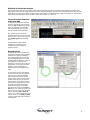
After setting up the simulation model, a typical
thick metal circular spiral inductor might look like:
Analysis Setup
To set up analysis, use Analysis > Setup from
the Sonnet xgeom menu. In most cases, an
Adaptive Band Synthesis (ABS) sweep over a
wide frequency range will be the best choice, e.g.
0.1 – 15GHz. This typically takes five or six EM
simulated frequency points to generate fine data
output at approximately 300 frequency points in
the desired range 0.1-15GHz.
Please don’t forget to enable the advanced solver
setting “Q factor accuracy” to ensure that ABS
results are visually identical to a discrete
frequency analysis for Q-factor values. (Requires
Sonnet Version 10 or later)
9
Plot Analysis Data
Electromagnetic analysis with the example
shown here will take 16 minutes and 59MB
memory to simulate the complete
frequency range (full thick metal analysis
on P4/2.5GHz) with very fine geometry
sampling of 2µm at 600µm box size.
Plot Equations
When the EM simulation is done, you can
now use the new equation feature, which
plots results based on predefined or user
defined equations. Sonnet has already
included equations to plot the series
inductance of two port devices (equation
name inductance2) and the quality factor.
To plot these values, bring up the result in
the emGraph data display, then use
Equation > Add equation curve from
the emGraph menu.
Note: You can also plot results of different
equations on left and right axis at the
same time, or plot equation results as a
function of a swept parameter.
10
View Current Density
It is also interesting to observe the current
density as a function of frequency.
Calculating the current density adds
minimal EM simulation overhead, but it is
very useful to gain insight into how a
circuit works and what cell size is
appropriate.
Current density at 0.1GHz is shown in the
figure to the right. Since skin effect at this
low frequency is much thicker than the
metal, current is relatively evenly
distributed across the width of the
transmission lines, and the conductive
losses dominate the current spreading
effects.
Current density at 15GHz is shown in the
second picture. In this case, skin effect
losses will dominate the spiral Q, as the
skin effect is much thinner than the metal.
In addition, current crowding is observed
below (where current tends to have a
maximum on the edges of the
transmission lines). Current crowding
occurs at higher frequencies where the
self-reactance of the transmission lines is
comparable to or greater than the
conductive loss. Note the high edge
current that Sonnet conformal meshing
shows very accurately. This edge current
must be modeled very accurately by any
EM analysis tool in order to correctly
assess the losses in the device that
contribute to the Q.
Back annotating results to ADS
You can easily back annotate EM simulation results to ADS, to use it in a model based simulation. In the Sonnet plotting tool emGraph,
select the data set which you want to export, then use Output > S/Y/Z Parameter File from the menu. This brings up a dialog
where you can save model data in Touchstone (S2P), MDIF and other file formats. That data can be used easily in ADS as black box
data, just like measurement results.
The Ebridge plug-in also offers a menu item Import MDIF to assist you in reading MDIF swept parameter results created by a sweptparameter EM analysis in Sonnet into an ADS schematic.
11
This application note is courtesy of Dr.-Ing. Volker Muehlhaus of
Muehlhaus Consulting & Software GmbH
www.muehlhaus.com
Sonnet Software, Inc.
Phone: 315-453-3096
Toll Free in North America: 877-7SONNET
Email: [email protected]
Web: www.sonnetsoftware.com
United States Regional Sales:
Eastern US Sales Office: 203.439.0815
Western US Sales Office: 303.443.2646
Japan:
Sonnet Giken Co., Ltd.
Phone: 43-463-6663
Email: [email protected]
Web: www.sonnetsoftware.co.jp
Germany:
Muehlhaus Consulting & Software GmbH
Phone: +49 (2302) 91438-0
Email: [email protected]
Web: www.muehlhaus.com
12