1
4
PROGRAMMING
cont.
4
PROGRAMMING
cont.
4.2 Setting Current Time of Day and Day of Week
Setting Residual Cooling Fan Feature
NOTE:
The default setting is 60 seconds. During the COOL mode of normal operation the fan
will stay on for 60 seconds after the cooling system has satisfied the stipend
temperature and has turned off the compressor. This allows the system to provide
higher efficiency during cooling operation.
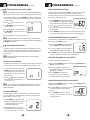
It is important for you to set the current time of day (note AM/PM indicator in
display), and the current day of week correctly to avoid problems with program execution.
1. When in normal operating mode, press the DAY/TIME keypad button. The LCD display will
be cleared except for the time, am/pm indicator and the day of the week. The hour portion
of the time will flash.
2. Press the
or
button to set the current hour.
3. Press DAY/TIME button again, the minute portion
of the time will flash.
4. Press the
or
button to set the current minute.
5. Press DAY/TIME button again, the day of the week
indicator will flash.
6. Press the
or
button to set the current day of the week.
NOTE:
The thermostat will return to normal operating mode automatically after 15
seconds if no key is pressed. It will also return to normal operating mode immediately if
the RETURN button is pressed.
4.3 Setting Thermostat User Options
The default user options are compatible with most systems and applications. They are
normally set at the time of installation and usually do not require any modification under
normal operating conditions. If you desire to change these settings, simply follow the
instructions below.
NOTE: The first and second stage differential settings are the same for both the
heating and cooling systems.
5. Press the RETURN button again and the LCD display
will show "FAN XX", where "XX" equals the fan delay
time in seconds during the cooling mode of operation.
6. Press the or button to set the residual cooling
fan delay to your desired setting of 0 (disabled), 30,
60, or 90 seconds.
7. Press the RETURN button again to return to set the extended hold time or wait 15
seconds and the thermostat will automatically return to normal operating mode.
Setting the Extended Hold Time (see also section 5.3)
The default setting is Long (indefinite) Hold. If the HOLD feature is activated, the current
setpoint will be held until HOLD is released.
HOLD
8. After pressing the RETURN button again, the display
will show "HOLD LG", where LG is indefinite hold.
9. Press the or button to change the Extended
Hold time from indefinite (LG) to 24 hours (SH).
10. Press RETURN again to set the Filter Check Monitor
or wait 15 seconds for the thermostat to return to the normal mode.
Setting Filter Check Monitor (see also section 5.4)
The default setting is 0 days (monitor disabled).
Setting the First Stage Differential
The default setting is 0.5˚ F (0.25˚ C). The room temperature must change 0.5˚ F (0.25˚ C) from
the setpoint temperature before the thermostat will initiate the system in heating or cooling.
1. In normal operating mode, press and hold the
RETURN button for 4 seconds. The LCD display
will show "d1 X", where "X" equals the ˚F / ˚C
differential setting. This is the current first stage
differential setting.
11. After pressing the RETURN button again, the display will show FILT XXX SET, where
XXX is the Filter Monitor interval.
12. Press the or button to change the Filter
Monitor interval to the desired value of 0 (disabled),
30, 60, 90, 120, or 180 days.
13. Press the RETURN button again to set the
Recirculating Fan cycle, or wait 15 seconds
for the thermostat to return to the normal mode.
FILT
2. Press the or button to set the temperature
differential to your desired setting of 0.5˚, 1˚, or
2˚ F (0.25˚, 0.5˚, or 1˚ C).
Setting the Recirculating Fan Cycle (see also section 5.7)
NOTE:
14. After pressing the RETURN button again, the display will show "XXX OC SET", where
XXX is the Recirculating Fan off cycle.
If at any time while in the options setting mode, you desire not to make any
further changes, you can wait 15 seconds without pressing any keys to return to the
normal operating mode.
Second Stage Differential
The default setting is 2˚ F (1.0˚ C). This means that the room temperature must change
2˚ F (1.0˚ C) in addition to the first stage differential setting before the thermostat will
initiate the system in heating or cooling.
15. Press the or button to change the Recirculating
Fan off cycle to the desired value of 120, 60, or
40 minutes.
16. Press the RETURN button again to return to the
normal mode, or wait 15 seconds for the thermostat
to return automatically.
3. Press the RETURN button again and the LCD
display will show "d2 X", where "X" equals the
˚F / ˚C differential setting. This is the current
second stage differential setting.
4. Press the or button to set the second
stage differential to your desired setting of 2˚, 3˚,
4˚, 5˚, or 6˚ F (1.0˚, 1.5˚, 2.0˚, 2.5˚, or 3.0˚ C).
4
5