1
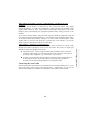
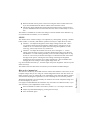
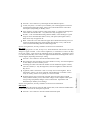
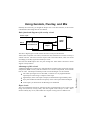
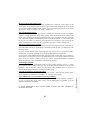
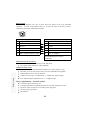
Therefore if the number displayed on the Eclipse is 23 then
Baud = 230400 = 9600
23 + 1
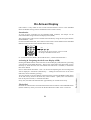
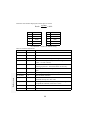
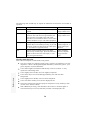
No.
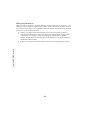
Baud Rate
No.
Baud Rate
1
115200
15
14400
3
57600
23*
9600*
5
38400
47
4800
7
28800
95
2400
11
19200
191
1200
*23, Baud rate = 9600 is the default setting.
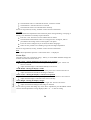
Both versions
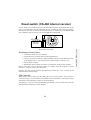
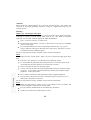
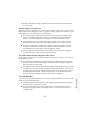
Table of available adjustments
Adjustment Values*
Comment
Auto Set
0 or 1
Set to 1 to initiate AutoSet
Baud Rate
0 to 191
Actual baud rate = 230400/(n+1)
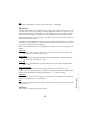
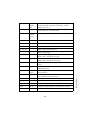
Brightness
0 to 250
Adjusts the scan-converted picture brightness.
Buttons
Off, On
Off=disable front-panel (only available through RS232
control - use with caution).
Disp Credits
Off, On
Determines whether credits are displayed when
powering-up the unit - internal PCI/ISA version only.
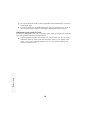
Fade
0 or 1
Set to 0 to fade out the PC signal, and 1 to fade it back in
again.
Fade Speed
1 to 25
Sets fade speed to very slow (1) or very fast (25).
Flicker Red.
2, 4
Lines of flicker reduction
ID Restrict
n
Restricts RS232 control only to those units which have
RS232 ID already set to this value.
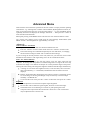
Image Freeze
Off, On
On=Image Frozen. Do not adjust any other settings
(except Mode and Fade) when this is active.
Infra Red
Off, On
On=Infra-red remote control is enabled.
Key Level
0 to 250
Adjusts Key Level used when in Overlay mode.
32