1
SECTION 6: Editing the Library
Passwords
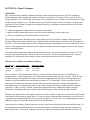
There are two different levels of passwords that can be used on the Buck 210 AA. Both Level 1 and level 2 can
be used to make changes in the file libraries as well as other parameters. The two passwords and their differences
are as follows:
•
Level 1 (pw1)
A “pw1” password can make any changes, save, and delete element libraries that have been saved by a level 1
password only. “pw” must be typed using the lowercase key.
•
Level 2 (PW2)
A “PW2” password can make any changes, save, and delete element libraries that have been saved under a level 1
or a level 2 password. “PW” must be typed using the uppercase key.
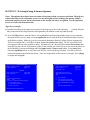
Once a password is entered, the Buck 210VGP remains in “password mode” until the 210 is turned off so you’ll
only have to enter a password once while you’re optimizing your library file. You enter a password by pressing
the [LIB] key while on the active analysis screen. Select option <3> Enter A Password, then type the password
and press enter. Options for saving and deleting library files will then appear on the menu.
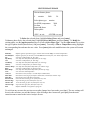
Changing Measurement Controls
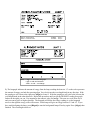
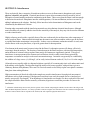
Certain settings may be stored in the library so they are automatically loaded every time you run that analysis. If
you change one of these settings and then load a new element library in the same lamp position without saving it
you will lose the changes. The majority of the settings that can be saved are in on the Measurement Controls
menu.
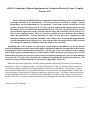
1) Library Name; Many operators who run only a few elements like to keep them grouped together in the
library so they are easier to find. The library name is limited to 16 characters. You may, for example, start
each library name with the initials for your company. You MUST change the library name before you can
save changes. The Library name can also be changed on the LIB menu.
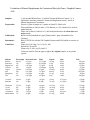
2) Method; If a element does not have a library with the method you wish to run, you can create a new
library with the desired method. For example, If you load the library for Ca_D2_422.7 (Air/Acet Flame
Meth), you can change the method to Graphite Furnace on the Measurement Controls menu. Simply
highlight the existing method and toggle through the method options using the arrow keys and press
[enter] when you get to the method. Not all elements can be run using all methods so you should check a
applications resource before proceeding. Graphite Furnace programs and other settings unique to the new
method may have to be entered before you can obtain accurate results.
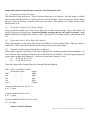
3) Lamp Currents; If a lamp from another manufacturer is being used which requires a different lamp
current setting or your Buck lamp needs to have the current adjusted, you can change lamp current on the
measurement controls screen. Change the Peak pulse value so that the ave current is the value desired.
(NOTE: ave current = 25% of peak pulse). For example, if a 5ma ave current is desired type [020] then
[enter] for peak pulse. The ave current will change to 5 when [enter] is pressed.
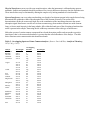
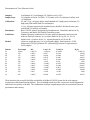
4) PMT Volts; This is the initial PMT voltage setting when the library is loaded. You will not normally
change this setting since the PMT voltage is set automatically when you Autozero.
5) DC Suppress; Preset for best results, no need to change this setting.
6) Data, period; Preset timing variables, normally no need to change this setting
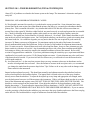
7) Integration Time; The time the software integrates when you press [read] during a Flame Analysis. You
can increase the integration time to improve reproducibility.