1
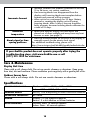
Inaccurate forecast
•W
eather Forecast icon predicts conditions for the next
12 to 24 hours, not current conditions.
•H
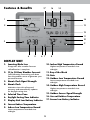
as Learning Mode icon disappeared from the
display unit? Learning Mode must complete before
forecast and pressure will be accurate.
•A
llow unit to run continuously for 33 days. Battery
removal or resetting the display unit will restart
Learning Mode. After 14 days, forecast should be
fairly accurate, however Learning Mode calibrates for
a total of 33 days.
Inaccurate
temperature
•M
ake sure both the display unit and sensor are
placed out of direct sunlight and away from any heat
sources or vents (see page 7).
Atomic signal or time
syncing problems
•P
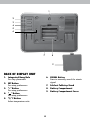
ress the SIGNAL button on the back of the display to
manually search for the atomic clock signal.
For additional troubleshooting, please visit:
http://www.nist.gov/pml/div688/grp40/radioclocks.cfm
If your AcuRite product does not operate properly after trying the
troubleshooting steps, visit www.AcuRite.com or call
(877) 221-1252 for assistance.
Care & Maintenance
Display Unit Care
Clean with a soft, damp cloth. Do not use caustic cleaners or abrasives. Keep away
from dust, dirt and moisture. Clean ventilation ports regularly with a gentle puff of air.
Outdoor Sensor Care
Clean with a soft damp cloth. Do not use caustic cleaners or abrasives.
Specifications
TEMPERATURE RANGE
Outdoor: -40ºF to 158ºF; -40ºC to 70ºC
Indoor: 32ºF to 122ºF; 0ºC to 50ºC
WIRELESS RANGE
OPERATING FREQUENCY
330 ft / 100 m depending on home construction materials
433 MHz
POWER
Display: 3 x AA alkaline batteries
Sensor: 2 x AA alkaline or lithium batteries
DATA REPORTING
Outdoor Data: 16 second updates
Indoor Data: 60 second updates
10