1
RadVis SUM Issue 1 Revision 4 (30th August 2005) – DRAFT 15th July 2005
Software User Manual
3.5 Working with the Virtual Dosimeter
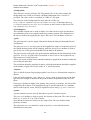
The virtual dosimeter is used for querying specific points in the dataset.
To use the virtual dosimeter:
1. Select “Tools > Detached Dosimeter” or use the keyboard shortcut
“Command-D” to detach the dosimeter.
2. The virtual dosimeter is detached from your “body”, and appears in front of
the your view.
3. Select “View > Info” or use the keyboard shortcut “Command-I” to enable the
information head-up display (HUD).
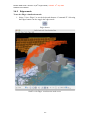
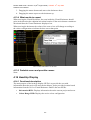
4. Information about the current location of the virtual dosimeter is displayed in
the information HUD.
5. Using the mouse you can drag the virtual dosimeter around in the 3D scene.
If you click and drag the side of the dosimeter that is facing towards you, the
dosimeter will be moved to your left or right.
If you click and drag on the top or bottom of the dosimeter, it will be moved
up or down.
Note that the information HUD is updated when the dosimeter is moved.
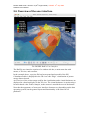
RadVis with a detached Virtual Dosimeter and Information HUD enabled
12- -