1
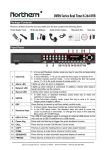
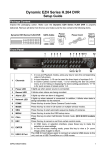
16CH models:
1
Main Monitor (VGA)
2
USB 2.0 Port
3
Power Jack
4
LAN 10/100/1000M
(RJ-45)
5
Main Monitor (HDMI)
6
Alarm I/O & RS-485
7
Main Monitor (BNC)
8
Video Out (BNC)
9
Video In (BNC)
10
Call Monitor (BNC)
11
Audio In/Out
VGA output is offered for connecting to VGA monitors.1280x1024,
1024x768 resolutions recommended for 4:3 aspect monitors.
The USB 2.0 port allows users to connect external USB devices to
the unit, such as a USB ThumbDrive or a USB mouse.
Connect the power supply cord shipped with the DVR. Use of other
power supply cords may cause overloading.
The DVR is capable of networking, and it allows the videos to be
viewed over the LAN network or the Internet via internet browsers.
HDMI output is offered for connecting to a HDMI main monitor.
Supports 1080p,720p,1280x1024,1024x768 resolutions.
The DVR provides alarm I/O and RS-485 ports that offer users the
flexibility to connect the unit to other devices.
BNC output is offered for connecting to a BNC main monitor.
The same amount of BNC connectors beneath Video In (BNC) are
offered for looping out the video from the specific input.
A group of BNC connectors is provided for video input streams from
installed cameras. The number of connectors equals to the number
of channels.
BNC connector is provided for connecting to a BNC call monitor.
An Audio connector is provided for connecting audio input devices
for all channels and an audio ouput device for the Main monitor.
3