1
PRIMERGY
PRIMERGY RX220
Server System
Operating Manual
Martin Jung
Fujitsu Siemens Computers GmbH cognitas PS
81730 München
e-mail: e-mail:[email protected]
Tel.: (089) 61001-154
Fax: 0 700 / 372 00000
RX220
Sprachen: En
Edition September 2005
Pfad: U:\RX220\rx220_ba\rx220_e.pdf\rx220us.vor
© cognitas. Gesellschft für Technik-Dokumentation mbH 2005
Comments… Suggestions… Corrections…
The User Documentation Department would like to
know your opinion of this manual. Your feedback helps
us optimize our documentation to suit your individual
needs.
Fax forms for sending us your comments are included in
the back of the manual.
There you will also find the addresses of the relevant
User Documentation Department.
Certified documentation
according to DIN EN ISO 9001:2000
To ensure a consistently high quality standard and
user-friendliness, this documentation was created to
meet the regulations of a quality management system
which complies with the requirements of the standard
DIN EN ISO 9001:2000.
cognitas. Gesellschaft für Technik-Dokumentation mbH
www.cognitas.de
Copyright and Trademarks
Copyright © 2005 Fujitsu Siemens Computers GmbH.
All rights reserved.
Delivery subject to availability; right of technical modifications reserved.
All hardware and software names used are trademarks of their respective manufacturers.
Contents
1
1.1
1.2
1.3
1.4
Introduction . . . . . . . . .
Overview of the Documentation
Features . . . . . . . . . . . .
Notational Conventions . . . .
Technical Data . . . . . . . . .
.
.
.
.
.
2
Installation Steps: Overview
. . . . . . . . . . . . . . . . .
3
3.1
3.2
3.3
3.4
3.5
Important Notes . . . . . . . .
Safety . . . . . . . . . . . . . .
CE Certificate . . . . . . . . . .
Transporting the Server . . . . .
Notes on Installing into the Rack
Environment Protection . . . . .
.
.
.
.
.
.
.
.
.
.
.
.
.
.
.
.
.
.
.
.
.
.
.
.
.
.
.
.
.
.
.
.
.
.
.
.
17
17
23
23
24
25
4
4.1
4.2
4.3
4.3.1
4.3.2
4.3.3
4.3.4
4.3.5
4.3.6
4.3.7
4.4
4.5
4.6
Hardware Installation . . . . . . . . . . . . . . . .
Installation Steps . . . . . . . . . . . . . . . . . . .
Unpacking the Server . . . . . . . . . . . . . . . . .
Installing/Removing the Server into/from the Rack . .
Requirements of the Rack . . . . . . . . . . . . . . .
Necessary parts . . . . . . . . . . . . . . . . . . . .
Preparing the Server . . . . . . . . . . . . . . . . .
Mounting in the PRIMECENTER/DataCenter Rack . .
Mounting into the Classic Rack . . . . . . . . . . . .
Installing the Server . . . . . . . . . . . . . . . . . .
Mounting in 3rd-Party Racks . . . . . . . . . . . . .
Connecting Devices to the Server . . . . . . . . . . .
Connecting the Server to the Mains . . . . . . . . . .
Instructions on Connecting and Disconnecting Cables
.
.
.
.
.
.
.
.
.
.
.
.
.
.
.
.
.
.
.
.
.
.
.
.
.
.
.
.
.
.
.
.
.
.
.
.
.
.
.
.
.
.
.
.
.
.
.
.
.
.
.
.
.
.
.
.
.
.
.
.
.
.
.
.
.
.
.
.
.
.
27
28
28
29
30
33
33
34
36
37
38
39
40
41
5
5.1
5.1.1
5.1.2
5.2
5.3
5.3.1
5.3.2
5.3.3
5.4
Preparation for Use and Operation . . . . . . . . . . . .
Operating and Indicator Elements . . . . . . . . . . . . . .
The Front . . . . . . . . . . . . . . . . . . . . . . . . . .
The Rear . . . . . . . . . . . . . . . . . . . . . . . . . .
Switching the Server ON and OFF . . . . . . . . . . . . .
Configuring the Server and Installing the Operating System
Configuring the SATA RAID controller . . . . . . . . . . . .
Configuration with ServerStart . . . . . . . . . . . . . . .
Configuration without ServerStart . . . . . . . . . . . . . .
Cleaning the Server . . . . . . . . . . . . . . . . . . . . .
.
.
.
.
.
.
.
.
.
.
.
.
.
.
.
.
.
.
.
.
43
43
43
47
48
51
51
52
52
53
RX220
.
.
.
.
.
.
.
.
.
.
.
.
.
.
.
.
.
.
.
.
.
.
Operating Manual
.
.
.
.
.
.
.
.
.
.
.
.
.
.
.
.
.
.
.
.
.
.
.
.
.
.
.
.
.
.
.
.
.
.
.
.
.
.
.
.
.
.
.
.
.
.
.
.
.
.
.
.
.
.
.
.
.
.
.
.
.
.
.
.
.
.
.
.
.
.
.
.
.
.
.
.
.
.
.
.
.
.
.
.
.
.
.
.
.
.
.
.
.
.
.
.
.
.
.
.
.
.
.
.
.
.
.
.
.
.
.
.
.
. . 5
. . 6
. . 8
. 12
. 12
15
Contents
6
6.1
Property and Data Protection . . . . . . . . . . . . . . . . .
BIOS Setup Security Functions . . . . . . . . . . . . . . . . .
55
55
7
7.1
7.2
7.3
7.4
7.5
7.6
7.7
7.8
7.9
7.10
7.11
7.12
Troubleshooting and Tips . . . . . . . . .
Power-ON Indicator Remains Dark . . . . .
The Server Switches itself OFF . . . . . . .
Screen Remains Blank . . . . . . . . . . .
Flickering Stripes on the Monitor Screen . .
No Screen Display or the Display Drifts . . .
No Mouse Pointer Displayed on Screen . . .
Floppy Disk Cannot be Read and/or Written
Incorrect Time and/or Date . . . . . . . . .
System Will Not Boot . . . . . . . . . . . .
Drives Are Reported as "Dead" . . . . . . .
Added Drive Reported Defective . . . . . .
Error Messages on the Screen . . . . . . .
.
.
.
.
.
.
.
.
.
.
.
.
.
.
.
.
.
.
.
.
.
.
.
.
.
.
.
.
.
.
.
.
.
.
.
.
.
.
.
.
.
.
.
.
.
.
.
.
.
.
.
.
.
.
.
.
.
.
.
.
.
.
.
.
.
.
.
.
.
.
.
.
.
.
.
.
.
.
.
.
.
.
.
.
.
.
.
.
.
.
.
.
.
.
.
.
.
.
.
.
.
.
.
.
.
.
.
.
.
.
.
.
.
.
.
.
.
.
.
.
.
.
.
.
.
.
.
.
.
.
57
57
58
58
59
59
59
60
60
60
61
61
61
8
8.1
8.1.1
8.2
Hot-plug Components . . . . . . . . . . .
Hot-plug Hard Disk Drives . . . . . . . . . .
Handling Hard Disk Drives or HDD Modules
Installing/Removing an HDD Module . . . .
.
.
.
.
.
.
.
.
.
.
.
.
.
.
.
.
.
.
.
.
.
.
.
.
.
.
.
.
.
.
.
.
.
.
.
.
.
.
.
.
63
63
64
65
Abbreviations . . . . . . . . . . . . . . . . . . . . . . . . . . . . . . .
69
Related Publications . . . . . . . . . . . . . . . . . . . . . . . . . . .
75
Index . . . . . . . . . . . . . . . . . . . . . . . . . . . . . . . . . . . .
77
Operating Manual
RX220
1
Introduction
The PRIMERGY RX220 server is a high performance AMD-based 2-way rack
server which is characterized by an ultra compact design. The compact design
(only 1HU high) fits perfectly into the data processing center and server farms.
Within 19-inch infrastructures the server forms a flexible platform for sophisticated Web applications. It is suitable for use as e-mail server, terminal server
and also as general application in multi-tier configurations.
The PRIMERGY RX220 server offers a high level of reliability and availability
through highly developed hardware and software components. Up to two AMD®
Opteron™ processors, up to 16 GB ECC DDR-SDRAM main memory and max.
two hot-plug hard disk drives fulfill highest requirements of functionality, performance and capacity. There are up two PCI extension slots: one PCI Express x8
and one 64-bit PCI-X.
With its integrated SATA RAID controller the PRIMERGY RX220 system
delivers maximum data security due to its hard-disk mirroring capability using
Integrated Mirroring Enhanced (IME).
In conjunction with ServerView and RemoteView, the onboard server management
controller provides a comprehensive monitoring and remote management
functionality. The optional RemoteView Service Board (RSB S2) enhances this
functionality.
Security functions in the BIOS Setup ("D2130 Setup Utility for RX220") and on
the system board protect the data on the server against manipulation.
Additional security is provided by the lockable rack door.
RX220
Operating Manual
5
Overview of the Documentation
1.1
Introduction
Overview of the Documentation
I PRIMERGY manuals are available in PDF format on the ServerBooks CD.
The ServerBooks CD is part of the ServerView Suite delivered with each
server system.
The PDF files for the manuals can also be downloaded free of charge
from the Internet. The overview page showing the online documentation
available on the Internet can be found via the URL:
http://manuals.fujitsu-siemens.com (choose: industry standard servers).
Concept and target group of this manual
This operating manual describes how to install and how to operate your server.
This manual is intended for those responsible for installing the hardware and
ensuring that the system runs smoothly. The manual contains all the information
required for installing and operating your PRIMERGY RX220.
To understand the different expansion options, it is necessary to have a
knowledge of hardware and data transmission, as well as basic knowledge of
the operating system used.
Additional server documentation
To the PRIMERGY RX220 documentation set belong the following additional
manuals:
– "Quick Start Hardware - PRIMERGY RX220" (poster)
– "Quick Start Software - PRIMERGY ServerView Suite" (poster)
– "Warranty" manual (print version delivered together with the system, PDF
file available on the ServerBooks CD)
– "Safety" manual (print version delivered together with the system, PDF file
available on the ServerBooks CD)
– "Ergonomics" manual (PDF file available on the ServerBooks CD)
– "Helpdesk" (poster with worldwide helpdesk telephone numbers)
– Technical Manual for the system board D2130 (PDF file available on the
ServerBooks CD)
– "D2130 Setup Utility for RX220" manual (PDF file available on the
ServerBooks CD)
6
Operating Manual
RX220
Introduction
Overview of the Documentation
– "ServerView Suite" includes the ServerStart CD, the ServerBooks CD and the
ServerSupport CDs. The PDF file of the user manual "PRIMERGY
ServerView Suite - ServerStart" is also available on the ServerBooks CD.
I If you need a backup of the ServerBooks CD, send the details of your
server via email address: [email protected].
– "Global Array Manager Client Software User’s Guide" (PDF file available on
the ServerBooks CD)
– "Global Array Manager Server Software User’s Guide" (PDF file available on
the ServerBooks CD)
– "Integrated Mirroring User’s Guide" (PDF file available on the ServerBooks
CD)
– "RX220 Options Guide" (PDF file available on the ServerBooks CD)
Further sources of information
–
–
–
–
–
–
–
technical Manual for the corresponding rack
manual for the monitor
manual for ServerView server management
manual for the remote test and diagnostic system RemoteView
documentation for the boards and drives
operating system documentation
information files of your operating system
(see also “Related Publications” on page 75).
RX220
Operating Manual
7
Features
1.2
Introduction
Features
System board
The features of the system board (D2130) are described in the Technical
Manual for the system board in relation to the hardware and in the "D2130 Setup
Utility for RX220" (see “Related Publications” on page 75).
Hard disk drives
The server can accommodate up to two Serial ATA hard disk drive modules. It
is also possible to connect external drives.
Each hard disk drive module (also called "HDD module") can accommodate a
SATA hard disk drive with a SATA interface and a maximum height of 1 inch. The
module is connected to the SATA backplane without cables via the SATA
interface. This allows hard disk drive modules to be simply plugged in or pulled
out (for further details see section “Hot-plug Hard Disk Drives” on page 63).
The internal hard disk drives are exclusively controlled by the onboard SATA
RAID controller. Additional external drives are controlled by an optional PCI
RAID controller card or via the USB interface.
In a corresponding RAID configuration, the HDD modules can be exchanged
during operation (hot-plug).
SATA controller with IME functionality
For operating internal hard disk drives, the SATA RAID controller with IME
functionality is available (Integrated Mirroring Enhanced), offering RAID-0 and
RAID 1 functionality for mirroring the internal disks.
I To configure IME, the Promise FastBuild™ utility is available. For further
information, see the corresponding manual on the ServerBooks CD
(choose Controllers from the menu). Also refer to the "Integrated
Mirroring User’s Guide".
8
Operating Manual
RX220
Introduction
Features
Accessible drives/components
One mounting locations is available:
– one location 5.25“ for an optional slimline CD-/DVD-ROM drive
The accessible drives integrated in these locations cannot be replaced during
operation.
Power supply
In its basic configuration level, the server has one power supply unit which
automatically adjust to any power voltage in the range from 100 V to 240 V,
respectively.
High level of availability and reliability
When memory data is accessed, 1-bit errors in the main memory are recognized and automatically corrected with the ECC (Error Correcting Code)
method. The patented memory scrubbing function regularly starts up the EDC
mechanism and thus ensures continuous data integrity.
The memory modules used support Chipkill™ technology, which in addition
increases the effectiveness of the monitoring and correction of memory errors.
ASR&R (Automatic Server Reconfiguration and Restart) restarts the system in
the case of an error and automatically „hides“ the defective system components.
The PDA (Prefailure Detection and Analyzing) technology from Fujitsu Siemens
Computers analyzes and monitors all components important for system
reliability.
The onboard SATA RAID controller supports RAID Level 1 and increases
system availability. The hot-plug HDD modules provide additional security.
Server management
Server management is implemented with the aid of the supplied ServerView
software and PDA (Prefailure Detection and Analyzing) technology from Fujitsu
Siemens. PDA reports the threat of a system error or overloading early on so
that preventative measures can be taken.
ServerView enables the management of all PRIMERGY servers in the network
via a central console. The following key features are supported among others
by ServerView in this context.
●
Remote power-on (Wake On LAN)
RX220
Operating Manual
9
Features
Introduction
●
Temperature monitoring of the CPU and the surrounding area
●
Monitoring of the utilization of the PCI buses
●
Detailed status and error reports for bus systems, processors and main
memory
●
Watchdog timer for Automatic Server Reconfiguration and Restart (ASR&R)
in the event of failure of memory modules or processors
●
Power monitoring
●
Early detection of a defective fan
●
Watchdog timer for operating system monitoring and application monitoring
with ASR&R
Further information on ServerView server management is provided in the
associated documentation (see “Related Publications” on page 75).
ServerStart
You can configure your PRIMERGY server quickly and purposefully with the
ServerStart software provided. User-guided menus are available for installing the
server operating systems.
10
Operating Manual
RX220
Introduction
Features
Service and support
PRIMERGY servers are service-friendly and modular, thus enabling quick and
simple maintenance. The flash EPROM program supplied with the Fujitsu
Siemens Computers utilities supports a fast BIOS update.
The optional RemoteView Remote Test and Diagnosis System allows the
PRIMERGY RX220 Server to be maintained from remote locations. RemoteView
and the relevant hardware components integrated on the system board allow
remote monitoring and maintenance as well as fast restoration of operability in
the event of errors.
A Remote Service Board (RSB S2) can be used in conjunction with RemoteView.
Together they facilitate a remote diagnosis for system analysis, remote configuration, and remote restart should the operating system or hardware fail.
Remote monitoring and maintenance avoids time-consuming and costly on-site
repairs and reduces service costs. This leads to a reduction in the total cost of
ownership and an excellent return on investment for the remote management
solution.
RemoteView helps
●
switch on/off the system remotely
●
monitor systems and analyze the cause of faults
●
prepare error resolution or to have this process initiated independently if
possible
●
identify potential sources of error
●
configure the system
●
adjust system settings and initiate system restarts from a remote location
RX220
Operating Manual
11
Notational Conventions
1.3
Introduction
Notational Conventions
The following notational conventions are used in this manual:
text in italics
indicate commands, menu items or software programs
„Quotation marks“
indicate names of chapters and terms that are being
emphasized
Ê
text which follows this symbol describes activities that
must be performed in the order shown
V CAUTION!
I
pay particular attention to texts marked with this
symbol. Failure to observe this warning may endanger
your life, destroy the system or lead to the loss of data.
indicates additional information, notes and tips
Table 1: Notational conventions
1.4
Technical Data
Electrical data (power supply unit)
Power supply unit
500 W
Rated voltage range
100 V - 240 V
Frequency
50 Hz - 60 Hz
Max. rated current:
6,0 A at 100 V - 127 V
3,0 A at 200 V - 240 V
Effective power
500 W
Apparent power
670 VA
Heat dissipation
1706 BTU/hr
Main power fuse
10 A
Protection class
Class 1
12
Operating Manual
RX220
Introduction
Technical Data
National and international standards
Product safety and
ergonomics
IEC 60950 / EN 60950 / UL 60950-00 3rd.
Ed., CAN/CSA C22.2 No. 60950-00 3rd. Ed.
Electromagnetic compatibility
International standards
FCC class A
JEIDA
C-Tick class A
BSMI CNS 13438 class A
European standards
Interference emission
EN 55022 class A
Harmonic current
EN 61000-3-2
flicker
EN 61000-3-3
Interference immunity
CE label
according to EU directives
EN 55024
Low-Voltage Directive 73/23/EEC
Electromagnetic Compatibility 89/336/EEC
Mechanical values
Width
485 mm
Length
715 mm
Height
43 mm or 1 HU
Installation depth
737 mm
area for cable routing (cable area depth) in the rack
100 mm
Weight
approx. 14 kg (depending on the configuration)
Ventilation clearance
at least 200 mm on the front and on the rear side
RX220
Operating Manual
13
Technical Data
Introduction
Environmental conditions
Environment class 3K2
Environment class 2K2
EN 60721 / IEC 721 section 3-3
EN 60721 / IEC 721 section 3-2
Temperature:
Operation (3K2)
Transport (2K2)
5 °C .... 35 °C
-25 °C .... 60 °C
Humidity
10% ... 85%
Condensation during operation must be avoided!
Noise level
Sound power level LWAd (ISO 9296)
≤7,2 B (standby)
≤7,2 B (operating)
Sound pressure level at bystander position
LpAm (ISO 9296)
≤55 dB(A) (standby)
≤55 dB(A) (operating)
14
Operating Manual
RX220
2
Installation Steps: Overview
In this chapter you will find an overview of the steps necessary to install your
server system. Links guide you to sections where you can find more detailed
information on the individual steps:
Ê At first, please take notice of chapter “Important Notes” on page 17 and
following.
Ê Unpack the system, check the contents of the package for visible transport
damage and check whether the delivery agrees with the details in the
delivery note (see “Unpacking the Server” on page 28).
Ê Transport the server to the place where you want to set it up.
Ê Make sure all necessary manuals (see “Additional server documentation” on
page 6) are available; possibly print of the PDF files.
Ê Mounting the server into the rack (see “Installing/Removing the Server
into/from the Rack” on page 29).
Ê Cable the server. Please also refer to the section “Connecting Devices to the
Server” on page 39 and the section “Instructions on Connecting and Disconnecting Cables” on page 41.
Ê Connect the system to the line voltage (see “Connecting the Server to the
Mains” on page 40).
Ê Make yourself familiar with the operating and indicator elements on the front
and on the rear side of the server (see “Operating and Indicator Elements”
on page 43).
Ê The server is equipped with an onboard SATA RAID controller with IME
functionality (Integrated Mirroring Enhanced).
Configure the SATA controller either during BIOS POST with CTRL-F before
you begin with ServerStart or in a ServerStart installation with the Promise
FastBuilt utility. For further information, see the corresponding manuals on
the ServerBooks CD (choose Controllers from the menu).
RX220
Operating Manual
15
Installation Steps: Overview
Ê Configure the server and install the desired operating system and applications. To do so, you have the following possibilities:
– Remote configuration and installation with ServerStart:
With the ServerStart CD provided, you can configure the server and install
the operating system in a convenient manner.
To find out how to operate ServerStart and for further information, refer to
the "ServerView Suite" manual shipped with your system.
You find additional information for configuration in section “Configuration
with ServerStart” on page 52.
– Local configuration and installation with or without ServerStart (see
“Configuration with ServerStart” on page 52 and/or “Configuration
without ServerStart” on page 52).
16
Operating Manual
RX220
3
Important Notes
In this chapter you will find essential information regarding safety when working
with your server.
3.1
Safety
I The following safety notes are also provided in the “Safety” manual.
This device complies with the relevant safety regulations for data processing
equipment.
If you have any questions about where you can set up the device, contact your
sales outlet or our customer service team.
V CAUTION!
The actions described in these instructions should only be performed by
technical specialists. Equipment repairs should only be performed by
authorized, qualified staff. Any unauthorized openings and improper
repairs could expose the user to risks (electric shock, energy hazards,
fire hazards) and could also damage the equipment. Please note that
any unauthorized openings of the device will result in the invalidation of
the warranty and exclusion from all liability.
RX220
Operating Manual
17
Safety
Important Notes
Before operating the device
V CAUTION!
●
During installation and before operating the device, observe the
instructions on environmental conditions for your device (see section
“Technical Data” on page 12).
●
If the device is brought in from a cold environment, condensation may
form both inside and on the outside of the machine.
Wait until the device has acclimatized to room temperature and is
absolutely dry before starting it up. Material damage may be caused
to the device if this requirement is not observed.
●
Transport the device only in the original packaging or in packaging
that protects it from knocks and jolts.
Installation and operation
V CAUTION!
18
●
If the rack model is integrated in an installation that receives power
from an industrial (public) power supply network with the IEC309
connector, the (public) power supply protection must comply with the
requirements for the non-industrial (public) power supply networks for
the type A connector.
●
The server automatically sets itself to a voltage in the range from
100 V to 240 V, respectively. Make sure that your local voltage is
within this range.
●
This device has a specially approved power cable and must only be
connected to a grounded insulated socket.
●
Ensure that the power socket on the device or the grounded wall
outlet is freely accessible.
●
The ON/OFF button does not disconnect the device from the mains
voltage. To disconnect the line voltage completely, remove the power
plug from the grounded insulated socket.
Operating Manual
RX220
Important Notes
Safety
V CAUTION!
●
Always connect the device and the attached peripherals to the same
power circuit. Otherwise you run the risk of losing data if, for example,
the central processing unit is still running but the peripheral device
(e.g. storage subsystem) has failed during a power outage.
●
Data cables to peripheral devices must be adequately shielded.
●
To the LAN wiring the requirements apply in accordance with the
standards EN 50173 and EN 50174-1/2. As minimum requirement
the use of a protected LAN line of category 5 for 10/100 MBps
Ethernet, and/or of category 5e for Gigabit Ethernet is considered.
The requirements of the specification ISO/IEC 11801 are to be
considered.
●
Route the cables in such a way that they do not form a potential
hazard (make sure no-one can trip over them) and that they cannot
be damaged. When connecting up a device, refer to the relevant
notes in this manual.
●
Never connect or disconnect data transmission lines during a storm
(lightning hazard).
●
Make sure that no objects (such as bracelets or paper clips) fall into
or liquids spill into the device (risk of electric shock or short circuit).
●
In emergencies (e.g. damaged casing, controls or cables, penetration
of liquids or foreign matter), switch off the device immediately, remove
the power plug and contact your sales outlet or customer service
team.
●
Proper operation of the device (in accordance with
IEC 60950/EN 60950) is only ensured if the casing is completely
assembled and the rear covers for the installation openings have
been put in place (electric shock, cooling, fire protection, interference
suppression).
V CAUTION!
●
RX220
Only install system expansions that satisfy the requirements and
rules governing safety and electromagnetic compatibility and relating
to telecommunications terminal equipment. If you install other expansions, you may damage the system or violate the safety regulations
and regulations governing RFI suppression. Information on which
system expansions are suitable can be obtained from the customer
service centre or your sales outlet.
Operating Manual
19
Safety
Important Notes
V CAUTION!
●
The components marked with a warning label (e.g. lightning symbol)
may only be opened, removed or exchanged by authorized, qualified
personnel.
●
The warranty expires if the device is damaged during the installation
or replacement of system expansions.
●
You may only set those resolutions and refresh rates specified in the
„Technical data“ section of the monitor description. Otherwise, you
may damage your monitor. If you are in any doubt, contact your sales
outlet or customer service centre.
Batteries
V CAUTION!
●
Incorrect replacement of batteries may lead to a risk of explosion. The
batteries may only be replaced with identical batteries or with a type
recommended by the manufacturer (see the technical manual for the
system board under “Related Publications” on page 75).
●
Do not throw batteries into the trash can. They must be disposed of
in accordance with local regulations concerning special waste.
●
The battery must be disposed of in accordance with local regulations
concerning special waste.
●
Replace the lithium battery on the system board in accordance with
the instructions in the Technical Manual for the system board (see
“Related Publications” on page 75).
●
All batteries containing pollutants are marked with a symbol (a
crossed-out garbage can). In addition, the marking is provided with
the chemical symbol of the heavy metal decisive for the classification
as a pollutant:
Cd Cadmium
Hg Mercury
Pb Lead
20
Operating Manual
RX220
Important Notes
Safety
Notes on handling CDs/DVDs and CD/DVD drives
V CAUTION!
●
Use only CDs/DVDs in proper condition in the CD/DVD drive of your
server to prevent data loss, damage to the device and injuries.
●
Therefore, check each CD/DVD for damage, cracks, breakage etc.
before inserting it in the drive.
Please note that any additional labels applied may change the
mechanical properties of a CD/DVD and cause imbalance.
Damaged and imbalanced CDs/DVDs can break at high drive speeds
(data loss).
Under certain conditions sharp-edged pieces of broken CDs/DVDs
can penetrate the cover of the drive (damage to the device) and be
thrown out of the device (danger of injury, particularly on uncovered
body parts such as the face or neck).
I You protect the CD/DVD drive and prevent mechanical damage, as well
as premature wearing of the CDs/DVDs, by observing the following
suggestions:
– Only insert the CDs/DVDs in the drive when needed and remove
them after use.
– Store the CDs/DVDs in suitable sleeves.
– Protect the CDs/DVDs from exposure to heat and direct sunlight.
Note about the laser
The CD/DVD drive is classified for laser class 1according to IEC 60825-1.
V CAUTION!
The CD/DVD drive contains a laser diode (LED). Sometimes the LED
produces a stronger laser beam than laser class 1. Direct view into this
laser beam is dangerous.
Never remove parts of the CD/DVD drive assembly!
RX220
Operating Manual
21
Safety
Important Notes
Modules with electrostatic-sensitive components
Systems and components that might be damaged by electrostatic discharge
(ESD) are marked with the following label:
Figure 1: ESD label
When you handle components fitted with ESDs, you must observe the following
points under all circumstances:
●
Remove the power plug from the power socket before inserting or removing
components containing ESDs.
●
You must always discharge yourself of static charges (e.g. by touching a
grounded object) before working.
●
Use a grounding cable designed for this purpose to connect yourself to the
system unit as you install components.
●
The equipment and tools you use must be free of static charges.
●
Only touch the components at the edges or at the positions highlighted in
green (touch points).
●
Do not touch any exposed pins or conductors on a component.
●
Place all components on a static-safe base.
I You will find a detailed description for handling ESD components in the
relevant European or international standards (EN 61340-5-1,
ANSI/ESD S20.20).
22
Operating Manual
RX220
Important Notes
CE Certificate
Other important points:
●
When cleaning the device, please observe the relevant notes in section
“Cleaning the Server” on page 53.
●
Keep this operating manual and all additional documentation (such as
the technical manual, CD) together with the device. All documentation
should be included if the device is passed on to a third party.
3.2
CE Certificate
The shipped version of this device complies with the requirements of
the EEC directives 89/336/EEC "Electromagnetic compatibility" and
73/23/EEC "Low voltage directive". The device therefore qualifies for
the CE certificate (CE=Communauté Européenne).
3.3
Transporting the Server
V CAUTION!
Only transport the server to the new site in its original packaging or in
packaging that protects it from knocks and jolts. Do not unpack the server
until it is at its installation location.
If you need to lift or transport the server, ask other people to help you.
Never lift or transport the rack model using the handles on the front
panel.
RX220
Operating Manual
23
Notes on Installing into the Rack
3.4
Important Notes
Notes on Installing into the Rack
V CAUTION!
24
●
For safety reasons, at least two people are required to install the
system in the rack because of its weight and size.
●
Never lift the server using the handles on the front panel.
●
When connecting and disconnecting cables, observe the relevant
notes in the chapter „Important notes“ in the Technical Manual for the
corresponding rack. The Technical Manual is supplied with the corresponding rack.
●
Make sure when installing the rack that the anti-tilt mechanism is
properly mounted.
●
For safety reasons, no more than one unit may be removed from the
rack at any one time during installation and maintenance work.
●
If several units are removed from the rack at the same time, there is
a risk that the rack will tilt forward.
●
The rack must be connected to the power supply by an authorized
specialist (electrician).
●
If the rack model is integrated in an installation that receives power
from an industrial (public) power supply network with the IEC309
connector, the (public) power supply protection must comply with the
requirements for non-industrial (public) power supply networks for the
type A connector.
Operating Manual
RX220
Important Notes
3.5
Environment Protection
Environment Protection
Environmentally-friendly product design and development
This product has been designed in accordance with the Fujitsu Siemens
Computers standard for “environmentally friendly product design and development”. This means that key factors such as durability, selection and labeling
of materials, emissions, packaging, ease of disassembly and recycling have
been taken into account.
This saves resources and thus reduces the harm done to the environment.
Notes on saving energy.
Devices that do not have to be switched on permanently should be switched off
until they are needed as well as during long breaks and after completion of work.
Notes on packaging
Please do not throw away the packaging. You may need it later for transporting
your system unit. If possible, the device should only be transported in its original
packaging.
Notes on dealing with consumables
Please dispose of printer consumables and batteries in accordance with local
government regulations.
Do not throw batteries or rechargeable batteries into the trash can. They must
be disposed of in accordance with local regulations concerning special waste.
Note on labeling plastic parts
Please avoid sticking your own labels on plastic parts wherever possible, since
this makes it difficult to recycle them.
RX220
Operating Manual
25
Environment Protection
Important Notes
Returning, recycling and disposal
For details on take-back and reuse of devices and consumables within Europe,
contact your Fujitsu Siemens Computers branch office/subsidiary or our
recycling center in Paderborn:
Fujitsu Siemens Computers
Recycling Center
D-33106 Paderborn
Tel.
+49 5251 8180-10
Fax
+49 5251 8180-15
26
Operating Manual
RX220
4
Hardware Installation
V CAUTION!
Please note the safety instructions in chapter “Important Notes” on
page 17.
Do not expose the server to extreme environmental conditions (see
“Environmental conditions” on page 14). Protect it from dust, humidity,
and heat.
The HDD modules installed in the server may not be exposed to a
temperature shock (see “Handling Hard Disk Drives or HDD Modules” on
page 64).
In order to avoid the formation of condensation inside or on the outside
of the hard disk drives the server must be acclimatized in its operating
environment for an acclimatization time (table 2).
Temperature difference (°C)
Minimum acclimatization time
(hours)
5
3
10
5
15
7
20
8
25
9
30
10
Table 2: Acclimatization time
I The temperature difference in table 2 represents the difference between
the operating temperature and the external, transport or storage temperature.
RX220
Operating Manual
27
Installation Steps
4.1
Hardware Installation
Installation Steps
The following installation steps are described in detail in other sections of this
chapter:
Ê Unpacking the server (see next section “Unpacking the Server” on page 28).
Ê Mounting the server into the rack (see the layout arrangement created with
System-Architect on the order lists and “Installing/Removing the Server
into/from the Rack” on page 29).
Ê Cabling the server. Please also refer to the Technical Manual for the corresponding rack and the section “Instructions on Connecting and Disconnecting Cables” on page 41.
Ê Connect the server to the power supply (see “Connecting the Server to the
Mains” on page 40).
4.2
Unpacking the Server
V CAUTION!
Please note the safety instructions in chapter “Important Notes” on
page 17.
Do not unpack the server until it is at its installation location.
Ê Transport the server to the place where you want to set it up.
It is recommended not to throw away the original packaging material as it may
be required for transportation at a later date.
Ê Unpack all individual parts.
Ê Check the delivery for any damage during transport.
Ê Check whether the delivery agrees with the details on the delivery receipt.
The identification rating plate is located on the front area on the server.
Notify your supplier immediately should you discover that the delivery does not
correspond to the delivery receipt.
I If the HDD modules are provided with a transport lock (see figure 13 on
page 65), remove these.
Keep the transport locks in case you want to transport the server again.
28
Operating Manual
RX220
Hardware Installation
4.3
Installing/Removing the Server into/from the Rack
Installing/Removing the Server into/from
the Rack
V CAUTION!
●
Please note the safety instructions in chapter “Important Notes” on
page 17 and in section “Notes on Installing into the Rack” on page 24.
●
The rack can tip over when more than one slide-in module is pulled
out.
V CAUTION!
No cable management is available for the server!
Before removing the server from the rack, all cables connected on the
server must be unpluged from the sockets. Proceed as follows:
Ê Close all applications and shut down the operating system in a
orderly manner.
Ê Switch OFF the server.
Ê Unplug all cables from the server.
Ê Remove the server.
RX220
Operating Manual
29
Installing/Removing the Server into/from the Rack
4.3.1
Hardware Installation
Requirements of the Rack
The rack systems of the Fujitsu Siemens Computers (PRIMECENTER Rack,
DataCenter Rack and 19-Inch (Classic) Rack) support fully the installation of the
PRIMERGY server systems. The installation into the at present usual rack
systems of different foreign manufacturers (3rd-Party Rack) is supported to
large part.
To accommodate the ventilation concept and ensure proper ventilation of the
components in the rack, any unused areas must be closed using dummy covers.
Power is supplied via the socket strips available in the rack.
The main features of the rack systems of the Fujitsu Siemens Computers are:
PRIMECENTER Rack
– Frontally bolted telescopic rails.
The rails are provided with a linear alignment possibility to ensure also an
adjustment to different rack depths.
DataCenter Rack
– Frontally or laterally bolted telescopic rails (except within the rear left area
where a support angle is used).
Classic (19-Inch) Rack
– Laterally bolted telescopic rails.
The mounting of the rails in the different racks is described in the next sections.
3rd-Party Rack
Certain boundary conditions are to be fulfilled:
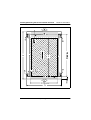
– Installation dimensions (see the dimensions shown in figure 2 on page 32):
30
1
rack front side
2
rack rear side
A
rack depth (comparison PRIMECENTER Rack 940/1000 mm)
B
rack width (comparison PRIMECENTER Rack 700 mm)
C
clearance of the 19-inch installation level
C1
front 19-inch installation level
C2
rear 19-inch installation level
Operating Manual
RX220
Hardware Installation
Installing/Removing the Server into/from the Rack
D
area for cable routing (cable area depth) and ventilation
E
area for front panel and ventilation
F
right and left area for support systems
P
PRIMERGY installation depth
a1
front left support upright
a2
front right support upright
b1
rear left support upright
b2
rear right support upright
– The operability of the safety mechanisms at the server e.g. stoppers or
holding back systems must be guaranteed.
– The form of the rack support uprights must ensure the frontal screwing on of
the rails.
– There is no support for the cable management delivered with the mounting
kit.
– Frontally bolted telescopic rails or sliding rails.
The rails are provided with a linear alignment possibility to ensure also an
adjustment to different rack depths.
– Climatic conditions.
For the ventilation of the installed server a large extent unhindered air intake
in the rack front and air discharge in the rear cover of the rack are necessary.
In principle, the ventilation concept plans that the necessary cooling is
reached by the horizontal self-ventilation of the installed devices (air flow
from the front to the rear).
– Power supply.
For the installation in 3rd-Party Racks it is to be made certain that appropriate socket strips are present.
RX220
Operating Manual
31
Installing/Removing the Server into/from the Rack
Hardware Installation
Figure 2: Mechanical conditions
32
Operating Manual
RX220
Hardware Installation
4.3.2
Installing/Removing the Server into/from the Rack
Necessary parts
For mounting the server into the appropriate rack the following parts are
available:
– support bracket
– one left and one right telescopic rail (assembled)
– ten screws with integrated plugwashers
4.3.3
Preparing the Server
Ê Open one of the telescopic rails completely.
Ê Push the locking spring and pull the u-shaped telescopic bar completely out
from the rail.
Ê Repeat the both steps with the second telescopic rail.
Figure 3: Screwing this part of the rail onto the server
Ê Place the u-shaped telescopic bars with the flat side on the left and/or on the
right on the server.
Ê Fasten the telescopic bars with 4 screws (M4) each, to the server (left and
right).
RX220
Operating Manual
33
Installing/Removing the Server into/from the Rack
4.3.4
Hardware Installation
Mounting in the PRIMECENTER/DataCenter Rack
I General information are provided in the Technical Manual for the PRIMECENTER and/or DataCenter Rack (see “Related Publications” on
page 75).
Mounting the support bracket
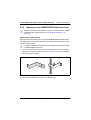
When mounting the left telescopic rail in the PRIMECENTER/DataCenter Rack,
the supplied support bracket must first be mounted level with the device on the
rear left support upright.
I For better orientation the height units are marked on the support uprights
(PRIMECENTER Rack only).
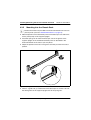
Ê Place the support bracket at the appropriate height on the left rear support
upright by inserting the positioning nub (1 in figure 4) in the corresponding
hole of the support upright.
1
Figure 4: Mounting the support bracket
Ê Secure the bracket with two screws incl. plugwashers.
34
Operating Manual
RX220
Hardware Installation
Installing/Removing the Server into/from the Rack
Mounting the rails into the rack
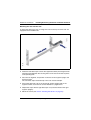
To fasten the telescopic rails, no flange nuts are necessary since the rails are
equipped with threaded holes.
Figure 5: Mounting the left telescopic rail
Ê Position the left telescopic rail onto the support bracket by inserting the small
horizontal lead (between the securing holes on the rear end of the rail) in the
corresponding hole.
Ê Press the rail together, and position it onto the frontal support upright, and
release it again.
The rail will be adjust automatically in the rack clearance depth.
Ê Secure the telescopic rail on the frontal left support upright and on the
support bracket, each with two screws M5x10 incl. plugwashers.
Ê Repeat the steps with the right telescopic rail (to be mounted on the right
support uprights).
Ê Mount the server (see section “Installing the Server” on page 37).
RX220
Operating Manual
35
Installing/Removing the Server into/from the Rack
4.3.5
Hardware Installation
Mounting into the Classic Rack
I General information are provided in the Technical Manual for the Classic
(19-inch) Rack (see also “Related Publications” on page 75).
Ê Mark the position of the attachment points for the telescopic rails and for the
server (front panel) on the support uprights.
Ê Place the spring nuts to fasten the telescopic rails in the groove of the
support uprights at the marked attachment points as described in the
Technical Manual for the Classic (19-inch) Rack.
Ê Adjust the position of the nuts in the groove until they lock into the correct
position.
2
1 x M 5
2
1 x M 5
1
Figure 6: Mounting the left telescopic rail into the Classic Rack
Ê There is a guide nub (1) at both ends of the telescopic rail. Fit this nubs into
the oblong holes of the support uprights next to the spring nuts.
36
Operating Manual
RX220
Hardware Installation
Installing/Removing the Server into/from the Rack
Ê Using the supplied Allen key (No. 5) secure the telescopic rail with one screw
M5 each in the rack at the left front and rear support uprights.
Ê Repeat the steps with the right telescopic rail (to be mounted on the right
support uprights).
Ê Mount the server (see “Installing the Server” on page 37).
4.3.6
Installing the Server
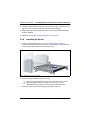
Ê Position the prepared server (see section “Preparing the Server” on
page 33) into the telescopic rails, push the locking springs (1) and insert the
server until the telescopic bars click into place (2).
2
3
2
4
1
4
Figure 7: Fitting the server in the rack
Ê Push the server completely into the rack (3).
I After you have inserted the server, you should pull out the server
again completely and insert it again into the rack. Thus it is
guaranteed that the server runs cleanly in the telescopic rails.
Ê Fasten the server (front panel) using two knurled screws (4).
RX220
Operating Manual
37
Installing/Removing the Server into/from the Rack
Hardware Installation
The server is removed in the reverse order.
V CAUTION!
No cable management is available for the server!
Before the server is removed, all cables must be disconnected from their
sockets. Please note the instructions in section “Installing/Removing the
Server into/from the Rack” on page 29.
4.3.7
Mounting in 3rd-Party Racks
For mounting the server in the 3rd-Party Rack the following parts are necessary:
– one left and one right telescopic rail (assembled)
– possibly ten plugwashers
Ê Take the original manual of the rack manufacturer regarding the mechanical
installation and/or the climatic conditions to assistance.
V CAUTION!
With the installation in 3rd-Party Rack it is to be made certain that the
air flow is ensured from the front to the rear in the rack.
Ê Mount the necessary manufacturer original parts (like support bracket).
I Sometimes a number of parts of the delivered mounting kit cannot be
used because original parts of the 3rd-Party Rack are to be used.
Ê Mount the telescopic bars as described in section “Preparing the Server” on
page 33.
Ê Secure the telescopic rails into the rack as described in section “Mounting in
the PRIMECENTER/DataCenter Rack” on page 34.
Ê Mount the server (see “Installing the Server” on page 37) and route the
cables as described in the original manual of the rack.
38
Operating Manual
RX220
Hardware Installation
4.4
Connecting Devices to the Server
Connecting Devices to the Server
The ports for external devices are on the rear of the server. You find an
additional USB port on the front of the server. Which additional ports are
available on your server depends on the PCI boards installed.
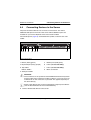
The standard ports (figure 8) are marked with symbols, and some are colorcoded:
1
2
3
4
5
6
7
8
Figure 8: Connections
1 Mouse (PS/2) (green)
5
Monitor port (VGA) (blue)
2 Keyboard port (PS/2) (purple)
6
LAN 2 (10/100/1000 MBps)
3 Top: USB 1
7
LAN 1 (10/100/1000 MBps)
8
Mains connection
Bottom: USB 2
4 Serial port COM1
V CAUTION!
The connectors on the system board are SMD-mounted and may break
easily if under strain. Therefore, install the cables in such a way as to put
as little strain on the connectors as possible. This applies especially to
the VGA cable (5).
I Some of the devices that can be connected may require special drivers
(see the documentation for the connected device).
Ê Connect the desired devices to the server.
RX220
Operating Manual
39
Connecting the Server to the Mains
4.5
Hardware Installation
Connecting the Server to the Mains
The server is equipped with a power supply unit.
V CAUTION!
The installed power supply unit automatically sets itself to a voltage in the
range from 100 V to 127 V or from 200 V to 240 V, respectively. Make
sure that your local voltage is within this range.
Ê Connect the insulated connector of the power cable to the power supply unit
of the server (see figure 8 on page 39, connection 8).
Ê Connect the power plug to a grounded mains socket in the socket strip of the
rack (see also the Technical Manual of the rack).
40
Operating Manual
RX220
Hardware Installation
4.6
Connecting and Disconnecting Cables
Instructions on Connecting and
Disconnecting Cables
V CAUTION!
Be sure to read the documentation for the peripheral devices before
connecting them.
Do not connect or disconnect data cables during a thunderstorm.
When removing a cable, always hold it by the plug. Never unplug a cable
by pulling at the cable itself.
Connect and disconnect the cables in the order described below.
Connecting cables
Ê Turn off all power and equipment switches.
Ê Pull all power plugs out of the grounded power sockets.
Ê Plug all cables into the server and peripherals.
Ê Plug all data communication cables into the utility sockets.
Ê Plug all power cables into the grounded power sockets.
Disconnecting cables
Ê Turn off all power and equipment switches.
Ê Pull all power plugs out of the grounded power sockets.
Ê Unplug all data communication cables from the utility sockets.
Ê Disconnect the relevant cables from the server and all the peripherals.
RX220
Operating Manual
41
5
Preparation for Use and
Operation
V CAUTION!
Please note the safety instructions in chapter “Important Notes” on
page 17.
5.1
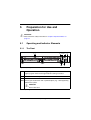
Operating and Indicator Elements
5.1.1
The Front
3 4 56 7
1 2
14, 15
14, 15
8
9 11 13
10 12
Figure 9: Operating elements and indicators on the front
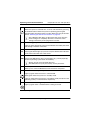
1
CD-ROM/DVD access indicator (green)
Lights up green when the storage medium is being accessed.
2
CD-ROM/DVD drive: eject button
3
Reset button
RST Pressing the reset button with a pointed object (e.g. a bent paperclip)
reboots the system.
V CAUTION!
Risk of data loss!
Table 3: Operating elements and indicators on the front
RX220
Operating Manual
43
Operating and Indicator Elements
4
Preparation for Use and Operation
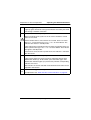
ON/OFF button
When the system is switched OFF, it can be switched ON by pressing
the ON/OFF button. When the system is operating, pressing the
ON/OFF button will switch OFF the system. More hints may be found in
section “Switching the Server ON and OFF” on page 48.
I The ON/OFF button does not disconnect the server from the
mains voltage. To completely disconnect it from the mains
voltage, remove the power plug from the socket.
5
LAN1 LED (green)
Lights up green when data is being transmitted or received by the LAN1
port through a network connection.
6
Identification (ID) button
ID
Pressing this button lights up synchronously the identification indicators
on the front and on the rear of the server.
7
NMI button
NMI Pressing the NMI button with a pointed object (e.g. a bent paperclip)
shuts the operating system down immediately.
I Please, do not use it! Possible data loss!
The NMI button may only be used by service personnel.
8
USB 2.0 ports
Allows you to connect USB devices from the server front panel.
9
Power-on indicator (bicolor)
Lights up green when the server is switched ON.
Blinks green when the system is in standby mode.
Lights up amber when the server is in shutdown mode (shut down of the
operating system) or switched OFF, respectively.
10
HDD access indicator (green)
Lights up green when a hard disk drive is being accessed.
Table 3: Operating elements and indicators on the front
44
Operating Manual
RX220
Preparation for Use and Operation
11
Operating and Indicator Elements
LAN2 LED (green)
Lights up green when data is being transmitted or received by the LAN2
port through a network connection.
12
!!
Global Error indicator (amber)
Does not light when the system is ok. No service incident or critical
event has occurred.
Flashes amber when a critical event has occurred. Users can check
BIOS Setup, system event log or via ServerView for event details. The
indicator also flashes in standby mode.
Lights amber when a prefailure event has been recognized. Users can
check system event log or via ServerView for event details. The indicator
also lights in standby mode.
If the event is still acute after a power failure, the indicator is activated
after the restart.
13
Identification (ID) indicator (blue)
Lights up blue when the system has been selected by pressing the
identification button (6). To deactivate, press the button again. The
identification indicator lights up synchronously with the corresponding
indicator on the rear.
The indicator can also be selected via ServerView and its status is also
reported to ServerView.
14,
15
HDD indicators (green, amber)
For explanation see “Hard disk drive control indicators” on page 46.
Table 3: Operating elements and indicators on the front
RX220
Operating Manual
45
Operating and Indicator Elements
Preparation for Use and Operation
Hard disk drive control indicators
HDD Access
HDD Fault
Figure 10: HDD module: indicators
LED
green
HDD access
– lights: HDD in active phase
– does not light: HDD inactive
LED
HDD FAULT (in conjunction with a RAID controller)
amber
– does not light: No HDD Error
– lights: HDD Faulty or Rebuild Stopped (drive defective/needs
replacing, a rebuild process was stopped or the HDD module is
not correctly inserted)
– slow blink: HDD Rebuild (the data is restored by the RAID
controller after changing a hard disk drive)
– fast blink: HDD Identify
46
Operating Manual
RX220
Preparation for Use and Operation
5.1.2
Operating and Indicator Elements
The Rear
1 2
1 2 34
Figure 11: Connection panel: indicators
1
LAN activity indicator (green)
Flashes green when a LAN transfer occurs.
Does not light if there is no LAN connection available.
Lights if there is a LAN connection available.
2
LAN transfer rate indicator (dual color)
No function. Does not light.
3
Global Error indicator (amber)
Does not light when the system is ok. No service incident or critical event
has occurred.
Flashes amber when a critical event has occurred. Users can check
BIOS Setup, system event log or via ServerView for event details. The
indicator also flashes in standby mode.
Lights amber when a prefailure event has been recognized. Users can
check system event log or via ServerView for event details. The indicator
also lights in standby mode.
If the event is still acute after a power failure, the indicator is activated
after the restart.
Table 4: Indicators on the rear
RX220
Operating Manual
47
Switching the Server ON and OFF
4
Preparation for Use and Operation
Identification (ID) indicator (blue)
Lights up when the system has been selected by pressing the ID button.
To deactivate, press the button again.
The identification indicator lights up synchronously with the corresponding indicator on the rear.
The ID indicator can also be activated via ServerView and its status
reported to ServerView.
Table 4: Indicators on the rear
5.2
Switching the Server ON and OFF
V CAUTION!
If after switching ON the server there is nothing but flickering stripes on
the screen, switch the server OFF immediately (see “Flickering Stripes
on the Monitor Screen” on page 59).
The ON/OFF button does not disconnect the server from the mains. To
disconnect from the mains completely, remove the power plug.
48
Operating Manual
RX220
Preparation for Use and Operation
Switching the Server ON and OFF
Switching the server ON
The power-on indicator (position 11 in figure 9 on page 43) lights amber.
– First system installation:
Ê Press the ON/OFF button (position 9 in figure 9 on page 43).
The power-on indicator lights green.
Ê Insert the ServerStart-CD and/or an installation disk into the corresponding drive.
Ê Follow the instructions on the monitor (see also “Configuring the Server
and Installing the Operating System” on page 51).
– System already installed:
Ê Press the ON/OFF button (position 9 in figure 9 on page 43).
The server is switched on, performs a system test and boots the
operating system.
Switching the server OFF (ACPI-compatible operating systems, e.g.
Windows 2000, Linux)
The power-on indicator (position 11 in figure 9 on page 43) lights green.
Ê Shut down the operating system in an orderly manner.
The server is switched OFF automatically.
The power-on indicator lights amber.
Switching the server OFF (non-ACPI-compatible operating systems)
The power-on indicator (position 11 in figure 9 on page 43) lights green.
Ê Shut down the operating system in an orderly manner.
The server remains ON and the power-on indicator stays green.
Ê Press the ON/OFF button (position 9 in figure 9 on page 43) or send a corresponding control signal (see “Other ON/OFF options” on page 50).
The server switches OFF.
The power-on indicator lights amber.
RX220
Operating Manual
49
Switching the Server ON and OFF
Preparation for Use and Operation
Server in standby mode
The power-on indicator (position 11 in figure 9 on page 43) flashes green. The
CPU, the system fans and the drives have been slowed down.
Ê Shut down all RGB applications.
Ê Press any button to return to normal operation.
Other ON/OFF options
In addition to the ON/OFF button, the server can be switched ON and OFF in
the following ways:
– Specified switch-on time/switch-off time
The server is switched ON or OFF at a time specified in the ServerView
program.
– Ring indicator
The server is switched ON via an internal or external modem.
– Wake On LAN (WOL)
The server is switched ON by a command via the LAN (Magic Package).
– After power failure
The server automatically reboots following a power failure (depending on the
BIOS settings).
– Power override function
The system can be switched OFF by pressing the ON/OFF button for about
4 to 5 seconds.
V CAUTION!
Data loss may occur!
– IPMI
The server is switched ON by an IPMI console (via the serial COM1 port or
via the RJ45 LAN port).
50
Operating Manual
RX220
Perparation for Use and Operation
5.3
Configuring the Server
Configuring the Server and Installing the
Operating System
This section contains information about configuring the server and installing the
operating system.
I Make sure that the energy saving functions are disabled in the BIOS Setup
(„D2130 Setup Utility for RX220“) during server operation.
5.3.1
Configuring the SATA RAID controller
The server is equipped with an onboard SATA RAID controller with "Integrated
Mirroring" (IME) functionality. You may configure the RAID either before
running ServerStart or with ServerStart. It is recommended to use ServerStart.
Configuring the SATA RAID controller is either performed via the BIOS configuration utility (calling CTRL-F during BIOS POST) or with the ServerStart CD
using GAM (Global Array Management). More information is contained in the
controller documentation on the ServerBooks CD in section "controllers" (see
also “Related Publications” on page 75).
I Note on SATA-IDs:
Please note that the SATA-IDs for the hot-plug hard disk drives are
permanently assigned (from left to right).
I Descriptions of operating systems not covered in the RAID controller
manual are provided in the appropriate readme files on the driver
diskettes.
RX220
Operating Manual
51
Configuring the Server
5.3.2
Perparation for Use and Operation
Configuration with ServerStart
With the ServerStart-CD provided, you can configure the server and install the
operating system in a convenient manner. The menu-guided configuration
includes the server configuration using SCU and the RAID controller configuration using GAM (Global Array Manager).
To find out how to operate ServerStart and for further information, refer to the
corresponding ServerStart manual (see “Related Publications” on page 75).
If you use ServerStart, you can skip the following sections on how to configure
the server and install the operating system. Continue with section “Cleaning the
Server” on page 53.
5.3.3
Configuration without ServerStart
Configuring the RAID controller
– The onboard SATA RAID Controller is configured as described in section
“Configuring the SATA RAID controller” on page 51.
– An optional PCI RAID controller is configured as described in the pertaining
documentation.
Installing the Operating System
Ê Insert the installation floppy disk and the CD for the operating system you
want to install into the corresponding drive.
Ê Reboot the server.
Ê Follow the instructions on the screen and in the manual for the operating
system.
I Please read how to install the desired operating system in the related
manual for the RAID controller.
52
Operating Manual
RX220
Perparation for Use and Operation
5.4
Cleaning the Server
Cleaning the Server
V CAUTION!
Switch the server off and pull the power plug out of the groundedcontact power socket.
Do not clean any interior parts yourself; leave this job to a service
technician.
Do not use any cleaning agents that contain abrasives or may corrode
plastic.
Ensure that no liquid enters the system. Ensure that the ventilation areas
of the server and the monitor are clear.
Clean the keyboard and the mouse with a disinfecting cloth.
Wipe the server and monitor casing with a dry cloth. If particularly dirty, use a
cloth that has been moistened in a mild domestic detergent and then carefully
wrung out.
RX220
Operating Manual
53
6
Property and Data Protection
The server is protected against unauthorized access with the lockable rack
door.
To protect your system and data internally against unauthorized access, you
can activate the BIOS Setup security functions.
6.1
BIOS Setup Security Functions
In the BIOS Setup, the Security menu offers you various options for protecting
your data from unauthorized access. By combining these options you can
achieve optimum protection for your system. Examples for security functions are
contained in this chapter.
I You will find a detailed description of the Security menu and how to assign
passwords in the manual "D2130 Setup Utility for RX220" on the
ServerBooks CD (see “Related Publications” on page 75).
Preventing unauthorized BIOS Setup calls
You can activate this protection by entering a setup password in the Security
menu with the function Set Setup Password.
Preventing unauthorized system access
You can activate this protection by entering a system password in the Security
menu with the function Set System Password.
Preventing diskette writing
You can activate this protection in the Security menu by setting the Diskette Write
entry to Disabled. Default value is Enabled.
Protecting BIOS from overwriting
You can activate this protection in the Security menu by setting the Flash Write
entry to Disabled. Default value is Enabled.
RX220
Operating Manual
55
7
Troubleshooting and Tips
V CAUTION!
Observe the safety information in the "Security" manual and in
chapter “Important Notes” on page 17.
If a problem occurs, try to resolve it as described:
– in this chapter,
– in the documentation for the attached devices,
– in the help systems of the software used.
If you fail to correct the problem, proceed as follows:
Ê Make a list of the steps and the circumstances that led to the fault. Also make
a list of any error messages that were displayed.
Ê Switch off the server.
Ê Contact our customer service team.
7.1
Power-ON Indicator Remains Dark
The power-ON indicator remains dark after you switch on your device.
Power cord incorrectly connected
Ê Make sure that the power cable is correctly connected to the server and to
the grounded socket.
Power supply overloaded
Ê Pull the server power plug out of the power socket.
Ê Wait a few seconds before you plug it into the grounded socket again.
Ê Switch on your server.
RX220
Operating Manual
57
The Server Switches itself OFF
7.2
Troubleshooting and Tips
The Server Switches itself OFF
Server management has detected an error
Ê Check the error list or the ErrorLog file in the ServerView program, and
attempt to eliminate the error.
7.3
Screen Remains Blank
Monitor is switched off
Ê Switch on your monitor.
Screen has gone blank
Ê Press any key on the keyboard.
or
Ê Deactivate screen blanking (screen saver). Enter the appropriate password.
Brightness control is set to dark
Ê Set the brightness control on the monitor to light. For detailed information,
please refer to the Operating Manual supplied with your monitor.
Power cable or monitor cable not connected
Ê Switch off the monitor and the server.
Ê Check whether the power cable is properly connected to the monitor and to
the grounded socket.
Ê Check whether the monitor cable is properly connected to the server and
monitor (if it is plugged in with a connector). If a separate graphics card is
installed in the server, then the monitor cable must be connected to the
graphics card.
Ê Switch on the monitor and the server.
58
Operating Manual
RX220
Troubleshooting and Tips
7.4
Flickering Stripes on the Monitor Screen
Flickering Stripes on the Monitor Screen
V CAUTION!
Switch off the server immediately. Risk of material damage.
Monitor does not support the set horizontal frequency
Ê Find out which horizontal frequency your monitor screen supports. You will
find the horizontal frequency (also known as line frequency or horizontal
deflection frequency) in the documentation for your monitor.
Ê Refer to the documentation for your operating system or corresponding
software for the screen controller for how to set the correct horizontal
frequency for your monitor, and follow the procedure accordingly.
7.5
No Screen Display or the Display Drifts
The wrong horizontal frequency or resolution has been selected for the
monitor or for the application program.
Ê Find out which horizontal frequency your monitor screen supports. You will
find the horizontal frequency (also known as line frequency or horizontal
deflection frequency) in the documentation for your monitor.
Ê Refer to the documentation for your operating system or corresponding
software for the screen controller for how to set the correct horizontal
frequency for your monitor, and follow the procedure accordingly.
7.6
No Mouse Pointer Displayed on Screen
Mouse driver not loaded
Ê Check whether the mouse driver is properly installed and is present when
the application program is started. Detailed information can be found in the
user manuals for the mouse, the operating system or the application
program.
RX220
Operating Manual
59
Floppy Disk Cannot be Read and/or Written
Troubleshooting and Tips
Mouse controller disabled
The mouse controller on the system board must be enabled if you use the
supplied mouse.
Ê Make sure in the BIOS Setup Advanced menu that the mouse controller is
Enabled.
7.7
Floppy Disk Cannot be Read and/or Written
Ê Check whether the write protection for the floppy disk is activated.
Ê Check the entry for the floppy disk drive in the BIOS Setup Main menu.
Ê Check in the BIOS Setup Advanced menu whether the floppy disk drive
controller is Enabled.
Ê Check in the BIOS Setup Security menu whether the floppy disk drive write
permission is Enabled. See “Protecting BIOS from overwriting” on page 55
7.8
Incorrect Time and/or Date
Ê Set the time and/or date in the operating system or in the BIOS Setup Main
menu.
I If the time and date are repeatedly wrong when you switch on your
server, you must change the lithium battery. Contact our Service group.
7.9
System Will Not Boot
The system will not boot after installing a new hard disk drive.
Incorrect SATA configuration (SATA Controller)
Ê In the SATA configuration menu, check the settings for the hard disk drives.
60
Operating Manual
RX220
Troubleshooting and Tips
7.10
Drives Are Reported as "Dead"
Drives Are Reported as "Dead"
This error message may occur with an incorrect configuration of the RAID
controller.
RAID controller configuration incorrect
Ê Check and correct the settings for the drives with the RAID controller utility.
Further information is provided in the manual on the RAID controller.
7.11
Added Drive Reported Defective
This error message may occur with an incorrect configuration of the RAID
controller.
RAID controller is not configured for this hard disk drive
The drive was probably installed when the system was switched off.
Ê Reconfigure the RAID controller for the drive with the corresponding utility.
Further information is provided in the manual on the RAID controller.
or
Ê Remove and reinstall the drive while the system is switched ON (see
“Installing the HDD module” on page 66).
If the drive continues to be shown as defective, then replace it.
7.12
Error Messages on the Screen
The meaning of the error messages is explained in the documentation for the
relevant components and programs on the PRIMERGY ServerBooks CD.
RX220
Operating Manual
61
8
Hot-plug Components
This chapter describes how to handle hot-plug components and/or how to
modify your server hardware (e.g. hot-plug HDD modules).
I Upgrading or replacing fix installed components are described in the
Service Manual and may only be performed by maintenance staff.
The hot-plug procedure enhances the availability of system operation, ensuring
a high degree of data security and system stability.
8.1
Hot-plug Hard Disk Drives
Up to two hot-plug hard disk drives can be installed into the PRIMERGY RX220
server.
The hard disk drives are built on a carrier which allows defective drives to be
replaced or new drives to be added during operation. The hard disk drive and
the carrier constitute the hard disk drive module (called "HDD module" in the
following sections).
V CAUTION!
Only a service technician may remove a hard disk drive from the HDD
module.
V CAUTION!
The HDD modules must be marked clearly so that they can be put back
into their original place after an upgrade. If this is not taken into account,
existing data can be destroyed.
V CAUTION!
The hot-plug function can only be performed together with a corresponding RAID configuration.
Further information about RAID configurations or RAID levels can be
found in the RAID controller documentation (see “Related Publications”
on page 75).
RX220
Operating Manual
63
Hot-plug Hard Disk Drives
8.1.1
Hot-plug Components
Handling Hard Disk Drives or HDD Modules
Hard disk drives incorporated in the HDD modules are highly sensitive electromagnetic devices and must be handled with great care. It is extremely likely that
an incorrect handling will lead to a partially and/or total failure of the hard disk
drives.
These failures will result in data errors and to loss of data or to total destruction
of the hard disk drive.
Please observe following rules, which will help to avoid the occurrence of this
type of problems:
●
Store and transport HDD modules only within the limits stipulated in the
specification.
●
When transporting HDD modules (even over short distances), always use
the original packaging (ESD labeling).
●
Never expose a HDD module to a temperature shock. Avoid the formation of
condensation inside and on the outside of the hard disk drives.
V CAUTION!
The HDD module must be acclimatized in its operating environment for
an acclimatization time.
Temperature difference (°C)
(operating environment/outside)
Minimum acclimatization time
(hours)
5
3
10
5
15
7
20
8
25
9
30
10
Table 5: Acclimatization time for the HDD module
●
64
Always put the HDD module down carefully, with its largest surface facing
downwards, to avoid the danger of tipping over.
Operating Manual
RX220
Hot-plug Components
8.2
Installing/Removing an HDD Module
Installing/Removing an HDD Module
Unlocking the HDD module
Figure 12: Unlocking the HDD module
Ê Release the locking mechanism by pressing the locking button (1).
Ê Push the handle of the HDD module fully in the direction of the arrow.
Figure 13: Removing the HDD module
I If the HDD modules are provided with a transport lock (see 1 in
figure 14), remove it before you release the locking mechanism.
RX220
Operating Manual
65
Installing/Removing an HDD Module
Hot-plug Components
Figure 14: Removing the transport lock
Installing the HDD module
Figure 15: Installing the HDD module
Ê Insert the HDD module with the opened handle carefully into the empty slot
(1) until it stops.
66
Operating Manual
RX220
Hot-plug Components
Installing/Removing an HDD Module
Figure 16: Locking the HDD module
Ê Push the module handle completely in the original position (2) until the
locking mechanism engages.
Swapping the HDD module
If you want to replace a HDD module during operation, proceed as follows:
Ê Pull out the HDD module by a few centimeters.
V CAUTION!
Under no circumstances should you remove a HDD module while the
system is in operation, if you are not sure that the hard disk drive is
operated by a RAID controller and belongs to a disk array which is
operating in RAID level 1.
Only pull out a HDD module if the drive is not being accessed.
Observe the control LEDs for the corresponding HDD module (see
“Hard disk drive control indicators” on page 46).
Ê Wait for at least 60 seconds.
I This period is necessary for the RAID controller to recognize that a
HDD module has been pulled out and for the hard disk drive to come
to a stop.
Ê Pull out the HDD module completely.
Ê Insert the new HDD module, as described in “Unlocking the HDD module”
on page 65 and in “Installing the HDD module” on page 66.
RX220
Operating Manual
67
Installing/Removing an HDD Module
Hot-plug Components
V CAUTION!
If the HDD module is removed and not replaced with a new module, then
the dummy module must be reinstalled due to cooling, the applicable
EMC (electromagnetic compatibility) regulations and fire protection (see
“Installing/Removing an HDD Module” on page 65). Make sure that the
retaining clips of the dummy unit engage correctly in the location.
68
Operating Manual
RX220
Abbreviations
AC
Alternating Current
ACPI
Advanced Configuration and Power Interface
ANSI
American National Standard Institut
ASR&R
Automatic Server Reconfiguration and Restart
BIOS
Basic Input-Output System
BMC
Baseboard Management Controller
CC
Cache Coherency
CD
Compact Disk
CD-ROM
Compact Disk-Read Only Memory
CHS
Cylinder Head Sector
CMOS
Complementary Metal Oxide Semiconductor
COM
Communication
CPU
Central Processing Unit
RX220
Operating Manual
69
Abbreviations
DC
Direct Current
DIMM
Dual Inline Memory Module
DIP
Dual Inline Package
DMA
Direct Memory Access
DMI
Desktop Management Interface
ECC
Errror Checking and Correcting
ECP
Extended Capabilities Port
EEPROM
Electrically Erasable Programmable Read-Only Memory
EMC
ElectroMagnetic Compatibility
EMP
Emergency Management Port
EPP
Enhanced Parallel Port
ESD
ElectroStatic Discharge
FPC
Front Panel Controller
FRU
Field Replaceable Unit
70
Operating Manual
RX220
Abbreviations
FSB
Front Side Bus
GAM
Global Array Manager
GUI
Graphical User Interface
HDD
Hard Disk Drive
HSC
Hot-Swap Controller
I²C
Inter-Integrated Circuit
I/O
Input/Output
ICM
Intelligent Chassis Management
ID
Identification
IDE
Intergrated Drive Electronics
IRQ
Interrupt Request Line
LAN
Local Area Network
LBA
Logical Block Address
LCD
Liquid Crystal Display
RX220
Operating Manual
71
Abbreviations
LUN
Logical Unit Number
LVD
Low-Voltage Differential SCSI
MMF
Multi Mode Faser
MRL
Manually Retention Latch
NMI
Non Maskable Interrupt
NVRAM
Non Volatile Random Access Memory
OS
Operating System
PCI
Peripheral Component Interconnect
PDA
Prefailure Detection and Analysing
POST
Power ON Self Test
RAID
Redundant Arrays of Independent Disks
RAM
Random Access Memory
ROM
Read-Only Memory
RSB
Remote Service Board
72
Operating Manual
RX220
Abbreviations
RTC
Real Time Clock
RTDS
Remote Test- und Diagnose-System
SAF-TE
SCSI Accessed Fault-Tolerance Enclosures
SBE
Single Bit Error
SCA
Single Connector Attachment
SCSI
Small Computer System Interface
SDR
Sensor Data Record
SDRAM
Synchronous Dynamic Random Access Memory
SEL
System Event Log
SMI
System Management Interrupt
SSU
System Setup Utility
SVGA
Super Video Graphics Adapter
USB
Universal Serial Bus
VGA
Video Graphics Adapter
RX220
Operating Manual
73
Abbreviations
ZCR
Zero Channel RAID
74
Operating Manual
RX220
Related Publications
Manuals for PRIMERGY server systems are available as PDF files on the
ServerBooks CD. The ServerBooks CD is part of the PRIMERGY ServerView Suite
delivered with each server system.
The current versions of the required manuals can be downloaded free of charge
as PDF files from the Internet. The overview page showing the online documentation available on the Internet can be found via the URL:
http://manuals.fujitsu-siemens.com (choose: industry standard servers).
[1]
Safety
[2]
Ergonomics
[3]
Warranty
[4]
System Board D2130
Technical Manual
[5]
D2130 Setup Utility for RX220
Reference Manual
[6]
Quick Start Hardware - PRIMERGY RX220
Poster
[7]
Quick Start Software - PRIMERGY ServerView Suite
Poster
[8]
PRIMERGY RX220 Server System
Options Guide
[9]
Global Array Manager Client Software
User Manual
[10]
Global Array Manager Server Software
User Manual
[11]
Integrated Mirroring
User Manual
[12]
PRIMERGY ServerView Suite - ServerStart
User Manual
RX220
Operating Manual
75
Related publications
[13]
PRIMECENTER Rack
Technical Manual
[14]
DataCenter Rack
Technical Manual
[15]
19 inch rack
Technical Manual
[16]
ServerView
Server Management
User Manual
[17]
RemoteView
User Manual
[18]
RemoteView Service Board S2
Installation Guide
76
Operating Manual
RX220
Index
configuring
server 10, 53
connecting
cables 43
external devices 43
connections
mains 41
consumables 25
correcting error 59
3rd-Party Rack
installing in 40
requirements 32
A
Abbreviations 73
accessible drives
CD-ROM 9
DVD-ROM 9
floppy disk drive 9
acclimatization time 66
server 29
additional information sources
ASR&R 9
availability 9
B
BIOS
security functions 57
BIOS flashing protection 57
BIOS update 11
button
identification 46
C
cables
connecting 43
disconnecting 43
cage nut 38
CD-ROM drive
indicator 45
CE certification 13, 23
Chipkill 9
Classic Rack
requirements 32
cleaning
monitor, mouse, server,
keyboard 55
components
hardware/software 5
RX220
7
D
data manipulation 5
data protection 57
DataCenter Rack
requirements 32
delivery note 15, 30
devices
connecting to the server 41
disconnecting
cables 43
diskette writing protection 57
disposal
devices 26
drive
"dead" 63
defective 63
E
ECC 9
EDC 9
electrical data 12
electromagnetic compatibility 13, 23
EMC 13
Environment Protection 25
environmental conditions 14
error
display drifts 61
drive "dead" 63
drive defective 63
floppy disk cannot be read or
written 62
Operating Manual
77
Index
no mouse pointer 61
power-on indicator does not
light 59
screen remains dark 60
screen shows flickering
stripes 61
server switches off 60
system does not boot 62
wrong date 62
wrong time 62
Error Correcting Code 9
Error Detection and Correction 9
error message
on screen 63
ESD (devices sensitive to electrostatic
discharge) 22
ESD-sensitive devices 22
external devices
connecting 43
indicator 48
online replacing 69
hard disk drive module
hot-plug 9
HDD busy
indicator 46, 47
HDD module
acclimatization time 29, 66
carrier 67
dummy module 65
handling 65
hard disk drive 67
hot-plug 9, 69
installing/removing 67
height units 38
hot-plug
HDD module 65, 69
F
fault
display drifts 61
screen dark 61
screen shows flickering
stripes 61
system does not boot 62
features 8
flash EPROM 11
floppy disk
cannot be read or written 62
indicator 50
identification
button 46
indicator 46
IME 53
RAID-Funktionalität 8
indicator
hard disk drive 48
indicators
CD-ROM 45
Global Error 47, 49
HDD busy 46, 47
ID 50
identification 46
LAN active 49
LAN connection 49
on the server 45
power-ON indicator 46
installation
server 30
system architect 30
installing
server 31
installing in
G
GAM 54
Global Array Manager (GAM) 54
Global Error
indicator 47, 49
H
hard disk drive 8
carrier 65
handling 66
HDD module 65
hot-plug 65
78
I
ID
Operating Manual
RX220
Pfad: U:\RX220\rx220_ba\rx220_e.pdf\rx220us.six
© Siemens Nixdorf Informationssysteme AG 1995
Index
3rd-Party Rack 40
PRIMECENTER Rack 36
L
LAN active
indicator 49
LAN connection
indicator 49
light-emitting diode (LED) 21
lithium battery 20
low-voltage directive 13, 23
M
mains voltage
connecting the server 42
meaning
of the symbols 12
Memory Scrubbing 9
model rating plate 30
monitor
display drifts 61
mounting kit
server 35
mouse
no mouse pointer on the
screen 61
N
NMI button 46
noise level 14
notational conventions 12
note about the laser 21
O
ON/OFF button 46
operating system
installing 54
operation 45
operation elements 45
overloading 9
P
packaging
PDA 9
RX220
25, 30
ports 41
keyboard port 41
LAN 41
monitor port 41
mouse 41
serial port (COM1) 41
USB 41
power-on indicator
does not light 59
PRIMECENTER Rack
installing in 36
requirements 32
PRIMERGY 11
property protection 57
R
rack
requirements 32
RAID controller
configuring 54
not configured for hard disk
drive 63
RAID level 9
RAID-Funktionalität 8
recycling
devices 26
reliability 9
RemoteView 11
removing
server 31
requirements
3rd-Party Rack 32
Classic Rack 32
DataCenter Rack 32
PRIMECENTER Rack 32
reset button 45
routing cables 37
S
safety 17
SATA 8
SATA-Controller
IME 8
saving energy 25
Operating Manual
79
Index
screen
error message 63
flickering 61
no display on screen 61
remains dark 60
screen dark 61
shows flickering stripes 61
security functions 5
BIOS flashing protection 57
diskette writing protection 57
setup password 57
system password 57
Server
IME 8
server
acclimatization time 29
configuring 53
connecting external devices 41
connecting mains voltage 42
correcting error 59
data protection 57
dimensions 13
electrical data 12
environmental conditions 14
fitting in the rack 31
height units 38
indicators 45, 46
installing 31
keyboard port 41
LAN 41
mains connection 41
monitor port 41
mounting kit 35
mouse port 41
NMI button 46
noise level 14
ON/OFF button 46
operation 45
ports 41
property protection 57
removing 31
reset button 45
routing cables 37
safety standards 12, 13
80
serial port (COM1) 41
standards 13
startup 45
suspend mode 52
switches itself off (error) 60
switching OFF 50
switching ON 50
technical data 12
transport 23
troubleshooting 59
unpacking 30
USB 41
ventilation clearance 13
weight 13
server management 9
ServerStart 10, 54
ServerView 9
supported functions 9
setup password 57
standards 13
startup
server 45
sticker 25
support bracket 36
suspend mode 52
switching OFF
server 50
switching ON
server 50
switch-OFF time
define 52
switch-ON time
define 52
system architect 30
system board 8
system does not boot 62
system password 57
T
take-back
devices 26
technical data 12
telescopic rail 39
transport damage 15, 30
Operating Manual
RX220
Pfad: U:\RX220\rx220_ba\rx220_e.pdf\rx220us.six
© Siemens Nixdorf Informationssysteme AG 1995
Index
troubleshooting, server 59
U
unpacking
server 30
USB 2.0 ports 46
V
ventilation clearance 13
W
weight
RX220
13
Operating Manual
81
Fujitsu Siemens Computers GmbH
User Documentation
81730 München
Germany
Fax: 0 700 / 372 00000
e-mail: [email protected]
http://manuals.fujitsu-siemens.com
Submitted by
✁
Comments on PRIMERGY RX220
Server System
RX220
Comments
Suggestions
Corrections
© cognitas. Gesellschft für Technik-Dokumentation mbH 2005
Pfad: U:\RX220\rx220_ba\rx220_e.pdf\rx220us.nac
Fujitsu Siemens Computers GmbH
User Documentation
81730 München
Germany
Fax: 0 700 / 372 00000
e-mail: [email protected]
http://manuals.fujitsu-siemens.com
Submitted by
✁
Comments on PRIMERGY RX220
Server System
RX220
Comments
Suggestions
Corrections
Information on this document
On April 1, 2009, Fujitsu became the sole owner of Fujitsu Siemens Computers. This new subsidiary of Fujitsu has been renamed Fujitsu Technology Solutions.
This document from the document archive refers to a product version which
was released a considerable time ago or which is no longer marketed.
Please note that all company references and copyrights in this document have
been legally transferred to Fujitsu Technology Solutions.
Contact and support addresses will now be offered by Fujitsu Technology Solutions and have the format …@ts.fujitsu.com.
The Internet pages of Fujitsu Technology Solutions are available at
http://ts.fujitsu.com/...
and the user documentation at http://manuals.ts.fujitsu.com.
Copyright Fujitsu Technology Solutions, 2009
Hinweise zum vorliegenden Dokument
Zum 1. April 2009 ist Fujitsu Siemens Computers in den alleinigen Besitz von
Fujitsu übergegangen. Diese neue Tochtergesellschaft von Fujitsu trägt seitdem den Namen Fujitsu Technology Solutions.
Das vorliegende Dokument aus dem Dokumentenarchiv bezieht sich auf eine
bereits vor längerer Zeit freigegebene oder nicht mehr im Vertrieb befindliche
Produktversion.
Bitte beachten Sie, dass alle Firmenbezüge und Copyrights im vorliegenden
Dokument rechtlich auf Fujitsu Technology Solutions übergegangen sind.
Kontakt- und Supportadressen werden nun von Fujitsu Technology Solutions
angeboten und haben die Form …@ts.fujitsu.com.
Die Internetseiten von Fujitsu Technology Solutions finden Sie unter
http://de.ts.fujitsu.com/..., und unter http://manuals.ts.fujitsu.com finden Sie die
Benutzerdokumentation.
Copyright Fujitsu Technology Solutions, 2009