1
3. Function Keys
•
•
•
•
•
Press the SET key to toggle between wind speed and temperature display.
Press and Hold the SET key for 2 seconds to turn on the back light.
Press and Hold the SET key for 3 seconds to power on and off the unit.
Press and Hold the SET key for 4 seconds to clear historical data (high wind speed).
Press and Hold the SET key for 6 seconds to enter the SET Mode. The SET mode allows you
to change units of measure and averaging time frame.
4. Wind Speed vs. Temperature Display
Press the SET key to toggle between wind speed and temperature display.
4.1 Wind Speed Display Mode
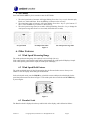
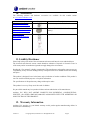
There are three wind speed display modes:
• Current wind speed (WIND)
• Maximum wind speed (ΔWIND)
• Average wind speed ((ΦWIND)
Press the + key to toggle between the three wind speed display modes.
Current wind speed
maximum wind speed
average wind speed
Figure 2
4.2 Temperature Display Mode
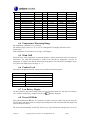
There are two temperature display modes:
• Temperature
• Wind Chill
Press the + key to toggle between the two temperature display modes.
Temperature
Version 1.1
Wind chill
Figure 3
©Copyright 2012, Ambient LLC. All Rights Reserved.
Page 3