1
<Toc>
5-17
<5. Parameters>
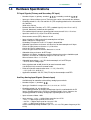
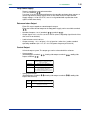
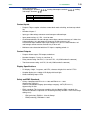
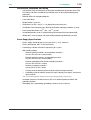
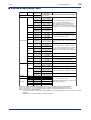
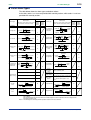
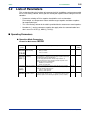
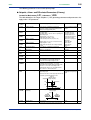
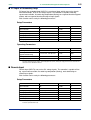
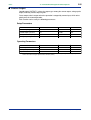
■ Setup Parameters
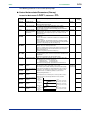
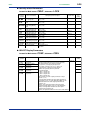
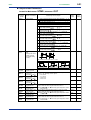
The following parameter is for cascade primary-loop.
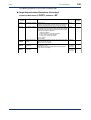
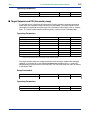
● Target Setpoint-related Parameters (Primary)
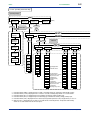
Located in: Main menu = LOOP1 ; Submenu = SP
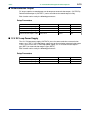
Parameter
Symbol
Name of Parameter
Setting Range and Description
Initial Value
RMS
Remote input
selection
RSP (0): Uses the value set remotely via remote input (terminals).
COM (1): Uses the value set remotely via communication.
(Common to the primary-loop and secondary-loop.)
RSP (0)
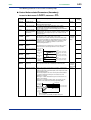
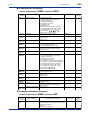
SPT
SP tracking selection
ON (1)
PVT
PV tracking selection
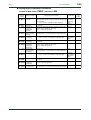
TMU
Ramp-rate time unit
setting
SPH
Target setpoint limiter
upper limit
SPL
Target setpoint limiter
lower limit
OFF (0), ON (1)
Tracking is performed when the mode changes from Remote to
Local (The local setpoint keeps track of the remote setpoint.)
Causes the setpoint to keep track of the PV value so the setpoint
automatically reverts to its original value at a preset rate of change.
The Setpoint Ramp-up (UPR) and Setpoint Ramp-down (DNR)
parameters are used in combination.
- Operating conditions 1: Manual operation → Automatic operation;
2: Stop → Start of automatic operation;
3: Power-on; 4: Change SP number
OFF (0): Disable
ON (1): Enable
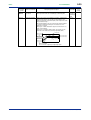
Time unit of setpoint ramp-up (UPR) and setpoint ramp-down (DNR)
HOUR (0): Denotes “per hour.”
MIN (1): Denotes “per minute.”
0.0% to 100.0% of primary PV input range.
Note that SPL < SPH
Places limits on the ranges within which the target setpoints
(1.SP to 8.SP) are changed.
IM 05D01B02-53E
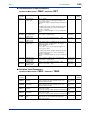
User
Setting
OFF (0)
HOUR (0)
100.0% of
primary PV
input range
0.0% of
primary PV
input range
1st Edition : May 31,2000-00