1
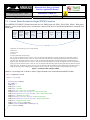
Bluetooth Low Energy Software Interface Application Manual ESD Sensitive Date of Issue: Jan 15th, 2014 ABBTM-NVC-MDCS71 Page (10) of (33) Abracon Drawing # 453732 Revision #: A 5.1.4.3. Parameter Description: Parameter Features Description A 16-bit value as a bit mask, for example, 8000 means the bit 15 is 1 and all other bits is 0. The features are defined with the 16 bits mask, 1 is enable. Bit 15: automatically start advertising when power up. Bit 14: reserved, always set to 1. Bit 13: reserved, always set to 1. Bit 12: use privacy, which means the module only connects to bonded devices (need to clear the paring information before connect a new device) Bit 11-1: Not defined yet. Bit 0: Apple’s iBeacon feature. Set to 1 and reset the module will put it to be an iBeacon station. Set to 0 will put it back to normal working state. Mandatory or Optional Comments O Notes: 1. The default feature configuration may be different per software version. 5.1.4.4. Examples: Ex. 5.6. To query current feature configuration of Bluetooth Module: BC:FT<CR><LF> query current feature configuration. FT=e000<CR><LF> report current feature configuration. 5.1.5. CC - Preferred Connection Parameters Characteristic 5.1.5.1. Description: This command can query or configure the GAP preferred connection parameter characteristic of Bluetooth Module. Once configured, the configuration will take effect at the next time when a Bluetooth connection is being established. The Bluetooth module stores the value in its non-volatile memory so the value won’t change until be set again. If the parameter is not presented, the Bluetooth Module will report current configuration by the Indicator CC. 5.1.5.2. Syntax: Synopsis: BC:CC[=Min Interval,Max Interval, Latency, Supervision Timeout]<CR><LF>