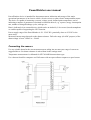
1
12
TX
13
Speed sensor 1
14
Speed sensor 2
15
Common potential
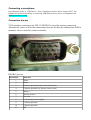
Pin-out for direct wire soldering into PCB bypassing the DSUB15 connector:
Pin number
Function
1
Battery +
2
Not used
3
Not used
4
Common potential (minus of traction battery)
5
Common potential
6
Not used
7
Shunt +
8
Shunt -
9
Not used
10
Thermo sensor +
11
+5V (sensors power supply)
12
RX
13
TX
14
Speed sensor 1
15
Speed sensor 2
Software deployment on Android based device
1. Check USB Host function of your smartphone. Download “USB Host Diagnostics” from
Play Market and run it. Run the diagnostics and agree to “fix errors” as the program
propmts.
2. Download “PowerWatcher” program from Play Market.
3. After the connection of your smartphone to PowerWatcher device the software will run
automatically.
Warning: Device gives power supply from battery (not from USB!). So device works only then it
connected to battery.
Setting the software
“PowerWatcher” software has 3 screens – “Display”, “All parameters” and “Settings”. Switching
between the screens is by double tap.
- “Main screen” or “Display” solely indicates the selected parameters.
- “All parameters” screen allows selecting the parameter set to be indicated on the “Display”