1
LED
Display
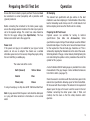
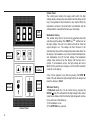
Control Panel
The control panel contains the supply on/off switch, the high
voltage display, voltage ramp rate selection and the three control
keys. The operation of the instrument is very simple. When the
instrument is turned on, the on/off switch is illuminated, and the
software edition code will be flashed up on the display.
s
Breakdown Testing
The suitable ramp rate for the test to be performed should be
selected using the ‘s' key. The START key ‘ ‘ will then turn on
the high voltage. The red H.V. indicator will light to show the
output voltage is on. The voltage will then increase at the
selected ramp rate and the corresponding value will be shown on
the display. If oil breakdown occurs the instrument will detect this
and immediately shut off the high voltage. The breakdown
voltage value will be left on the display until the next test is
started. If no breakdown occurs, the high voltage will rise to
60 kV. At this point the test voltage is cut off and this maximum
value left on the display.
Main
controls
Ramp rate
selection
Mains
on/off
switch
HV on
indicator
Control Panel
6.
A test can be stopped at any time by pressing the STOP ‘n’
button. This will remove the high voltage from the oil sample and
leave the display at 0,0 kV.
Withstand Testing
A Withstand (proof) test can be carried out by pressing the
PAUSE ‘ ‘ key. This will maintain the high voltage at the current
value for one minute. After this time the high voltage will continue
to rise until one of the following:1) Oil breakdown occurs
2) The STOP ‘n' key is pressed