1
MIDI Control Change Messages
MIDI Program Change Messages
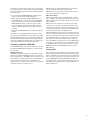
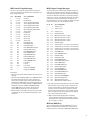
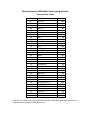
The 45000 can respond to specific Control Change messages. The following lists all of the 45000 parameters and
their corresponding CC#.
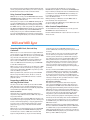
The 45000 interprets certain Program Change messages as
button pushes and mute/unmute commands. In addition to
accessing every button on the 45000 with Program Change,
we have also added more functions not present on the face
of the 45000, such as mute/unmute of the tracks and direct
selection of a track. A program change message has one
information byte, P0 (0 to 127), but this is usually presented
to the user as being 1 to 128, shown below as P1.
CC#
9
20
21
22
23
24
25
26
27
28
29
30
31
102
103
104
105
106
107
108
109
110
111
112
113
114
115
124
125
Data Range
0 to 127
0 to 127
0 to 127
0 to 127
0 to 127
0 to 127
0 to 127
0 to 127
0 to 127
0 to 127
0 to 127
0 to 127
0 to 127
127
127
127
127
127
127
127
127
127
127
127
127
127
0 to 99
0
0
45000 Parameter
Clix level
Dry Out slider
Track 1 play/feedback slider
Track 2 play/feedback slider
Track 3 play/feedback slider
Track 4 play/feedback slider
Mix track play/feedback slider
Tempo slider
Dry Out pan
Track 1 pan
Track 2 pan
Track 3 pan
Track 4 pan
Push REC button
Push NEW button
Push PLAY button
Push TRACK SELECT button
Push EXT SYNC button
Push MIXDOWN button
Push STEREO button
Push REVERSE button
Push OCTAVE button
Push PUNCH-IN button
Push QUANTIZE button
Loop Down
Loop Up
Loop Select
Change to OMNI=OFF
Change to OMNI=ON
Please Note:
• There must be at least 300mS between each button push
message.
• At power up the 45000 will always be in OMNI=OFF mode.
This means that it will only obey Control Change messages on the selected channel. The 45000 can however
be switched to OMNI=ON mode by receipt of the appropriate command on its selected channel. In OMNI=ON mode
45000 will respond to CONTROL CHANGE MESSAGES
(except OMNI=OFF) on any channel. The 45000 only
accepts OMNI messages set to its current channel.
• Moving a fader or knob after receiving a CC message will
overwrite the last CC message with the last fader or knob
movement.
P0 or P1
0
1
0
2
:
:
99
100
100 101 101 102 102 103 103 104 104 105 105 106 106 107
107 108 108 109 109 110 110 111 111 112 112 113 113 114 114 115 115 116 116 117 117 118 118 119 119 120 120 121 121 122 122 123 123 124 124 125 125 126 126 127 45000 Parameter
Select Loop 00
Select Loop 01
Select Loop 99
Push PLAY button
Mute/unmute track 1’s play**
Mute/unmute track 2’s play**
Mute/unmute track 3’s play**
Mute/unmute track 4’s play**
Push REC button
Select track 1 for record (or 1 and 2 if stereo)
Select track 2 for record (or 1 and 2 if stereo)
Select track 3 for record (or 3 and 4 if stereo)
Select track 4 for record (or 3 and 4 if stereo)
Push NEW button
Push QUANTIZE button
Push REC button
Push PLAY button
Push REVERSE button
Push TRACK SELECT button
Push STEREO button
Push PUNCH-IN button
Push EXT SYNC button
Push OCTAVE button
Push MIXDOWN button
Push LOOP DOWN button
Push LOOP UP button
Mute/unmute MIXDOWN**
Mute/unmute Dry Out**
Mute/unmute clix level**
Mute/unmute all play tracks***
** The single channel mute/unmute action works as follows:
If the channel’s level is greater than zero when the command is received then the channel will be muted. If the
channel’s level is zero when the command is received
then the level will be set either to that of 45000’s panel
fader or to that of the last CC message (20..24), depending on which was the last received.
*** When a mute/unmute all-play-tracks command is
received all play tracks will be muted if ANY of them is
greater than zero. If ALL of them are zero then each will
be set to fader or CC level.
MIDI Out (MIDI Thru)
45000 generally relays all received MIDI messages at its
MIDI out connector. But in Internal sync mode it does not
relay the sequencer commands: STOP START CONT CLOCK.
20