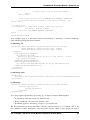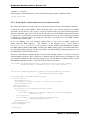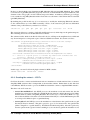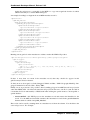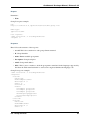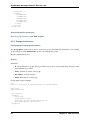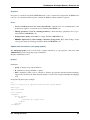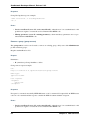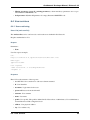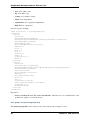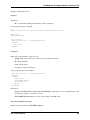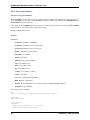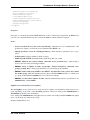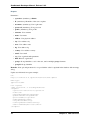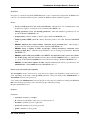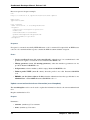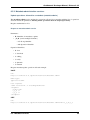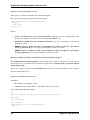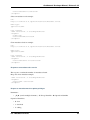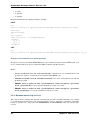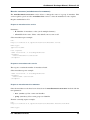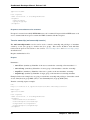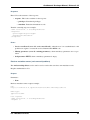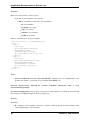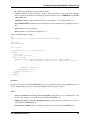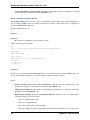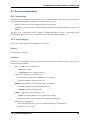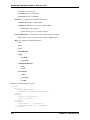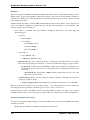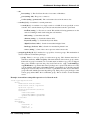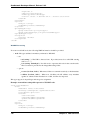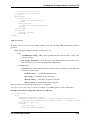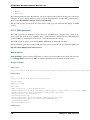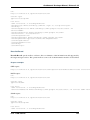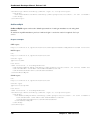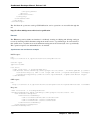
1
GeoNetwork Developer Manual Release 2.9.2 GeoNetwork April 03, 2015 Contents 1 Software development 1.1 System Requirements 1.2 Tools . . . . . . . . . 1.3 Check out source code 1.4 Build GeoNetwork . . 1.5 Creating the installer . 1.6 Eclipse setup . . . . . . . . . . . . . . . . . . . . . . . . . . . . . . . . . . . . . . . . . . . . . . . . . . . . . . . . . . . . . . . . . . . . . . . . . . . . . . . . . . . . . . . . . . . . . . . . . . . . . . . . . . . . . . . . . . . . . . . . . . . . . . . . . . . . . . . . . . . . . . . . . . . . . . . . . . . . . . . . . . . . . . . . . . . . . . . . . . . . . . . . . . . . . . . . . . . . . . . . . . . . . . . . . . . . . . . 3 3 4 4 5 6 7 2 Create GeoNetwork releases 11 2.1 Create a stable release for GeoNetwork . . . . . . . . . . . . . . . . . . . . . . . . . . 11 3 Harvesting 17 3.1 Structure . . . . . . . . . . . . . . . . . . . . . . . . . . . . . . . . . . . . . . . . . . 17 3.2 Data storage . . . . . . . . . . . . . . . . . . . . . . . . . . . . . . . . . . . . . . . . 19 3.3 Guidelines . . . . . . . . . . . . . . . . . . . . . . . . . . . . . . . . . . . . . . . . . 19 4 Schema Plugins 21 4.1 Contents of a GeoNetwork schema . . . . . . . . . . . . . . . . . . . . . . . . . . . . 21 4.2 Preparation . . . . . . . . . . . . . . . . . . . . . . . . . . . . . . . . . . . . . . . . . 23 4.3 Example - ISO19115/19139 Marine Community Profile (MCP) . . . . . . . . . . . . . 23 5 Metadata Exchange Format 5.1 Introduction . . . . . . 5.2 MEF v1 file format . . . 5.3 MEF v2 file format . . . 5.4 The info.xml file . . . . 6 . . . . XML Services 6.1 Calling specifications . . . 6.2 Login and logout services 6.3 Group services . . . . . . 6.4 User services . . . . . . . 6.5 Metadata services . . . . 6.6 System configuration . . . 6.7 General services . . . . . 6.8 File download services . . 6.9 Harvesting services . . . . . . . . . . . . . . . . . . . . . . . . . . . . . . . . . . . . . . . . . . . . . . . . . . . . . . . . . . . . . . . . . . . . . . . . . . . . . . . . . . . . . . . . . . . . . . . . . . . . . . . . . . . . . . . . . . . . . . . . . . . . . . . . . . . . . . . . . . . . . . . . . . . . . . . . . . . . . . . . . . . . . . . . . . . . . . . . . . . . . . . . . . . . . . . . . . . . . . . . . . . . . . . . . . . . . . . . . . . . . . . . . . . . . . . . . . . . . . . . . . . . . . . . . . . . . . . . . . . . . . . . . . . . . . . . . . . . . . . . . . . . . . . . . . . . . . . . . . . . . . . . . . . . . . . . . . . . . . . . . . . . . . . . . . . . . . . . . . . . . . . . . . . . . . . . . . . . . . . . . . . . . . . . . . . . . . . . . . . . . . . . . . . . . . . . . . . . . . . . . . . . . . . . . . . . . . . . . . . . . . . . 49 49 49 50 51 . . . . . . . . . 55 55 58 60 65 75 99 102 108 110 i 6.10 6.11 6.12 6.13 6.14 Schema information . . . . . . . . . Relations . . . . . . . . . . . . . . . MEF services . . . . . . . . . . . . . CSW service . . . . . . . . . . . . . Java development with XML services . . . . . . . . . . . . . . . . . . . . . . . . . . . . . . . . . . . . . . . . . . . . . . . . . . . . . . . . . . . . . . . . . . . . . . . . . . . . . . . . . . . . . . . . . . . . . . . . . . . . . . . . . . . . . . . . . . . . . . . . . . . . . . . . . . . . . . . 120 122 124 125 134 7 Settings hierarchy 141 7.1 Introduction . . . . . . . . . . . . . . . . . . . . . . . . . . . . . . . . . . . . . . . . 141 7.2 The system hierarchy . . . . . . . . . . . . . . . . . . . . . . . . . . . . . . . . . . . . 141 7.3 Harvesting nodes . . . . . . . . . . . . . . . . . . . . . . . . . . . . . . . . . . . . . . 143 8 User Interface 8.1 Classic . . 8.2 Search . . 8.3 TabSearch 8.4 HTML5UI ii . . . . . . . . . . . . . . . . . . . . . . . . . . . . . . . . . . . . . . . . . . . . . . . . . . . . . . . . . . . . . . . . . . . . . . . . . . . . . . . . . . . . . . . . . . . . . . . . . . . . . . . . . . . . . . . . . . . . . . . . . . . . . . . . . . . . . . . . . . . . . . . . . . . . . . . . . . . . . . . . . . . . 147 147 147 150 153 GeoNetwork Developer Manual, Release 2.9.2 Welcome to the GeoNetwork Developer Manual v2.9.2. The manual is for those who want to help with the development process, including source code, software releasing, and other administrative work. Other documents: GeoNetwork User Manual GeoNetwork Developer Manual (PDF) Contents 1 GeoNetwork Developer Manual, Release 2.9.2 2 Contents CHAPTER 1 Software development 1.1 System Requirements GeoNetwork is a Java application that runs as a servlet so the Java Runtime Environment (JRE) must be installed in order to run it. You can get the JRE from the following address http://java.sun.com and you have to download the Java 5 Standard Edition (SE). GeoNetwork won’t run with Java 1.4 and Java 6 has some problems with it so we recommend to use Java 5. Being written in Java, GeoNetwork can run on any platform that supports Java, so it can run on Windows, Linux and Mac OSX. For the latter one, make sure to use version 10.4 (Tiger) or newer. Version 10.3 (Panther) has only Java 1.4 so it cannot run GeoNetwork. Next, you need a servlet container. GeoNetwork comes with an embedded one (Jetty) which is fast and well suited for most applications. If you need a stronger one, you can install Tomcat from the Apache Software Foundation (http://tomcat.apache.org). It provides load balance, fault tolerance and other corporate needed stuff. If you work for an organisation, it is probable that you already have it up and running. The tested version is 5.5 but GeoNetwork should work with all other versions. Regarding storage, you need a Database Management System (DBMS) like Oracle, MySQL, Postgresql and so on. GeoNetwork comes with an embedded one (McKoi) which is used by default during installation. This DBMS can be used for small or desktop installations, where the speed is not an issue. You can use this DBMS for several thousands of metadata. If you manage more than 10.000 metadata it is better to use a professional, stand alone DBMS. In this case, using a separate DBMS also frees up some memory for the application. GeoNetwork does not require a strong machine to run. A good performance can be obtained even with 128 Mb of RAM. The suggested amount is 512 Mb. For the hard disk space, you have to consider the space required for the application itself (about 40 Mb) and the space required for data maps, which can require 50 GB or more. A simple disk of 250 GB should be OK. Maybe you can choose a fast one to reduce backup time but GeoNetwork itself does not speed up on a faster disk. You also need some space for the search index which is located in WEB-INF/lucene. Even with a lot of metadata the index is small so usually 10-20 Mb of space is enough. The software is run in different ways depending on the servlet container you are using: • Tomcat - You can use the manager web application to start/stop GeoNetwork. You can also use the startup.* and shutdown.* scripts located into Tomcat’s bin folder (.* means .sh or .bat depending on your OS) but this way you restart all applications you are running, not only GeoNetwork. After installation and before running GeoNetwork you must link it to Tomcat. • Jetty - If you use the provided container you can use the scripts into GeoNetwork’s bin folder. The scripts are start-geonetwork.* and stop-geonetwork.* and you must be inside the bin folder 3 GeoNetwork Developer Manual, Release 2.9.2 to run them. You can use these scripts just after installation. 1.2 Tools The following tools are required to be installed to setup a development environment for GeoNetwork: • Java - Developing with GeoNetwork requires a Java Development Kit (JDK) 1.5 or greater. • Maven - GeoNetwork uses Maven to manage the build process and the dependencies. Once is installed, you should have the mvn command in your path (on Windows systems, you have to open a shell to check). • Git - GeoNetwork source code is stored and versioned in a Git repository on Github. Depending on your operating system a variety of git clients are avalaible. Check in http://gitscm.com/downloads/guis for some alternatives. Good documentation can be found on the git website: http://git-scm.com/documentation and on the Github website https://help.github.com/. • Ant - GeoNetwork uses Ant to build the installer. Version 1.6.5 works but any other recent version should be OK. Once installed, you should have the ant command in your path (on Windows systems, you have to open a shell to check). • Sphinx - To create the GeoNetwork documentation in a nice format Sphinx is used. 1.3 Check out source code If you just want to quickly get the code the fastest way is to download the zip bundle: https://github.com/geonetwork/core-geonetwork/zipball/master However, it is recommended that if you want to contribute back to Geonetwork you create a Github account, fork the Geonetwork repository and work on your fork. This is a huge benefit because you can push your changes to your repository as much as you want and when a feature is complete you can make a ‘Pull Request’. Pull requests are the recommended method of contributing back to Geonetwork because Github has code review tools and merges are much easier than trying to apply a patch attached to a ticket. The Geonetwork Repository is at: https://github.com/geonetwork/core-geonetwork. Follow the instructions on the Github website to get started (make accounts, how to fork etc...) http://help.github.com/ Once you have the repository forked and cloned locally you can begin to work. A clone contains all branches so you can list the branches with: $ git branch -a Just look at last section (ignoring remotes/origin/). To checkout a branch just: $ git checkout 2.8.x Typically work is done on branches and merged back so when developing normally you will go change to the branch you want to work on, create a branch from there, work and then merge the changes back (or make a Pull Request on Github). There are many great guides (See the links above) but here is a quick sequence illustrating how to make a change and commit the change. 4 Chapter 1. Software development GeoNetwork Developer Manual, Release 2.9.2 $ git checkout master # master is the ‘trunk’ and main development branch # the checkout command “checks out” the requested branch $ git checkout -b myfeature # the -b requests that the branch be created # git branch will list all the branches you have checked out locally at some point # git branch -a will list all branches in repository (checked out or not) # work work work $ git status # See what files have been modified or added $ git add <new or modified files> # Add all files to be committed git add -u will add all modified (but not untracked) $ git commit # Commit often. it is VERY fast to commit # NOTE: doing a commit is a local operation. It does not push the change to Github # more work # another commit $ git push origin myfeature # this pushed your new branch to Github now you are ready to make a Pull Request to get the new feature added to Geonetwork 1.4 Build GeoNetwork Once you checked out the code from Github repository, go inside the GeoNetwork’s root folder and execute the maven build command: $ mvn clean install If the build is succesful you’ll get an output like: [INFO] [INFO] [INFO] [INFO] [INFO] [INFO] [INFO] [INFO] [INFO] [INFO] [INFO] [INFO] [INFO] [INFO] [INFO] [INFO] [INFO] [INFO] [INFO] [INFO] -----------------------------------------------------------------------Reactor Summary: -----------------------------------------------------------------------GeoNetwork opensource ................................. SUCCESS [1.825s] Caching xslt module ................................... SUCCESS [1.579s] Jeeves modules ........................................ SUCCESS [1.140s] Oaipmh modules ........................................ SUCCESS [0.477s] ArcSDE module (dummy-api) ............................. SUCCESS [0.503s] GeoNetwork Web module ................................. SUCCESS [31.758s] GeoServer module ...................................... SUCCESS [16.510s] Gast module ........................................... SUCCESS [24.961s] ----------------------------------------------------------------------------------------------------------------------------------------------BUILD SUCCESSFUL -----------------------------------------------------------------------Total time: 1 minute 19 seconds Finished at: Tue Aug 03 16:49:15 CEST 2010 Final Memory: 79M/123M ------------------------------------------------------------------------ and your local maven repository should contain the GeoNetwork ($HOME/.m2/repository/org/geonetwork-opensource). 1.4. Build GeoNetwork artifacts created 5 GeoNetwork Developer Manual, Release 2.9.2 Note: Many Maven build options are available. Please refer to the maven documentation for any other options, Maven: The Complete Reference For instance, you would like to use following options : -- Skip test $ mvn install -Dmaven.test.skip=true -- Offline use $ mvn install -o Please refer to the maven documentation for any other options, Maven: The Complete Reference 1.4.1 Run embedded jetty server Maven comes with built-in support for Jetty via a plug-in. To run GeoNetwork with embedded jetty server you have to change directory to the root of the web module, and then execute the following maven command: $ mvn jetty:run After a moment, GeoNetwork should be accessible at: http://localhost:8080/geonetwork 1.4.2 Source code documentation The GeoNetwork Java source code is based on Javadoc. Javadoc is a tool for generating API documentation in HTML format from doc comments in source code. To see documentation generated by the Javadoc tool, go to: • GeoNetwork opensource Javadoc 1.5 Creating the installer To run the build script that creates the installer you need the Ant tool. You can generate an installer by running the ant command inside the installer directory: $ ant Buildfile: build.xml setProperties: ... BUILD SUCCESSFUL Total time: 31 seconds Both platform independent and Windows specific installers are generated by default. Make sure you update version number and other relevant properties in the installer/build.xml file You can also create an installer that includes a Java Runtime Environment (JRE) for Windows. This will allow GeoNetwork to run on a compatible, embedded JRE and thus avoid error messages caused by JRE incompatibilities on the PC. 6 Chapter 1. Software development GeoNetwork Developer Manual, Release 2.9.2 Creating an installer with an embedded JRE requires you to first download and unzip the JRE in a folder jre1.5.0_12 at the project root level. Refer to the installer-config-win-jre.xml file for exact configuration. 1.5.1 Packaging GeoNetwork using Maven Using Maven, you have the ability to package GeoNetwork in two different ways : • WAR files (geonetwork.war, geoserver.war) • Binary ZIP package (with Jetty embedded) The Assembly Plugin is used to create the packages using $ mvn package assembly:assembly The Assembly Plugin configuration is in the release module (See bin.xml and zip-war.xml). 1.6 Eclipse setup 1.6.1 Setting eclipse preferences • M2_REPO Classpath Variable: • Navigate to Java> Build Path> Classpath Variable • Press New.. button • In Name field enter M2_REPO • In Path field enter the path to your .m2/repository_directory • Example: “C:Documents and Settingsm.coudert.m2repository” An alternative to set up this variable directly using maven could to run the following command into your workspace directory $ mvn -Declipse.workspace=. eclipse:add-maven-repo • Generate Eclipse project files To generate all the .classpath and .project files execute the following command at the project root directory $ mvn eclipse:eclipse 1.6.2 Import source code In order to import the source code, follow instructions below : • Press File> Import Menu item • In new dialog Select General> Existing Projects into Workspace • Press Next • In Select root directory field enter where your code is: 1.6. Eclipse setup 7 GeoNetwork Developer Manual, Release 2.9.2 8 Chapter 1. Software development GeoNetwork Developer Manual, Release 2.9.2 • example: C:devgeonetworktrunk • Select All projects and Press Finish button. 1.6.3 Setting m2eclipse plugin To install m2eclipse, please refer to the following documentation. Then click on File > Import > Maven > Check out Maven Projects From SCM Choose svn and enter your Github fork as SCM URL options. (If you have not made a fork you can use: git://github.com/geonetwork/core-geonetwork.git) Note: It is also possible to import existing Maven projects using Maven (m2eclipse) import facilities choosing the Existing Maven projects option. 1.6. Eclipse setup 9 GeoNetwork Developer Manual, Release 2.9.2 1.6.4 Debugging into eclipse • Tomcat Server : TODO • Remote debuging : • How do I configure Tomcat to support remote debugging? • How do I remotely debug Tomcat using Eclipse? 10 Chapter 1. Software development CHAPTER 2 Create GeoNetwork releases 2.1 Create a stable release for GeoNetwork This guide details the process of performing a GeoNetwork release. Note: • BRANCH: Branches are created for major stables releases and end with .x (for example 2.6.x) • VERSION (for tag): version to release (for example 2.6.1) • NEW_VERSION (for branch): next version (for example 2.6.2) 2.1.1 Release committee To create new releases a committee of 3-4 persons should be choosen. The members of the committee are responsible of creating the releases following the steps described in this document to guarantee the quality of releases. A rotation policy can be use to select the person of the committee responsible of creating a release. 2.1.2 Notify developer lists It is good practice to notify the GeoNetwork developer list of the intention to make the release a few days in advance. On the day the release is being made a warning mail must be send to the list asking that developers refrain from committing until the release tag has been created. 2.1.3 Prerequisites The following are necessary to perform a GeoNetwork release: 1. Commit access to GeoNetwork svn 2. Administration rights to SourceForge server to publish the release 11 GeoNetwork Developer Manual, Release 2.9.2 2.1.4 Update source code from SVN Warning: This steps must be performed in branch code. 1. Update or check out the branch to be released from. 2. Ensure that svn status yields no local modifications. Test issues solved for new release 1. Create an installer $ mvn clean install $ cd installer $ ant 2. Install the installer located in geonetwork-[VERSION] folder 3. Test the issues included for the release, checking in GeoNetwork trac. If tests are passed, proceed with the release. Otherwise: 1. If any critical bug detected, fix before continue with the release. 2. If no critical bug detected, move the bug to next release and continue with release Note: to discuss and get feedback This approach implicates a code freeze in branch until the release is done, if all test are ok (no bugs found in tests or non critical bugs), 1 day or less is ok. If a critical bug is detected, the code freeze can take some time if a bug is complicated to fix. To avoid this code freeze some alternatives can be considered: 1. If there is a commit on the branch before the critical fix is commited, it will be part of the release (properly tested in a new release cycle) 2. Create a tag anyway and commit the critical fix to that tag/branch/trunk so there is no freeze on the branch at all. No other commits should happen on a tag, except critical bug fixes. This allows people to commit on the branch while the critical bug is been solved. 2.1.5 Update changes.txt file 1. Add an entry to docs/changes.txt describing the changes in this new release, using the following template. Comments from the SVN commits are used to extract the most important changes (e.g. use svn log -r 7219:HEAD > ~/changes264.txt to obtain these. Some cleanup is required before adding them in the changes.txt document) ================================================================================ === === GeoNetwork [VERSION]: List of changes === ================================================================================ -------------------------------------------------------------------------------- 12 Chapter 2. Create GeoNetwork releases GeoNetwork Developer Manual, Release 2.9.2 --- Bug fixes -------------------------------------------------------------------------------- Fix fo issue #NUMBER: Description of fix - Fix fo issue #NUMBER: Description of fix - ... ---------------------------------------------------------------------------------- Changes -------------------------------------------------------------------------------- Description of change - Description of change - ... 2. Commit docs/changes.txt file $ svn commit -m "Updating CHANGES for [VERSION]" docs/changes.txt 2.1.6 Update version numbers for a release A *NIX (Linux, OSX etc..) operating system can use the following batch script. 1. Execute in root of the branch source tree updateReleaseVersions.sh. Example to create version 2.6.1 from 2.6.1-SNAPSHOT $ ./updateReleaseVersions.sh 2.6.1 2. Commit updated files $ svn commit -m "Updated files version to [VERSION]" . 2.1.7 Create release tag 1. Create a tag for the release $ svn copy -m "Create tag for release [VERSION]" https://geonetwork.svn.sourceforge.net/svnroot/geonetwork/branches/[BRANCH] https://geonetwork.svn.sourceforge.net/svnroot/geonetwork/tags/[VERSION] 2. Checkout the release tag $ svn co https://geonetwork.svn.sourceforge.net/svnroot/geonetwork/tags/[VERSION] 2.1.8 Build release artifacts Warning: All operations for the remainder of this guide must be performed from the release tag, not the branch. Unless otherwise stated. 1. Uncomment doc sections in web/pom.xml: <webResources> <resource> <directory>../docs/eng/users/build/html</directory> <targetPath>docs/eng/users</targetPath> 2.1. Create a stable release for GeoNetwork 13 GeoNetwork Developer Manual, Release 2.9.2 </resource> ... </webResources> 2. Build documentation. In docs folder, execute $ mvn clean install Note: Building the GeoNetwork documentation requires the following be installed: • Sphinx, version 0.6 or greater • pdflatex utility to build PDF files • Make utility 3. Compile from the root of the source tree $ mvn clean install 2.1.9 WAR distribution After building the release articfacts in previous steps, the war distribution of the new release is located in: web/target/geonetwork.war 2.1.10 Build installers To build the Windows and platform independent installers, execute the next command in installer folder $ ant The installers (exe and jar) are created in a folder geonetwork-[VERSION] 2.1.11 Upload and release on SourceForge All of the artifacts generated so far need to be uploaded to the SourceForce File release System: 1. WAR distribution 2. Installers (exe and jar) Note: This step requires administrative privileges in SourceForge for the GeoNetwork opensource project. 1. Log in to SourceForge. 2. Go to the ‘ GeoNetwork Files section <https://sourceforge.net/projects/geonetwork/files/GeoNetwork_opensource/ 3. Add the new v[VERSION] folder for this release. 4.a. Using the commandline secure copy is the simplest way for developers working under a *NIX like system: 14 Chapter 2. Create GeoNetwork releases GeoNetwork Developer Manual, Release 2.9.2 $ $ $ $ scp scp scp scp geonetwork.war [email protected]:/home/frs/project/g/ge/geonetwork/GeoN geonetwork-[VERSION].jar [email protected]:/home/frs/project/g/ge/geone geonetwork-[VERSION].exe [email protected]:/home/frs/project/g/ge/geone docs/readme.txt [email protected]:/home/frs/project/g/ge/geonetwork/Geo 4.b. The same can be accomplished in Windows using WinSCP. Or a desktop client like Cyberduck on Windows and Mac OS X 5. Once the upload of the files has been completed, use the web interface to set the default download files. The (i) button allows to set the default operating systems for each installer (.exe for Windows and .jar for all other systems). 6. The default downloads are ready now. 2.1.12 Update geonetwork-opensource website The website requires updates to reflect the new release. Update the version number and add a new news entry in the following files: website/docsrc/conf.py website/docsrc/docs.rst website/docsrc/downloads.rst site/docsrc/index.rst website/docsrc/news.rst website/checkup_docs.sh web- Commit the changes and build the website using the Hudson deployment system 2.1.13 Announce the release Mailing lists Send an email to both the developers list and users list announcing the release. TODO: Template mail? 2.1. Create a stable release for GeoNetwork 15 GeoNetwork Developer Manual, Release 2.9.2 SourceForge TODO: Do we create SourceForge notifications? 2.1.14 Close the tag Warning: This script must be configured in SVN server. After a version is released we must “close” the tag to prevent commits using a pre-commit script in SVN like #!/bin/sh REPOS="$1" TXN="$2" SVNLOOK=/usr/bin/svnlook # Committing to tags is not allowed $SVNLOOK changed -t "$TXN" "$REPOS" | grep "^U\W*tags" && /bin/echo "Cannot commit to ta # All checks passed, so allow the commit. exit 0 TODO: Check the regular expression to identify the tags. After creating a tag we commit the new versions in tag, so we need to close the tag when the release it’s finished. 2.1.15 Upgrade branch pom versions Warning: This steps must be performed using branch code. After a release has being created the branch version number must be increased to next release version. On a *NIX (Linux, OSX etc..) operating system you can use the following batch script. 1. From the root of the branch source tree execute the script updateBranchVersions.sh. To update from version 2.6.1-SNAPSHOT to 2.6.2-SNAPSHOT for example $ ./updateBranchVersions.sh 2.6.1 2.6.2 2. Commit the updated files $ svn commit -m "Updated files version to [VERSION]-SNAPSHOT" . 16 Chapter 2. Create GeoNetwork releases CHAPTER 3 Harvesting 3.1 Structure The harvesting capability is built around 3 areas: JavaScript code, Java code and XSL stylesheets (on both the server and client side). 3.1.1 JavaScript code This refers to the web interface. The code is located in the web/geonetwork/scripts/harvesting folder. Here, there is a subfolder for each harvesting type plus some classes for the main page. These are: 1. harvester.js: This is an abstract class that must be implemented by harvesting types. It defines some information retrieval methods (getType, getLabel, etc...) used to handle the harvesting type, plus one getUpdateRequest method used to build the XML request to insert or update entries. 2. harvester-model.js: Another abstract class that must be implemented by harvesting types. When creating the XML request, the only method substituteCommon takes care of adding common information like privileges and categories taken from the user interface. 3. harvester-view.js: This is an important abstract class that must be implemented by harvesting types. It takes care of many common aspects of the user interface. It provides methods to add group’s privileges, to select categories, to check data for validity and to set and get common data from the user interface. 4. harvesting.js: This is the main JavaScript file that takes care of everything. It starts all the submodules, loads XML strings from the server and displays the main page that lists all harvesting nodes. 5. model.js: Performs all XML requests to the server, handles errors and decode responses. 6. view.js: Handles all updates and changes on the main page. 7. util.js: just a couple of utility methods. 3.1.2 Java code The harvesting package is located in web/src/main/java/org/fao/geonet/kernel/harvest. Here too, there is one subfolder for each harvesting type. The most important classes for the implementor are: 17 GeoNetwork Developer Manual, Release 2.9.2 1. AbstractHarvester: This is the main class that a new harvesting type must extends. It takes care of all aspects like adding, updating, removing, starting, stopping of harvesting nodes. Some abstract methods must be implemented to properly tune the behaviour of a particular harvesting type. 2. AbstractParams: All harvesting parameters must be enclosed in a class that extends this abstract one. Doing so, all common parameters can be transparently handled by this abstract class. All others are small utility classes used by harvesting types. 3.1.3 XSL stylesheets Stylesheets are spread in some folders and are used by both the JavaScript code and the server. The main folder is located at web/src/webapp/xsl/harvesting. Here there are some general stylesheets, plus one subfolder for each harvesting type. The general stylesheets are: 1. buttons.xsl: Defines all button present in the main page (activate, deactivate, run, remove, back, add, refresh), buttons present in the “add new harvesting” page (back and add) and at the bottom of the edit page (back and save). 2. client-error-tip.xsl: This stylesheet is used by the browser to build tooltips when an harvesting error occurred. It will show the error class, the message and the stacktrace. 3. client-node-row.xsl: This is also used by the browser to add one row to the list of harvesting nodes in the main page. 4. harvesting.xsl: This is the main stylesheet. It generates the HTML page of the main page and includes all panels from all the harvesting nodes. In each subfolder, there are usually 4 files: 1. xxx.xsl: This is the server stylesheets who builds all panels for editing the parameters. XXX is the harvesting type. Usually, it has the following panels: site information, search criteria, options, privileges and categories. 2. client-privil-row.xsl: This is used by the JavaScript code to add rows in the group’s privileges panel. 3. client-result-tip.xsl: This is used by the JavaScript code (which inherits from harvester-view.js) to show the tool tip when the harvesting has been successful. 4. client-search-row.xsl: Used in some harvesting types to generate the HTML for the search criteria panel. As you may have guessed, all client side stylesheets (those used by JavaScript code) start with the prefix client-. Another set of stylesheets are located in web/src/webapp/xsl/xml/harvesting and are used by the xml.harvesting.get service. This service is used by the JavaScript code to retrieve all the nodes the system is currently harvesting from. This implies that a stylesheet (one for each harvesting type) must be provided to convert from the internal setting structure to an XML structure suitable to clients. The last file to take into consideration contains all localised strings and is located at web/src/webapp/loc/XX/xml/harvesting.xml (where XX refers to a language code). This file is used by both JavaScript code and the server. 18 Chapter 3. Harvesting GeoNetwork Developer Manual, Release 2.9.2 3.2 Data storage Harvesting nodes are stored inside the Settings table. Further useful information can be found in the chapter Harvesting. The SourceNames table is used to keep track of the uuid/name couple when metadata get migrated to different sites. 3.3 Guidelines To add a new harvesting type, follow these steps: 1. Add the proper folder in web/src/webapp/scripts/harvesting, maybe copying an already existing one. 2. Edit the harvesting.js file to include the new type (edit both constructor and init methods). 3. Add the proper folder in web/src/webapp/xsl/harvesting (again, it is easy to copy from an already existing one). 4. Edit the stylesheet web/src/webapp/xsl/harvesting/harvesting.xsl and add the new type 5. Add the transformation stylesheet in web/src/webapp/xsl/xml/harvesting. Its name must match the string used for the harvesting type. 6. Add the Java code in a package inside org.fao.geonet.kernel.harvest.harvester. 7. Add proper strings in web/src/webapp/loc/XX/xml/harvesting.xml. Here is a list of steps to follow when adding a new harvesting type: 1. Every harvesting node (not type) must generate its UUID. This UUID is used to remove metadata when the harvesting node is removed and to check if a metadata (which has another UUID) has been already harvested by another node. 2. If a harvesting type supports multiple searches on a remote site, these must be done sequentially and results merged. 3. Every harvesting type must save in the folder images/logos a GIF image whose name is the node’s UUID. This image must be deleted when the harvesting node is removed. This is necessary to propagate harvesting information to other GeoNetwork nodes. 4. When a harvesting node is removed, all collected metadata must be removed too. 5. During harvesting, take in mind that a metadata could have been removed just after being added to the result list. In this case the metadata should be skipped and no exception raised. 6. The only settable privileges are: view, dynamic, featured. It does not make sense to use the others. 7. If a node raises an exception during harvesting, that node will be deactivated. 8. If a metadata already exists (its UUID exists) but belong to another node, it must not be updated even if it has been changed. This way the harvesting will not conflict with the other one. As a side effect, this prevent locally created metadata from being changed. 9. The harvesting engine does not store results on disk so they will get lost when the server will be restarted. 3.2. Data storage 19 GeoNetwork Developer Manual, Release 2.9.2 10. When some harvesting parameters are changed, the new harvesting type must use them during the next harvesting without requiring to reboot the server. 20 Chapter 3. Harvesting CHAPTER 4 Schema Plugins A schema in GeoNetwork is a directory with stylesheets, XML schema descriptions (XSDs) and other information necessary for GeoNetwork to index, view and possibly edit content from XML metadata records. To be used in GeoNetwork, a schema directory can be placed in INSTALL_DIR/web/geonetwork/xml/schemas. Schemas in this directory are built-in schemas. The contents of these schemas are parsed during GeoNetwork initialization. If valid, they will be available for use when GeoNetwork starts up. Schemas can also added to GeoNetwork dynamically if a zip archive of the schema directory is created and then uploaded to GeoNetwork in one of following ways using functions in the Administration menu: 1. Server file path (specified using file chooser) 2. HTTP URL (eg. http://somehost/somedirectory/iso19139.mcp.zip) 3. As an online resource attached to an iso19139 metadata record When schemas are added to GeoNetwork dynamically, they are stored in the directory specified in INSTALL_DIR/web/geonetwork/WEB-INF/config.xml. By default, this is INSTALL_DIR/web/geonetwork/schemaPlugins. 4.1 Contents of a GeoNetwork schema When installed, a GeoNetwork schema is a directory. The following subdirectories can be present: • convert: (Mandatory) Directory of XSLTs to convert metadata from or to this schema. This could be to convert metadata to other schemas or to convert metadata from other schemas and formats to this schema. Eg. convert/oai_dc.xsl • loc: (Optional) Directory of localized information: labels, codelists or schema specific strings. Eg. loc/en/codelists.xml • present: (Mandatory) contains XSLTs for presenting metadata in the viewer/editor and in response to CSW requests for brief, summary and full records. • process: (Optional) contains XSLTs for processing metadata elements by metadata suggestions mechanism (see suggest.xsl below). • sample-data: (Mandatory) Sample metadata for this schema. The metadata samples are in MEF format so that samples can have thumbnails or browse graphics as well as online resources. 21 GeoNetwork Developer Manual, Release 2.9.2 • schema: (Optional) Directory containing the official XSDs of the metadata schema. If the schema is described by a DTD then this directory is optional. Note that schemas described by a DTD cannot be edited by GeoNetwork. • templates: (Optional) Directory containing template and subtemplate metadata records for this schema. Template metadata records are usually metadata records with the set of elements (and content) that will be used for a specific purpose. Eg. iso19139.mcp schema has a ‘Minimum Element’ template that has the mandatory elements for the schema and a example of the content that is expected. The following stylesheets can be present: • extract-date-modified.xsl: (Mandatory) Extract the date of modification from the metadata record. • extract-gml.xsl: (Mandatory) Extract the spatial extent from the metadata record as a GML GeometryCollection element. • extract-thumbnails.xsl: (Optional) Extract the browse graphic/thumbnail from the metadata record. • extract-uuid.xsl: (Mandatory) Extract the UUID of the metadata record. • index-fields.xsl: (Mandatory) Index the metadata record content in Lucene. Creates the Lucene document used by GeoNetwork to index the metadata record content. • schematron-rules-*.xsl: (Optional) XSLT created from schematron rules when building the schema plugin (see schematrons directory). • set-thumbnail.xsl: (Optional) Set the browse graphic/thumbnail in the metadata record. • set-uuid.xsl: (Optional) Set the UUID of the metadata record. • suggest.xsl: (Optional) XSLT run by metadata suggestions service. The XSLT contains processes that can be registered and run on different elements of a metadata record. eg. expand keyword field with comma separated content into multiple keyword fields. See http://trac.osgeo.org/geonetwork/wiki/proposals/MetadataEditorSuggestion for more info. • unset-thumbnail.xsl: (Optional) Remove the browse graphic/thumbnail from the metadata record. • update-child-from-parent-info.xsl: (Optional) XSLT to specify which elements in a child record are updated from a parent record. Used to manage hierarchical relationships between metadata records. • update-fixed-info.xsl: (Optional) XSLT to update ‘fixed’ content in metadata records. The following configuration files can be present: • oasis-catalog.xml: (Optional) An oasis catalog describing any mappings that should be used for this schema eg. mapping URLs to local copies such as schemaLocations eg. http://www.isotc211.org/2005/gmd/gmd.xsd is mapped to schema/gmd/gmd.xsd. Path names used in the oasis catalog are relative to the location of this file which is the schema directory. • schema.xsd: (Optional) XML schema directory file that includes the XSDs used by this metadata schema. If the schema uses a DTD then this file should not be present. Metadata records from schemas that use DTDs cannot be edited in GeoNetwork. 22 Chapter 4. Schema Plugins GeoNetwork Developer Manual, Release 2.9.2 • schema-ident.xml: (Mandatory) XML file that contains the schema name, identifier, version number and details on how to recognise metadata records that belong to this schema. This file has an XML schema definition in INSTALL_DIR/web/geonetwork/xml/validation/schemaPlugins/schema-ident.xsd which is used to validate it when the schema is loaded. • schema-substitutes.xml: (Optional) XML file that redefines the set of elements that can be used as substitutes for a specific element. • schema-suggestions.xml: (Optional) XML file that tells the editor which child elements of a complex element to automatically expand in the editor. To help in understanding what each of these components is and what is required, we will now give a step-by-step example of how to build a schemaPlugin for GeoNetwork. 4.2 Preparation In order to create a schema plugin for GeoNetwork, you should check out the schemaPlugins directory from the GeoNetwork sourceforge subversion repository. You can do this by installing subversion on your workstation and then executing the following command: svn co https://geonetwork.svn.sourceforge.net/svnroot/geonetwork/schemaPlugins/trunk sch This will create a directory called schemaPlugins with some GeoNetwork schema plugins in it. To work with the example shown here, you should create your new schema plugin in a subdirectory of this directory. 4.3 Example - ISO19115/19139 Marine Community Profile (MCP) The Marine Community Profile (MCP) is a profile of ISO19115/19139 developed for and with the Marine Community. The profile extends the ISO19115 metadata standard and is implemented using an extension of the XML implementation of ISO19115 described in ISO19139. Both the ISO19115 metadata standard and its XML implementation, ISO19139, are available through ISO distribution channels. The documentation for the Marine Community Profile can be found at http://www.aodc.gov.au/files/MarineCommunityProfilev1.4.pdf. The implementation of the Marine Community Profile as XML schema definitions is based on the approach described at https://www.seegrid.csiro.au/wiki/AppSchemas/MetadataProfiles. The XML schema definitions (XSDs) are available at the URL http://bluenet3.antcrc.utas.edu.au/mcp-1.4. Looking at the XML schema definitions, the profile adds a few new elements to the base ISO19139 standard. So the basic idea in defining a plugin Marine Community Profile schema for GeoNetwork is to use as much of the basic ISO19139 schema definition supplied with GeoNetwork as possible. We’ll now describe in basic steps how to create each of the components of a plugin schema for GeoNetwork that implements the MCP. 4.3.1 Creating the schema-ident.xml file Now we need to provide the information necessary to identify the schema and metadata records that belong to the schema. The schema-ident.xml file for the MCP is as follows: 4.2. Preparation 23 GeoNetwork Developer Manual, Release 2.9.2 <?xml version="1.0" encoding="UTF-8"?> <schema xmlns="http://geonetwork-opensource.org/schemas/schema-ident" xmlns:xsi="http://www.w3.org/2001/XMLSchema-instance" .....> <name>iso19139.mcp</name> <id>19c9a2b2-dddb-11df-9df4-001c2346de4c</id> <version>1.5</version> <schemaLocation> http://bluenet3.antcrc.utas.edu.au/mcp http://bluenet3.antcrc.utas.edu.au/mcp-1.5-experimental/schema.xsd http://www.isotc211.org/2005/gmd http://www.isotc211.org/2005/gmd/gmd.xsd http://www.isotc211.org/2005/srv http://schemas.opengis.net/iso/19139/20060504/srv/srv.xsd </schemaLocation> <autodetect xmlns:mcp="http://bluenet3.antcrc.utas.edu.au/mcp" xmlns:gmd="http://www.isotc211.org/2005/gmd" xmlns:gco="http://www.isotc211.org/2005/gco"> <elements> <gmd:metadataStandardName> <gco:CharacterString> Australian Marine Community Profile of ISO 19115:2005/19139 </gco:CharacterString> </gmd:metadataStandardName> <gmd:metadataStandardVersion> <gco:CharacterString>MCP:BlueNet V1.5</gco:CharacterString> </gmd:metadataStandardVersion> </elements> </autodetect> </schema> Each of the elements is as follows: • name - the name by which the schema will be known in GeoNetwork. If the schema is a profile of a base schema already added to GeoNetwork then the convention is to call the schema <base_schema_name>.<namespace_of_profile>. • id - a unique identifier for the schema. • version - the version number of the schema. Multiple versions of the schema can be present in GeoNetwork. • schemaLocation - a set of pairs, where the first member of the pair is a namespace URI and the second member is the official URL of the XSD. The contents of this element will be added to the root element of any metadata record displayed by GeoNetwork as a schemaLocation/noNamespaceSchemaLocation attribute, if such as attribute does not already exist. It will also be used whenever an official schemaLocation/noNamespaceSchemaLocation is required (eg. in response to a ListMetadataFormats OAI request). • autodetect - contains elements or attributes (with content) that must be present in any metadata record that belongs to this schema. This is used during schema detection whenever GeoNetwork receives a metadata record of unknown schema. After creating this file you can validate it manually using the XML schema definition (XSD) in INSTALL_DIR/web/geonetwork/xml/validation/schemaPlugins/schema-ident.xsd. This XSD is also used to validate this file when the schema is loaded. If schema-ident.xml failes validation, the schema will not be loaded. 24 Chapter 4. Schema Plugins GeoNetwork Developer Manual, Release 2.9.2 More on autodetect The autodetect section of schema-ident.xml is used when GeoNetwork needs to identify which metadata schema a record belongs to. The five rules that can be used in this section in order of evaluation are: 1. Attributes - Find one or more attributes and/or namespaces in the document. An example use case is a profile of ISO19115/19139 that adds optional elements under a new namespace to gmd:identificationInfo/gmd:MD_DataIdentification. To detect records that belong to this profile the autodetect section in the schema-ident.xml file could look something like the following: <autodetect xmlns:cmar="http://www.marine.csiro.au/schemas/cmar.xsd"> <!-- catch all cmar records that have the cmar vocab element --> <attributes cmar:vocab="http://www.marine.csiro.au/vocabs/projectCodes.xml"/> </autodetect> Some other points about attributes autodetect: • multiple attributes can be specified - all must be match for the record to be recognized as belonging to this schema. • if the attributes have a namespace then the namespace should be specified on the autodetect element or somewhere in the schema-ident.xml document. 2. Elements - Find one or more elements in the document. An example use case is the one shown in the example schema-ident.xml file earlier: <autodetect xmlns:mcp="http://bluenet3.antcrc.utas.edu.au/mcp" xmlns:gmd="http://www.isotc211.org/2005/gmd" xmlns:gco="http://www.isotc211.org/2005/gco"> <elements> <gmd:metadataStandardName> <gco:CharacterString> Australian Marine Community Profile of ISO 19115:2005/19139 </gco:CharacterString> </gmd:metadataStandardName> <gmd:metadataStandardVersion> <gco:CharacterString>MCP:BlueNet V1.5</gco:CharacterString> </gmd:metadataStandardVersion> </elements> </autodetect> Some other points about elements autodetect: • multiple elements can be specified - eg. as in the above, both metadataStandardName and metadataStandardVersion have been specified - all must be match for the record to be recognized as belonging to this schema. • if the elements have a namespace then the namespace(s) should be specified on the autodetect element or somewhere in the schema-ident.xml document before the element in which they are used - eg. in the above there are there namespace declarations on the autodetect element so as not to clutter the content. 3. Root element - root element of the document must match. An example use case is the one used for the eml-gbif schema. Documents belonging to this schema always have root element of eml:eml so the autodetect section for this schema is: 4.3. Example - ISO19115/19139 Marine Community Profile (MCP) 25 GeoNetwork Developer Manual, Release 2.9.2 <autodetect xmlns:eml="eml://ecoinformatics.org/eml-2.1.1"> <elements type="root"> <eml:eml/> </elements> </autodetect> Some other points about root element autodetect: • multiple elements can be specified - any element in the set that matches the root element of the record will trigger a match. • if the elements have a namespace then the namespace(s) should be specified on the autodetect element or somewhere in the schema-ident.xml document before the element that uses them - eg. as in the above there is a namespace declaration on the autodetect element for clarity. 4. Namespaces - Find one or more namespaces in the document. An example use case is the one used for the csw:Record schema. Records belonging to the csw:Record schema can have three possible root elements: csw:Record, csw:SummaryRecord and csw:BriefRecord, but instead of using a multiple element root autodetect, we could use the common csw namespace for autodetect as follows: <autodetect> <namespaces xmlns:csw="http://www.opengis.net/cat/csw/2.0.2"/> </autodetect> Some other points about namespaces autodetect: • multiple namespaces can be specified - all must be present for the record to be recognized as belonging to this schema. • the prefix is ignored. A namespace match occurs if the namespace URI found in the record matches the namespace URI specified in the namespaces autodetect element. 5. Default schema - This is the fail-safe provision for records that don’t match any of the installed schemas. The value for the default schema is specified in the appHandler configuration of the INSTALL_DIR/web/geonetwork/WEB-INF/config.xml config file or it could be a default specified by the operation calling autodetect (eg. a value parsed from a user bulk loading some metadata records). For flexibility and accuracy reasons it is preferable that records be detected using the autodetect information of an installed schema. The default schema is just a ‘catch all’ method of assigning records to a specific schema. The config element in INSTALL_DIR/web/geonetwork/WEB-INF/config.xml looks like the following: <appHandler class="org.fao.geonet.Geonetwork"> ..... <param name="preferredSchema" value="iso19139" /> ..... </appHandler> More on autodetect evaluation The rules for autodetect are evaluated as follows: for-each autodetect rule type in ( 'attributes/namespaces', 'elements', 'namespaces', 'root element' ) for-each schema if schema has autodetect rule type then check rule for a match 26 Chapter 4. Schema Plugins GeoNetwork Developer Manual, Release 2.9.2 if match add to list of previous matches end if end for-each if more than one match throw 'SCHEMA RULE CONFLICT EXCEPTION' if one match then set matched = first match and break loop end for-each if no match then if namespaces of record and default schema overlap then set match = default schema else throw 'NO SCHEMA MATCHES EXCEPTION' end if return matched schema As an example, suppose we have three schemas iso19139.mcp, iso19139.mcp-1.4 and iso19139.mcpcmar with the following autodetect elements: iso19139.mcp-1.4: <autodetect xmlns:mcp="http://bluenet3.antcrc.utas.edu.au/mcp" xmlns:gmd="http://www.isotc211.org/2005/gmd" xmlns:gco="http://www.isotc211.org/2005/gco"> <elements> <gmd:metadataStandardName> <gco:CharacterString> Australian Marine Community Profile of ISO 19115:2005/19139 </gco:CharacterString> </gmd:metadataStandardName> <gmd:metadataStandardVersion> <gco:CharacterString>MCP:BlueNet V1.4</gco:CharacterString> </gmd:metadataStandardVersion> </elements> </autodetect> iso19139.mcp-cmar: <autodetect> <attributes xmlns:mcp-cmar="http://www.marine.csiro.au/schemas/mcp-cmar"> </autodetect> iso19139.mcp: <autodetect xmlns:mcp="http://bluenet3.antcrc.utas.edu.au/mcp"> <elements type="root"> <mcp:MD_Metadata/> </elements> </autodetect> A record going through autodetect processing (eg. on import) would be checked against: • iso19139.mcp-cmar first as it has an ‘attributes’ rule • then iso19139.mcp-1.4 as it has an ‘elements’ rules • then finally against iso19139.mcp, as it has a ‘root element’ rule. The idea behind this processing algorithm is that base schemas will use a ‘root element’ rule (or the more difficult to control ‘namespaces’ rule) and profiles will use a finer or more specific rule such as 4.3. Example - ISO19115/19139 Marine Community Profile (MCP) 27 GeoNetwork Developer Manual, Release 2.9.2 ‘attributes’ or ‘elements’. After setting up schema-ident.xml, our new GeoNetwork plugin schema for MCP contains: schema-ident.xml 4.3.2 Creating the schema directory and schema.xsd file The schema and schema.xsd components are used by the GeoNetwork editor and validation functions. GeoNetwork’s editor uses the XSDs to build a form that will not only order the elements in a metadata document correctly but also offer options to create any elements that are not in the metadata document. The idea behind this approach is twofold. Firstly, the editor can use the XML schema definition rules to help the user avoid creating a document that is structurally incorrect eg. missing mandatory elements or elements not ordered correctly. Secondly, the same editor code can be used on any XML metadata document with a defined XSD. If you are defining your own metadata schema then you can create an XML schema document using the XSD language. The elements of the language can be found online at http://www.w3schools.com/schema/ or you can refer to a textbook such as Priscilla Walmsley’s Definitive XML Schema (Prentice Hall, 2002). GeoNetwork’s XML schema parsing code understands almost all of the XSD language with the exception of redefine, any and anyAttribute (although the last two can be handled under special circumstances). In the case of the Marine Commuity Profile, we are basically defining a number of extensions to the base standard ISO19115/19139. These extensions are defined using the XSD extension mechanism on the types defined in ISO19139. The following snippet shows how the Marine Community Profile extends the gmd:MD_Metadata element to add a new element called revisionDate: <xs:schema targetNamespace="http://bluenet3.antcrc.utas.edu.au/mcp" xmlns:mcp="http://bluenet3.antcrc.utas.edu.au/mcp" .....> .... <xs:element name="MD_Metadata" substitutionGroup="gmd:MD_Metadata" type="mcp:MD_Metadata_Type"/> <xs:complexType name="MD_Metadata_Type"> <xs:annotation> <xs:documentation> Extends the metadata element to include revisionDate </xs:documentation> </xs:annotation> <xs:complexContent> <xs:extension base="gmd:MD_Metadata_Type"> <xs:sequence> <xs:element name="revisionDate" type="gco:Date_PropertyType" minOccurs="0"/> </xs:sequence> <xs:attribute ref="gco:isoType" use="required" fixed="gmd:MD_Metadata"/> </xs:extension> </xs:complexContent> </xs:complexType> </xs:schema> 28 Chapter 4. Schema Plugins GeoNetwork Developer Manual, Release 2.9.2 In short, we have defined a new element mcp:MD_Metadata with type mcp:MD_Metadata_Type, which is an extension of gmd:MD_Metadata_Type. By extension, we mean that the new type includes all of the elements of the old type plus one new element, mcp:revisionDate. A mandatory attribute (gco:isoType) is also attached to mcp:MD_Metadata with a fixed value set to the name of the element that we extended (gmd:MD_Metadata). By defining the profile in this way, it is not necessary to modify the underlying ISO19139 schemas. So the schema directory for the MCP essentially consists of the extensions plus the base ISO19139 schemas. One possible directory structure is as follows: extensions gco gmd gml gmx gsr gss gts resources srv xlink The extensions directory contains a single file mcpExtensions.xsd, which imports the gmd namespace. The remaining directories are the ISO19139 base schemas. The schema.xsd file, which is the file GeoNetwork looks for, will import the mcpExtensions.xsd file and any other namespaces not imported as part of the base ISO19139 schema. It is shown as follows: <xs:schema targetNamespace="http://bluenet3.antcrc.utas.edu.au/mcp" elementFormDefault="qualified" xmlns:xs="http://www.w3.org/2001/XMLSchema" xmlns:mcp="http://bluenet3.antcrc.utas.edu.au/mcp" xmlns:gmd="http://www.isotc211.org/2005/gmd" xmlns:gmx="http://www.isotc211.org/2005/gmx" xmlns:srv="http://www.isotc211.org/2005/srv"> <xs:include schemaLocation="schema/extensions/mcpExtensions.xsd"/> <!-- this is a logical place to include any additional schemas that are related to ISO19139 including ISO19119 --> <xs:import namespace="http://www.isotc211.org/2005/srv" schemaLocation="schema/srv/srv.xsd"/> <xs:import namespace="http://www.isotc211.org/2005/gmx" schemaLocation="schema/gmx/gmx.xsd"/> </xs:schema> At this stage, our new GeoNetwork plugin schema for MCP contains: schema-ident.xml schema.xsd schema 4.3.3 Creating the extract-... XSLTs GeoNetwork needs to extract certain information from a metadata record and translate it into a common, simplified XML structure that is independent of the metadata schema. Rather than do this with Java coded XPaths, XSLTs are used to process the XML and return the common, simplified XML structure. The three xslts we’ll create are: • extract-date-modified.xsl - this XSLT processes the metadata record and extracts the date the metadata record was last modified. For the MCP, this information is held in the mcp:revisionDate element which is a child of mcp:MD_Metadata. The easiest way to create this for MCP is to copy extract-date-modified.xsl from the iso19139 schema and modify it to suit the MCP namespace and to use mcp:revisionDate in place of gmd:dateStamp. • extract-gml.xsl - this XSLT processes the metadata record and extracts the spatial extent as a gml GeometryCollection element. The gml is passed to geotools for insertion into the spatial index (either a shapefile or a spatial database). For ISO19115/19139 and profiles, this task is quite easy because spatial extents (apart from the bounding box) are encoded as gml in the metadata record. 4.3. Example - ISO19115/19139 Marine Community Profile (MCP) 29 GeoNetwork Developer Manual, Release 2.9.2 Again, the easiest way to create this for the MCP is to copy extract-gml.xsd from the iso19139 schema ad modify it to suit the MCP namespace. An example bounding box fragment from an MCP metadata record is: <gmd:extent> <gmd:EX_Extent> <gmd:geographicElement> <gmd:EX_GeographicBoundingBox> <gmd:westBoundLongitude> <gco:Decimal>112.9</gco:Decimal> </gmd:westBoundLongitude> <gmd:eastBoundLongitude> <gco:Decimal>153.64</gco:Decimal> </gmd:eastBoundLongitude> <gmd:southBoundLatitude> <gco:Decimal>-43.8</gco:Decimal> </gmd:southBoundLatitude> <gmd:northBoundLatitude> <gco:Decimal>-9.0</gco:Decimal> </gmd:northBoundLatitude> </gmd:EX_GeographicBoundingBox> </gmd:geographicElement> </gmd:EX_Extent> </gmd:extent> Running extract-gml.xsl on the metadata record that contains this XML will produce: <gml:GeometryCollection xmlns:gml="http://www.opengis.net/gml"> <gml:Polygon> <gml:exterior> <gml:LinearRing> <gml:coordinates> 112.9,-9.0, 153.64,-9.0, 153.64,-43.8, 112.9,-43.8, 112.9,-9.0 </gml:coordinates> </gml:LinearRing> </gml:exterior> </gml:Polygon> </gml:GeometryCollection> If there is more than one extent in the metadata record, then they should also appear in this gml:GeometryCollection element. To find out more about gml, see Lake, Burggraf, Trninic and Rae, “GML Geography Mark-Up Language, Foundation for the Geo-Web”, Wiley, 2004. Finally, a note on projections. It is possible to have bounding polygons in an MCP record in a projection other than EPSG:4326. GeoNetwork transforms all projections known to GeoTools (and encoded in a form that GeoTools understands) to EPSG:4326 when writing the spatial extents to the shapefile or spatial database. • extract-uuid.xsl - this XSLT processes the metadata record and extracts the identifier for the record. For the MCP and base ISO standard, this information is held in the gmd:fileIdentifier element which is a child of mcp:MD_Metadata. These xslts can be tested by running them on a metadata record from the schema. You should use the saxon xslt processor. For example: 30 Chapter 4. Schema Plugins GeoNetwork Developer Manual, Release 2.9.2 java -jar INSTALL_DIR/web/geonetwork/WEB-INF/lib/saxon-9.1.0.8b-patch.jar -s testmcp.xml -o output.xml extract-gml.xsl At this stage, our new GeoNetwork plugin schema for MCP contains: extract-date-modified.xsl extract-gml.xsd schema-ident.xml schema.xsd schema extract-uuid.xsl 4.3.4 Creating the localized strings in the loc directory The loc directory contains localized strings specific to this schema, arranged by language abbreviation in sub-directories. You should provide localized strings in whatever languages you expect your schema to be used in. Localized strings for this schema can be used in the presentation xslts and schematron error messages. For the presentation xslts: • codelists for controlled vocabulary fields should be in loc/<language_abbreviation>/codelists.xml eg. loc/en/codelists.xml • label strings that replace XML element names with more intelligible/alternative phrases and rollover help strings should be in loc/<language_abbreviation>/labels.xml eg. loc/en/labels.xml. • all other localized strings should be in loc/<language_abbreviation>/strings.xml eg. loc/en/strings.xml Note that because the MCP is a profile of ISO19115/19139 and we have followed the GeoNetwork naming convention for profiles, we need only include the labels and codelists that are specific to the MCP or that we want to override. Other labels and codelists will be retrieved from the base schema iso19139. More on codelists.xml Typically codelists are generated from enumerated lists in the metadata schema XSDs such as the following from http://www.isotc211.org/2005/gmd/identification.xsd for gmd:MD_TopicCategoryCode in the iso19139 schema: <xs:element name="MD_TopicCategoryCode" type="gmd:MD_TopicCategoryCode_Type"/> <xs:simpleType name="MD_TopicCategoryCode_Type"> <xs:restriction base="xs:string"> <xs:enumeration value="farming"/> <xs:enumeration value="biota"/> <xs:enumeration value="boundaries"/> <xs:enumeration value="climatologyMeteorologyAtmosphere"/> <xs:enumeration value="economy"/> <xs:enumeration value="elevation"/> <xs:enumeration value="environment"/> <xs:enumeration value="geoscientificInformation"/> <xs:enumeration value="health"/> <xs:enumeration value="imageryBaseMapsEarthCover"/> <xs:enumeration value="intelligenceMilitary"/> <xs:enumeration value="inlandWaters"/> <xs:enumeration value="location"/> <xs:enumeration value="oceans"/> 4.3. Example - ISO19115/19139 Marine Community Profile (MCP) 31 GeoNetwork Developer Manual, Release 2.9.2 <xs:enumeration <xs:enumeration <xs:enumeration <xs:enumeration <xs:enumeration </xs:restriction> </xs:simpleType> value="planningCadastre"/> value="society"/> value="structure"/> value="transportation"/> value="utilitiesCommunication"/> The following is part of the codelists.xml entry manually created for this element: <codelist name="gmd:MD_TopicCategoryCode"> <entry> <code>farming</code> <label>Farming</label> <description>Rearing of animals and/or cultivation of plants. Examples: agriculture, irrigation, aquaculture, plantations, herding, pests and diseases affecting crops livestock</description> </entry> <!-- - - - - - - - - - - - - - - - - - - - - - - - - --> <entry> <code>biota</code> <label>Biota</label> <description>Flora and/or fauna in natural environment. Examples: wildlife, vegetati biological sciences, ecology, wilderness, sealife, wetlands, habitat</description> </entry> <!-- - - - - - - - - - - - - - - - - - - - - - - - - --> <entry> <code>boundaries</code> <label>Boundaries</label> <description>Legal land descriptions. Examples: political and administrative boundaries</description> </entry> ..... </codelist> The codelists.xml file maps the enumerated values from the XSD to a localized label and a description via the code element. A localized copy of codelists.xml is made available on an XPath to the presentation XSLTs eg. /root/gui/schemas/iso19139/codelist for the iso19139 schema. The XSLT metadata.xsl which contains templates used by all metadata schema presentation XSLTs, handles the creation of a select list/drop down menu in the editor and display of the code and description in the metadata viewer. The iso19139 schema has additional codelists that are managed external to the XSDs in catalog/vocabulary files such as http://www.isotc211.org/2005/resources/Codelist/gmxCodelists.xml These have also been added to the codelists.xml file so that they can be localized, overridden in profiles and include an extended description to provide more useful information when viewing the metadata record. The iso19139 schema has additional templates in its presentation xslts to handlese codelists because they are specific to that schema. These are discussed in the section on presentation XSLTs later in this manual. 32 Chapter 4. Schema Plugins GeoNetwork Developer Manual, Release 2.9.2 More on labels.xml A localized copy of labels.xml is made available on an XPath to the presentation XSLTs eg. /root/gui/schemas/iso19139/labels for the iso19139 schema. The labels.xml file can also be used to provide helper values in the form of a drop down/select list for free text fields. As an example: <element name="gmd:credit" id="27.0"> <label>Credit</label> <description>Recognition of those who contributed to the resource(s)</description> <helper> <option value="University of Tasmania">UTAS</option> <option value="University of Queensland">UQ</option> </helper> </element> This would result in the Editor (through the XSLT metadata.xsl) displaying the credit field with these helper options listed beside it in a drop down/select menu something like the following: More on strings.xml A localized copy of strings.xml is made available on an XPath to the presentation XSLTs eg. /root/gui/schemas/iso19139/strings for the iso19139 schema. After adding the localized strings, our new GeoNetwork plugin schema for MCP contains: extract-date-modified.xsl extract-gml.xsd loc present schema-ident.xml schema.xsd extract-uuid.xsl schema 4.3.5 Creating the presentations XSLTs in the present directory Each metadata schema should contain XSLTs that display and possibly edit metadata records that belong to the schema. These XSLTs are held in the present directory. To be be used in the XSLT include/import hierarchy these XSLTs must follow a naming convention: metadata-<schema-name>.xsl. So for example, the presentation xslt for the iso19139 schema is metadata-iso19139.xsl. For the MCP, since our schema name is iso19139.mcp, the presentation XSLT would be called metadata-iso19193.mcp.xsl. Any XSLTs included by the presentation XSLT should also be in the present directory (this is a convention for clarity - it is not mandatory as include/import URLs can be mapped in the oasis-catalog.xml for the schema to other locations). There are certain XSLT templates that the presentation XSLT must have: 4.3. Example - ISO19115/19139 Marine Community Profile (MCP) 33 GeoNetwork Developer Manual, Release 2.9.2 • the main template, which must be called: metadata-<schema-name>. For the MCP profile of iso19139 the main template would look like the following (taken from metadataiso19139.mcp.xsl): <xsl:template name="metadata-iso19139.mcp"> <xsl:param name="schema"/> <xsl:param name="edit" select="false()"/> <xsl:param name="embedded"/> <xsl:apply-templates mode="iso19139" select="." > <xsl:with-param name="schema" select="$schema"/> <xsl:with-param name="edit" select="$edit"/> <xsl:with-param name="embedded" select="$embedded" /> </xsl:apply-templates> </xsl:template> Analyzing this template: 1. The name=”metadata-iso19139.mcp” is used by the main element processing template in metadata.xsl: elementEP. The main metadata services, show and edit, end up calling metadata-show.xsl and metadata-edit.xsl respectively with the metadata record passed from the Java service. Both these XSLTs, process the metadata record by applying the elementEP template from metadata.xsl to the root element. The elementEP template calls this main schema template using the schema name iso19139.mcp. 2. The job of this main template is set to process all the elements of the metadata record using templates declared with a mode name that matches the schema name or the name of the base schema (in this case iso19139). This modal processing is to ensure that only templates intended to process metadata elements from this schema or the base schema are applied. The reason for this is that almost all profiles change or add a small number of elements to those in the base schema. So most of the metadata elements in a profile can be processed in the mode of the base schema. We’ll see later in this section how to override processing of an element in the base schema. • a completeTab template, which must be called: <schema-name>CompleteTab. This template will display all tabs, apart from the ‘default’ (or simple mode) and the ‘XML View’ tabs, in the left hand frame of the editor/viewer screen. Here is an example for the MCP: <xsl:template name="iso19139.mcpCompleteTab"> <xsl:param name="tabLink"/> <xsl:call-template name="displayTab"> <!-- non existent tab - by profile --> <xsl:with-param name="tab" select="''"/> <xsl:with-param name="text" select="/root/gui/strings/byGroup"/> <xsl:with-param name="tabLink" select="''"/> </xsl:call-template> <xsl:call-template name="displayTab"> <xsl:with-param name="tab" select="'mcpMinimum'"/> <xsl:with-param name="text" select="/root/gui/strings/iso19139.mcp/mcpMinimum"/> <xsl:with-param name="indent" select="'   '"/> <xsl:with-param name="tabLink" select="$tabLink"/> </xsl:call-template> <xsl:call-template name="displayTab"> <xsl:with-param name="tab" select="'mcpCore'"/> <xsl:with-param name="text" select="/root/gui/strings/iso19139.mcp/mcpCore"/> <xsl:with-param name="indent" select="'   '"/> 34 Chapter 4. Schema Plugins GeoNetwork Developer Manual, Release 2.9.2 <xsl:with-param name="tabLink" select="$tabLink"/> </xsl:call-template> <xsl:call-template name="displayTab"> <xsl:with-param name="tab" select="'complete'"/> <xsl:with-param name="text" select="/root/gui/strings/iso19139.mcp/mcpAll"/> <xsl:with-param name="indent" select="'   '"/> <xsl:with-param name="tabLink" select="$tabLink"/> </xsl:call-template> ...... (same as for iso19139CompleteTab in INSTALL_DIR/web/geonetwork/xml/schemas/iso19139/present/ metadata-iso19139.xsl) ...... </xsl:template> This template is called by the template named “tab” (which also adds the “default” and “XML View” tabs) in INSTALL_DIR/web/geonetwork/xsl/metadata-tab-utils.xsl using the schema name. That XSLT also has the code for the “displayTab” template. ‘mcpMinimum’, ‘mcpCore’, ‘complete’ etc are the names of the tabs. The name of the current or active tab is stored in the global variable “currTab” available to all presentation XSLTs. Logic to decide what to display when a particular tab is active should be contained in the root element processing tab. • a root element processing tab. This tab should match on the root element of the metadata record. For example, for the iso19139 schema: <xsl:template mode="iso19139" match="gmd:MD_Metadata"> <xsl:param name="schema"/> <xsl:param name="edit"/> <xsl:param name="embedded"/> <xsl:choose> <!-- metadata tab --> <xsl:when test="$currTab='metadata'"> <xsl:call-template name="iso19139Metadata"> <xsl:with-param name="schema" select="$schema"/> <xsl:with-param name="edit" select="$edit"/> </xsl:call-template> </xsl:when> <!-- identification tab --> <xsl:when test="$currTab='identification'"> <xsl:apply-templates mode="elementEP" select="gmd:identificationInfo|geonet:child[st <xsl:with-param name="schema" select="$schema"/> <xsl:with-param name="edit" select="$edit"/> </xsl:apply-templates> </xsl:when> ......... </xsl:template> This template is basically a very long “choose” statement with “when” clauses that test the value of the currently defined tab (in global variable currTab). Each “when” clause will display the set of metadata elements that correspond to the tab definition using “elementEP” directly (as in the “when” 4.3. Example - ISO19115/19139 Marine Community Profile (MCP) 35 GeoNetwork Developer Manual, Release 2.9.2 clause for the ‘identification’ tab above) or via a named template (as in the ‘metadata’ tab above). For the MCP our template is similar to the one above for iso19139, except that the match would be on “mcp:MD_Metadata” (and the processing mode may differ - see the section ‘An alternative XSLT design for profiles’ below for more details). • a brief template, which must be called: <schema-name>Brief. This template processes the metadata record and extracts from it a format neutral summary of the metadata for purposes such as displaying the search results. Here is an example for the eml-gbif schema (because it is fairly short!): <xsl:template match="eml-gbifBrief"> <xsl:for-each select="/metadata/*[1]"> <metadata> <title><xsl:value-of select="normalize-space(dataset/title[1])"/></title> <abstract><xsl:value-of select="dataset/abstract"/></abstract> <xsl:for-each select="dataset/keywordSet/keyword"> <xsl:copy-of select="."/> </xsl:for-each> <geoBox> <westBL><xsl:value-of select="dataset/coverage/geographicCoverage/boundingCoordi <eastBL><xsl:value-of select="dataset/coverage/geographicCoverage/boundingCoordi <southBL><xsl:value-of select="dataset/coverage/geographicCoverage/boundingCoord <northBL><xsl:value-of select="dataset/coverage/geographicCoverage/boundingCoord </geoBox> <xsl:copy-of select="geonet:info"/> </metadata> </xsl:for-each> </xsl:template> Analyzing this template: 1. The template matches on an element eml-gbifBrief, created by the mode=”brief” template in metadata-utils.xsl. The metadata record will be the first child in the /metadata XPath. 2. Then process metadata elements to produce a flat XML structure that is used by search-resultsxhtml.xsl to display a summary of the metadata record found by a search. Once again, for profiles of an existing schema, it makes sense to use a slighlty different approach so that the profile need not duplicate templates. Here is an example from metadata-iso19139.mcp.xsl: <xsl:template match="iso19139.mcpBrief"> <metadata> <xsl:for-each select="/metadata/*[1]"> <!-- call iso19139 brief --> <xsl:call-template name="iso19139-brief"/> <!-- now brief elements for mcp specific elements --> <xsl:call-template name="iso19139.mcp-brief"/> </xsl:for-each> </metadata> </xsl:template> This template splits the processing between the base iso19139 schema and a brief template that handles elements specific to the profile. This assumes that: 1. The base schema has separated the <metadata> element from the remainder of its brief processing so that it can be called by profiles 36 Chapter 4. Schema Plugins GeoNetwork Developer Manual, Release 2.9.2 2. The profile includes links to equivalent elements that can be used by the base schema to process common elements eg. for ISO19139, elements in the profile have gco:isoType attributes that give the name of the base element and can be used in XPath matches such as “gmd:MD_DataIdentification|*[@gco:isoType=’gmd:MD_DataIdentification’]”. • templates that match on elements specific to the schema. Here is an example from the eml-gbif schema: <!-- keywords are processed to add thesaurus name in brackets afterwards in view mode --> <xsl:template mode="eml-gbif" match="keywordSet"> <xsl:param name="schema"/> <xsl:param name="edit"/> <xsl:choose> <xsl:when test="$edit=false()"> <xsl:variable name="keyword"> <xsl:for-each select="keyword"> <xsl:if test="position() > 1">, </xsl:if> <xsl:value-of select="."/> </xsl:for-each> <xsl:if test="keywordThesaurus"> <xsl:text> (</xsl:text> <xsl:value-of select="keywordThesaurus"/> <xsl:text>)</xsl:text> </xsl:if> </xsl:variable> <xsl:apply-templates mode="simpleElement" select="."> <xsl:with-param name="schema" select="$schema"/> <xsl:with-param name="edit" select="$edit"/> <xsl:with-param name="text" select="$keyword"/> </xsl:apply-templates> </xsl:when> <xsl:otherwise> <xsl:apply-templates mode="complexElement" select="."> <xsl:with-param name="schema" select="$schema"/> <xsl:with-param name="edit" select="$edit"/> </xsl:apply-templates> </xsl:otherwise> </xsl:choose> </xsl:template> Analyzing this template: 1. In view mode the individual keywords from the set are concatenated into a comma separated string with the name of the thesaurus in brackets at the end. 2. In edit mode, the keywordSet is handled as a complex element ie. the user can add individual keyword elements with content and a single thesaurus name. 3. This is an example of the type of processing that can be done on an element in a metadata record. For profiles, templates for elements can be defined in the same way except that the template will process in the mode of the base schema. Here is an example showing the first few lines of a template for processing the mcp:revisionDate element: 4.3. Example - ISO19115/19139 Marine Community Profile (MCP) 37 GeoNetwork Developer Manual, Release 2.9.2 <xsl:template mode="iso19139" match="mcp:revisionDate"> <xsl:param name="schema"/> <xsl:param name="edit"/> <xsl:choose> <xsl:when test="$edit=true()"> <xsl:apply-templates mode="simpleElement" select="."> <xsl:with-param name="schema" select="$schema"/> <xsl:with-param name="edit" select="$edit"/> ...... If a template for a profile is intended to override a template in the base schema, then the template can be defined in the presentation XSLT for the profile with a priority attribute set to a high number and an XPath condition that ensures the template is processed for the profile only. For example in the MCP, we can override the handling of gmd:EX_GeographicBoundingBox in metadata-iso19139.xsl by defining a template in metadata-iso19139.mcp.xsl as follows: <xsl:template mode="iso19139" match="gmd:EX_GeographicBoundingBox[starts-with(//geonet:i ...... Finally, a profile may also extend some of the existing codelists in the base schema. These extended codelists should be held in a localized codelists.xml. As an example, in iso19139 these codelists are often attached to elements like the following: <gmd:role> <gmd:CI_RoleCode codeList="http://www.isotc211.org/2005/resources/Codelist/gmxCodelist </gmd:role> Templates for handling these elements are in the iso19139 presentation XSLT INSTALL_DIR/web/geonetwork/xml/schemas/iso19139/present/metadata-iso19139.xsl. These templates use the name of the element (eg. gmd:CI_RoleCode) and the codelist XPath (eg. /root/gui/schemas/iso19139/codelists) to build select list/drop down menus when editing and to display a full description when viewing. See templates near the template named ‘iso19139Codelist’. These templates can handle the extended codelists for any profile because they: • match on any element that has a child element with attribute codeList • use the schema name in the codelists XPath • fall back to the base iso19139 schema if the profile codelist doesn’t have the required codelist However, if you don’t need localized codelists, it is often easier and more direct to extract codelists directly from the gmxCodelists.xml file. This is in fact the solution that has been adopted for the MCP. The gmxCodelists.xml file is included in the presentation xslt for the MCP using a statement like: <xsl:variable name="codelistsmcp" select="document('../schema/resources/Codelist/gmxCodelists.xml')"/> Check the codelists handling templates in metadata-iso19139.mcp.xsl to see how this works. An alternative XSLT design for profiles In all powerful languages there will be more than one way to achieve a particular goal. This alternative XSLT design is for processing profiles. The idea behind the alternative is based on the following observations about the GeoNetwork XSLTs: 38 Chapter 4. Schema Plugins GeoNetwork Developer Manual, Release 2.9.2 1. All elements are initially processed by apply-templates in mode “elementEP”. 2. The template “elementEP” (see INSTALL_DIR/web/geonetwork/xsl/metadata.xsl) eventually calls the main template of the schema/profile. 3. The main template can initially process the element in a mode particular to the profile and if this is not successful (ie. no template matches and thus no HTML elements are returned), process the element in the mode of the base schema. The advantage of this design is that overriding a template for an element in the base schema does not need the priority attribute or an XPath condition check on the schema name. Here is an example for the MCP (iso19139.mcp) with base schema iso19139: • the main template, which must be called: metadata-iso19139.mcp.xsl: <!-- main template - the way into processing iso19139.mcp --> <xsl:template name="metadata-iso19139.mcp"> <xsl:param name="schema"/> <xsl:param name="edit" select="false()"/> <xsl:param name="embedded"/> <!-- process in profile mode first --> <xsl:variable name="mcpElements"> <xsl:apply-templates mode="iso19139.mcp" select="." > <xsl:with-param name="schema" select="$schema"/> <xsl:with-param name="edit" select="$edit"/> <xsl:with-param name="embedded" select="$embedded" /> </xsl:apply-templates> </xsl:variable> <xsl:choose> <!-- if we got a match in profile mode then show it --> <xsl:when test="count($mcpElements/*)>0"> <xsl:copy-of select="$mcpElements"/> </xsl:when> <!-- otherwise process in base iso19139 mode --> <xsl:otherwise> <xsl:apply-templates mode="iso19139" select="." > <xsl:with-param name="schema" select="$schema"/> <xsl:with-param name="edit" select="$edit"/> <xsl:with-param name="embedded" select="$embedded" /> </xsl:apply-templates> </xsl:otherwise> </xsl:choose> </xsl:template> Analyzing this template: 1. The name=”metadata-iso19139.mcp” is used by the main element processing template in metadata.xsl: elementEP. The main metadata services, show and edit, end up calling metadata-show.xsl and metadata-edit.xsl respectively with the metadata record passed from the Java service. Both these XSLTs, process the metadata record by applying the elementEP template from metadata.xsl to the root element. elementEP calls the appropriate main schema template using the schema name. 2. The job of this main template is set to process all the elements of the metadata profile. The 4.3. Example - ISO19115/19139 Marine Community Profile (MCP) 39 GeoNetwork Developer Manual, Release 2.9.2 processing takes place in one of two modes. Firstly, the element is processed in the profile mode (iso19139.mcp). If a match is found then HTML elements will be returned and copied to the output document. If no HTML elements are returned then the element is processed in the base schema mode, iso19139. • templates that match on elements specific to the profile have mode iso19139.mcp: <xsl:template mode="iso19139.mcp" match="mcp:taxonomicElement"> <xsl:param name="schema"/> <xsl:param name="edit"/> ..... </xsl:template> • templates that override elements in the base schema are processed in the profile mode iso19139.mcp <xsl:template mode="iso19139.mcp" match="gmd:keyword"> <xsl:param name="schema"/> <xsl:param name="edit"/> ..... </xsl:template> Notice that the template header of the profile has a simpler design than that used for the original design? Neither the priority attribute or the schema XPath condition is required because we are using a different mode to the base schema. • To support processing in two modes we need to add a null template to the profile mode iso19139.mcp as follows: <xsl:template mode="iso19139.mcp" match="*|@*"/> This template will match all elements that we don’t have a specific template for in the profile mode iso19139.mcp. These elements will be processed in the base schema mode iso19139 instead because the null template returns nothing (see the main template discussion above). The remainder of the discussion in the original design relating to tabs etc applies to the alternative design and is not repeated here. CSW Presentation XSLTs The CSW server can be asked to provide records in a number of output schemas. The two supported by GeoNetwork are: • ogc - http://www.opengis.net/cat/csw/2.0.2 - a dublin core derivative • iso - http://www.isotc211.org/2005/gmd - ISO19115/19139 From each of these output schemas, a brief, summary or full element set can be requested. These output schemas and element sets are implemented in GeoNetwork as XSLTs and they are stored in the ‘csw’ subdirectory of the ‘present’ directory. The ogc output schema XSLTs are implemented as ogc-brief.xsl, ogc-summary and ogc-full.xsl. The iso output schema XSLTs are implemented as isobrief.xsl, iso-summary.xsl and iso-full.xsl. To create these XSLTs for the MCP, the best option is to copy and modify the csw presentation XSLTs from the base schema iso19139. 40 Chapter 4. Schema Plugins GeoNetwork Developer Manual, Release 2.9.2 After creating the presentation XSLTs, our new GeoNetwork plugin schema for MCP contains: extract-date-modified.xsl extract-gml.xsd loc present schema-ident.xml schema.xsd extract-uuid.xsl schema 4.3.6 Creating the index-fields.xsl to index content from the metadata record This XSLT indexes the content of elements in the metadata record. The essence of this XSLT is to select elements from the metadata record and map them to lucene index field names. The lucene index field names used in GeoNetwork are as follows: Lucene Index Field Name abstract any changeDate createDate denominator download digital eastBL keyword metadataStandardName northBL operatesOn orgName parentUuid paper protocol publicationDate southBL spatialRepresentationType tempExtentBegin tempExtentEnd title topicCat type westBL Description Metadata abstract Content from all metadata elements (for free text) Date that the metadata record was modified Date that the metadata record was created Scale denominator in data resolution Does the metadata record have a downloadable resource attached? (0 or 1) Is the metadata record distributed/available in a digital format? (0 or 1) East bounding box longitude Metadata keywords Metadata standard name North bounding box latitude Uuid of metadata record describing dataset that is operated on by a service Name of organisation listed in point-of-contact information Uuid of parent metadata record Is the metadata record distributed/available in a paper format? (0 or 1) On line resource access protocol Date resource was published South bounding box latitude vector, raster, etc Beginning of temporal extent range End of temporal extent range Metadata title Metadata topic category Metadata hierarchy level (should be dataset if unknown) West bounding box longitude For example, here is the mapping created between the metadata element mcp:revisionDate and the lucene index field changeDate: <xsl:for-each select="mcp:revisionDate/*"> <Field name="changeDate" string="{string(.)}" store="true" index="true"/> </xsl:for-each> Notice that we are creating a new XML document. The Field elements in this document are read by GeoNetwork to create a Lucene document object for indexing (see the SearchManager class in the GeoNetwork source). 4.3. Example - ISO19115/19139 Marine Community Profile (MCP) 41 GeoNetwork Developer Manual, Release 2.9.2 Once again, because the MCP is a profile of ISO19115/19139, it is probably best to modify indexfields.xsl from the schema iso19139 to handle the namespaces and additional elements of the MCP. At this stage, our new GeoNetwork plugin schema for MCP contains: extract-date-modified.xsl extract-gml.xsd extract-uuid.xsl index-fields.xsl loc present schema-ident.xml schema.xsd schema 4.3.7 Creating the sample-data directory This is a simple directory. Put MEF files with sample metadata in this directory. Make sure they have a .mef suffix. A MEF file is a zip archive with the metadata, thumbnails, file based online resources and an info file describing the contents. The contents of a MEF file are discussed in more detail in the next section of this manual. Sample data in this directory can be added to the catalog using the Administration menu. At this stage, our new GeoNetwork plugin schema for MCP contains: extract-date-modified.xsl extract-gml.xsd extract-uuid.xsl index-fields.xsl loc present sample-data schema-ident.xml schema schema.xsd 4.3.8 Creating schematrons to describe MCP conditions Schematrons are rules that are used to check conditions and content in the metadata record as part of the two stage validation process used by GeoNetwork. Schematron rules are created in the schematrons directory that you checked out earlier - see Preparation above. An example rule is: <!-- anzlic/trunk/gml/3.2.0/gmd/spatialRepresentation.xsd--> <!-- TEST 12 --> <sch:pattern> <sch:title>$loc/strings/M30</sch:title> <sch:rule context="//gmd:MD_Georectified"> <sch:let name="cpd" value="(gmd:checkPointAvailability/gco:Boolean='1' or gmd:checkP (not(gmd:checkPointDescription) or count(gmd:checkPointDescription[@gco:nilReason= <sch:assert test="$cpd = false()" >$loc/strings/alert.M30</sch:assert> <sch:report test="$cpd = false()" >$loc/strings/report.M30</sch:report> </sch:rule> </sch:pattern> As for most of GeoNetwork, the output of this rule can be localized to different languages. The corresponding localized strings are: <strings> 42 Chapter 4. Schema Plugins GeoNetwork Developer Manual, Release 2.9.2 ..... <M30>[ISOFTDS19139:2005-TableA1-Row15] - Check point description required if available ..... <alert.M30><div>'checkPointDescription' is mandatory if 'checkPointAvailability' = 1 o ..... <report.M30>Check point description documented.</report.M30> ..... </strings> Procedure for adding schematron rules, working within the schematrons directory: 1. Place your schematron rules in ‘rules’. Naming convetion is ‘schematron-rules-<suffix>.sch’ eg. ‘schematron-rules-iso-mcp.sch’. Place localized strings for the rule assertions into ‘rules/loc/<language_prefix>’. 2. Edit ‘build.xml’. 3. Add a “clean-schema-dir” target for your plugin schema directory. This target will remove the schematron rules from plugin schema directory (basically removes all files with pattern schematron-rules-*.xsl). 4. Add a “compile-schematron” target for your rules - value attribute is the suffix used in the rules name. eg. for ‘schematron-rules-iso-mcp.sch’ the value attribute should be “iso-mcp”. This target will turn the .sch schematron rules into an XSLT using the saxon XSLT engine and ‘resources/iso_svrl_for_xslt2.xsl’. 5. Add a “publish-schematron” target. This target copies the compiled rules (in XSLT form) into the plugin schema directory. 6. Run ‘ant’ to create the schematron XSLTs. At this stage, our new GeoNetwork plugin schema for MCP contains: extract-date-modified.xsl extract-gml.xsd extract-uuid.xsl index-fields.xsl loc present sample-data schema-ident.xml schema schematron-rules-iso-mcp.xsl schema.xsd 4.3.9 Adding the components necessary to create and edit MCP metadata So far we have added all the components necessary for GeoNetwork to identify, view and validate MCP metadata records. Now we will add the remaining components necessary to create and edit MCP metadata records. We’ll start with the XSLTs that set the content of various elements in the MCP metadata records. Creating set-uuid.xsl • set-uuid.xsl - this XSLT takes as a parameter the UUID of the metadata record and writes it into the appropriate element of the metadata record. For the MCP this element is the same as the base 4.3. Example - ISO19115/19139 Marine Community Profile (MCP) 43 GeoNetwork Developer Manual, Release 2.9.2 ISO schema (called iso19139 in GeoNetwork), namely gmd:fileIdentifier. However, because the MCP uses a different namespace on the root element, this XSLT needs to be modified. Creating the extract, set and unset thumbnail XSLTs If your metadata record can have a thumbnail or browse graphic link, then you will want to add XSLTs that extract, set and unset this information so that you can use the GeoNetwork thumbnail editing interface. The three XSLTs that support this interface are: • extract-thumbnails.xsl - this XSLT extracts the thumbnails/browse graphics from the metadata record, turning it into generic XML that is the same for all metadata schemas. The elements need to have content that GeoNetwork understands. The following is an example of what the thumbnail interface for iso19139 expects (we’ll duplicate this requirement for MCP): <gmd:graphicOverview> <gmd:MD_BrowseGraphic> <gmd:fileName> <gco:CharacterString>bluenet_s.png</gco:CharacterString> </gmd:fileName> <gmd:fileDescription> <gco:CharacterString>thumbnail</gco:CharacterString> </gmd:fileDescription> <gmd:fileType> <gco:CharacterString>png</gco:CharacterString> </gmd:fileType> </gmd:MD_BrowseGraphic> </gmd:graphicOverview> <gmd:graphicOverview> <gmd:MD_BrowseGraphic> <gmd:fileName> <gco:CharacterString>bluenet.png</gco:CharacterString> </gmd:fileName> <gmd:fileDescription> <gco:CharacterString>large_thumbnail</gco:CharacterString> </gmd:fileDescription> <gmd:fileType> <gco:CharacterString>png</gco:CharacterString> </gmd:fileType> </gmd:MD_BrowseGraphic> </gmd:graphicOverview> When extract-thumbnails.xsl is run, it creates a small XML hierarchy from this information which looks something like the following: <thumbnail> <large> bluenet.png </large> <small> bluenet_s.png </small> </thumbnail> • set-thumbnail.xsl - this XSLT does the opposite of extract-thumbnails.xsl. It takes the simplified, common XML structure used by GeoNetwork to describe the large and small thumbnails and 44 Chapter 4. Schema Plugins GeoNetwork Developer Manual, Release 2.9.2 creates the elements of the metadata record that are needed to represent them. This is a slightly more complex XSLT than extract-thumbnails.xsl because the existing elements in the metadata record need to be retained and the new elements need to be created in their correct places. • unset-thumbnail.xsl - this XSLT targets and removes elements of the metadata record that describe a particular thumbnail. The remaining elements of the metadata record are retained. Because the MCP is a profile of ISO19115/19139, the easiest path to creating these XSLTs is to copy them from the iso19139 schema and modify them for the changes in namespace required by the MCP. Creating the update-... XSLTs • update-child-from-parent-info.xsl - this XSLT is run when a child record needs to have content copied into it from a parent record. It is an XSLT that changes the content of a few elements and leaves the remaining elements untouched. The behaviour of this XSLT would depend on which elements of the parent record will be used to update elements of the child record. • update-fixed-info.xsl - this XSLT is run after editing to fix certain elements and content in the metadata record. For the MCP there are a number of actions we would like to take to ‘hard-wire’ certain elements and content. To do this the XSLT the following processing logic: if the element is one that we want to process then add a template with a match condition for that element and process it else copy the element to output Because the MCP is a profile of ISO19115/19139, the easiest path to creating this XSLT is to copy update-fixed-info.xsl from the iso19139 schema and modify it for the changes in namespace required by the MCP and then to include the processing we want. A simple example of MCP processing is to make sure that the gmd:metadataStandardName and gmd:metadataStandardVersion elements have the content needed to ensure that the record is recognized as MCP. To do this we can add two templates as follows: <xsl:template match="gmd:metadataStandardName" priority="10"> <xsl:copy> <gco:CharacterString>Australian Marine Community Profile of ISO 19115:2005/19139</gc </xsl:copy> </xsl:template> <xsl:template match="gmd:metadataStandardVersion" priority="10"> <xsl:copy> <gco:CharacterString>MCP:BlueNet V1.5</gco:CharacterString> </xsl:copy> </xsl:template> Processing by update-fixed-info.xsl can be enabled/disabled using the Automatic Fixes check box in the System Configuration menu. By default, it is enabled. Some important tasks handled in upgrade-fixed-info.xsl: • creating URLs for metadata with attached files (eg. onlineResources with ‘File for download’ in iso19139) • setting date stamp/revision date • setting codelist URLs to point to online ISO codelist catalogs • adding default spatial reference system attributes to spatial extents 4.3. Example - ISO19115/19139 Marine Community Profile (MCP) 45 GeoNetwork Developer Manual, Release 2.9.2 A specific task required for the MCP update-fixed-info.xsl was to automatically create an online resource with a URL pointing to the metadata.show service with parameter set to the metadata uuid. This required some changes to the update-fixed-info.xsl supplied with iso19139. In particular: • the parent elements may not be present in the metadata record • processing of the online resource elements for the metadata point of truth URL should not interfere with other processing of online resource elements Rather than describe the individual steps required to implement this and the decisions required in the XSLT language, take a look at the update-fixed-info.xsl already present for the MCP schema in the iso19139.mcp directory and refer to the dot points above. Creating the templates directory This is a simple directory. Put XML metadata files to be used as templates in this directory. Make sure they have a .xml suffix. Templates in this directory can be added to the catalog using the Administration menu. Editor behaviour: Adding schema-suggestions.xml and schema-substitutes.xml • schema-suggestions.xml - The default behaviour of the GeoNetwork advanced editor when building the editor forms is to show elements that are not in the metadata record as unexpanded elements. To add these elements to the record, the user will have to click on the ‘+’ icon next to the element name. This can be tedious especially as some metadata standards have elements nested in others (ie. complex elements). The schema-suggestions.xml file allows you to specify elements that should be automatically expanded by the editor. An example of this is the online resource information in the ISO19115/19139 standard. If the following XML was added to the schema-suggestions.xml file: <field name="gmd:CI_OnlineResource"> <suggest name="gmd:protocol"/> <suggest name="gmd:name"/> <suggest name="gmd:description"/> </field> The effect of this would be that when an online resource element was expanded, then input fields for the protocol (a drop down/select list), name and description would automatically appear in the editor. Once again, a good place to start when building a schema-suggestions.xml file for the MCP is the schema-suggestions.xml file for the iso19139 schema. • schema-substitutes.xml - Recall from the ‘Schema and schema.xsd’ section above, that the method we used to extend the base ISO19115/19139 schemas is to extend the base type, define a new element with the extended base type and allow the new element to substitute for the base element. So for example, in the MCP, we want to add a new resource constraint element that holds Creative Commons and other commons type licensing information. This requires that the MD_Constraints type be extended and a new mcp:MD_Commons element be defined which can substitute for gmd:MD_Constraints. This is shown in the following snippet of XSD: <xs:complexType name="MD_CommonsConstraints_Type"> <xs:annotation> <xs:documentation> Add MD_Commons as an extension of gmd:MD_Constraints_Type 46 Chapter 4. Schema Plugins GeoNetwork Developer Manual, Release 2.9.2 </xs:documentation> </xs:annotation> <xs:complexContent> <xs:extension base="gmd:MD_Constraints_Type"> <xs:sequence minOccurs="0"> <xs:element name="jurisdictionLink" type="gmd:URL_PropertyType" minOccurs="1"/> <xs:element name="licenseLink" type="gmd:URL_PropertyType" minOccurs="1"/> <xs:element name="imageLink" type="gmd:URL_PropertyType" minOccurs="1"/> <xs:element name="licenseName" type="gco:CharacterString_PropertyType" minOccurs <xs:element name="attributionConstraints" type="gco:CharacterString_PropertyType <xs:element name="derivativeConstraints" type="gco:CharacterString_PropertyType" <xs:element name="commercialUseConstraints" type="gco:CharacterString_PropertyTy <xs:element name="collectiveWorksConstraints" type="gco:CharacterString_Property <xs:element name="otherConstraints" type="gco:CharacterString_PropertyType" minO </xs:sequence> <xs:attribute ref="mcp:commonsType" use="required"/> <xs:attribute ref="gco:isoType" use="required" fixed="gmd:MD_Constraints"/> </xs:extension> </xs:complexContent> </xs:complexType> <xs:element name="MD_Commons" substitutionGroup="gmd:MD_Constraints" type="mcp:MD_Common For MCP records, the GeoNetwork editor will show a choice of elements from the substitution group for gmd:MD_Constraints when adding ‘Resource Constraints’ to the metadata document. This will now include mcp:MD_Commons. Note that by similar process, two other elements, now deprecated in favour of MD_Commons, were also added as substitutes for MD_Constraints. If it was necessary to constrain the choices shown in this menu, say to remove the deprecated elements and limit the choices to just legal, security and commons, then this can be done by the following piece of XML in the schema-substitutes.xml file: <field name="gmd:MD_Constraints"> <substitute name="gmd:MD_LegalConstraints"/> <substitute name="gmd:MD_SecurityConstraints"/> <substitute name="mcp:MD_Commons"/> </field> The result of this change is shown below. Once again, a good place to start when building a schema-substitutes.xml file for the MCP is the schemasubstitutes.xml file for the iso19139 schema. 4.3. Example - ISO19115/19139 Marine Community Profile (MCP) 47 GeoNetwork Developer Manual, Release 2.9.2 4.3.10 Adding components to support conversion of metadata records to other schemas Creating the convert directory If the new GeoNetwork plugin schema is to support on the fly translation of metadata records to other schemas, then the convert directory should be created and populated with appropriate XSLTs. Supporting OAIPMH conversions The OAIPMH server in GeoNetwork can deliver metadata records from any of the schemas known to GeoNetwork. It can also be configured to deliver schemas not known to GeoNetwork if an XSLT exists to convert a metadata record to that schema. The file INSTALL_DIR/web/geonetwork/WEB-INF/configoai-prefixes.xml describes the schemas (known as prefixes in OAI speak) that can be produced by an XSLT. A simple example of the content of this file is shown below: <schemas> <schema prefix="oai_dc" nsUrl="http://www.openarchives.org/OAI/2.0/" schemaLocation="http://www.openarchives.org/OAI/2.0/oai_dc.xsd"/> </schemas> In the case of the prefix oai_dc shown above, if an XSLT called oai_dc.xsl exists in the convert directory of a GeoNetwork schema, then records that belong to this schema will be transformed and included in OAIPMH requests for the oai_dc prefix. To add oai_dc support for the MCP, the easiest method is to copy oai_dc.xsl from the convert directory of the iso19139 schema and modify it to cope with the different namespaces and additional elements of the MCP. 48 Chapter 4. Schema Plugins CHAPTER 5 Metadata Exchange Format 5.1 Introduction The metadata exchange format (MEF in short) is a special designed file format whose purpose is to allow metadata exchange between different platforms. A metadata exported into this format can be imported by any platform which is able to understand it. This format has been developed with GeoNetwork in mind so the information it contains is mainly related to it. Nevertheless, it can be used as an interoperability format between any platform. This format has been designed with these needs in mind: 1. Export a metadata record for backup purposes 2. Import a metadata record from a previous backup 3. Import a metadata record from a different GeoNetwork version to allow a smooth migration from one version to another. All these operations regard the metadata and its related data as well. In the paragraphs below, some terms should be intended as follows: 1. the term actor is used to indicate any system (application, service etc...) that operates on metadata. 2. the term reader will be used to indicate any actor that can import metadata from a MEF file. 3. the term writer will be used to indicate any actor that can generate a MEF file. 5.2 MEF v1 file format A MEF file is simply a ZIP file which contains the following files: Root | +--+--+--| +--- metadata.xml info.xml public +---- all public documents and thumbnails private +---- all private documents and thumbnails 1. metadata.xml: this file contains the metadata itself, in XML format. The text encoding of the metadata is that one specified into the XML declaration. 49 GeoNetwork Developer Manual, Release 2.9.2 2. info.xml: this is a special XML file which contains information related to the metadata but that cannot be stored into it. Examples of such information are the creation date, the last change date, privileges on the metadata and so on. Now this information is related to the GeoNetwork’s architecture. 3. public: this is a directory used to store the metadata thumbnails and other public files. There are no restrictions on the images’ format but it is strongly recommended to use the portable network graphics (PNG), the JPEG or the GIF formats. 4. private: this is a directory used to store all data (maps, shape files etc...) associated to the metadata. Files in this directory are private in the sense that an authorisation is required to access them. There are no restrictions on the file types that can be stored into this directory. Any other file or directory present into the MEF file should be ignored by readers that don’t recognise them. This allows actors to add custom extensions to the MEF file. A MEF file can have empty public and private folders depending on the export format, which can be: 1. simple: both public and private are omitted. 2. partial: only public files are provided. 3. full: both public and private files are provided. It is recommended to use the .mef extension when naming MEF files. 5.3 MEF v2 file format MEF version 2 support the following: • multi-metadata support: be able to have more than one metadata record in a single MEF file. • multi-metadata format support: be able to store in a single MEF n formats (eg. for ISO profil, also store ISO19139 record) • related metadata export: export related metadata in the MEF file. Related metadata record could be : • child metadata (Using parentUuid search field) • service metadata (Using operatesOn search field) • related metadata (Using xml.relation.get service) MEF v2 format structure is the following: Root | + 0..n metadata | +--- metadata | +--- metadata.xml (ISO19139) | +--- (optional) metadata.profil.xml (ISO19139profil) +--- info.xml +--- applischema | +--- (optional) schema.xml (ISO19110) +--- public | +---- all public documents and thumbnails 50 Chapter 5. Metadata Exchange Format GeoNetwork Developer Manual, Release 2.9.2 +--- private +---- all private documents and thumbnails 5.4 The info.xml file This file contains general information about a metadata. It must have an info root element with a mandatory version attribute. This attribute must be in the X.Y form, where X represents the major version and Y the minor one. The purpose of this attribute is to allow future changes of this format maintaining compatibility with older readers. The policy behind the version is this: 1. A change to Y means a minor change. All existing elements in the previous version must be left unchanged: only new elements or attributes may be added. A reader capable of reading version X.Y is also capable of reading version X.Y’ with Y’>Y. 2. A change to X means a major change. Usually, a reader of version X.Y is not able to read version X’.Y with X’>X. The root element must have the following children: 1. general: a container for general information. It must have the following children: (a) UUID: this is the universally unique identifier assigned to the metadata and must be a valid UUID. This element is optional and, when omitted, the reader should generate one. A metadata without a UUID can be imported several times into the same system without breaking uniqueness constraints. When missing, the reader should also generate the siteId value. (b) createDate: This date indicates when the metadata was created. (c) changeDate: This date keeps track of the most recent change to the metadata. (d) siteId: This is an UUID that identifies the actor that created the metadata and must be a valid UUID. When the UUID element is missing, this element should be missing too. If present, it will be ignored. (e) siteName: This is a human readable name for the actor that created the metadata. It must be present only if the siteId is present. (f) schema: Indicates the metadata’s schema. The value can be assigned as will but if the schema is one of those describe below, that value must be used: i. dublin-core: A metadata in the Dublin Core format as described in http://dublincore.org ii. fgdc-std: A metadata in the Federal Geographic Data Committee. iii. iso19115: A metadata in the ISO 19115 format iv. iso19139: A metadata in the ISO 19115/2003 format for which the ISO19139 is the XML encoding. (g) format: Indicates the MEF export format. The element’s value must belong to the following set: { simple, partial, full }. (h) localId: This is an optional element. If present, indicates the id used locally by the sourceId actor to store the metadata. Its purpose is just to allow the reuse of the same local id when reimporting a metadata. 5.4. The info.xml file 51 GeoNetwork Developer Manual, Release 2.9.2 (i) isTemplate: A boolean field that indicates if this metadata is a template used to create new ones. There is no real distinction between a real metadata and a template but some actors use it to allow fast metadata creation. The value must be: { true, false }. (j) rating: This is an optional element. If present, indicates the users’ rating of the metadata ranging from 1 (a bad rating) to 5 (an excellent rating). The special value 0 means that the metadata has not been rated yet. Can be used to sort search results. (k) popularity: Another optional value. If present, indicates the popularity of the metadata. The value must be positive and high values mean high popularity. The criteria used to set the popularity is left to the writer. Its main purpose is to provide a metadata ordering during a search. 2. categories: a container for categories associated to this metadata. A category is just a name, like ’audio-video’ that classifies the metadata to allow an easy search. Each category is specified by a category element which must have a name attribute. This attribute is used to store the category’s name. If there are no categories, the categories element will be empty. 3. privileges: a container for privileges associated to this metadata. Privileges are operations that a group (which represents a set of users) can do on a metadata and are specified by a set of group elements. Each one of these, has a mandatory name attribute to store the group’s name and a set of operation elements used to store the operations allowed on the metadata. Each operation element must have a name attribute which value must belong to the following set: { view, download, notify, dynamic, featured }. If there are no groups or the actor does not have the concept of group, the privileges element will be empty. A group element without any operation element must be ignored by readers. 4. public: All metadata thumbnails (and any other public file) must be listed here. This container contains a file element for each file. Mandatory attributes of this element are name, which represents the file’s name and changeDate, which contains the date of the latest change to the file. The public element is optional but, if present, must contain all the files present in the metadata’s public directory and any reader that imports these files must set the latest change date on these using the provided ones. The purpose of this element is to provide more information in the case the MEF format is used for metadata harvesting. 5. private: This element has the same purpose and structure of the public element but is related to maps and all other private files. Any other element or attribute should be ignored by readers that don’t understand them. This allows actors to add custom attributes or subtrees to the XML. 5.4.1 Date format Unless differently specified, all dates in this file must be in the ISO/8601 format. The pattern must be YYYY-MM-DDTHH:mm:SS and the timezone should be the local one. Example of info file: <info version="1.0"> <general> <UUID>0619abc0-708b-eeda-8202-000d98959033</uuid> <createDate>2006-12-11T10:33:21</createDate> <changeDate>2006-12-14T08:44:43</changeDate> <siteId>0619cc50-708b-11da-8202-000d9335906e</siteId> <siteName>FAO main site</siteName> <schema>iso19139</schema> <format>full</format> 52 Chapter 5. Metadata Exchange Format GeoNetwork Developer Manual, Release 2.9.2 <localId>204</localId> <isTemplate>false</isTemplate> </general> <categories> <category name="maps"/> <category name="datasets"/> </categories> <privileges> <group name="editors"> <operation name="view"/> <operation name="download"/> </group> </privileges> <public> <file name="small.png" changeDate="2006-10-07T13:44:32"/> <file name="large.png" changeDate="2006-11-11T09:33:21"/> </public> <private> <file name="map.zip" changeDate="2006-11-12T13:23:01"/> </private> </info> 5.4. The info.xml file 53 GeoNetwork Developer Manual, Release 2.9.2 54 Chapter 5. Metadata Exchange Format CHAPTER 6 XML Services 6.1 Calling specifications 6.1.1 Calling XML services GeoNetwork provides access to several internal structures through the use of XML services. These are much like HTML addresses but return XML instead. As an example, consider the xml.info service: you can use this service to get some system’s information without fancy styles and graphics. In GeoNetwork, XML services have usually the xml. prefix in their address. Request Each service accepts a set of parameters, which must be embedded into the request. A service can be called using different HTTP methods, depending on the structure of its request: GET The parameters are sent using the URL address. On the server side, these parameters are grouped into a flat XML document with one root and several simple children. A service can be called this way only if the parameters it accepts are not structured. xml_request shows an example of such request and the parameters encoded in XML. POST There are 3 variants of this method: ENCODED The request has one of the following content types: application/x-www-form-urlencoded or multipart/form-data. The first case is very common when sending web forms while the second one is used to send binary data (usually files) to the server. In these cases, the parameters are not structured so the rules of the GET method applies. Even if the second case could be used to send XML documents, this possibility is not considered on the server side. XML The content type is application/xml. This is the common case when the client is not a browser but a specialised client. The request is a pure XML document in string form, encoded using the encoding specified into the prologue of the XML document. Using this form, any type of request can be made (structured or not) so any service can be called. SOAP The content type is application/soap+xml. SOAP is a simple protocol used to access objects and services using XML. Clients that use this protocol can embed XML requests into a SOAP structure. On the server side, GeoNetwork will remove the SOAP structure and feed the content to the service. Its response will be embedded again into a SOAP structure and sent back to the caller. It makes sense to use this protocol if it is the only protocol understood by the client. A GET request to a XML service and its request encoding: 55 GeoNetwork Developer Manual, Release 2.9.2 <request> <hitsPerPage>10</hitsPerPage> <any /> </request> Response The response of an XML service always has a content type of application/xml (the only exception are those services which return binary data). The document encoding is the one specified into the document’s prologue. Anyway, all GeoNetwork services return documents in the UTF-8 encoding. On a GET request, the client can force a SOAP response adding the application/soap+xml content type to the Accept header parameter. 6.1.2 Exception handling A response document having an error root element means that the XML service raised an exception. This can happen under several conditions: bad parameters, internal errors et cetera. In this cases the returned XML document has the following structure: • error: This is the root element of the document. It has a mandatory id attribute that represents an identifier of the error from a common set. See error2_ids for a list of all id values. – message: A message related to the error. It can be a short description about the error type or it can contain some other information that completes the id code. – class: The Java class of the raised error (name without package information). – stack: The server’s stacktrace up to the point that generated the exception. It contains several at children, one for each nested level. Useful for debugging purposes. * at: Information about a nested level of called code. It has the following mandatory attributes: class Java class of the called method. method Java called method. line Line, inside the called method’s source code where there the method call of the next nested level. file Source file where the class is defined. – object: An optional container for parameters or other values that caused the exception. In case a parameter is an XML object, this container will contain that object in XML form. – request: A container for some useful information that can be needed to debug the service. * language: Language used when the service was called. * service: Name of the called service. Summary of error ids: 56 Chapter 6. XML Services GeoNetwork Developer Manual, Release 2.9.2 id error bad-format bad-parameter file-not-found file-upload-toobig missingparameter object-not-found operationaborted operation-notallowed resource-notfound service-notallowed service-notfound user-login user-not-found metadata-notfound Meaning of message element General message, human readable Reason Name of the parameter x x Meaning of object element Name of the parameter x Reason of abort XML container where the parameter should have been present. Object’s name If present, the object that caused the abort x x x Resource’s name x Service’s name x Service’s name User login failed message x The requested metadata was not found User’s name User’s id or name Metadata’s id x x Parameter’s bad value File’s name x mef_export_exception shows an example of exception generated by the mef.export service. The service complains about a missing parameter, as you can see from the content of the id attribute. The object element contains the xml request with an unknown test parameter while the mandatory UUID parameter (as specified by the message element) is missing. An example of generated exception: <error> <message>UUID</message> <class>MissingParameterEx</class> <stack> <at class="jeeves.utils.Util" file="Util.java" line="66" method="getParam"/> <at class="org.fao.geonet.services.mef.Export" file="Export.java" line="60" method="exec"/> <at class="jeeves.server.dispatchers.ServiceInfo" file="ServiceInfo.java" line="226" method="execService"/> <at class="jeeves.server.dispatchers.ServiceInfo" file="ServiceInfo.java" line="129" method="execServices"/> <at class="jeeves.server.dispatchers.ServiceManager" file="ServiceManager.java" line="370" method="dispatch"/> </stack> <object> <request> <asd>ee</asd> </request> </object> <request> 6.1. Calling specifications 57 GeoNetwork Developer Manual, Release 2.9.2 <language>en</language> <service>mef.export</service> </request> </error> 6.2 Login and logout services 6.2.1 Login services GeoNetwork standard login (xml.user.login) The xml.user.login service is used to authenticate the user in GeoNetwork, allowing using the Xml services that require authentication. For example, the services to maintain group or user information. Request Parameters: • username (mandatory): Login for the user to authenticate • password (mandatory): Password for the user to authenticate Login request example: Url: http://localhost:8080/geonetwork/srv/en/xml.user.login Mime-type: application/xml Post request: <?xml version="1.0" encoding="UTF-8"?> <request> <username>admin</username> <password>admin</password> </request> Response When user authentication is succesful the next response is received: OK Date: Mon, 01 Feb 2010 09:29:43 GMT Expires: Thu, 01 Jan 1970 00:00:00 GMT Set-Cookie: JSESSIONID=1xh3kpownhmjh;Path=/geonetwork Content-Type: application/xml; charset=UTF-8 Pragma: no-cache Cache-Control: no-cache Expires: -1 Transfer-Encoding: chunked Server: Jetty(6.1.14) 58 Chapter 6. XML Services GeoNetwork Developer Manual, Release 2.9.2 The authentication process sets JSESSIONID cookie with the authentication token that should be send in the services that need authentication to be invoqued. Otherwise, a Service not allowed exception will be returned by these services. Errors • Missing parameter (error id: missing-parameter), when mandatory parameters are not send. Returned 400 HTTP code • bad-parameter XXXX, when an empty username or password is provided. Returned 400 HTTP code • User login failed (error id: user-login), when login information is not valid. Returned 400 HTTP code Example returning User login failed exception: <?xml version="1.0" encoding="UTF-8"?> <error id="user-login"> <message>User login failed</message> <class>UserLoginEx</class> <stack> <at class="org.fao.geonet.services.login.Login" file="Login.java" line="90" method=" <at class="jeeves.server.dispatchers.ServiceInfo" file="ServiceInfo.java" line="238" <at class="jeeves.server.dispatchers.ServiceInfo" file="ServiceInfo.java" line="141" <at class="jeeves.server.dispatchers.ServiceManager" file="ServiceManager.java" line <at class="jeeves.server.JeevesEngine" file="JeevesEngine.java" line="621" method="d <at class="jeeves.server.sources.http.JeevesServlet" file="JeevesServlet.java" line= <at class="jeeves.server.sources.http.JeevesServlet" file="JeevesServlet.java" line= <at class="javax.servlet.http.HttpServlet" file="HttpServlet.java" line="727" method <at class="javax.servlet.http.HttpServlet" file="HttpServlet.java" line="820" method <at class="org.mortbay.jetty.servlet.ServletHolder" file="ServletHolder.java" line=" </stack> <object>admin2</object> <request> <language>en</language> <service>user.login</service> </request> </error> Shibboleth login (shib.user.login) The shib.user.login service process the creadentials of a Shibboleth login. To use this service the user previously should be authenticated to Shibboleth. If the authentication is succesful, the HTTP headers will contain the user credentials. When calling shib.user.login service in GeoNetwork, the Shibboleth credentials are then used to find or create (if don’t exists) the user account in GeoNetwork. GeoNetwork processes the next HTTP header parameters filled by Shibboleth authentication: • system/shib/attrib/username • system/shib/attrib/surname • system/shib/attrib/firstname 6.2. Login and logout services 59 GeoNetwork Developer Manual, Release 2.9.2 • system/shib/attrib/profile: User profile. Values: Administrator, UserAdmin, Reviewer, Editor and Guest GeoNetwork checks if exists a user with the specified username in the users table, creating it if not found. 6.2.2 Logout service Logout (xml.user.logout) The xml.user.logout service clears user authentication session, removing the JSESSIONID cookie. Request Parameters: • None:This request requires no parameters, just it’s required sending the JSESSIONID cookie value. Logout request example: Url: http://localhost:8080/geonetwork/srv/en/xml.user.logout Mime-type: application/xml Post request: <?xml version="1.0" encoding="UTF-8"?> <request/> Response Logout response example: <?xml version="1.0" encoding="UTF-8"?> <ok /> 6.3 Group services 6.3.1 Groups retrieving Groups list (xml.group.list) The xml.group.list service can be used to retrieve the user groups avalaible in GeoNetwork. Requires authentication: No 60 Chapter 6. XML Services GeoNetwork Developer Manual, Release 2.9.2 Request Parameters: • None Group list request example: Url: http://localhost:8080/geonetwork/srv/en/xml.group.list Mime-type: application/xml Post request:: <?xml version="1.0" encoding="UTF-8"?> <request /> Response Here follows the structure of the response: • record: This is the container for each group element returned • id: Group identifier • name: Human readable group name • description: Group description • email: Group email address • label: This is just a container to hold the group names translated in the languages supported by GeoNetwork. Each translated label it’s enclosed in a tag that identifies the language code Group list response example: <?xml version="1.0" encoding="UTF-8"?> <response> <record> <id>2</id> <name>sample</name> <description /> <email /> <referrer /> <label> <en>Sample group</en> <fr>Sample group</fr> <es>Sample group</es> <de>Beispielgruppe</de> <nl>Voorbeeldgroep</nl> </label> </record> <record> <id>3</id> <name>RWS</name> <description /> <email /> 6.3. Group services 61 GeoNetwork Developer Manual, Release 2.9.2 <referrer /> <label> <de>RWS</de> <fr>RWS</fr> <en>RWS</en> <es>RWS</es> <nl>RWS</nl> </label> </record> </response> Group information (group.get) Retrieves group information. Non XML response. 6.3.2 Groups maintenance Create/update a group (group.update) The group.update service can be used to create new groups and update the information of an existing group. Only users with Administrator profile can create/update groups. Requires authentication: Yes Request Parameters: • id: Group identifier to update. If not provided a new group it’s created with name, description and email parameters provided. • name: (mandatory) Name of the group • description: Group description • email: Mail address for the group Group update request example: Url: http://localhost:8080/geonetwork/srv/en/group.update Mime-type: application/xml Post request: <request> <id>2</id> <name>sample</name> <description>Demo group</description> <email>[email protected]</email> </request> 62 Chapter 6. XML Services GeoNetwork Developer Manual, Release 2.9.2 Response If request it’s executed succesfully HTTP 200 status code it’s returned. If request fails an HTTP status code error it’s returned and the response contains the XML document with the exception. Errors • Service not allowed (error id: service-not-allowed), when the user is not authenticated or his profile has no rights to execute the service. Returned 401 HTTP code • Missing parameter (error id: missing-parameter), when mandatory parameters are not provided. Returned 400 HTTP code • bad-parameter name, when name it’s empty. Returned 400 HTTP code • ERROR: duplicate key violates unique constraint “groups_name_key”, when trying to create a new group using an existing group name. Returned 500 HTTP code Update label translations (xml.group.update) The xml.group.update service can be used to update translations of a group name. Only users with Administrator profile can update groups translations. Requires authentication: Yes Request Parameters: • group: Container for group information • id: (mandatory) Group identifier to update • label: (mandatory) This is just a container to hold the group names translated in the languages supported by GeoNetwork. Each translated label it’s enclosed in a tag that identifies the language code Group label update request example: Url: http://localhost:8080/geonetwork/srv/en/xml.group.update Mime-type: application/xml Post request: <request> <group id="2"> <label> <es>Grupo de ejemplo</es> </label> </group> </request> 6.3. Group services 63 GeoNetwork Developer Manual, Release 2.9.2 Response Group label update response example: <?xml version="1.0" encoding="UTF-8"?> <ok /> Errors • Service not allowed (error id: service-not-allowed), when the user is not authenticated or his profile has no rights to execute the service. Returned 401 HTTP code • Missing parameter (error id: missing-parameter), when mandatory parameters are not provided. Returned 400 HTTP code Remove a group (group.remove) The group.remove service can be used to remove an existing group. Only users with Administrator profile can delete groups. Requires authentification: Yes Request Parameters: • id: (mandatory) Group identifier to delete Group remove request example: Url: http://localhost:8080/geonetwork/srv/en/group.remove Mime-type: application/xml Post request: <request> <id>2</id> </request> Response If request it’s executed succesfully HTTP 200 status code it’s returned. If request fails an HTTP status code error it’s returned and the response contains the XML document with the exception. Errors • Service not allowed (error id: service-not-allowed), when the user is not authenticated or his profile has no rights to execute the service. Returned 401 HTTP code 64 Chapter 6. XML Services GeoNetwork Developer Manual, Release 2.9.2 • Missing parameter (error id: missing-parameter), when mandatory parameters are not provided. Returned 400 HTTP code • bad-parameter id, when id parameter it’s empty. Returned 400 HTTP code 6.4 User services 6.4.1 Users retrieving Users list (xml.user.list) The xml.user.list service can be used to retrieve the users defined in GeoNetwork. Requires authentication: Yes Request Parameters: • None User list request example: Url: http://localhost:8080/geonetwork/srv/en/xml.user.list Mime-type: application/xml Post request: <?xml version="1.0" encoding="UTF-8"?> <request /> Response Here follows the structure of the response: • record: This is the container for each user element returned • id: User identifier • username: Login name for the user • password: Password encoded in md5 • surname: User surname • name: User name • profile: User profile. The profiles defined in GeoNetwork are: Administrator, User administrator, Content Reviewer, Editor, Registered user • address: User physical address • city: User address city 6.4. User services 65 GeoNetwork Developer Manual, Release 2.9.2 • state: User address state • zip: User address zip • country: User address country • email: User email address • organisation: User organisation/department • kind: Kind of organisation User list response example: <?xml version="1.0" encoding="UTF-8"?> <response> <record> <id>1</id> <username>admin</username> <password>d033e22ae348aeb566fc214aec3585c4da997</password> <surname>admin</surname> <name>admin</name> <profile>Administrator</profile> <address /> <city /> <state /> <zip /> <country /> <email /> <organisation /> <kind /> </record> <record> <id>2</id> <username>editor</username> <password>ab41949825606da179db7c89ddcedcc167b64847</password> <surname>Smith</surname> <name>John</name> <profile>Editor</profile> <address /> <city>Amsterdam</city> <state /> <zip /> <country>nl</country> <email>[email protected]</email> <organisation /> <kind>gov</kind> </record> </response> Exceptions: • Service not allowed (error id: service-not-allowed), when the user is not authenticated or his profile has no rights to execute the service User groups list (xml.usergroups.list) The xml.usergroups.list service can be used to retrieve the groups assigned to a user. 66 Chapter 6. XML Services GeoNetwork Developer Manual, Release 2.9.2 Requires authentication: Yes Request Parameters: • id: User identifier (multiple id elements can be espeficied) User groups list request example: Url: http://localhost:8080/geonetwork/srv/en/xml.usergroups.list Mime-type: application/xml Post request: <?xml version="1.0" encoding="UTF-8"?> <request> <id>3</id> <request> Response Here follows the structure of the response: • group: This is the container for each user group element returned • id: Group identifier • name: Group name • description: Group description User groups list response example: <?xml version="1.0" encoding="UTF-8"?> <groups> <group> <id>3</id> <name>RWS</name> <description /> </group> </groups> Exceptions: • Service not allowed (error id: service-not-allowed), when the user is not authenticated or his profile has no rights to execute the service • User XXXX doesn’t exist, if no exists a user with provided id value User information (user.get) Retrieves user information. Non XML response. 6.4. User services 67 GeoNetwork Developer Manual, Release 2.9.2 6.4.2 Users maintenance Create a user (user.update) The user.update service can be used to create new users, update user information and reset user password, depending on the value of the operation parameter. Only users with profiles Administrator or UserAdmin can create new users. Users with profile Administrator can create users in any group, while users with profile UserAdmin can create users only in the groups where they belong. Requires authentication: Yes Request Parameters: • operation: (mandatory) newuser • username: (mandatory) User login name • password: (mandatory) User password • profile: (mandatory) User profile • surname:User surname • name: User name • address: User physical address • city: User address city • state: User address state • zip: User address zip • country: User address country • email: User email • org: User organisation/departament • kind: Kind of organisation • groups: Group identifier to set for the user, can be multiple groups elements • groupid: Group identifier User create request example: Url: http://localhost:8080/geonetwork/srv/en/user.update Mime-type: application/xml Post request: <request> <operation>**newuser**</operation> <username>samantha</username> 68 Chapter 6. XML Services GeoNetwork Developer Manual, Release 2.9.2 <password>editor2</password> <profile>Editor</profile> <name>Samantha</name> <city>Amsterdam</city> <country>Netherlands</country> <email>[email protected]</email> <groups>2</groups> <groups>4</groups> </request> Response If request it’s executed succesfully HTTP 200 status code it’s returned. If request fails an HTTP status code error it’s returned and the response contains the XML document with the exception. Errors • Service not allowed (error id: service-not-allowed), when the user is not authenticated or his profile has no rights to execute the service. Returned 401 HTTP code • Missing parameter (error id: missing-parameter), when mandatory parameters are not provided • bad-parameter, when a mandatory fields is empty • Unknow profile XXXX (error id: error), when the profile is not valid • ERROR: duplicate key violates unique constraint “users_username_key”, when trying to create a new user using an existing username • ERROR: insert or update on table “usergroups” violates foreign key constraint “usergroups_groupid_fkey”, when group identifier is not an existing group identifier • ERROR: tried to add group id XX to user XXXX - not allowed because you are not a member of that group, when the authenticated user has profile UserAdmin and tries to add the user to a group in which the UserAdmin user is not allowed to manage • ERROR: you don’t have rights to do this, when the authenticated user has a profile that is not Administrator or UserAdmin Update user information (user.update) The user.update service can be used to create new users, update user information and reset user password, depending on the value of the operation parameter. Only users with profiles Administrator or UserAdmin can update users information. Users with profile Administrator can update any user, while users with profile UserAdmin can update users only in the groups where they belong. Requires authentication: Yes 6.4. User services 69 GeoNetwork Developer Manual, Release 2.9.2 Request Parameters: • operation: (mandatory) editinfo • id: (mandatory) Identifier of the user to update • username: (mandatory) User login name • password: (mandatory) User password • profile: (mandatory) User profile • surname: User surname • name: User name • address: User physical address • city: User address city • state: User address state • zip: User address zip • country: User address country • email: User email • org: User organisation/departament • kind: Kind of organisation • groups: Group identifier to set for the user, can be multiple groups elements • groupid: Group identifier Remarks: If an optional parameter it’s not provided the value it’s updated in the database with an empty string. Update user information request example: Url: http://localhost:8080/geonetwork/srv/en/user.update Mime-type: application/xml Post request: <?xml version="1.0" encoding="UTF-8"?> <request> <operation>**editinfo**</operation> <id>5</id> <username>samantha</username> <password>editor2</password> <profile>Editor</profile> <name>Samantha</name> <city>Rotterdam</city> <country>Netherlands</country> <email>[email protected]</email> </request> 70 Chapter 6. XML Services GeoNetwork Developer Manual, Release 2.9.2 Response If request it’s executed succesfully HTTP 200 status code it’s returned. If request fails an HTTP status code error it’s returned and the response contains the XML document with the exception. Errors • Service not allowed (error id: service-not-allowed), when the user is not authenticated or his profile has no rights to execute the service. Returned 401 HTTP code • Missing parameter (error id: missing-parameter), when the mandatory parameters are not provided. Returned 400 HTTP code • bad-parameter, when a mandatory field is empty. Returned 400 HTTP code • Unknow profile XXXX (error id: error), when the profile is not valid. Returned 500 HTTP code • ERROR: duplicate key violates unique constraint “users_username_key”, when trying to create a new user using an existing username. Returned 500 HTTP code • ERROR: insert or update on table “usergroups” violates foreign key constraint “usergroups_groupid_fkey”, when the group identifier is not an existing group identifier. Returned 500 HTTP code • ERROR: tried to add group id XX to user XXXX - not allowed because you are not a member of that group, when the authenticated user has profile UserAdmin and tries to add the user to a group in which the UserAdmin user is not allowed to manage. Returned 500 HTTP code • ERROR: you don’t have rights to do this, when the authenticated user has a profile that is not Administrator or UserAdmin. Returned 500 HTTP code**** Reset user password (user.update) The user.update service can be used to create new users, update user information and reset user password, depending on the value of the operation parameter. Only users with profiles Administrator or UserAdmin can reset users password. Users with profile Administrator can reset the password for any user, while users with profile UserAdmin can reset the password for users only in the groups where they belong. Requires authentication: Yes Request Parameters: • operation: (mandatory) resetpw • id: (mandatory) Identifier of the user to reset the password • username: (mandatory) User login name • password: (mandatory) User new password • profile: (mandatory) User profile 6.4. User services 71 GeoNetwork Developer Manual, Release 2.9.2 Reset user password request example: Url: http://localhost:8080/geonetwork/srv/en/user.update Mime-type: application/xml Post request: <?xml version="1.0" encoding="UTF-8"?> <request> <operation>**resetpw**</operation> <id>2</id> <username>editor</username> <password>newpassword</password> <profile>Editor</profile> </request> Response If request it’s executed succesfully HTTP 200 status code it’s returned. If request fails an HTTP status code error it’s returned and the response contains the XML document with the exception. Errors • Service not allowed (error id: service-not-allowed), when the user is not authenticated or his profile has no rights to execute the service. Returned 401 HTTP code • Missing parameter (error id: missing-parameter), when the mandatory parameters are not provided. Returned 400 HTTP code • bad-parameter, when a mandatory field is empty. Returned 400 HTTP code • Unknow profile XXXX (error id: error), when the profile is not valid. Returned 500 HTTP code • ERROR: you don’t have rights to do this, when the authenticated user has a profile that it’s not Administrator or UserAdmin. Returned 500 HTTP code**** Update current authenticated user information (user.infoupdate) The user.infoupdate service can be used to update the information related to the current authenticated user. Requires authentication: Yes Request Parameters: • surname: (mandatory) User surname • name: (mandatory) User name 72 Chapter 6. XML Services GeoNetwork Developer Manual, Release 2.9.2 • address: User physical address • city: User address city • state: User address state • zip: User address zip • country: User address country • email: User email • org: User organisation/departament • kind: Kind of organisation Remarks: If an optional parameter is not provided the value is updated in the database with an empty string. Current user info update request example: Url: http://localhost:8080/geonetwork/srv/en/user.infoupdate Mime-type: application/xml Post request: <request> <name>admin</name> <surname>admin</surname> <address>address</address> <city>Amsterdam</city> <zip>55555</zip> <country>Netherlands</country> <email>[email protected]</email> <org>GeoCat</org> <kind>gov</kind> </request> Response If request it’s executed succesfully HTTP 200 status code it’s returned. If request fails an HTTP status code error it’s returned and the response contains the XML document with the exception. Errors • Service not allowed (error id: service-not-allowed), when the user is not authenticated. Returned 401 HTTP code Change current authenticated user password (user.pwupdate) The user.pwupdate service can be used to change the password of the current user authenticated. Requires authentication: Yes 6.4. User services 73 GeoNetwork Developer Manual, Release 2.9.2 Request Parameters: • password: Actual user password • newPassword: New password to set for the user Example: <request> <password>admin</password> <newPassword>admin2</newPassword> </request> Response If request it’s executed succesfully HTTP 200 status code it’s returned. If request fails an HTTP status code error it’s returned and the response contains the XML document with the exception. Errors • Service not allowed (error id: service-not-allowed), when the user is not authenticated. Returned 401 HTTP code • Old password is not correct. Returned 500 HTTP code • Bad parameter (newPassword), when an empty password is provided. Returned 400 HTTP code Remove a user (user.remove) The user.remove service can be used to remove an existing user. Only users with profiles Administrator or UserAdmin can delete users. Users with profile Administrator can delete any user (except himself), while users with profile UserAdmin can delete users only in the groups where they belong (except himself). Requires authentification: Yes Request Parameters: • id: (mandatory) User identifier to delete User remove request example: Url: http://localhost:8080/geonetwork/srv/en/user.remove Mime-type: application/xml Post request: 74 Chapter 6. XML Services GeoNetwork Developer Manual, Release 2.9.2 <request> <id>2</id> </request> Response If request it’s executed succesfully HTTP 200 status code it’s returned. If request fails an HTTP status code error it’s returned and the response contains the XML document with the exception. Errors • Service not allowed (error id: service-not-allowed), when the user is not authenticated or his profile has no rights to execute the service. Returned 401 HTTP code • Missing parameter (error id: missing-parameter), when the id parameter is not provided. Returned 400 HTTP code • You cannot delete yourself from the user database (error id: error), when trying to delete the authenticated user himself. Returned 500 HTTP code • You don’t have rights to delete this user (error id: error), when trying to delete using an authenticated user that don’t belongs to Administrator or User administrator profiles. Returned 500 HTTP code • You don’t have rights to delete this user because the user is not part of your group (error id: error), when trying to delete a user that is not in the same group of the authenticated user (belonging the authenticated user to profile User administrator). Returned 500 HTTP code 6.5 Metadata services 6.5.1 Retrieve metadata services Search metadata (xml.search) The xml.search service can be used to retrieve the metadata stored in GeoNetwork. Requires authentication: Optional Request Search configuration parameters (all values are optional) • remote: Search in local catalog or in a remote catalog. Values: off (default), on • extended: Values: on, off (default) • timeout: Timeout for request in seconds (default: 20) • hitsPerPage: Results per page (default: 10) • similarity: Lucene accuracy for searches (default 0.8) 6.5. Metadata services 75 GeoNetwork Developer Manual, Release 2.9.2 • sortBy: Sorting criteria. Values: relevance (default), rating, popularity, changeDate, title Search parameters (all values are optional): • eastBL, southBL, northBL, westBL: Bounding box to restrict the search • relation: Bounding box criteria. Values: equal, overlaps (default), encloses, fullyOutsideOf, intersection, crosses, touches, within • any: Text to search in a free text search • title: Metadata title • abstract: Metadata abstract • themeKey: Metadata keywords. To search for several use a value like “Global” or “watersheds” • template: Indicates if search for templates or not. Values: n (default), y • dynamic: Map type. Values: off (default), on • download: Map type. Values: off (default), on • digital: Map type. Values: off (default), on • paper: Map type. Values: off (default), on • group: Filter metadata by group, if missing search in all groups • attrset: • dateFrom: Filter metadata created after specified date • dateTo: Filter metadata created before specified date • category: Metadata category. If not specified, search all categories Request to search for all metadata example: Url: http://localhost:8080/geonetwork/srv/en/xml.search Mime-type: application/xml Post request: <?xml version="1.0" encoding="UTF-8"?> <request /> Request with free text search example: Url: http://localhost:8080/geonetwork/srv/en/xml.search Mime-type: application/xml Post request:s <?xml version="1.0" encoding="UTF-8"?> <request> <any>africa</any> </request> 76 Chapter 6. XML Services GeoNetwork Developer Manual, Release 2.9.2 Request with a geographic search example: Url: http://localhost:8080/geonetwork/srv/en/xml.search Mime-type: application/xml Post request: <?xml version="1.0" encoding="UTF-8"?> <request> <any>africa</any> <eastBL>74.91574</eastBL> <southBL>29.40611</southBL> <northBL>38.47198</northBL> <westBL>60.50417</westBL> <relation>overlaps</relation> <sortBy>relevance</sortBy> <attrset>geo</attrset> </request> Request to search using dates and keywords example: Url: http://localhost:8080/geonetwork/srv/en/xml.search Mime-type: application/xml Post request: <?xml version="1.0" encoding="UTF-8"?> <request> <title>africa</title> <themekey>"Global" or "World"</themekey> <dateFrom>2000-02-03T12:47:00</dateFrom> <dateTo>2010-02-03T12:49:00</dateTo> </request> Response The response is the metadata record with additional geonet:info section. The main fields for geonet:info are: • response: Response container. – summary: Attribute count indicates the number of metadata records retrieved * keywords: List of keywords that are part of the metadata resultset. Each keyword contains the value and the number of occurences in the retrieved metadata – metadata: Container for metadata records found. Each record contains an geonet:info element with the following information: * title: RSS channel title * description: RSS channel description * item: Metadata RSS item (one item for each metadata retrieved) 6.5. Metadata services 77 GeoNetwork Developer Manual, Release 2.9.2 · id: Metadata internal identifier · uuid : Metadata Universally Unique Identifier (UUID) · schema: Metadata schema · createDate: Metadata creation date · changeDate: Metadata last modification date · source: Source catalogue the metadata · category: Metadata category (Can be multiple elements) · score: Value indicating the accuracy of search Metadata search response example: <?xml version="1.0" encoding="UTF-8"?> <response from="1" to="7"> <summary count="7" type="local"> <keywords> <keyword count="2" name="Global"/> <keyword count="2" name="World"/> <keyword count="2" name="watersheds"/> <keyword count="1" name="Biology"/> <keyword count="1" name="water resources"/> <keyword count="1" name="endangered plant species"/> <keyword count="1" name="Africa"/> <keyword count="1" name="Eurasia"/> <keyword count="1" name="endangered animal species"/> <keyword count="1" name="Antarctic ecosystem"/> </keywords> </summary> <metadata xmlns:gmx="http://www.isotc211.org/2005/gmx"> <geonet:info xmlns:geonet="http://www.fao.org/geonetwork"> <id>12</id> <uuid>bc179f91-11c1-4878-b9b4-2270abde98eb</uuid> <schema>iso19139</schema> <createDate>2007-07-25T12:05:45</createDate> <changeDate>2007-11-06T12:10:47</changeDate> <source>881a1630-d4e7-4c9c-aa01-7a9bbbbc47b2</source> <category>maps</category> <category>interactiveResources</category> <score>1.0</score> </geonet:info> </metadata> <metadata xmlns:gmx="http://www.isotc211.org/2005/gmx"> <geonet:info xmlns:geonet="http://www.fao.org/geonetwork"> <id>11</id> <uuid>5df54bf0-3a7d-44bf-9abf-84d772da8df1</uuid> <schema>iso19139</schema> <createDate>2007-07-19T14:45:07</createDate> <changeDate>2007-11-06T12:13:00</changeDate> <source>881a1630-d4e7-4c9c-aa01-7a9bbbbc47b2</source> <category>maps</category> <category>datasets</category> <category>interactiveResources</category> <score>0.9178859</score> </geonet:info> 78 Chapter 6. XML Services GeoNetwork Developer Manual, Release 2.9.2 </metadata> </response> Get metadata (xml.metadata.get) The xml.metadata.get service can be used to retrieve a metadata record stored in GeoNetwork. Requires authentication: Optional Request Parameters (one of them mandatory): • uuid : Metadata Universally Unique Identifier (UUID) • id: Metadata internal identifier Get metadata request example: Url: http://localhost:8080/geonetwork/srv/en/xml.metadata.get Mime-type: application/xml Post request: <?xml version="1.0" encoding="UTF-8"?> <request> <uuid>aa9bc613-8eef-4859-a9eb-4df35d8b21e4</uuid> </request> Response The response is the metadata record with additional geonet:info section. The principal fields for geonet:info are: • schema: Metadata schema • createDate: Metadata creation date • changeDate: Metadata last modification date • isTemplate: Indicates if the metadata returned is a template • title: Metadata title • source: Source catalogue the metadata • uuid : Metadata Universally Unique Identifier (UUID) • isHarvested: Indicates if the metadata is harvested • popularity: Indicates how often the record is retrieved • rating: Average rating provided by users • State of operation on metadata for the user: view, notify, download, dynamic, featured, edit 6.5. Metadata services 79 GeoNetwork Developer Manual, Release 2.9.2 • owner: Indicates if the user that executed the service is the owner of metadata • ownername: Metadata owner name Get metadata response example: <?xml version="1.0" encoding="UTF-8"?> <Metadata xmlns:geonet="http://www.fao.org/geonetwork" xmlns:csw="http://www.opengis.net/cat/csw/2.0.2"> <mdFileID>aa9bc613-8eef-4859-a9eb-4df35d8b21e4</mdFileID> ... <geonet:info> <id>10</id> <schema>iso19115</schema> <createDate>2005-08-23T17:58:18</createDate> <changeDate>2007-03-12T17:49:50</changeDate> <isTemplate>n</isTemplate> <title /> <source>881a1630-d4e7-4c9c-aa01-7a9bbbbc47b2</source> <uuid>aa9bc613-8eef-4859-a9eb-4df35d8b21e4</uuid> <isHarvested>n</isHarvested> <popularity>0</popularity> <rating>0</rating> <view>true</view> <notify>true</notify> <download>true</download> <dynamic>true</dynamic> <featured>true</featured> <edit>true</edit> <owner>true</owner> <ownername>admin</ownername> <subtemplates /> </geonet:info> </Metadata> Errors • Request must contain a UUID or an ID, when no uuid or id parameter is provided • Operation not allowed (error id: operation-not-allowed), when the user is not allowed to show the metadata record. Returned 403 HTTP code RSS Search: Search metadata and retrieve in RSS format (rss.search) The rss.search service can be used to retrieve metadata records in RSS format, using regular search parameters. This service can be configured in WEB-INF\config.xml file setting the next parameters: • maxSummaryKeys: Maximum number of RSS records to retrieve (default = 10) Requires authentication: Optional. If not provided only public metadata records are retrieved Request Parameters: 80 Chapter 6. XML Services GeoNetwork Developer Manual, Release 2.9.2 • georss: valid values are simple, simplepoint and default. See also http://georss.org – simple: Bounding box in georss simple format – simplepoint: Bounding box in georss simplepoint format – default: Bounding box in georss GML format • eastBL, southBL, northBL, westBL: Bounding box to restrict the search**** • relation: Bounding box criteria. Values: equal, overlaps (default), encloses, fullyOutsideOf, intersection, crosses, touches, within • any: Text to search in a free text search • title: Metadata title • abstract: Metadata abstract • themeKey: Metadata keywords. To search for several use a value like “Global” or “watersheds” • dynamic: Map type. Values: off (default), on • download: Map type. Values: off (default), on • digital: Map type. Values: off (default), on • paper: Map type. Values: off (default), on • group: Filter metadata by group, if missing search in all groups • attrset: • dateFrom: Filter metadata created after specified date • dateTo: Filter metadata created before specified date • category: Metadata category. If not specified, search all categories RSS search request example: Url: http://localhost:8080/geonetwork/srv/en/rss.search Mime-type: application/xml Post request: <?xml version="1.0" encoding="UTF-8"?> <request> <georss>simplepoint</georss> <any>africa</any> <eastBL>74.91574</eastBL> <southBL>29.40611</southBL> <northBL>38.47198</northBL> <westBL>60.50417</westBL> <relation>overlaps</relation> <sortBy>relevance</sortBy> <attrset>geo</attrset> </request> 6.5. Metadata services 81 GeoNetwork Developer Manual, Release 2.9.2 Response Here follows the principal fields of the response: • channel: This is the container for the RSS response – title: RSS channel title – description: RSS channel description – item: Metadata RSS item (one item for each metadata retrieved) * title: Metadata title * link: Link to show metadata page. Additional link elements (with rel=”alternate”) to OGC WXS services, shapefile/images files, Google KML, etc. can be returned depending on metadata * description: Metadata description * pubDate: Metadata publication date * media: Metadata thumbnails * georrs:point: Bounding box in georss simplepoint format RSS latest response example: Mimetype: application/rss+xml Response: <?xml version="1.0" encoding="UTF-8"?> <rss xmlns:media="http://search.yahoo.com/mrss/" xmlns:georss="http://www.georss.org/geo <channel> <title>GeoNetwork opensource portal to spatial data and information</title> <link>http://localhost:8080/geonetwork</link> <description>GeoNetwork opensource provides Internet access to interactive maps, sat <language>en</language> <copyright>All rights reserved. Your generic copyright statement </copyright> <category>Geographic metadata catalog</category> <generator>GeoNetwork opensource</generator> <ttl>30</ttl> <item> <title>Hydrological Basins in Africa (Sample record, please remove!)</title> <link>http://localhost:8080/geonetwork?uuid=5df54bf0-3a7d-44bf-9abf-84d772da8df1</ <link href="http://geonetwork3.fao.org/ows/296?SERVICE=wms$amp;VERSION=1.1.1&REQUE <link href="http://localhost:8080/geonetwork/srv/en/google.kml?uuid=5df54bf0-3a7d<category>Geographic metadata catalog</category> <description><![CDATA[ ... ]]></description> <pubDate>06 Nov 2007 12:13:00 EST</pubDate> <guid>http://localhost:8080/geonetwork?uuid=5df54bf0-3a7d-44bf-9abf-84d772da8df1</ <media:content url="/geonetwork/srv/en/resources.get?id=11&fname=thumbnail_s.gif&a <media:text>Major hydrological basins and their sub-basins ...</media:text> <!--Bounding box in georss simplepoint format (default) (http://georss.org)--> <georss:point>16.9 1.8</georss:point> </item> </channel> </rss> 82 Chapter 6. XML Services GeoNetwork Developer Manual, Release 2.9.2 RSS latest: Get latest updated metadata (rss.latest) The rss.latest service can be used to retrieve the latest added metadata records in RSS format. This service can be configured in WEB-INF\config.xml file setting the next parameters: • maxItems: Maximum number of RSS records to retrieve (default = 20) • timeBetweenUpdates: Minutes to query database for new metadata (default = 60) Requires authentication: Optional. If not provided only public metadata records are retrieved Request Parameters: • georss: valid values are simple, simplepoint and default. See also http://georss.org – simple: Bounding box in georss simple format – simplepoint: Bounding box in georss simplepoint format – default: Bounding box in georss GML format RSS latest request example: Url: http://localhost:8080/geonetwork/srv/en/rss.latest Mime-type: application/xml Post request: <?xml version="1.0" encoding="UTF-8"?> <request> <georss>default</georss> <maxItems>1</maxItems> </request> Response Here follows the principal fields of the response: • channel: This is the container for the RSS response – title: RSS channel title – description: RSS channel description – item: Metadata RSS item (one item for each metadata retrieved) * title: Metadata title * link: Link to show metadata page. Additional link elements (with rel=”alternate”) to OGC WXS services, shapefile/images files, Google KML, etc. can be returned depending on metadata * description: Metadata description * pubDate: Metadata publication date 6.5. Metadata services 83 GeoNetwork Developer Manual, Release 2.9.2 * media: Metadata thumbnails * georrs:where: Bounding box with the metadata extent RSS latest response example: Mimetype: application/rss+xml Response: <?xml version="1.0" encoding="UTF-8"?> <rss xmlns:media="http://search.yahoo.com/mrss/" xmlns:georss="http://www.georss.org/geo xmlns:gml="http://www.opengis.net/gml" version="2.0"> <channel> <title>GeoNetwork opensource portal to spatial data and information</title> <link>http://localhost:8080/geonetwork</link> <description>GeoNetwork opensource provides Internet access to interactive maps, satellite imagery and related spatial databases ... </description> <language>en</language> <copyright>All rights reserved. Your generic copyright statement </copyright> <category>Geographic metadata catalog</category> <generator>GeoNetwork opensource</generator> <ttl>30</ttl> <item> <title>Hydrological Basins in Africa (Sample record, please remove!)</title> <link>http://localhost:8080/geonetwork?uuid=5df54bf0-3a7d-44bf-9abf-84d772da8df1</li <link href="http://geonetwork3.fao.org/ows/296?SERVICE=wms$amp;VERSION=1.1.1&REQUEST &BBOX=-17.3,-34.6,51.1,38.2&LAYERS=hydrological_basins&SRS=EPSG:4326&WIDTH=200 &HEIGHT=213&FORMAT=image/png&TRANSPARENT=TRUE&STYLES=default" type="image/png" rel="alternate" title="Hydrological basins in Africa"/> <link href="http://localhost:8080/geonetwork/srv/en/google.kml? uuid=5df54bf0-3a7d-44bf-9abf-84d772da8df1&layers=hydrological_basins" type="application/vnd.google-earth.kml+xml" rel="alternate" title="Hydrological basins in Africa"/> <category>Geographic metadata catalog</category> <description><![CDATA[ ... ]]></description> <pubDate>06 Nov 2007 12:13:00 EST</pubDate> <guid>http://localhost:8080/geonetwork?uuid=5df54bf0-3a7d-44bf-9abf-84d772da8df1</gu <media:content url="/geonetwork/srv/en/resources.get?id=11&fname=thumbnail_s.gif &access=public" type="image/gif" width="100"/> <media:text>Major hydrological basins and their sub-basins ...</media:text> <!--Bounding box in georss GML format (http://georss.org)--> <georss:where> <gml:Envelope> <gml:lowerCorner>-34.6 -17.3</gml:lowerCorner> <gml:upperCorner>38.2 51.1</gml:upperCorner> </gml:Envelope> </georss:where> </item> </channel> </rss> 84 Chapter 6. XML Services GeoNetwork Developer Manual, Release 2.9.2 6.5.2 Metadata administration services Update operations allowed for a metadata (metadata.admin) The metadata.admin service updates the operations allowed for a metadata with the list of operations allowed send in the parameters, deleting all the operations allowed assigned previously. Requires authentication: Yes Request to metadata.admin service Parameters: • id: Identifier of metadata to update • _G_O: (can be multiple elements) – G: Group identifier – O: Operation identifier Operation identifiers: • 0: view • 1: download • 2: editing • 3: notify • 4: dynamic • 5: featured Request metadata update operations allowed example: POST: Url: http://localhost:8080/geonetwork/srv/en/metadata.admin Mime-type: application/xml Post request: <?xml version="1.0" encoding="UTF-8"?> <request> <id>6</id> <_1_2 /> <_1_1 /> </request> GET: Url: http://localhost:8080/geonetwork/srv/en/metadata.admin?id=6&_1_2&_1_1 6.5. Metadata services 85 GeoNetwork Developer Manual, Release 2.9.2 Response to metadata.admin service The response contains the identifier of the metadata updated. Response metadata update operations allowed example: <?xml version="1.0" encoding="UTF-8"?> <request> <id>6</id> </request> Errors • Service not allowed (error id: service-not-allowed), when the user is not authenticated or his profile has no rights to execute the service. Returned 401 HTTP code • Metadata not found (error id: metadata-not-found) if not exists a metadata record with the identifier provided • ERROR: insert or update on table “operationallowed” violates foreign key ‘operationallowed_operationid_fkey », if an operation identifier provided is not valid • ERROR: insert or update on table “operationallowed” violates foreign key ‘operationallowed_groupid_fkey », if a group identifier provided is not valid Massive update privilegies (metadata.massive.update.privileges) The metadata.massive.update.privileges service updates the operations allowed for a selected metadata with the list of operations allowed send in the parameters, deleting all the operations allowed assigned previously. This service requires a previous call to metadata.select service to select the metadata records to update. Requires authentication: Yes Request to metadata.select service Parameters: • id: Identifier of metadata to select • selected: Selection state. Values: add, add-all, remove, remove-all Select all metadata allowed example: Url: http://localhost:8080/geonetwork/srv/en/metadata.select Mime-type: application/xml Post request: <?xml version="1.0" encoding="UTF-8"?> <request> 86 Chapter 6. XML Services GeoNetwork Developer Manual, Release 2.9.2 <selected>add-all</selected> </request> Select a metadata record example: Url: http://localhost:8080/geonetwork/srv/en/metadata.select Mime-type: application/xml Post request: <?xml version="1.0" encoding="UTF-8"?> <request> <id>2</id> <selected>add</selected> </request> Clear metadata selection example: Url: http://localhost:8080/geonetwork/srv/en/metadata.select Mime-type: application/xml Post request: <?xml version="1.0" encoding="UTF-8"?> <request> <selected>remove-all</selected> </request> Response to metadata.select service The response contains the number of metadata selected. Response select metadata example: <?xml version="1.0" encoding="UTF-8"?> <request> <Selected>10</Selected> </request> Request to metadata.massive.update.privileges Parameters: • _G_O: (can be multiple elements) - G: Group identifier - O: Operation identifier Operation identifiers: • 0: view • 1: download • 2: editing 6.5. Metadata services 87 GeoNetwork Developer Manual, Release 2.9.2 • 3: notify • 4: dynamic • 5: featured Request metadata massive update privilegies example: POST: Url: http://localhost:8080/geonetwork/srv/en/metadata.massive.update.privileges Mime-type: application/xml Post request: <?xml version="1.0" encoding="UTF-8"?> <request> <_1_2 /> <_1_1 /> </request> GET: Url: http://localhost:8080/geonetwork/srv/en/metadata.massive.update.privileges?_1_2&_1_1 Response to metadata.massive.update.privileges If request is executed succesfully HTTP 200 status code is returned. If request fails an HTTP status code error is returned and the response contains the XML document with the exception. Errors • Service not allowed (error id: service-not-allowed), when the user is not authenticated or his profile has no rights to execute the service. Returned 401 HTTP code • Metadata not found (error id: metadata-not-found) if not exists a metadata record with the identifier provided • ERROR: insert or update on table “operationallowed” violates foreign key ‘operationallowed_operationid_fkey », if an operation identifier provided is not valid • ERROR: insert or update on table “operationallowed” violates foreign key ‘operationallowed_groupid_fkey », if a group identifier provided is not valid 6.5.3 Metadata ownership services This services allow to manage the metadata ownership (the user who created the metadata), for example to get information about the users who created metadata records or transfer the ownership of metadata records to another user. Only users with Administrator and UserAdmin profiles can execute these services. 88 Chapter 6. XML Services GeoNetwork Developer Manual, Release 2.9.2 Massive new owner (metadata.massive.newowner) The metadata.massive.newowner service allows to change the owner of a group of metadata. This service requires a previous call to metadata.select service to select the metadata records to update. Requires authentication: Yes Request to metadata.select service Parameters: • id: Identifier of metadata to select (can be multiple elements) • selected: Selection state. Values: add, add-all, remove, remove-all Select metadata request example: Url: http://localhost:8080/geonetwork/srv/en/metadata.select Mime-type: application/xml Post request: <?xml version="1.0" encoding="UTF-8"?> <request> <selected>add-all</selected> </request> Response to metadata.select service The response contains the number of metadata selected. Select metadata response example: <?xml version="1.0" encoding="UTF-8"?> <request> <Selected>10</Selected> </request> Request to metadata.massive.newowner Once the metadata records have been selected can be metadata.massive.newowner invoked with the next parameters: • user: (mandatory) New owner user identifier • group: (mandatory) New owner group user identifier Transfer ownership request example: Url: http://localhost:8080/geonetwork/srv/en/metadata.massive.newowner Mime-type: 6.5. Metadata services 89 GeoNetwork Developer Manual, Release 2.9.2 application/xml Post request: <?xml version="1.0" encoding="UTF-8"?> <request> <user>2</user> <group>2</group> </request> Response to metadata.massive.newowner If request is executed succesfully HTTP 200 status code is returned. If request fails an HTTP status code error is returned and the response contains the XML document with the exception. Transfer ownership (xml.ownership.transfer) The xml.ownership.transfer service can be used to transfer ownership and privileges of metadata owned by a user (in a group) to another user (in a group). This service should be used with data retrieved from previous invocations to the services xml.ownership.editors and xml.ownership.groups, described below. Requires authentication: Yes Request Parameters: • sourceUser: (mandatory) Identifier of the user to transfer the ownership of her metadata**** • sourceGroup: (mandatory) Identifier of source group of the metadata to transfer ownership • targetUser: (mandatory) Identifier of the user to get the set the new metadata ownership • targetGroup: (mandatory) Identifier of target group of the transferred ownership metadata Example: In the next example we are going to transfer the ownership and privileges of metadata owned of user John (id=2) in group RWS (id=5) to user Samantha(id=7) in group NLR (id=6) Transfer ownership request example: Url: http://localhost:8080/geonetwork/srv/en/xml.ownership.transfer Mime-type: application/xml Post request: <?xml version="1.0" encoding="UTF-8"?> <request> <sourceUser>2</sourceUser> <sourceGroup>5</sourceGroup> <targetUser>7</targetUser> <targetGroup>6</targetGroup> </request> 90 Chapter 6. XML Services GeoNetwork Developer Manual, Release 2.9.2 Response Here follows the structure of the response: • response: This is the container for the response – privileges: Transferred privileges – metadata: Transferred metadata records Transfer ownership response example: <?xml version="1.0" encoding="UTF-8"?> <response> <privileges>4</privileges> <metadata>2</metadata> </response> Errors • Service not allowed (error id: service-not-allowed), when the user is not authenticated or his profile has no rights to execute the service. Returned 401 HTTP code • Missing parameter (error id: missing-parameter), when mandatory parameters are not provided • bad-parameter XXXX, when a mandatory parameter is empty Retrieve metadata owners (xml.ownership.editors) The xml.ownership.editors service can be used to retrieve the users that own metadata records. Requires authentication: Yes Request Parameters: • None Retrieve metadata owners request example: Url: http://localhost:8080/geonetwork/srv/en/xml.ownership.editors Mime-type: application/xml Post request: <?xml version="1.0" encoding="UTF-8"?> <request /> 6.5. Metadata services 91 GeoNetwork Developer Manual, Release 2.9.2 Response Here follows the structure of the response: • root: This is the container for the response – editor: Container for each editor user information * id: User identifier * username: User login * name: User name * surname: User surname * profile: User profile Retrieve metadata editors response example: <?xml version="1.0" encoding="UTF-8"?> <root> <editor> <id>1</id> <username>admin</username> <name>admin</name> <surname>admin</surname> <profile>Administrator</profile> </editor> <editor> <id>2</id> <username>samantha</username> <name>Samantha</name> <surname>Smith</surname> <profile>Editor</profile> </editor> </root> Errors • Service not allowed (error id: service-not-allowed), when the user is not authenticated or his profile has no rights to execute the service. Returned 401 HTTP code Retrieve groups/users allowed to transfer metadata ownership from a user (xml.ownership.groups) The xml.ownership.groups service can be used to retrieve the groups/users to which can be transferred the metadata ownership/privilegies from the specified user. Request Parameters: • id: (mandatory) User identifier of the user to check to which groups/users can be transferred the ownership/privilegies of her metadata 92 Chapter 6. XML Services GeoNetwork Developer Manual, Release 2.9.2 Retrieve ownership groups request example: Url: http://localhost:8080/geonetwork/srv/en/xml.ownership.groups Mime-type: application/xml Post request: <?xml version="1.0" encoding="UTF-8"?> <request> <id>2</id> </request> Response Here follows the structure of the response: • response: This is the container for the response – targetGroup: Allowed target group to transfer ownership of user metadata (can be multiple targetGroup elements) * id, name, description, email, referrer, label: Group information * editor: Users of the group that own metadata (can be multiple editor elements) · id,surname, name: Metadata user owner information Retrieve ownership groups response example: <?xml version="1.0" encoding="UTF-8"?> <response> <targetGroup> <id>2</id> <name>sample</name> <description>Demo group</description> <email>[email protected]</email> <referrer /> <label> <en>Sample group</en> <fr>Sample group</fr> <es>Sample group</es> <de>Beispielgruppe</de> <nl>Voorbeeldgroep</nl> </label> <editor> <id>12</id> <surname /> <name /> </editor> <editor> <id>13</id> <surname /> <name>Samantha</name> </editor> </targetGroup> <targetGroup> 6.5. Metadata services 93 GeoNetwork Developer Manual, Release 2.9.2 <id>6</id> <name>RWS</name> <description /> <email /> <referrer /> <label> <de>RWS</de> <fr>RWS</fr> <en>RWS</en> <es>RWS</es> <nl>RWS</nl> </label> <editor> <id>7</id> <surname /> <name>Samantha</name> </editor> </targetGroup> ... </response> Errors • Service not allowed (error id: service-not-allowed), when the user is not authenticated or his profile has no rights to execute the service. Returned 401 HTTP code 6.5.4 Metadata editing This services allow to maintaining the metadata in the catalog. Insert metadata (metadata.insert) The metadata.insert service allows to create a new metadata record in the catalog. Requires authentication: Yes Request Parameters: • data: (mandatory) Contains the metadata record • group (mandatory): Owner group identifier for metadata • isTemplate: indicates if the metadata content is a new template or not. Default value: “n” • title: Metadata title. Only required if isTemplate = “y” • category (mandatory): Metadata category. Use “_none_” value to don’t assign any category • styleSheet (mandatory): Stylesheet name to transform the metadata before inserting in the catalog. Use “_none_” value to don’t apply any stylesheet 94 Chapter 6. XML Services GeoNetwork Developer Manual, Release 2.9.2 • validate: Indicates if the metadata should be validated before inserting in the catalog. Values: on, off (default) Insert metadata request example: Url: http://localhost:8080/geonetwork/srv/en/metadata.insert Mime-type: application/xml Post request: <?xml version="1.0" encoding="UTF-8"?> <request> <group>2</group> <category>_none_</category> <styleSheet>_none_</styleSheet> <data><![CDATA[ <gmd:MD_Metadata xmlns:gmd="http://www.isotc211.org/2005/gmd" xmlns:xsi="http://www.w3.org/2001/XMLSchema-instance" ... </gmd:DQ_DataQuality> </gmd:dataQualityInfo> </gmd:MD_Metadata>]]> </data> </request> Response If request is executed succesfully HTTP 200 status code is returned. If request fails an HTTP status code error is returned and the response contains the XML document with the exception. If validate parameter is set to “on” and the provided metadata is not valid confirming the xsd schema an exception report is returned. Validation metadata report: <?xml version="1.0" encoding="UTF-8"?> <error id="xsd-validation-error"> <message>XSD Validation error(s)</message> <class>XSDValidationErrorEx</class> <stack> <at class="org.fao.geonet.services.metadata.ImportFromDir" file="ImportFromDir.java" line="297" method="validateIt" /> <at class="org.fao.geonet.services.metadata.ImportFromDir" file="ImportFromDir.java" line="281" method="validateIt" /> <at class="org.fao.geonet.services.metadata.Insert" file="Insert.java" line="102" method="exec" /> <at class="jeeves.server.dispatchers.ServiceInfo" file="ServiceInfo.java" line="238" method="execService" /> <at class="jeeves.server.dispatchers.ServiceInfo" file="ServiceInfo.java" line="141" method="execServices" /> <at class="jeeves.server.dispatchers.ServiceManager" file="ServiceManager.java" line="377" method="dispatch" /> <at class="jeeves.server.JeevesEngine" file="JeevesEngine.java" line="621" method="dispatch" /> <at class="jeeves.server.sources.http.JeevesServlet" 6.5. Metadata services 95 GeoNetwork Developer Manual, Release 2.9.2 file="JeevesServlet.java" line="174" method="execute" /> <at class="jeeves.server.sources.http.JeevesServlet" file="JeevesServlet.java" line="99" method="doPost" /> <at class="javax.servlet.http.HttpServlet" file="HttpServlet.java" line="727" method="service" /> </stack> <object> <xsderrors> <error> <message>ERROR(1) org.xml.sax.SAXParseException: cvc-datatype-valid.1.2.1: '' is <xpath>gmd:identificationInfo/gmd:MD_DataIdentification/gmd:citation/gmd:CI_Cita </error> <error> <message>ERROR(2) org.xml.sax.SAXParseException: cvc-type.3.1.3: The value '' of <xpath>gmd:identificationInfo/gmd:MD_DataIdentification/gmd:citation/gmd:CI_Cita </error> <error> <message>ERROR(3) org.xml.sax.SAXParseException: cvc-datatype-valid.1.2.1: '' is <xpath>gmd:identificationInfo/gmd:MD_DataIdentification/gmd:spatialResolution/gm </error> <error> <message>ERROR(4) org.xml.sax.SAXParseException: cvc-type.3.1.3: The value '' of <xpath>gmd:identificationInfo/gmd:MD_DataIdentification/gmd:spatialResolution/gm </error> </xsderrors> </object> <request> <language>en</language> <service>metadata.insert</service> </request> </error> Errors • Service not allowed (error id: service-not-allowed), when the user is not authenticated or his profile has no rights to execute the service. Returned 401 HTTP code • Missing parameter (error id: missing-parameter), when mandatory parameters are not provided. Returned 400 HTTP code • bad-parameter XXXX, when a mandatory parameter is empty. Returned 400 HTTP code • ERROR: duplicate key violates unique constraint “metadata_uuid_key”, if exists another metadata record in catalog with the same uuid of the metadata provided to insert Update metadata (metadata.update) The metadata.update service allows to update the content of a metadata record in the catalog. Requires authentication: Yes Request Parameters: 96 Chapter 6. XML Services GeoNetwork Developer Manual, Release 2.9.2 • id: (mandatory) Identifier of the metadata to update • version: (mandatory) This parameter is used to check if another user has updated the metadata after we retrieved it and before involking the update metadata service. CHECK how to provide value to the user • isTemplate: indicates if the metadata content is a new template or not. Default value: “n” • showValidationErrors: Indicates if the metadata should be validated before updating in the catalog. • title: Metadata title (for templates) • data (mandatory) Contains the metadata record Update metadata request example: Url: http://localhost:8080/geonetwork/srv/en/metadata.update Mime-type: application/xml Post request: <?xml version="1.0" encoding="UTF-8"?> <request> <id>11</id> **<version>1</version>** <data><![CDATA[ <gmd:MD_Metadata xmlns:gmd="http://www.isotc211.org/2005/gmd" xmlns:xsi="http://www.w3.org/2001/XMLSchema-instance" ... </gmd:DQ_DataQuality> </gmd:dataQualityInfo> </gmd:MD_Metadata>]]> </data> </request> Response If request is executed succesfully HTTP 200 status code is returned. If request fails an HTTP status code error is returned and the response contains the XML document with the exception. Errors • Service not allowed (error id: service-not-allowed), when the user is not authenticated or his profile has no rights to execute the service. Returned 401 HTTP code • Missing parameter (error id: missing-parameter), when mandatory parameters are not provided. Returned 400 HTTP code • bad-parameter XXXX, when a mandatory parameter is empty. Returned 400 HTTP code 6.5. Metadata services 97 GeoNetwork Developer Manual, Release 2.9.2 • Concurrent update (error id: client), when the version number provided is different from actual version number for metatada. Returned 400 HTTP code Delete metadata (metadata.delete) The metadata.delete service allows to remove a metadata record from the catalog. The metadata content is backup in MEF format by default in data\removed folder. This folder can be configured in geonetwork\WEB-INF\config.xml. Requires authentication: Yes Request Parameters: • id: (mandatory) Identifier of the metadata to delete Delete metadata request example: Url: http://localhost:8080/geonetwork/srv/en/metadata.delete Mime-type: application/xml Post request: <?xml version="1.0" encoding="UTF-8"?> <request> <id>10</id> </request> Response If request is executed succesfully HTTP 200 status code is returned. If request fails an HTTP status code error is returned and the response contains the XML document with the exception. Errors • Service not allowed (error id: service-not-allowed), when the user is not authenticated or his profile has no rights to execute the service. Returned 401 HTTP code • Metadata not found (error id: error), if the identifier provided don’t correspond to an existing metadata. Returned 500 HTTP code • Operation not allowed (error id: operation-not-allowed), when the user is not authorized to edit the metadata. To edit a metadata: – The user is the metadata owner – The user is an Administrator – The user has edit rights over the metadata – The user is a Reviewer and/or UserAdmin and the metadata groupOwner is one of his groups 98 Chapter 6. XML Services GeoNetwork Developer Manual, Release 2.9.2 6.6 System configuration 6.6.1 Introduction The GeoNetwork’s configuration is made up of a set of parameters that can be changed to accommodate any installation need. These parameters are subdivided into 2 groups: • parameters that can be easily changed through a web interface. • parameters not accessible from a web interface and that must be changed when the system is not running. The first group of parameters can be queried or changed through 2 services: xml.config.get and xml.config.set. The second group of parameters can be changed using the GAST tool. 6.6.2 xml.config.get This service returns the system configuration’s parameters. Request No parameters are needed. Response The response is an XML tree similar to the system hierarchy into the settings structure. The response has the following elements: • site: A container for site information. – name: Site’s name. – organisation: Site’s organisation name. • server: A container for server information. – host: Name of the host from which the site is reached. – port: Port number of the previous host. • Intranet: Information about the Intranet of the organisation. – network: IP address that specifies the network. – netmask: netmask of the network. • z3950: Configuration about Z39.50 protocol. – enable: true means that the server component is running. – port: Port number to use to listen for incoming Z39.50 requests. • proxy: Proxy configuration – use: true means that the proxy is used when connecting to external nodes. – host: Proxy’s server host. 6.6. System configuration 99 GeoNetwork Developer Manual, Release 2.9.2 – port: Proxy’s server port. – username: Proxy’s credentials. – password: Proxy’s credentials. • feedback: A container for feedback information – email: Administrator’s email address – mailServer: Email server to use to send feedback * host: Email’s host address * port: Email’s port to use in host address • removedMetadata: A container for removed metadata information – dir: Folder used to store removed metadata in MEF format • ldap: A container for LDAP parameters – use: – host: – port: – defaultProfile: – login: * userDN: * password: – distinguishedNames: * base: * users: – userAttribs: * name: * password: * profile: Example of xml.config.get response: <config> <site> <name>dummy</name> <organisation>dummy</organization> </site> <server> <host>localhost</host> <port>8080</port> </server> <Intranet> <network>127.0.0.1</network> <netmask>255.255.255.0</netmask> </intranet> 100 Chapter 6. XML Services GeoNetwork Developer Manual, Release 2.9.2 <z3950> <enable>true</enable> <port>2100</port> </z3950> <proxy> <use>false</use> <host/> <port/> <username>proxyuser</username> <password>proxypass</password> </proxy> <feedback> <email/> <mailServer> <host/> <port>25</port> </mailServer> </feedback> <removedMetadata> <dir>WEB-INF/removed</dir> </removedMetadata> <ldap> <use>false</use> <host /> <port /> <defaultProfile>RegisteredUser</defaultProfile> <login> <userDN>cn=Manager</userDN> <password /> </login> <distinguishedNames> <base>dc=fao,dc=org</base> <users>ou=people</users> </distinguishedNames> <userAttribs> <name>cn</name> <password>userPassword</password> <profile>profile</profile> </userAttribs> </ldap> </config> 6.6.3 xml.config.set This service is used to update the system’s information and so it is restricted to administrators. Request The request format must have the same structure returned by the xml.config.get service and can contain only elements that the caller wants to be updated. If an element is not included, it will not be updated. However, when included some elements require mandatory information (i.e. the value cannot be empty). Please, refer to table_config_parameters. Mandatory and optional parameters for the xml.config.set service: 6.6. System configuration 101 GeoNetwork Developer Manual, Release 2.9.2 Parameter site/name site/organization server/host server/port intranet/network intranet/netmask z3950/enable z3950/port proxy/use proxy/host proxy/port proxy/username proxy/password feedback/email feedback/mailServer/host feedback/mailServer/port removedMetadata/dir ldap/use ldap/host ldap/port ldap/defaultProfile ldap/login/userDN ldap/login/password ldap/distinguishedNames/base ldap/distinguishedNames/users ldap/userAttribs/name ldap/userAttribs/password ldap/userAttribs/profile Type string string string integer string string boolean integer boolean string integer string string string string integer string boolean string integer string string string string string string string string Mandatory yes no yes no yes yes yes no yes no no no no no no no yes yes no no yes yes no yes yes yes yes no Response On success, the service returns a response element with the OK text. Example: <response>ok</response> Otherwise a proper error element is returned. 6.7 General services 6.7.1 xml.info The xml.info service can be used to query the site about its configuration, services, status and so on. For example, it is used by the harvesting web interface to retrieve information about a remote node. Request The XML request should contain at least one type element to indicates the kind of information to retrieve. More type elements can be specified to obtain more information at once. The set of allowed values are: 102 Chapter 6. XML Services GeoNetwork Developer Manual, Release 2.9.2 1. site: Returns general information about the site like its name, id, etc... 2. categories: Returns all site’s categories 3. groups: Returns all site’s groups visible to the requesting user. If the user does not authenticate himself, only the Intranet and the all groups are visible. 4. operations: Returns all possible operations on metadata 5. regions: Returns all geographical regions usable for queries 6. sources: Returns all GeoNetwork sources that the remote site knows. The result will contain: • The remote node’s name and siteId • All source UUIDs and names that have been discovered through harvesting. • All source UUIDs and names of metadata that have been imported into the remote node through the MEF format. • Administrators can see all users into the system (normal, other administrators, etc...) • User administrators can see all users they can administrate and all other user administrators in the same group set. The group set is defined by all groups visible to the user administration, beside the All and the Intranet groups. • An authenticated user can see only himself. • A guest cannot see any user. Request example: <request> <type>site</type> <type>groups</type> </request> Response Each type element produces an XML subtree so the response to the previous request is like this: <info> <site>...</site> <categories>...</categories> <groups>...</groups> ... </info> Here follows the structure of each subtree: • site: This is the container – name: Human readable site name – siteId: Universal unique identifier of the site – platform: This is just a container to hold the site’s back end * name: Platform name. For GeoNetwork installations it must be GeoNetwork. 6.7. General services 103 GeoNetwork Developer Manual, Release 2.9.2 * version: Platform version, given in the X.Y.Z format * subVersion: Additional version notes, like ’alpha-1’ or ’beta-2’. Example site information: <site> <name>My site</name> <organisation>FAO</organization> <siteId>0619cc50-708b-11da-8202-000d9335906e</siteId> <platform> <name>geonetwork</name> <version>2.2.0</version> </platform> </site> • categories: This is the container for categories. – category [0..n]: A single GeoNetwork’s category. This element has an id attribute which represents the local identifier for the category. It can be useful to a client to link back to this category. * name: Category’s name * label: The localised labels used to show the category on screen. xml_response_categories. See Example response for categories: <categories> <category id="1"> <name>datasets</name> <label> <en>Datasets</en> <fr>Jeux de données</fr> </label> </category> </categories> • groups: This is the container for groups – group [2..n]: This is a GeoNetwork group. There are at least the Internet and Intranet groups. This element has an id attribute which represents the local identifier for the group. * name: Group’s name * description: Group’s description * referrer: The user responsible for this group * email: The email address to notify when a map is downloaded * label: The localised labels used to show the group on screen. See xml_response_groups. Example response for groups: <groups> <group id="1"> <name>editors</name> <label> <en>Editors</en> <fr>Éditeurs</fr> 104 Chapter 6. XML Services GeoNetwork Developer Manual, Release 2.9.2 </label> </group> </groups> • operations: This is the container for the operations – operation [0..n]: This is a possible operation on metadata. This element has an id attribute which represents the local identifier for the operation. * name: Short name for the operation. * reserved: Can be y or n and is used to distinguish between system reserved and user defined operations. * label: The localised labels used to show the operation on screen. xml_response_operations. See Example response for operations: <operations> <operation id="0"> <name>view</name> <label> <en>View</en> <fr>Voir</fr> </label> </operation> </operations> • regions: This is the container for geographical regions – region [0..n]: This is a region present into the system. This element has an id attribute which represents the local identifier for the operation. * north: North coordinate of the bounding box. * south: South coordinate of the bounding box. * west: West coordinate of the bounding box. * east: east coordinate of the bounding box. The localised labels used to show the region on screen. * label: xml_response_regions. See Example response for regions: <regions> <region id="303"> <north>82.99</north> <south>26.92</south> <west>-37.32</west> <east>39.24</east> <label> <en>Western Europe</en> <fr>Western Europe</fr> </label> </region> </regions> • sources: This is the container. 6.7. General services 105 GeoNetwork Developer Manual, Release 2.9.2 – source [0..n]: A source known to the remote node. * name: Source’s name * UUID: Source’s unique identifier Example response for a source: <sources> <source> <name>My Host</name> <UUID>0619cc50-708b-11da-8202-000d9335906e</uuid> </source> </sources> • users: This is the container for user information – user [0..n]: A user of the system * id: The local identifier of the user * username: The login name * surname: The user’s surname. Used for display purposes. * name: The user’s name. Used for display purposes. * profile: User’s profile, like Administrator, Editor, UserAdmin etc... * address: The user’s address. * state: The user’s state. * zip: The user’s address zip code. * country: The user’s country. * email: The user’s email address. * organisation: The user’s organisation. * kind: Example response for a user: <users> <user> <id>3</id> <username>eddi</username> <surname>Smith</surname> <name>John</name> <profile>Editor</profile> <address/> <state/> <zip/> <country/> <email/> <organisation/> <kind>gov</kind> </user> </users> 106 Chapter 6. XML Services GeoNetwork Developer Manual, Release 2.9.2 Localised entities Localised entities have a general label element which contains the localised strings in all supported languages. This element has as many children as the supported languages. Each child has a name that reflect the language code while its content is the localised text. Here is an example of such elements: <label> <en>Editors</en> <fr>Éditeurs</fr> <es>Editores</es> </label> 6.7.2 xml.forward This is just a router service. It is used by JavaScript code to connect to a remote host because a JavaScript program cannot access a machine other than its server. For example, it is used by the harvesting web interface to query a remote host and retrieve the list of site ids. Request The service’s request: <request> <site> <url>...</url> <type>...</type> <account> <username>...</username> <password>...</password> </account> </site> <params>...</params> </request> Where: 1. site: A container for site information where the request will be forwarded. 2. url: Refers to the remote URL to connect to. Usually it points to a GeoNetwork XML service but it can point to any XML service. 3. type: Its only purpose is to distinguish GeoNetwork nodes which use a different authentication scheme. The value GeoNetwork refers to these nodes. Any other value, or if the element is missing, refers to a generic node. 4. account: This element is optional. If present, the provided credentials will be used to authenticate to the remote site. 5. params: This is just a container for the request that must be executed remotely. Request for info from a remote server: <request> <site> <url>http://mynode.org:8080/geonetwork/srv/en/xml.info</url> </site> 6.7. General services 107 GeoNetwork Developer Manual, Release 2.9.2 <params> <request> <type>site<type> </request> </params> </request> Please note that this service uses the GeoNetwork’s proxy configuration. Response The response is just the response from the remote service. 6.8 File download services 6.8.1 Introduction This chapter provides a detailed explanation of GeoNetwork file download services. These are the services you would use if you want to download a file attached to a metadata record as ‘Data for Download’ (usually in onlineResources section of an ISO record) or perhaps as a gmx:FileName (where allowed). The two services, used together, can be used to create a simple click through licensing scheme for file resources attached to metadata records in GeoNetwork. 6.8.2 xml.file.disclaimer Retrieves information from the metadata about constraints or restrictions on the resources attached to the metadata record. The information is xml and an xhtml presentation of the constraints and restrictions. Note: only users that have download rights over the record will be able to use this service. To obtain these rights your application will need to use xml.user.login. Request Called with a metadata id or uuid, one or more file names (if more than one file is attached to the metadata record as ‘data for download’) and access (which is almost always private). Example: <request> <uuid>d8c8ca11-ecc8-45dc-b424-171a9e212220</uuid> <fname>roam-rsf-aus-bathy-topo-contours.sff</fname> <fname>mse09_M8.nc</fname> <access>private</access> </request> Response The service returns a copy of the request parameters, a copy of the metadata record xml and an HTML version of the license annex generated from the metadata record by the XSL metadata-license-annex.xsl (see web/geonetwork/xsl directory). 108 Chapter 6. XML Services GeoNetwork Developer Manual, Release 2.9.2 Example of an xml.file.disclaimer response for a GeoNetwork node (Note: the <metadata> and <license> elements are not shown in full as they are too big): <response> <id>22</id> <uuid>d8c8ca11-ecc8-45dc-b424-171a9e212220</uuid> <fname>roam-rsf-aus-bathy-topo-contours.sff</fname> <fname>mse09_M8.nc</fname> <access>private</access> <metadata> <gmd:MD_Metadata xmlns:gmd="http://www.isotc211.org/2005/gmd" xmlns:xsi="http:// <!--.........--> </gmd:MD_Metadata> </metadata> <license> <html> <head> <link href="http://localhost:8080/geonetwork/favicon.ico" rel="shortcut <link href="http://localhost:8080/geonetwork/favicon.ico" rel="icon" typ <link rel="stylesheet" type="text/css" href="http://localhost:8080/geone <link rel="stylesheet" type="text/css" href="http://localhost:8080/geone </head> <body> <!--.........--> </body> </html> </license> </response> The idea behind this service is that you will receive an HTML presentation of the constraints/restrictions on the resource that you can show to a user for an accept/decline response. The HTML presentation is controlled by the server so together with the xml.file.download service, this is the way that GeoNetwork can be used to provide a simple click-through licensing system for file resources attached to metadata records. To signify acceptance of the license and download the resources you should use the xml.file.download service. Errors • IllegalArgumentException: Request must contain a UUID or an ID parameter. • IllegalArgumentException: Metadata not found. • OperationNowAllowedException: you don’t have download permission over this record. 6.8.3 xml.file.download After your application has received any license conditions that go with the file resources attached to the metadata record from xml.file.disclaimer, you can use this service to download the resources. Note: only users that have download rights over the record will be able to use this service. To obtain these rights your application will need to use xml.user.login. 6.8. File download services 109 GeoNetwork Developer Manual, Release 2.9.2 Request Called with a metadata id or uuid, one or more file names (if more than one file is attached to the metadata record as ‘data for download’), access (which is almost always private) and details of the user who has accepted the license and wants to download the files. Example: <request> <uuid>d8c8ca11-ecc8-45dc-b424-171a9e212220</uuid> <fname>roam-rsf-aus-bathy-topo-contours.sff</fname> <fname>mse09_M8.nc</fname> <access>private</access> <name>Aloyisus Wankania</name> <org>Allens Butter Factory</org> <email>[email protected]</email> <comments>Gimme the data buddy</comments> </request> Response The service returns a zip archive containing the file resources requested, a copy of the metadata record (as a mef) and a copy of the html license generated and provided by the xml.file.disclaimer service. Note: this service is protected against users and/or applications that do not go through the xml.file.disclaimer service first. Errors • IllegalArgumentException: Request must contain a UUID or an ID parameter. • OperationNowAllowedException: you don’t have download permission over this record. 6.9 Harvesting services 6.9.1 Introduction This chapter provides a detailed explanation of the GeoNetwork’s harvesting services. These services allow a complete control over the harvesting behaviour. They are used by the web interface and can be used by any other client. 6.9.2 xml.harvesting.get Retrieves information about one or all configured harvesting nodes. Request Called with no parameters returns all nodes. Example: <request/> Otherwise, an id parameter can be specified: 110 Chapter 6. XML Services GeoNetwork Developer Manual, Release 2.9.2 <request> <id>123</id> </request> Response When called with no parameters the service provide its output inside a nodes container. You get as many node elements as are configured. Example of an xml.harvesting.get response for a GeoNetwork node: <nodes> <node id="125" type="geonetwork"> <site> <name>test 1</name> <UUID>0619cc50-708b-11da-8202-000d9335aaae</uuid> <host>localhost</host> <port>8080</port> <servlet>geonetwork</servlet> <account> <use>false</use> <username /> <password /> </account> </site> <searches> <search> <freeText /> <title /> <abstract /> <keywords /> <digital>false</digital> <hardcopy>false</hardcopy> <source> <UUID>0619cc50-708b-11da-8202-000d9335906e</uuid> <name>Food and Agriculture organisation</name> </source> </search> </searches> <options> <every>90</every> <oneRunOnly>false</oneRunOnly> <status>inactive</status> </options> <info> <lastRun /> <running>false</running> </info> <groupsCopyPolicy> <group name="all" policy="copy"/> <group name="mygroup" policy="createAndCopy"/> </groupsCopyPolicy> <categories> <category id="4"/> </categories> </node> 6.9. Harvesting services 111 GeoNetwork Developer Manual, Release 2.9.2 </nodes> If you specify an id, you get a response like the one below. Example of an xml.harvesting.get response for a WebDAV node: <node id="165" type="webdav"> <site> <name>test 1</name> <UUID>0619cc50-708b-11da-8202-000d9335aaae</uuid> <url>http://www.mynode.org/metadata</url> <icon>default.gif</icon> <account> <use>true</use> <username>admin</username> <password>admin</password> </account> </site> <options> <every>90</every> <oneRunOnly>false</oneRunOnly> <recurse>false</recurse> <validate>true</validate> <status>inactive</status> </options> <privileges> <group id="0"> <operation name="view" /> </group> <group id="14"> <operation name="download" /> </group> </privileges> <categories> <category id="2"/> </categories> <info> <lastRun /> <running>false</running> </info> </node> The node’s structure has a common XML format, plus some additional information provided by the harvesting types. In the following structure, each element has a cardinality specified using the [x..y] notation, where x and y denote the minimum and the maximum values. The cardinality [1..1] is omitted for clarity. • node: The root element. It has a mandatory id attribute that represents the internal identifier and a mandatory type attribute which indicates the harvesting type. – site: A container for site information. * name (string): The node’s name used to describe the harvesting. * UUID (string): This is a system generated unique identifier associated to the harvesting node. This is used as the source field into the Metadata table to group all metadata from the remote node. * account: A container for account information. 112 Chapter 6. XML Services GeoNetwork Developer Manual, Release 2.9.2 · use (boolean): true means that the harvester will use the provided username and password to authenticate itself. The authentication mechanism depends on the harvesting type. · username (string): Username on the remote node. · password (string): Password on the remote node. – options: A container for generic options. * every (integer): Harvesting interval in minutes. * oneRunOnly (boolean): After the first run, the entry’s status will be set to inactive. * status (string): Indicates if the harvesting from this node is stopped (inactive) or if the harvester is waiting for the timeout (active). – privileges [0..1]: A container for privileges that must be associated to the harvested metadata. This optional element is present only if the harvesting type supports it. * group [0..n]: A container for allowed operations associated to this group. It has the id attribute which value is the identifier of a GeoNetwork group. · operation [0..n]: Specifies an operation to associate to the containing group. It has a name attribute which value is one of the supported operation names. The only supported operations are: view, dynamic, featured. – categories [0..1]: This is a container for categories to assign to each imported metadata. This optional element is present if the harvesting type supports it. * category (integer) [0..n]: Represents a local category and the id attribute is its local identifier. – info: A container for general information. * lastRun (string): The lastRun element will be filled as soon as the harvester starts harvesting from this entry. The value is the * running (boolean): True if the harvester is currently running. – error: This element will be present if the harvester encounters an error during harvesting. * code (string): The error code, in string form. * message (string): The description of the error. * object (string): The object that caused the error (if any). This element can be present or not depending on the case. Errors • ObjectNotFoundEx If the id parameter is provided but the node cannot be found. 6.9.3 xml.harvesting.add Create a new harvesting node. The node can be of any type supported by GeoNetwork (GeoNetwork node, web folder etc...). When a new node is created, its status is set to inactive. A call to the xml.harvesting.start service is required to start harvesting. 6.9. Harvesting services 113 GeoNetwork Developer Manual, Release 2.9.2 Request The service requires an XML tree with all information the client wants to add. In the following sections, default values are given in parenthesis (after the parameter’s type) and are used when the parameter is omitted. If no default is provided, the parameter is mandatory. If the type is boolean, only the true and false strings are allowed. All harvesting nodes share a common XML structure that must be honoured. Please, refer to the previous section for elements explanation. Each node type can add extra information to that structure. The common structure is here described: • node: The root container. The type attribute is mandatory and must be one of the supported harvesting types. – site [0..1] * name (string, ”) * account [0..1] · use (boolean, ’false’) · username (string, ”) · password (string, ”) – options [0..1] * every (integer, ’90’) * oneRunOnly (boolean, ’false’) – privileges [0..1]: Can be omitted but doing so the harvested metadata will not be visible. Please note that privileges are taken into account only if the harvesting type supports them. * group [0..n]: It must have the id attribute which value should be the identifier of a GeoNetwork group. If the id is not a valid group id, all contained operations will be discarded. · operation [0..n]: It must have a name attribute which value must be one of the supported operation names. – categories [0..1]: Please, note that categories will be assigned to metadata only if the harvesting type supports them. * category (integer) [0..n]: The mandatory id attribute is the category’s local identifier. Please note that even if clients can store empty values (”) for many parameters, before starting the harvesting entry those parameters should be properly set in order to avoid errors. In the following sections, the XML structures described inherit from this one here so the common elements have been removed for clarity reasons (unless they are containers and contain new children). Standard GeoNetwork harvesting To create a node capable of harvesting from another GeoNetwork node, the following XML information should be provided: • node: The type attribute is mandatory and must be GeoNetwork. 114 Chapter 6. XML Services GeoNetwork Developer Manual, Release 2.9.2 – site * host (string, ”): The GeoNetwork node’s host name or IP address. * port (string, ’80’): The port to connect to. * servlet (string, ’geonetwork’): The servlet name chosen in the remote site. – searches [0..1]: A container for search parameters. * search [0..n]: A container for a single search on a siteID. You can specify 0 or more searches. If no search element is provided, an unconstrained search is performed. · freeText (string, ”) : Free text to search. This and the following parameters are the same used during normal search using the web interface. · title (string, ”): Search the title field. · abstract (string, ”) : Search the abstract field. · keywords (string, ”) : Search the keywords fields. · digital (boolean, ’false’): Search for metadata in digital form. · hardcopy (boolean, ’false’): Search for metadata in printed form. · source (string, ”): One of the sources present on the remote node. – groupsCopyPolicy [0..1]: Container for copy policies of remote groups. This mechanism is used to retain remote metadata privileges. * group: There is one copy policy for each remote group. This element must have 2 mandatory attributes: name and policy. The name attribute is the remote group’s name. If the remote group is renamed, it is not found anymore and the copy policy is skipped. The policy attribute represents the policy itself and can be: copy, createAndCopy, copyToIntranet. copy means that remote privileges are copied locally if there is locally a group with the same name as the name attribute. createAndCopy works like copy but the group is created locally if it does not exist. copyToIntranet works only for the remote group named all, which represents the public group. This policy copies privileges of the remote group named all to the local Intranet group. This is useful to restrict metadata access. Example of an xml.harvesting.add request for a GeoNetwork node: <node type="geonetwork"> <site> <name>South Africa</name> <host>south.africa.org</host> <port>8080</port> <servlet>geonetwork</servlet> <account> <use>true</use> <username>admin</username> <password>admin</password> </account> </site> <searches> <search> <freeText /> <title /> <abstract /> 6.9. Harvesting services 115 GeoNetwork Developer Manual, Release 2.9.2 <keywords /> <digital>true</digital> <hardcopy>false</hardcopy> <source>0619cc50-708b-11da-8202-000d9335906e</source> </search> </searches> <options> <every>90</every> <oneRunOnly>false</oneRunOnly> </options> <groupsCopyPolicy> <group name="all" policy="copy"/> <group name="mygroup" policy="createAndCopy"/> </groupsCopyPolicy> <categories> <category id="4"/> </categories> </node> WebDAV harvesting To create a web DAV node, the following XML information should be provided. • node: The type attribute is mandatory and must be WebDAV. – site * url (string, ”): The URL to harvest from. If provided, must be a valid URL starting with HTTP://. * icon (string, ’default.gif’): Icon file used to represent this node in the search results. The icon must be present into the images/harvesting folder. – options * recurse (boolean, ’false’): When true, folders are scanned recursively to find metadata. * validate (boolean, ’false’): When true, GeoNetwork will validate every metadata against its schema. If the metadata is not valid, it will not be imported. This type supports both privileges and categories assignment. Example of an xml.harvesting.add request for a WebDAV node: <node type="webdav"> <site> <name>Asia remote node</name> <url>http://www.mynode.org/metadata</url> <icon>default.gif</icon> <account> <use>true</use> <username>admin</username> <password>admin</password> </account> </site> <options> <every>90</every> <oneRunOnly>false</oneRunOnly> 116 Chapter 6. XML Services GeoNetwork Developer Manual, Release 2.9.2 <recurse>false</recurse> <validate>true</validate> </options> <privileges> <group id="0"> <operation name="view" /> </group> <group id="14"> <operation name="features" /> </group> </privileges> <categories> <category id="4"/> </categories> </node> CSW harvesting To create a node to harvest from a CSW capable server, the following XML information should be provided: • node: The type attribute is mandatory and must be csw. – site * capabilitiesUrl (string): URL of the capabilities file that will be used to retrieve the operations address. * icon (string, ’default.gif’) : Icon file used to represent this node in the search results. The icon must be present into the images/harvesting folder. – searches [0..1] * search [0..n]: Contains search parameters. If this element is missing, an unconstrained search will be performed. · freeText (string, ”) : Search the entire metadata. · title (string, ”): Search the dc:title queryable. · abstract (string, ”): Search the dc:abstract queryable. · subject (string, ”): Search the dc:subject queryable. This type supports both privileges and categories assignment. xml_request_harvesting_add_csw shows an example of an XML request to create a CSW entry. Example of an xml.harvesting.add request for a CSW node: <node type="csw"> <site> <name>Minos CSW server</name> <capabilitiesUrl>http://www.minos.org/csw?request=GetCapabilities &amp;service=CSW&amp;acceptVersions=2.0.1</capabilitiesUrl> <icon>default.gif</icon> <account> <use>true</use> <username>admin</username> 6.9. Harvesting services 117 GeoNetwork Developer Manual, Release 2.9.2 <password>admin</password> </account> </site> <options> <every>90</every> <oneRunOnly>false</oneRunOnly> <recurse>false</recurse> <validate>true</validate> </options> <privileges> <group id="0"> <operation name="view" /> </group> <group id="14"> <operation name="features" /> </group> </privileges> <categories> <category id="4"/> </categories> </node> Response The service’s response is the output of the xml.harvesting.get service of the newly created node. Summary The following table: Summary of features of the supported harvesting types Harvesting type GeoNetwork WebDAV CSW Authentication native HTTP digest HTTP Basic Privileges through policies yes yes Categories yes yes yes 6.9.4 xml.harvesting.update This service is responsible for changing the node’s parameters. A typical request has a node root element and must include the id attribute: <node id="24"> ... </node> The body of the node element depends on the node’s type. The update policy is this: • If an element is specified, the associated parameter is updated. • If an element is not specified, the associated parameter will not be changed. So, you need to specify only the elements you want to change. However, there are some exceptions: 118 Chapter 6. XML Services GeoNetwork Developer Manual, Release 2.9.2 1. privileges: If this element is omitted, privileges will not be changed. If specified, new privileges will replace the old ones. 2. categories: Like the previous one. 3. searches: Some harvesting types support multiple searches on the same remote note. When supported, the updated behaviour should be like the previous ones. Note that you cannot change the type of an node once it has been created. Request The request is the same as that used to add an entry. Only the id attribute is mandatory. Response The response is the same as the xml.harvesting.get called on the updated entry. 6.9.5 xml.harvesting.remove /start /stop /run These services are put together because they share a common request interface. Their purpose is obviously to remove, start, stop or run a harvesting node. In detail: 1. remove: Remove a node. Completely deletes the harvesting instance. 2. start: When created, a node is in the inactive state. This operation makes it active, that is the countdown is started and the harvesting will be performed at the timeout. 3. stop: Makes a node inactive. Inactive nodes are never harvested. 4. run: Just start the harvester now. Used to test the harvesting. Request A set of ids to operate on. Example: <request> <id>123</id> <id>456</id> <id>789</id> </request> If the request is empty, nothing is done. Response The same as the request but every id has a status attribute indicating the success or failure of the operation. For example, the response to the previous request could be: <request> <id status="ok">123</id> <id status="not-found">456</id> <id status="inactive">789</id> </request> 6.9. Harvesting services 119 GeoNetwork Developer Manual, Release 2.9.2 Summary of status values summarises, for each service, the possible status values. Summary of status values Status value remove start stop run ok not-found inactive already-inactive already-active already-running 6.10 Schema information 6.10.1 Introduction GeoNetwork is able to handle several metadata schema formats. Up to now, the supported schemas are: • ISO-19115 (iso19115): GeoNetwork implements an old version of the draft, which uses short names for elements. This is not so standard so this schema is obsolete and will be removed in future releases. • ISO-19139 (iso19139): This is the XML encoding of the ISO 19115:2007 metadata and ISO 19119 service metadata specifications. • Dublin core (dublin-core): This is a simple metadata schema based on a set of elements capable of describing any metadata. • FGDC (fgdc-std): It stands for Federal Geographic Data Committee and it is a metadata schema used in North America. In parenthesis is indicated the name used by GeoNetwork to refer to that schema. These schemas are handled through their XML schema files (XSD), which GeoNetwork loads and interprets to allow the editor to add and remove elements. Beside its internal use, GeoNetwork provides some useful XML services to find out some element properties, like label, description and so on. 6.10.2 xml.schema.info This service returns information about a set of schema elements or codelists. The returned information consists of a localised label, a description, conditions that the element must satisfy etc... Request Due to its nature, this service accepts only the POST binding with application/XML content type. The request can contain several element and codelist elements. Each element indicate the will to retrieve information for that element. Here follows the element descriptions: 120 Chapter 6. XML Services GeoNetwork Developer Manual, Release 2.9.2 • element: It must contain a schema and a name attribute. The first one must be one of the supported schemas (see the section above). The second must be the qualified name of the element which information must be retrieved. The namespace must be declared into this element or into the root element of the request. • codelist: Works like the previous one but returns information about codelists. <request xmlns:gmd="http://www.isotc211.org/2005/gmd"> <element schema="iso19139" name="gmd:constraintLanguage" /> <codelist schema="iso19115" name="DateTypCd" /> </request> Note: The returned text is localised depending on the language specified during the service call. A call to /geonetwork/srv/en/xml.schema.info will return text in the English language. Response The response’s root element will be populated with information of the elements/codelists specified into the request. The structure is the following: • element: A container for information about an element. It has a name attribute which contains the qualified name of the element. – label: The human readable name of the element, localised into the request’s language. – description: A generic description of the element. – condition [0..1]: This element is optional and indicates if the element must satisfy a condition, like the element is always mandatory or is mandatory if another one is missing. • codelist: A container for information about a codelist. It has a name attribute which contains the qualified name of the codelist. – entry [1..n]: A container for a codelist entry. There can be many entries. * code: The entry’s code. This is the value that will be present inside the metadata. * label: This is a human readable name, used to show the entry into the user interface. It is localised. * description: A generic localised description of the codelist. <response> <element name="gmd:constraintLanguage"> <label>Constraint language</label> <description>language used in Application Schema</description> <condition>mandatory</condition> </element> <codelist name="DateTypCd"> <entry> <code>creation</code> <label>Creation</label> <description>date when the resource was brought into existence</description> </entry> <entry> <code>publication</code> <label>Publication</label> <description>date when the resource was issued</description> 6.10. Schema information 121 GeoNetwork Developer Manual, Release 2.9.2 </entry> <entry> <code>revision</code> <label>Revision</label> <description>date identifies when the resource was examined or re-examined and improved or amended</description> </entry> </codelist> </response> Error management Beside the normal exceptions management, the service can encounter some errors trying to retrieve an element/codelist information. In this case, the object is copied verbatim to the response with the addition of an error attribute that describes the encountered error. Here follows an example of such response: <response> <element schema="iso19139" name="blablabla" error="not-found"/> </response> Possible errors returned by xml.schema.info service: Error code unknown-schema unknown-namespace not-found Description The specified schema is not supported The namespace of the specified prefix was not found The requested element / codelist was not found 6.11 Relations 6.11.1 Introduction This chapter describes general services used to get and set relations between metadata records inside GeoNetwork. The association is performed by a Relations table which stores a metadata id and a metadata relatedId fields. Structure of table Relations: Field id relatedId Datatype foreign key to Metadata(id) foreign key to Metadata(id) Description Source metadata whose relation is being described. Metadata related to the source one 6.11.2 xml.relation.get This service retrieves all relations between metadata. Request The request accepts an id and a relation parameters, whose meaning is this: • id (integer): This is the local GeoNetwork identifier of the metadata whose relations are requested. 122 Chapter 6. XML Services GeoNetwork Developer Manual, Release 2.9.2 • relation (string, ’normal’): This optional parameter identifies the kind of relation that the client wants to be returned. It can be one of these values: – normal: The service performs a query into the id field and returns all relatedId records. – reverse: The service performs a query into the relatedId field and returns all id records. – full: Includes both normal and reverse queries (duplicated ids are removed). Here is an example of POST/XML request: <request> <id>10</id> <relation>full</relation> </request> Response The response has a response root element with several metadata children depending on the relations found. Example: <response> <metadata>...</metadata> <metadata>...</metadata> ... </response> Each metadata element has the following structure: • title: Metadata title • abstract: A brief explanation of the metadata • keyword: Keywords found inside the metadata • image: Information about thumbnails • link: A link to the source site • geoBox: coordinates of the bounding box • geonet:info: A container for GeoNetwork related information Example of a metadata record: <metadata> <title>Globally threatened species of the world</title> <abstract> Contains information on animals.</abstract> <keyword>biodiversity</keyword> <keyword>endangered animal species</keyword> <keyword>endangered plant species</keyword> <link type="url">http://www.mysite.org</link> <geoBox> <westBL>-180.0</westBL> <eastBL>180.0</eastBL> <southBL>-90.0</southBL> <northBL>90.0</northBL> </geoBox> <geonet:info> <id>11</id> 6.11. Relations 123 GeoNetwork Developer Manual, Release 2.9.2 <schema>fgdc-std</schema> <createDate>2005-03-31T19:13:31</createDate> <changeDate>2007-03-12T14:52:46</changeDate> <isTemplate>n</isTemplate> <title/> <source>38b75c1b-634b-443e-9c36-a12e89b4c866</source> <UUID>84b4190b-de43-4bd7-b25f-6ed47eb239ac</uuid> <isHarvested>n</isHarvested> <view>true</view> <admin>false</admin> <edit>false</edit> <notify>false</notify> <download>true</download> <dynamic>false</dynamic> <featured>false</featured> </geonet:info> </metadata> 6.12 MEF services 6.12.1 Introduction This chapter describes the services related to the Metadata Exchange Format. These services allow to import/export metadata using the MEF format. 6.12.2 mef.export As the name suggests, this service exports a GeoNetwork’s metadata using the MEF file format. This service is public but metadata access rules apply. For a partial export, the view privilege is enough but for a full export the download privilege is also required. Without a login step, only partial exports on public metadata are allowed. This service uses the system’s temporary directory to build the MEF file. With full exports of big data maybe it is necessary to change this directory. In this case, use the Java’s -D command line option to set the new directory before running GeoNetwork (if you use Jetty, simply change the script into the bin directory). Request This service accepts requests in GET/POST and XML form. The input parameters are: • UUID the universal unique identifier of the metadata • format which format to use. Can be one of: simple, partial, full. • skipUuid If provided, tells the exporter to not export the metadata’s UUID. Without the UUID (which is a unique key inside the database) the metadata can be imported over and over again. Can be one of: true, false. The default value is false. 124 Chapter 6. XML Services GeoNetwork Developer Manual, Release 2.9.2 Response The service’s response is a MEF file with these characteristics: • the name of the file is the metadata’s UUID • the extension of the file is mef 6.12.3 mef.import This service is reserved to administrators and is used to import a metadata provided in the MEF format. Request The service accepts a multipart/form-data POST request with a single mefFile parameter that must contain the MEF information. Response If all goes well, the service returns an OK element containing the local id of the created metadata. Example: <ok>123</ok> 6.12.4 Metadata ownership Version 1.0 of the MEF format does not take into account the metadata owner (the creator) and the group owner. This implies that this information is not contained into the MEF file. During import, the user that is performing this operation will become the metadata owner and the group owner will be set to null. 6.13 CSW service 6.13.1 Introduction GeoNetwork opensource catalog publishes metadata using CSW (Catalog Services for the Web) protocol supporting HTTP binding to invoke the operations. The protocol operations are described in the document OpenGIS® Catalogue Services Specification: http://portal.opengeospatial.org/files/?artifact_id=20555 GeoNetwork is compliant with the 2.0.2 version of the specification, supporting the following CSW operations: • GetCapabilities • DescribeRecord • GetRecordById • GetRecords 6.13. CSW service 125 GeoNetwork Developer Manual, Release 2.9.2 • Harvest • Transaction This chapter briefly describes the different operations supported in GeoNetwork and gives some usage examples. To get a complete reference of the operations and parameters of each CSW operation refer to the document OpenGIS® Catalogue Services Specification. The invocation of the operations from a Java client is analogous as described in the chapter for XML services. 6.13.2 CSW operations The CSW operations are divided in 2 types: Discovery and Publication. The Discovery operations are used to query the server about its capacities and to search and retrieve metadata from it. The Publication opertions (Harvest and Transaction) are used to insert metadata into the catalog. The CSW operations can be accesed using POST, GET methods and SOAP encoding. The GeoNetwork opensource catalog CSW Discovery service operations are accessible through the url: http://localhost:8080/geonetwork/srv/en/csw GetCapabilities GetCapabilities operation allows CSW clients to retrieve service metadata from a server. The response to a GetCapabilities request is an XML document containing service metadata about the server. Request examples GET request: http://localhost:8080/geonetwork/srv/en/csw?request=GetCapabilities&service=CSW&acceptVe POST request: Url: http://localhost:8080/geonetwork/srv/en/csw Content-type: application/xml Post data: <?xml version="1.0" encoding="UTF-8"?> <csw:GetCapabilities xmlns:csw="http://www.opengis.net/cat/csw/2.0.2" service="CSW"> <ows:AcceptVersions xmlns:ows="http://www.opengis.net/ows"> <ows:Version>2.0.2</ows:Version> </ows:AcceptVersions> <ows:AcceptFormats xmlns:ows="http://www.opengis.net/ows"> <ows:OutputFormat>application/xml</ows:OutputFormat> </ows:AcceptFormats> </csw:GetCapabilities> SOAP request: 126 Chapter 6. XML Services GeoNetwork Developer Manual, Release 2.9.2 Url: http://localhost:8080/geonetwork/srv/en/csw Content-type: application/soap+xml Post data: <?xml version="1.0" encoding="UTF-8"?> <env:Envelope xmlns:env="http://www.w3.org/2003/05/soap-envelope"> <env:Body> <csw:GetCapabilities xmlns:csw="http://www.opengis.net/cat/csw/2.0.2" service="CSW"> <ows:AcceptVersions xmlns:ows="http://www.opengis.net/ows"> <ows:Version>2.0.2</ows:Version> </ows:AcceptVersions> <ows:AcceptFormats xmlns:ows="http://www.opengis.net/ows"> <ows:OutputFormat>application/xml</ows:OutputFormat> </ows:AcceptFormats> </csw:GetCapabilities> </env:Body> </env:Envelope> DescribeRecord DescribeRecord operation allows a client to discover elements of the information model supported by the target catalogue service. The operation allows some or all of the information model to be described. Request examples GET request: http://localhost:8080/geonetwork/srv/en/csw?request=DescribeRecord&service=CSW&version=2 POST request: Url: http://localhost:8080/geonetwork/srv/en/csw Content-type: application/xml Post data: <?xml version="1.0" encoding="UTF-8"?> <csw:DescribeRecord xmlns:csw="http://www.opengis.net/cat/csw/2.0.2" service="CSW" versi SOAP request: Url: http://localhost:8080/geonetwork/srv/en/csw Content-type: application/soap+xml Post data: <?xml version="1.0" encoding="UTF-8"?> 6.13. CSW service 127 GeoNetwork Developer Manual, Release 2.9.2 <env:Envelope xmlns:env="http://www.w3.org/2003/05/soap-envelope"> <env:Body> <csw:DescribeRecord xmlns:csw="http://www.opengis.net/cat/csw/2.0.2" service="CSW" v </env:Body> </env:Envelope> GetRecordById GetRecordById request retrieves the default representation of catalogue metadata records using their identifier. To retrieve non public metadata a previous**xml.user.login** service invocation is required. See login service. Request examples GET request: http://localhost:8080/geonetwork/srv/en/csw?request=GetRecordById&service=CSW&version=2. POST request: Url: http://localhost:8080/geonetwork/srv/en/csw Content-type: application/xml Post data: <?xml version="1.0" encoding="UTF-8"?> <csw:GetRecordById xmlns:csw="http://www.opengis.net/cat/csw/2.0.2" service="CSW" vers <csw:Id>5df54bf0-3a7d-44bf-9abf-84d772da8df1</csw:Id> <csw:ElementSetName>full</csw:ElementSetName> </csw:GetRecordById> SOAP request: Url: http://localhost:8080/geonetwork/srv/en/csw Content-type: application/soap+xml Post data: <?xml version="1.0" encoding="UTF-8"?> <env:Envelope xmlns:env="http://www.w3.org/2003/05/soap-envelope"> <env:Body> <csw:GetRecordById xmlns:csw="http://www.opengis.net/cat/csw/2.0.2" service="CSW" ve <csw:Id>5df54bf0-3a7d-44bf-9abf-84d772da8df1</csw:Id> <csw:ElementSetName>full</csw:ElementSetName> </csw:GetRecordById> </env:Body> </env:Envelope> 128 Chapter 6. XML Services GeoNetwork Developer Manual, Release 2.9.2 GetRecords GetRecords request allows to query the catalogue metadata records specifying a query in OCG Filter or CQL languages. To retrieve non public metadata a previous**xml.user.login** service invocation is required. See login service. Request examples GET request (using CQL language): Url: http://localhost:8080/geonetwork/srv/en/csw?request=GetRecords&service=CSW&version=2.0.2 POST request: Url: http://localhost:8080/geonetwork/srv/en/csw Content-type: application/xml Post data: <?xml version="1.0" encoding="UTF-8"?> <csw:GetRecords xmlns:csw="http://www.opengis.net/cat/csw/2.0.2" service="CSW" version=" <csw:Query typeNames="csw:Record"> <csw:Constraint version="1.1.0"> <Filter xmlns="http://www.opengis.net/ogc" xmlns:gml="http://www.opengis.net/gml"> <PropertyIsLike wildCard="%" singleChar="_" escape="\\"> <PropertyName>AnyText</PropertyName> <Literal>%africa%</Literal> </PropertyIsLike> </Filter> </csw:Constraint> </csw:Query> </csw:GetRecords> SOAP request: Url: http://localhost:8080/geonetwork/srv/en/csw Content-type: application/soap+xml Post data: <?xml version="1.0" encoding="UTF-8"?> <env:Envelope xmlns:env="http://www.w3.org/2003/05/soap-envelope"> <env:Body> <csw:GetRecords xmlns:csw="http://www.opengis.net/cat/csw/2.0.2" service="CSW" versi <csw:Query typeNames="csw:Record"> <csw:Constraint version="1.1.0"> <Filter xmlns="http://www.opengis.net/ogc" xmlns:gml="http://www.opengis.net/g <PropertyIsLike wildCard="%" singleChar="_" escape="\\"> <PropertyName>AnyText</PropertyName> <Literal>%africa%</Literal> 6.13. CSW service 129 GeoNetwork Developer Manual, Release 2.9.2 </PropertyIsLike> </Filter> </csw:Constraint> </csw:Query> </csw:GetRecords> </env:Body> </env:Envelope> The GeoNetwork opensource catalog CSW Publication service operations are accessible through the url: http://localhost:8080/geonetwork/srv/en/csw-publication Harvest The Harvest operation defines an interface for indirectly creating, modifying and deleting catalogue records by invoking a CSW client harvesting run from the server to a specified target. It can be run in either synchronous or asynchronous mode and the harvesting run can be executed just once or periodically. This operation requires user authentification to be invoked. Synchronous one-run Harvest example POST request: Url: http://localhost:8080/geonetwork/srv/en/csw-publication Content-type: application/xml Post data: <?xml version="1.0" encoding="UTF-8"?> <csw:Harvest xmlns:csw="http://www.opengis.net/cat/csw/2.0.2" xmlns:gmd="http://www.is <csw:Source>http://[ URL to the target CSW server ]?request=GetCapabilities&se <csw:ResourceType>http://www.isotc211.org/schemas/2005/gmd/</csw:ResourceType> </csw:Harvest> GET request: Url: http://localhost:8080/geonetwork/srv/en/csw-publication?request=Harvest&service=CSW&ve Response: <?xml version="1.0" encoding="UTF-8"?> <csw:HarvestResponse xmlns:csw="http://www.opengis.net/cat/csw/2.0.2"> <csw:TransactionResponse> <csw:TransactionSummary> <csw:totalInserted>22</csw:totalInserted> <csw:totalUpdated>0</csw:totalUpdated> <csw:totalDeleted>0</csw:totalDeleted> </csw:TransactionSummary> </csw:TransactionResponse> </csw:HarvestResponse> 130 Chapter 6. XML Services GeoNetwork Developer Manual, Release 2.9.2 Aynchronous one-run Harvest example POST request: Url: http://localhost:8080/geonetwork/srv/en/csw-publication Content-type: application/xml Post data: <?xml version="1.0" encoding="UTF-8"?> <csw:Harvest xmlns:csw="http://www.opengis.net/cat/csw/2.0.2" xmlns:gmd="http://www.is <csw:Source>http://[ URL to the target CSW server ]?request=GetCapabilities&se <csw:ResourceType>http://www.isotc211.org/schemas/2005/gmd/</csw:ResourceType> <csw:ResponseHandler>[ URI or email address of response handler ]</csw:ResponseHan </csw:Harvest> GET request: Url: http://localhost:8080/geonetwork/srv/en/csw-publication?request=Harvest&service=CSW&ve Response: <?xml version="1.0" encoding="UTF-8"?> <csw:HarvestResponse xmlns:csw="http://www.opengis.net/cat/csw/2.0.2"> <csw:Acknowledgement timeStamp="2011-12-05T15:13:59"> <csw:EchoedRequest> <csw:Harvest xmlns:csw="http://www.opengis.net/cat/csw/2.0.2" xmlns:gmd="http:// <csw:Source>http://[ URL to the target CSW server ]?request=GetCapabilities& <csw:ResourceType>http://www.isotc211.org/schemas/2005/gmd/</csw:ResourceTyp <csw:ResponseHandler>[ URI or email address of response handler ]</csw:Respo </csw:Harvest> </csw:EchoedRequest> <csw:RequestId>e7684bec-1fa9-4053-814f-7ae970d7a4a1</csw:RequestId> </csw:Acknowledgement> </csw:HarvestResponse> Transaction The Transaction operation defines an interface for creating, modifying and deleting catalogue records. This operation requires user authentification to be invoqued. Insert operation example POST request: Url: http://localhost:8080/geonetwork/srv/en/csw-publication Content-type: application/xml Post data: 6.13. CSW service 131 GeoNetwork Developer Manual, Release 2.9.2 <?xml version="1.0" encoding="UTF-8"?> <csw:Transaction xmlns:csw="http://www.opengis.net/cat/csw/2.0.2" version="2.0.2" servic <csw:Insert> <gmd:MD_Metadata xmlns:gmd="http://www.isotc211.org/2005/gmd" xmlns:xsi="http://www. ... </gmd:MD_Metadata> </csw:Insert> </csw:Transaction> Response: <?xml version="1.0" encoding="UTF-8"?> <csw:TransactionResponse xmlns:csw="http://www.opengis.net/cat/csw/2.0.2"> <csw:TransactionSummary> <csw:totalInserted>1</csw:totalInserted> <csw:totalUpdated>0</csw:totalUpdated> <csw:totalDeleted>0</csw:totalDeleted> </csw:TransactionSummary> </csw:TransactionResponse> Update operation example POST request: Url: http://localhost:8080/geonetwork/srv/en/csw Content-type: application/xml Post data: <?xml version="1.0" encoding="UTF-8"?> <csw:Transaction xmlns:csw="http://www.opengis.net/cat/csw/2.0.2" version="2.0.2" servic <csw:Update> <gmd:MD_Metadata xmlns:gmd="http://www.isotc211.org/2005/gmd" xmlns:xsi="http://www. ... </gmd:MD_Metadata> <csw:Constraint version="1.1.0"> <ogc:Filter> <ogc:PropertyIsEqualTo> <ogc:PropertyName>title</ogc:PropertyName> <ogc:Literal>Eurasia</ogc:Literal> </ogc:PropertyIsEqualTo> </ogc:Filter> </csw:Constraint> </csw:Update> </csw:Transaction> Response: <?xml version="1.0" encoding="UTF-8"?> <csw:TransactionResponse xmlns:csw="http://www.opengis.net/cat/csw/2.0.2"> <csw:TransactionSummary> <csw:totalInserted>0</csw:totalInserted> <csw:totalUpdated>1</csw:totalUpdated> <csw:totalDeleted>0</csw:totalDeleted> 132 Chapter 6. XML Services GeoNetwork Developer Manual, Release 2.9.2 </csw:TransactionSummary> </csw:TransactionResponse> Delete operation example POST request: Url: http://localhost:8080/geonetwork/srv/en/csw Content-type: application/xml Post data: <?xml version="1.0" encoding="UTF-8"?> <csw:Transaction xmlns:csw="http://www.opengis.net/cat/csw/2.0.2" xmlns:ogc="http://www. <csw:Delete> <csw:Constraint version="1.1.0"> <ogc:Filter> <ogc:PropertyIsEqualTo> <ogc:PropertyName>title</ogc:PropertyName> <ogc:Literal>africa</ogc:Literal> </ogc:PropertyIsEqualTo> </ogc:Filter> </csw:Constraint> </csw:Delete> </csw:Transaction> Response: <?xml version="1.0" encoding="UTF-8"?> <csw:TransactionResponse xmlns:csw="http://www.opengis.net/cat/csw/2.0.2"> <csw:TransactionSummary> <csw:totalInserted>0</csw:totalInserted> <csw:totalUpdated>0</csw:totalUpdated> <csw:totalDeleted>1</csw:totalDeleted> </csw:TransactionSummary> </csw:TransactionResponse> Errors • User is not authenticated: <?xml version="1.0" encoding="UTF-8"?> <ows:ExceptionReport xmlns:ows="http://www.opengis.net/ows" xmlns:xsi="http://www.w <ows:Exception exceptionCode="NoApplicableCode"> <ows:ExceptionText>Cannot process transaction: User not authenticated.</ows:Exc </ows:Exception> </ows:ExceptionReport> 6.13. CSW service 133 GeoNetwork Developer Manual, Release 2.9.2 6.14 Java development with XML services In this chapter are shown some examples to access GeoNetwork XML services in Java. Apache http commons library is used to send the requests and retrieve the results. 6.14.1 Retrieve groups list This example shows a simple request, without requiring authentication, to retrieve the GeoNetwork groups. Source package org.geonetwork.xmlservices.client; import import import import import org.apache.commons.httpclient.HttpClient; org.apache.commons.httpclient.methods.PostMethod; org.apache.commons.httpclient.methods.StringRequestEntity; org.jdom.Document; org.jdom.Element; public class GetGroupsClient { public static void main(String args[]) { **// Create request xml** Element request = new Element("request"); **// Create PostMethod specifying service url** String serviceUrl = "http://localhost:8080/geonetwork/srv/en/xml.group.list"; PostMethod post = new PostMethod(serviceUrl); try { String postData = Xml.getString(new Document(request)); **// Set post data, mime-type and encoding** post.setRequestEntity(new StringRequestEntity(postData, "application/xml", "UTF8") **// Send request** HttpClient httpclient = new HttpClient(); int result = httpclient.executeMethod(post); **// Display status code** System.out.println("Response status code: " + result); **// Display response** System.out.println("Response body: "); System.out.println(post.getResponseBodyAsString()); } catch (Exception ex) { ex.printStackTrace(); } finally { **// Release current connection to the connection pool // once you are done** post.releaseConnection(); } 134 Chapter 6. XML Services GeoNetwork Developer Manual, Release 2.9.2 } } Output Response status code: 200 Response body: <?xml version="1.0" encoding="UTF-8"?> <response> <record> <id>2</id> <name>sample</name> <description>Demo group</description> <email>[email protected]</email> <referrer /> <label> <en>Sample group</en> <fr>Sample group</fr> <es>Sample group</es> <de>Beispielgruppe</de> <nl>Voorbeeldgroep</nl> </label> </record> </response> 6.14.2 Create a new user (exception management) This example show a request to create a new user, that requires authentication to complete succesfully. The request is executed without authentication to capture the exception returned by GeoNetwork. Source package org.geonetwork.xmlservices.client; import import import import import import org.apache.commons.httpclient.HttpClient; org.apache.commons.httpclient.HttpStatus; org.apache.commons.httpclient.methods.PostMethod; org.apache.commons.httpclient.methods.StringRequestEntity; org.jdom.Document; org.jdom.Element; public class CreateUserClient { public static void main(String args[]) { **// Create request** xml Element request = new Element("request") .addContent(new Element("operation").setText("newuser")) .addContent(new Element("username").setText("samantha")) .addContent(new Element("password").setText("editor2")) .addContent(new Element("profile").setText("Editor")) .addContent(new Element("name").setText("Samantha")) .addContent(new Element("city").setText("Amsterdam")) 6.14. Java development with XML services 135 GeoNetwork Developer Manual, Release 2.9.2 .addContent(new Element("country").setText("Netherlands")) .addContent(new Element("email").setText("[email protected]")); **// Create PostMethod specifying service url** String serviceUrl = "http://localhost:8080/geonetwork/srv/en/user.update"; PostMethod post = new PostMethod(serviceUrl); try { String postData = Xml.getString(new Document(request)); **// Set post data, mime-type and encoding** post.setRequestEntity(new StringRequestEntity(postData, "application/xml", "UTF8")); **// Send request** HttpClient httpclient = new HttpClient(); int result = httpclient.executeMethod(post); **// Display status code** System.out.println("Response status code: " + result); **// Display response** System.out.println("Response body: "); String responseBody = post.getResponseBodyAsString(); System.out.println(responseBody); if (result != HttpStatus.SC_OK) { **// Process exception** Element response = Xml.loadString(responseBody, false); System.out.println("Error code: " + response.getAttribute("id").getValue()); System.out.println("Error message: " + response.getChildText("message")); } } catch (Exception ex) { ex.printStackTrace(); } finally { // Release current connection to the connection pool // once you are done post.releaseConnection(); } } } Output Response status code: 401 Response body: <?xml version="1.0" encoding="UTF-8"?> <error id="service-not-allowed"> <message>Service not allowed</message> <class>ServiceNotAllowedEx</class> <stack> <at class="jeeves.server.dispatchers.ServiceManager" file="ServiceManager.java" line 136 Chapter 6. XML Services GeoNetwork Developer Manual, Release 2.9.2 <at class="jeeves.server.JeevesEngine" file="JeevesEngine.java" line="621" method="d <at class="jeeves.server.sources.http.JeevesServlet" file="JeevesServlet.java" line= <at class="jeeves.server.sources.http.JeevesServlet" file="JeevesServlet.java" line= <at class="javax.servlet.http.HttpServlet" file="HttpServlet.java" line="727" method <at class="javax.servlet.http.HttpServlet" file="HttpServlet.java" line="820" method <at class="org.mortbay.jetty.servlet.ServletHolder" file="ServletHolder.java" line=" <at class="org.mortbay.jetty.servlet.ServletHandler" file="ServletHandler.java" line <at class="org.mortbay.jetty.security.SecurityHandler" file="SecurityHandler.java" l <at class="org.mortbay.jetty.servlet.SessionHandler" file="SessionHandler.java" line </stack> <object>user.update</object> <request> <language>en</language> <service>user.update</service> </request> </error> Error code: service-not-allowed Error message: Service not allowed 6.14.3 Create a new user (sending credentials) This example show a request to create a new user, that requires authentication to complete succesfully. In this example httpClient it’s used first to send a login request to GeoNetwork, getting with JSESSIONID cookie. Nexts requests send to GeoNetwork using httpClient send the JSESSIONID cookie, and are managed as authenticated requests. Source package org.geonetwork.xmlservices.client; import import import import import import import import import org.apache.commons.httpclient.Credentials; org.apache.commons.httpclient.HttpClient; org.apache.commons.httpclient.HttpStatus; org.apache.commons.httpclient.UsernamePasswordCredentials; org.apache.commons.httpclient.auth.AuthScope; org.apache.commons.httpclient.methods.PostMethod; org.apache.commons.httpclient.methods.StringRequestEntity; org.jdom.Document; org.jdom.Element; public class CreateUserClientAuth { private HttpClient httpclient; CreateUserClientAuth() { httpclient = new HttpClient(); } **/\** * Authenticates the user in GeoNetwork and send a request * that needs authentication to create a new user * \*/** public void sendRequest() { **// Authenticate user** 6.14. Java development with XML services 137 GeoNetwork Developer Manual, Release 2.9.2 if (!login()) System.exit(-1); **// Create request XML** Element request = new Element("request") .addContent(new Element("operation").setText("newuser")) .addContent(new Element("username").setText("samantha")) .addContent(new Element("password").setText("editor2")) .addContent(new Element("profile").setText("Editor")) .addContent(new Element("name").setText("Samantha")) .addContent(new Element("city").setText("Amsterdam")) .addContent(new Element("country").setText("Netherlands")) .addContent(new Element("email").setText("[email protected]")); **// Create PostMethod specifying service url** String serviceUrl = "http://localhost:8080/geonetwork/srv/en/user.update"; PostMethod post = new PostMethod(serviceUrl); try { String postData = Xml.getString(new Document(request)); **// Set post data, mime-type and encoding** post.setRequestEntity(new StringRequestEntity(postData, "application/xml", "UTF8") **// Send request** **(httpClient has been set in // login request with JSESSIONID cookie)** int result = httpclient.executeMethod(post); **// Display status code** System.out.println("Create user response status code: " + result); if (result != HttpStatus.SC_OK) { **// Process exception** String responseBody = post.getResponseBodyAsString(); Element response = Xml.loadString(responseBody, false); System.out.println("Error code: " + response.getAttribute("id").getValue()); System.out.println("Error message: " + response.getChildText("message")); } } catch (Exception ex) { ex.printStackTrace(); } finally { **// Release current connection to the connection pool // once you are done** post.releaseConnection(); } } **/\** * Logins a user in GeoNetwork * * After login **httpClient** gets with JSSESIONID cookie. Using it * for nexts requests, these are managed as "authenticated requests" * 138 Chapter 6. XML Services GeoNetwork Developer Manual, Release 2.9.2 * @return True if login it's ok, false otherwise \*/** private boolean login() { **// Create request XML** Element request = new Element("request") .addContent(new Element("username").setText("admin")) .addContent(new Element("password").setText("admin")); **// Create PostMethod specifying login service url** String loginUrl = "http://localhost:8080/geonetwork/srv/en/xml.user.login"; PostMethod post = new PostMethod(loginUrl); try { String postData = Xml.getString(new Document(request)); **// Set post data, mime-type and encoding** post.setRequestEntity(new StringRequestEntity(postData, "application/xml", "UTF8")); **// Send login request** int result = httpclient.executeMethod(post); **// Display status code and authentication session cookie** System.out.println("Login response status code: " + result); System.out.println("Authentication session cookie: " + httpclient.getState().getCookies()[0]); return (result == HttpStatus.SC_OK); } catch (Exception ex) { ex.printStackTrace(); return false; } finally { // Release current connection to the connection pool // once you are done post.releaseConnection(); } } public static void main(String args[]) { CreateUserClientAuth request = new CreateUserClientAuth(); request.sendRequest(); } } Output Login response status code: 200 Authentication session cookie: JSESSIONID=ozj8iyva0agv Create user response status code: 200 Trying to run again the program, as the user it’s just created we get an exception: 6.14. Java development with XML services 139 GeoNetwork Developer Manual, Release 2.9.2 Login response status code: 200 Authentication session cookie: JSESSIONID=1q09kwg0r6fqe Create user response status code: 500 Error response: <?xml version="1.0" encoding="UTF-8"?> <error id="error"> <message>ERROR: duplicate key violates unique constraint "users_username_key"</message <class>PSQLException</class> <stack> <at class="org.postgresql.core.v3.QueryExecutorImpl" file="QueryExecutorImpl.java" l <at class="org.postgresql.core.v3.QueryExecutorImpl" file="QueryExecutorImpl.java" l <at class="org.postgresql.core.v3.QueryExecutorImpl" file="QueryExecutorImpl.java" l <at class="org.postgresql.jdbc2.AbstractJdbc2Statement" file="AbstractJdbc2Statement <at class="org.postgresql.jdbc2.AbstractJdbc2Statement" file="AbstractJdbc2Statement method="executeWithFlags" /> <at class="org.postgresql.jdbc2.AbstractJdbc2Statement" file="AbstractJdbc2Statement method="executeUpdate" /> <at class="jeeves.resources.dbms.Dbms" file="Dbms.java" line="261" method="execute" <at class="org.fao.geonet.services.user.Update" file="Update.java" line="134" method <at class="jeeves.server.dispatchers.ServiceInfo" file="ServiceInfo.java" line="238" <at class="jeeves.server.dispatchers.ServiceInfo" file="ServiceInfo.java" line="141" </stack> <request> <language>en</language> <service>user.update</service> </request> </error> Error code: error Error message: “users_username_key” 140 ERROR: duplicate key violates unique constraint Chapter 6. XML Services CHAPTER 7 Settings hierarchy 7.1 Introduction GeoNetwork stores many options and information inside the Settings table. Information is grouped into hierarchies where each node has a key/value pair and can have many children. Each key is limited to 32 characters while each value is limited to 250. The 2 top level hierarchies are system and harvesting. In the following sections, the indentation is used to show hierarchies. Names in bold represent keys with the value’s datatype in parenthesis. An italic font is used to indicate basic types (string, integer, boolean) while normal font with a | is used to represent a set of allowed values. Regarding the boolean type, value can be only true or false. A missing datatype means that the value of the node is not used. Square brackets indicate cardinality. If they are missing, a cardinality of [1..1] should be considered. 7.2 The system hierarchy • site: Contains information about the site – name (string): Name used to present this site to other sites. Used to fill comboboxes or lists. – organisation (string): Name of the organization/company/institute that is running GeoNetwork – siteId (string): A UUID that uniquely identifies the site. It is generated by the installer. • platform: Contains information about the current version – version (string): GeoNetwork’s version in the X.Y.Z format – subVersion (string): A small description about the version, like ’alpha-1’, ’beta’ etc... • server: Used when it is necessary to build absolute URLs to the GeoNetwork server. This is the case, for example, when creating links inside a metadata or when providing CSW capabilities. – host (string): Main HTTP server’s address – port (integer): Main HTTP server’s port (can be empty) • Intranet: specify the network of the Intranet – network (string): Network’s address – netmask (string): Network’s netmask • z3950: A container for Z39.50 server parameters 141 GeoNetwork Developer Manual, Release 2.9.2 – enable (boolean): If true, GeoNetwork will start the Z30.50 server – port (integer): The port opened by GeoNetwork to listen to Z39.50 requests. Usually is 2100. • proxy: This container specify proxy configuration to use – use (boolean): If true, GeoNetwork will use the given proxy for outgoing connections – host (string): Proxy’s host – port (integer): Proxy’s port – username (string): Proxy’s credentials. – password (string): Proxy’s credentials. • feedback: Feedback is sent with proper web form or when downloading a resource. – email (string): email address of a GeoNetwork administrator or someone else – mailServer: This container represents the mail server that will be used to send email * host (string): Address of the SMTP server to use * port (string): SMTP port to use • removedMetadata: This container contains settings about removed metadata. – dir: This folder will contain removed metadata in MEF format. It gets populated when the user deletes a metadata using the web interface. • LDAP: Parameters for LDAP authentication – use (boolean) – host (string) – port (integer) – defaultProfile (string): Default GeoNetwork’s profile to use when the profile user attribute does not exist. – login * userDN (string) * password (string) – distinguishedNames * base (string) * users (string) – userAttribs: A container for user attributes present into the LDAP directory that must be retrieved and used to create the user in GeoNetwork. * name (string) * password (string) * profile (string) 142 Chapter 7. Settings hierarchy GeoNetwork Developer Manual, Release 2.9.2 7.3 Harvesting nodes The second top level hierarchy is harvesting. All nodes added using the web interface are stored here. Each child has node in its key and its value can be GeoNetwork, WebDAV, CSW or another depending on the node type. All harvesting nodes share a common setting structure, which is used by the harvesting engine to retrieve these common parameters. This imply that any new harvesting type must honour this structure, which is the following: • site: A container for site information. – name (string): Node name as shown in the harvesting list. – UUID (string): A unique identifier assigned by the system when the harvesting node is created. – useAccount (boolean): Indicates if the harvester has to authenticate to access the data. * username (string): * password (string): • options: – every (integer): Timeout, in minutes, between 2 consecutive harvesting. – oneRunOnly (boolean): If true, the harvester will harvest one time from this node and then it will set the status to inactive. – status (active|inactive): Indicates if the harvesting from this node is stopped (inactive) or if the harvester is waiting until the timeout comes. • privileges [0..1]: This is a container for privileges to assign to each imported metadata – group (integer) [0..n]: Indicate a local group. The node’s value is its local identifier. There can be several group nodes each with its set of privileges. * operation (integer) [0..n]: Privilege to assign to the group. The node’s value is the numeric id of the operation like 0=view, 1=download, 2=edit etc... • categories [0..1]: This is a container for categories to assign to each imported metadata – category (integer) [0..n]: Indicate a local category and the node’s value is its local identifier. • info: Just a container for some information about harvesting from this node. – lastRun (string): If not empty, tells when the harvester harvested from this node. The value is the current time in milliseconds since 1 January, 1970. Privileges and categories nodes can or cannot be present depending on the harvesting type. In the following structures, this common structure is not shown. Only extra information specific to the harvesting type is described. 7.3.1 Nodes of type GeoNetwork This is the native harvesting supported by GeoNetwork 2.1 and above. • site: Contains host and account information – host (string) 7.3. Harvesting nodes 143 GeoNetwork Developer Manual, Release 2.9.2 – port (integer) – servlet (string) • search [0..n]: Contains the search parameters. If this element is missing, an unconstrained search will be performed. – freeText (string) – title (string) – abstract (string) – keywords (string) – digital (boolean) – hardcopy (boolean) – source (string) • groupsCopyPolicy [0..n]: Represents a copy policy for a remote group. It is used to maintain remote privileges on harvested metadata. – name (string): Internal name (not localised) of a remote group. – policy (string): Copy policy. For the group all, policies are: copy, copyToIntranet. For all other groups, policies are: copy, createAndCopy. The Intranet group is not considered. 7.3.2 Nodes of type GeoNetwork20 This type allows harvesting from older GeoNetwork 2.0.x nodes. • site: Contains host and account information – host (string) – port (integer) – servlet (string) • search [0..n]: Contains the search parameters. If this element is missing no harvesting will be performed but the host’s parameters will be used to connect to the remote node. – freeText (string) – title (string) – abstract (string) – keywords (string) – digital (boolean) – hardcopy (boolean) – siteId (string) 7.3.3 Nodes of type WebDAV This harvesting type is capable of connecting to a web server which is WebDAV enabled. 144 Chapter 7. Settings hierarchy GeoNetwork Developer Manual, Release 2.9.2 • Site: Contains the URL to connect to and account information – URL (string): URL to connect to. Must be well formed, starting with http://, file:// or a supported protocol. – Icon (string): This is the icon that will be used as the metadata source’s logo. The image is taken from the images/harvesting folder and copied to the images/logos folder. • options – Recurse (boolean): Indicates if the remote folder must be recursively scanned for metadata. – Validate (boolean): If set, the harvester will validate the metadata against its schema and the metadata will be harvested only if it is valid. 7.3.4 Nodes of type CSW This type of harvesting is capable of querying a Catalogue Services for the Web (CSW) server and retrieving all found metadata. • site – capabUrl (string): URL of the capabilities file that will be used to retrieve the operations address. – icon (string): This is the icon that will be used as the metadata source’s logo. The image is taken from the images/harvesting folder and copied to the images/logos folder. • search [0..n]: Contains search parameters. If this element is missing, an unconstrained search will be performed. – freeText (string) – title (string) – abstract (string) – subject (string) 7.3. Harvesting nodes 145 GeoNetwork Developer Manual, Release 2.9.2 146 Chapter 7. Settings hierarchy CHAPTER 8 User Interface There are four different user interfaces on geonetwork: • Classic - Perfect for hard environments, uses less javascript. • Search - Uses the new widgets library. More responsive than the classic UI. Example Search • TabSearch - Similar to the Search UI, but desktop-like as it uses tabs. Example TabSearch • HTML5UI - Also based on widgets, makes use of latest web technologies. Compatibility table: Compatibility Classic Search TabSearch HTML5UI IE 7 X X X x 8 X X X X 9 X X X X Chrome Firefox Safari X X X X X X X X X X X X 10 Full compatibility: X Compatibility with penalties: x Blank spaces means no information provided for that case. 8.1 Classic This is the default user interface in GeoNetwork. It is a complete user interface with all the functionalities the rest of the user interfaces have, but it is prepared to work on the hardest environments, using as less javascript and Ajax as possible, for example. You don’t have to do anything special to run this user interface, as it is the default one. 8.2 Search To use this UI, you have to compile the web project with widgets profile activated, like: mvn clean package -Pwidgets 147 GeoNetwork Developer Manual, Release 2.9.2 8.2.1 Widgets The GeoNetwork widget framework provides a list of independent pieces of code that let you build a geonetwork user interface. Add widget Widgets are (usually) pieces of html that will be shown on your user interface. You should place them in some html structure so they are visually arranged. The widgets are prepared with some configuration options, so you can select some of the visual aspects. For example, on the picture above, you an select the number of tags on the cloud or the number of items shown on the “latest” section. To add a widget you should wait for the page to be loaded. This may be approached with the onReady function of ExtJS: Ext.onReady(function() { new GeoNetwork.TagCloudView({ catalogue : catalogue, query : 'fast=true&summaryOnly=true&from=1&to=4', renderTo : 'cloud-tag', onSuccess : 'app.loadResults' }); }); On this example, we just have to set up four properties on the constructor: the catalogue variable which makes all , the query which will be sent to the server to provide the items to show, the renderTo id of the 148 Chapter 8. User Interface GeoNetwork Developer Manual, Release 2.9.2 8.2. Search 149 GeoNetwork Developer Manual, Release 2.9.2 div where the tag cloud will be drawn and the onSuccess function which will decorate and give style to the results of the tag cloud search. You can find the whole API of widgets here. Create a new widget You can create new widgets to add to your customized user interface. Using the same example as before, you can see that you can easily create new widgets. You just have to take care of two things: • Visualization: define an html div where your widget will display information • Manipulation of information: add some functionality (like a search connector) so the visualization has data to show. Using outside GeoNetwork Although it is a testing functionality, in fact you can use this same widgets on your own webpage. You just have to make sure that all dependencies are fulfilled and the settings are properly set up. As development will go on, this functionality will be made easier and documentation will be filled up. //TODO some simple examples 8.3 TabSearch To use this UI, you have to compile the web project with widgets-tab profile activated, like: mvn clean package -Pwidgets-tab 8.3.1 Widgets The GeoNetwork widget framework provides a list of independent pieces of code that let you build a geonetwork user interface. Add widget Widgets are (usually) pieces of html that will be shown on your user interface. You should place them in some html structure so they are visually arranged. The widgets are prepared with some configuration options, so you can select some of the visual aspects. For example, on the picture above, you an select the number of tags on the cloud or the number of items shown on the “latest” section. To add a widget you should wait for the page to be loaded. This may be approached with the onReady function of ExtJS: Ext.onReady(function() { new GeoNetwork.TagCloudView({ catalogue : catalogue, query : 'fast=true&summaryOnly=true&from=1&to=4', 150 Chapter 8. User Interface GeoNetwork Developer Manual, Release 2.9.2 renderTo : 'cloud-tag', onSuccess : 'app.loadResults' }); }); On this example, we just have to set up four properties on the constructor: the catalogue variable which makes all , the query which will be sent to the server to provide the items to show, the renderTo id of the div where the tag cloud will be drawn and the onSuccess function which will decorate and give style to the results of the tag cloud search. You can find the whole API of widgets here. Create a new widget You can create new widgets to add to your customized user interface. Using the same example as before, you can see that you can easily create new widgets. You just have to take care of two things: • Visualization: define an html div where your widget will display information • Manipulation of information: add some functionality (like a search connector) so the visualization has data to show. Using outside GeoNetwork Although it is a testing functionality, in fact you can use this same widgets on your own webpage. You just have to make sure that all dependencies are fulfilled and the settings are properly set up. 8.3. TabSearch 151 GeoNetwork Developer Manual, Release 2.9.2 152 Chapter 8. User Interface GeoNetwork Developer Manual, Release 2.9.2 As development will go on, this functionality will be made easier and documentation will be filled up. //TODO some simple examples 8.4 HTML5UI To use this UI, you have to compile the web project with html5ui profile activated, like: mvn clean package -Phtml5ui 8.4.1 HTML 5 UI This is an html5 based UI which uses the wigets from geonetwork and the library ExtJS. Widgets The GeoNetwork widget framework provides a list of independent pieces of code that let you build a geonetwork user interface. 8.4. HTML5UI 153 GeoNetwork Developer Manual, Release 2.9.2 Add widget Widgets are (usually) pieces of html that will be shown on your user interface. You should place them in some html structure so they are visually arranged. The widgets are prepared with some configuration options, so you can select some of the visual aspects. For example, on the picture above, you an select the number of tags on the cloud or the number of items shown on the “latest” section. To add a widget you should wait for the page to be loaded. This may be approached with the onReady function of ExtJS: Ext.onReady(function() { new GeoNetwork.TagCloudView({ catalogue : catalogue, query : 'fast=true&summaryOnly=true&from=1&to=4', renderTo : 'cloud-tag', onSuccess : 'app.loadResults' }); }); On this example, we just have to set up four properties on the constructor: the catalogue variable which 154 Chapter 8. User Interface GeoNetwork Developer Manual, Release 2.9.2 makes all , the query which will be sent to the server to provide the items to show, the renderTo id of the div where the tag cloud will be drawn and the onSuccess function which will decorate and give style to the results of the tag cloud search. You can find the whole API of widgets here. Create a new widget You can create new widgets to add to your customized user interface. Using the same example as before, you can see that you can easily create new widgets. You just have to take care of two things: • Visualization: define an html div where your widget will display information • Manipulation of information: add some functionality (like a search connector) so the visualization has data to show. Using outside GeoNetwork Although it is a testing functionality, in fact you can use this same widgets on your own webpage. You just have to make sure that all dependencies are fulfilled and the settings are properly set up. As development will go on, this functionality will be made easier and documentation will be filled up. //TODO some simple examples It contains two maps: preview map and big map. You can access the big map clicking on the preview map. Both maps have synchronized layers, so if you add or remove (or change style) on one map layer, you will see that the other map also changes. Tested in Chrome, Firefox and IE>8 (also works but with some penalties on IE7). Changing Style Basic changing styling is pretty easy with this UI: Colors There is a file on web-client/src/main/resources/apps/html5ui/css/colors.css which contains all the colors of the app. Page design The html is loaded from web/src/main/webapp/xsl/search.xsl This xsl is interpreted by jeeves and transformed to show the basic page. The page scheme is basically the same on all links, so if you change the position of some html elements, they will be changed on all views. Don’t forget that some of the elements are also placed with css. Specific css for this UI (not shared with other UIs like search or tabsearch) is placed on webclient/src/main/resources/apps/html5ui/css/main.css 8.4. HTML5UI 155 GeoNetwork Developer Manual, Release 2.9.2 Results view templates They are on web/src/main/resources/apps/html5ui/js/Templates.js Add more tabs To add more tabs just look on search.xsl around line 240 (id=”main-navigation”) and add a new element like this: <li> <a id="new-tab" href="//TODO"> <xsl:value-of select="/root/gui/strings/new-tab" /> </a> </li> The value of the string will be taken from the strings.xml file that corresponds to the language used. Add a footer link Look for the div element with id = “footer” and just add it: <li> <a href="http://geonetwork-opensource.org/">GeoNetwork OpenSource</a> </li> Maps and other elements: change display behaviour Maps are always loaded even if they are not displayed. You can change this behaviour and allow (for example) the big map to be shown at all times. This is the same for all elements you see that disappear. To change this behaviour you should take a look at GlobalFunctions.js file. For each “view” you have one function that shows it and hides it. You can change them to allow, for example, that the big map is not hidden when results are shown: • showBrowse • hideBrowse • showAdvancedSearch • hideAdvancedSearch • showBigMap • ... If you add a new “view”, you should update all this functions so the view is hidden or shown when you want. Settings There are a few configurations of this user interface defined on two javascript files. 156 Chapter 8. User Interface GeoNetwork Developer Manual, Release 2.9.2 js/Settings.js You can find here some global configuration settings for the UI. Usually you won’t have to change any of them. There are constants like: • GeoNetwork.Settings.facetListConfig: used to configure the keywords for the facet search. • OpenLayers.ProxyHostURL: (relative or absolute) path to url required by openlayers. js/map/Settings.js You can find here some specific map configuration settings for the UI. You can use this file to set up the kind of projection and default base layers the maps will use. There are constants like: • GeoNetwork.map.PROJECTION: Basic projection for maps. EPSG 900913 by default. • GeoNetwork.map.BACKGROUND_LAYERS: Base layers for the maps. • GeoNetwork.map.MAIN_MAP_OPTIONS: Used by the constructor of the main (big) map. • GeoNetwork.map.MAP_OPTIONS: When the user interface creates a new secondary map, it uses this options on the constructor. Right now it works for the mini-map, but will be used on each view a secondary map is shown. Changing more complex features Debugging To debug javascript you only have to add a “debug” or “debug=true” parameter to the url like this: http://....../srv/eng/search?debug Adding more widgets Widgets are usually added on the file /web-client/src/main/resources/apps/html5ui/js/App.js or one of its children (see next section). Global variable app App.js creates the app global variable wich has (or should have) all the information needed for the app to run. It also initializes some secondary objects which contains information and loads more widgets: init : function() { this.initializeEnvironment(); // Initialize utils this.loginApp = new GeoNetwork.loginApp(); 8.4. HTML5UI 157 GeoNetwork Developer Manual, Release 2.9.2 this.loginApp.init(); this.mapApp = new GeoNetwork.mapApp(); this.mapApp.init(); this.searchApp = new GeoNetwork.searchApp(); this.searchApp.init(); if (urlParameters.create !== undefined && catalogue.isIdentified()) { var actionCtn = Ext.getCmp('resultsPanel').getTopToolbar(); actionCtn.createMetadataAction.handler.apply(actionCtn); } } app.loginApp Should contain everything related to the authentication of the user like control buttons to log in and log out and handles the cookie. app.mapApp Should control everything related to maps. For example, if you want to add a new layer to the maps you should look here. Also initializes the maps (preview and big). app.searchApp Closely related to Catalogue.js, it launches searches and initializes the results view. To change the advanced search you have to look here too. More info History The ExtJS History plugin is also used on this UI. It is not quite stable (not at all on IE) but it can be modified to allow back button from browser to work. What is the div id=”only_for_spiders”? As the name says, this is for spiders or crawlers. When you access with the direct link to a metadata, that div will be used to load plain xml data so browsers can process it. Don’t worry, if you are human you will not see it at all. 8.4.2 Widgets The GeoNetwork widget framework provides a list of independent pieces of code that let you build a geonetwork user interface. Add widget Widgets are (usually) pieces of html that will be shown on your user interface. You should place them in some html structure so they are visually arranged. 158 Chapter 8. User Interface GeoNetwork Developer Manual, Release 2.9.2 8.4. HTML5UI 159 GeoNetwork Developer Manual, Release 2.9.2 The widgets are prepared with some configuration options, so you can select some of the visual aspects. For example, on the picture above, you an select the number of tags on the cloud or the number of items shown on the “latest” section. To add a widget you should wait for the page to be loaded. This may be approached with the onReady function of ExtJS: Ext.onReady(function() { new GeoNetwork.TagCloudView({ catalogue : catalogue, query : 'fast=true&summaryOnly=true&from=1&to=4', renderTo : 'cloud-tag', onSuccess : 'app.loadResults' }); }); On this example, we just have to set up four properties on the constructor: the catalogue variable which makes all , the query which will be sent to the server to provide the items to show, the renderTo id of the div where the tag cloud will be drawn and the onSuccess function which will decorate and give style to the results of the tag cloud search. You can find the whole API of widgets here. Create a new widget You can create new widgets to add to your customized user interface. Using the same example as before, you can see that you can easily create new widgets. You just have to take care of two things: • Visualization: define an html div where your widget will display information • Manipulation of information: add some functionality (like a search connector) so the visualization has data to show. Using outside GeoNetwork Although it is a testing functionality, in fact you can use this same widgets on your own webpage. You just have to make sure that all dependencies are fulfilled and the settings are properly set up. As development will go on, this functionality will be made easier and documentation will be filled up. //TODO some simple examples 160 Chapter 8. User Interface